Solved is there a way for doing that ?

sweetseven

New member
Local time
9:10 PM
Messages
26
hi all again thanks alot for that amazing forum ~!

now i understood that a VHD when i restart my pc it disappear

but now is there a way to make a new drive my drive C is 450 Gb

and i find it too big :( i want to make other two drives as C (not in size) but don't dissapear as Virtual hard disks > plz can any one help and say a way to do that i wanna to make 2 new partations :o and ty alot !
 

My Computer My Computer

OS
Windows 7 Home basic
Hello again.


Have you had a look at Method Two in this tutorial linked below to create an Extended partition so you can create as many Logical drives within the Extended partition as there are available drive letters?

I tried to get you to look at it last night.


My Computer My Computer

Computer Manufacturer/Model Number
* BFK Customs *
OS
W 7 64-bit Ultimate
CPU
Intel Q9550 Yorkfield
Motherboard
ASUS P5Q Pro
Memory
8GB Dominator 8500C5D
Graphics Card(s)
ATI : XFX 5870
Sound Card
Realtek HD Audio 7-1
Monitor(s) Displays
1x 47" LCD HDMI & 3x 26" LCD HDMI
Screen Resolution
1920x1080P & 1920x1200
Hard Drives
1x 80GB Intel X25-M G2 SSD : 1x 500GB & 1x 640GB WD Caviar Black(s)
PSU
Corsair 620HX
Case
Cooler Master RC-690
Cooling
Tuniq Tower 120, 2x 140mm and 3x 120mm case fans
Keyboard
Microsoft 500
Mouse
Razer Diamondback 3G
Internet Speed
14 Mb/s
Other Info
1x Koutech 3Gb/s SATA HDD Hot Swap Rack
i am srry mr bare i didn't know that there was 2 methods ty alot and i will take a look and try :( I Hoop it will be easy !
 

My Computer My Computer

OS
Windows 7 Home basic
It's very easy, have a look at this additional information below.


As good and reliable a program as Partition Wizard is, I would not trust the installed version for the operation you need, use the boot CD as suggested and be sure to post back with any further questions you may have and to keep us informed.

First download the Partition Wizard Bootable Disk (PWBD) ISO file to the desktop, be sure to get the PWBD and not the installed version; scroll down to see the download link for the Bootable CD ISO file at this link below.
Then use ImgBurn to burn the ISO to a CD, at no greater than 4x speed with a verify; it was designed for use and works best from a CD rather than a DVD; then boot the created CD to make the changes, it doesn't take any input from the user to setup, just relax and let it load.
 

My Computer My Computer

Computer Manufacturer/Model Number
* BFK Customs *
OS
W 7 64-bit Ultimate
CPU
Intel Q9550 Yorkfield
Motherboard
ASUS P5Q Pro
Memory
8GB Dominator 8500C5D
Graphics Card(s)
ATI : XFX 5870
Sound Card
Realtek HD Audio 7-1
Monitor(s) Displays
1x 47" LCD HDMI & 3x 26" LCD HDMI
Screen Resolution
1920x1080P & 1920x1200
Hard Drives
1x 80GB Intel X25-M G2 SSD : 1x 500GB & 1x 640GB WD Caviar Black(s)
PSU
Corsair 620HX
Case
Cooler Master RC-690
Cooling
Tuniq Tower 120, 2x 140mm and 3x 120mm case fans
Keyboard
Microsoft 500
Mouse
Razer Diamondback 3G
Internet Speed
14 Mb/s
Other Info
1x Koutech 3Gb/s SATA HDD Hot Swap Rack
mr bare it is so hard to do :( and ican't understand it
 

My Computer My Computer

OS
Windows 7 Home basic
i don't have a CD for now and it is so hard to do it :S and i have a slow internet connection mmm is that te only way for that and if i installedd the programs do i have to restart < cauze i can't remmeber all that in my mind
 

My Computer My Computer

OS
Windows 7 Home basic
  • anyway ty Mr.Bare and i am now half a sleepy so i will sleep now better and tommorrow i will get a blank CD and try that way i hoop u will be online to help me i will make a new thread and srry :( i am still new in windows 7 but i am trying to help myself without going to some proficionals to help ! and any way ty so much for helping me for second time :D tommorrow when i try i will make a new thread hooping That u will be online ~!
 

My Computer My Computer

OS
Windows 7 Home basic
It`s sounds to me that you`re not sure of what you`re doing. If that`s the case I highly stress that you DO NOT do anything to your pc or you might be reposting and saying your pc won`t boot to Windows.

What is your purpose for doing this other than your drive is too big ? As you say.
 

My Computer My Computer

Computer Manufacturer/Model Number
Myself
OS
Windows 7 Ultimate 64Bit
CPU
C2D E8200
Motherboard
XFX 750i
Memory
8GB PNY PC2-6400
Graphics Card(s)
BFG 9600GT x 2
Sound Card
Stock XFX Optical
Monitor(s) Displays
Gateway 22" HD Display
Hard Drives
C: 1 TB G: 500 GB H: 500 GB
PSU
Ultra LSP 550 Pro Lifetime Series
Case
Xion2
Cooling
ThermalTake
  • :D tommorrow when i try i will make a new thread hooping That u will be online ~!


I'll see you tomorrow. ;)

Don't make a new thread, post back to this one so I'll be sure to see it.
 

My Computer My Computer

Computer Manufacturer/Model Number
* BFK Customs *
OS
W 7 64-bit Ultimate
CPU
Intel Q9550 Yorkfield
Motherboard
ASUS P5Q Pro
Memory
8GB Dominator 8500C5D
Graphics Card(s)
ATI : XFX 5870
Sound Card
Realtek HD Audio 7-1
Monitor(s) Displays
1x 47" LCD HDMI & 3x 26" LCD HDMI
Screen Resolution
1920x1080P & 1920x1200
Hard Drives
1x 80GB Intel X25-M G2 SSD : 1x 500GB & 1x 640GB WD Caviar Black(s)
PSU
Corsair 620HX
Case
Cooler Master RC-690
Cooling
Tuniq Tower 120, 2x 140mm and 3x 120mm case fans
Keyboard
Microsoft 500
Mouse
Razer Diamondback 3G
Internet Speed
14 Mb/s
Other Info
1x Koutech 3Gb/s SATA HDD Hot Swap Rack
It`s sounds to me that you`re not sure of what you`re doing. If that`s the case I highly stress that you DO NOT do anything to your pc or you might be reposting and saying your pc won`t boot to Windows.

What is your purpose for doing this other than your drive is too big ? As you say.


mmmm i know what i do i am not a prof. but i am learing :D and the other cases is that it is not for me helpfull to have just one drive with space 450 G.B ! and a recovery disk :D so i want at least one drive more :S :D
 

My Computer My Computer

OS
Windows 7 Home basic
  • :D tommorrow when i try i will make a new thread hooping That u will be online ~!

I'll see you tomorrow. ;)

Don't make a new thread, post back to this one so I'll be sure to see it.


k i am posting here back and what i did is just to download the Partition Wizard Bootable Disk (PWBD) and having a blank CD shall i burn it to the C.D without setup or setup first :D and can u be with me a step by step plz ;) ty
 

My Computer My Computer

OS
Windows 7 Home basic
click this link to burn the ISO file to a CD.

then boot the PW CD and it will set up all by itself, when PW is open right click the C: partition and click Modify then Set As Logical to convert the partition to an Extended partition and follow the prompts to complete the process.

When the "convert" process is finshed, remove the CD and at the top left click General and then Exit to close PW and restart the PC.

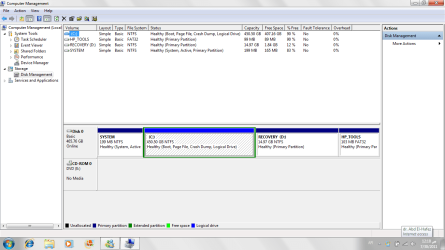
When that's all done post another snip of Windows 7 disk management for me to see and we'll go from there.
 

My Computer My Computer

Computer Manufacturer/Model Number
* BFK Customs *
OS
W 7 64-bit Ultimate
CPU
Intel Q9550 Yorkfield
Motherboard
ASUS P5Q Pro
Memory
8GB Dominator 8500C5D
Graphics Card(s)
ATI : XFX 5870
Sound Card
Realtek HD Audio 7-1
Monitor(s) Displays
1x 47" LCD HDMI & 3x 26" LCD HDMI
Screen Resolution
1920x1080P & 1920x1200
Hard Drives
1x 80GB Intel X25-M G2 SSD : 1x 500GB & 1x 640GB WD Caviar Black(s)
PSU
Corsair 620HX
Case
Cooler Master RC-690
Cooling
Tuniq Tower 120, 2x 140mm and 3x 120mm case fans
Keyboard
Microsoft 500
Mouse
Razer Diamondback 3G
Internet Speed
14 Mb/s
Other Info
1x Koutech 3Gb/s SATA HDD Hot Swap Rack
hi mr bare i did what u said > and i am waiting till now for 5 minutes and nothing appeared see that snip
 

Attachments

  • new drive.png
    new drive.png
    67 KB · Views: 5

My Computer My Computer

OS
Windows 7 Home basic
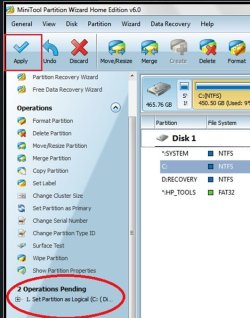
Hello mate, you have to click Apply at the top left, then Yes and OK for the next 2 boxes that open.


click to enlarge
14447.jpg
 

My Computer My Computer

Computer Manufacturer/Model Number
* BFK Customs *
OS
W 7 64-bit Ultimate
CPU
Intel Q9550 Yorkfield
Motherboard
ASUS P5Q Pro
Memory
8GB Dominator 8500C5D
Graphics Card(s)
ATI : XFX 5870
Sound Card
Realtek HD Audio 7-1
Monitor(s) Displays
1x 47" LCD HDMI & 3x 26" LCD HDMI
Screen Resolution
1920x1080P & 1920x1200
Hard Drives
1x 80GB Intel X25-M G2 SSD : 1x 500GB & 1x 640GB WD Caviar Black(s)
PSU
Corsair 620HX
Case
Cooler Master RC-690
Cooling
Tuniq Tower 120, 2x 140mm and 3x 120mm case fans
Keyboard
Microsoft 500
Mouse
Razer Diamondback 3G
Internet Speed
14 Mb/s
Other Info
1x Koutech 3Gb/s SATA HDD Hot Swap Rack
hi hun hhh i am really shy k i will close all application and to that ty :$
 

My Computer My Computer

OS
Windows 7 Home basic
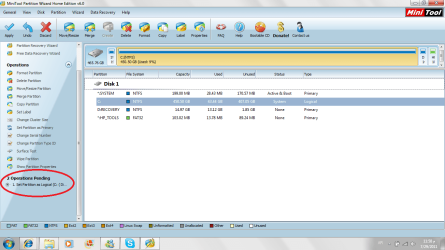
k i am back with the snip u said that i must do and i hoop that i did what u said right ~ here is the snip
 

Attachments

  • d2.png
    d2.png
    40.4 KB · Views: 7

My Computer My Computer

OS
Windows 7 Home basic
Well done, :party:

Now close Partition Wizard and restart the PC, post back here after you restart the PC and we'll go from there.
 

My Computer My Computer

Computer Manufacturer/Model Number
* BFK Customs *
OS
W 7 64-bit Ultimate
CPU
Intel Q9550 Yorkfield
Motherboard
ASUS P5Q Pro
Memory
8GB Dominator 8500C5D
Graphics Card(s)
ATI : XFX 5870
Sound Card
Realtek HD Audio 7-1
Monitor(s) Displays
1x 47" LCD HDMI & 3x 26" LCD HDMI
Screen Resolution
1920x1080P & 1920x1200
Hard Drives
1x 80GB Intel X25-M G2 SSD : 1x 500GB & 1x 640GB WD Caviar Black(s)
PSU
Corsair 620HX
Case
Cooler Master RC-690
Cooling
Tuniq Tower 120, 2x 140mm and 3x 120mm case fans
Keyboard
Microsoft 500
Mouse
Razer Diamondback 3G
Internet Speed
14 Mb/s
Other Info
1x Koutech 3Gb/s SATA HDD Hot Swap Rack
it restarted auto. does i have to restart again :D
 

My Computer My Computer

OS
Windows 7 Home basic
Yeah do it one more time just to be on the safe side. ;)
 

My Computer My Computer

Computer Manufacturer/Model Number
* BFK Customs *
OS
W 7 64-bit Ultimate
CPU
Intel Q9550 Yorkfield
Motherboard
ASUS P5Q Pro
Memory
8GB Dominator 8500C5D
Graphics Card(s)
ATI : XFX 5870
Sound Card
Realtek HD Audio 7-1
Monitor(s) Displays
1x 47" LCD HDMI & 3x 26" LCD HDMI
Screen Resolution
1920x1080P & 1920x1200
Hard Drives
1x 80GB Intel X25-M G2 SSD : 1x 500GB & 1x 640GB WD Caviar Black(s)
PSU
Corsair 620HX
Case
Cooler Master RC-690
Cooling
Tuniq Tower 120, 2x 140mm and 3x 120mm case fans
Keyboard
Microsoft 500
Mouse
Razer Diamondback 3G
Internet Speed
14 Mb/s
Other Info
1x Koutech 3Gb/s SATA HDD Hot Swap Rack
;) k now on the save side let us begin !
 

My Computer My Computer

OS
Windows 7 Home basic
Back
Top