Is this HD failing ?

Odd Job

New member
Member
Local time
12:45 PM
Messages
93
I've just burnt a 3 Gb movie to DVD in about 2 minutes, yet when I tried to move the same file from one hard drive to another the pop up box was quoting one hour to move the file.
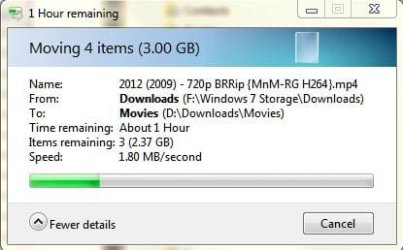
file transfer.JPG

The file transfer speed started out at about 6Mb a second, then gradually got slower and slower. In the pic it is showing 1.8 per second but it got slower than this until in the end I cancelled the transfer.

This disk has just been formatted and it totally clean (apart from one folder "MSOCache" and one file "msdia80.dll" which I assume were put there during the format process as I never put them there).

This drive used to be very slow and hung a lot when I had windows installed on there, so I changed my windows installation drive and formatted that one ready for storage (I've had no problems with windows since I changed the drive). I've run chkdsk and it found no problems. Are there any other apps that could test this drive.

So should I bin this drive and replace it or could it be some other issue.
 

My Computer My Computer

Computer type
PC/Desktop
Computer Manufacturer/Model Number
Self build
OS
Windows 7 professional X 64
CPU
Phenom 11 X 6 1090t 3.2 GHz
Motherboard
Asus Crosshair III Formula 790FX
Memory
8 gb Corsair 1600MHz C9 DDR3
Graphics Card(s)
2 X Saphire HD5770 Vapour X in crossfire
Sound Card
SupremeFX X-Fi
Monitor(s) Displays
Samsung 24" full HD
Screen Resolution
1920 X 1080
Hard Drives
1 X 1Tb Sata HHD
PSU
Corsair TX 650 watt
Case
Antec 902 ultimate gamer case
Cooling
Zalman CNPS 9900
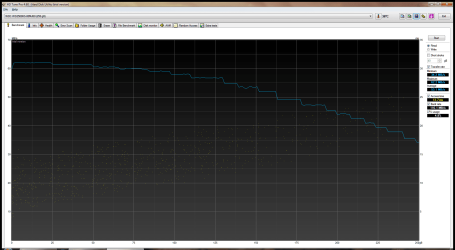
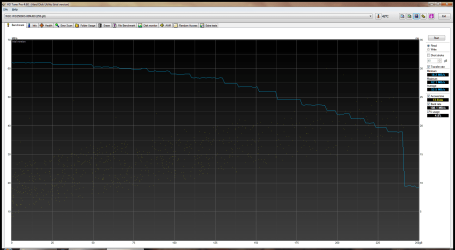
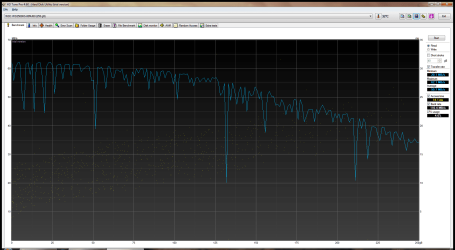
I have a little more info if it helps. I downloaded and ran HD tune on all of my drives (I have 3 identical HDD's, all 250Mb).

Here are the screenshots:

Disk 1.pngThis is the drive I was trying to move the file to.

Disk 2.pngThis is my backup drive. I had problems with trying to backup my computer to this drive a week or so back. I left backup running all night and it still didn't complete.

Disk 3.pngThis is my C: drive.

As you can see, my C: drive has the normal HD tune signature of a squiggly line, whereas the other two drives The ones I have had problems with are showing a different, almost straight line.

So it looks like I could have two dodgy drives :(:(
 

My Computer My Computer

Computer type
PC/Desktop
Computer Manufacturer/Model Number
Self build
OS
Windows 7 professional X 64
CPU
Phenom 11 X 6 1090t 3.2 GHz
Motherboard
Asus Crosshair III Formula 790FX
Memory
8 gb Corsair 1600MHz C9 DDR3
Graphics Card(s)
2 X Saphire HD5770 Vapour X in crossfire
Sound Card
SupremeFX X-Fi
Monitor(s) Displays
Samsung 24" full HD
Screen Resolution
1920 X 1080
Hard Drives
1 X 1Tb Sata HHD
PSU
Corsair TX 650 watt
Case
Antec 902 ultimate gamer case
Cooling
Zalman CNPS 9900
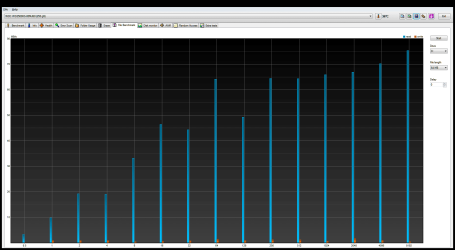
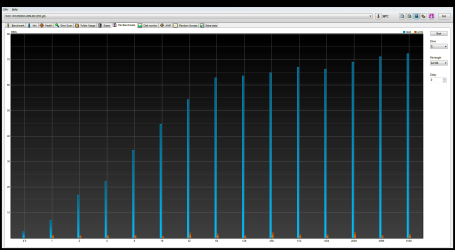
Unfortunately, after running a couple more tests with HD Tune it looks like I've got two screwed disks. The problem appears to be with the write capability of the disks, as in the pics below.

Drive C read write (2).png
My OS drive appears to be OK

Drive D read write.png
This is the drive that was quoting 1 hour to do a file transfer

Drive E read write.png
This is the drive that couldn't complete a 50 Gb backup when left running all night.

So it appears as though I need to ditch two of my HDD's and replace. Or is there something else I can do to recover them. Luckily I moved all of the data off of them when I rebuilt my machine.
 

My Computer My Computer

Computer type
PC/Desktop
Computer Manufacturer/Model Number
Self build
OS
Windows 7 professional X 64
CPU
Phenom 11 X 6 1090t 3.2 GHz
Motherboard
Asus Crosshair III Formula 790FX
Memory
8 gb Corsair 1600MHz C9 DDR3
Graphics Card(s)
2 X Saphire HD5770 Vapour X in crossfire
Sound Card
SupremeFX X-Fi
Monitor(s) Displays
Samsung 24" full HD
Screen Resolution
1920 X 1080
Hard Drives
1 X 1Tb Sata HHD
PSU
Corsair TX 650 watt
Case
Antec 902 ultimate gamer case
Cooling
Zalman CNPS 9900
Anyone ?

Do I have two knackered HDD's ? :confused::confused::confused:
 

My Computer My Computer

Computer type
PC/Desktop
Computer Manufacturer/Model Number
Self build
OS
Windows 7 professional X 64
CPU
Phenom 11 X 6 1090t 3.2 GHz
Motherboard
Asus Crosshair III Formula 790FX
Memory
8 gb Corsair 1600MHz C9 DDR3
Graphics Card(s)
2 X Saphire HD5770 Vapour X in crossfire
Sound Card
SupremeFX X-Fi
Monitor(s) Displays
Samsung 24" full HD
Screen Resolution
1920 X 1080
Hard Drives
1 X 1Tb Sata HHD
PSU
Corsair TX 650 watt
Case
Antec 902 ultimate gamer case
Cooling
Zalman CNPS 9900
You could just have bad cables. Both drives doing the same thing? I would be taking a look at your cables. I had drives that were dropping out and having issues and I replaced my sata cables and sure enough those drives were fine and it was just a cable.

Cables are cheap and it is easy to change them out to eliminate one probable cause.

From my experience it is practically impossible to tell if a hard drive is going out based only on a software reading. Especially software not designed to test the disc integrity.
 

My Computer My Computer

Computer Manufacturer/Model Number
Custom
OS
Win7 64bit Ultimate
CPU
AMD Phenom II X6 1100T Black Edition Thuban 3.3GHz, 3.7GHz
Motherboard
Gigabyte GA-890FXA-UD5
Memory
CORSAIR DOMINATOR GT 8GB (2 x 4GB) 1866 DDR3
Graphics Card(s)
XFX HD-697A-CNDC Radeon HD6970 2GB 256-bit
Sound Card
Creative SoundBlaster X-Fi Platinum Fatal1ty Edition
Monitor(s) Displays
Dual 25 Inch Hanns-G HZ251
Screen Resolution
1920x1080 X 2
PSU
Corsair 850W Single Rail
Case
Thermaltake V9 BlacX w/ Dual HDD Docking Station
Cooling
Air lots and lots of air and copper...
Keyboard
Kensington (Low-Profile)
Mouse
Creative Fatal1ty
Internet Speed
15Gbit (15 Down 5 Up)
Other Info
XIGMATEK HDT-S1284F 120mm HYPRO Bearing CPU Cooler, LG Blu-Ray Burner.
Tried your recommendation regarding the cables (even though the cables were brand new less than a month ago), but still have the same issues unfortunately. I'm assuming that the cables will work either way round i.e. it doesn't matter which end goes to the M/board or to the drive ?
 

My Computer My Computer

Computer type
PC/Desktop
Computer Manufacturer/Model Number
Self build
OS
Windows 7 professional X 64
CPU
Phenom 11 X 6 1090t 3.2 GHz
Motherboard
Asus Crosshair III Formula 790FX
Memory
8 gb Corsair 1600MHz C9 DDR3
Graphics Card(s)
2 X Saphire HD5770 Vapour X in crossfire
Sound Card
SupremeFX X-Fi
Monitor(s) Displays
Samsung 24" full HD
Screen Resolution
1920 X 1080
Hard Drives
1 X 1Tb Sata HHD
PSU
Corsair TX 650 watt
Case
Antec 902 ultimate gamer case
Cooling
Zalman CNPS 9900

My Computer My Computer

Computer type
PC/Desktop
Computer Manufacturer/Model Number
Golden Mk. I.4
OS
Windows 10 Pro x64 ; Xubuntu x64
CPU
Intel i7 860 @ 2.80 GHz O/C'ed to 4.0GHz
Motherboard
Gigabyte P55A-UD3R Rev.1. Award BIOS F13
Memory
16GB Corsair Vengance DDR3 @ 661 MHz Dual Channel (9-9-9-24)
Graphics Card(s)
EVGA NVidia GTX 560 1024MB
Sound Card
Realtek Integrated
Monitor(s) Displays
Dual Samsung SyncMaster 2494HS
Screen Resolution
1920*1080 and 1920*1080
Hard Drives
1*Samsung 840 EVO 120GB SSD;
1*OCZ Vertex 2 60GB SSD;
2*Samsung F3 SpinPoint 1TB in RAID0;
1*Samsung F1 SpinPoint 1TB;
2*Western Digital 1TB External USB 3.0
1*Western Digital 500GB External USB 3.0
1*Seagate 500GB External USB 2.0
PSU
Thermaltake ToughPower QFan 750W
Case
Thermaltake Element S VK60001W2Z
Cooling
Corsair H60 Water Cooling, 2*230mm and 2*80mm case fans
Keyboard
Logitech G110
Mouse
Logitech MX518
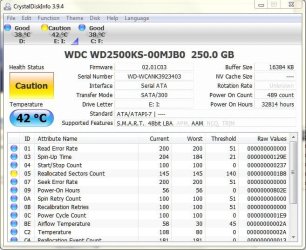
Have run the utility and it is just showing a caution on one of the disks

Disks2.JPG

So I'm at a complete loss now why these two disks are performing so badly.

Let me give you a bit of background. All 3 of the disks in my current machine came out of my old machine about a month back when I built my current PC. Both the disks that are giving me problems now had OS's on them when in my old machine (one XP and one Win 7). Both were running slow and "hanging" quite frequently (I was forever getting "application stopped responding" messages), and I always knew when Avast was downloading updates as the machine would grind to a complete halt. Also it would take about 2 hours to install a 3 Gig application. I put this down to my old machine getting old. When I built my new machine I put these 3 drives into it and installed win 7 on the spare drive and formatted the other two ready to use as storage.

For some unknown reason, writing data to these disks takes forever, hence the poor write performance in the screenshots in a previous post.
 

My Computer My Computer

Computer type
PC/Desktop
Computer Manufacturer/Model Number
Self build
OS
Windows 7 professional X 64
CPU
Phenom 11 X 6 1090t 3.2 GHz
Motherboard
Asus Crosshair III Formula 790FX
Memory
8 gb Corsair 1600MHz C9 DDR3
Graphics Card(s)
2 X Saphire HD5770 Vapour X in crossfire
Sound Card
SupremeFX X-Fi
Monitor(s) Displays
Samsung 24" full HD
Screen Resolution
1920 X 1080
Hard Drives
1 X 1Tb Sata HHD
PSU
Corsair TX 650 watt
Case
Antec 902 ultimate gamer case
Cooling
Zalman CNPS 9900
OK. Well, the reason your disks are taking so long to do things/freezing etc. is because they are probably on the verge of failing, hence the yellow caution.

The data that CrystalDiskInfo reports is the S.M.A.R.T information that is intended to measure various characteristics of the physical disk in an attempt to predict when it will fail. The Reallocated Sector Counts is one of these characteristics, and if that is flagged it usually indicates an imminent mechanical failure. You can read more about it here S.M.A.R.T. - Wikipedia, the free encyclopedia.

I had the same happen to me with 3 WD drives. The best you can do, is backup any/all information on them as soon as possible. Buy a new disk for the OS installation if you need to. All disks eventually die, its just a matter of when. No amount of reformatting and/or re-installation can prevent that. That disk has definately tired of living - replace it ASAP.

Regards,
Golden
 

My Computer My Computer

Computer type
PC/Desktop
Computer Manufacturer/Model Number
Golden Mk. I.4
OS
Windows 10 Pro x64 ; Xubuntu x64
CPU
Intel i7 860 @ 2.80 GHz O/C'ed to 4.0GHz
Motherboard
Gigabyte P55A-UD3R Rev.1. Award BIOS F13
Memory
16GB Corsair Vengance DDR3 @ 661 MHz Dual Channel (9-9-9-24)
Graphics Card(s)
EVGA NVidia GTX 560 1024MB
Sound Card
Realtek Integrated
Monitor(s) Displays
Dual Samsung SyncMaster 2494HS
Screen Resolution
1920*1080 and 1920*1080
Hard Drives
1*Samsung 840 EVO 120GB SSD;
1*OCZ Vertex 2 60GB SSD;
2*Samsung F3 SpinPoint 1TB in RAID0;
1*Samsung F1 SpinPoint 1TB;
2*Western Digital 1TB External USB 3.0
1*Western Digital 500GB External USB 3.0
1*Seagate 500GB External USB 2.0
PSU
Thermaltake ToughPower QFan 750W
Case
Thermaltake Element S VK60001W2Z
Cooling
Corsair H60 Water Cooling, 2*230mm and 2*80mm case fans
Keyboard
Logitech G110
Mouse
Logitech MX518
Back
Top