Is this normal cpu activity?

Robwan

New member
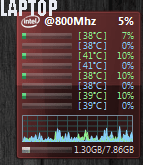
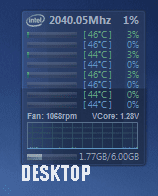
I've noticed that my cpu activity when idol and no programs open is quite different on my laptop compared to my desktop and i wondered whether this is normal for a laptop.

From the images, the desktop one shows literally nothing, it fluctuates from 0-1% when nothing is open.

However my laptop just keeps going up and down and fluctuates from like 0-20% all the bars randomly spike every now and again.

I have checked processes and startup programs and the laptop has no significant differences to my desktop both have the highest process as svchost which is normal. I've also done all windows updates etc.

Is it just something with laptops or should i be worred?

Desktop cpu - i7-920
laptop cpu - i7 2670qm

Thanks, any help is appreciated
 

Attachments
  • desktop cpu.PNG
    desktop cpu.PNG
    46.8 KB · Views: 102
  • laptop cpu.PNG
    laptop cpu.PNG
    29.4 KB · Views: 100

My Computer

Computer type
PC/Desktop
Computer Manufacturer/Model Number
Custom
OS
Windows 7 Professional 64-bit SP1
CPU
i7 920 Factory OC 3.4ghz
Motherboard
Gigabyte EX58-UD3R
Memory
6GB 1600mhz Triple-Channel DDR3
Graphics Card(s)
1535MB GeForce GTX 580
Sound Card
onboard
Monitor(s) Displays
BenQ GL2460
Screen Resolution
1920x1080@60Hz
Hard Drives
466GB Seagate ST3500418AS ATA Device (SATA)
PSU
corsair tx650w
Case
Antec 300
Cooling
Akasa Nero AK-967
Keyboard
Cheap asda keyboard
Mouse
Gigabyte M6900
Antivirus
MSE
Browser
Chrome
What do you see in Task Manager / Processes tab, sorted by CPU utilization?
 

My Computer

Computer type
PC/Desktop
Computer Manufacturer/Model Number
Lenovo IdeaCenter 450
OS
Windows 10 Pro X64
CPU
Intel Quad Core i7-4770 @ 3.4Ghz
Memory
16.0GB PC3-12800 DDR3 SDRAM 1600 MHz
Graphics Card(s)
Intel Integrated HD Graphics
Sound Card
Realtek HD Audio
Monitor(s) Displays
HP 22" LCD
Screen Resolution
1680 x 1050
Hard Drives
250GB Samsung EVO SATA-3 SSD
2TB Seagate ST2000DM001 SATA-2
1.5TB Seagate ST3150041AS SATA
Keyboard
Dell USB
Mouse
Lenovo USB
Internet Speed
Cable via Road Runner 3MB Upload, 30MB Download
Antivirus
Windows Defender, MBAM Pro, MBAE
Browser
Seamonkey
Other Info
UEFI/GPT
PLDS DVD-RW DH16AERSH
i would normally put that down to the overall performance difference that desktops have over laptop counterparts.

but it could be some hidden process or service running in the background.
 

My Computer

Computer Manufacturer/Model Number
.
OS
.
CPU
.
Motherboard
.
Memory
.
Graphics Card(s)
.
Monitor(s) Displays
.
Screen Resolution
.
Hard Drives
.
PSU
.
Case
.
Cooling
.
Keyboard
.
Mouse
.
Internet Speed
.
Other Info
.
Robwan, download Process Explorer to get a more detailed view than the one provided by Windows Task Manager.
 

My Computer

Computer type
PC/Desktop
OS
Microsoft Windows 10 Professional / Windows 7 Professional
CPU
Intel i5-3570
Motherboard
Lenovo Mahobay
Memory
16GB DDR3
Graphics Card(s)
AMD Radeon HD 7850 2GB
Sound Card
(1) Realtek HD Audio (2) AMD HD Audio
Monitor(s) Displays
LG LS192WS
Screen Resolution
1440 x 900 @ 32bit color
Hard Drives
(1) SUV300S37A/120G (2) ST3500413AS SATA Disk Device AHCI mode enabled.
PSU
Corsair HX620
Case
Thermaltake V4 Black Edition
Cooling
Cooler Master Hyper 212 + Artic Silver 5 on CPU/GPU
Keyboard
Dell SK-8115
Mouse
Razer Copperhead with MAPED mat (awesome!)
Internet Speed
100 Mbps up/down
Browser
Chrome
Ok thanks guys. It seems to have calmed down now, with a more steady flow. However, when it was fluctuating it was something like this ordered by cpu: (sorry, i should have taken a shot)

System idle = 94-99
MsMpEng = 1-2
taskmgr = 1-2


all the other processes weren't really doing much, occasionally other ones would pop up and use a bit of cpu, but i checked most of them and the folder location and they all seemed safe.

I'm assuming it could be MSE doing background stuff. Also its a new install of win 7 (few days old) so possibly still settling down?


Robwan, download Process Explorer to get a more detailed view than the one provided by Windows Task Manager.

This is really good! thankyou :)


Anyways I will see it goes over next few days and report back if I see any anomalies.

Thanks again for the help guys
 

My Computer

Computer type
PC/Desktop
Computer Manufacturer/Model Number
Custom
OS
Windows 7 Professional 64-bit SP1
CPU
i7 920 Factory OC 3.4ghz
Motherboard
Gigabyte EX58-UD3R
Memory
6GB 1600mhz Triple-Channel DDR3
Graphics Card(s)
1535MB GeForce GTX 580
Sound Card
onboard
Monitor(s) Displays
BenQ GL2460
Screen Resolution
1920x1080@60Hz
Hard Drives
466GB Seagate ST3500418AS ATA Device (SATA)
PSU
corsair tx650w
Case
Antec 300
Cooling
Akasa Nero AK-967
Keyboard
Cheap asda keyboard
Mouse
Gigabyte M6900
Antivirus
MSE
Browser
Chrome
Back
Top