Is W7 defrag tool enough?

Is the included W7 derfag tool enough?
I am using perfectdisk 10 but it is always moving files about when using smartplacement.
And I see no real benefit to this smartplacement.

Enough for what? :)

It's sort of like beauty in the eye of the beholder. Not everyone uses their systems for the same things. For surfing the web you might find it fine not to defrag for a month or 2. If you routinely mux video files you might defrag every day.

That said, I like Puran Defrag. It's free and has some nice options without getting "too thorough." I don't want to spend 4 days defragging my drive when 15 minutes is good enough(for my usage.)
 

My Computer My Computer

Computer Manufacturer/Model Number
HP Media Center
OS
Windows 7 32 bit
CPU
AMD 5200+ dual core
Memory
2 GB
Graphics Card(s)
NVidia GeForce 6150SE 128 MB
Monitor(s) Displays
CRT
Screen Resolution
1280x1024
Hard Drives
500 GB Sata internal :

SIIG USB 3.0 docking stations w/WD Caviar Black 6 Gb/s drives
Keyboard
PS/2
Mouse
PS/2 Wheel Mouse
Other Info
SIIG USB 3.0 PCIexpress card.
IMHO, the 7 defrag is a step up from the horrible mess that was the Vista defragger but still lags well behind the better third party utilities in speed, thoroughness of defrag, options,customization, file placement algorithms, reporting etc. Ofcourse, the best commercial utilities are not free, so depends on what your priorities are. Some of the high end utilities even have interesting features like auto fragmentation prevention thus obviating the need for most defrags in the first place.
 

My Computer My Computer

OS
XP Pro SP3, Windows 7 Pro x64
CPU
i2500
Motherboard
Asus P8P67
Memory
8GB 1333 MHz
Graphics Card(s)
GTX260
Sound Card
Asus Xonar DG
Monitor(s) Displays
Dell 2407WFP-HC
Screen Resolution
1920x1200
Hard Drives
Several; total 4TB
PSU
Silverstone Zeus 750W
Case
Gigabyte Full Tower
Cooling
Stock
Keyboard
Logitech G15
Mouse
Razer Deathadder
Internet Speed
10Mbps
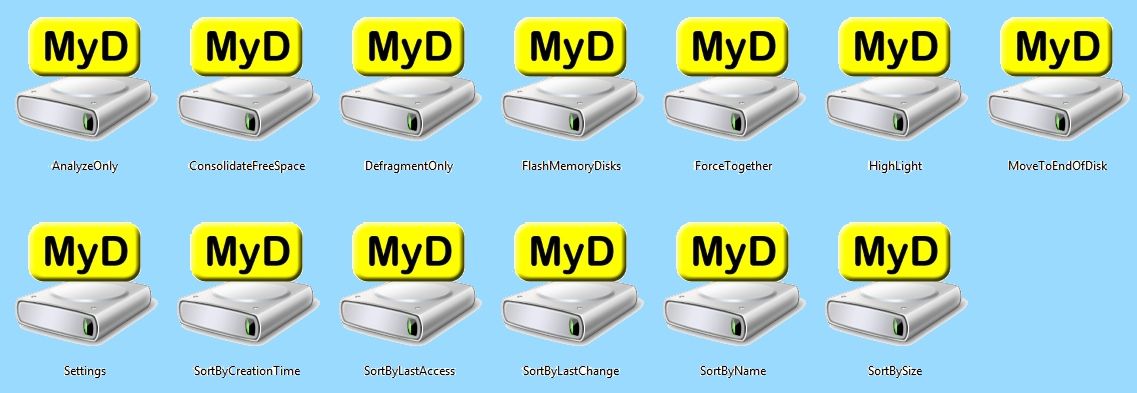
To my knowledge MyDefrag has a wider variety of Scripts to choose from than any other Defragmentation program free or paid plus the ability to create your own custom Scripts which unique to MyDefrag...

2b5eab2d.jpg


Sometimes the best things in life are Free!

~Maxx~
 

My Computer My Computer

Computer Manufacturer/Model Number
HP HPE 270f
OS
Windows 7 x64 Home Premium
CPU
Intel Core i7 930 @ 2.8 Ghz Socket 1366 LGA
Motherboard
Pegatron Truckee v1.04E41
Memory
8 GB 1366 Mhz DDR3 (PC3-10700) RAM
Graphics Card(s)
ATI Radeon 5770 1 GB DDR5 RAM
Sound Card
Realtech High Definition
Monitor(s) Displays
32" Sony Bravia
Screen Resolution
1366 X 768
Hard Drives
Intel 25nm 120 GB Series 320 SSD HD Tune- 265 MBps Read/ 130 MBps Write

LaCie 1TB + 1TB RAID 0 eSATA Drive HD Tune- 160 MBps Read/ 90 MBps Write
Keyboard
Logitech Illuminated
Mouse
Logitech MX Revolution
Internet Speed
36.4 Mbps Maximum on a 37 Mbps Motorola SB501 Modem
Sometimes the best things in life are Free!
Ah, like the native defragger in Window 7, which is free, very effective, and does not consume additional disk space like 3rd party defrag programs you must download and install. ;)

I remind folks again that the minute you start to use your computer after defragging, fragmentation starts again. So it really makes little sense to put so much concern in trying to an eek every last bit of defragging out of a drive. It is like washing a your car when rain is predicted.
 

My Computer My Computer

Computer Manufacturer/Model Number
BrightWorks Systems B4
OS
Windows 7 Profession 64-bit
CPU
Intel Core i7-860 Quad
Motherboard
Gigabyte P55-UD4P
Memory
Mushkin 4x2Gb PC12800
Graphics Card(s)
Gigabyte GTX260 896Mb
Sound Card
Integrated 7.1 HD Dolby
Monitor(s) Displays
2 Samsung 2220wm-HAS 22"
Screen Resolution
1680 x 1050 | 1680 x 1050
Hard Drives
WD HE 1Tb
PSU
Corsair TX-750W
Case
Ultra M998
Cooling
OEM
Keyboard
MS Wireless Comfort 5000
Mouse
MS Wireless 5000
Internet Speed
Cable and pretty darn fast
I do not refrain from eating knowing I will only become hungry again and neither do I neglect to defrag my Hard Disk simply because it will start to defragment again because while it is in a highly defragmented state the optical reader will have much less ware thus prolonging the life of my Hard Drive.

This is not just about defragmentation it is also about Optimization of the Hard drive which if done well can yield improvements in computer performance far beyond any possible benefits that defragmentation can.

For example after the first time I used MyDefrag to Optimize my computer's Hard Drive by using the Sorting According To Last Access Script it took a full 30 seconds off of its boot time which is far and away more than simple defragmentation can accomplish!

~Maxx~
 

My Computer My Computer

Computer Manufacturer/Model Number
HP HPE 270f
OS
Windows 7 x64 Home Premium
CPU
Intel Core i7 930 @ 2.8 Ghz Socket 1366 LGA
Motherboard
Pegatron Truckee v1.04E41
Memory
8 GB 1366 Mhz DDR3 (PC3-10700) RAM
Graphics Card(s)
ATI Radeon 5770 1 GB DDR5 RAM
Sound Card
Realtech High Definition
Monitor(s) Displays
32" Sony Bravia
Screen Resolution
1366 X 768
Hard Drives
Intel 25nm 120 GB Series 320 SSD HD Tune- 265 MBps Read/ 130 MBps Write

LaCie 1TB + 1TB RAID 0 eSATA Drive HD Tune- 160 MBps Read/ 90 MBps Write
Keyboard
Logitech Illuminated
Mouse
Logitech MX Revolution
Internet Speed
36.4 Mbps Maximum on a 37 Mbps Motorola SB501 Modem
For example after the first time I used MyDefrag to Optimize my computer's Hard Drive by using the Sorting According To Last Access Script it took a full 30 seconds off of its boot time which is far and away more than simple defragmentation can accomplish!

~Maxx~

I found a better solution that nets even better results. Seagate's Momentus XT Hybrid Hard Drive. It uses 4 GBs of solid state memory to cache frequently access files (regardless of OS in use) this includes most bootup files. Making fragmentation and position less of an issue is this regard.

I just so happen to got one a few weeks ago.
 

My Computer My Computer

Computer type
PC/Desktop
Computer Manufacturer/Model Number
Alienware Aurora ALX R4
OS
Windows 10 Pro (x64)
CPU
Intel Core i7-3930K (3.2GHz - 4.5GHz)
Motherboard
Alienware Aurora-R4 x79
Memory
4x Samsung 4GB PC3-12800 DDR3 (16GB 1600MHz)
Graphics Card(s)
Nvidia Geforce GTX 690
Sound Card
SteelSeries Siberia Elite
Monitor(s) Displays
Dell UltraSharp U3011
Screen Resolution
2560x1600
Hard Drives
Samsung 850 Pro 256 GB, Seagate 1TB Desktop Hybrid HDD, 2x Western Digital 4TB Green HDD
PSU
875W Some Dell PSU <.<
Case
Alienware Aurora ALX
Cooling
Custom Liquid Cooling (EK CPU & GPU blocks) dual EK 480RAD
Keyboard
Logitech G710+ Mechanical
Mouse
Logitech G700s
Internet Speed
Verizon Fios (50 mbps average)
Other Info
Server: Intel NUC D54250WYK: i5-4250U, 16GB, 256 GB mSATA, Windows Server 2012 R2
For example after the first time I used MyDefrag to Optimize my computer's Hard Drive by using the Sorting According To Last Access Script it took a full 30 seconds off of its boot time which is far and away more than simple defragmentation can accomplish!

~Maxx~

I found a better solution that nets even better results. Seagate's Momentus XT Hybrid Hard Drive. It uses 4 GBs of solid state memory to cache frequently access files (regardless of OS in use) this includes most bootup files. Making fragmentation and position less of an issue is this regard.

I just so happen to got one a few weeks ago.

Slightly off topic but, I was actually curious about these.
Not for the OS, but as a drive for Games only.

I'm wondering if it would help any there. I'm guessing it would only have benefits as a OS drive though.

Seeing as you have one, what do think of it and do you think it may help as a Games only drive?
 

My Computer My Computer

Computer Manufacturer/Model Number
Custom (Self Build)
OS
Windows 7 Home Premium 64bit
CPU
Intel Core i7 2700k
Motherboard
eVGA P67 SLI
Memory
8GB Mushkin Redline Ridgebacks @1866
Graphics Card(s)
EVGA GTX570 SC
Sound Card
XiFi Titanium HD
Monitor(s) Displays
LG W2453V
Screen Resolution
1920x1080
Hard Drives
Intel 320 80GB -- Intel X25-V 40GB --WD Black 1TB x2 -- WD Blue 640GB
PSU
Seasonic x750
Case
Corsair 600T SE White
Cooling
eVGA Superclocked CPU Cooler
Keyboard
Saitek Cyborg
Antivirus
Kaspersky
Browser
IE
Other Info
LG BD/DVD

My Computer My Computer

Computer Manufacturer/Model Number
HP HPE 270f
OS
Windows 7 x64 Home Premium
CPU
Intel Core i7 930 @ 2.8 Ghz Socket 1366 LGA
Motherboard
Pegatron Truckee v1.04E41
Memory
8 GB 1366 Mhz DDR3 (PC3-10700) RAM
Graphics Card(s)
ATI Radeon 5770 1 GB DDR5 RAM
Sound Card
Realtech High Definition
Monitor(s) Displays
32" Sony Bravia
Screen Resolution
1366 X 768
Hard Drives
Intel 25nm 120 GB Series 320 SSD HD Tune- 265 MBps Read/ 130 MBps Write

LaCie 1TB + 1TB RAID 0 eSATA Drive HD Tune- 160 MBps Read/ 90 MBps Write
Keyboard
Logitech Illuminated
Mouse
Logitech MX Revolution
Internet Speed
36.4 Mbps Maximum on a 37 Mbps Motorola SB501 Modem

My Computer My Computer

Computer Manufacturer/Model Number
Custom (Self Build)
OS
Windows 7 Home Premium 64bit
CPU
Intel Core i7 2700k
Motherboard
eVGA P67 SLI
Memory
8GB Mushkin Redline Ridgebacks @1866
Graphics Card(s)
EVGA GTX570 SC
Sound Card
XiFi Titanium HD
Monitor(s) Displays
LG W2453V
Screen Resolution
1920x1080
Hard Drives
Intel 320 80GB -- Intel X25-V 40GB --WD Black 1TB x2 -- WD Blue 640GB
PSU
Seasonic x750
Case
Corsair 600T SE White
Cooling
eVGA Superclocked CPU Cooler
Keyboard
Saitek Cyborg
Antivirus
Kaspersky
Browser
IE
Other Info
LG BD/DVD
0cdaa4b5.png


With all due respect the Seagate Momentus XT Hybrid Drive's read and write times aren't even as fast as the 1TB OEM Hitachi HDD in my Win 7 desktop which has a 132 MBps read and 126 MBps write time according to Crystal Disk Mark and it is the bottleneck that is keeping my WEI at 5.9 instead of 7.5.

~Maxx~
 

My Computer My Computer

Computer Manufacturer/Model Number
HP HPE 270f
OS
Windows 7 x64 Home Premium
CPU
Intel Core i7 930 @ 2.8 Ghz Socket 1366 LGA
Motherboard
Pegatron Truckee v1.04E41
Memory
8 GB 1366 Mhz DDR3 (PC3-10700) RAM
Graphics Card(s)
ATI Radeon 5770 1 GB DDR5 RAM
Sound Card
Realtech High Definition
Monitor(s) Displays
32" Sony Bravia
Screen Resolution
1366 X 768
Hard Drives
Intel 25nm 120 GB Series 320 SSD HD Tune- 265 MBps Read/ 130 MBps Write

LaCie 1TB + 1TB RAID 0 eSATA Drive HD Tune- 160 MBps Read/ 90 MBps Write
Keyboard
Logitech Illuminated
Mouse
Logitech MX Revolution
Internet Speed
36.4 Mbps Maximum on a 37 Mbps Motorola SB501 Modem
Last edited:

My Computer My Computer

Computer type
PC/Desktop
Computer Manufacturer/Model Number
Home made Desktop
OS
Windows 10 Pro. 64/ version 1709 Windows 7 Pro/64
CPU
Intel i7-6800K @ 4.3
Motherboard
ASUS X-99 Deluxe II
Memory
Corsair Platinum 16 gig @2400
Graphics Card(s)
EVGA GTX 1070 OC
Monitor(s) Displays
Asus 27" LED LCD/VE278Q
Screen Resolution
1920-1080 or 1280-720 HDMI
Hard Drives
INTEL SSD 730-240 Gb Sata 3.0/
PSU
EVGA Platium 1200W
Case
Phanteks Luxe Tempered Glass 8 fans/ one radiator
Cooling
XSPC/ Water Cooled CPU
Keyboard
Das 4 Professional
Mouse
Logitech M705/MX Anywhere 2-S
Internet Speed
100 mbits
Antivirus
Microsoft Security Essentials/ Malwarebytes Premium 3.0/ SAS
Browser
I.E. 11 default/Firefox/ ISP Time Warner Cable/Spectrum
Other Info
LG BluRay Burner/
Sound system-KLipsch-THX/
Icy Dock ssd Hot Swap bays.
Thanks! I'll be here all week - try the veal!

//queue bad 70s music//
 

My Computer My Computer

Computer type
PC/Desktop
Computer Manufacturer/Model Number
Custom
OS
Windows 10 Pro x64
CPU
Intel Core i7 4790K @ 4.5GHz
Motherboard
Asus Maximus Hero VII
Memory
32GB DDR3
Graphics Card(s)
Nvidia GeForce GTX970
Sound Card
Realtek HD Audio
Screen Resolution
1920x1200
Hard Drives
1x Samsung 250GB SSD
4x WD RE 2TB (RAIDZ)
PSU
Corsair AX760i
Case
Fractal Design Define R4
Cooling
Noctua NH-D15
Seeing as you have one, what do think of it and do you think it may help as a Games only drive?

Very much so esp., when it is a game you play multiple times. A lot of the stuff that has to remain on the HDD gets cached in the SSD portion so the loading the screens come and go just as quickly. Now it is not as fast as a say a full SSD drive and the cache is for frequently read items only.

This caching to SSD is completely independent of the OS you are using.
It is maintained and monitored by the drive itself.
 

My Computer My Computer

Computer type
PC/Desktop
Computer Manufacturer/Model Number
Alienware Aurora ALX R4
OS
Windows 10 Pro (x64)
CPU
Intel Core i7-3930K (3.2GHz - 4.5GHz)
Motherboard
Alienware Aurora-R4 x79
Memory
4x Samsung 4GB PC3-12800 DDR3 (16GB 1600MHz)
Graphics Card(s)
Nvidia Geforce GTX 690
Sound Card
SteelSeries Siberia Elite
Monitor(s) Displays
Dell UltraSharp U3011
Screen Resolution
2560x1600
Hard Drives
Samsung 850 Pro 256 GB, Seagate 1TB Desktop Hybrid HDD, 2x Western Digital 4TB Green HDD
PSU
875W Some Dell PSU <.<
Case
Alienware Aurora ALX
Cooling
Custom Liquid Cooling (EK CPU & GPU blocks) dual EK 480RAD
Keyboard
Logitech G710+ Mechanical
Mouse
Logitech G700s
Internet Speed
Verizon Fios (50 mbps average)
Other Info
Server: Intel NUC D54250WYK: i5-4250U, 16GB, 256 GB mSATA, Windows Server 2012 R2
With all due respect the Seagate Momentus XT Hybrid Drive's read and write times aren't even as fast as the 1TB OEM Hitachi HDD in my Win 7 desktop which has a 132 MBps read and 126 MBps write time according to Crystal Disk Mark and it is the bottleneck that is keeping my WEI at 5.9 instead of 7.5.

~Maxx~

You are going have to get a full SSD drive if you are wanting 7.5.
The Momentus XT is not a full SSD drive, merely a middle ground between the two.
 

My Computer My Computer

Computer type
PC/Desktop
Computer Manufacturer/Model Number
Alienware Aurora ALX R4
OS
Windows 10 Pro (x64)
CPU
Intel Core i7-3930K (3.2GHz - 4.5GHz)
Motherboard
Alienware Aurora-R4 x79
Memory
4x Samsung 4GB PC3-12800 DDR3 (16GB 1600MHz)
Graphics Card(s)
Nvidia Geforce GTX 690
Sound Card
SteelSeries Siberia Elite
Monitor(s) Displays
Dell UltraSharp U3011
Screen Resolution
2560x1600
Hard Drives
Samsung 850 Pro 256 GB, Seagate 1TB Desktop Hybrid HDD, 2x Western Digital 4TB Green HDD
PSU
875W Some Dell PSU <.<
Case
Alienware Aurora ALX
Cooling
Custom Liquid Cooling (EK CPU & GPU blocks) dual EK 480RAD
Keyboard
Logitech G710+ Mechanical
Mouse
Logitech G700s
Internet Speed
Verizon Fios (50 mbps average)
Other Info
Server: Intel NUC D54250WYK: i5-4250U, 16GB, 256 GB mSATA, Windows Server 2012 R2
Seeing as you have one, what do think of it and do you think it may help as a Games only drive?

Very much so esp., when it is a game you play multiple times. A lot of the stuff that has to remain on the HDD gets cached in the SSD portion so the loading the screens come and go just as quickly. Now it is not as fast as a say a full SSD drive and the cache is for frequently read items only.

This caching to SSD is completely independent of the OS you are using.
It is maintained and monitored by the drive itself.

Im thinking I may try one. I would like to have a SSD for a Game drive, but I have a lot of Games installed. So I certainly want something that performs decent with plenty of space.

Or maybe even 2 spinners in RAID, or 2 of these even :)


Think I may give one a try.

The entire hybrid concept seems like it may be a good idea.
 

My Computer My Computer

Computer Manufacturer/Model Number
Custom (Self Build)
OS
Windows 7 Home Premium 64bit
CPU
Intel Core i7 2700k
Motherboard
eVGA P67 SLI
Memory
8GB Mushkin Redline Ridgebacks @1866
Graphics Card(s)
EVGA GTX570 SC
Sound Card
XiFi Titanium HD
Monitor(s) Displays
LG W2453V
Screen Resolution
1920x1080
Hard Drives
Intel 320 80GB -- Intel X25-V 40GB --WD Black 1TB x2 -- WD Blue 640GB
PSU
Seasonic x750
Case
Corsair 600T SE White
Cooling
eVGA Superclocked CPU Cooler
Keyboard
Saitek Cyborg
Antivirus
Kaspersky
Browser
IE
Other Info
LG BD/DVD
You are going have to get a full SSD drive if you are wanting 7.5.
The Momentus XT is not a full SSD drive, merely a middle ground between the two.

logicearth- I was just commenting on the suggestion of using a Hybrid SSD. As for myself l do believe that SSD is definitely the way to go and 2 Intel SSD's in RAID 0 simply fly...

d375408b.png


~Maxx~
 

My Computer My Computer

Computer Manufacturer/Model Number
HP HPE 270f
OS
Windows 7 x64 Home Premium
CPU
Intel Core i7 930 @ 2.8 Ghz Socket 1366 LGA
Motherboard
Pegatron Truckee v1.04E41
Memory
8 GB 1366 Mhz DDR3 (PC3-10700) RAM
Graphics Card(s)
ATI Radeon 5770 1 GB DDR5 RAM
Sound Card
Realtech High Definition
Monitor(s) Displays
32" Sony Bravia
Screen Resolution
1366 X 768
Hard Drives
Intel 25nm 120 GB Series 320 SSD HD Tune- 265 MBps Read/ 130 MBps Write

LaCie 1TB + 1TB RAID 0 eSATA Drive HD Tune- 160 MBps Read/ 90 MBps Write
Keyboard
Logitech Illuminated
Mouse
Logitech MX Revolution
Internet Speed
36.4 Mbps Maximum on a 37 Mbps Motorola SB501 Modem
Back
Top