
Issue after a W7 install.

darkhorse

New member
Power User
Local time
4:30 PM
Messages
514
Location
Denmark
Hi.
Yesterday I installed a W7U-32bit on a computer.
This was after what I recognized what I see here.
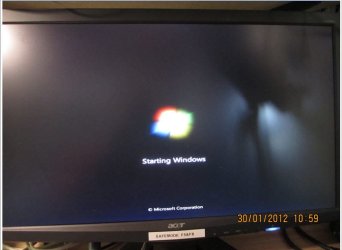
I would start up the computer, and got the window "Starting Windows".
The computer has been on with this window since 3 hours now.

What to do ?.

Attached is what I see.
 

Attachments
  • startup.jpg
    startup.jpg
    43.3 KB · Views: 8

My Computer

Computer type
PC/Desktop
Computer Manufacturer/Model Number
Homemade
OS
Windows 7 Ultimate
CPU
E7300
Motherboard
ASUS P5Q DeLuxe
Memory
4g
Graphics Card(s)
NVIDIA GeForce 7300 LE
Sound Card
N/A
Monitor(s) Displays
Acer
Screen Resolution
1600x1200
Hard Drives
Samsung HD503HI ATA Device
PSU
Seasonic
Case
ATX
Cooling
FAN
Keyboard
Logitech
Mouse
HP
Internet Speed
20/2
Antivirus
MSE
Browser
IE9, Chrome, Firefox
Please fill out your system specs.
 

My Computer

Computer Manufacturer/Model Number
Dell and Custom
OS
Systems 1 and 2: Windows 7 Enterprise x64, Win 8 Developer
CPU
System 1: i7 [email protected], System 2: AMD FX-4100 Zambezi 3.6G
Motherboard
System 1:Dell 06NWYK System 2: ASUS M5A97 AM3+
Memory
System 1: 8GB System 2: 8GB
Graphics Card(s)
System 1: ATI FirePro V4800 System 2: Radeon HD 6850
Sound Card
System 1: onboard System 2: onboard
Monitor(s) Displays
System1: Viewsonic HDMI 24"
Screen Resolution
System 1: 1920x1080 System 2: 1920x1080
Hard Drives
System 1: Mirrored .5B drives System 2: Seagate Barracuda ST1000DM003 1TB 7200 RPM 64MB Cache SATA 6.0Gb/s
Case
System 1: Dell System 2: Cooler Master
Internet Speed
10 MBPS

My Computer

Computer type
PC/Desktop
Computer Manufacturer/Model Number
Homemade
OS
Windows 7 Ultimate
CPU
E7300
Motherboard
ASUS P5Q DeLuxe
Memory
4g
Graphics Card(s)
NVIDIA GeForce 7300 LE
Sound Card
N/A
Monitor(s) Displays
Acer
Screen Resolution
1600x1200
Hard Drives
Samsung HD503HI ATA Device
PSU
Seasonic
Case
ATX
Cooling
FAN
Keyboard
Logitech
Mouse
HP
Internet Speed
20/2
Antivirus
MSE
Browser
IE9, Chrome, Firefox

My Computer

Computer type
PC/Desktop
Computer Manufacturer/Model Number
Homemade
OS
Windows 7 Ultimate
CPU
E7300
Motherboard
ASUS P5Q DeLuxe
Memory
4g
Graphics Card(s)
NVIDIA GeForce 7300 LE
Sound Card
N/A
Monitor(s) Displays
Acer
Screen Resolution
1600x1200
Hard Drives
Samsung HD503HI ATA Device
PSU
Seasonic
Case
ATX
Cooling
FAN
Keyboard
Logitech
Mouse
HP
Internet Speed
20/2
Antivirus
MSE
Browser
IE9, Chrome, Firefox

My Computer

Computer Manufacturer/Model Number
Dell and Custom
OS
Systems 1 and 2: Windows 7 Enterprise x64, Win 8 Developer
CPU
System 1: i7 [email protected], System 2: AMD FX-4100 Zambezi 3.6G
Motherboard
System 1:Dell 06NWYK System 2: ASUS M5A97 AM3+
Memory
System 1: 8GB System 2: 8GB
Graphics Card(s)
System 1: ATI FirePro V4800 System 2: Radeon HD 6850
Sound Card
System 1: onboard System 2: onboard
Monitor(s) Displays
System1: Viewsonic HDMI 24"
Screen Resolution
System 1: 1920x1080 System 2: 1920x1080
Hard Drives
System 1: Mirrored .5B drives System 2: Seagate Barracuda ST1000DM003 1TB 7200 RPM 64MB Cache SATA 6.0Gb/s
Case
System 1: Dell System 2: Cooler Master
Internet Speed
10 MBPS

My Computer

Computer type
PC/Desktop
Computer Manufacturer/Model Number
Homemade
OS
Windows 7 Ultimate
CPU
E7300
Motherboard
ASUS P5Q DeLuxe
Memory
4g
Graphics Card(s)
NVIDIA GeForce 7300 LE
Sound Card
N/A
Monitor(s) Displays
Acer
Screen Resolution
1600x1200
Hard Drives
Samsung HD503HI ATA Device
PSU
Seasonic
Case
ATX
Cooling
FAN
Keyboard
Logitech
Mouse
HP
Internet Speed
20/2
Antivirus
MSE
Browser
IE9, Chrome, Firefox
Boot into your Win7 DVD System Recovery Options or System Repair Disk to run Startup Repair repeatedly.

The system suggested that itself, but couldn't do anything.
At the present, I'm running the Seatool as it's a Seagate HDD

What has indicated it might be a HD problem requiring the HD maker's diagnostics? No prob running them but they don't seem indicated yet by what you've reported.

What you need first is to disinfect, from Safe Mode if necessary. Run Malwarebytes after updating it, then your AV full scan. Use a free lightweight AV like Microsoft Security Essentials or Avast for best performance in Win7.

If Win7 still won't function correctly then you need to repair System files using SFC. Again, if it won't run as Admin from Win7, then boot into Recovery Options to run it from Command Line as given above.

If these fail you'll need to run a Repair Install. Do you have the latest SP1 installer? Where did you get Win7? How is it activated?
 
Did you change your UEFI? Overclock or anything?
Anything on the internal diagnostic LED post?
 

My Computer

Computer Manufacturer/Model Number
Dell and Custom
OS
Systems 1 and 2: Windows 7 Enterprise x64, Win 8 Developer
CPU
System 1: i7 [email protected], System 2: AMD FX-4100 Zambezi 3.6G
Motherboard
System 1:Dell 06NWYK System 2: ASUS M5A97 AM3+
Memory
System 1: 8GB System 2: 8GB
Graphics Card(s)
System 1: ATI FirePro V4800 System 2: Radeon HD 6850
Sound Card
System 1: onboard System 2: onboard
Monitor(s) Displays
System1: Viewsonic HDMI 24"
Screen Resolution
System 1: 1920x1080 System 2: 1920x1080
Hard Drives
System 1: Mirrored .5B drives System 2: Seagate Barracuda ST1000DM003 1TB 7200 RPM 64MB Cache SATA 6.0Gb/s
Case
System 1: Dell System 2: Cooler Master
Internet Speed
10 MBPS
Boot into your Win7 DVD System Recovery Options or System Repair Disk to run Startup Repair repeatedly.

The system suggested that itself, but couldn't do anything.
At the present, I'm running the Seatool as it's a Seagate HDD

What has indicated it might be a HD problem requiring the HD maker's diagnostics? No prob running them but they don't seem indicated yet by what you've reported.

What you need first is to disinfect, from Safe Mode if necessary. Run Malwarebytes after updating it, then your AV full scan. Use a free lightweight AV like Microsoft Security Essentials or Avast for best performance in Win7.

If Win7 still won't function correctly then you need to repair System files using SFC. Again, if it won't run as Admin from Win7, then boot into Recovery Options to run it from Command Line as given above.

If these fail you'll need to run a Repair Install. Do you have the latest SP1 installer? Where did you get Win7? How is it activated?

To do it short at first.

There is an issue. I have installed since 3 days. Now I stopped when the scrren I showed came up.
The what indicates it's NOT a hardware issue ?.

BTW I use 2 computers all in all. How to fill out the spec's then ?
 

My Computer

Computer type
PC/Desktop
Computer Manufacturer/Model Number
Homemade
OS
Windows 7 Ultimate
CPU
E7300
Motherboard
ASUS P5Q DeLuxe
Memory
4g
Graphics Card(s)
NVIDIA GeForce 7300 LE
Sound Card
N/A
Monitor(s) Displays
Acer
Screen Resolution
1600x1200
Hard Drives
Samsung HD503HI ATA Device
PSU
Seasonic
Case
ATX
Cooling
FAN
Keyboard
Logitech
Mouse
HP
Internet Speed
20/2
Antivirus
MSE
Browser
IE9, Chrome, Firefox
Did you change your UEFI? Overclock or anything?
Anything on the internal diagnostic LED post?

What for instance do you mean ?

I'm not doing overclock. I never do that.

What should the LED's show ?.
 

My Computer

Computer type
PC/Desktop
Computer Manufacturer/Model Number
Homemade
OS
Windows 7 Ultimate
CPU
E7300
Motherboard
ASUS P5Q DeLuxe
Memory
4g
Graphics Card(s)
NVIDIA GeForce 7300 LE
Sound Card
N/A
Monitor(s) Displays
Acer
Screen Resolution
1600x1200
Hard Drives
Samsung HD503HI ATA Device
PSU
Seasonic
Case
ATX
Cooling
FAN
Keyboard
Logitech
Mouse
HP
Internet Speed
20/2
Antivirus
MSE
Browser
IE9, Chrome, Firefox

My Computer

OS
ME/XP/Vista/Win7
As the ASRock 970 Extreme3 has a uEFI BIOS.

Try Cleaning the HD Drive, using the CLEAN command (no need to use CLEAN ALL) in Step One in this tutorial:
http://www.sevenforums.com/tutorials/91339-ssd-hdd-optimize-windows-reinstallation.html
Do not partition or format.
than Reboot PC & Follow this tutorial to install Windows.
How to install Windows 64 bit on a uEFI BIOS:
http://www.sevenforums.com/tutorial...e-firmware-interface-install-windows-7-a.html

For uEFT BIOS setup: Check your manual.

@theog thanks, will do that
 

My Computer

Computer type
PC/Desktop
Computer Manufacturer/Model Number
Homemade
OS
Windows 7 Ultimate
CPU
E7300
Motherboard
ASUS P5Q DeLuxe
Memory
4g
Graphics Card(s)
NVIDIA GeForce 7300 LE
Sound Card
N/A
Monitor(s) Displays
Acer
Screen Resolution
1600x1200
Hard Drives
Samsung HD503HI ATA Device
PSU
Seasonic
Case
ATX
Cooling
FAN
Keyboard
Logitech
Mouse
HP
Internet Speed
20/2
Antivirus
MSE
Browser
IE9, Chrome, Firefox
Is it correct what I have seen, that the MOBO only support 63bit ?.
If that's the case maybe this is what I see, as I have installed WIN7U-32bit.
 

My Computer

Computer type
PC/Desktop
Computer Manufacturer/Model Number
Homemade
OS
Windows 7 Ultimate
CPU
E7300
Motherboard
ASUS P5Q DeLuxe
Memory
4g
Graphics Card(s)
NVIDIA GeForce 7300 LE
Sound Card
N/A
Monitor(s) Displays
Acer
Screen Resolution
1600x1200
Hard Drives
Samsung HD503HI ATA Device
PSU
Seasonic
Case
ATX
Cooling
FAN
Keyboard
Logitech
Mouse
HP
Internet Speed
20/2
Antivirus
MSE
Browser
IE9, Chrome, Firefox
Yes of course with 8G.

But I think on this:

OS- Microsoft® Windows® 7 / 7 64-bit / Vista™ / Vista™ 64-bit / XP / XP 64-bit compliantCertifications- FCC, CE, WHQL
- ErP/EuP Ready (ErP/EuP ready power supply is required)
Does this info imply, that the MOBO only supports 64bit ?
 

My Computer

Computer type
PC/Desktop
Computer Manufacturer/Model Number
Homemade
OS
Windows 7 Ultimate
CPU
E7300
Motherboard
ASUS P5Q DeLuxe
Memory
4g
Graphics Card(s)
NVIDIA GeForce 7300 LE
Sound Card
N/A
Monitor(s) Displays
Acer
Screen Resolution
1600x1200
Hard Drives
Samsung HD503HI ATA Device
PSU
Seasonic
Case
ATX
Cooling
FAN
Keyboard
Logitech
Mouse
HP
Internet Speed
20/2
Antivirus
MSE
Browser
IE9, Chrome, Firefox
NO, but if you install 32 bit with 8gb of ram, 32 bit install can play up.
 

My Computer

OS
ME/XP/Vista/Win7
What is "can play up" ?
 

My Computer

Computer type
PC/Desktop
Computer Manufacturer/Model Number
Homemade
OS
Windows 7 Ultimate
CPU
E7300
Motherboard
ASUS P5Q DeLuxe
Memory
4g
Graphics Card(s)
NVIDIA GeForce 7300 LE
Sound Card
N/A
Monitor(s) Displays
Acer
Screen Resolution
1600x1200
Hard Drives
Samsung HD503HI ATA Device
PSU
Seasonic
Case
ATX
Cooling
FAN
Keyboard
Logitech
Mouse
HP
Internet Speed
20/2
Antivirus
MSE
Browser
IE9, Chrome, Firefox
As the ASRock 970 Extreme3 has a uEFI BIOS.

Try Cleaning the HD Drive, using the CLEAN command (no need to use CLEAN ALL) in Step One in this tutorial:
http://www.sevenforums.com/tutorials/91339-ssd-hdd-optimize-windows-reinstallation.html
Do not partition or format.
than Reboot PC & Follow this tutorial to install Windows.
How to install Windows 64 bit on a uEFI BIOS:
http://www.sevenforums.com/tutorial...e-firmware-interface-install-windows-7-a.html

For uEFT BIOS setup: Check your manual.

I need to install Windows 32 bit.
Then what ?
 

My Computer

Computer type
PC/Desktop
Computer Manufacturer/Model Number
Homemade
OS
Windows 7 Ultimate
CPU
E7300
Motherboard
ASUS P5Q DeLuxe
Memory
4g
Graphics Card(s)
NVIDIA GeForce 7300 LE
Sound Card
N/A
Monitor(s) Displays
Acer
Screen Resolution
1600x1200
Hard Drives
Samsung HD503HI ATA Device
PSU
Seasonic
Case
ATX
Cooling
FAN
Keyboard
Logitech
Mouse
HP
Internet Speed
20/2
Antivirus
MSE
Browser
IE9, Chrome, Firefox
Back
Top