issue i can disable a douple Controller High Definition Audio

drugo

New member
Member
VIP
Local time
2:59 AM
Messages
476
Hi

i update my ati drivers and the realtek high definition drivers

i have 2 Controller High Definition Audio

and i can not disable one
one is for realtek

the other is of the video card
i disable it
reboot and it's enabled again :confused::eek:

please help me?

thanks

ps i remember under xp i was able to disable the ati audio codec
under w7 , at every reboot , re-enable the second High Definition Audio
here is disabled
 

Attachments

  • Cattur2a.JPG
    Cattur2a.JPG
    11 KB · Views: 5

My Computer My Computer

At a glance

windows 7 ultimate 64bit
Computer type
PC/Desktop
OS
windows 7 ultimate 64bit
i just reboot and it's enabled again
and i run devmgmt.msc with the administrator rights:cry::cry:
 

Attachments

  • Cattur2a.JPG
    Cattur2a.JPG
    10.9 KB · Views: 8

My Computer My Computer

At a glance

windows 7 ultimate 64bit
Computer type
PC/Desktop
OS
windows 7 ultimate 64bit
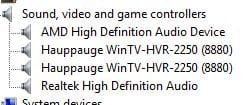
Do you have the onboard audio enabled in the BIOS, because usually after installing the AMD HDMI driver and the Realtek driver, it looks like this.
1.JPG

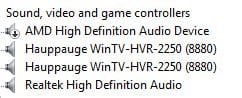
After disabling the AMD HDMI driver, it looks like this.
2.JPG

I believe the yellow icon is from the driver being uninstalled.
It's probably best to just re-install the AMD HDMI driver and then disable it.

As long as the card has HDMI, you can't make the device go away,
you can only disable it or uninstall the driver.

Try enabling the audio in the BIOS, then disable the AMD driver.
 

My Computer My Computer

At a glance

Windows 7 Home Premium 64 bitIntel Core i7-4790G.SKILL 8GB (2 x 4GB) DDR3 F3-10666CL9D-8GBNTAMD Radeon R7 250
Computer type
PC/Desktop
Computer Manufacturer/Model Number
Custom Build
OS
Windows 7 Home Premium 64 bit
CPU
Intel Core i7-4790
Motherboard
GA-Z87X-D3H
Memory
G.SKILL 8GB (2 x 4GB) DDR3 F3-10666CL9D-8GBNT
Graphics Card(s)
AMD Radeon R7 250
Sound Card
Realtek ALC892
Monitor(s) Displays
Samsung UN32EH5000, Dell 1703FPT
Screen Resolution
1920 x 1080, 1280 x 1024
Hard Drives
WD5003AZEX
WD10EZEX
Samsung HD103SJ
Samsung 128 GB 840 PRO
PSU
SeaSonic M12II SS-500GM
Case
Fractal Design Define R4
Cooling
Zalman CNPS9900ALED
Keyboard
Logitech K800
Mouse
Logitech M705
Internet Speed
16 Mbps
Antivirus
Avast
Browser
Firefox
Other Info
Bose Companion 2 Multimedia Speakers
Do you have the onboard audio enabled in the BIOS, because usually after installing the AMD HDMI driver and the Realtek driver, it looks like this.
View attachment 144757

After disabling the AMD HDMI driver, it looks like this.
View attachment 144758

I believe the yellow icon is from the driver being uninstalled.
It's probably best to just re-install the AMD HDMI driver and then disable it.

As long as the card has HDMI, you can't make the device go away,
you can only disable it or uninstall the driver.

Try enabling the audio in the BIOS, then disable the AMD driver.
i can't disable in the bios of my pc the ati hdmi feature
in the log i got an error apci about the ati hdmi
can't understand why i can not disable it for ever
 

My Computer My Computer

At a glance

windows 7 ultimate 64bit
Computer type
PC/Desktop
OS
windows 7 ultimate 64bit
Back
Top