Issues logging into Windows.

Going back and reading the posts, please send link(s) to which ever program I should download for the next step. I have downloaded so much software, I forget what is what. lol

Currently I have on the infected PC:
mbar
FSS
PC scan and repair (re-image I guess)
MGADiag
ComboFix
PC Health Boos
FRST64
RogueKiller

If I have to purchase any of these software tools, no problem. Please advise on which one. I did download Microsoft Essential Tools but have not installed it. When the PC is clean, I can do that.

thanks
 

My Computer

Computer type
PC/Desktop
Computer Manufacturer/Model Number
HP
OS
Windows 7 Home
GilV37

You may remove MGADiag . You don't need that anymore .
 

My Computer

Computer Manufacturer/Model Number
Custom Built
OS
Windows 7 Ultimate 32-Bit & Windows 7 Ultimate 64-Bit
CPU
Intel Core i7 CPU 950 @ 3.07GHz
Motherboard
ASUS P6T DELUXE V2
Memory
OCZ 6GB (3 x 2GB) 240-Pin DDR3 SDRAM DDR3 1600 OCZ3X1600R2
Graphics Card(s)
ATI Radeon HD 5700 Series
Sound Card
OnBoard
Hard Drives
WD6400AACS-00M3B0 (640GB SATA )
PSU
CORSAIR 850w
Case
NZXT LEXA
Cooling
Intel Stock Heatsink Fan
Keyboard
Microsoft Wireless Laser Keyboard 7000
Mouse
Microsoft Wireless Laser Mouse 7000
Let's press on...

Part I:
Please open Notepad: (Start > All Programs > Accessories > Notepad)

Copy/paste the entire content inside the quote box below to Notepad (Do not copy the word 'Quote'):

File::
C:\Program Files (x86)\MyFunCards_5m\bar\1.bin\5mdatact.dll
C:\Program Files (x86)\MyFunCards_5m\bar\1.bin\5mhtmlmu.dll
C:\Program Files (x86)\MyFunCards_5m\bar\1.bin\5mieovr.dll
C:\Program Files (x86)\MyFunCards_5m\bar\1.bin\5mPlugin.dll
C:\Program Files (x86)\MyFunCards_5m\bar\1.bin\5mskin.dll
C:\Program Files (x86)\MyFunCards_5m\bar\1.bin\T8HTML.DLL
C:\Users\Ferreira Family\AppData\Local\Google\Chrome\User Data\Default\Default\aadhddddgcdidgdbdedbdcdcdediddgf\background.js
C:\Users\Ferreira Family\AppData\Local\Google\Chrome\User Data\Default\Default\aadhddddgcdidgdbdedbdcdcdediddgf\ContentScript.js
C:\Users\Ferreira Family\AppData\LocalLow\D403.tmp.dat
C:\Users\Ferreira Family\AppData\LocalLow\D404.tmp
C:\Windows\ServiceProfiles\NetworkService\AppData\Roaming\9c280d90-34ad-49ca-b231-e331aaf99bbaad\cdadcabeaafbbaad.exe
C:\Windows\System32\config\systemprofile\AppData\Local\Microsoft\Windows\Temporary Internet Files\Content.IE5\iframe3CA3LH8DI.htm
C:\Windows\System32\config\systemprofile\AppData\Local\Microsoft\Windows\Temporary Internet Files\Content.IE5\iframe3CA9QNTCC.htm
C:\Windows\System32\config\systemprofile\AppData\Local\Microsoft\Windows\Temporary Internet Files\Content.IE5\iframe3CAAPZEWF.htm
C:\Windows\System32\config\systemprofile\AppData\Local\Microsoft\Windows\Temporary Internet Files\Content.IE5\impCA1B8V4P.js
C:\Windows\System32\config\systemprofile\AppData\Local\Microsoft\Windows\Temporary Internet Files\Content.IE5\2LMNF8W4\foasgroup_com[1].htm
C:\Windows\System32\config\systemprofile\AppData\Local\Microsoft\Windows\Temporary Internet Files\Content.IE5\334KE5MZ\iframe3[2].htm
C:\Windows\System32\config\systemprofile\AppData\Local\Microsoft\Windows\Temporary Internet Files\Content.IE5\RSD4GYOY\iframe3[1].htm
C:\Windows\SysWOW64\config\systemprofile\AppData\Local\Microsoft\Windows\Temporary Internet Files\Content.IE5\iframe3CA3LH8DI.htm
C:\Windows\SysWOW64\config\systemprofile\AppData\Local\Microsoft\Windows\Temporary Internet Files\Content.IE5\iframe3CA9QNTCC.htm
C:\Windows\SysWOW64\config\systemprofile\AppData\Local\Microsoft\Windows\Temporary Internet Files\Content.IE5\iframe3CAAPZEWF.htm
C:\Windows\SysWOW64\config\systemprofile\AppData\Local\Microsoft\Windows\Temporary Internet Files\Content.IE5\impCA1B8V4P.js
C:\Windows\SysWOW64\config\systemprofile\AppData\Local\Microsoft\Windows\Temporary Internet Files\Content.IE5\2LMNF8W4\foasgroup_com[1].htms
C:\Windows\SysWOW64\config\systemprofile\AppData\Local\Microsoft\Windows\Temporary Internet Files\Content.IE5\334KE5MZ\iframe3[2].htm
C:\Windows\SysWOW64\config\systemprofile\AppData\Local\Microsoft\Windows\Temporary Internet Files\Content.IE5\RSD4GYOY\iframe3[1].htm
ClearJavaCache::


In Notepad, click: File (upper left) > Save As...
Save the file to the Desktop
Name it: CFScript.txt
Click: Save

Both the CFScript.txt and the ComboFix program icon must be on the Desktop, or this will not work.

Make sure all AntiVirus and AntiMalware programscontinue to be disabled, so they do not interfere with the running of ComboFix.

Now, drag the CFScript.txt into ComboFix.exe as depicted below:

CFScript.gif


This action starts ComboFix again.

If the porgram asks to reboot, please do so.
When done, pease attach the new Combofix.txt in your reply.


Part II:
Also, you can remove the following:
1. PC Scan and Repair:
Please go to: Start > Control Panel > Programs and Features, and in the list of installed programs, look for entries like:
PC Scan and Repair
Reimage PC Repair
Reimage Repair
Reimage Community
Select the program, and click: Uninstall
Pay attention to the uninstall process, just in case Reimage attempts to prompt for additional nuisance software.

2. PC Health Boost
Uninstall: How To Uninstall PC HealthBoost™ | PCHealthBoost.com

3. MGADiag


Part III:
Next, please download Malwarebytes' Anti-Malware:
http://www.malwarebytes.org/mbam-download-exe.php
Save to the Desktop.

MBAM may make changes to the Registry as part of its disinfection routine.
If using other security programs that detect Registry changes, they may interfere or alert you.
Temporarily disable such programs as shown, or permit them to allow the changes:
http://www.bleepingcomputer.com/forums/topic114351.html

Right-click the MBAM file, and select: Run as Administrator
When the installation begins, follow the prompts.

Make sure you leave both of these checked:
Update Malwarebytes' Anti-Malware
Launch Malwarebytes' Anti-Malware
Click: Finish

MBAM automatically starts and you are asked to update the program.
If an update is found, the program will automatically update itself.
Press the OK button to close that box and continue.

On the Scanner tab:
Make sure the Perform Full Scan option is selected.
Then click on the Scan button.

If asked to select the drives to scan, leave all the drives selected.
Click on the Start Scan button.

The scan may take some time to complete, so please be patient.

When the scan is finished, a message box shows The scan completed successfully. Click 'Show Results' to display all objects found
Click OK to close the message box and continue with the removal process.

Back at the main Scanner screen:
Click on the Show Results button to see a list of any malware found.
Make sure everything is checked, and click: Remove Selected

When removal is completed, a report opens in Notepad.
The log is automatically saved and can be viewed by clicking the Logs tab.

Please copy/paste the entire contents of the MBAM report in your reply.
Exit MBAM when done.

Note: If MBAM encounters a file that is difficult to remove, you are asked to reboot the computer so MBAM can proceed with the disinfection process. If asked to restart the computer, please do so immediately.
Failure to reboot normally (not into safe mode) prevents MBAM from removing all the malware.

 

My Computer

Computer type
PC/Desktop
Computer Manufacturer/Model Number
An ol' eMachines
OS
Windows 7 Home Premium
Internet Speed
Fine for me...I'm retired!
thanks cb :D
 

My Computer

Computer type
PC/Desktop
Computer Manufacturer/Model Number
Bruce ... somewhere in his 40's
OS
Windows 7 Ultimate 32bit SP1
CPU
Intel(R) Core(TM)2 Quad CPU @ 2.40GHz, 2400 MHz
Motherboard
INTEL/D975XBX2
Memory
4 GB
Graphics Card(s)
ATI Radeon HD 2600 Pro
Monitor(s) Displays
Samsung SyncMaster 914v
Screen Resolution
1280 x 1024
Hard Drives
2/500GB each ... ST3500630AS ATA Device.
One is not connected
PSU
Rocketfish 700 W
Case
G.Skill Gigabyte Chassis
Keyboard
Standard PS/2 Keyboard
Mouse
Microsoft PS/2 Mouse
Internet Speed
DSL
Antivirus
Avira Internet Security
Browser
IE 11
Other Info
ATI HDMI Audio
Thanks Cottonball. Unfortunatly I will not be able to get to that PC for at least another 3 hours. But will try this fix, and get back to you ASAP.
 

My Computer

Computer type
PC/Desktop
Computer Manufacturer/Model Number
HP
OS
Windows 7 Home
No problem with that...I'll be out for a while also.
 

My Computer

Computer type
PC/Desktop
Computer Manufacturer/Model Number
An ol' eMachines
OS
Windows 7 Home Premium
Internet Speed
Fine for me...I'm retired!
On the ESET Online Scanner...

It is my undertanding that in order to remove the malware, there needs to be a check next to the Remove found threats option in the Computer Scan Settings prompt:

eset_onlinescanner5-500x467.jpg

This option should be selected by default. Apparently, this was not the case, or the setting was unchecked, to see what ESET finds. This is not bad idea, since there are situations when a false positive is detected.


-->> Instead of running ESET for a long while once again, used ComboFix to cut to the chase. <<--


If anyone runs the ESET Smart Security or ESET NOD32 Antivirus, the situation is different.
In the Threatsense Engine Parameter Setup, click Cleaning on the left pane, and, on the right pane, move the slider to the left or right to set the cleaning level (see image).

The different cleaning levels are No cleaning, Standard cleaning or Strict cleaning (used by most).

These levels determine the behavior of the ESET Smart Security or ESET NOD32 Antivirus when cleaning infected files.

SOLN910FIG1-1.png
 

My Computer

Computer type
PC/Desktop
Computer Manufacturer/Model Number
An ol' eMachines
OS
Windows 7 Home Premium
Internet Speed
Fine for me...I'm retired!
Ok, the scans finished, and here are the two files. These scans took a long time, but finally got them. The PC did reboot at one point yesterday to finish the scan and I can tell a difference already. :D:geek:
 

Attachments

My Computer

Computer type
PC/Desktop
Computer Manufacturer/Model Number
HP
OS
Windows 7 Home
Thanks for the reports, GilV37.

There is some Reimage showing, so let's make sure it is out of the game...

Please go to: Downloading HijackThis
Save to the Desktop.
Right-click and select: Run as Administrator
Accept the License Agreement if you decide to run the program.

When the HijackThis console opens, press the following button: Do A system scan and save a logfile
When done scanning, a log opens in Notepad, and also appears on your Desktop.
>>Please post the HijackThis log in your reply.<<


Again in HijackThis, access the Uninstall Manager as follows:

At tne HijackThis console:
Click: Config button > Misc Tools button > Open Uninstall Manager
Now, click oo: Save list... button and save to the Desktop
A Notepad opens with the information needed.
Please provide the contents of Uninstall list in your reply.
 

My Computer

Computer type
PC/Desktop
Computer Manufacturer/Model Number
An ol' eMachines
OS
Windows 7 Home Premium
Internet Speed
Fine for me...I'm retired!
ok, i'll take care of this later on this evening. thanks!
 

My Computer

Computer type
PC/Desktop
Computer Manufacturer/Model Number
HP
OS
Windows 7 Home
ok here are the results of hijackthis...
 

Attachments

My Computer

Computer type
PC/Desktop
Computer Manufacturer/Model Number
HP
OS
Windows 7 Home
Sorry forgot the uninstall list.
 

Attachments

My Computer

Computer type
PC/Desktop
Computer Manufacturer/Model Number
HP
OS
Windows 7 Home
I have installed MSE on this computer and I am doing a full scan.
 

My Computer

Computer type
PC/Desktop
Computer Manufacturer/Model Number
HP
OS
Windows 7 Home
Good move.

However, you may want to hold off on the scan (if it still has a ways to go) until you do the following, since MSE will then have less to scan...


Task I:
Once again, please run HijackThis, and Scan
Check box for the following entries:

O2 - BHO: Search Assistant BHO - {c4b22c87-45ef-4f43-89f2-40db2078864e} - C:\Program Files (x86)\MyFunCards_5m\bar\1.bin\5mSrcAs.dll
O2 - BHO: Bing Bar Helper - {d2ce3e00-f94a-4740-988e-03dc2f38c34f} - "C:\Program Files (x86)\Microsoft\BingBar\BingExt.dll" (file missing)
O2 - BHO: Toolbar BHO - {da71fd14-5f7b-46ae-b8b1-44074a38f331} - C:\PROGRA~2\MYFUNC~2\bar\1.bin\5mbar.dll
O3 - Toolbar: Bing Bar - {8dcb7100-df86-4384-8842-8fa844297b3f} - "C:\Program Files (x86)\Microsoft\BingBar\BingExt.dll" (file missing)
O3 - Toolbar: MyFunCards - {210f1b36-3b7f-41a4-b5da-3eb87f5a56c2} - C:\Program Files (x86)\MyFunCards_5m\bar\1.bin\5mbar.dll
O4 - HKLM\..\Run: [MyFunCards Search Scope Monitor] "C:\PROGRA~2\MYFUNC~2\bar\1.bin\5msrchmn.exe" /m=2 /w /h
O4 - HKLM\..\Run: [MyFunCards_5m Browser Plugin Loader] C:\PROGRA~2\MYFUNC~2\bar\1.bin\5mbrmon.exe
O23 - Service: MyFunCardsService (MyFunCards_5mService) - COMPANYVERS_NAME - C:\PROGRA~2\MYFUNC~2\bar\1.bin\5mbarsvc.exe

Select: Fix checked

Close out of HijackThis.


Task II:
Please go to the AdwCleaner Download
Save to the Desktop.

Close all open programs.
To run the program, right-click AdwCleaner.exe and select: Run as Administrator

Click on Delete and confirm the prompt.

After the program finishes, the computer is restarted.
A text file report opens after the restart.

Please attach the content of the C:\AdwCleaner[S1].txt in your reply.


Task III:
Also use the Junkware Removal Tool Download
Save to the Desktop.

Make sure you temporarily disable your AntiVirus, Firewall, and any other AntiSpyware applications.
These programs may interfere with the running of JRT.

Right-click JRT.exe and select: Run as Administrator

The tool opens and starts scanning the system. Please be patient as this can take a while...

When done, a report, JRT.txt is saved on the Desktop.

Please post the contents of JRT.txt in your reply.


Task IV:
Last, let’s check the system security status with the following:

Download Security Check:
http://screen317.spywareinfoforum.org/
Save to your Desktop.

Double-click SecurityCheck.exe

Follow the onscreen instructions inside the black box.

When done, a Notepad report opens automatically, called: checkup.txt

Please post the contents of the checkup.txt in your reply.

Note:
SecurityCheck may produce some false warning(s). Please do not take any corrective actions!
 

My Computer

Computer type
PC/Desktop
Computer Manufacturer/Model Number
An ol' eMachines
OS
Windows 7 Home Premium
Internet Speed
Fine for me...I'm retired!
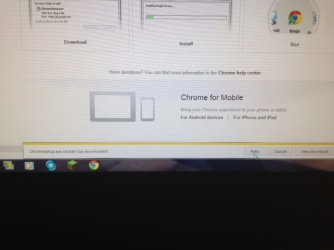
the jrt.txt file never created. but the summary still says that it has stability issues 10 programs, and the registry has 221 errors. Also I have to use another computer to download the software and put it on a thumbplug. Every time I try to download anything from the internet, I get a yellow pop up on the bottom of the screen that says, "couldn't download".
 

Attachments

My Computer

Computer type
PC/Desktop
Computer Manufacturer/Model Number
HP
OS
Windows 7 Home
...have to use another computer to download the software and put it on a thumbplug. Every time I try to download anything from the internet, I get a yellow pop up on the bottom of the screen that says, "couldn't download".

Did the above behavior just started happening, or has it been that way for a while?

Also, can you be more specific on what the pop-up says?
 

My Computer

Computer type
PC/Desktop
Computer Manufacturer/Model Number
An ol' eMachines
OS
Windows 7 Home Premium
Internet Speed
Fine for me...I'm retired!
I believe this has been happening for a while. But just noticed this last night. Tried to download the Security Check.exe and it says: "Securitycheck.exe couldn't be downloaded. Retry Cancel View downloads." I even tried with any other download like a file from my email, and same thing.
 

My Computer

Computer type
PC/Desktop
Computer Manufacturer/Model Number
HP
OS
Windows 7 Home
GilV37,

You are probably at work now, so will see you later when you provide the following:

The downloading problem may occur if a certain Security option in Internet Options is checked.
So, let's see what you have...

In IE, go to the Menu bar (at the top), and select: Tools > Internet Options
In Internet Options prompt, select the Advanced tab
In the Settings area, scroll down to Security

Make sure the following is unchecked: Do not save encrypted pages to disk

File downloads in Internet Explorer require a cache, and, if IE is configured to not save encrypted pages to disk, a cache file is not created making the download fail.

If the above is already unchecked, right-click the IE icon, and select: Run as Administrator
Can you download as Administrator?

Can you download using another browser, like Chrome?
 

My Computer

Computer type
PC/Desktop
Computer Manufacturer/Model Number
An ol' eMachines
OS
Windows 7 Home Premium
Internet Speed
Fine for me...I'm retired!
hey cottonball. I just realized that I don't see my post to the IE issue. I did what you have instructed, and still can't download anything. I even uploaded a photo. did you get it?
 

My Computer

Computer type
PC/Desktop
Computer Manufacturer/Model Number
HP
OS
Windows 7 Home
here's the photo
 

Attachments

  • photo.JPG
    photo.JPG
    74.8 KB · Views: 10

My Computer

Computer type
PC/Desktop
Computer Manufacturer/Model Number
HP
OS
Windows 7 Home
Back
Top