
You are using an out of date browser. It may not display this or other websites correctly.
You should upgrade or use an alternative browser.
You should upgrade or use an alternative browser.
Issues logging into Windows.
- Thread starter GilV37
- Start date

Please open Notepad (Start > All Programs > Accessories > Notepad)
Copy/paste the text in the code box to Notepad:
Go to the File menu at the top of the Notepad and select: Save As...
Select Save in: Desktop
Fill in File name with: letmedwnld.reg
Save as type: All files
Click: Save
Close Notepad.
Locate letmedwnld.reg on the Desktop.
Right-click and select: Merge
Allow the merge.
Restart the computer.
Try to download. Please explain whatever happens.
Copy/paste the text in the code box to Notepad:
Code:
Windows Registry Editor Version 5.00
[HKEY_LOCAL_MACHINE\SOFTWARE\Microsoft\Windows\CurrentVersion\Policies\Attachments]
"ScanWithAntiVirus"=dword: 2
Go to the File menu at the top of the Notepad and select: Save As...
Select Save in: Desktop
Fill in File name with: letmedwnld.reg
Save as type: All files
Click: Save
Close Notepad.
Locate letmedwnld.reg on the Desktop.
Right-click and select: Merge
Allow the merge.
Restart the computer.
Try to download. Please explain whatever happens.
My Computer
- Computer type
- PC/Desktop
- Computer Manufacturer/Model Number
- An ol' eMachines
- OS
- Windows 7 Home Premium
- Internet Speed
- Fine for me...I'm retired!

- Local time
- 3:38 AM
- Messages
- 6,830
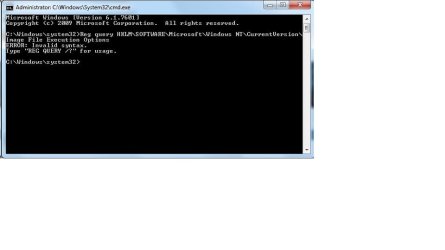
Open Command Prompt with administrator privileges known as Elevated Command Prompt. To do this, click on  rb: type CMD in the Search programs and files box and right-click on CMD under Programs(1) and choose Run as administrator . On the User Access Control window click on the Yes Button . Copy and Paste the command below and press <ENTER>
Show me the results
rb: type CMD in the Search programs and files box and right-click on CMD under Programs(1) and choose Run as administrator . On the User Access Control window click on the Yes Button . Copy and Paste the command below and press <ENTER>
Code:
Reg query HKLM\SOFTWARE\Microsoft\Windows NT\CurrentVersion\Image File Execution OptionsShow me the results
My Computer
- Computer Manufacturer/Model Number
- Custom Built
- OS
- Windows 7 Ultimate 32-Bit & Windows 7 Ultimate 64-Bit
- CPU
- Intel Core i7 CPU 950 @ 3.07GHz
- Motherboard
- ASUS P6T DELUXE V2
- Memory
- OCZ 6GB (3 x 2GB) 240-Pin DDR3 SDRAM DDR3 1600 OCZ3X1600R2
- Graphics Card(s)
- ATI Radeon HD 5700 Series
- Sound Card
- OnBoard
- Hard Drives
- WD6400AACS-00M3B0 (640GB SATA )
- PSU
- CORSAIR 850w
- Case
- NZXT LEXA
- Cooling
- Intel Stock Heatsink Fan
- Keyboard
- Microsoft Wireless Laser Keyboard 7000
- Mouse
- Microsoft Wireless Laser Mouse 7000
My Computer
- Computer type
- PC/Desktop
- Computer Manufacturer/Model Number
- HP
- OS
- Windows 7 Home
- Local time
- 3:38 AM
- Messages
- 6,830
GilV37
Can you navigate to
Inside the Registry manually
Can you navigate to
Code:
HKEY_LOCAL_MACHINE
SOFTWARE
Microsoft
Windows NT
CurrentVersion
Image File Execution Options
Inside the Registry manually
My Computer
- Computer Manufacturer/Model Number
- Custom Built
- OS
- Windows 7 Ultimate 32-Bit & Windows 7 Ultimate 64-Bit
- CPU
- Intel Core i7 CPU 950 @ 3.07GHz
- Motherboard
- ASUS P6T DELUXE V2
- Memory
- OCZ 6GB (3 x 2GB) 240-Pin DDR3 SDRAM DDR3 1600 OCZ3X1600R2
- Graphics Card(s)
- ATI Radeon HD 5700 Series
- Sound Card
- OnBoard
- Hard Drives
- WD6400AACS-00M3B0 (640GB SATA )
- PSU
- CORSAIR 850w
- Case
- NZXT LEXA
- Cooling
- Intel Stock Heatsink Fan
- Keyboard
- Microsoft Wireless Laser Keyboard 7000
- Mouse
- Microsoft Wireless Laser Mouse 7000
One last shot...
Copy/paste the text in the code box to Notepad:
Go to the File menu at the top of the Notepad and select: Save As...
Select Save in: Desktop
Fill in File name with: letmedwnld2.reg
Save as type: All files
Click: Save
Close Notepad.
Locate letmedwnld2.reg on the Desktop.
Right-click and select: Merge
Allow the merge.
Restart the computer.
Try to download.
Copy/paste the text in the code box to Notepad:
Code:
Windows Registry Editor Version 5.00
[HKEY_LOCAL_MACHINE\SOFTWARE\Microsoft\Windows\CurrentVersion\Policies\Attachments]
"ScanWithAntiVirus"=dword: 1
Go to the File menu at the top of the Notepad and select: Save As...
Select Save in: Desktop
Fill in File name with: letmedwnld2.reg
Save as type: All files
Click: Save
Close Notepad.
Locate letmedwnld2.reg on the Desktop.
Right-click and select: Merge
Allow the merge.
Restart the computer.
Try to download.
My Computer
- Computer type
- PC/Desktop
- Computer Manufacturer/Model Number
- An ol' eMachines
- OS
- Windows 7 Home Premium
- Internet Speed
- Fine for me...I'm retired!
@VistaKing,
Try the following:
Reg query "HKLM\SOFTWARE\Microsoft\Windows NT\CurrentVersion\Image File Execution Options"
There are spaces in the Key. Use quotes, and it should work. If not, owe you a beer.
Try the following:
Reg query "HKLM\SOFTWARE\Microsoft\Windows NT\CurrentVersion\Image File Execution Options"
There are spaces in the Key. Use quotes, and it should work. If not, owe you a beer.
My Computer
- Computer type
- PC/Desktop
- Computer Manufacturer/Model Number
- An ol' eMachines
- OS
- Windows 7 Home Premium
- Internet Speed
- Fine for me...I'm retired!

Did you install an AV yet?
You had uninstalled MSE...
If you have no AV, please reinstall MSE.
Try to download after installing the AV.
You had uninstalled MSE...
If you have no AV, please reinstall MSE.
Try to download after installing the AV.
My Computer
- Computer type
- PC/Desktop
- Computer Manufacturer/Model Number
- An ol' eMachines
- OS
- Windows 7 Home Premium
- Internet Speed
- Fine for me...I'm retired!
- Local time
- 3:38 AM
- Messages
- 6,830
@VistaKing,
Try the following:
Reg query "HKLM\SOFTWARE\Microsoft\Windows NT\CurrentVersion\Image File Execution Options"
There are spaces in the Key. Use quotes, and it should work. If not, owe you a beer.
Thanks Man
@GilV37
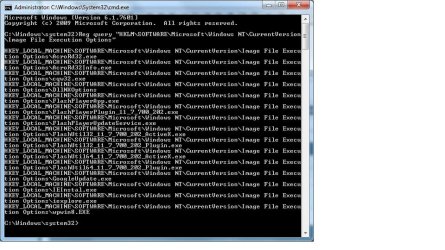
Open up an Elevated Command Prompt. Click on
rb: type in CMD inside Search Programs and Files. Right click on CMD under Programs (1) choose Run as administrator . On the User Access Control window click on the Yes button . Command Prompt opens up to C:\Windows\System32>_Type this command ( Thanks to Cottonball )
Code:
Reg query "HKLM\SOFTWARE\Microsoft\Windows NT\CurrentVersion\Image File Execution Options"Press <ENTER>
My Computer
- Computer Manufacturer/Model Number
- Custom Built
- OS
- Windows 7 Ultimate 32-Bit & Windows 7 Ultimate 64-Bit
- CPU
- Intel Core i7 CPU 950 @ 3.07GHz
- Motherboard
- ASUS P6T DELUXE V2
- Memory
- OCZ 6GB (3 x 2GB) 240-Pin DDR3 SDRAM DDR3 1600 OCZ3X1600R2
- Graphics Card(s)
- ATI Radeon HD 5700 Series
- Sound Card
- OnBoard
- Hard Drives
- WD6400AACS-00M3B0 (640GB SATA )
- PSU
- CORSAIR 850w
- Case
- NZXT LEXA
- Cooling
- Intel Stock Heatsink Fan
- Keyboard
- Microsoft Wireless Laser Keyboard 7000
- Mouse
- Microsoft Wireless Laser Mouse 7000
- Local time
- 3:38 AM
- Messages
- 6,830
Can you right click on cqw32.exe choose Delete ? Click on the Yes button to Confirm
My Computer
- Computer Manufacturer/Model Number
- Custom Built
- OS
- Windows 7 Ultimate 32-Bit & Windows 7 Ultimate 64-Bit
- CPU
- Intel Core i7 CPU 950 @ 3.07GHz
- Motherboard
- ASUS P6T DELUXE V2
- Memory
- OCZ 6GB (3 x 2GB) 240-Pin DDR3 SDRAM DDR3 1600 OCZ3X1600R2
- Graphics Card(s)
- ATI Radeon HD 5700 Series
- Sound Card
- OnBoard
- Hard Drives
- WD6400AACS-00M3B0 (640GB SATA )
- PSU
- CORSAIR 850w
- Case
- NZXT LEXA
- Cooling
- Intel Stock Heatsink Fan
- Keyboard
- Microsoft Wireless Laser Keyboard 7000
- Mouse
- Microsoft Wireless Laser Mouse 7000
- Local time
- 3:38 AM
- Messages
- 6,830
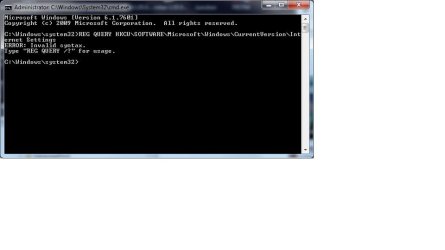
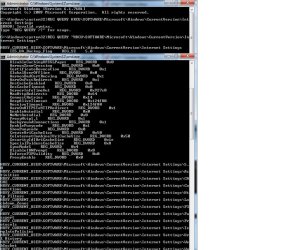
Open up an Elevated Command Prompt. Click on rb: type in CMD inside Search Programs and Files. Right click on CMD under Programs (1) choose Run as administrator . On the User Access Control window click on the Yes button . Command Prompt opens up to C:\Windows\System32>_
Copy and paste . ( right click inside the command prompt and choose Paste )
Forgot to add the quotes
rb: type in CMD inside Search Programs and Files. Right click on CMD under Programs (1) choose Run as administrator . On the User Access Control window click on the Yes button . Command Prompt opens up to C:\Windows\System32>_Copy and paste . ( right click inside the command prompt and choose Paste )
Code:
REG QUERY "HKCU\SOFTWARE\Microsoft\Windows\CurrentVersion\Internet Settings"Forgot to add the quotes
My Computer
- Computer Manufacturer/Model Number
- Custom Built
- OS
- Windows 7 Ultimate 32-Bit & Windows 7 Ultimate 64-Bit
- CPU
- Intel Core i7 CPU 950 @ 3.07GHz
- Motherboard
- ASUS P6T DELUXE V2
- Memory
- OCZ 6GB (3 x 2GB) 240-Pin DDR3 SDRAM DDR3 1600 OCZ3X1600R2
- Graphics Card(s)
- ATI Radeon HD 5700 Series
- Sound Card
- OnBoard
- Hard Drives
- WD6400AACS-00M3B0 (640GB SATA )
- PSU
- CORSAIR 850w
- Case
- NZXT LEXA
- Cooling
- Intel Stock Heatsink Fan
- Keyboard
- Microsoft Wireless Laser Keyboard 7000
- Mouse
- Microsoft Wireless Laser Mouse 7000
- Local time
- 3:38 AM
- Messages
- 6,830
I edit the post . Add the quotes before HKLM and at end after settings then press enter
My Computer
- Computer Manufacturer/Model Number
- Custom Built
- OS
- Windows 7 Ultimate 32-Bit & Windows 7 Ultimate 64-Bit
- CPU
- Intel Core i7 CPU 950 @ 3.07GHz
- Motherboard
- ASUS P6T DELUXE V2
- Memory
- OCZ 6GB (3 x 2GB) 240-Pin DDR3 SDRAM DDR3 1600 OCZ3X1600R2
- Graphics Card(s)
- ATI Radeon HD 5700 Series
- Sound Card
- OnBoard
- Hard Drives
- WD6400AACS-00M3B0 (640GB SATA )
- PSU
- CORSAIR 850w
- Case
- NZXT LEXA
- Cooling
- Intel Stock Heatsink Fan
- Keyboard
- Microsoft Wireless Laser Keyboard 7000
- Mouse
- Microsoft Wireless Laser Mouse 7000
Similar threads
- Replies
- 9
- Views
- 3K

- Replies
- 2
- Views
- 3K

- Replies
- 2
- Views
- 952

- Replies
- 13
- Views
- 5K
