
You are using an out of date browser. It may not display this or other websites correctly.
You should upgrade or use an alternative browser.
You should upgrade or use an alternative browser.
Issues logging into Windows.
- Thread starter GilV37
- Start date

- Local time
- 2:41 AM
- Messages
- 6,830
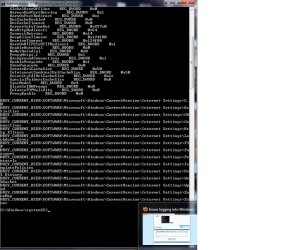
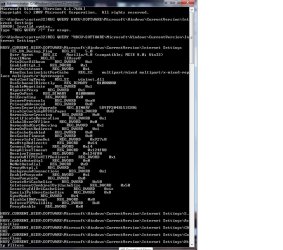
Lets try this make it easier
Type this inside the command prompt
Code:
A text file name InternetSettings should be located on your desktop . Upload that file ( if worked right )
Type this inside the command prompt
Code:
Code:
REG QUERY "HKCU\SOFTWARE\Microsoft\Windows\CurrentVersion\Internet Settings" >%USERPROFILE%\Desktop\InternetSettings.txtA text file name InternetSettings should be located on your desktop . Upload that file ( if worked right )
My Computer
- Computer Manufacturer/Model Number
- Custom Built
- OS
- Windows 7 Ultimate 32-Bit & Windows 7 Ultimate 64-Bit
- CPU
- Intel Core i7 CPU 950 @ 3.07GHz
- Motherboard
- ASUS P6T DELUXE V2
- Memory
- OCZ 6GB (3 x 2GB) 240-Pin DDR3 SDRAM DDR3 1600 OCZ3X1600R2
- Graphics Card(s)
- ATI Radeon HD 5700 Series
- Sound Card
- OnBoard
- Hard Drives
- WD6400AACS-00M3B0 (640GB SATA )
- PSU
- CORSAIR 850w
- Case
- NZXT LEXA
- Cooling
- Intel Stock Heatsink Fan
- Keyboard
- Microsoft Wireless Laser Keyboard 7000
- Mouse
- Microsoft Wireless Laser Mouse 7000
- Local time
- 2:41 AM
- Messages
- 6,830
Lets change from %Userprofile%\Desktop\InternetSettings to C:\InternetSettings.txt
So it should be
So it should be
REG QUERY "HKCU\SOFTWARE\Microsoft\Windows\CurrentVersion\Internet Settings" >C:\InternetSettings.txt
My Computer
- Computer Manufacturer/Model Number
- Custom Built
- OS
- Windows 7 Ultimate 32-Bit & Windows 7 Ultimate 64-Bit
- CPU
- Intel Core i7 CPU 950 @ 3.07GHz
- Motherboard
- ASUS P6T DELUXE V2
- Memory
- OCZ 6GB (3 x 2GB) 240-Pin DDR3 SDRAM DDR3 1600 OCZ3X1600R2
- Graphics Card(s)
- ATI Radeon HD 5700 Series
- Sound Card
- OnBoard
- Hard Drives
- WD6400AACS-00M3B0 (640GB SATA )
- PSU
- CORSAIR 850w
- Case
- NZXT LEXA
- Cooling
- Intel Stock Heatsink Fan
- Keyboard
- Microsoft Wireless Laser Keyboard 7000
- Mouse
- Microsoft Wireless Laser Mouse 7000
- Local time
- 2:41 AM
- Messages
- 6,830
Check your C drive
My Computer
- Computer Manufacturer/Model Number
- Custom Built
- OS
- Windows 7 Ultimate 32-Bit & Windows 7 Ultimate 64-Bit
- CPU
- Intel Core i7 CPU 950 @ 3.07GHz
- Motherboard
- ASUS P6T DELUXE V2
- Memory
- OCZ 6GB (3 x 2GB) 240-Pin DDR3 SDRAM DDR3 1600 OCZ3X1600R2
- Graphics Card(s)
- ATI Radeon HD 5700 Series
- Sound Card
- OnBoard
- Hard Drives
- WD6400AACS-00M3B0 (640GB SATA )
- PSU
- CORSAIR 850w
- Case
- NZXT LEXA
- Cooling
- Intel Stock Heatsink Fan
- Keyboard
- Microsoft Wireless Laser Keyboard 7000
- Mouse
- Microsoft Wireless Laser Mouse 7000

Try these two commands:
reg query "HKCU\Software\Microsoft\Windows\CurrentVersion\Internet Settings" /v ProxyEnable>>"%userprofile%\desktop\check.txt"
"%userprofile%\desktop\check.txt"
Check the Desktop.
reg query "HKCU\Software\Microsoft\Windows\CurrentVersion\Internet Settings" /v ProxyEnable>>"%userprofile%\desktop\check.txt"
"%userprofile%\desktop\check.txt"
Check the Desktop.
My Computer
- Computer type
- PC/Desktop
- Computer Manufacturer/Model Number
- An ol' eMachines
- OS
- Windows 7 Home Premium
- Internet Speed
- Fine for me...I'm retired!
GilV37,
Did you install MSE?
Any luck downloading after doing so?
Also, can you download, for example, SystemLook, instead of the .jpg file done previously?
http://www.sevenforums.com/system-security/289521-issues-logging-into-windows-24.html#post2411335
Did you install MSE?
Any luck downloading after doing so?
Also, can you download, for example, SystemLook, instead of the .jpg file done previously?
http://www.sevenforums.com/system-security/289521-issues-logging-into-windows-24.html#post2411335
My Computer
- Computer type
- PC/Desktop
- Computer Manufacturer/Model Number
- An ol' eMachines
- OS
- Windows 7 Home Premium
- Internet Speed
- Fine for me...I'm retired!
- Local time
- 2:41 AM
- Messages
- 6,830
Lets see if you could run a scan with Surfright's HitmanPro
Download Link :ar: http://dl.surfright.nl/HitmanPro_x64.exe
:ar: Save to a USB Flash Drive then plug the USB Flash Drive to the issue PC and drag the file from the USB Flash Drive to the Desktop
:ar: Right click on HitmanPro.exe and choose Run as administrator
:ar: When HitmanPro opens up click on the Next button
:ar: Click on No, I only want to perform a one-time scan to check this computer on the Setup page . Click Next once done .
:ar: Let it scan the PC once its done Click Next
:ar: Click Activate free license to start the free 30 days trial and remove all the malicious files from your computer then click Next
Download Link :ar: http://dl.surfright.nl/HitmanPro_x64.exe
:ar: Save to a USB Flash Drive then plug the USB Flash Drive to the issue PC and drag the file from the USB Flash Drive to the Desktop
:ar: Right click on HitmanPro.exe and choose Run as administrator
:ar: When HitmanPro opens up click on the Next button
:ar: Click on No, I only want to perform a one-time scan to check this computer on the Setup page . Click Next once done .
:ar: Let it scan the PC once its done Click Next
:ar: Click Activate free license to start the free 30 days trial and remove all the malicious files from your computer then click Next
My Computer
- Computer Manufacturer/Model Number
- Custom Built
- OS
- Windows 7 Ultimate 32-Bit & Windows 7 Ultimate 64-Bit
- CPU
- Intel Core i7 CPU 950 @ 3.07GHz
- Motherboard
- ASUS P6T DELUXE V2
- Memory
- OCZ 6GB (3 x 2GB) 240-Pin DDR3 SDRAM DDR3 1600 OCZ3X1600R2
- Graphics Card(s)
- ATI Radeon HD 5700 Series
- Sound Card
- OnBoard
- Hard Drives
- WD6400AACS-00M3B0 (640GB SATA )
- PSU
- CORSAIR 850w
- Case
- NZXT LEXA
- Cooling
- Intel Stock Heatsink Fan
- Keyboard
- Microsoft Wireless Laser Keyboard 7000
- Mouse
- Microsoft Wireless Laser Mouse 7000
My Computer
- Computer type
- PC/Desktop
- Computer Manufacturer/Model Number
- HP
- OS
- Windows 7 Home

- Local time
- 2:41 AM
- Messages
- 8,608
Restore IE's default settings ... http://www.sevenforums.com/tutorials/1222-internet-explorer-reset.html
If you don't have CCleaner, download from here: Download CCleaner 4.01.4093 - FileHippo.com
Uncheck any prechecked bundled add-ons!
Check these items in IE and run the analyzer, when finished, click 'run cleaner'.
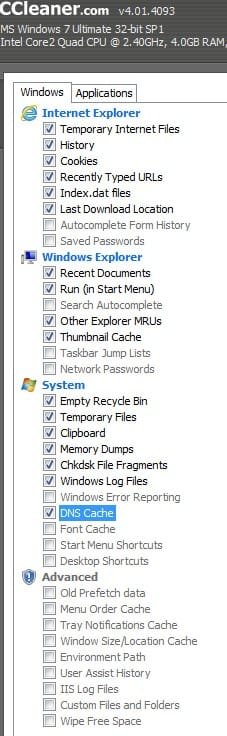
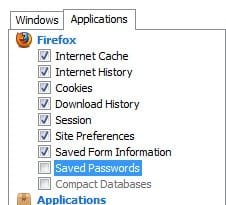
Next, click on the applications tab, check these items in Firefox and Chrome (if showing) Analyze and run cleaner.
If you don't have CCleaner, download from here: Download CCleaner 4.01.4093 - FileHippo.com
Uncheck any prechecked bundled add-ons!
Check these items in IE and run the analyzer, when finished, click 'run cleaner'.
Next, click on the applications tab, check these items in Firefox and Chrome (if showing) Analyze and run cleaner.
Attachments
My Computer
- Computer type
- PC/Desktop
- Computer Manufacturer/Model Number
- Bruce ... somewhere in his 40's
- OS
- Windows 7 Ultimate 32bit SP1
- CPU
- Intel(R) Core(TM)2 Quad CPU @ 2.40GHz, 2400 MHz
- Motherboard
- INTEL/D975XBX2
- Memory
- 4 GB
- Graphics Card(s)
- ATI Radeon HD 2600 Pro
- Monitor(s) Displays
- Samsung SyncMaster 914v
- Screen Resolution
- 1280 x 1024
- Hard Drives
- 2/500GB each ... ST3500630AS ATA Device.
One is not connected
- PSU
- Rocketfish 700 W
- Case
- G.Skill Gigabyte Chassis
- Keyboard
- Standard PS/2 Keyboard
- Mouse
- Microsoft PS/2 Mouse
- Internet Speed
- DSL
- Antivirus
- Avira Internet Security
- Browser
- IE 11
- Other Info
- ATI HDMI Audio
Wouldn't it be something if one of these scans solved the problem?
Will give this up and take up planting various kinds of tomatoes.
Did that one year, and the squirrels ate them all!! The tomatoes were fenced in!!
Please try the following to activate the real Administrator on this computer:
Go to the Command Prompt, right-click and select: Run as Administrator
Once at the Command Prompt type or copy/paste the following, and press Enter:
Net user administrator /active:yes
The Command Prompt tells you whether the command was processed successfully.
Now, log off by going to Start, pressing the arrow to the right of Shutdown, and select: Log off
When the computer boots back up, press the Administrator account.
Find and click the Internet Explorer icon.
You get a notice with 3 choices, one of which is: To continue browsing click Home, etc.
Go to the upper right of IE, and click on the small house icon. If you place the mouse cursor over it tells you what it is.
At whatever webpage you get, you will see a notice at the bottom: The current security settings put your computer at risk.
Please ignore the notice.
Try to download SystemLook:
http://jpshortstuff.247Fixes.com/SystemLook_x64.exe
Does it download, or still the same? Press on with the following before posting here...
Go back to Start, press the arrow to the right of Shutdown, and select: Log off
Once back at your normal Desktop, go back to the Command Prompt, right-click and select: Run as Administrator
At the Command Prompt, type or copy/paste the following, and press Enter:
Net user administrator /active:no
Make sure you see the command was processed successfully message.
Please post back on whether the download got through, or still the same.
Will give this up and take up planting various kinds of tomatoes.
Did that one year, and the squirrels ate them all!! The tomatoes were fenced in!!
Please try the following to activate the real Administrator on this computer:
Go to the Command Prompt, right-click and select: Run as Administrator
Once at the Command Prompt type or copy/paste the following, and press Enter:
Net user administrator /active:yes
The Command Prompt tells you whether the command was processed successfully.
Now, log off by going to Start, pressing the arrow to the right of Shutdown, and select: Log off
When the computer boots back up, press the Administrator account.
Find and click the Internet Explorer icon.
You get a notice with 3 choices, one of which is: To continue browsing click Home, etc.
Go to the upper right of IE, and click on the small house icon. If you place the mouse cursor over it tells you what it is.
At whatever webpage you get, you will see a notice at the bottom: The current security settings put your computer at risk.
Please ignore the notice.
Try to download SystemLook:
http://jpshortstuff.247Fixes.com/SystemLook_x64.exe
Does it download, or still the same? Press on with the following before posting here...
Go back to Start, press the arrow to the right of Shutdown, and select: Log off
Once back at your normal Desktop, go back to the Command Prompt, right-click and select: Run as Administrator
At the Command Prompt, type or copy/paste the following, and press Enter:
Net user administrator /active:no
Make sure you see the command was processed successfully message.
Please post back on whether the download got through, or still the same.
My Computer
- Computer type
- PC/Desktop
- Computer Manufacturer/Model Number
- An ol' eMachines
- OS
- Windows 7 Home Premium
- Internet Speed
- Fine for me...I'm retired!
- Local time
- 2:41 AM
- Messages
- 6,830
GilV37
The HITMANPro log wasn't displaying correctly on my iPad . Did it locate anything ?
Question : Do you Corel's Word Profect ?
The HITMANPro log wasn't displaying correctly on my iPad . Did it locate anything ?
Question : Do you Corel's Word Profect ?
My Computer
- Computer Manufacturer/Model Number
- Custom Built
- OS
- Windows 7 Ultimate 32-Bit & Windows 7 Ultimate 64-Bit
- CPU
- Intel Core i7 CPU 950 @ 3.07GHz
- Motherboard
- ASUS P6T DELUXE V2
- Memory
- OCZ 6GB (3 x 2GB) 240-Pin DDR3 SDRAM DDR3 1600 OCZ3X1600R2
- Graphics Card(s)
- ATI Radeon HD 5700 Series
- Sound Card
- OnBoard
- Hard Drives
- WD6400AACS-00M3B0 (640GB SATA )
- PSU
- CORSAIR 850w
- Case
- NZXT LEXA
- Cooling
- Intel Stock Heatsink Fan
- Keyboard
- Microsoft Wireless Laser Keyboard 7000
- Mouse
- Microsoft Wireless Laser Mouse 7000
Jacee! I ran that and unfortunately it didn't work.
Cottonball! I was able to download that file as administrator, but have not tried under the other account.
VistaKing! I don't have Word Perfect on this machine.
Cottonball! I was able to download that file as administrator, but have not tried under the other account.
VistaKing! I don't have Word Perfect on this machine.
My Computer
- Computer type
- PC/Desktop
- Computer Manufacturer/Model Number
- HP
- OS
- Windows 7 Home
You did get out of the real Administrator account, and are now on your normal Desktop, right?
Will have to do some more checking...
Will have to do some more checking...
My Computer
- Computer type
- PC/Desktop
- Computer Manufacturer/Model Number
- An ol' eMachines
- OS
- Windows 7 Home Premium
- Internet Speed
- Fine for me...I'm retired!
- Local time
- 2:41 AM
- Messages
- 6,830
GilV37
Do you see this file mstsc.exe inside the C:\ drive ? If you do can you upload that file to www.virustotal.com
I noticed that file on your FRST.txt log on page 1 .
Do you see this file mstsc.exe inside the C:\ drive ? If you do can you upload that file to www.virustotal.com
I noticed that file on your FRST.txt log on page 1 .
My Computer
- Computer Manufacturer/Model Number
- Custom Built
- OS
- Windows 7 Ultimate 32-Bit & Windows 7 Ultimate 64-Bit
- CPU
- Intel Core i7 CPU 950 @ 3.07GHz
- Motherboard
- ASUS P6T DELUXE V2
- Memory
- OCZ 6GB (3 x 2GB) 240-Pin DDR3 SDRAM DDR3 1600 OCZ3X1600R2
- Graphics Card(s)
- ATI Radeon HD 5700 Series
- Sound Card
- OnBoard
- Hard Drives
- WD6400AACS-00M3B0 (640GB SATA )
- PSU
- CORSAIR 850w
- Case
- NZXT LEXA
- Cooling
- Intel Stock Heatsink Fan
- Keyboard
- Microsoft Wireless Laser Keyboard 7000
- Mouse
- Microsoft Wireless Laser Mouse 7000
I uploaded mstsc.exe and it came back saying that it was already analyzed on 5/9. Reanalyzed again and its fine. I got a 1 on the green angel, and a zero on the devil. GREAT PHOTOS.
My Computer
- Computer type
- PC/Desktop
- Computer Manufacturer/Model Number
- HP
- OS
- Windows 7 Home
- Local time
- 2:41 AM
- Messages
- 6,830
Can you upload the link with the results ?
I don't think that file should be inside the C:\ drive but inside C:\Windows\System32 .
You don't use Remote Desktop Connection
Can you run another scan with FRST . Delete the old FRST exe file and the log files ? I apologize . I am just trying to see what is on the PC after all the stuff we had you run . I do remember seeing TeamViewer in the C:\ drive as well . Do you have TeamViewer installed ?
You will need a USB FLASH DRIVE
Download Farbar Recovery Scan Tool
32-bit Version OS :ar: Farbar Recovery Scan Tool
64-Bit Version OS :ar: Farbar Recovery Scan Tool x64
Plug the flash drive into the infected PC.
Enter System Recovery Options.
:ar: To enter System Recovery Options from the Advanced Boot Options:
Restart the computer.
As soon as the BIOS is loaded begin tapping the F8 key until Advanced Boot Options appears.
Use the arrow keys to select the Repair your computer menu item.
Select US as the keyboard language settings, and then click Next.
Select the operating system you want to repair, and then click Next.
Select your user account an click Next.
:ar: To enter System Recovery Options by using Windows installation disc:
Insert the installation disc.
Restart your computer.
If prompted, press any key to start Windows from the installation disc. If your computer is not configured to start from a CD or DVD, check your BIOS settings.
Click Repair your computer.
Select US as the keyboard language settings, and then click Next.
Select the operating system you want to repair, and then click Next.
Select your user account and click Next.
:ar: On the System Recovery Options menu you will get the following options:
Startup Repair
System Restore
Windows Complete PC Restore
Windows Memory Diagnostic Tool
Command Prompt
Select Command Prompt
In the command window type e:\frst.exe (for x64 bit version type e:\frst64) and press Enter
The tool will start to run.
When the tool opens click Yes to disclaimer.
Press Scan button.
FRST will let you know when the scan is complete and has written the FRST.txt to file
Please copy and paste both logs in your reply.(FRST.txt and Addition.txt)
I don't think that file should be inside the C:\ drive but inside C:\Windows\System32 .
You don't use Remote Desktop Connection
Can you run another scan with FRST . Delete the old FRST exe file and the log files ? I apologize . I am just trying to see what is on the PC after all the stuff we had you run . I do remember seeing TeamViewer in the C:\ drive as well . Do you have TeamViewer installed ?
Warning
You will need a USB FLASH DRIVE
Tip
Download the Tool from a non infected PC
Download Farbar Recovery Scan Tool
32-bit Version OS :ar: Farbar Recovery Scan Tool
64-Bit Version OS :ar: Farbar Recovery Scan Tool x64
Note
Click the  rb: button and right-click Computer .Select Properties .Look for System Type: which will say 32-bit Operating System or 64-bit Operating System
rb: button and right-click Computer .Select Properties .Look for System Type: which will say 32-bit Operating System or 64-bit Operating System Plug the flash drive into the infected PC.
Enter System Recovery Options.
:ar: To enter System Recovery Options from the Advanced Boot Options:
Restart the computer.
As soon as the BIOS is loaded begin tapping the F8 key until Advanced Boot Options appears.
Use the arrow keys to select the Repair your computer menu item.
Select US as the keyboard language settings, and then click Next.
Select the operating system you want to repair, and then click Next.
Select your user account an click Next.
:ar: To enter System Recovery Options by using Windows installation disc:
Insert the installation disc.
Restart your computer.
If prompted, press any key to start Windows from the installation disc. If your computer is not configured to start from a CD or DVD, check your BIOS settings.
Click Repair your computer.
Select US as the keyboard language settings, and then click Next.
Select the operating system you want to repair, and then click Next.
Select your user account and click Next.
:ar: On the System Recovery Options menu you will get the following options:
Startup Repair
System Restore
Windows Complete PC Restore
Windows Memory Diagnostic Tool
Command Prompt
Select Command Prompt
In the command window type e:\frst.exe (for x64 bit version type e:\frst64) and press Enter
Note
Replace letter e with the drive letter of your flash drive.
Tip
Type the commands below to see what your letter is for the USB drive and press ENTER after each command
Code:
Diskpart
List volumeWhen the tool opens click Yes to disclaimer.
Press Scan button.
FRST will let you know when the scan is complete and has written the FRST.txt to file
Please copy and paste both logs in your reply.(FRST.txt and Addition.txt)
My Computer
- Computer Manufacturer/Model Number
- Custom Built
- OS
- Windows 7 Ultimate 32-Bit & Windows 7 Ultimate 64-Bit
- CPU
- Intel Core i7 CPU 950 @ 3.07GHz
- Motherboard
- ASUS P6T DELUXE V2
- Memory
- OCZ 6GB (3 x 2GB) 240-Pin DDR3 SDRAM DDR3 1600 OCZ3X1600R2
- Graphics Card(s)
- ATI Radeon HD 5700 Series
- Sound Card
- OnBoard
- Hard Drives
- WD6400AACS-00M3B0 (640GB SATA )
- PSU
- CORSAIR 850w
- Case
- NZXT LEXA
- Cooling
- Intel Stock Heatsink Fan
- Keyboard
- Microsoft Wireless Laser Keyboard 7000
- Mouse
- Microsoft Wireless Laser Mouse 7000
Similar threads
- Replies
- 9
- Views
- 3K

- Replies
- 2
- Views
- 3K

- Replies
- 2
- Views
- 948

- Replies
- 13
- Views
- 5K
