Issues with CPU hit 100%

shadowskippie

New member
Local time
2:16 AM
Messages
8
Right.
This problem has been bugging me for a while. My windows 7 machine has been optimised to use all eight cores and every now and then one or more of those core will peek to 100% stalling what ever is using that core at the time. it only lasts for about 1-3 seconds but it gets very annoying that it keeps happening.

nothing is safe from this, anything that is using the core at the time will lock up for a short time, from the media and being that the music i'm running even to mouse pointer leave others systems going no problem. it really pisses me off when i'm about to get that allusive ******* in some game to have the game freeze for 3 seconds only to find i'm the on being shot at.

any ways, hopefully someone know this problem and can help.

if you need to know here are my core machine stats
I7 920
Asus P6t
6Gb triple channel DDR3 1600
Asus 9800 GTX+
Zalman 850W
windows 7 pro x64

also, my brother is running window 7 home premium with a quad core, it is also optimised for all cores and every now and then he will have the same problem although not as much as i do, but then again he doesn't use his machine as much as i do
 

My Computer My Computer

At a glance

windows 7 Pro x64Intel core I7 9206Gb DDR3 1600Asus 9800 GTX+
OS
windows 7 Pro x64
CPU
Intel core I7 920
Motherboard
Asus P6T
Memory
6Gb DDR3 1600
Graphics Card(s)
Asus 9800 GTX+
Monitor(s) Displays
2x Samsung SyncMaster 923nw
Hard Drives
3x 320Gb
1x 160Gb
1x 500Gb
1x 1Tb
1x 250Gb
PSU
Zalman 850W
Go to search type memory diagnostics, make sure the memory is ok.

Go to search download the free process explorer, see what is using memory.

Run and Anti Virus Scan.

Try using computer without the A/V

Make sure drives are up to date

Go to device manager look for yellow problem warning markers.

When it happens go to event viewer look for errors.

Dowload and run malwarebytes and see what happens.
 

My Computer My Computer

At a glance

Windows 10, Home Clean InstallIntel Core2 processsor Q8200(2.33Ghz 1333FSB)...6 gbATI Radeon 256MB HD3650
Computer type
PC/Desktop
Computer Manufacturer/Model Number
Dell XPS 420
OS
Windows 10, Home Clean Install
CPU
Intel Core2 processsor Q8200(2.33Ghz 1333FSB) Quad Core Tech
Motherboard
Dell
Memory
6 gb
Graphics Card(s)
ATI Radeon 256MB HD3650
Sound Card
Intergrated 7.1 Channel Audio
Monitor(s) Displays
Dell SP2009W 20"
Hard Drives
640 GB Serial ATA Hard drive
Cooling
Fan
Keyboard
Dell USB Keyboard
Mouse
Dell Premium Optical USB
Internet Speed
DSL 2.85
right

I have avast, malwarebytes and spybot on this machine. it is squeaky clean

The next time it does a freeze i'll note the time and check the event viewer

Device manager reports no issues with any of the hardware devices

gonna start checking the other stuff now.


When all the tasks have been ticked off i'll come back here with my findings :)
 

My Computer My Computer

At a glance

windows 7 Pro x64Intel core I7 9206Gb DDR3 1600Asus 9800 GTX+
OS
windows 7 Pro x64
CPU
Intel core I7 920
Motherboard
Asus P6T
Memory
6Gb DDR3 1600
Graphics Card(s)
Asus 9800 GTX+
Monitor(s) Displays
2x Samsung SyncMaster 923nw
Hard Drives
3x 320Gb
1x 160Gb
1x 500Gb
1x 1Tb
1x 250Gb
PSU
Zalman 850W
When you have additional information or questions, you can report back and you will be provided with the excellent assistance that Seven Forum is known for.
 

My Computer My Computer

At a glance

Windows 10, Home Clean InstallIntel Core2 processsor Q8200(2.33Ghz 1333FSB)...6 gbATI Radeon 256MB HD3650
Computer type
PC/Desktop
Computer Manufacturer/Model Number
Dell XPS 420
OS
Windows 10, Home Clean Install
CPU
Intel Core2 processsor Q8200(2.33Ghz 1333FSB) Quad Core Tech
Motherboard
Dell
Memory
6 gb
Graphics Card(s)
ATI Radeon 256MB HD3650
Sound Card
Intergrated 7.1 Channel Audio
Monitor(s) Displays
Dell SP2009W 20"
Hard Drives
640 GB Serial ATA Hard drive
Cooling
Fan
Keyboard
Dell USB Keyboard
Mouse
Dell Premium Optical USB
Internet Speed
DSL 2.85
What kind of optimization have you done?

From what I've read, dedicating cores to specific tasks is useless because of the default way Windows assigns processes. There is little to no performance gain.
 

My Computer My Computer

At a glance

Windows 7 32 bit build 7600Intel 7400 2.78 GHz 3MB L2 Cache2 x 2048 PC2ATI HD 4350
Computer Manufacturer/Model Number
HP
OS
Windows 7 32 bit build 7600
CPU
Intel 7400 2.78 GHz 3MB L2 Cache
Motherboard
Some crappy chipset
Memory
2 x 2048 PC2
Graphics Card(s)
ATI HD 4350
Sound Card
See motherboard
Monitor(s) Displays
HP 2159m and AOC 2236
Hard Drives
Some hitachi thing
PSU
Bad
Case
bad
Cooling
bad
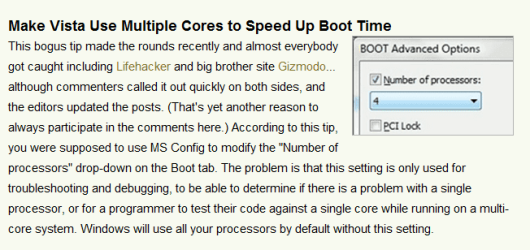
msconfig
went to the boot section, told it to use all eight cores
 

My Computer My Computer

At a glance

windows 7 Pro x64Intel core I7 9206Gb DDR3 1600Asus 9800 GTX+
OS
windows 7 Pro x64
CPU
Intel core I7 920
Motherboard
Asus P6T
Memory
6Gb DDR3 1600
Graphics Card(s)
Asus 9800 GTX+
Monitor(s) Displays
2x Samsung SyncMaster 923nw
Hard Drives
3x 320Gb
1x 160Gb
1x 500Gb
1x 1Tb
1x 250Gb
PSU
Zalman 850W
Hi, you might want to read this about window myths.


myth.PNG
 

My Computer My Computer

At a glance

Vista Ult64, Win7600Intel Core 2 Quad Q6600 @ 2400 MHz 64bit OS4096 MB DDR3-SDRAMATI Radeon HD 3870 Series x2 Crossfired
Computer Manufacturer/Model Number
Self Build 64bit
OS
Vista Ult64, Win7600
CPU
Intel Core 2 Quad Q6600 @ 2400 MHz 64bit OS
Motherboard
Asus P5E3 Deluxe WiFi @p 64 bit OS
Memory
4096 MB DDR3-SDRAM
Graphics Card(s)
ATI Radeon HD 3870 Series x2 Crossfired
Sound Card
Realtek on board
Monitor(s) Displays
Samsung SyncMaster - 23 inches
Screen Resolution
1680x1050 pixels at 60 Hz in True Colors
Hard Drives
Hitachi (250 GB)/Samsung 750 GB. /Barracuda 160 GB.
My Book 1 TB external..
PSU
Cooler Master 1000w
Case
Cooler Master Cosmos 1000.
Cooling
Fans and fresh air,
Keyboard
Wireless
Mouse
Wireless
Internet Speed
Never fast enough
Other Info
I use a Magnum.
Well as Richard told it might be the drivers that is causing the issue. You could also try to reboot the System in Selective Startup

Hope this helps,
Captain
 

My Computer My Computer

At a glance

Windows 7 Ultimate - 64-bit | Windows 8 Pro -...Intel® Core™ i7 Processor 3,610QM (2.30Hz, 6M...8 GBNVIDIA® GeForce® GT 650M 2GB Graphics, Optimu...
Computer Manufacturer/Model Number
Samsung NP550P5C-S02IN
OS
Windows 7 Ultimate - 64-bit | Windows 8 Pro - 64-bit
CPU
Intel® Core™ i7 Processor 3,610QM (2.30Hz, 6MB L3 Cach
Memory
8 GB
Graphics Card(s)
NVIDIA® GeForce® GT 650M 2GB Graphics, Optimus™ techno
Sound Card
SoundAlive™ JBL 3 Speakers (With sub-Woofer)
Monitor(s) Displays
39.62cm (15.6) SuperBright 300nit HD+ LED Display
Screen Resolution
1,600 x 900, Anti-Reflective
Hard Drives
1TB S-ATA II Hard Drive (5,400RPM)
that would be easier if i could replicate the error all the time, i'm afraid the issues (although they do come round often) are random.

no, I've done the selective thing several times with clients machines and the one thing that is a must with that is a static problem.

This is why this problem is so elusive. any ways, i think i found something of significance but i need to observe a bit longer to see if this 'thing' pops up every time one of the cores go max or if it only has to do when explorer does a quick freeze on me
 

My Computer My Computer

At a glance

windows 7 Pro x64Intel core I7 9206Gb DDR3 1600Asus 9800 GTX+
OS
windows 7 Pro x64
CPU
Intel core I7 920
Motherboard
Asus P6T
Memory
6Gb DDR3 1600
Graphics Card(s)
Asus 9800 GTX+
Monitor(s) Displays
2x Samsung SyncMaster 923nw
Hard Drives
3x 320Gb
1x 160Gb
1x 500Gb
1x 1Tb
1x 250Gb
PSU
Zalman 850W
I suspect this is an A/V problem like richc mentioned earlier. I would try to disable or better yet, uninstall them one at a time to find out which one is causing the problem. It's the only thing that can cause this type of problem and A/V's are famous for it. The fact that it's happening on both machines which no doubt have the same A/V's installed makes it pretty clear what the problem is.
 

My Computer My Computer

At a glance

Windows 7 Ult, Windows 8.1 Pro,Q9650-4.275GHz, E8600 4.5GHz, E6750-3.8GHzG.Skill PC2 9600 1200Mhz 5 5 5 15 2TGTX480
Computer type
PC/Desktop
Computer Manufacturer/Model Number
Home built
OS
Windows 7 Ult, Windows 8.1 Pro,
CPU
Q9650-4.275GHz, E8600 4.5GHz, E6750-3.8GHz
Motherboard
Evga 780i FTW
Memory
G.Skill PC2 9600 1200Mhz 5 5 5 15 2T
Graphics Card(s)
GTX480
Sound Card
Asus Xonar D2
Monitor(s) Displays
HannsG
Screen Resolution
1680X1050
Hard Drives
GSkill Phoenix Pro 120GB SSD
PSU
ThermalTake Toughpower 1000Watt modular
Case
ThermalTake XaserV
Cooling
Xigmatek S1283
Keyboard
Logitech G15
Mouse
Logitech G9
Internet Speed
T1
It might be an issue with the hyperthreading of the core i7. Are there updated drivers for your chipset or processor?
 

My Computer My Computer

At a glance

Windows 7 64 bit build 7600Intel Core i5 750/Intel Pentium Duo T4200 2.0...6 gig/4 gigATI Radeon HD 4350/Intel Graphics Media Accel...
Computer Manufacturer/Model Number
Dell XPS 8000/HP G70 258US
OS
Windows 7 64 bit build 7600
CPU
Intel Core i5 750/Intel Pentium Duo T4200 2.00 ghz
Memory
6 gig/4 gig
Graphics Card(s)
ATI Radeon HD 4350/Intel Graphics Media Accelerator 4500MHD
Sound Card
Realtek/Conexant Smartaudio High Definition Device
Monitor(s) Displays
Two
Screen Resolution
1920x1080/1440x900
Hard Drives
750/250 gig
Internet Speed
24 mb
yes, i will look at it but it will be a time that i can stay by the machine for a long period of time. i don't like running any machine with out an anti virus and my machine needs to stay connected to the net 80% of the time so i can't disconnect it

When i can i will run that test.

One thing though. i run Avast on my machine, i like the program while my brother runs avg so there is a difference there

next thing, a while back i stated there was something i was watching in the event viewer, well the machine did its little hiccup again a while ago, this time whilst i was playing a game, Eve-online. it was short but i took note of the time and run to the event viewer but this time the event did not correspond with the times, this basically means what ever is happening is not being logged by the event viewer
 

My Computer My Computer

At a glance

windows 7 Pro x64Intel core I7 9206Gb DDR3 1600Asus 9800 GTX+
OS
windows 7 Pro x64
CPU
Intel core I7 920
Motherboard
Asus P6T
Memory
6Gb DDR3 1600
Graphics Card(s)
Asus 9800 GTX+
Monitor(s) Displays
2x Samsung SyncMaster 923nw
Hard Drives
3x 320Gb
1x 160Gb
1x 500Gb
1x 1Tb
1x 250Gb
PSU
Zalman 850W
It might be an issue with the hyperthreading of the core i7. Are there updated drivers for your chipset or processor?

hmm, the drivers i have in here are the beta drivers. i have not checked lately if there are any new ones out. also windows has not done any updates on those drivers (except for the network one, several times). i'll look into this

I will also head into the Bios and disable the HT, see if that changes the issue

I'd just like to say that to everyone here who is helping me :D
 

My Computer My Computer

At a glance

windows 7 Pro x64Intel core I7 9206Gb DDR3 1600Asus 9800 GTX+
OS
windows 7 Pro x64
CPU
Intel core I7 920
Motherboard
Asus P6T
Memory
6Gb DDR3 1600
Graphics Card(s)
Asus 9800 GTX+
Monitor(s) Displays
2x Samsung SyncMaster 923nw
Hard Drives
3x 320Gb
1x 160Gb
1x 500Gb
1x 1Tb
1x 250Gb
PSU
Zalman 850W
Back
Top