Solved iTunes Will Not Open.

cdwriter2

New member
Local time
8:35 AM
Messages
14
Location
New Zealand
Hello,

I have been using Windows 7 and iTunes for a long time. But a while ago on my old laptop it stopped opening. Now on my new PC the same thing happens.

I boot the PC and open iTunes, the mouse loading picture spins a few times and then stops. Nothing happens.

However, the process for iTunes appears in the list of active processes.

Also, sometimes it will open once perfectly, then once closed it won'y open again. AND occasionally it will open but not respond.

I've tried:
  • Reinstalling
  • Restarting PC
  • Closing proccesses and starting again
  • Running as administrator

Currently Running
  • Windows 7 Home Premium 64bit
  • iTunes (current version) 64bit

PLEASE, I need iTunes to sync my iPad and iPhone so simply trying another program is not an option.

Thanks,
Caleb Watson
 

My Computer

Computer Manufacturer/Model Number
Computer Lounge Custom Build
OS
Windows 7 Home Premium 64bit
CPU
Intel Core i5 2500K Sandy Bridge 3.30GHz 6MB 95W LGA1155
Motherboard
ASUS P8Z68-V
Memory
Corsair CMZ8GX3M2A1600C9B Vengeance 2x4GB DDR3-1600
Graphics Card(s)
EVGA nVidia GeForce GTX570 Superclocked 1280MB GDDR5
Monitor(s) Displays
Viewsonic VX2453mh-LED 23.6" 2ms HDMI LED Monitor X2
Screen Resolution
1080p
Hard Drives
Seagate Barracuda 1TB ST31000524AS 32MB 6Gb/s SATA3
PSU
Corsair HX750 750W Modular Power Supply
Case
NZXT Phantom (BLACK)
Cooling
Liquid CPU with multiple case fans
Keyboard
HP Wireless Comfort Keyboard
Mouse
HP Wireless Comfort Mouse
I suggest that you uninstall iTunes again. After that reboot the computer.

When the computer has started after rebooting, open the Registry Editor by typing Regedit in the Run Box (Windows+R). In the Registry Editor Window click on the Edit Menu and in the drop down list click find. In the Find Text Box type "iTunes" without the inverted commas and delete all the entries pertaining to iTunes one by one and close the Registry Editor when done.

Now reboot again and install iTunes and see if it works. Please report back your results.

Please note that Registry editing if not done correctly can cause severe problems so it is best to back up your Registry first before editing it.
 

My Computer

Computer Manufacturer/Model Number
Custom Built
OS
Windows 7 Pro with SP1 32bit
Motherboard
Intel D845GVS1 X86-based PC
Memory
2 gigs of RAM
Graphics Card(s)
Intel(R) 82845G/GL/GE/PE/GV Graphics Controller
Sound Card
Realtek AC'97 Audio
Monitor(s) Displays
Samsung SyncMaster 931BF Black 19" LCD Monitor
Screen Resolution
1280X960
Hard Drives
1. SAMSUNG SP0822N ATA Device ~ 80 GigaBytes

2. Seagate FreeAgent Go USB Device ~ 500 GigaBytes
Keyboard
COMPAQ Standard PS/2 Keyboard
Mouse
iBall Laser Precise Speedster
Internet Speed
4 mb/sec
Thanks for the information, I will try it later.

Will I need to clear out any remaining folders ect in the program files. If so, what about iPod driver files ect?
 

My Computer

Computer Manufacturer/Model Number
Computer Lounge Custom Build
OS
Windows 7 Home Premium 64bit
CPU
Intel Core i5 2500K Sandy Bridge 3.30GHz 6MB 95W LGA1155
Motherboard
ASUS P8Z68-V
Memory
Corsair CMZ8GX3M2A1600C9B Vengeance 2x4GB DDR3-1600
Graphics Card(s)
EVGA nVidia GeForce GTX570 Superclocked 1280MB GDDR5
Monitor(s) Displays
Viewsonic VX2453mh-LED 23.6" 2ms HDMI LED Monitor X2
Screen Resolution
1080p
Hard Drives
Seagate Barracuda 1TB ST31000524AS 32MB 6Gb/s SATA3
PSU
Corsair HX750 750W Modular Power Supply
Case
NZXT Phantom (BLACK)
Cooling
Liquid CPU with multiple case fans
Keyboard
HP Wireless Comfort Keyboard
Mouse
HP Wireless Comfort Mouse
It may be best to uninstall all iTunes managed programs like iPod, iPad etc but it shall be very tedious. Therefore first try out without uninstalling these programs

However there are many common entries in the Registry for iPad, iPod and iTunes. These entries shall need to be cleared and you may have to re-install iPad and iPod etc all over again. As I have never done this myself before you shall have to be the guinea pig.
 

My Computer

Computer Manufacturer/Model Number
Custom Built
OS
Windows 7 Pro with SP1 32bit
Motherboard
Intel D845GVS1 X86-based PC
Memory
2 gigs of RAM
Graphics Card(s)
Intel(R) 82845G/GL/GE/PE/GV Graphics Controller
Sound Card
Realtek AC'97 Audio
Monitor(s) Displays
Samsung SyncMaster 931BF Black 19" LCD Monitor
Screen Resolution
1280X960
Hard Drives
1. SAMSUNG SP0822N ATA Device ~ 80 GigaBytes

2. Seagate FreeAgent Go USB Device ~ 500 GigaBytes
Keyboard
COMPAQ Standard PS/2 Keyboard
Mouse
iBall Laser Precise Speedster
Internet Speed
4 mb/sec
Uninstalling iTunes now. Will clear registry soon...

I'll edit this post with the results
 

My Computer

Computer Manufacturer/Model Number
Computer Lounge Custom Build
OS
Windows 7 Home Premium 64bit
CPU
Intel Core i5 2500K Sandy Bridge 3.30GHz 6MB 95W LGA1155
Motherboard
ASUS P8Z68-V
Memory
Corsair CMZ8GX3M2A1600C9B Vengeance 2x4GB DDR3-1600
Graphics Card(s)
EVGA nVidia GeForce GTX570 Superclocked 1280MB GDDR5
Monitor(s) Displays
Viewsonic VX2453mh-LED 23.6" 2ms HDMI LED Monitor X2
Screen Resolution
1080p
Hard Drives
Seagate Barracuda 1TB ST31000524AS 32MB 6Gb/s SATA3
PSU
Corsair HX750 750W Modular Power Supply
Case
NZXT Phantom (BLACK)
Cooling
Liquid CPU with multiple case fans
Keyboard
HP Wireless Comfort Keyboard
Mouse
HP Wireless Comfort Mouse
By now you would have finished. Did you succeed?


Uninstalling iTunes now. Will clear registry soon...

I'll edit this post with the results
 

My Computer

Computer Manufacturer/Model Number
Custom Built
OS
Windows 7 Pro with SP1 32bit
Motherboard
Intel D845GVS1 X86-based PC
Memory
2 gigs of RAM
Graphics Card(s)
Intel(R) 82845G/GL/GE/PE/GV Graphics Controller
Sound Card
Realtek AC'97 Audio
Monitor(s) Displays
Samsung SyncMaster 931BF Black 19" LCD Monitor
Screen Resolution
1280X960
Hard Drives
1. SAMSUNG SP0822N ATA Device ~ 80 GigaBytes

2. Seagate FreeAgent Go USB Device ~ 500 GigaBytes
Keyboard
COMPAQ Standard PS/2 Keyboard
Mouse
iBall Laser Precise Speedster
Internet Speed
4 mb/sec
Hi nellie321, iTunes used to be slow for me too. But since I got a better computer it is now fine.

To Speed Up Windows in General:
If you want to speed up your Shut Down, there is a Tutorial here

Just before Cleaning via CCleaner, run Disk Cleanup and Disk Defragmenter.

I would download and open CCleaner and use CCEnhancer for more features. Then go to the Clean Tab, Analyze and run the Cleaner. Next go to Tools (NEVER GO TO REGISTRY) and select Startup, select them all and select Disable and then Remove.

Then click on CCleaner's Uninstall Tab and remove anything you don't need or use. Ask here if you are unsure if it is safe to remove or not, or you could Google it.

Next, read this article:
99 ways to Make Your Computer Blazingly Fast

This guide was intended for Windows XP, but I would ignore Step 2, Step 10, Step 11, Step 16, Step 28, Step 37.

Another guide can be found here:
http://www.sevenforums.com/tutorials/11728-optimize-windows-7-a.html

I would next run an SFC Scan and a Check Disk Scan.

What I do as soon as I get a computer os open MSConfig, select the Boot Tab and select No GUI Boot, this will disable the Boot Animation.

I would also use MSE and Malwarebytes to check for Viruses and Malware.

To speed up iTunes
1: Delete all playlists.

2: Go to Edit, Preferences and remove all the sources you do not need ( iTunes DJ/Genius, etc ). Just below that, deselect Show list tickboxes and Show source icons. Then change the source and list text to small (unless you have difficulty reading). Under When you inset a CD, change the dropdown box to Ask to Import CD. Click Import Settings and deselect Use Error correction when reading Audio CD's. Finally deselect Automatically receive CD track names from Internet and Check for new software updates automatically

3: Go to Playback tab still inside Preferences, deselect everything and set Subtitle Language to Off.

4: Click on the Sharing tab and deselect everything (same goes for Store and Parental).

5: Click Devices, delete any un-needed Backups. and select Prevent iPod's, iPhone's, and iPad's from syncing automatically, deselect Warn when more than ?% of the data on this computer will be changed. Deselect Allow iTunes audio control from remote speakers and Reset sync history.

6: Click Advanced and deselect everything. Reset Warnings, and Cache and Music Location


7: Delete Music, Videos, Apps, etc.

8: Open services.msc and disable any un-needed services:
Apple Mobile Device - If you have no apple devices (iPhone, iPod, Apple TV).
iPod Service - Same as above.

You could try Reinstalling iTunes, updating iTunes using Apple Software Update.

You could also use an alternative to iTunes:
Foobar2000, MediaMonkey, Winamp, VLC Media Player, CopyTrans Manager, Songbird, SharePod,

Hope this helps :)
 

My Computer

Computer type
PC/Desktop
Computer Manufacturer/Model Number
Novatech iRush Pro
OS
Windows 7 Ultimate SP1 - 64 Bit
CPU
Intel Core i5 2500k
Motherboard
Foxconn H67M-S/H67M-V/H67
Memory
2x4GB DDR3 1333Hz
Graphics Card(s)
Ati Radeon 6770
Sound Card
None
Monitor(s) Displays
Samsung S22B150
Screen Resolution
1920x1080
Hard Drives
2x500GB
PSU
500W
Cooling
Fan
Keyboard
HP KU0316
Mouse
Wireless Logitech M185
Internet Speed
20MB/s
Antivirus
Avast Free
Browser
Google Chrome
Other Info
Logitech M185 Mouse
KU-M316 Keyboard
Nothing changed. Opened once. Won't open again.

Sometimes when I sleep the PC and wake it again it is open.

When clearing the registry, I may have missed some.

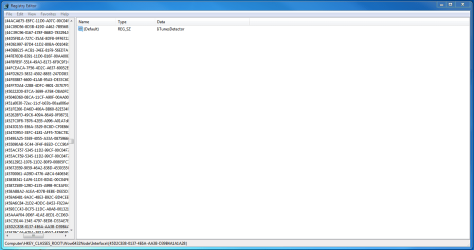
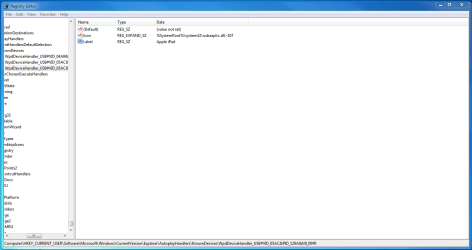
Do I delete all of the following entries shown in attached images?
 

Attachments

  • Capture.PNG
    Capture.PNG
    41.6 KB · Views: 213
  • Capture2.PNG
    Capture2.PNG
    40.5 KB · Views: 73
  • Capture3.PNG
    Capture3.PNG
    29.7 KB · Views: 67

My Computer

Computer Manufacturer/Model Number
Computer Lounge Custom Build
OS
Windows 7 Home Premium 64bit
CPU
Intel Core i5 2500K Sandy Bridge 3.30GHz 6MB 95W LGA1155
Motherboard
ASUS P8Z68-V
Memory
Corsair CMZ8GX3M2A1600C9B Vengeance 2x4GB DDR3-1600
Graphics Card(s)
EVGA nVidia GeForce GTX570 Superclocked 1280MB GDDR5
Monitor(s) Displays
Viewsonic VX2453mh-LED 23.6" 2ms HDMI LED Monitor X2
Screen Resolution
1080p
Hard Drives
Seagate Barracuda 1TB ST31000524AS 32MB 6Gb/s SATA3
PSU
Corsair HX750 750W Modular Power Supply
Case
NZXT Phantom (BLACK)
Cooling
Liquid CPU with multiple case fans
Keyboard
HP Wireless Comfort Keyboard
Mouse
HP Wireless Comfort Mouse
Please don't delete them for the time being. I found a lot of useful information at iTunes does not start up - Tech Support Forum that you might like to see. One suggestion was to uncheck all the iTunes and connected applications related Boxes in the start-up tab in msconfig.

You may have done that already but if not then please try it out and see if that helps any.
 

My Computer

Computer Manufacturer/Model Number
Custom Built
OS
Windows 7 Pro with SP1 32bit
Motherboard
Intel D845GVS1 X86-based PC
Memory
2 gigs of RAM
Graphics Card(s)
Intel(R) 82845G/GL/GE/PE/GV Graphics Controller
Sound Card
Realtek AC'97 Audio
Monitor(s) Displays
Samsung SyncMaster 931BF Black 19" LCD Monitor
Screen Resolution
1280X960
Hard Drives
1. SAMSUNG SP0822N ATA Device ~ 80 GigaBytes

2. Seagate FreeAgent Go USB Device ~ 500 GigaBytes
Keyboard
COMPAQ Standard PS/2 Keyboard
Mouse
iBall Laser Precise Speedster
Internet Speed
4 mb/sec
OK.

I don't think iTunes, the program is to blame. It could be my computer / copy of Windows.

This time when I started my PC everything ran perfectly and iTunes started quickly.

---

However when iTunes doesn't start I also sometimes notice that:
  • Windows Explorer stops refreshing (for example after creating a new file [in folders or on desktop])
  • Wireless networks icon takes a very long time to settle on the found network
  • Some services take a very long time to start such as AVG and Microsoft Security Essentials
  • Start bar and desktop stop responding and lead to Windows Explorer not responding and having to restart.

Do you think all of these issues could be intertwined? Or are they all random?

Thanks,
Caleb
 

My Computer

Computer Manufacturer/Model Number
Computer Lounge Custom Build
OS
Windows 7 Home Premium 64bit
CPU
Intel Core i5 2500K Sandy Bridge 3.30GHz 6MB 95W LGA1155
Motherboard
ASUS P8Z68-V
Memory
Corsair CMZ8GX3M2A1600C9B Vengeance 2x4GB DDR3-1600
Graphics Card(s)
EVGA nVidia GeForce GTX570 Superclocked 1280MB GDDR5
Monitor(s) Displays
Viewsonic VX2453mh-LED 23.6" 2ms HDMI LED Monitor X2
Screen Resolution
1080p
Hard Drives
Seagate Barracuda 1TB ST31000524AS 32MB 6Gb/s SATA3
PSU
Corsair HX750 750W Modular Power Supply
Case
NZXT Phantom (BLACK)
Cooling
Liquid CPU with multiple case fans
Keyboard
HP Wireless Comfort Keyboard
Mouse
HP Wireless Comfort Mouse
Hello Caleb,

Did you have a look at the site that I had suggested earlier and follow up some of the links there? May be you are right that iTunes is not to blame but perhaps you cannot absolve it completely considering that so many others are facing the same problem.

The issues that you have listed may be interrelated and may be in part due to two A-V (MSE & AVG) Programs that you are using at the same time. Perhaps unchecking their services and removing from start-up one at a time and trying out might solve all your problems. I would have stopped MSE first and checked. MSE is a resource pig as per Langa. Please do read at Is your free AV tool a ‘resource pig?’ and tell us if matters improved after you did that.

Best regards,

Amarnath
 

My Computer

Computer Manufacturer/Model Number
Custom Built
OS
Windows 7 Pro with SP1 32bit
Motherboard
Intel D845GVS1 X86-based PC
Memory
2 gigs of RAM
Graphics Card(s)
Intel(R) 82845G/GL/GE/PE/GV Graphics Controller
Sound Card
Realtek AC'97 Audio
Monitor(s) Displays
Samsung SyncMaster 931BF Black 19" LCD Monitor
Screen Resolution
1280X960
Hard Drives
1. SAMSUNG SP0822N ATA Device ~ 80 GigaBytes

2. Seagate FreeAgent Go USB Device ~ 500 GigaBytes
Keyboard
COMPAQ Standard PS/2 Keyboard
Mouse
iBall Laser Precise Speedster
Internet Speed
4 mb/sec
Stopped AVG and MSE startup. Nothing. iTunes still doesn't open.

The weird thing is that I see it along with iTunesHelper in the running processes page.

Any other ideas?

I checked the articles and no change when I followed their steps
 

My Computer

Computer Manufacturer/Model Number
Computer Lounge Custom Build
OS
Windows 7 Home Premium 64bit
CPU
Intel Core i5 2500K Sandy Bridge 3.30GHz 6MB 95W LGA1155
Motherboard
ASUS P8Z68-V
Memory
Corsair CMZ8GX3M2A1600C9B Vengeance 2x4GB DDR3-1600
Graphics Card(s)
EVGA nVidia GeForce GTX570 Superclocked 1280MB GDDR5
Monitor(s) Displays
Viewsonic VX2453mh-LED 23.6" 2ms HDMI LED Monitor X2
Screen Resolution
1080p
Hard Drives
Seagate Barracuda 1TB ST31000524AS 32MB 6Gb/s SATA3
PSU
Corsair HX750 750W Modular Power Supply
Case
NZXT Phantom (BLACK)
Cooling
Liquid CPU with multiple case fans
Keyboard
HP Wireless Comfort Keyboard
Mouse
HP Wireless Comfort Mouse
Try ending AppleMobileDevice, iTunes and iTunesHelper from TaskManager and disable iTunes from Startup or try following Post 7
 

My Computer

Computer type
PC/Desktop
Computer Manufacturer/Model Number
Novatech iRush Pro
OS
Windows 7 Ultimate SP1 - 64 Bit
CPU
Intel Core i5 2500k
Motherboard
Foxconn H67M-S/H67M-V/H67
Memory
2x4GB DDR3 1333Hz
Graphics Card(s)
Ati Radeon 6770
Sound Card
None
Monitor(s) Displays
Samsung S22B150
Screen Resolution
1920x1080
Hard Drives
2x500GB
PSU
500W
Cooling
Fan
Keyboard
HP KU0316
Mouse
Wireless Logitech M185
Internet Speed
20MB/s
Antivirus
Avast Free
Browser
Google Chrome
Other Info
Logitech M185 Mouse
KU-M316 Keyboard
In the Services Tab of msconfig there is a Check Box which if checked hides the Windows Services. That gives a better view of the services started by third-party programs. Please do that and see if there any iTunes related services still running and stop them. iTunesHelper process shouldn't have been running if it had been unchecked in start-up and its related service stopped.

If only one A-V is running, all the related start-up items have been unchecked and their related services stopped and iTunes still doesn't start normally after a reboot then there is one more thing left to do. That is to uncheck all the start-up items except one A-V and one firewall and stop all the third party services except for A-V and Firewall. Then reboot and try to open iTunes and to check that it has become normal again.


Stopped AVG and MSE startup. Nothing. iTunes still doesn't open.

The weird thing is that I see it along with iTunesHelper in the running processes page.

Any other ideas?

I checked the articles and no change when I followed their steps
 

My Computer

Computer Manufacturer/Model Number
Custom Built
OS
Windows 7 Pro with SP1 32bit
Motherboard
Intel D845GVS1 X86-based PC
Memory
2 gigs of RAM
Graphics Card(s)
Intel(R) 82845G/GL/GE/PE/GV Graphics Controller
Sound Card
Realtek AC'97 Audio
Monitor(s) Displays
Samsung SyncMaster 931BF Black 19" LCD Monitor
Screen Resolution
1280X960
Hard Drives
1. SAMSUNG SP0822N ATA Device ~ 80 GigaBytes

2. Seagate FreeAgent Go USB Device ~ 500 GigaBytes
Keyboard
COMPAQ Standard PS/2 Keyboard
Mouse
iBall Laser Precise Speedster
Internet Speed
4 mb/sec
Well I stopped iTunes, Apple Push and QuickTime from startup.

Now SOMETIMES I can open iTunes. A small victory
 

My Computer

Computer Manufacturer/Model Number
Computer Lounge Custom Build
OS
Windows 7 Home Premium 64bit
CPU
Intel Core i5 2500K Sandy Bridge 3.30GHz 6MB 95W LGA1155
Motherboard
ASUS P8Z68-V
Memory
Corsair CMZ8GX3M2A1600C9B Vengeance 2x4GB DDR3-1600
Graphics Card(s)
EVGA nVidia GeForce GTX570 Superclocked 1280MB GDDR5
Monitor(s) Displays
Viewsonic VX2453mh-LED 23.6" 2ms HDMI LED Monitor X2
Screen Resolution
1080p
Hard Drives
Seagate Barracuda 1TB ST31000524AS 32MB 6Gb/s SATA3
PSU
Corsair HX750 750W Modular Power Supply
Case
NZXT Phantom (BLACK)
Cooling
Liquid CPU with multiple case fans
Keyboard
HP Wireless Comfort Keyboard
Mouse
HP Wireless Comfort Mouse
According to this Apple support article, when uninstalling iTunes and its dependable components, it has to be done in the exact same order as described. Did you uninstall ALL of the components associated with iTunes (including QuickTime) in the described sequence?
 

My Computer

OS
Windows 7
We have been on this for quite sometime now. Please now uncheck all the third party programs in msconfig except the A-V and the third party Firewall if any and then again reboot to check if you have scored a big victory.

Incidentally which A-V Program are you running?


Well I stopped iTunes, Apple Push and QuickTime from startup.

Now SOMETIMES I can open iTunes. A small victory
 

My Computer

Computer Manufacturer/Model Number
Custom Built
OS
Windows 7 Pro with SP1 32bit
Motherboard
Intel D845GVS1 X86-based PC
Memory
2 gigs of RAM
Graphics Card(s)
Intel(R) 82845G/GL/GE/PE/GV Graphics Controller
Sound Card
Realtek AC'97 Audio
Monitor(s) Displays
Samsung SyncMaster 931BF Black 19" LCD Monitor
Screen Resolution
1280X960
Hard Drives
1. SAMSUNG SP0822N ATA Device ~ 80 GigaBytes

2. Seagate FreeAgent Go USB Device ~ 500 GigaBytes
Keyboard
COMPAQ Standard PS/2 Keyboard
Mouse
iBall Laser Precise Speedster
Internet Speed
4 mb/sec
I disabled firewalls, antivirus and stopped all services related to them and iTunes.

Still nothing, I try to open iTunes and nothing happens.

It just appears in the task manager as shown:

However, sometimes after I wake the PC from sleep I can open iTunes.
 

Attachments

  • wtm.PNG
    wtm.PNG
    17.8 KB · Views: 18
Last edited:

My Computer

Computer Manufacturer/Model Number
Computer Lounge Custom Build
OS
Windows 7 Home Premium 64bit
CPU
Intel Core i5 2500K Sandy Bridge 3.30GHz 6MB 95W LGA1155
Motherboard
ASUS P8Z68-V
Memory
Corsair CMZ8GX3M2A1600C9B Vengeance 2x4GB DDR3-1600
Graphics Card(s)
EVGA nVidia GeForce GTX570 Superclocked 1280MB GDDR5
Monitor(s) Displays
Viewsonic VX2453mh-LED 23.6" 2ms HDMI LED Monitor X2
Screen Resolution
1080p
Hard Drives
Seagate Barracuda 1TB ST31000524AS 32MB 6Gb/s SATA3
PSU
Corsair HX750 750W Modular Power Supply
Case
NZXT Phantom (BLACK)
Cooling
Liquid CPU with multiple case fans
Keyboard
HP Wireless Comfort Keyboard
Mouse
HP Wireless Comfort Mouse
::RESOLVED!::

This issue seems to have resolved itself!
 

My Computer

Computer Manufacturer/Model Number
Computer Lounge Custom Build
OS
Windows 7 Home Premium 64bit
CPU
Intel Core i5 2500K Sandy Bridge 3.30GHz 6MB 95W LGA1155
Motherboard
ASUS P8Z68-V
Memory
Corsair CMZ8GX3M2A1600C9B Vengeance 2x4GB DDR3-1600
Graphics Card(s)
EVGA nVidia GeForce GTX570 Superclocked 1280MB GDDR5
Monitor(s) Displays
Viewsonic VX2453mh-LED 23.6" 2ms HDMI LED Monitor X2
Screen Resolution
1080p
Hard Drives
Seagate Barracuda 1TB ST31000524AS 32MB 6Gb/s SATA3
PSU
Corsair HX750 750W Modular Power Supply
Case
NZXT Phantom (BLACK)
Cooling
Liquid CPU with multiple case fans
Keyboard
HP Wireless Comfort Keyboard
Mouse
HP Wireless Comfort Mouse
Hello Caleb,

Would you like to test all the stopped programs and services one at a time to pinpoint the one which causing all the trouble?

If you are able to identify then please let us know too.

Amarnath


::RESOLVED!::

This issue seems to have resolved itself!
 

My Computer

Computer Manufacturer/Model Number
Custom Built
OS
Windows 7 Pro with SP1 32bit
Motherboard
Intel D845GVS1 X86-based PC
Memory
2 gigs of RAM
Graphics Card(s)
Intel(R) 82845G/GL/GE/PE/GV Graphics Controller
Sound Card
Realtek AC'97 Audio
Monitor(s) Displays
Samsung SyncMaster 931BF Black 19" LCD Monitor
Screen Resolution
1280X960
Hard Drives
1. SAMSUNG SP0822N ATA Device ~ 80 GigaBytes

2. Seagate FreeAgent Go USB Device ~ 500 GigaBytes
Keyboard
COMPAQ Standard PS/2 Keyboard
Mouse
iBall Laser Precise Speedster
Internet Speed
4 mb/sec
Back
Top