I've had it with Windows Update!

martinlest

New member
Power User
VIP
Local time
1:46 AM
Messages
661
I am not one of those people who like to knock Windows just because it's 'cool' to do so. They gave me one of my life passions after all (MS Flight Simulator), plus an O/S which I like, Windows 7, so it'd be churlish to be ungrateful! Even so...

For now, I am giving up with Windows Update. I made a clean installation of Windows 7 last week and found that the Update would not run - after two hours it was still 'searching for updates'. I followed various threads here and elsewhere, stopping the automatic updates and update service, installing KB3020369 & KB3172605.. but although this solved the endless search problem, the updates did not install properly (Update Failed). This was on a clean Win7 x64 installation, as I say. So I finally downloaded the Update Rollup for Win7 SP1 (KB3125574) and installed that instead. Then I tried to update further from there: back to never-ending 'searching for updates'! Incredible!!

Today I find that the installed updates have ruined my Adobe Photoshop installation. The two 'guilty' KB updates are listed on an Adobe forum, but since all my updates were installed by the rollup, I can't remove them. Not the first time of course updating has caused problems to installed applications. (One even killed Microsoft's own Flight Simulator, which I did fix, luckily - but only after some time Googling the issue).

Plus of course the ongoing issue of the Update Service continually hogging at least 70% of my CPU.. which again I must have spent hours Googling and applying 'fixes' which never worked for long.

I appreciate that it must be virtually impossible for Microsoft to prepare these fixes and be sure that they will not interfere with other programmes, especially third-party ones, and that we only see the negative results of the updates, not the positive ones, but frankly enough is enough. I have uninstalled all the KB3125574 update (and now Photoshop seems Ok again) and have turned off the Update Service, perhaps for good. I know some are going to say that this is very unwise, but I have in the past had PCs running for two years with no updates (one running XP), with no issues at all as far as I am aware at least. My PC problems always seem to come after I install updates, not after ignoring them.

I just needed to get this off my chest, I guess! How many hours and hours have I wasted trying to get to the bottom of applications suddenly going awry? Enough is enough..

Martin :)
 
Last edited:

My Computer

Computer type
PC/Desktop
Computer Manufacturer/Model Number
Custom Build
OS
Windows 7 Home Premium SP1 64-bit
CPU
Intel Core i7-4790K CPU @ 4.5GHz
Motherboard
Asus H97I-PLUS
Memory
16GB KINGSTON HYPER-X FURY DUAL-DDR3 1600MHz
Graphics Card(s)
8GB NVIDIA GEFORCE GTX 1070
Monitor(s) Displays
HannsG 28" & Dell 24"
Screen Resolution
1920x1200
Hard Drives
1 x 2TB Samsung Evo 860 SSD
2 x 500GB Samsung Evo 850 SSD
PSU
CORSAIR 650W CS SERIES
Case
Thermaltake Core V1 Mini ITX Cube
Cooling
NOCTUA NH-L12
Browser
Firefox
Other Info
Custom PC used for X-Plane 11
See this post:

How do I reset Windows Update components?

CURRENT PROCEDURE:
------------------------------------------------------------------------------------------------------
Download https://support.microsoft.com/en-us/kb/3020369 and https://support.microsoft.com/en-us/kb/3172605 in advance.
Disconnect the computer from the Internet so Windows Update cannot automatically update itself to 7.6.7600.320.
Perform a fresh reload from Recovery Media or Windows 7/64 with SP1 RTM.
When the installation prompts for updates, choose "Ask Me Later".
Apply KB3020369 and then KB3172605 in that order.
Restore the Internet connection, configure update settings to your preference and launch Windows Update as normal.

Anyway you are not alone. I got an update notification that Internet Explorer 10 was available as an important update even though IE 11 was already installed.

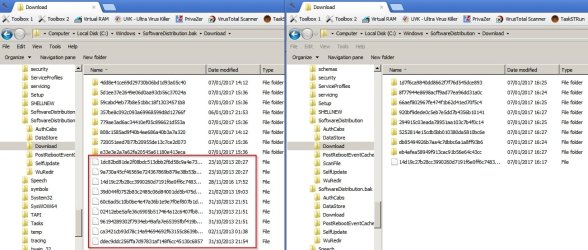
Problem is caused by a faulty / corrupt update in softwaredistribution > download folder.

Resetting WU components to include deleting the folder clears the offending update(s)

SofwareDistribution-Download.jpg

Windows Update - Reset - see Option Three
 

My Computer

Computer type
Laptop
Computer Manufacturer/Model Number
ASUS
OS
Microsoft Windows 7 Home Premium 64-bit 7601 Multiprocessor Free Service Pack 1
CPU
AMD C-60 APU with Radeon(tm) HD Graphics
Motherboard
ASUSTeK COMPUTER INC. X501U
Memory
4.00 GB
Graphics Card(s)
AMD Radeon HD 6290 Graphics
Sound Card
(1) AMD High Definition Audio Device (2) Realtek High Defi
Screen Resolution
1366 x 768 x 32 bits (4294967296 colors) @ 60 Hz
Hard Drives
Hitachi HTS545050A7E380 SATA Disk Device
Antivirus
Comodo CIS & FW, SecureAplus App Whitelisting, Threatfire
Browser
Cyberfox 64bit, Opera 64bit, Airfox
Other Info
Spy-The-Spy, HitmanPro.Alert, Norton Connect Safe, MJRegWatcher, BitDefender TrafficLight, Voodoo Shield, Zemana AntiMalware
Thanks for the reply. My post didn't describe in 100% detail what I had done (not sure I recall absolutely everything) - but I did clear all those files and follow those instructions less than two weeks ago, just after I reinstalled Windows. Now the problem is back - Windows Update sits for ever looking for new updates; at least it did before I switched it off again. Given the number of times updating has broken something on my PCs, plus the CPU issue that I have never solved (for more than a few days at least) I think I am going to leave the update service disabled for now.
 

My Computer

Computer type
PC/Desktop
Computer Manufacturer/Model Number
Custom Build
OS
Windows 7 Home Premium SP1 64-bit
CPU
Intel Core i7-4790K CPU @ 4.5GHz
Motherboard
Asus H97I-PLUS
Memory
16GB KINGSTON HYPER-X FURY DUAL-DDR3 1600MHz
Graphics Card(s)
8GB NVIDIA GEFORCE GTX 1070
Monitor(s) Displays
HannsG 28" & Dell 24"
Screen Resolution
1920x1200
Hard Drives
1 x 2TB Samsung Evo 860 SSD
2 x 500GB Samsung Evo 850 SSD
PSU
CORSAIR 650W CS SERIES
Case
Thermaltake Core V1 Mini ITX Cube
Cooling
NOCTUA NH-L12
Browser
Firefox
Other Info
Custom PC used for X-Plane 11

My Computers

System One System Two


I've seen that 3rd-party tutorial recommended at other communities, and it seems to work.

However, we already have several similar tutorials, especially this one by @ThrashZone:

Post #2 here:
Windows Update will not update and I've tried multiple fixes

If you search the forum, you'll find several others, all of which solve the problem by manually installing from the MS Update Catalog the offline installers for KB3125574 (for fresh Win7 installs), as well as KB3020369 and KB3172605.
The key is to first temporarily set WU to manual from services.msc and to set WU update to "never check for updates". Then, one must REBOOT (important!). That will allow the 2 (or 3) patches to install manually. That will get WU client working again.
On a fresh Win7 install, it may also help to have IE11 (from the offline installer, if needed) and .NET Framework 4.6.1

Hope this helps,
MM


Cheers,
MM
 
Last edited:

My Computer

Computer type
PC/Desktop
Computer Manufacturer/Model Number
Dell Studio XPS 8500
OS
OEM Windows 7 Ult (x64) SP1
CPU
Intel Core-i7 3770 @ 3.4 GHz
Motherboard
"Dell" branded
Memory
16 GB DDR3 SDRAM @ 1333 MHz
Graphics Card(s)
NVidia GeForce GT620 1 GB
Sound Card
THX TruStudio PC
Monitor(s) Displays
Dell U2410 Full HD
Hard Drives
2.0 TB SATA2 @ 7200 RPM
PSU
350W
Keyboard
MS 4000 Ergon - Wired
Mouse
Logitech Anywhere MX
Internet Speed
Cable HSI w/Turbo (router)
Antivirus
KIS-MBAM Premium-MBAE Premium
Browser
Fx (current version); IE
Other Info
And a Win7/64 Pro laptop; And a Win10/64 Pro desktop.
Hi,
You might try installing in the correct order :)
KB3020369
KB3125574 probably has April's update client which is just as broken as many other months releases
KB3172605 best update client in it and should be installed last if using the above second update.

But yes many have had issue installing a lot of updates using only the 2 updates
I suppose the error message should state do not apply instead of failed.... since a lot are superseded.
 

My Computer

Computer type
PC/Desktop
Computer Manufacturer/Model Number
Custom assembled by me :}
OS
Win-7-Pro64bit 7-H-Prem-64bit
CPU
i7-5930K 2nd i9-9940x both water blocked VRM's too
Motherboard
ASUS SABERTOOTH X99 2nd ASUS x299 Apex
Memory
Trident-z 3200C14 2nd Trident-z 3600C16
Graphics Card(s)
EVGA 1080ti ftw3 2nd Titan Xp both water blocked
Sound Card
Built-in Realtek
Monitor(s) Displays
1-AOC G2460PG 24"G-Sync 144Hz/ 2nd 1-ASUS VG248QE 24" 144Hz
Screen Resolution
1920 x 1080 144Hz
Hard Drives
2-Samsung M.2 Evo & Evo Plus
2-Samsung 850 EVO 500GB SSD's/ 3-2.5 W.D. Black 1tb-&3-1tb/3-3.5 WD Black 1tb hdd's
PSU
EVGA SuperNOVA 1000-P2 2nd 1200-P2
Case
2-Corsair Obsidian Series 450D Black ATX Mid Tower
Cooling
Custom water loops
Keyboard
Logitech G710+/ 2nd Logitech G910
Mouse
2-RedDragon M901 Perdition 16400 dpi Gaming mouse = wired
Internet Speed
Comcast Ping 19ms 89.31mbps download speed 6.12mbps upload
Antivirus
Malwarebytes Pro/ Superantispyware Pro
Browser
FireFox & Pale moon
Other Info
2nd ASUS X299 Apex/Intel i9-9940x with Custom water loop/7H-Prem-x64/Corsair 450D case/Ram Trident-z 3600C16 4x8gb / Samsung970Evo plus 500gb SSD/Dual ssd EZ swap evo/PSU EVGA SuperNova 1200w-P2 80+Platinum/GPU Titan Xp /8-ML-140 on push-pull on 2-280GTX rads
I have found that '360 Total Tecurity' did/does an excellent job of updating W-7 (XP also). Just leave it alone & let it do its thing, , ,

-c-
 

My Computer

Computer type
Laptop
Computer Manufacturer/Model Number
toshiba 505
OS
Windows 7 Home Premium bit
CPU
amd?
Motherboard
?
Memory
4 gig
Monitor(s) Displays
Samsung S27D360 &S24D300 - Acer K222HQL - Eizo 21" (4x3)
Screen Resolution
1280 x 720 -1600x900 - (eizo 1024x768
Hard Drives
240 ssd
PSU
amd (?)
Mouse
logitech tackball
Antivirus
360 total security
Browser
firefox portable 29.0.1
Thanks, I may give it another go. According to 'Programs & Features' there are just two updates left on my laptop, KB3020369 (sic) and KB976902: there's no uninstall option for either of them, but as both are necessary for update to work, perhaps I can leave them as they are and install KB3125574 and then KB3172605 on top of them?
 

My Computer

Computer type
PC/Desktop
Computer Manufacturer/Model Number
Custom Build
OS
Windows 7 Home Premium SP1 64-bit
CPU
Intel Core i7-4790K CPU @ 4.5GHz
Motherboard
Asus H97I-PLUS
Memory
16GB KINGSTON HYPER-X FURY DUAL-DDR3 1600MHz
Graphics Card(s)
8GB NVIDIA GEFORCE GTX 1070
Monitor(s) Displays
HannsG 28" & Dell 24"
Screen Resolution
1920x1200
Hard Drives
1 x 2TB Samsung Evo 860 SSD
2 x 500GB Samsung Evo 850 SSD
PSU
CORSAIR 650W CS SERIES
Case
Thermaltake Core V1 Mini ITX Cube
Cooling
NOCTUA NH-L12
Browser
Firefox
Other Info
Custom PC used for X-Plane 11
Just installed from scratch on a new SSD, Used Thrash's instructions. took less than 2 hours,
Have updated (x2) as well since then the search/install took less than 15 mins on both.
I was plesently surprised that my COA key, although previously in use on HDD, was accepted with no problem after installing

2 comments
i would make sure that WU is STILL dissabled after installing the 1st 2.
(it auto-enabled them)
DO NOT install any of your programs/Apps until your up to date.

Roy
 

My Computer

Computer type
PC/Desktop
Computer Manufacturer/Model Number
medionl/Aspire 6930G/acer x55a
OS
W7 home premium 32bit/W7HP 64bit/w10 tp insider ring
CPU
E5300 dual core
Motherboard
medion MS7366
Memory
3gb
Graphics Card(s)
Nvidia Geforce 7100 Nforce 630i
Monitor(s) Displays
avixc
Internet Speed
n (isp resticted to 72)
Antivirus
mse/pands
Browser
palemoon
Other Info
Belkin Fd7050 n USB using Railink RT2870 drivers, more upto date
DO NOT install any of your programs/Apps until your up to date.
Thanks Roy - but I only reinstalled Windows ten days ago, I am not going to do it again any time soon. (I had activation issues, as my laptop was bought when I was living and working in Thailand and I got a message window saying that the license was not valid for Europe. Hats off to Microsoft: I left a 'call me back' note on their support site, which they did in 10 minutes and activated it over the phone for me).
 

My Computer

Computer type
PC/Desktop
Computer Manufacturer/Model Number
Custom Build
OS
Windows 7 Home Premium SP1 64-bit
CPU
Intel Core i7-4790K CPU @ 4.5GHz
Motherboard
Asus H97I-PLUS
Memory
16GB KINGSTON HYPER-X FURY DUAL-DDR3 1600MHz
Graphics Card(s)
8GB NVIDIA GEFORCE GTX 1070
Monitor(s) Displays
HannsG 28" & Dell 24"
Screen Resolution
1920x1200
Hard Drives
1 x 2TB Samsung Evo 860 SSD
2 x 500GB Samsung Evo 850 SSD
PSU
CORSAIR 650W CS SERIES
Case
Thermaltake Core V1 Mini ITX Cube
Cooling
NOCTUA NH-L12
Browser
Firefox
Other Info
Custom PC used for X-Plane 11
Thanks, I may give it another go. According to 'Programs & Features' there are just two updates left on my laptop, KB3020369 (sic) and KB976902: there's no uninstall option for either of them, but as both are necessary for update to work, perhaps I can leave them as they are and install KB3125574 and then KB3172605 on top of them?

Why install KB3125574? Doesn't make sense.

Hi,
KB3125574 probably has April's update client which is just as broken as many other months releases

RE: Uninstalling updates. Disable WU and reboot or stop WU Service.

From an elevated command prompt type:

wusa /uninstall /kb:3125574 /quiet /norestart

Replace 3125574 in the above command with the desired kb number

to uninstall with no prompts and no restart. You still need to reboot once the update is removed and ideally run advanced disk cleanup to include windows update cleanup.

or wusa /uninstall /kb:3125574

to uninstall with prompts and confirmation of removal.
 

My Computer

Computer type
Laptop
Computer Manufacturer/Model Number
ASUS
OS
Microsoft Windows 7 Home Premium 64-bit 7601 Multiprocessor Free Service Pack 1
CPU
AMD C-60 APU with Radeon(tm) HD Graphics
Motherboard
ASUSTeK COMPUTER INC. X501U
Memory
4.00 GB
Graphics Card(s)
AMD Radeon HD 6290 Graphics
Sound Card
(1) AMD High Definition Audio Device (2) Realtek High Defi
Screen Resolution
1366 x 768 x 32 bits (4294967296 colors) @ 60 Hz
Hard Drives
Hitachi HTS545050A7E380 SATA Disk Device
Antivirus
Comodo CIS & FW, SecureAplus App Whitelisting, Threatfire
Browser
Cyberfox 64bit, Opera 64bit, Airfox
Other Info
Spy-The-Spy, HitmanPro.Alert, Norton Connect Safe, MJRegWatcher, BitDefender TrafficLight, Voodoo Shield, Zemana AntiMalware
Hi,
Mostly because if one does not install KB3125574 more than not a lot of updates will fail to install
Which makes sense seeing a lot of updates are superseded
But MS has not made a better error message saying Does not apply instead of the error failed to install.
 

My Computer

Computer type
PC/Desktop
Computer Manufacturer/Model Number
Custom assembled by me :}
OS
Win-7-Pro64bit 7-H-Prem-64bit
CPU
i7-5930K 2nd i9-9940x both water blocked VRM's too
Motherboard
ASUS SABERTOOTH X99 2nd ASUS x299 Apex
Memory
Trident-z 3200C14 2nd Trident-z 3600C16
Graphics Card(s)
EVGA 1080ti ftw3 2nd Titan Xp both water blocked
Sound Card
Built-in Realtek
Monitor(s) Displays
1-AOC G2460PG 24"G-Sync 144Hz/ 2nd 1-ASUS VG248QE 24" 144Hz
Screen Resolution
1920 x 1080 144Hz
Hard Drives
2-Samsung M.2 Evo & Evo Plus
2-Samsung 850 EVO 500GB SSD's/ 3-2.5 W.D. Black 1tb-&3-1tb/3-3.5 WD Black 1tb hdd's
PSU
EVGA SuperNOVA 1000-P2 2nd 1200-P2
Case
2-Corsair Obsidian Series 450D Black ATX Mid Tower
Cooling
Custom water loops
Keyboard
Logitech G710+/ 2nd Logitech G910
Mouse
2-RedDragon M901 Perdition 16400 dpi Gaming mouse = wired
Internet Speed
Comcast Ping 19ms 89.31mbps download speed 6.12mbps upload
Antivirus
Malwarebytes Pro/ Superantispyware Pro
Browser
FireFox & Pale moon
Other Info
2nd ASUS X299 Apex/Intel i9-9940x with Custom water loop/7H-Prem-x64/Corsair 450D case/Ram Trident-z 3600C16 4x8gb / Samsung970Evo plus 500gb SSD/Dual ssd EZ swap evo/PSU EVGA SuperNova 1200w-P2 80+Platinum/GPU Titan Xp /8-ML-140 on push-pull on 2-280GTX rads
Cheers. :)
 

My Computer

Computer type
Laptop
Computer Manufacturer/Model Number
ASUS
OS
Microsoft Windows 7 Home Premium 64-bit 7601 Multiprocessor Free Service Pack 1
CPU
AMD C-60 APU with Radeon(tm) HD Graphics
Motherboard
ASUSTeK COMPUTER INC. X501U
Memory
4.00 GB
Graphics Card(s)
AMD Radeon HD 6290 Graphics
Sound Card
(1) AMD High Definition Audio Device (2) Realtek High Defi
Screen Resolution
1366 x 768 x 32 bits (4294967296 colors) @ 60 Hz
Hard Drives
Hitachi HTS545050A7E380 SATA Disk Device
Antivirus
Comodo CIS & FW, SecureAplus App Whitelisting, Threatfire
Browser
Cyberfox 64bit, Opera 64bit, Airfox
Other Info
Spy-The-Spy, HitmanPro.Alert, Norton Connect Safe, MJRegWatcher, BitDefender TrafficLight, Voodoo Shield, Zemana AntiMalware
Hi,
I'll (d) to that :)
 

My Computer

Computer type
PC/Desktop
Computer Manufacturer/Model Number
Custom assembled by me :}
OS
Win-7-Pro64bit 7-H-Prem-64bit
CPU
i7-5930K 2nd i9-9940x both water blocked VRM's too
Motherboard
ASUS SABERTOOTH X99 2nd ASUS x299 Apex
Memory
Trident-z 3200C14 2nd Trident-z 3600C16
Graphics Card(s)
EVGA 1080ti ftw3 2nd Titan Xp both water blocked
Sound Card
Built-in Realtek
Monitor(s) Displays
1-AOC G2460PG 24"G-Sync 144Hz/ 2nd 1-ASUS VG248QE 24" 144Hz
Screen Resolution
1920 x 1080 144Hz
Hard Drives
2-Samsung M.2 Evo & Evo Plus
2-Samsung 850 EVO 500GB SSD's/ 3-2.5 W.D. Black 1tb-&3-1tb/3-3.5 WD Black 1tb hdd's
PSU
EVGA SuperNOVA 1000-P2 2nd 1200-P2
Case
2-Corsair Obsidian Series 450D Black ATX Mid Tower
Cooling
Custom water loops
Keyboard
Logitech G710+/ 2nd Logitech G910
Mouse
2-RedDragon M901 Perdition 16400 dpi Gaming mouse = wired
Internet Speed
Comcast Ping 19ms 89.31mbps download speed 6.12mbps upload
Antivirus
Malwarebytes Pro/ Superantispyware Pro
Browser
FireFox & Pale moon
Other Info
2nd ASUS X299 Apex/Intel i9-9940x with Custom water loop/7H-Prem-x64/Corsair 450D case/Ram Trident-z 3600C16 4x8gb / Samsung970Evo plus 500gb SSD/Dual ssd EZ swap evo/PSU EVGA SuperNova 1200w-P2 80+Platinum/GPU Titan Xp /8-ML-140 on push-pull on 2-280GTX rads
Re. KB3125574, I don't want to install that again as it contains the updates that stop Photoshop from working, which cannot be removed when installed via a 'rollup'. The two updates that show in programs & features refuse to be removed (by elevated cmd), I get a notice saying they are necessary for my computer and cannot be uninstalled (Googling shows that MS have said that once installed, these cannot be removed). OK

Seems to me that, unless I reinstall Windows again (which I am not going to do at this stage), I am not going to get update working: the utility has been 'checking for updates' for half an hour now. Some people report that the updates do appear, but you might have to leave the PC running overnight (???!).
 

My Computer

Computer type
PC/Desktop
Computer Manufacturer/Model Number
Custom Build
OS
Windows 7 Home Premium SP1 64-bit
CPU
Intel Core i7-4790K CPU @ 4.5GHz
Motherboard
Asus H97I-PLUS
Memory
16GB KINGSTON HYPER-X FURY DUAL-DDR3 1600MHz
Graphics Card(s)
8GB NVIDIA GEFORCE GTX 1070
Monitor(s) Displays
HannsG 28" & Dell 24"
Screen Resolution
1920x1200
Hard Drives
1 x 2TB Samsung Evo 860 SSD
2 x 500GB Samsung Evo 850 SSD
PSU
CORSAIR 650W CS SERIES
Case
Thermaltake Core V1 Mini ITX Cube
Cooling
NOCTUA NH-L12
Browser
Firefox
Other Info
Custom PC used for X-Plane 11
Try this script:

How do I reset Windows Update components?

Right click the CMD file and run as admin. Choose option to reset WU components. Let it run. When finished choose the option to reboot.

EDIT: Personally I find it works without needing to boot into safe mode but I use admin account with UAC disabled.
 

My Computer

Computer type
Laptop
Computer Manufacturer/Model Number
ASUS
OS
Microsoft Windows 7 Home Premium 64-bit 7601 Multiprocessor Free Service Pack 1
CPU
AMD C-60 APU with Radeon(tm) HD Graphics
Motherboard
ASUSTeK COMPUTER INC. X501U
Memory
4.00 GB
Graphics Card(s)
AMD Radeon HD 6290 Graphics
Sound Card
(1) AMD High Definition Audio Device (2) Realtek High Defi
Screen Resolution
1366 x 768 x 32 bits (4294967296 colors) @ 60 Hz
Hard Drives
Hitachi HTS545050A7E380 SATA Disk Device
Antivirus
Comodo CIS & FW, SecureAplus App Whitelisting, Threatfire
Browser
Cyberfox 64bit, Opera 64bit, Airfox
Other Info
Spy-The-Spy, HitmanPro.Alert, Norton Connect Safe, MJRegWatcher, BitDefender TrafficLight, Voodoo Shield, Zemana AntiMalware
Hi. I ran the script and then left Windows Update 'searching' before I went to work. When I came back, the updates were listed - took about half an hour as far as I can see.

However, reading various threads on the Adobe forums it seems that Windows updates which cause Photoshop to stop working come in thick and fast; it's not a case of just one previous update causing this. It seems as if every time you update you have to start deleting updates that are causing the issue - some of them are listed on the Adobe forum. As I use Photoshop quite often, that is not a road I want to go down!. I can either go back to a very early version of PS I have (6.1) or just not run any more updates on the laptop. Most annoying...

Thanks for the help with this.
 

My Computer

Computer type
PC/Desktop
Computer Manufacturer/Model Number
Custom Build
OS
Windows 7 Home Premium SP1 64-bit
CPU
Intel Core i7-4790K CPU @ 4.5GHz
Motherboard
Asus H97I-PLUS
Memory
16GB KINGSTON HYPER-X FURY DUAL-DDR3 1600MHz
Graphics Card(s)
8GB NVIDIA GEFORCE GTX 1070
Monitor(s) Displays
HannsG 28" & Dell 24"
Screen Resolution
1920x1200
Hard Drives
1 x 2TB Samsung Evo 860 SSD
2 x 500GB Samsung Evo 850 SSD
PSU
CORSAIR 650W CS SERIES
Case
Thermaltake Core V1 Mini ITX Cube
Cooling
NOCTUA NH-L12
Browser
Firefox
Other Info
Custom PC used for X-Plane 11
I use an older version of Photoshop and it works okay with Windows Updates patched and up to date. Don't know much about problems with newer versions of Photoshop.

:)

RE: Updates taking half an hour to appear. I know that WU would have to rescan your system for installed and missing updates before it could determine which updates to offer. Half an hour seems a little too long but see if it's any faster next patch tuesday.
 

My Computer

Computer type
Laptop
Computer Manufacturer/Model Number
ASUS
OS
Microsoft Windows 7 Home Premium 64-bit 7601 Multiprocessor Free Service Pack 1
CPU
AMD C-60 APU with Radeon(tm) HD Graphics
Motherboard
ASUSTeK COMPUTER INC. X501U
Memory
4.00 GB
Graphics Card(s)
AMD Radeon HD 6290 Graphics
Sound Card
(1) AMD High Definition Audio Device (2) Realtek High Defi
Screen Resolution
1366 x 768 x 32 bits (4294967296 colors) @ 60 Hz
Hard Drives
Hitachi HTS545050A7E380 SATA Disk Device
Antivirus
Comodo CIS & FW, SecureAplus App Whitelisting, Threatfire
Browser
Cyberfox 64bit, Opera 64bit, Airfox
Other Info
Spy-The-Spy, HitmanPro.Alert, Norton Connect Safe, MJRegWatcher, BitDefender TrafficLight, Voodoo Shield, Zemana AntiMalware
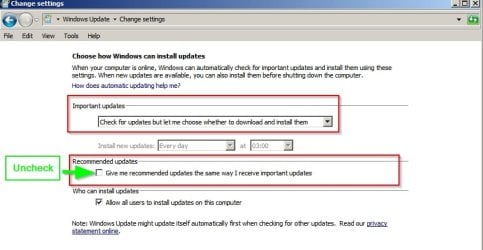
Also suggest that you use use settings for Windows Update. That way nothing gets downloaded or installed automatically.

Change settings.jpg

You can then review updates and research any problems before downloading and installing them. You can also delay download until you are happy that there are no problem updates in the latest bunch of releases.

Personally I don't really care about faulty updates as I always keep several working system image backups. Any problems I image current drive and restore backup then copy over any missing important or personal files.
 

My Computer

Computer type
Laptop
Computer Manufacturer/Model Number
ASUS
OS
Microsoft Windows 7 Home Premium 64-bit 7601 Multiprocessor Free Service Pack 1
CPU
AMD C-60 APU with Radeon(tm) HD Graphics
Motherboard
ASUSTeK COMPUTER INC. X501U
Memory
4.00 GB
Graphics Card(s)
AMD Radeon HD 6290 Graphics
Sound Card
(1) AMD High Definition Audio Device (2) Realtek High Defi
Screen Resolution
1366 x 768 x 32 bits (4294967296 colors) @ 60 Hz
Hard Drives
Hitachi HTS545050A7E380 SATA Disk Device
Antivirus
Comodo CIS & FW, SecureAplus App Whitelisting, Threatfire
Browser
Cyberfox 64bit, Opera 64bit, Airfox
Other Info
Spy-The-Spy, HitmanPro.Alert, Norton Connect Safe, MJRegWatcher, BitDefender TrafficLight, Voodoo Shield, Zemana AntiMalware
Hi,
I'd like to see a list of updates that are hosing ps personally :)

I would assume net framework updates ?
 

My Computer

Computer type
PC/Desktop
Computer Manufacturer/Model Number
Custom assembled by me :}
OS
Win-7-Pro64bit 7-H-Prem-64bit
CPU
i7-5930K 2nd i9-9940x both water blocked VRM's too
Motherboard
ASUS SABERTOOTH X99 2nd ASUS x299 Apex
Memory
Trident-z 3200C14 2nd Trident-z 3600C16
Graphics Card(s)
EVGA 1080ti ftw3 2nd Titan Xp both water blocked
Sound Card
Built-in Realtek
Monitor(s) Displays
1-AOC G2460PG 24"G-Sync 144Hz/ 2nd 1-ASUS VG248QE 24" 144Hz
Screen Resolution
1920 x 1080 144Hz
Hard Drives
2-Samsung M.2 Evo & Evo Plus
2-Samsung 850 EVO 500GB SSD's/ 3-2.5 W.D. Black 1tb-&3-1tb/3-3.5 WD Black 1tb hdd's
PSU
EVGA SuperNOVA 1000-P2 2nd 1200-P2
Case
2-Corsair Obsidian Series 450D Black ATX Mid Tower
Cooling
Custom water loops
Keyboard
Logitech G710+/ 2nd Logitech G910
Mouse
2-RedDragon M901 Perdition 16400 dpi Gaming mouse = wired
Internet Speed
Comcast Ping 19ms 89.31mbps download speed 6.12mbps upload
Antivirus
Malwarebytes Pro/ Superantispyware Pro
Browser
FireFox & Pale moon
Other Info
2nd ASUS X299 Apex/Intel i9-9940x with Custom water loop/7H-Prem-x64/Corsair 450D case/Ram Trident-z 3600C16 4x8gb / Samsung970Evo plus 500gb SSD/Dual ssd EZ swap evo/PSU EVGA SuperNova 1200w-P2 80+Platinum/GPU Titan Xp /8-ML-140 on push-pull on 2-280GTX rads
Back
Top