Solved I've lost my Run As Administrator command

Osiris19

New member
Local time
1:52 PM
Messages
7
In my context menu, I had lost my Run As Administrator command. I had installed a Take Ownership command for installing WMP11 but uninstalled it because I wanted RAA. But, it doesn't show up in my context menu anymore. Anyway to solve?
 
Last edited:

My Computer

OS
Windows 7 RC Build 7100
What happens if you try to remove the Take Ownership from the menu? In my zip file you have what you need... if not try the reg key i also attached!
 

Attachments

When I got rid of Take Ownership, it's gone too. Which was what I wanted. But I was expecting to see Run as Administrator replace Take Ownership.

Thank you, it worked.
 

My Computer

OS
Windows 7 RC Build 7100
In addition to the solution above, one option which is not well known is the SHIFT-Right Click on an executable file - This will bring up the "Run as another user" option which may be used to run at higher user rights if you have another admin account available or Lower rights (which is useful for troubleshooting)
 

My Computers

System One System Two

  • Computer type
    PC/Desktop
    Computer Manufacturer/Model Number
    ChillBlast - Custom to my design
    OS
    Windows 11 Pro x64 [Latest Release and Release Preview]
    CPU
    Ryzen 9 5950X, 3.8 - 5.2 MHz
    Motherboard
    Asus Prime X570-Pro
    Memory
    64GB [2 x 32GB] DDR4 3200MHz
    Graphics Card(s)
    4GB NVIDIA GEFORCE GTX 1650 Ti
    Sound Card
    On-board SPDIF to 5.1 System + HDMI [5.1 system]
    Monitor(s) Displays
    32" UHD 32 Bit HDR Monitor + 43" UHD 4K 32Bit HDR TV
    Screen Resolution
    2 x 3840 x 2160 @60Hz
    Hard Drives
    1TB M2 SSD OS, 500GB Fast Access SSD, 2 x 8TB Data + Various Externals from 1TB to 4TB, 10TB NAS
    PSU
    NZXT C750 80 PLUS Gold 750W Modular PSU
    Case
    Workstation Case [Matt Black]
    Cooling
    NZXT Kraken X63 280mm CPU Cooler +2x Quiet Case fans
    Keyboard
    Logitech Wireless MX Keys & K400 + others
    Mouse
    Logitech Wireless MX Master 3S
    Internet Speed
    920 MB Down 50 MB Up
    Antivirus
    BitDefender Total Security Pro
    Browser
    Chrome (always run latest Non-Beta)
    Other Info
    Also run ...
    Laptop - Quad 8GB - Windows 10 Pro x64
    Nexus 7 Android tablet x2
    Samsung 10.2" tablet
    Blackview TAB 8 4G Android Tablet c/w Keyboard
    Wacom Intuos Pro Medium Pen Pad
    Wacom Intuos Pro Small Pen Pad
    Wacom Expresskeys Remote
    Loopdeck+ Graphics Controller
    Shuttle Pro v2 Control
  • Computer type
    Laptop
    System Manufacturer/Model Number
    Dell XPS 17 10750H
    OS
    Windows 11 Pro x64 Latest RP
    CPU
    Intel I7 10750H 5.0GHz
    Motherboard
    Dell XPS
    Memory
    32GB [2x16GB] DDR4 2933 MHz
    Graphics Card(s)
    nVidia GTX1650Ti 4 GB GDDR6
    Sound Card
    Stock [Realtek] 4 Speaker
    Monitor(s) Displays
    17" IPS UHD+ Infinity Edge Touchscreen
    Screen Resolution
    3840 x 2400
    Hard Drives
    2TB M2 NVMe, 4TB External + various 500GB & 1TB External NVMe (also have access to spinner HDD from
    PSU
    Stock
    Case
    Stock XPS Aluminium & Carbon Fibre
    Cooling
    Stock - Active Fan Control
    Keyboard
    Backlit + Various Logitech
    Mouse
    Stock Track Pad + Logitech MX Trackball
    Internet Speed
    72 MB Down 18MB Up
    Browser
    Chrome
    Other Info
    Also run ...
    Laptop - Quad 8GB - Windows 10 Pro x64
    Nexus 7 Android tablet x2
    10.2" tablet
    Sony Z3 Android Smartphone
    Wacom Intuos Pro Medium Pen Pad
    Wacom Intuos Pro Small Pen Pad
    Wacom Expresskeys Remote
    Loopdeck+ Graphics Controller
    Shuttle Pro v2 Control Pad
    10TB NAS
I have lost "Run as administrator" from my right-click context menu. I have searched and searched for an answer and found this. What I am most interested in is the registry key file bansh attached. Will that put the RunAs back into the registry? I don't know why it disappeared. I don't know what to check for in the Registry to make sure that is even where the problem is. I am searching for help. If you can help me please respond. OS is Vista Home Premium SP2
 

My Computer

Computer type
PC/Desktop
Computer Manufacturer/Model Number
Dell XPS410
OS
Windows 7 Home Premium SP1
Memory
4 GB
Browser
Google Chrome
I wish you luck with the solutions presented.

I had much the same problem months ago and was only able to restore the Run as Admin capability by doing a Repair Install. There is a tutorial in the Installations section on how to do that -- but you will need Win7 installation media to do that.
 

My Computer

Computer type
PC/Desktop
Computer Manufacturer/Model Number
Custom
OS
Win7 Pro 32-bit, Win8 Pro 32-bit
CPU
AMD Phenom II X6 1090T
Motherboard
Gigabyte
Memory
4GB ddr3 1300
Graphics Card(s)
AMD HD 4290 onboard
Sound Card
Builtin Realtek HD Audio
Monitor(s) Displays
Samsung 24" widescreen, LG 23" widescreen
Screen Resolution
1920x1200/1920x1080
Hard Drives
Kingston 256GB SSD
Keyboard
Logitech Illuminated Keyboard
Mouse
Logitech M705 wireless mouse
Antivirus
Norton Av 2013
Browser
IE v10
Try the following .reg file - I just exported it from my own registry. It'll only work for .exe files but I'm assuming that's where the problem lies to begin with.
Code:
Windows Registry Editor Version 5.00

[HKEY_CLASSES_ROOT\exefile\shell\runas]
"HasLUAShield"=""

[HKEY_CLASSES_ROOT\exefile\shell\runas\command]
@="\"%1\" %*"
"IsolatedCommand"="\"%1\" %*"
 

Attachments

My Computer

Computer type
PC/Desktop
Computer Manufacturer/Model Number
Custom-built
OS
Windows 7 Professional SP1 32-bit
CPU
Intel Core 2 Duo E6600 2.4GHz
Motherboard
Asus PL5D2
Memory
4GB DDR2-667 (4x1GB in dual-channel config)
Graphics Card(s)
nVidia GeForce 9800 GT
Sound Card
Creative X-Fi XtremeMusic
Monitor(s) Displays
Acer P236H
Screen Resolution
1920x1200 (DVI)
Hard Drives
OCZ SSD Vertex Plus 60GB SATA (Firmware 3.55), 64MB cache
Hitachi HD321KJ SATA, 320GB, 7200rpm, 16MB cache
PSU
Antec TruePower 2.0
Case
Cooler Master Centurion
Cooling
Too many fans
Keyboard
Standard
Mouse
Microsoft wireless optical mouse
Internet Speed
AT&T U-verse (18mbit/sec)
Antivirus
Microsoft Security Essentials
Browser
Firefox
Other Info
Other devices:
Compaq CQ-60 laptop
Google Nexus 7 (2012) tablet
Nvidia SHIELD tablet (US/LTE)
Hardkernel ODROID-XU single-board computer (Samsung Exynos 5420)
Before I go ahead with this key, I want to make sure you are aware that I don't run Windows 7. I have Vista Home Premium SP2. Also, there is one thing I forgot to mention before. If I right-click anything which appears in my Start menu, or most things under All Programs there, the "Run as administrator command" still appears in the context menu. Example: I right clicked Jarte from Start/All Programs and the command was there. However, I went into C/Program Files and right clicked Jarte and the command is not there. If I click the shortcut on my desktop it is not there. In the past, I have used that command a lot with games from Shockwave. Sometimes a game will not open and play unless you "Run as administrator." I can still get to this command by going through Properties/Compatibility -- but it no longer appears in my right-click context menu.
 

My Computer

Computer type
PC/Desktop
Computer Manufacturer/Model Number
Dell XPS410
OS
Windows 7 Home Premium SP1
Memory
4 GB
Browser
Google Chrome

My Computer

Computer type
PC/Desktop
Computer Manufacturer/Model Number
Self built custom
OS
64-bit Windows 11 Pro for Workstations
CPU
Intel i7-8700K OC'd to 5 GHz
Motherboard
ASUS ROG Maximus XI Formula Z390
Memory
64 GB (4x16GB) G.SKILL TridentZ RGB DDR4 3600 MHz
Graphics Card(s)
ASUS ROG-STRIX-GTX1080TI-O11G-GAMING
Sound Card
Integrated
Monitor(s) Displays
2 x Samsung Odyssey G7 27"
Screen Resolution
2560x1440
Hard Drives
1TB Samsung 990 PRO M.2,
4TB Samsung 990 PRO PRO M.2,
TerraMaster F8 SSD Plus NAS
PSU
Seasonic Prime Titanium 850W
Case
Thermaltake Core P3
Cooling
Corsair Hydro H115i
Keyboard
Logitech wireless K800
Mouse
Logitech MX Master 4
Internet Speed
2 Gb/s Download and 100 Mb/s Upload
Antivirus
Malwarebyte Anti-Malware Premium
Browser
Google Chrome
Other Info
Logitech Z625 speaker system,
Logitech BRIO 4K Pro webcam,
HP Color LaserJet Pro MFP M477fdn,
APC SMART-UPS RT 1000 XL - SURT1000XLI,
Galaxy S23 Plus phone
I need to hear from Corazon and Brink. Will this work on Vista?
 

My Computer

Computer type
PC/Desktop
Computer Manufacturer/Model Number
Dell XPS410
OS
Windows 7 Home Premium SP1
Memory
4 GB
Browser
Google Chrome
I need to hear from Corazon and Brink. Will this work on Vista?

Hello Nikilet,

Yes, it will work in Vista just as well. :)
 
Last edited:

My Computer

Computer type
PC/Desktop
Computer Manufacturer/Model Number
Self built custom
OS
64-bit Windows 11 Pro for Workstations
CPU
Intel i7-8700K OC'd to 5 GHz
Motherboard
ASUS ROG Maximus XI Formula Z390
Memory
64 GB (4x16GB) G.SKILL TridentZ RGB DDR4 3600 MHz
Graphics Card(s)
ASUS ROG-STRIX-GTX1080TI-O11G-GAMING
Sound Card
Integrated
Monitor(s) Displays
2 x Samsung Odyssey G7 27"
Screen Resolution
2560x1440
Hard Drives
1TB Samsung 990 PRO M.2,
4TB Samsung 990 PRO PRO M.2,
TerraMaster F8 SSD Plus NAS
PSU
Seasonic Prime Titanium 850W
Case
Thermaltake Core P3
Cooling
Corsair Hydro H115i
Keyboard
Logitech wireless K800
Mouse
Logitech MX Master 4
Internet Speed
2 Gb/s Download and 100 Mb/s Upload
Antivirus
Malwarebyte Anti-Malware Premium
Browser
Google Chrome
Other Info
Logitech Z625 speaker system,
Logitech BRIO 4K Pro webcam,
HP Color LaserJet Pro MFP M477fdn,
APC SMART-UPS RT 1000 XL - SURT1000XLI,
Galaxy S23 Plus phone
There is no "Merge" in my context menu. Can I just left click and run it?

I went to defaults and that is correct.
 
Last edited by a moderator:

My Computer

Computer type
PC/Desktop
Computer Manufacturer/Model Number
Dell XPS410
OS
Windows 7 Home Premium SP1
Memory
4 GB
Browser
Google Chrome
Nikilet,

Double check to make sure that the downloaded .reg file actually has the .reg file extension on the end of it. There are some security or antivirus programs out there that may change it when downloaded.

Since you do not see a Merge option when you right click on the REG file, then you will need to check in Default Programs to set the reg file extension to have it's Current Default program set as Registry Editor (C:\Windows\regedit.exe). Afterwards, try merging the REG file again.
 

My Computer

Computer type
PC/Desktop
Computer Manufacturer/Model Number
Self built custom
OS
64-bit Windows 11 Pro for Workstations
CPU
Intel i7-8700K OC'd to 5 GHz
Motherboard
ASUS ROG Maximus XI Formula Z390
Memory
64 GB (4x16GB) G.SKILL TridentZ RGB DDR4 3600 MHz
Graphics Card(s)
ASUS ROG-STRIX-GTX1080TI-O11G-GAMING
Sound Card
Integrated
Monitor(s) Displays
2 x Samsung Odyssey G7 27"
Screen Resolution
2560x1440
Hard Drives
1TB Samsung 990 PRO M.2,
4TB Samsung 990 PRO PRO M.2,
TerraMaster F8 SSD Plus NAS
PSU
Seasonic Prime Titanium 850W
Case
Thermaltake Core P3
Cooling
Corsair Hydro H115i
Keyboard
Logitech wireless K800
Mouse
Logitech MX Master 4
Internet Speed
2 Gb/s Download and 100 Mb/s Upload
Antivirus
Malwarebyte Anti-Malware Premium
Browser
Google Chrome
Other Info
Logitech Z625 speaker system,
Logitech BRIO 4K Pro webcam,
HP Color LaserJet Pro MFP M477fdn,
APC SMART-UPS RT 1000 XL - SURT1000XLI,
Galaxy S23 Plus phone
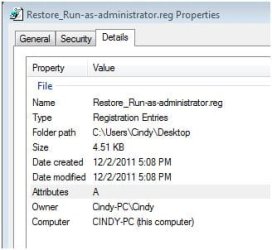
Brink: The file you had me download from here: Run as Administrator - Add or Remove from Context Menu in Windows 7 -- does have the .reg file extension. See the screenshot of it's properties box. I already mentioned that I went to defaults and the program for .reg is correct. See screenshot for this also.
 

Attachments

  • properties screen.JPG
    properties screen.JPG
    22.5 KB · Views: 4
  • screenshot.JPG
    screenshot.JPG
    15.8 KB · Views: 5

My Computer

Computer type
PC/Desktop
Computer Manufacturer/Model Number
Dell XPS410
OS
Windows 7 Home Premium SP1
Memory
4 GB
Browser
Google Chrome
Strange. Yes, double clicking on the .reg file to run it would be the same as merging it. What happens when you try this?

I had to double check to make sure about Default Programs since that is vital.
 

My Computer

Computer type
PC/Desktop
Computer Manufacturer/Model Number
Self built custom
OS
64-bit Windows 11 Pro for Workstations
CPU
Intel i7-8700K OC'd to 5 GHz
Motherboard
ASUS ROG Maximus XI Formula Z390
Memory
64 GB (4x16GB) G.SKILL TridentZ RGB DDR4 3600 MHz
Graphics Card(s)
ASUS ROG-STRIX-GTX1080TI-O11G-GAMING
Sound Card
Integrated
Monitor(s) Displays
2 x Samsung Odyssey G7 27"
Screen Resolution
2560x1440
Hard Drives
1TB Samsung 990 PRO M.2,
4TB Samsung 990 PRO PRO M.2,
TerraMaster F8 SSD Plus NAS
PSU
Seasonic Prime Titanium 850W
Case
Thermaltake Core P3
Cooling
Corsair Hydro H115i
Keyboard
Logitech wireless K800
Mouse
Logitech MX Master 4
Internet Speed
2 Gb/s Download and 100 Mb/s Upload
Antivirus
Malwarebyte Anti-Malware Premium
Browser
Google Chrome
Other Info
Logitech Z625 speaker system,
Logitech BRIO 4K Pro webcam,
HP Color LaserJet Pro MFP M477fdn,
APC SMART-UPS RT 1000 XL - SURT1000XLI,
Galaxy S23 Plus phone
After I double clicked the file, then selected yes, a window came up telling me these keys or changes, something, had been successfully added to the registry. However, I still don't have the "run as ..." option. Don't have the merge anymore, and I used to. Have lost the right-click scan ability for avast. The command is there, but it only appears to work on a few certain files. It seems to work on .exe files. I used to be able to scan jpg, pps, wmv, etc., etc. Now the only way I can scan those is if I first place them in a file folder. Then it will scan. But if I just click on an individual file with these extensions it's like the "scan with" command is just dead.
 

My Computer

Computer type
PC/Desktop
Computer Manufacturer/Model Number
Dell XPS410
OS
Windows 7 Home Premium SP1
Memory
4 GB
Browser
Google Chrome
Nikilet,

It sounds like you have more going on there. I would recommend that you do a full scan of your system with Malwarebytes Free to help make sure that your system is malware free.

Afterwards, you might see if doing a system restore using a restore point (if available) dated before you had these issues may be able to undo and fix them.
 

My Computer

Computer type
PC/Desktop
Computer Manufacturer/Model Number
Self built custom
OS
64-bit Windows 11 Pro for Workstations
CPU
Intel i7-8700K OC'd to 5 GHz
Motherboard
ASUS ROG Maximus XI Formula Z390
Memory
64 GB (4x16GB) G.SKILL TridentZ RGB DDR4 3600 MHz
Graphics Card(s)
ASUS ROG-STRIX-GTX1080TI-O11G-GAMING
Sound Card
Integrated
Monitor(s) Displays
2 x Samsung Odyssey G7 27"
Screen Resolution
2560x1440
Hard Drives
1TB Samsung 990 PRO M.2,
4TB Samsung 990 PRO PRO M.2,
TerraMaster F8 SSD Plus NAS
PSU
Seasonic Prime Titanium 850W
Case
Thermaltake Core P3
Cooling
Corsair Hydro H115i
Keyboard
Logitech wireless K800
Mouse
Logitech MX Master 4
Internet Speed
2 Gb/s Download and 100 Mb/s Upload
Antivirus
Malwarebyte Anti-Malware Premium
Browser
Google Chrome
Other Info
Logitech Z625 speaker system,
Logitech BRIO 4K Pro webcam,
HP Color LaserJet Pro MFP M477fdn,
APC SMART-UPS RT 1000 XL - SURT1000XLI,
Galaxy S23 Plus phone
I run Malwarebytes paid version all the time and have it scheduled to do 3 quick scans and 1 full scan every week. Since I've been posting Malwarebytes has run. Restore won't solve it because my points didn't go back far enough.
 

My Computer

Computer type
PC/Desktop
Computer Manufacturer/Model Number
Dell XPS410
OS
Windows 7 Home Premium SP1
Memory
4 GB
Browser
Google Chrome
In that case, I would personally recommend to do a clean reinstall and start fresh if that is an option for you. :(
 

My Computer

Computer type
PC/Desktop
Computer Manufacturer/Model Number
Self built custom
OS
64-bit Windows 11 Pro for Workstations
CPU
Intel i7-8700K OC'd to 5 GHz
Motherboard
ASUS ROG Maximus XI Formula Z390
Memory
64 GB (4x16GB) G.SKILL TridentZ RGB DDR4 3600 MHz
Graphics Card(s)
ASUS ROG-STRIX-GTX1080TI-O11G-GAMING
Sound Card
Integrated
Monitor(s) Displays
2 x Samsung Odyssey G7 27"
Screen Resolution
2560x1440
Hard Drives
1TB Samsung 990 PRO M.2,
4TB Samsung 990 PRO PRO M.2,
TerraMaster F8 SSD Plus NAS
PSU
Seasonic Prime Titanium 850W
Case
Thermaltake Core P3
Cooling
Corsair Hydro H115i
Keyboard
Logitech wireless K800
Mouse
Logitech MX Master 4
Internet Speed
2 Gb/s Download and 100 Mb/s Upload
Antivirus
Malwarebyte Anti-Malware Premium
Browser
Google Chrome
Other Info
Logitech Z625 speaker system,
Logitech BRIO 4K Pro webcam,
HP Color LaserJet Pro MFP M477fdn,
APC SMART-UPS RT 1000 XL - SURT1000XLI,
Galaxy S23 Plus phone
Things aren't bad enough for me to do a full reinstall. I don't have a OS CD so I'd have to use my option to restore to Dell factory condition. I had typed a post and then apparently forgot to finalize it. I asked if starting a new admn account would solve anything, and also if it would create any problems for me and how does one get all your files and such to a new account then. I also told you how every much I appreciate all that you have done for me. I do realize and appreciate how much that is. It seems like this context menu problem should be easy to fix because neither function is totally gone. I can using "scan with avast" to scan some individual files, and I can still scan all of them if I place in a folder first. I have the "run as admn" command on about anything in my Start, or All Programs there, but nowhere else. Now that Merge command is different. I did find instructions to add that command and mentioned it to you. I think I bookmarked it so maybe will have another look at it.
 

My Computer

Computer type
PC/Desktop
Computer Manufacturer/Model Number
Dell XPS410
OS
Windows 7 Home Premium SP1
Memory
4 GB
Browser
Google Chrome
Back
Top