Java 6 Problem

kenburenga

New member
Local time
3:18 AM
Messages
29
I am running Windows 7 Home Premium edition on an Acer 64-Bit Netbook using Firefox 3.6.10 with Java script enabled.
I have installed and reinstalled Java 6 Update 22. The installation goes smoothly and says that Java 6 has been installed.
However, when I go to the Control Panel to access the Java Console and click on the Java (32 Bit) icon I get the message “Application Not Found”.
More importantly when I access a Web page that has a Java script Firefox crashes even though it shows that the Java Extension and Plug-In are enabled.
Can someone please help me with this problem.
Thank you.
 

My Computer

Computer Manufacturer/Model Number
Acer 721-3070
OS
Windows 7 Home Premium x64

Attachments

  • Java.jpg
    Java.jpg
    28.4 KB · Views: 33

My Computer

Computer type
PC/Desktop
Computer Manufacturer/Model Number
Bruce ... somewhere in his 40's
OS
Windows 7 Ultimate 32bit SP1
CPU
Intel(R) Core(TM)2 Quad CPU @ 2.40GHz, 2400 MHz
Motherboard
INTEL/D975XBX2
Memory
4 GB
Graphics Card(s)
ATI Radeon HD 2600 Pro
Monitor(s) Displays
Samsung SyncMaster 914v
Screen Resolution
1280 x 1024
Hard Drives
2/500GB each ... ST3500630AS ATA Device.
One is not connected
PSU
Rocketfish 700 W
Case
G.Skill Gigabyte Chassis
Keyboard
Standard PS/2 Keyboard
Mouse
Microsoft PS/2 Mouse
Internet Speed
DSL
Antivirus
Avira Internet Security
Browser
IE 11
Other Info
ATI HDMI Audio
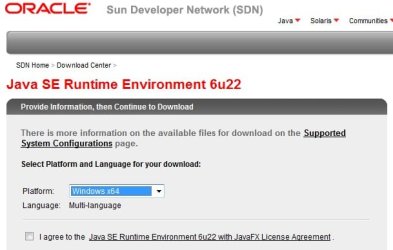
URL Doesn't Match Screen Shot

Jacee --

Thanks for the guidance. However, I can't find the Web page depicted in your screen shot. The URL link you provided takes me to another Java page. Can you send me the URL of the screen shot.
Thanks.
 

My Computer

Computer Manufacturer/Model Number
Acer 721-3070
OS
Windows 7 Home Premium x64
Found It

Jacee -
Upon further searching the URL link page I found the Windows 64 download for JRE-6u22-Windows-x64.
Thanks.
 

My Computer

Computer Manufacturer/Model Number
Acer 721-3070
OS
Windows 7 Home Premium x64
You're welcome :)
 

My Computer

Computer type
PC/Desktop
Computer Manufacturer/Model Number
Bruce ... somewhere in his 40's
OS
Windows 7 Ultimate 32bit SP1
CPU
Intel(R) Core(TM)2 Quad CPU @ 2.40GHz, 2400 MHz
Motherboard
INTEL/D975XBX2
Memory
4 GB
Graphics Card(s)
ATI Radeon HD 2600 Pro
Monitor(s) Displays
Samsung SyncMaster 914v
Screen Resolution
1280 x 1024
Hard Drives
2/500GB each ... ST3500630AS ATA Device.
One is not connected
PSU
Rocketfish 700 W
Case
G.Skill Gigabyte Chassis
Keyboard
Standard PS/2 Keyboard
Mouse
Microsoft PS/2 Mouse
Internet Speed
DSL
Antivirus
Avira Internet Security
Browser
IE 11
Other Info
ATI HDMI Audio
Jacee
I installed jre-6u22-windows-x64 and installed Java 6 Update 20 with no problem. However, when I go to the Java Control Panel/Advanced/Default Java For Browsers I am unable to save the Mozilla Family selection. After checking the box, applying, and clicking OK the box is unchecked when I review it again. (The IE box is checked and gray so I can't uncheck it.) While the Java extension appears in my Firefox, the Java plug-in does not likely due to the browser selection problem above. Can you help me solve this problem?
Thanks.
 

My Computer

Computer Manufacturer/Model Number
Acer 721-3070
OS
Windows 7 Home Premium x64
Back
Top