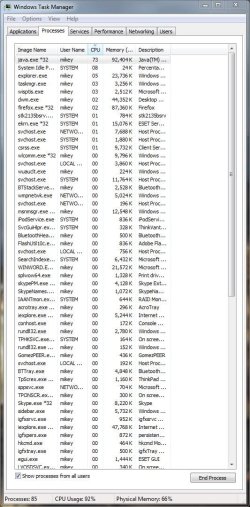
Java.exe *32 extensively using CPU

iwasalive

New member
Local time
7:18 PM
Messages
10
Hi, im having issues with Java or something.

when i first turn on my shstem. eveyrthing works fine, no problems. cpu usage is normal and all. after starting some other applications, when i close them, my CPU usage stays at 100% always. if i have a photoshop running 50%, Java.exe *32 will be running the other 50%.

i am running 7 64bit. it is alwasy the same application using cpu. its annoying cause the heat causes fan to run max.

help please!
thanks
 

My Computer

OS
windows 7
CPU
AMD 3800+
Motherboard
Asus m2a-VM
Memory
6gig
Graphics Card(s)
ATI HD3550 (dedicated) and ATI X1200 (intergrated)
Sound Card
intergrated
Monitor(s) Displays
Samsung 21.5" LG 22" Samsung 17"
Screen Resolution
1080p 1050x1680 1024x1280
Hard Drives
WD 500gig
PSU
ULTRA 600w
Case
Ultra
Cooling
OCZ
Mouse
OCZ equalizer

My Computer

Computer type
PC/Desktop
Computer Manufacturer/Model Number
Bruce ... somewhere in his 40's
OS
Windows 7 Ultimate 32bit SP1
CPU
Intel(R) Core(TM)2 Quad CPU @ 2.40GHz, 2400 MHz
Motherboard
INTEL/D975XBX2
Memory
4 GB
Graphics Card(s)
ATI Radeon HD 2600 Pro
Monitor(s) Displays
Samsung SyncMaster 914v
Screen Resolution
1280 x 1024
Hard Drives
2/500GB each ... ST3500630AS ATA Device.
One is not connected
PSU
Rocketfish 700 W
Case
G.Skill Gigabyte Chassis
Keyboard
Standard PS/2 Keyboard
Mouse
Microsoft PS/2 Mouse
Internet Speed
DSL
Antivirus
Avira Internet Security
Browser
IE 11
Other Info
ATI HDMI Audio
Until you can pin down what the problem is OP, assuming you are using a multi-core CPU... try this... open task manager, right click the Java process which is eating up your CPU cycles... choose Set Affinity... and reduce the number of CPU cores the application is authorised to employ...

At least you'll be able to temporarily restrict the annoyance using this approach... :)
 

My Computer

Computer Manufacturer/Model Number
Custom built machine
OS
W7 x64
CPU
Intel Q9300 2.5Ghz Quad LGA775 (Would like Q9650)
Motherboard
Gigabyte GA-EP45T-UD3R (F6 Bios)
Memory
4Gb OCZ Gold 1,333Mhz
Graphics Card(s)
Palit HD4850 O/C Sonic 512Mb DDR3, Dual DViD's
Sound Card
Azalia to twin Samson 50w Studio Monitors
Monitor(s) Displays
Twin Dell (E-IPS) U2311H 23.6" Screens
Screen Resolution
1920 x 1080 @ 60Hz
Hard Drives
Crucial M4 SSD, archives on twin Western Digital Caviar Black WD2002FAEX, 2TB, 7200rpm HDD's, Samsung Ritemaster CD/DVD Burner...
PSU
OCZ 600w
Case
Lian-Li PC8 acoustifoamed' aluminium tower
Cooling
Scythe 140mm Zipang
Keyboard
Cherry PS/2 custom model
Mouse
Lenovo USB laser "Thinkpad" Mouse
Internet Speed
ADSL2+ @14Mbps downstream & Cat6 Gigabit Ethernet
Antivirus
NOD32
Browser
Opera
Other Info
Silicon Dust HD Homerun Dual FTA (Ethernet) TV Tuners, Dray Tek Vigor 2850Vn router and 8x HP Gigabit Switch. Lian-Li CR26 Card Reader, Canon MF4430 iSensys laser printer/scanner.
Hi, im having issues with Java or something.

when i first turn on my shstem. eveyrthing works fine, no problems. cpu usage is normal and all. after starting some other applications, when i close them, my CPU usage stays at 100% always. if i have a photoshop running 50%, Java.exe *32 will be running the other 50%.

i am running 7 64bit. it is alwasy the same application using cpu. its annoying cause the heat causes fan to run max.

help please!
thanks

Hi and welcome

can you open task manager (right click the task bar) and use the snipping tool (biolt in see pic) to make a scfreen shot of the process tab. Make sure you have the all users checked. To attach teh snip use the attachment icon see other pic

thanks

Kenn J++
 
Last edited:

My Computer

Computer Manufacturer/Model Number
HP Pavillion dv-7 1005 Tx
OS
Win 8 Release candidate 8400
CPU
[email protected]
Memory
4 gigs
Graphics Card(s)
Nvidia 9600M
Sound Card
HD built-in
Monitor(s) Displays
17" Wxga
Screen Resolution
1440x900
Cooling
none
Internet Speed
45Mb down 5Mb up
hi, thanks for the rapid response.

both my machines running running windows 7 have this problem
here is the capture.

It is not a server machine so i dont think the sever thing applies.
 

Attachments

  • Capture.JPG
    Capture.JPG
    116.6 KB · Views: 1,175

My Computer

OS
windows 7
CPU
AMD 3800+
Motherboard
Asus m2a-VM
Memory
6gig
Graphics Card(s)
ATI HD3550 (dedicated) and ATI X1200 (intergrated)
Sound Card
intergrated
Monitor(s) Displays
Samsung 21.5" LG 22" Samsung 17"
Screen Resolution
1080p 1050x1680 1024x1280
Hard Drives
WD 500gig
PSU
ULTRA 600w
Case
Ultra
Cooling
OCZ
Mouse
OCZ equalizer
help please!
 

My Computer

OS
windows 7
CPU
AMD 3800+
Motherboard
Asus m2a-VM
Memory
6gig
Graphics Card(s)
ATI HD3550 (dedicated) and ATI X1200 (intergrated)
Sound Card
intergrated
Monitor(s) Displays
Samsung 21.5" LG 22" Samsung 17"
Screen Resolution
1080p 1050x1680 1024x1280
Hard Drives
WD 500gig
PSU
ULTRA 600w
Case
Ultra
Cooling
OCZ
Mouse
OCZ equalizer
You got quite a bit running there mate, possibly something in either FF or IE8 using Java, Like Runescape or some sort of animation running on Java.
 

My Computer

Computer Manufacturer/Model Number
Custom Build
OS
W7 RTM Ultimate x64
CPU
Intel Q8400 @ 2.66GHZ
Motherboard
Gigabyte GA-EG45M-UD2H
Memory
4GB DDR2-800
Graphics Card(s)
Gainward GTS 450 GLH 1GB Edition
Sound Card
Integrated 8 Channel
Monitor(s) Displays
AOC 23.6 Inch Widescreen LCD
Screen Resolution
1920x1080
Hard Drives
Seagate 500GB Internal
Western Digital 1TB Internal

Hitachi 1TB External
PSU
Apevia Java Power 500W
Case
Cooler Master HAF 922 Black
Cooling
Stock Intel CPU Fan
Keyboard
HP SK-2960 Multimedia Keyboard
Mouse
Logitech M350 Wireless Gaming Mouse
Internet Speed
1.5MB
i thought that first too, so i tried turning off all startup programs, and restarting

on bootup, the java.exe *32 begins and uses all the cpu

if i go to task manager and end process, it comes back in a few minutes.

is it a capability issue with 64 bit?
i have the latest software
 

My Computer

OS
windows 7
CPU
AMD 3800+
Motherboard
Asus m2a-VM
Memory
6gig
Graphics Card(s)
ATI HD3550 (dedicated) and ATI X1200 (intergrated)
Sound Card
intergrated
Monitor(s) Displays
Samsung 21.5" LG 22" Samsung 17"
Screen Resolution
1080p 1050x1680 1024x1280
Hard Drives
WD 500gig
PSU
ULTRA 600w
Case
Ultra
Cooling
OCZ
Mouse
OCZ equalizer
No, but have you disabled jushed.exe, which is the Java Updater? Which might be causing it to start-up.
 

My Computer

Computer Manufacturer/Model Number
Custom Build
OS
W7 RTM Ultimate x64
CPU
Intel Q8400 @ 2.66GHZ
Motherboard
Gigabyte GA-EG45M-UD2H
Memory
4GB DDR2-800
Graphics Card(s)
Gainward GTS 450 GLH 1GB Edition
Sound Card
Integrated 8 Channel
Monitor(s) Displays
AOC 23.6 Inch Widescreen LCD
Screen Resolution
1920x1080
Hard Drives
Seagate 500GB Internal
Western Digital 1TB Internal

Hitachi 1TB External
PSU
Apevia Java Power 500W
Case
Cooler Master HAF 922 Black
Cooling
Stock Intel CPU Fan
Keyboard
HP SK-2960 Multimedia Keyboard
Mouse
Logitech M350 Wireless Gaming Mouse
Internet Speed
1.5MB
No, but have you disabled jushed.exe, which is the Java Updater? Which might be causing it to start-up.

hi, yes i did disable the updater, the updaters for the majority of software are disabled. i do manual updates
 

My Computer

OS
windows 7
CPU
AMD 3800+
Motherboard
Asus m2a-VM
Memory
6gig
Graphics Card(s)
ATI HD3550 (dedicated) and ATI X1200 (intergrated)
Sound Card
intergrated
Monitor(s) Displays
Samsung 21.5" LG 22" Samsung 17"
Screen Resolution
1080p 1050x1680 1024x1280
Hard Drives
WD 500gig
PSU
ULTRA 600w
Case
Ultra
Cooling
OCZ
Mouse
OCZ equalizer
Hmm, running out of ideas..

Try booting your PC, and not opening any Browser at all, and see if Java decides to pop-up on it's own.
 

My Computer

Computer Manufacturer/Model Number
Custom Build
OS
W7 RTM Ultimate x64
CPU
Intel Q8400 @ 2.66GHZ
Motherboard
Gigabyte GA-EG45M-UD2H
Memory
4GB DDR2-800
Graphics Card(s)
Gainward GTS 450 GLH 1GB Edition
Sound Card
Integrated 8 Channel
Monitor(s) Displays
AOC 23.6 Inch Widescreen LCD
Screen Resolution
1920x1080
Hard Drives
Seagate 500GB Internal
Western Digital 1TB Internal

Hitachi 1TB External
PSU
Apevia Java Power 500W
Case
Cooler Master HAF 922 Black
Cooling
Stock Intel CPU Fan
Keyboard
HP SK-2960 Multimedia Keyboard
Mouse
Logitech M350 Wireless Gaming Mouse
Internet Speed
1.5MB
Hmm, running out of ideas..

Try booting your PC, and not opening any Browser at all, and see if Java decides to pop-up on it's own.


thanks for the suggestions, but ive already tried that :S
 

My Computer

OS
windows 7
CPU
AMD 3800+
Motherboard
Asus m2a-VM
Memory
6gig
Graphics Card(s)
ATI HD3550 (dedicated) and ATI X1200 (intergrated)
Sound Card
intergrated
Monitor(s) Displays
Samsung 21.5" LG 22" Samsung 17"
Screen Resolution
1080p 1050x1680 1024x1280
Hard Drives
WD 500gig
PSU
ULTRA 600w
Case
Ultra
Cooling
OCZ
Mouse
OCZ equalizer
Are you running the Latest version of Java?
 

My Computer

Computer Manufacturer/Model Number
Custom Build
OS
W7 RTM Ultimate x64
CPU
Intel Q8400 @ 2.66GHZ
Motherboard
Gigabyte GA-EG45M-UD2H
Memory
4GB DDR2-800
Graphics Card(s)
Gainward GTS 450 GLH 1GB Edition
Sound Card
Integrated 8 Channel
Monitor(s) Displays
AOC 23.6 Inch Widescreen LCD
Screen Resolution
1920x1080
Hard Drives
Seagate 500GB Internal
Western Digital 1TB Internal

Hitachi 1TB External
PSU
Apevia Java Power 500W
Case
Cooler Master HAF 922 Black
Cooling
Stock Intel CPU Fan
Keyboard
HP SK-2960 Multimedia Keyboard
Mouse
Logitech M350 Wireless Gaming Mouse
Internet Speed
1.5MB

My Computer

OS
windows 7
CPU
AMD 3800+
Motherboard
Asus m2a-VM
Memory
6gig
Graphics Card(s)
ATI HD3550 (dedicated) and ATI X1200 (intergrated)
Sound Card
intergrated
Monitor(s) Displays
Samsung 21.5" LG 22" Samsung 17"
Screen Resolution
1080p 1050x1680 1024x1280
Hard Drives
WD 500gig
PSU
ULTRA 600w
Case
Ultra
Cooling
OCZ
Mouse
OCZ equalizer
This might be a long shot, but have you tried installing the x64 Java, and do you get the same problem?
 

My Computer

Computer Manufacturer/Model Number
Custom Build
OS
W7 RTM Ultimate x64
CPU
Intel Q8400 @ 2.66GHZ
Motherboard
Gigabyte GA-EG45M-UD2H
Memory
4GB DDR2-800
Graphics Card(s)
Gainward GTS 450 GLH 1GB Edition
Sound Card
Integrated 8 Channel
Monitor(s) Displays
AOC 23.6 Inch Widescreen LCD
Screen Resolution
1920x1080
Hard Drives
Seagate 500GB Internal
Western Digital 1TB Internal

Hitachi 1TB External
PSU
Apevia Java Power 500W
Case
Cooler Master HAF 922 Black
Cooling
Stock Intel CPU Fan
Keyboard
HP SK-2960 Multimedia Keyboard
Mouse
Logitech M350 Wireless Gaming Mouse
Internet Speed
1.5MB
Same issue for me

I was just reading this post because I am having the exact same issue. My Java applications will sometimes slam my CPU's to 100% and eventually overheat them. I tried re-installing java as 64-bit by uninstalling 32-bit, and reinstalling the 64-bit. However in my services it still lists the service as javaw.exe *32

I'm wondering if anyone else has had this issue, and has figured out what the problem is.
 

My Computer

OS
Windows 7 Ultimate x64
Hi, im having issues with Java or something.

when i first turn on my shstem. eveyrthing works fine, no problems. cpu usage is normal and all. after starting some other applications, when i close them, my CPU usage stays at 100% always. if i have a photoshop running 50%, Java.exe *32 will be running the other 50%.

i am running 7 64bit. it is alwasy the same application using cpu. its annoying cause the heat causes fan to run max.

help please!
thanks


Try Using JavaRa. Use it to wipe every trace of java from the PC then reinstall... And Hope it Works:geek:
 

My Computer

Computer Manufacturer/Model Number
ASUS/N61JV
OS
Windows 7 Home Premium x64
CPU
Intel Core i5 inside
Motherboard
ASUS
Memory
4.00GB
Graphics Card(s)
NViDiA GT 325M
Sound Card
Realtek HD Audio
Screen Resolution
1366x768
Hard Drives
500GB
I tried that, but it still doesn't work... any other ideas?
 

My Computer

OS
Windows 7 Ultimate x64
Well, short of uninstalling Java(I am assuming you have it installed for a reason), it might be useful to use process explorer to see what parent process is starting it so we can get a better idea of why it's starting, which may give us a clue as to what Java is then doing as well.
 

My Computer

Computer type
PC/Desktop
Computer Manufacturer/Model Number
Custom
OS
Windows 10 Pro x64
CPU
Intel Core i7 4790K @ 4.5GHz
Motherboard
Asus Maximus Hero VII
Memory
32GB DDR3
Graphics Card(s)
Nvidia GeForce GTX970
Sound Card
Realtek HD Audio
Screen Resolution
1920x1200
Hard Drives
1x Samsung 250GB SSD
4x WD RE 2TB (RAIDZ)
PSU
Corsair AX760i
Case
Fractal Design Define R4
Cooling
Noctua NH-D15
Well... New forumer and I'm necroposting... Great.
Anyways, I solved the java.exe*32 issue by opening task manager, right clicking the process and clicking "End Process Tree". It ends the java process and keeps it shut off till you use Java again. Works very effectively.
 

My Computer

Computer type
PC/Desktop
OS
Windows 7 Home Premium 32bit
Back
Top