Jump Lists

How to Open and Use Windows 7 Start Menu and Taskbar Jump Lists

   Information
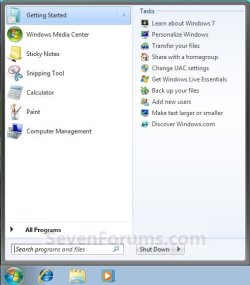
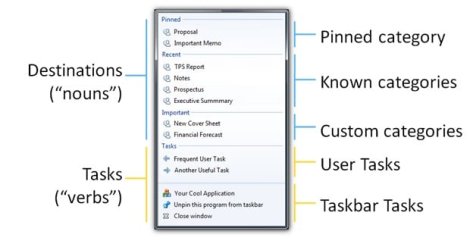
Jump Lists help you easily find and open the files and programs you use often. This will show you how to open and use the Start menu and taskbar Jump Lists in Windows 7.

For more information about Jump Lists, see: Developing for the Windows 7 Taskbar - Jump into Jump Lists - Part 1 - Windows 7 for Developers - The Windows Blog

   Note
Jump lists provide quick access to application features. Think of Jump Lists as a mini Start menu for the application. You can use Jump Lists on the taskbar and the Start menu to open your most frequently visited websites, recently opened files, and favorite programs with just one click. This helps eliminate the need to open the program and then load the relevant file, or by performing common tasks without opening the program first. Programs that use the system API for their Most Recently Used list (the list of recently used filenames that many apps have in their File menus) will automatically acquire a Jump List containing their most recently used files. You can Pin the programs and files you use the most on the taskbar and Start menu so you can open them from the same spot every time for quicker access.

On a computer that is running Windows 7 or Windows Server 2008 R2, the Jump List of an application may disappear permanently when you use the application to open or save a new item. This issue occurs when there are 999 items in the Jump List already.

Installing the update at the link below resolves the issue and enables the displaying of the Jump Lists.

A Jump List is not displayed in Windows 7 or in Windows Server 2008 R2 if the list contains more than 999 items

   Warning
Jump Lists will require that you have Recent Programs and Recent Items turned on for it to work.

A Tasks jump list for program (ex: Windows Live Messenger) options does not require to have Recent Programs or Recent Items turned on to work though.


OPTION ONE

Jump Lists in the Start Menu


NOTE: Jump Lists don't appear in the All Programs area in the Start menu.
1. Open the Start Menu.

2. Hover over a program in the Start Menu "pin to area" that has a arrow to the right of it indicating it has a jump list. (see screenshots below step 3)

3. The jump list for the selected program will now automatically expand open. Select a jump list item. (see screenshots below)
NOTE: You can also select the program in the Start menu pin area, then use the Shift+Tab keys to move over to the jump list. Next, use the arrow keys to select a jump list item and press Enter to open it.
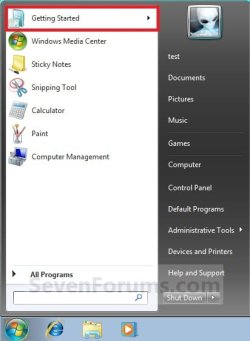
Start_Menu-1.jpgStart_Menu-2.jpg


OPTION TWO

Open Jump Lists on the Taskbar


1. Right click on a pinned icon on the taskbar (ex: Windows Explorer icon), and go to step 4.
OR

2. Press the Windows + ALT + (1-10) keys for the icon in the numerical order from either left to right or top to bottom on the taskbar, then go to step 4.

OR

3. Left click and hold on a pinned icon on the taskbar, drag up and release the left click, and go to step 4.

4. From here you can select what item you want to open with the selected program. (See screeshots below)
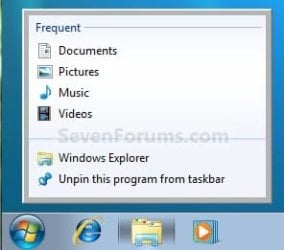
Taskbar-1.jpgTaskbar-2.jpg


That's it,
Shawn


Last edited:
Jump Lists not accessable

I have following problem trying to use taskbar jump lists:

When I right click a pinned taskbar icon the the jump list shows up like it should for as long as the mouse cursor stays on top of the taskbar icon. When I try to move the cursor onto the jump list, the jump list disappears before I reach it.:(
I only rarely manage to catch the jump list by really focussing on hitting it with explosive lightning speed. That can't be right, the jump list should be easily accessable. It seems like I am fighting with some too short delay setting.:mad: It's driving me nuts.:sa:

Could it be some menu delay or mouse speed setting?
I'd be grateful for suggestions on how to fix this.:rolleyes:

Cheers Uffe
 
Last edited:

My Computer

Computer Manufacturer/Model Number
Selfmade
OS
Win 7 x64 Ultimate
CPU
E8500 @ 4005 MHz
Motherboard
Asus Rampage Formula
Memory
4 GB Corsair 8500
Graphics Card(s)
Geforce 275 @ 715 MHz
Sound Card
X-Fi Fatal1ty Extreme Gamer
Monitor(s) Displays
LG Flatron Wide 22" LCD
Screen Resolution
1680 x 1050
Hard Drives
2 @ totally 1.75 TB internal
1 @ 1 TB external eSata
2 @ 0.9 TB external USB
PSU
BeQuiet 600W
Case
Antec P182
Cooling
5x120mm fans (3 in & 2 out), Zalman CNPS9700 NT
Keyboard
Logitech G15
Mouse
Logitech MX Revolution
Internet Speed
24 MB/s D/L
Hello Uffe,

Yeah, this seems to be a bug with the jump lists. Be sure to send feedback to Microsoft about it to help make them aware of this issue.

I have found that once you have it highlighted in the Start menu, using the arrow keys seem to help make selecting a item in the jump list easier to do.

Hope this helps,
Shawn
 
Last edited:

My Computer

Computer type
PC/Desktop
Computer Manufacturer/Model Number
Self built custom
OS
64-bit Windows 11 Pro for Workstations
CPU
Intel i7-8700K OC'd to 5 GHz
Motherboard
ASUS ROG Maximus XI Formula Z390
Memory
64 GB (4x16GB) G.SKILL TridentZ RGB DDR4 3600 MHz
Graphics Card(s)
ASUS ROG-STRIX-GTX1080TI-O11G-GAMING
Sound Card
Integrated
Monitor(s) Displays
2 x Samsung Odyssey G7 27"
Screen Resolution
2560x1440
Hard Drives
1TB Samsung 990 PRO M.2,
4TB Samsung 990 PRO PRO M.2,
TerraMaster F8 SSD Plus NAS
PSU
Seasonic Prime Titanium 850W
Case
Thermaltake Core P3
Cooling
Corsair Hydro H115i
Keyboard
Logitech wireless K800
Mouse
Logitech MX Master 4
Internet Speed
2 Gb/s Download and 100 Mb/s Upload
Antivirus
Malwarebyte Anti-Malware Premium
Browser
Google Chrome
Other Info
Logitech Z625 speaker system,
Logitech BRIO 4K Pro webcam,
HP Color LaserJet Pro MFP M477fdn,
APC SMART-UPS RT 1000 XL - SURT1000XLI,
Galaxy S23 Plus phone
Hello Uffe,

Yeah, this seems to be a bug with the jump lists. Be sure to send feedback to Microsoft about it to help make them aware of this issue.

I have found that once you have it highlighted in the Start menu, using the arrow keys seem to help make selecting a item in the jump list easier to do.

Hope this helps,
Shawn

Hi Shawn,
Thanks for swift response.
1. Feedback sent to MS.
2. Tried yr help by Start menu suggestion, but that only made a hassle of it all. I mean, if y're highlighting items in the Start menu, you might as well use that for yr selections and forget the elusive jump lists.
3. I also tried the following: right click taskbar icon, press shift or ctrl or alt or a combination of these, before trying to catch the jump list. Sometimes, it seemed, I got an extra fraction of a second for catching the jump list. Or maybe my hand is just getting faster through all this (silly) practice. It's like training for a shootdown at High Noon.:sarc:

I guess we have to wait for MS to fix it, maybe in an iterim Hotfix?:rolleyes:

Cheers Uffe
 
Last edited by a moderator:

My Computer

Computer Manufacturer/Model Number
Selfmade
OS
Win 7 x64 Ultimate
CPU
E8500 @ 4005 MHz
Motherboard
Asus Rampage Formula
Memory
4 GB Corsair 8500
Graphics Card(s)
Geforce 275 @ 715 MHz
Sound Card
X-Fi Fatal1ty Extreme Gamer
Monitor(s) Displays
LG Flatron Wide 22" LCD
Screen Resolution
1680 x 1050
Hard Drives
2 @ totally 1.75 TB internal
1 @ 1 TB external eSata
2 @ 0.9 TB external USB
PSU
BeQuiet 600W
Case
Antec P182
Cooling
5x120mm fans (3 in & 2 out), Zalman CNPS9700 NT
Keyboard
Logitech G15
Mouse
Logitech MX Revolution
Internet Speed
24 MB/s D/L
Hi Uffe,

One method that works for me with the jump lists is to left click on the icon then drag upward - this will open the jump list for me - I think it's included for multi-touch.

If your having right click problems however, it may not work, but worth a try
 

My Computers

System One System Two

  • Computer type
    PC/Desktop
    Computer Manufacturer/Model Number
    ChillBlast - Custom to my design
    OS
    Windows 11 Pro x64 [Latest Release and Release Preview]
    CPU
    Ryzen 9 5950X, 3.8 - 5.2 MHz
    Motherboard
    Asus Prime X570-Pro
    Memory
    64GB [2 x 32GB] DDR4 3200MHz
    Graphics Card(s)
    4GB NVIDIA GEFORCE GTX 1650 Ti
    Sound Card
    On-board SPDIF to 5.1 System + HDMI [5.1 system]
    Monitor(s) Displays
    32" UHD 32 Bit HDR Monitor + 43" UHD 4K 32Bit HDR TV
    Screen Resolution
    2 x 3840 x 2160 @60Hz
    Hard Drives
    1TB M2 SSD OS, 500GB Fast Access SSD, 2 x 8TB Data + Various Externals from 1TB to 4TB, 10TB NAS
    PSU
    NZXT C750 80 PLUS Gold 750W Modular PSU
    Case
    Workstation Case [Matt Black]
    Cooling
    NZXT Kraken X63 280mm CPU Cooler +2x Quiet Case fans
    Keyboard
    Logitech Wireless MX Keys & K400 + others
    Mouse
    Logitech Wireless MX Master 3S
    Internet Speed
    920 MB Down 50 MB Up
    Antivirus
    BitDefender Total Security Pro
    Browser
    Chrome (always run latest Non-Beta)
    Other Info
    Also run ...
    Laptop - Quad 8GB - Windows 10 Pro x64
    Nexus 7 Android tablet x2
    Samsung 10.2" tablet
    Blackview TAB 8 4G Android Tablet c/w Keyboard
    Wacom Intuos Pro Medium Pen Pad
    Wacom Intuos Pro Small Pen Pad
    Wacom Expresskeys Remote
    Loopdeck+ Graphics Controller
    Shuttle Pro v2 Control
  • Computer type
    Laptop
    System Manufacturer/Model Number
    Dell XPS 17 10750H
    OS
    Windows 11 Pro x64 Latest RP
    CPU
    Intel I7 10750H 5.0GHz
    Motherboard
    Dell XPS
    Memory
    32GB [2x16GB] DDR4 2933 MHz
    Graphics Card(s)
    nVidia GTX1650Ti 4 GB GDDR6
    Sound Card
    Stock [Realtek] 4 Speaker
    Monitor(s) Displays
    17" IPS UHD+ Infinity Edge Touchscreen
    Screen Resolution
    3840 x 2400
    Hard Drives
    2TB M2 NVMe, 4TB External + various 500GB & 1TB External NVMe (also have access to spinner HDD from
    PSU
    Stock
    Case
    Stock XPS Aluminium & Carbon Fibre
    Cooling
    Stock - Active Fan Control
    Keyboard
    Backlit + Various Logitech
    Mouse
    Stock Track Pad + Logitech MX Trackball
    Internet Speed
    72 MB Down 18MB Up
    Browser
    Chrome
    Other Info
    Also run ...
    Laptop - Quad 8GB - Windows 10 Pro x64
    Nexus 7 Android tablet x2
    10.2" tablet
    Sony Z3 Android Smartphone
    Wacom Intuos Pro Medium Pen Pad
    Wacom Intuos Pro Small Pen Pad
    Wacom Expresskeys Remote
    Loopdeck+ Graphics Controller
    Shuttle Pro v2 Control Pad
    10TB NAS
Barman, thanks a lot!
You solved it. Left click & hold down & drag upward works like a charm. :D
Seems like that's the way it's supposed to work.
I feel stupid for not trying that myself. Obviously the solution was too easy.:p
No need to try right click any longer.

I hope Brink can also confirm this easy method for accessing jump lists, and, if deemed necessary, adjust the tutorial accordingly.

Cheers Uffe
 

My Computer

Computer Manufacturer/Model Number
Selfmade
OS
Win 7 x64 Ultimate
CPU
E8500 @ 4005 MHz
Motherboard
Asus Rampage Formula
Memory
4 GB Corsair 8500
Graphics Card(s)
Geforce 275 @ 715 MHz
Sound Card
X-Fi Fatal1ty Extreme Gamer
Monitor(s) Displays
LG Flatron Wide 22" LCD
Screen Resolution
1680 x 1050
Hard Drives
2 @ totally 1.75 TB internal
1 @ 1 TB external eSata
2 @ 0.9 TB external USB
PSU
BeQuiet 600W
Case
Antec P182
Cooling
5x120mm fans (3 in & 2 out), Zalman CNPS9700 NT
Keyboard
Logitech G15
Mouse
Logitech MX Revolution
Internet Speed
24 MB/s D/L
Hi Uffe,

One method that works for me with the jump lists is to left click on the icon then drag upward - this will open the jump list for me - I think it's included for multi-touch.

If your having right click problems however, it may not work, but worth a try

Nice trick Nigel. The tutorial has been updated to include it. :)

Shawn
 

My Computer

Computer type
PC/Desktop
Computer Manufacturer/Model Number
Self built custom
OS
64-bit Windows 11 Pro for Workstations
CPU
Intel i7-8700K OC'd to 5 GHz
Motherboard
ASUS ROG Maximus XI Formula Z390
Memory
64 GB (4x16GB) G.SKILL TridentZ RGB DDR4 3600 MHz
Graphics Card(s)
ASUS ROG-STRIX-GTX1080TI-O11G-GAMING
Sound Card
Integrated
Monitor(s) Displays
2 x Samsung Odyssey G7 27"
Screen Resolution
2560x1440
Hard Drives
1TB Samsung 990 PRO M.2,
4TB Samsung 990 PRO PRO M.2,
TerraMaster F8 SSD Plus NAS
PSU
Seasonic Prime Titanium 850W
Case
Thermaltake Core P3
Cooling
Corsair Hydro H115i
Keyboard
Logitech wireless K800
Mouse
Logitech MX Master 4
Internet Speed
2 Gb/s Download and 100 Mb/s Upload
Antivirus
Malwarebyte Anti-Malware Premium
Browser
Google Chrome
Other Info
Logitech Z625 speaker system,
Logitech BRIO 4K Pro webcam,
HP Color LaserJet Pro MFP M477fdn,
APC SMART-UPS RT 1000 XL - SURT1000XLI,
Galaxy S23 Plus phone
Just out of curiosity is there a way to edit jump lists on items pined to the taskbar?
 

My Computer

OS
Vista/Windows 7
Hello Burtie,

I have not found a way to yet. :(
 

My Computer

Computer type
PC/Desktop
Computer Manufacturer/Model Number
Self built custom
OS
64-bit Windows 11 Pro for Workstations
CPU
Intel i7-8700K OC'd to 5 GHz
Motherboard
ASUS ROG Maximus XI Formula Z390
Memory
64 GB (4x16GB) G.SKILL TridentZ RGB DDR4 3600 MHz
Graphics Card(s)
ASUS ROG-STRIX-GTX1080TI-O11G-GAMING
Sound Card
Integrated
Monitor(s) Displays
2 x Samsung Odyssey G7 27"
Screen Resolution
2560x1440
Hard Drives
1TB Samsung 990 PRO M.2,
4TB Samsung 990 PRO PRO M.2,
TerraMaster F8 SSD Plus NAS
PSU
Seasonic Prime Titanium 850W
Case
Thermaltake Core P3
Cooling
Corsair Hydro H115i
Keyboard
Logitech wireless K800
Mouse
Logitech MX Master 4
Internet Speed
2 Gb/s Download and 100 Mb/s Upload
Antivirus
Malwarebyte Anti-Malware Premium
Browser
Google Chrome
Other Info
Logitech Z625 speaker system,
Logitech BRIO 4K Pro webcam,
HP Color LaserJet Pro MFP M477fdn,
APC SMART-UPS RT 1000 XL - SURT1000XLI,
Galaxy S23 Plus phone
Hello:)

Hmm such a shame, maybe there will be a way soon, it would be a really handy feature :)
 

My Computer

OS
Vista/Windows 7
Just out of curiosity is there a way to edit jump lists on items pined to the taskbar?

Do you just want to remove an item? If that's all you want to do, just right click on the item in the jump list and then on "remove from this list". I haven't found a way to add an item though.
 

My Computer

OS
Window 7
CPU
Intel Core 2 Quad
Memory
8GB DDR 2
Graphics Card(s)
nVidia GeForce 9800 GT
Sound Card
Creative SB X-Fi
Monitor(s) Displays
HP w2408HDMI
Screen Resolution
1920 X 1200
Hard Drives
325GB 7200
Mouse
Microsoft Laser Mouse
Internet Speed
50Mbps Extreme tier from Comcast.
Isn't the arrow to the RIGHT, not the left of the name?
 

My Computer

Computer Manufacturer/Model Number
Dell Inc./DXG051
OS
Windows 7 RC
CPU
2.80 GB Intel Pentium D
Motherboard
Dell Inc. 0XH241
Memory
2046 Megabytes
Graphics Card(s)
NVIDIA GeForce 6800
Sound Card
Creative SB X-Fi
Monitor(s) Displays
Dell 205FPW
Hard Drives
NVIDIA STRIPE 320 GB
Hello Sheryl,

I'm not certain what you mean.

If you mean the menu arrow for a jump list in the Start Menu, then yes it should to the right of the name if it has one.

Hope this helps for now,
Shawn
 

My Computer

Computer type
PC/Desktop
Computer Manufacturer/Model Number
Self built custom
OS
64-bit Windows 11 Pro for Workstations
CPU
Intel i7-8700K OC'd to 5 GHz
Motherboard
ASUS ROG Maximus XI Formula Z390
Memory
64 GB (4x16GB) G.SKILL TridentZ RGB DDR4 3600 MHz
Graphics Card(s)
ASUS ROG-STRIX-GTX1080TI-O11G-GAMING
Sound Card
Integrated
Monitor(s) Displays
2 x Samsung Odyssey G7 27"
Screen Resolution
2560x1440
Hard Drives
1TB Samsung 990 PRO M.2,
4TB Samsung 990 PRO PRO M.2,
TerraMaster F8 SSD Plus NAS
PSU
Seasonic Prime Titanium 850W
Case
Thermaltake Core P3
Cooling
Corsair Hydro H115i
Keyboard
Logitech wireless K800
Mouse
Logitech MX Master 4
Internet Speed
2 Gb/s Download and 100 Mb/s Upload
Antivirus
Malwarebyte Anti-Malware Premium
Browser
Google Chrome
Other Info
Logitech Z625 speaker system,
Logitech BRIO 4K Pro webcam,
HP Color LaserJet Pro MFP M477fdn,
APC SMART-UPS RT 1000 XL - SURT1000XLI,
Galaxy S23 Plus phone
It's because you say the arrow to the "left" of it in number 2 of the tutorial Shawn. :)
 

My Computer

Computer type
PC/Desktop
Computer Manufacturer/Model Number
Airbot 2.0
OS
Windows 7 Ultimate x64 SP1
CPU
Core i7 920 (D0) @ 4Ghz, *26c idle *65c full load on air
Motherboard
Asus P6X58D Premium - Sata 6Gb/s - USB 3.0
Memory
12GB DDR3 Corsair Dominator -CMD12GX3M6A1600C8 at 1600MHz
Graphics Card(s)
Zotac Geforce GTX 770
Sound Card
ASUS Xonar D2X
Monitor(s) Displays
1 LG 24" Flatron W2453V-PF 1 Samsung 24" P2450H both 2ms RT
Screen Resolution
1920x1080@60hz
Hard Drives
1 Samsung 250GB 840 Evo SSD
1 OCZ Vertex2 180GB SSD
1 TB Samsung Spinpoint F1 7200RPM 32MB cache
2 500GB WD Caviar Blacks 7200RPM 32MB cache (WD5001AALS)

Pioneer DVD Burner DVR-S18M
PSU
Corsair HX1000W
Case
Cooler Master HAF 932
Cooling
Case Fans *3 230mm, *1 140mm/CPU - *Tuniq Tower 120 Extreme
Keyboard
Logitech Wireless MK700
Mouse
Logitech Wireless MK700
Internet Speed
DL 15 Mbps UL 0.98 Mbps
Antivirus
None
Browser
Firefox Nightly
Other Info
Processor-7.7 *RAM- 7.9 *Graphics-7.9 *Gaming Graphics- 7.9 *SSD- 7.8 W.E.I final score= 7.7
*Phone- LG Nexus 5
LOL, DOH!! It's fixed now. :o

Dooh.gif

Thank you Aaron.
 

My Computer

Computer type
PC/Desktop
Computer Manufacturer/Model Number
Self built custom
OS
64-bit Windows 11 Pro for Workstations
CPU
Intel i7-8700K OC'd to 5 GHz
Motherboard
ASUS ROG Maximus XI Formula Z390
Memory
64 GB (4x16GB) G.SKILL TridentZ RGB DDR4 3600 MHz
Graphics Card(s)
ASUS ROG-STRIX-GTX1080TI-O11G-GAMING
Sound Card
Integrated
Monitor(s) Displays
2 x Samsung Odyssey G7 27"
Screen Resolution
2560x1440
Hard Drives
1TB Samsung 990 PRO M.2,
4TB Samsung 990 PRO PRO M.2,
TerraMaster F8 SSD Plus NAS
PSU
Seasonic Prime Titanium 850W
Case
Thermaltake Core P3
Cooling
Corsair Hydro H115i
Keyboard
Logitech wireless K800
Mouse
Logitech MX Master 4
Internet Speed
2 Gb/s Download and 100 Mb/s Upload
Antivirus
Malwarebyte Anti-Malware Premium
Browser
Google Chrome
Other Info
Logitech Z625 speaker system,
Logitech BRIO 4K Pro webcam,
HP Color LaserJet Pro MFP M477fdn,
APC SMART-UPS RT 1000 XL - SURT1000XLI,
Galaxy S23 Plus phone
No Problem Shawn, you're bound to have typos with all the tutorials you pump out. :D
 

My Computer

Computer type
PC/Desktop
Computer Manufacturer/Model Number
Airbot 2.0
OS
Windows 7 Ultimate x64 SP1
CPU
Core i7 920 (D0) @ 4Ghz, *26c idle *65c full load on air
Motherboard
Asus P6X58D Premium - Sata 6Gb/s - USB 3.0
Memory
12GB DDR3 Corsair Dominator -CMD12GX3M6A1600C8 at 1600MHz
Graphics Card(s)
Zotac Geforce GTX 770
Sound Card
ASUS Xonar D2X
Monitor(s) Displays
1 LG 24" Flatron W2453V-PF 1 Samsung 24" P2450H both 2ms RT
Screen Resolution
1920x1080@60hz
Hard Drives
1 Samsung 250GB 840 Evo SSD
1 OCZ Vertex2 180GB SSD
1 TB Samsung Spinpoint F1 7200RPM 32MB cache
2 500GB WD Caviar Blacks 7200RPM 32MB cache (WD5001AALS)

Pioneer DVD Burner DVR-S18M
PSU
Corsair HX1000W
Case
Cooler Master HAF 932
Cooling
Case Fans *3 230mm, *1 140mm/CPU - *Tuniq Tower 120 Extreme
Keyboard
Logitech Wireless MK700
Mouse
Logitech Wireless MK700
Internet Speed
DL 15 Mbps UL 0.98 Mbps
Antivirus
None
Browser
Firefox Nightly
Other Info
Processor-7.7 *RAM- 7.9 *Graphics-7.9 *Gaming Graphics- 7.9 *SSD- 7.8 W.E.I final score= 7.7
*Phone- LG Nexus 5
I just got a new laptop at work running Windows 7 Professional, and for some reason when I try to LEFT-CLICK & DRAG UP the jump lists, they disappear as soon as I move the mouse off of the taskbar shortcut.

Any ideas?

For the record, when I RIGHT-click on a taskbar shortcut, the jump list works fine, it's only when I LEFT-click and drag up that it doesn't work. Maybe there is a registry fix for this?
 

My Computer

OS
Windows 7
Hello MJS,

Could you post a screenshot of the jump list with the item you want to drag pointed out? We'll see what may be wrong. :)
 

My Computer

Computer type
PC/Desktop
Computer Manufacturer/Model Number
Self built custom
OS
64-bit Windows 11 Pro for Workstations
CPU
Intel i7-8700K OC'd to 5 GHz
Motherboard
ASUS ROG Maximus XI Formula Z390
Memory
64 GB (4x16GB) G.SKILL TridentZ RGB DDR4 3600 MHz
Graphics Card(s)
ASUS ROG-STRIX-GTX1080TI-O11G-GAMING
Sound Card
Integrated
Monitor(s) Displays
2 x Samsung Odyssey G7 27"
Screen Resolution
2560x1440
Hard Drives
1TB Samsung 990 PRO M.2,
4TB Samsung 990 PRO PRO M.2,
TerraMaster F8 SSD Plus NAS
PSU
Seasonic Prime Titanium 850W
Case
Thermaltake Core P3
Cooling
Corsair Hydro H115i
Keyboard
Logitech wireless K800
Mouse
Logitech MX Master 4
Internet Speed
2 Gb/s Download and 100 Mb/s Upload
Antivirus
Malwarebyte Anti-Malware Premium
Browser
Google Chrome
Other Info
Logitech Z625 speaker system,
Logitech BRIO 4K Pro webcam,
HP Color LaserJet Pro MFP M477fdn,
APC SMART-UPS RT 1000 XL - SURT1000XLI,
Galaxy S23 Plus phone
Thank you for posting back your results MJS. How interesting. :)
 

My Computer

Computer type
PC/Desktop
Computer Manufacturer/Model Number
Self built custom
OS
64-bit Windows 11 Pro for Workstations
CPU
Intel i7-8700K OC'd to 5 GHz
Motherboard
ASUS ROG Maximus XI Formula Z390
Memory
64 GB (4x16GB) G.SKILL TridentZ RGB DDR4 3600 MHz
Graphics Card(s)
ASUS ROG-STRIX-GTX1080TI-O11G-GAMING
Sound Card
Integrated
Monitor(s) Displays
2 x Samsung Odyssey G7 27"
Screen Resolution
2560x1440
Hard Drives
1TB Samsung 990 PRO M.2,
4TB Samsung 990 PRO PRO M.2,
TerraMaster F8 SSD Plus NAS
PSU
Seasonic Prime Titanium 850W
Case
Thermaltake Core P3
Cooling
Corsair Hydro H115i
Keyboard
Logitech wireless K800
Mouse
Logitech MX Master 4
Internet Speed
2 Gb/s Download and 100 Mb/s Upload
Antivirus
Malwarebyte Anti-Malware Premium
Browser
Google Chrome
Other Info
Logitech Z625 speaker system,
Logitech BRIO 4K Pro webcam,
HP Color LaserJet Pro MFP M477fdn,
APC SMART-UPS RT 1000 XL - SURT1000XLI,
Galaxy S23 Plus phone
Back
Top