Jump Lists

How to Open and Use Windows 7 Start Menu and Taskbar Jump Lists

   Information
Jump Lists help you easily find and open the files and programs you use often. This will show you how to open and use the Start menu and taskbar Jump Lists in Windows 7.

For more information about Jump Lists, see: Developing for the Windows 7 Taskbar - Jump into Jump Lists - Part 1 - Windows 7 for Developers - The Windows Blog

   Note
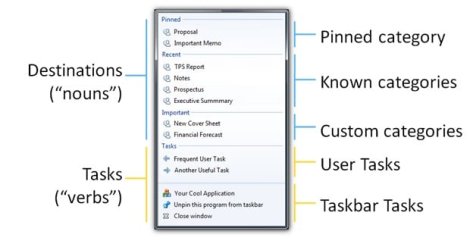
Jump lists provide quick access to application features. Think of Jump Lists as a mini Start menu for the application. You can use Jump Lists on the taskbar and the Start menu to open your most frequently visited websites, recently opened files, and favorite programs with just one click. This helps eliminate the need to open the program and then load the relevant file, or by performing common tasks without opening the program first. Programs that use the system API for their Most Recently Used list (the list of recently used filenames that many apps have in their File menus) will automatically acquire a Jump List containing their most recently used files. You can Pin the programs and files you use the most on the taskbar and Start menu so you can open them from the same spot every time for quicker access.

On a computer that is running Windows 7 or Windows Server 2008 R2, the Jump List of an application may disappear permanently when you use the application to open or save a new item. This issue occurs when there are 999 items in the Jump List already.

Installing the update at the link below resolves the issue and enables the displaying of the Jump Lists.

A Jump List is not displayed in Windows 7 or in Windows Server 2008 R2 if the list contains more than 999 items

   Warning
Jump Lists will require that you have Recent Programs and Recent Items turned on for it to work.

A Tasks jump list for program (ex: Windows Live Messenger) options does not require to have Recent Programs or Recent Items turned on to work though.


OPTION ONE

Jump Lists in the Start Menu


NOTE: Jump Lists don't appear in the All Programs area in the Start menu.
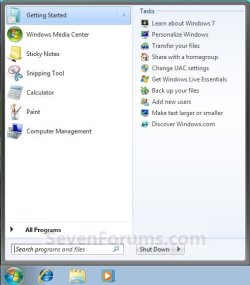
1. Open the Start Menu.

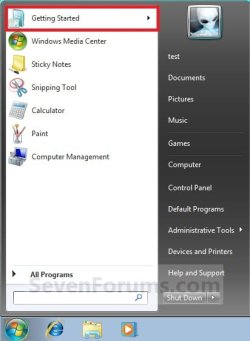
2. Hover over a program in the Start Menu "pin to area" that has a arrow to the right of it indicating it has a jump list. (see screenshots below step 3)

3. The jump list for the selected program will now automatically expand open. Select a jump list item. (see screenshots below)
NOTE: You can also select the program in the Start menu pin area, then use the Shift+Tab keys to move over to the jump list. Next, use the arrow keys to select a jump list item and press Enter to open it.
Start_Menu-1.jpgStart_Menu-2.jpg


OPTION TWO

Open Jump Lists on the Taskbar


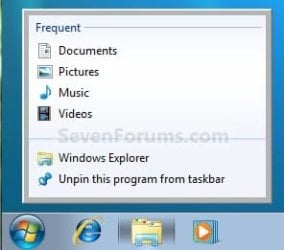
1. Right click on a pinned icon on the taskbar (ex: Windows Explorer icon), and go to step 4.
OR

2. Press the Windows + ALT + (1-10) keys for the icon in the numerical order from either left to right or top to bottom on the taskbar, then go to step 4.

OR

3. Left click and hold on a pinned icon on the taskbar, drag up and release the left click, and go to step 4.

4. From here you can select what item you want to open with the selected program. (See screeshots below)
Taskbar-1.jpgTaskbar-2.jpg


That's it,
Shawn


Last edited:
Hello!
Sorry for asking this, I'm new in here but I have a problem with my Jump list.

It is actually the jump list for the windows explorer. I used to have some folders pinned in it, but recently they disapearde :S I don't know what I did, but I want them back. Now there only appears two options:
1) Windows Explorer
2) Unpin this program from the task bar.

I want to be able to see my "frequent" and "pinned" jump list, so if any of you have a solution for me I would be really grateful!
 

My Computer

OS
Windows 7
Hello Achia, and welcome to Seven Forums.

Check to make sure that you have Recent Programs and Recent Items turned on. You should also be able to drag and drop the folder to the taskbar to have it pinned inside the Windows Explorer Jump List as well.

Hope this helps,
Shawn
 

My Computer

Computer type
PC/Desktop
Computer Manufacturer/Model Number
Self built custom
OS
64-bit Windows 11 Pro for Workstations
CPU
Intel i7-8700K OC'd to 5 GHz
Motherboard
ASUS ROG Maximus XI Formula Z390
Memory
64 GB (4x16GB) G.SKILL TridentZ RGB DDR4 3600 MHz
Graphics Card(s)
ASUS ROG-STRIX-GTX1080TI-O11G-GAMING
Sound Card
Integrated
Monitor(s) Displays
2 x Samsung Odyssey G7 27"
Screen Resolution
2560x1440
Hard Drives
1TB Samsung 990 PRO M.2,
4TB Samsung 990 PRO PRO M.2,
TerraMaster F8 SSD Plus NAS
PSU
Seasonic Prime Titanium 850W
Case
Thermaltake Core P3
Cooling
Corsair Hydro H115i
Keyboard
Logitech wireless K800
Mouse
Logitech MX Master 4
Internet Speed
2 Gb/s Download and 100 Mb/s Upload
Antivirus
Malwarebyte Anti-Malware Premium
Browser
Google Chrome
Other Info
Logitech Z625 speaker system,
Logitech BRIO 4K Pro webcam,
HP Color LaserJet Pro MFP M477fdn,
APC SMART-UPS RT 1000 XL - SURT1000XLI,
Galaxy S23 Plus phone
Well I already double-checked and they are "On", and even tried turnin them off and then on and only managed to lose all of my recents... T_T.
And whenever I try to drag either "My Documents" or "My Music" to the Windows Explorer Jump List as it used to be, they just simply don't stay there...

... and I really liked the jump list for windows explorer...
 

My Computer

OS
Windows 7

My Computer

Computer type
PC/Desktop
Computer Manufacturer/Model Number
Self built custom
OS
64-bit Windows 11 Pro for Workstations
CPU
Intel i7-8700K OC'd to 5 GHz
Motherboard
ASUS ROG Maximus XI Formula Z390
Memory
64 GB (4x16GB) G.SKILL TridentZ RGB DDR4 3600 MHz
Graphics Card(s)
ASUS ROG-STRIX-GTX1080TI-O11G-GAMING
Sound Card
Integrated
Monitor(s) Displays
2 x Samsung Odyssey G7 27"
Screen Resolution
2560x1440
Hard Drives
1TB Samsung 990 PRO M.2,
4TB Samsung 990 PRO PRO M.2,
TerraMaster F8 SSD Plus NAS
PSU
Seasonic Prime Titanium 850W
Case
Thermaltake Core P3
Cooling
Corsair Hydro H115i
Keyboard
Logitech wireless K800
Mouse
Logitech MX Master 4
Internet Speed
2 Gb/s Download and 100 Mb/s Upload
Antivirus
Malwarebyte Anti-Malware Premium
Browser
Google Chrome
Other Info
Logitech Z625 speaker system,
Logitech BRIO 4K Pro webcam,
HP Color LaserJet Pro MFP M477fdn,
APC SMART-UPS RT 1000 XL - SURT1000XLI,
Galaxy S23 Plus phone
Thanks for the advise!
I did what you said, but still it didn't work. hahaha What the heck did I do to make it do this crazy stuff...

I was thinking that it might be more complex than what I thought at first... maybe it has something to do with de dll run error that I get every time I start my computer (although the problem started way after the error started flashing) is about a winurk32.rom.
 

My Computer

OS
Windows 7
Achia,

Well, if it has not been to long ago that you know it worked, then you can try a system restore using a restore point dated when it did work properly.

If it still does not help, and you do not have a older restore point to use, then you can do a repair install without losing anything.
 

My Computer

Computer type
PC/Desktop
Computer Manufacturer/Model Number
Self built custom
OS
64-bit Windows 11 Pro for Workstations
CPU
Intel i7-8700K OC'd to 5 GHz
Motherboard
ASUS ROG Maximus XI Formula Z390
Memory
64 GB (4x16GB) G.SKILL TridentZ RGB DDR4 3600 MHz
Graphics Card(s)
ASUS ROG-STRIX-GTX1080TI-O11G-GAMING
Sound Card
Integrated
Monitor(s) Displays
2 x Samsung Odyssey G7 27"
Screen Resolution
2560x1440
Hard Drives
1TB Samsung 990 PRO M.2,
4TB Samsung 990 PRO PRO M.2,
TerraMaster F8 SSD Plus NAS
PSU
Seasonic Prime Titanium 850W
Case
Thermaltake Core P3
Cooling
Corsair Hydro H115i
Keyboard
Logitech wireless K800
Mouse
Logitech MX Master 4
Internet Speed
2 Gb/s Download and 100 Mb/s Upload
Antivirus
Malwarebyte Anti-Malware Premium
Browser
Google Chrome
Other Info
Logitech Z625 speaker system,
Logitech BRIO 4K Pro webcam,
HP Color LaserJet Pro MFP M477fdn,
APC SMART-UPS RT 1000 XL - SURT1000XLI,
Galaxy S23 Plus phone
Thanks I'll try the repair install option later. Once I'm done with it I'll let you know.

Thanks for having me patience!
 

My Computer

OS
Windows 7
Hi..

I'm having some problems with the Start Menu jump lists for some users on my computer. They work perfectly on my user profile but on the others, the jump list arrow is not even present.

I've tried disabling/enabling recent items and recent programs but that doesn't make a difference. I've also tried removing all shortcut items from the start menu and added them again but that didn't help either.

I would be really grateful if someone here could suggest anything please.
 

My Computer

Computer type
PC/Desktop
Computer Manufacturer/Model Number
Custom Build
OS
Windows 7 Ultimate SP1 x64
CPU
Intel(R) Core 2 Duo E6600 'Conroe' 2.40Ghz (3.20Ghz - 400x8)
Motherboard
ASUS P5K-E WiFi-AP
Memory
4GB Corsair DDR2 XMS2-6400C4 (4-4-4-12 / DDR2-800MHz)
Graphics Card(s)
PowerColor ATI Radeon HD 3850 Pro Xtreme 512MB GDDR3
Hard Drives
1x Maxtor DiamondMax 22 500GB SATA II HDD (STM3500320AS)
2x Seagate Barracuda 7200.12 1TB SATA II HDD (ST31000528AS)
Hello Nick, and welcome to Seven Forums.

Check to see if those user profiles are also missing any of the "Pin to Taskbar", "Pin to Start Menu", "Run as administrator" options when you right click on a exe or program shortcut. This usually happens

If so, then download and merge the lnk (LNK) option in the tutorial below to see if that may help.

http://www.sevenforums.com/tutorials/19449-default-file-type-associations-restore.html

Hope this may help,
Shawn
 

My Computer

Computer type
PC/Desktop
Computer Manufacturer/Model Number
Self built custom
OS
64-bit Windows 11 Pro for Workstations
CPU
Intel i7-8700K OC'd to 5 GHz
Motherboard
ASUS ROG Maximus XI Formula Z390
Memory
64 GB (4x16GB) G.SKILL TridentZ RGB DDR4 3600 MHz
Graphics Card(s)
ASUS ROG-STRIX-GTX1080TI-O11G-GAMING
Sound Card
Integrated
Monitor(s) Displays
2 x Samsung Odyssey G7 27"
Screen Resolution
2560x1440
Hard Drives
1TB Samsung 990 PRO M.2,
4TB Samsung 990 PRO PRO M.2,
TerraMaster F8 SSD Plus NAS
PSU
Seasonic Prime Titanium 850W
Case
Thermaltake Core P3
Cooling
Corsair Hydro H115i
Keyboard
Logitech wireless K800
Mouse
Logitech MX Master 4
Internet Speed
2 Gb/s Download and 100 Mb/s Upload
Antivirus
Malwarebyte Anti-Malware Premium
Browser
Google Chrome
Other Info
Logitech Z625 speaker system,
Logitech BRIO 4K Pro webcam,
HP Color LaserJet Pro MFP M477fdn,
APC SMART-UPS RT 1000 XL - SURT1000XLI,
Galaxy S23 Plus phone
Hello Nick, and welcome to Seven Forums.

Check to see if those user profiles are also missing any of the "Pin to Taskbar", "Pin to Start Menu", "Run as administrator" options when you right click on a exe or program shortcut. This usually happens

If so, then download and merge the lnk (LNK) option in the tutorial below to see if that may help.

http://www.sevenforums.com/tutorials/19449-default-file-type-associations-restore.html

Hope this may help,
Shawn

Thanks for the reply Shawn and thanks for the welcome too.

Pin to taskbar/start menu and Run as admin are all present on the other profiles but I decided to import the default file association for lnkfiles but i'm afraid nothing changed after restarting.
 

My Computer

Computer type
PC/Desktop
Computer Manufacturer/Model Number
Custom Build
OS
Windows 7 Ultimate SP1 x64
CPU
Intel(R) Core 2 Duo E6600 'Conroe' 2.40Ghz (3.20Ghz - 400x8)
Motherboard
ASUS P5K-E WiFi-AP
Memory
4GB Corsair DDR2 XMS2-6400C4 (4-4-4-12 / DDR2-800MHz)
Graphics Card(s)
PowerColor ATI Radeon HD 3850 Pro Xtreme 512MB GDDR3
Hard Drives
1x Maxtor DiamondMax 22 500GB SATA II HDD (STM3500320AS)
2x Seagate Barracuda 7200.12 1TB SATA II HDD (ST31000528AS)
Nick,

As a test, create a new user account to see if the Start Menu jump lists work properly in it. You can pin Notepad to the Start Menu to test with and open some text files to see if they show up later.

If it does, then it may be easier to just create new accounts for the affected user profiles. Afterwards, copy all of the contents of the old user account's C:\Users\(user-name) folders (including hidden AppData folder) into the corresponding new account's C:\Users\(user-name) folder. After everything checks out ok, you can delete the old user account while logged in the new user account.


Other options to try and fix this would be:
 

My Computer

Computer type
PC/Desktop
Computer Manufacturer/Model Number
Self built custom
OS
64-bit Windows 11 Pro for Workstations
CPU
Intel i7-8700K OC'd to 5 GHz
Motherboard
ASUS ROG Maximus XI Formula Z390
Memory
64 GB (4x16GB) G.SKILL TridentZ RGB DDR4 3600 MHz
Graphics Card(s)
ASUS ROG-STRIX-GTX1080TI-O11G-GAMING
Sound Card
Integrated
Monitor(s) Displays
2 x Samsung Odyssey G7 27"
Screen Resolution
2560x1440
Hard Drives
1TB Samsung 990 PRO M.2,
4TB Samsung 990 PRO PRO M.2,
TerraMaster F8 SSD Plus NAS
PSU
Seasonic Prime Titanium 850W
Case
Thermaltake Core P3
Cooling
Corsair Hydro H115i
Keyboard
Logitech wireless K800
Mouse
Logitech MX Master 4
Internet Speed
2 Gb/s Download and 100 Mb/s Upload
Antivirus
Malwarebyte Anti-Malware Premium
Browser
Google Chrome
Other Info
Logitech Z625 speaker system,
Logitech BRIO 4K Pro webcam,
HP Color LaserJet Pro MFP M477fdn,
APC SMART-UPS RT 1000 XL - SURT1000XLI,
Galaxy S23 Plus phone
Ok...i've made some progress...thanks for your continued support :)

Jump Lists are working for the other profiles for recent items and pinnable files etc but the default tasks are missing. When i'm on my profile, I can expand the jump list for IE8 on my taskbar and/or start menu and I can see that there are two tasks present always (Start InPrivate Browsing and Open new tab). However, those tasks are still missing on the other profiles.

Does anyone know of a way to get them showing please?
 

My Computer

Computer type
PC/Desktop
Computer Manufacturer/Model Number
Custom Build
OS
Windows 7 Ultimate SP1 x64
CPU
Intel(R) Core 2 Duo E6600 'Conroe' 2.40Ghz (3.20Ghz - 400x8)
Motherboard
ASUS P5K-E WiFi-AP
Memory
4GB Corsair DDR2 XMS2-6400C4 (4-4-4-12 / DDR2-800MHz)
Graphics Card(s)
PowerColor ATI Radeon HD 3850 Pro Xtreme 512MB GDDR3
Hard Drives
1x Maxtor DiamondMax 22 500GB SATA II HDD (STM3500320AS)
2x Seagate Barracuda 7200.12 1TB SATA II HDD (ST31000528AS)
Nick,

You might see if unpinning and pinning IE8 to the Start Menu in the affected accounts may toggle it to work again.

If not, then you might turn Internet Explorer 8 Off and back On afterwards in Windows Features to see if it may help.
 

My Computer

Computer type
PC/Desktop
Computer Manufacturer/Model Number
Self built custom
OS
64-bit Windows 11 Pro for Workstations
CPU
Intel i7-8700K OC'd to 5 GHz
Motherboard
ASUS ROG Maximus XI Formula Z390
Memory
64 GB (4x16GB) G.SKILL TridentZ RGB DDR4 3600 MHz
Graphics Card(s)
ASUS ROG-STRIX-GTX1080TI-O11G-GAMING
Sound Card
Integrated
Monitor(s) Displays
2 x Samsung Odyssey G7 27"
Screen Resolution
2560x1440
Hard Drives
1TB Samsung 990 PRO M.2,
4TB Samsung 990 PRO PRO M.2,
TerraMaster F8 SSD Plus NAS
PSU
Seasonic Prime Titanium 850W
Case
Thermaltake Core P3
Cooling
Corsair Hydro H115i
Keyboard
Logitech wireless K800
Mouse
Logitech MX Master 4
Internet Speed
2 Gb/s Download and 100 Mb/s Upload
Antivirus
Malwarebyte Anti-Malware Premium
Browser
Google Chrome
Other Info
Logitech Z625 speaker system,
Logitech BRIO 4K Pro webcam,
HP Color LaserJet Pro MFP M477fdn,
APC SMART-UPS RT 1000 XL - SURT1000XLI,
Galaxy S23 Plus phone
Some more progress..

I tried the above suggestions but they didn't help but they did lead me to accidentally stumble on a workaround for the IE8 jump list tasks.

I think the problem was caused by some batch files which were deleting the 'Recent' folder. After a little tinkering, I was able to restore the Start InPrivate Browsing and Open new tab jump list tasks for IE8 on all profiles. However, other applications are still not displaying any jump list (Get Started, Office apps, WMP etc) at all on the other profiles but work perfectly on mine.

Kinda getting there I suppose :)
 

My Computer

Computer type
PC/Desktop
Computer Manufacturer/Model Number
Custom Build
OS
Windows 7 Ultimate SP1 x64
CPU
Intel(R) Core 2 Duo E6600 'Conroe' 2.40Ghz (3.20Ghz - 400x8)
Motherboard
ASUS P5K-E WiFi-AP
Memory
4GB Corsair DDR2 XMS2-6400C4 (4-4-4-12 / DDR2-800MHz)
Graphics Card(s)
PowerColor ATI Radeon HD 3850 Pro Xtreme 512MB GDDR3
Hard Drives
1x Maxtor DiamondMax 22 500GB SATA II HDD (STM3500320AS)
2x Seagate Barracuda 7200.12 1TB SATA II HDD (ST31000528AS)
Depending on much you need or want the jump lists, you may be able to fix everything by doing a repair install without losing anything. It will be alot faster and possibly safer.
 

My Computer

Computer type
PC/Desktop
Computer Manufacturer/Model Number
Self built custom
OS
64-bit Windows 11 Pro for Workstations
CPU
Intel i7-8700K OC'd to 5 GHz
Motherboard
ASUS ROG Maximus XI Formula Z390
Memory
64 GB (4x16GB) G.SKILL TridentZ RGB DDR4 3600 MHz
Graphics Card(s)
ASUS ROG-STRIX-GTX1080TI-O11G-GAMING
Sound Card
Integrated
Monitor(s) Displays
2 x Samsung Odyssey G7 27"
Screen Resolution
2560x1440
Hard Drives
1TB Samsung 990 PRO M.2,
4TB Samsung 990 PRO PRO M.2,
TerraMaster F8 SSD Plus NAS
PSU
Seasonic Prime Titanium 850W
Case
Thermaltake Core P3
Cooling
Corsair Hydro H115i
Keyboard
Logitech wireless K800
Mouse
Logitech MX Master 4
Internet Speed
2 Gb/s Download and 100 Mb/s Upload
Antivirus
Malwarebyte Anti-Malware Premium
Browser
Google Chrome
Other Info
Logitech Z625 speaker system,
Logitech BRIO 4K Pro webcam,
HP Color LaserJet Pro MFP M477fdn,
APC SMART-UPS RT 1000 XL - SURT1000XLI,
Galaxy S23 Plus phone
Depending on much you need or want the jump lists, you may be able to fix everything by doing a repair install without losing anything. It will be alot faster and possibly safer.

I think i'm just gonna stick with things as they are for now. The other user profiles have the jump lists working for IE8 and Office 2010 and they were the only ones I was concerned about. They probably won't get used much anyway by the missus and the kids but the option is there.

I think the problem may be related to some file permissions but i'll leave it for now. The computer is running perfectly well otherwise and all the jump lists work ok for me so i'm happy.

Thanks again for the help :)
 

My Computer

Computer type
PC/Desktop
Computer Manufacturer/Model Number
Custom Build
OS
Windows 7 Ultimate SP1 x64
CPU
Intel(R) Core 2 Duo E6600 'Conroe' 2.40Ghz (3.20Ghz - 400x8)
Motherboard
ASUS P5K-E WiFi-AP
Memory
4GB Corsair DDR2 XMS2-6400C4 (4-4-4-12 / DDR2-800MHz)
Graphics Card(s)
PowerColor ATI Radeon HD 3850 Pro Xtreme 512MB GDDR3
Hard Drives
1x Maxtor DiamondMax 22 500GB SATA II HDD (STM3500320AS)
2x Seagate Barracuda 7200.12 1TB SATA II HDD (ST31000528AS)
Back
Top