Just annoying slownesses

Senteaf

New member
Member
VIP
Local time
5:58 PM
Messages
244
Is there any reason why moving my mouse while pressing the left button over icons makes my computer slow and also the animation? *especially on the desktop

Why the hell "Super Energy Saver" power scheme on my laptop is so slow that only 5 seconds after I click something it responds?!?!?!?
swtiching between tabs, clicking Start button and many many many many more!


I think I need to buy an alienware or something...:mad::mad::mad::mad::mad::mad::mad::mad::mad::mad::mad::mad::mad::mad::mad::mad::mad::mad::mad::mad::mad::mad::mad::mad::mad::mad::mad::mad::mad::mad::mad::mad::mad:
 

My Computer My Computer

Computer Manufacturer/Model Number
Lenovo G560(this is a laptop)
OS
Windows 7 Ultimate x64
CPU
Intel(R) Core(TM) i3 CPU M370 2.40GHz
Memory
2 GB RAM
Graphics Card(s)
Intel(R) HD Grpahics (not worth the money)
Screen Resolution
1360 x 768
Is there any reason why moving my mouse while pressing the left button over icons makes my computer slow and also the animation? *especially on the desktop

Why the hell "Super Energy Saver" power scheme on my laptop is so slow that only 5 seconds after I click something it responds?!?!?!?
swtiching between tabs, clicking Start button and many many many many more!


I think I need to buy an alienware or something...:mad::mad::mad::mad::mad::mad::mad::mad::mad::mad::mad::mad::mad::mad::mad::mad::mad::mad::mad::mad::mad::mad::mad::mad::mad::mad::mad::mad::mad::mad::mad::mad::mad:

Senteaf Hi and Welcome

You are at the absolute minimum requirements for RAM and Windows 7- 64 bit.
That's the reason your laptop is probably running so slowly.


You can increase its performance by changing the power plan to something like "balanced" but it will use more battery (if you are on battery) and therefore reduce overall battery time before the next charge.


Recommendations include:

1-Buy more Ram (at least 4 gigs)

2-limit the applications loading at startup by going into msconfig and unchecking un-needed applications in the startup tab.


3-Run less applications simultaneously.
 
Last edited:

My Computer My Computer

Computer Manufacturer/Model Number
LAPTOP. HP Pavilion dv7-4010TX .
OS
Win 7 Ultimate 64-bit. SP1.
CPU
Intel i7 -720QM.[1.6GHz Turbo Boost 2.8GHz. 6MB Cache.]
Memory
8 DDR 3 RAM. 1066MHZ
Graphics Card(s)
ATI 1024 MB. DDR3. Radeon HD5650
Monitor(s) Displays
17.3" High Definition Brightview LCD. LED Backlit.
Screen Resolution
1600 x 900.
Hard Drives
640GB
Case
Laptop / notebook.
Mouse
Logitech Anywhere mouse. MX.
Internet Speed
ADSL [ but too slow ]
Thanks!
Yes I am afraid this is the reason for most of my problems(regarding performance with win 7)
I can buy more ram.

Now I have questions:

1.

  • How do I know if I have free slot for another module?

2+3.

  • I thought my CPU is "good" enough for multi-tasking -- as written on Intel's website...
  • Do you think it is, and the ram is the bottleneck?
  • I have verified my ram type, but I would like to see a list of all types. I want to make sure it is of a high standard.
 

My Computer My Computer

Computer Manufacturer/Model Number
Lenovo G560(this is a laptop)
OS
Windows 7 Ultimate x64
CPU
Intel(R) Core(TM) i3 CPU M370 2.40GHz
Memory
2 GB RAM
Graphics Card(s)
Intel(R) HD Grpahics (not worth the money)
Screen Resolution
1360 x 768
Is there any reason why moving my mouse while pressing the left button over icons makes my computer slow and also the animation? *especially on the desktop

Why the hell "Super Energy Saver" power scheme on my laptop is so slow that only 5 seconds after I click something it responds?!?!?!?
swtiching between tabs, clicking Start button and many many many many more!


I think I need to buy an alienware or something...:mad::mad::mad::mad::mad::mad::mad::mad::mad::mad::mad::mad::mad::mad::mad::mad::mad::mad::mad::mad::mad::mad::mad::mad::mad::mad::mad::mad::mad::mad::mad::mad::mad:

Senteaf Hi and Welcome

You are at the absolute minimum requirements for RAM and windows 7 64 bit. Thats the reason your laptop is probably running so slowly.


You can increase its performance by changing the power plan to something like "balanced" but it will use more battery (if you are on battery) and therefor reduce overall battery time before the next charge.


Recommendations include:

1-Buy more Ram (at least 4 gigs)

2-limit the applications loading at startup by going into msconfig and unchecking un-needed applications in the startup tab.


3-Run less applications simultaneously.


64 bit runs just fine in 2GB....it should NOT be slow.
 

My Computer My Computer

Computer Manufacturer/Model Number
Custom
OS
Windows 7 Ultimate RTM (Technet)
CPU
3.00 gigahertz Intel Core2 Duo E8400
Motherboard
ASUSTeK Computer INC. P5K/EPU Rev 1.xx
Memory
4GB
Graphics Card(s)
ATI Radeon X1950 Pro
Sound Card
Built in HD Audio
Monitor(s) Displays
22" Gateway LCD
Screen Resolution
1920 x 1200
Hard Drives
ST3160023A [Hard drive] (160.04 GB) -- drive 0, rev 8.01, ST3500630AS [Hard drive] (500.11 GB) -- drive 2, rev 3.AAK
ST3500630AS [Hard drive] (500.11 GB) -- drive 1, rev 3.AAK
Keyboard
Logitech G11
Mouse
Microsoft Wireless Laser Mouse 5000
Internet Speed
13.44 Mbps
Is there any reason why moving my mouse while pressing the left button over icons makes my computer slow and also the animation? *especially on the desktop

Why the hell "Super Energy Saver" power scheme on my laptop is so slow that only 5 seconds after I click something it responds?!?!?!?
swtiching between tabs, clicking Start button and many many many many more!


I think I need to buy an alienware or something...:mad::mad::mad::mad::mad::mad::mad::mad::mad::mad::mad::mad::mad::mad::mad::mad::mad::mad::mad::mad::mad::mad::mad::mad::mad::mad::mad::mad::mad::mad::mad::mad::mad:

Senteaf Hi and Welcome

You are at the absolute minimum requirements for RAM and windows 7 64 bit. Thats the reason your laptop is probably running so slowly.


You can increase its performance by changing the power plan to something like "balanced" but it will use more battery (if you are on battery) and therefor reduce overall battery time before the next charge.


Recommendations include:

1-Buy more Ram (at least 4 gigs)

2-limit the applications loading at startup by going into msconfig and unchecking un-needed applications in the startup tab.


3-Run less applications simultaneously.


64 bit runs just fine in 2GB....it should NOT be slow.
The system itself needs at least 2GB. Other programs need more memory hence the user will encounter some 'slowness'.
 

My Computer My Computer

Computer type
PC/Desktop
Computer Manufacturer/Model Number
Custom Build
OS
Windows 10 Pro x64, Arch Linux
CPU
Intel Core 2 Quad Q8200 OC'd 3.08GHz
Motherboard
Asus Rampage formula LGA775
Memory
8GB DDR2 900Mhz
Graphics Card(s)
MSI GT730 2GB GDDR5 (Kepler)
Sound Card
Supreme FX2
Monitor(s) Displays
Samsung LS22F350 LED
Screen Resolution
1080P
Hard Drives
Kingston SSDNow UV400 120GB, 500GB Hitachi, 2TB Samsung, 500GB Seagate FreeAgent, 640GB Samsung, 160GB Toshiba (Arch)
PSU
AeroCool 500W Bronze
Cooling
Cooler Master V6 + 3X fans
Keyboard
Prolink keyboard
Mouse
Logitech M705
Internet Speed
1MiB/s
Browser
Chrome Beta
right, 2gb is not just fine for 64bit...
 

My Computer My Computer

Computer Manufacturer/Model Number
Lenovo G560(this is a laptop)
OS
Windows 7 Ultimate x64
CPU
Intel(R) Core(TM) i3 CPU M370 2.40GHz
Memory
2 GB RAM
Graphics Card(s)
Intel(R) HD Grpahics (not worth the money)
Screen Resolution
1360 x 768
Hmm, have you ran all the performance tools that Windows has installed, like Disk Defragmenter, System Configuration Utility, perhaps Disk Cleanup? Those can help dramatically, especially the System Config tool. Also, on a laptop, certain manufacturers install battery "utilities", generally just bloatware that Windows has been built to manage, try changing the power scheme to Balanced or High Performance. An Intel i3 is definitely capable of being able to run a lot of things at once, and two gigs of RAM is generally ok with 64 bit systems. Unless of course, your graphics card is using some of that and you're left with less. But whatever.... :p
 

My Computer My Computer

Computer Manufacturer/Model Number
ASUS
OS
Windows 7 Ultimate x64
CPU
AMD Athlon 240 II @ 2.8-4.004 ghz
Motherboard
M4A78LT-M LE
Memory
SuperTalent 4gb DDR3
Graphics Card(s)
ATI Radeon 3000HD
Screen Resolution
1440*900
Case
Re-modded Dell Dimension 4550
Cooling
Vantec 92mm Tornado x2
Other Info
It looks pretty.
My graphic card is a chip(on the motherboard)

so it's basic, I mean integrated or something.
I know it does not have dedicated memory so it uses my RAM for processing, maybe even CPU sometimes.

And my laptop is new, bought it 5 months ago.

it just feels really slow, Windows UI/GUI is slow(perhaps my hard disk is the reason), browsing is slow(32bit firefox).

but now I know that I don't have enough RAM, my hard disk is slow, and my graphic chip is crap...oh well...
 

My Computer My Computer

Computer Manufacturer/Model Number
Lenovo G560(this is a laptop)
OS
Windows 7 Ultimate x64
CPU
Intel(R) Core(TM) i3 CPU M370 2.40GHz
Memory
2 GB RAM
Graphics Card(s)
Intel(R) HD Grpahics (not worth the money)
Screen Resolution
1360 x 768
64 bit runs just fine in 2GB....it should NOT be slow.

Exactly, RAM requirements should not be the cause of your slowdown. 2GB Windows 7 64bit provides generally perfect performance. Try using MalwareBytes AntiMalware just to check for viruses - it may not be a virus at all, but there's no harm in looking into it.
 

My Computer My Computer

Computer Manufacturer/Model Number
Spitfire X (Custom Rig)
OS
Windows 7 Ultimate x64 Service Pack 1
CPU
Intel Pentium E5500 Dual Core 2.8GHz OC'd @3.2GHz
Motherboard
AsRock G31M-S R2.0
Memory
4GB Corsair DDR2 800MHz (2x2GB)
Graphics Card(s)
Inno 3D Geforce GT 440 1GB
Sound Card
Realtek ALC662 Audio w/ Logitech Z506 5.1 Surround Speakers
Monitor(s) Displays
BenQ G2220HDA 21.5" Monitor
Screen Resolution
1920 x 1080 (1080p)
Hard Drives
OS: Seagate Barracuda 7200.12 250GB
Data and Programs: Seagate Barracuda 7200.12 500GB
PSU
Antec High Current Gamer HCG-520w
Case
Antec One Hundred
Cooling
140 mm Roof Fan, 120mm Rear Fan, 120mm Frontal Fan
Keyboard
Logitech Ultra Flat Keyboard PN 967653-0100
Mouse
Trust GXT 14S Gaming Mouse
Other Info
2x10cm Blue LED strips inside case
hahaha yeah right!

Are you serious? it is not just fine!

I have running:
1. Firefox - 13 tabs (no intensive calculations for chip/cpu
2. explorer.exe open on drive C

delete.png
 

My Computer My Computer

Computer Manufacturer/Model Number
Lenovo G560(this is a laptop)
OS
Windows 7 Ultimate x64
CPU
Intel(R) Core(TM) i3 CPU M370 2.40GHz
Memory
2 GB RAM
Graphics Card(s)
Intel(R) HD Grpahics (not worth the money)
Screen Resolution
1360 x 768
hahaha yeah right!

Are you serious? it is not just fine!

I have running:
1. Firefox - 13 tabs (no intensive calculations for chip/cpu
2. explorer.exe open on drive C

View attachment 159241

Well then you must be doing something wrong, because right now, I've 14 tabs in FireFox running, Windows Media Player open, Microsoft Office Word open, and like you said, Explorer. exe open. Guess what? Only 849MB of RAM usage, CPU at 4 % or so.

And that's 2GB RAM and Windows 7 64 bit.

O.O

I'll post a screenshot later to prove it, right now, I'm on my Smartphones browser.
 

My Computer My Computer

Computer Manufacturer/Model Number
Spitfire X (Custom Rig)
OS
Windows 7 Ultimate x64 Service Pack 1
CPU
Intel Pentium E5500 Dual Core 2.8GHz OC'd @3.2GHz
Motherboard
AsRock G31M-S R2.0
Memory
4GB Corsair DDR2 800MHz (2x2GB)
Graphics Card(s)
Inno 3D Geforce GT 440 1GB
Sound Card
Realtek ALC662 Audio w/ Logitech Z506 5.1 Surround Speakers
Monitor(s) Displays
BenQ G2220HDA 21.5" Monitor
Screen Resolution
1920 x 1080 (1080p)
Hard Drives
OS: Seagate Barracuda 7200.12 250GB
Data and Programs: Seagate Barracuda 7200.12 500GB
PSU
Antec High Current Gamer HCG-520w
Case
Antec One Hundred
Cooling
140 mm Roof Fan, 120mm Rear Fan, 120mm Frontal Fan
Keyboard
Logitech Ultra Flat Keyboard PN 967653-0100
Mouse
Trust GXT 14S Gaming Mouse
Other Info
2x10cm Blue LED strips inside case
hahaha yeah right!

Are you serious? it is not just fine!

I have running:
1. Firefox - 13 tabs (no intensive calculations for chip/cpu
2. explorer.exe open on drive C

View attachment 159241

Well then you must be doing something wrong, because right now, I've 14 tabs in FireFox running, Windows Media Player open, Microsoft Office Word open, and like you said, Explorer. exe open. Guess what? Only 849MB of RAM usage, CPU at 4 % or so.

And that's 2GB RAM and Windows 7 64 bit.

O.O

I'll post a screenshot later to prove it, right now, I'm on my Smartphones browser.


you have a laptop?

I looked at your specs, well you have way better hardware components
 

My Computer My Computer

Computer Manufacturer/Model Number
Lenovo G560(this is a laptop)
OS
Windows 7 Ultimate x64
CPU
Intel(R) Core(TM) i3 CPU M370 2.40GHz
Memory
2 GB RAM
Graphics Card(s)
Intel(R) HD Grpahics (not worth the money)
Screen Resolution
1360 x 768
Not really, my CPU isn't OC'd anymore, and although the clock speed is faster, its a 775 Wolfdale core, and your Core i3 is much newer, so according to most other people I know, it should be much better equipped for multitasking. And nope, its a desktop, but aside from the Graphic Card, it's fairly similar to your system.

Regarding your slowness, I can't be sure what is causing it - you said the laptop is 5 months old right? Was it always like this or when did it start becoming as slow as you say?

Just trying to help. :)
 

My Computer My Computer

Computer Manufacturer/Model Number
Spitfire X (Custom Rig)
OS
Windows 7 Ultimate x64 Service Pack 1
CPU
Intel Pentium E5500 Dual Core 2.8GHz OC'd @3.2GHz
Motherboard
AsRock G31M-S R2.0
Memory
4GB Corsair DDR2 800MHz (2x2GB)
Graphics Card(s)
Inno 3D Geforce GT 440 1GB
Sound Card
Realtek ALC662 Audio w/ Logitech Z506 5.1 Surround Speakers
Monitor(s) Displays
BenQ G2220HDA 21.5" Monitor
Screen Resolution
1920 x 1080 (1080p)
Hard Drives
OS: Seagate Barracuda 7200.12 250GB
Data and Programs: Seagate Barracuda 7200.12 500GB
PSU
Antec High Current Gamer HCG-520w
Case
Antec One Hundred
Cooling
140 mm Roof Fan, 120mm Rear Fan, 120mm Frontal Fan
Keyboard
Logitech Ultra Flat Keyboard PN 967653-0100
Mouse
Trust GXT 14S Gaming Mouse
Other Info
2x10cm Blue LED strips inside case
Yes it was always like this...

Can you give me a link for your laptop model?

I think first boot(the day I bought it) I felt the slowness.
 

My Computer My Computer

Computer Manufacturer/Model Number
Lenovo G560(this is a laptop)
OS
Windows 7 Ultimate x64
CPU
Intel(R) Core(TM) i3 CPU M370 2.40GHz
Memory
2 GB RAM
Graphics Card(s)
Intel(R) HD Grpahics (not worth the money)
Screen Resolution
1360 x 768
I said in the last post that my system is a Desktop, but the specifications are similar to your laptop. If you mean the Fujitsu in my description, then here: Fujitsu Siemens Esprimo Mobile V5535 VFY:EM81V5535 - Laptops Direct - but its nowhere near your systems specs.

About the matter at hand, your hard drive could be one thing, like someone mentioned earlier. Laptop drives can sometimes be a slower speed (5400 RPM) than regular drives (7200 RPM). That's one upgrade you could consider that should make your laptop notably faster. Depending on your cash, you could also check out an SSD instead. These use flash memory which is much faster than any hard drive, delivering blistering speed! There should be laptop SSDs somewhere if you look online, I've never looked myself yet so I can't point you anywhere in particular. Google is your friend. :)
 

My Computer My Computer

Computer Manufacturer/Model Number
Spitfire X (Custom Rig)
OS
Windows 7 Ultimate x64 Service Pack 1
CPU
Intel Pentium E5500 Dual Core 2.8GHz OC'd @3.2GHz
Motherboard
AsRock G31M-S R2.0
Memory
4GB Corsair DDR2 800MHz (2x2GB)
Graphics Card(s)
Inno 3D Geforce GT 440 1GB
Sound Card
Realtek ALC662 Audio w/ Logitech Z506 5.1 Surround Speakers
Monitor(s) Displays
BenQ G2220HDA 21.5" Monitor
Screen Resolution
1920 x 1080 (1080p)
Hard Drives
OS: Seagate Barracuda 7200.12 250GB
Data and Programs: Seagate Barracuda 7200.12 500GB
PSU
Antec High Current Gamer HCG-520w
Case
Antec One Hundred
Cooling
140 mm Roof Fan, 120mm Rear Fan, 120mm Frontal Fan
Keyboard
Logitech Ultra Flat Keyboard PN 967653-0100
Mouse
Trust GXT 14S Gaming Mouse
Other Info
2x10cm Blue LED strips inside case
My graphic card is a chip(on the motherboard)

so it's basic, I mean integrated or something.
I know it does not have dedicated memory so it uses my RAM for processing, maybe even CPU sometimes.

And my laptop is new, bought it 5 months ago.

it just feels really slow, Windows UI/GUI is slow(perhaps my hard disk is the reason), browsing is slow(32bit firefox).

but now I know that I don't have enough RAM, my hard disk is slow, and my graphic chip is crap...oh well...

Looking at the rest of the replies here, it does seem to suggest something with the hard drive. I have a PC gamer friend that bought a laptop with an i5 processor with I believe TurboBoost, and after some months, it literally took about three minutes for everything to start up. He didn't even have antivirus software either. But after I defragged the hard drive, and the Windows registry, it took about 45 seconds to start up. He just had to have Steam start up, for he is the most hardest core PC gamer I've ever met! ;) Actually, does your hard drive light flicker like mad when you do anything with it? It's either that, the registry, or malware causing it. The hardware should be all fine.
 

My Computer My Computer

Computer Manufacturer/Model Number
ASUS
OS
Windows 7 Ultimate x64
CPU
AMD Athlon 240 II @ 2.8-4.004 ghz
Motherboard
M4A78LT-M LE
Memory
SuperTalent 4gb DDR3
Graphics Card(s)
ATI Radeon 3000HD
Screen Resolution
1440*900
Case
Re-modded Dell Dimension 4550
Cooling
Vantec 92mm Tornado x2
Other Info
It looks pretty.
x64 Windows needs minimum of 2GB of RAM to run.

As with anything,. such as games, Minimum means just that. The absolute Minimum it takes for the software to operate. It does not mean it will run optimally.

Win7 x64 will typically use 1.5Gb of RAm at idle, give or take. This is completely normal.

In fact, it will use much more if it can. Look at mine-
Capture.JPG

You must also consider the fact 64bit has much more overhead to cope with. Such as being abkle to run 32bit apps in a 64bit enviroment.
Theres a lot more going on under the hood than with the 32 bit version.

If you try to limit it, or cut down its RAM use, you will only cripple the system.

The only reason to use a 64bit OS is if:
1) You have 4GB of RAM or more
2) You need to native 64bit applications (Which also requiire much more RAM)

With 4GB of RAm or less, you are better off using a 32bit OS since it has less overhead to deal with, and can get by with less memory.
 

My Computer My Computer

Computer Manufacturer/Model Number
Custom (Self Build)
OS
Windows 7 Home Premium 64bit
CPU
Intel Core i7 2700k
Motherboard
eVGA P67 SLI
Memory
8GB Mushkin Redline Ridgebacks @1866
Graphics Card(s)
EVGA GTX570 SC
Sound Card
XiFi Titanium HD
Monitor(s) Displays
LG W2453V
Screen Resolution
1920x1080
Hard Drives
Intel 320 80GB -- Intel X25-V 40GB --WD Black 1TB x2 -- WD Blue 640GB
PSU
Seasonic x750
Case
Corsair 600T SE White
Cooling
eVGA Superclocked CPU Cooler
Keyboard
Saitek Cyborg
Antivirus
Kaspersky
Browser
IE
Other Info
LG BD/DVD
  • Like
Reactions: JMH
x64 Windows needs minimum of 2GB of RAM to run.

As with anything,. such as games, Minimum means just that. The absolute Minimum it takes for the software to operate. It does not mean it will run optimally.

Win7 x64 will typically use 1.5Gb of RAm at idle, give or take. This is completely normal.

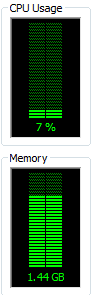
In fact, it will use much more if it can. Look at mine-
View attachment 159326

You must also consider the fact 64bit has much more overhead to cope with. Such as being abkle to run 32bit apps in a 64bit enviroment.
Theres a lot more going on under the hood than with the 32 bit version.

If you try to limit it, or cut down its RAM use, you will only cripple the system.

The only reason to use a 64bit OS is if:
1) You have 4GB of RAM or more
2) You need to native 64bit applications (Which also requiire much more RAM)

With 4GB of RAm or less, you are better off using a 32bit OS since it has less overhead to deal with, and can get by with less memory.

Hmm, I usually always see about 900MB of RAM in use at idle in 64 bit systems, even with Kaspersky 2011 running. But that usually comes after doing services configuration and uninstalling bloatware and disabling unwanted start up items.
 

My Computer My Computer

Computer Manufacturer/Model Number
ASUS
OS
Windows 7 Ultimate x64
CPU
AMD Athlon 240 II @ 2.8-4.004 ghz
Motherboard
M4A78LT-M LE
Memory
SuperTalent 4gb DDR3
Graphics Card(s)
ATI Radeon 3000HD
Screen Resolution
1440*900
Case
Re-modded Dell Dimension 4550
Cooling
Vantec 92mm Tornado x2
Other Info
It looks pretty.
Okay I see...Thanks everybody.

I will decide if I want a new laptop or 4gm ram upgrade!
 

My Computer My Computer

Computer Manufacturer/Model Number
Lenovo G560(this is a laptop)
OS
Windows 7 Ultimate x64
CPU
Intel(R) Core(TM) i3 CPU M370 2.40GHz
Memory
2 GB RAM
Graphics Card(s)
Intel(R) HD Grpahics (not worth the money)
Screen Resolution
1360 x 768
Did you do a clean install of the system after you bought it, or is the OS that's running now the same that was purchased with the laptop? Most OEM systems run like crap out of the box. I don't have any experience with Lenovo (I avoid them, to be honest), but if they have a lot of pre-installed crap on there along with extra drivers, bad power settings, etc....you might be better off wiping the drive and starting over. If you have no plans on upgrading the memory, then just run Windows 7x86.
 

My Computer My Computer

OS
Windows 7 Ultimate x64 SP1
CPU
Intel Core i7-2600
Motherboard
Gigabyte GA-P67A-UD3P-B3
Memory
12 GB Patriot Extreme DDR3-1333
Graphics Card(s)
Nvidia GTX 470
Monitor(s) Displays
Dell UltraSharp 2209WA
Hard Drives
OCZ Agility3 240 GB, WD5001AALS, WD7501AALS
PSU
OCZ ModStream 700W
Case
CoolerMaster HAF 912 Advanced
Cooling
CoolerMaster Hyper 212 Plus
Back
Top