Solved Just another internet connection issue

Merely

New member
Local time
10:14 PM
Messages
5
So I'm hooked up using an ethernet to my router/modem (using the 2-in-1 'Super Hub' provided by Virgin) and Windows is telling me that I have Internet Access, and sometimes that's true, but throughout the week it's been volatile a lot with hours on end not being able to access the internet on both Chrome, Firefox and other programs that use the internet. My old mans computer, which is also wired, seemingly hasn't been having this problem. Same with my mother and her wireless connection. Troubleshooting, the many times I've tried it, doesn't come up with anything. I turned off my firewall, also MSE. I'm kind of lost and frustrated. Right now I'm using my really slow tethered mobile internet connection so I'm not too keen spending hours learning and bruteforcing different methods.

Here's my ipconfig, if it helps:

Code:
Windows IP Configuration


Ethernet adapter Local Area Connection:

   Connection-specific DNS Suffix  . :
   Link-local IPv6 Address . . . . . : fe80::3d06:a7b6:5112:9d5a%15
   IPv4 Address. . . . . . . . . . . : 192.168.0.4
   Subnet Mask . . . . . . . . . . . : 255.255.255.0
   Default Gateway . . . . . . . . . : 192.168.0.1

Wireless LAN adapter Wireless Network Connection 2:

   Media State . . . . . . . . . . . : Media disconnected
   Connection-specific DNS Suffix  . :

Ethernet adapter Local Area Connection 3:

   Connection-specific DNS Suffix  . :
   IPv6 Address. . . . . . . . . . . : 2620:9b::198b:323e
   Link-local IPv6 Address . . . . . : fe80::4d7c:9dd:49d8:fa1a%28
   IPv4 Address. . . . . . . . . . . : 25.139.50.62
   Subnet Mask . . . . . . . . . . . : 255.0.0.0
   Default Gateway . . . . . . . . . : 2620:9b::1900:1
                                       25.0.0.1

Tunnel adapter isatap.{D70337CE-52B3-4EFF-93DD-AF2E00D5DDF8}:

   Media State . . . . . . . . . . . : Media disconnected
   Connection-specific DNS Suffix  . :

Tunnel adapter isatap.{74F3F469-C083-454D-90CC-D0EF50093EB5}:

   Media State . . . . . . . . . . . : Media disconnected
   Connection-specific DNS Suffix  . :

Tunnel adapter isatap.{8FA86F63-51C3-4924-A59D-3648029BCCE4}:

   Media State . . . . . . . . . . . : Media disconnected
   Connection-specific DNS Suffix  . :

Tunnel adapter 6TO4 Adapter:

   Media State . . . . . . . . . . . : Media disconnected
   Connection-specific DNS Suffix  . :

Tunnel adapter Local Area Connection* 9:

   Media State . . . . . . . . . . . : Media disconnected
   Connection-specific DNS Suffix  . :

Help would be greatly appreciated- thanks in advance!
 

My Computer My Computer

At a glance

Windows 7 Home Premium 64bit
OS
Windows 7 Home Premium 64bit
Hi There

I want to know how many computer are hooked up and how. Need to narrow down the issue whether its the router/modem or your system. As you said that there are more than 1 system if the other system is working fine then I dont think its an issue with your router. If you can provide some more info then I can definitely help.

Do you have a modem and router or just one modem which is also a modem+router.

Quick Fix that you can try

System Restore ( if u think the issue is with your system only )

Let me know

Cheers
 

My Computer My Computer

At a glance

Windows 7 Ultimate x324 gbGigabyte AMD Radeon 7770 1 GB
Computer type
PC/Desktop
OS
Windows 7 Ultimate x32
Motherboard
Gigabyte Z68XP UD3R rev 1
Memory
4 gb
Graphics Card(s)
Gigabyte AMD Radeon 7770 1 GB
Antivirus
ESET Smart Security 6
Browser
Chrome
System restore doesn't seem viable right now as I haven't created a restore point and not ready to go back to factory. Anyway, got one XP on Ethernet, one Win7 on wireless and my Win7 which is on Ethernet, using a modem which is also a modem+router. I'm having problems, the other computers aren't. I'm using my internet connection right now, but anytime it's just going to go. Thanks for your time.
 

My Computer My Computer

At a glance

Windows 7 Home Premium 64bit
OS
Windows 7 Home Premium 64bit
Hi

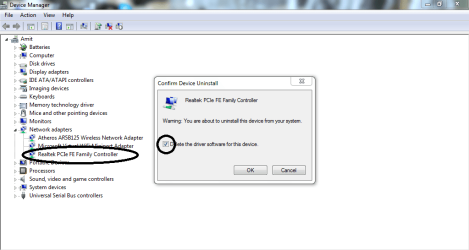
Could you please uninstall the drivers from device manager, reboot and install it back again. That should fix the issue
 

Attachments

  • Capture.PNG
    Capture.PNG
    27.8 KB · Views: 5

My Computer My Computer

At a glance

Windows 7 Ultimate x324 gbGigabyte AMD Radeon 7770 1 GB
Computer type
PC/Desktop
OS
Windows 7 Ultimate x32
Motherboard
Gigabyte Z68XP UD3R rev 1
Memory
4 gb
Graphics Card(s)
Gigabyte AMD Radeon 7770 1 GB
Antivirus
ESET Smart Security 6
Browser
Chrome
Uninstalled, deleted, rebooted, reinstalled, rebooted, still not working :/
 

My Computer My Computer

At a glance

Windows 7 Home Premium 64bit
OS
Windows 7 Home Premium 64bit
Hi

Please run Malwarebytes & Superantispyware on the system. These are free tools which I used to troubleshoot. Do check the LAN settings in IE options> Connections> Lan settings. There should not be any proxy. Try to go in safe mode with networking and see if the same issue occurs

Let me know

Cheers
 

My Computer My Computer

At a glance

Windows 7 Ultimate x324 gbGigabyte AMD Radeon 7770 1 GB
Computer type
PC/Desktop
OS
Windows 7 Ultimate x32
Motherboard
Gigabyte Z68XP UD3R rev 1
Memory
4 gb
Graphics Card(s)
Gigabyte AMD Radeon 7770 1 GB
Antivirus
ESET Smart Security 6
Browser
Chrome
I ran MSE (instead of what you use, heh) and it seems there were some viruses on board, now removed Silly me, I didn't really give regard to have a scan. My internet is working fine right now, so I'll see if it's working consistently 'till tomorrow evening and then I'll call this resolved. Thanks for your help!
 

My Computer My Computer

At a glance

Windows 7 Home Premium 64bit
OS
Windows 7 Home Premium 64bit
Back
Top