Note: SChannel means
secure channel.
sChannel uses TLS for security encryption. As long as the sites you visit do not use TLS.
Follow the steps below:
1. Open Internet Explorer.
2. Click Tools.
3. Click Internet Options.
4. Click Advanced tab.
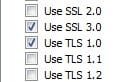
5. Scroll down the list under Security, uncheck all the Use TLS options.
6. Click OK.
Now restart the computer and check if the issue still occurs.
If the issue still persists, then I suggest that you optimize the internet explorer settings on the computer.
Follow the steps in the link below:
How to optimize Internet Explorer: http://support.microsoft.com/kb/936213
If the above steps do not help you, then you may try resetting the internet explorer settings on the computer, you may download the Microsoft fix-it from the above link which automatically resets the browser settings to default settings on the computer.
For the Bluescreen issue, we require the exact error code or error message to troubleshoot further with this issue. To get the exact error code or error message you may have to disable the automatic Feature.
Follow these easy steps to disable the automatic restart feature for system failures.
1. Click
Start.
2. Type
System in Start Search.
3. Click on
System under
Control Panel.
4. In the task pane on the left, click the
Advanced system settings link.
5. Locate the
Startup and Recovery area and click on the
Settings button.
6. In the Startup and Recovery window, locate and
uncheck the check box next to
Automatically restart.
7. Click
OK in the Startup and Recovery window.
8. Click
OK in the System Properties window.
9. You can now close the System window.
10. From now on, when a problem causes a BSOD or another major error that halts the system, the PC will not automatically reboot. Rebooting manually will be necessary.
Now when the blue screen occurs make a note of the error code or error message provide us the same.
If you are using Vista Operating System, you may refer the link below:
Microsoft Security Bulletin MS09-007 - Important
Vulnerability in SChannel Could Allow Spoofing (960225):http://www.microsoft.com/technet/security/Bulletin/ms09-007.mspx
Swathi B - Microsoft Support.