
Solved KB2952664 shows as both installed & hidden?

newpgm

New member
Member
VIP
Local time
12:53 PM
Messages
127
Location
Denver
Hi,

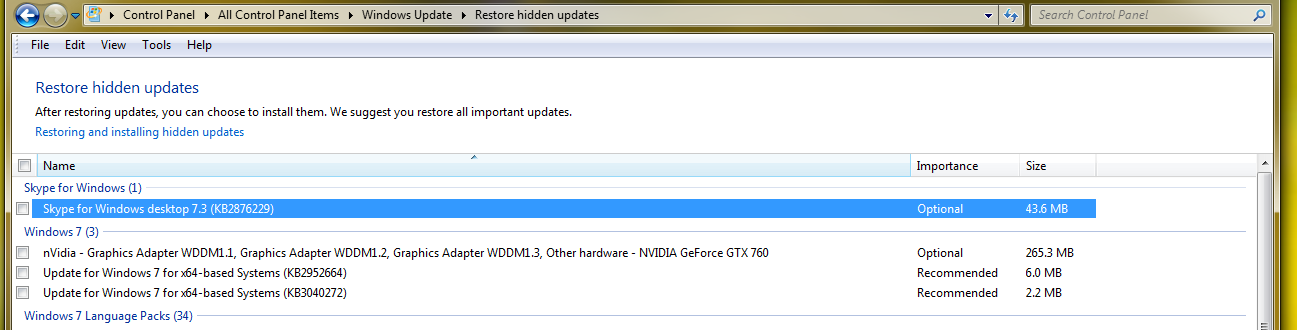
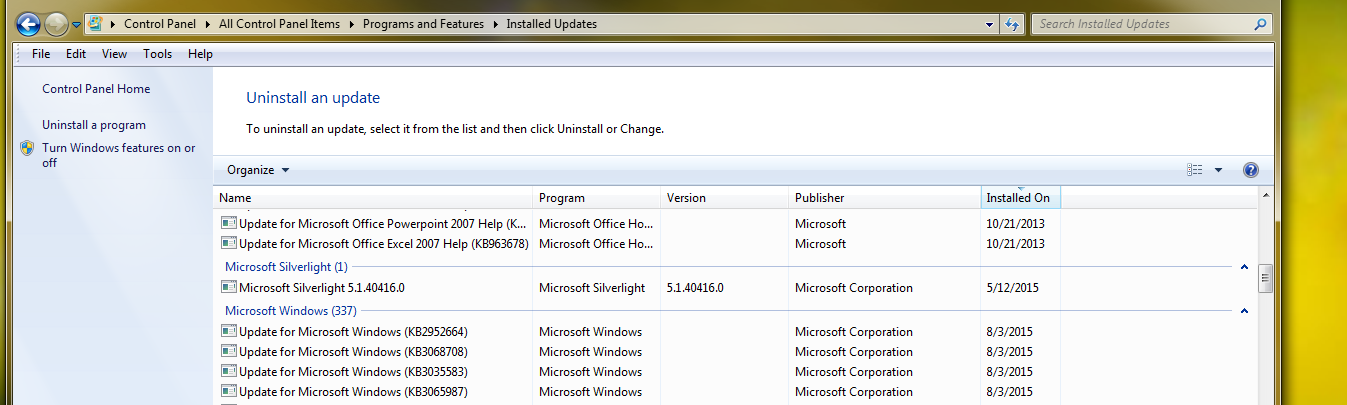
Is it possible for this update to be both, because it is both hidden & installed on both my desktop & laptop. Here are screen shots from the desktop:
trxBmnKxafUSdLAkEQYHMvCrSe8ihW-peLODJd2Cm-g=w1297-h330-no


HV2Bm2ZSI90BZoiPoQ2NnOVrLqGr0oM4HvRCaZlkFRQ=w1347-h405-no


I have made several attempts to uninstall, can't get it out of there. If I install the hidden one I can then uninstall it & hide it again. But it still shows as Installed.

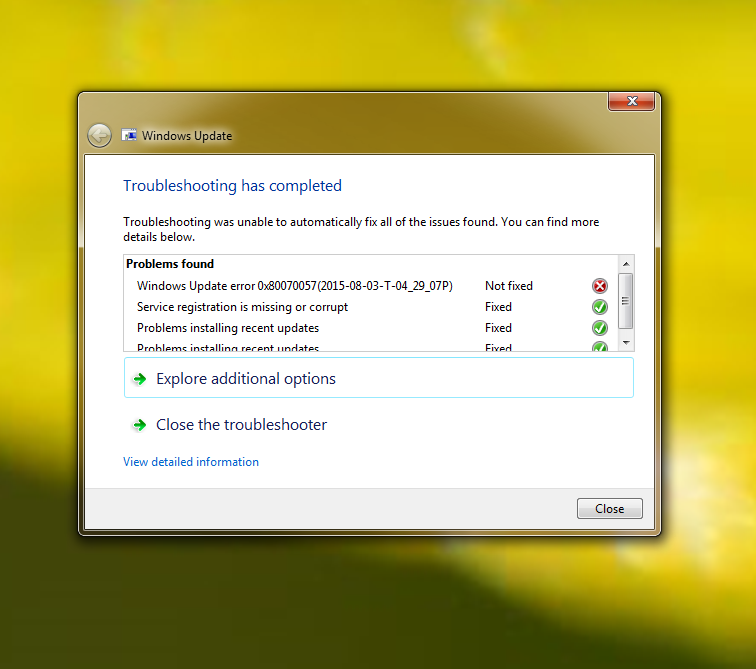
Ran MBAM scan & MSE, sfc /scannow, System Update Readindess Tool, Microsoft Fix it. Here are the results from Fix It which are also confusing:
wzHdcSkVVm4TpwdWlRMxLY8cv7x3Y3XIdLl8aKz0zlo=w756-h669-no


as you can see it tells me Windows Update Error 0x80070057 was not fixed, but the detailed info tells another story, check out the time stamp:

rPR3bjBcSzJ95q2198MLRdPQrZkSABXd-wlnprVQAys=w727-h625-no


Maybe the Fix It tool is not telling the truth? Found a thread related to Windows Update error = Windows update Error 0x80070005 - Need a fix? Click here. but have not yet attempted since cannot be sure Windows Update error 0x80070057 is valid.

Outside of KB2952664 & the Windows Update Error the computer appears to be running fine. Actually Windows Update was not quite working correctly until I ran the Fix It yesterday. Had not been receiving the "Windows Installed New Updates" notifications until after Fix It.

I should just have let Windows Update do it's thing & install all the Windows 10 prep. Perhaps constantly uninstalling & hiding KB2952664 has caused me problems. I believe there have been several iterations of this update, following thread How to remove Windows 10 upgrade updates in Windows 7 and 8 I see many have removed it a number of times.

I did perform a System Restore on the laptop to a point in time before KB2952664 was installed & that did not help, still shows installed.


& I am not able to upload the CBS.zip it is 113 MB. Thought it was taking too long to upload.
Found another thread said to use https://www.sendspace.com/ for large upload.
The link is https://www.sendspace.com/file/01lgjq

Thank you in advance for any help :(
 
Last edited:

My Computer My Computer

At a glance

Windows 7 Ultimate x64Intel Core i7-950Elpida DDR3 12 Gb 1066EVGA nVidia GeForce GTX 760 2GB GDDR5
Computer type
PC/Desktop
Computer Manufacturer/Model Number
Dell XPS 435MT
OS
Windows 7 Ultimate x64
CPU
Intel Core i7-950
Motherboard
Dell 0R849J
Memory
Elpida DDR3 12 Gb 1066
Graphics Card(s)
EVGA nVidia GeForce GTX 760 2GB GDDR5
Sound Card
Syba PCI-e VIA VT1723 Envy24DT
Monitor(s) Displays
Dell 3007WFP-HC, Nixeus Vue 30
Screen Resolution
1920 x 1200
Hard Drives
Crucial M500 240GB
1TB Seagate Barracuda
PSU
Corsair CX500M
Keyboard
Logitech MX 5500 combo
Mouse
Logitech MX 5500
Internet Speed
300Mbps
Antivirus
MSE
Browser
IE11 & Chrome
Other Info
MBAM Premium
I have the same issue. In fact, it now says KB2952664 has been installed TWICE in the "view installed updates" AFTER I've uninstalled it and it shows up as hidden.

They keep shoving all these updates down the pipe even if you hide them/uninstall them and then it causes a lot of problems.
 

My Computer My Computer

At a glance

Microsoft Windows 7 Home Premium 64-bit 7601 ...Intel(R) Core(TM)2 Duo CPU T6600 @ 2.20GHz4.00 GB(1) Mobile Intel(R) 4 Series Express Chipset ...
Computer type
Laptop
Computer Manufacturer/Model Number
Gateway NV78
OS
Microsoft Windows 7 Home Premium 64-bit 7601 Multiprocessor Free Service Pack 1
CPU
Intel(R) Core(TM)2 Duo CPU T6600 @ 2.20GHz
Motherboard
Gateway NV78
Memory
4.00 GB
Graphics Card(s)
(1) Mobile Intel(R) 4 Series Express Chipset Family (2) Mo
Sound Card
(1) High Definition Audio Device (2) High Definition Audio
Screen Resolution
1600 x 900 x 32 bits (4294967296 colors) @ 59 Hz
Hard Drives
WDC WD5000LPVX-22V0TT0 ATA Device
Antivirus
Bitdefender Free
Browser
Firefox
Last edited:

My Computer My Computer

At a glance

Win-7-Pro64bit 7-H-Prem-64biti7-5930K 2nd i9-9940x both water blocked VRM'...Trident-z 3200C14 2nd Trident-z 3600C16EVGA 1080ti ftw3 2nd Titan Xp both water blocked
Computer type
PC/Desktop
Computer Manufacturer/Model Number
Custom assembled by me :}
OS
Win-7-Pro64bit 7-H-Prem-64bit
CPU
i7-5930K 2nd i9-9940x both water blocked VRM's too
Motherboard
ASUS SABERTOOTH X99 2nd ASUS x299 Apex
Memory
Trident-z 3200C14 2nd Trident-z 3600C16
Graphics Card(s)
EVGA 1080ti ftw3 2nd Titan Xp both water blocked
Sound Card
Built-in Realtek
Monitor(s) Displays
1-AOC G2460PG 24"G-Sync 144Hz/ 2nd 1-ASUS VG248QE 24" 144Hz
Screen Resolution
1920 x 1080 144Hz
Hard Drives
2-Samsung M.2 Evo & Evo Plus
2-Samsung 850 EVO 500GB SSD's/ 3-2.5 W.D. Black 1tb-&3-1tb/3-3.5 WD Black 1tb hdd's
PSU
EVGA SuperNOVA 1000-P2 2nd 1200-P2
Case
2-Corsair Obsidian Series 450D Black ATX Mid Tower
Cooling
Custom water loops
Keyboard
Logitech G710+/ 2nd Logitech G910
Mouse
2-RedDragon M901 Perdition 16400 dpi Gaming mouse = wired
Internet Speed
Comcast Ping 19ms 89.31mbps download speed 6.12mbps upload
Antivirus
Malwarebytes Pro/ Superantispyware Pro
Browser
FireFox & Pale moon
Other Info
2nd ASUS X299 Apex/Intel i9-9940x with Custom water loop/7H-Prem-x64/Corsair 450D case/Ram Trident-z 3600C16 4x8gb / Samsung970Evo plus 500gb SSD/Dual ssd EZ swap evo/PSU EVGA SuperNova 1200w-P2 80+Platinum/GPU Titan Xp /8-ML-140 on push-pull on 2-280GTX rads
Correct, here is screen shot from my laptop. I installed them both:

KB2952664TWO.png


I am beginning to think the advice given on sevenforums to hide all WinX prepare updates was not great advice. Think I corrupted WU trying to keep KB2952664 hidden. I unhid & installed all of them & am going to go ahead & upgrade the laptop to WinX. See how it goes & how much like it. Hope MS improved the upgrade process from Vista to 7 days.

Also believe the Microsoft Fix It Quick Fix Tool & Windows Update Fix It Reinstall Tool (Aggressive mode) did in fact correct the issues I was having with Windows Update. It is working fine now on both PC's.
System Update Readiness Tool may have had something to do with it as well.

Repair or Reinstall Windows Update
 
Last edited:

My Computer My Computer

At a glance

Windows 7 Ultimate x64Intel Core i7-950Elpida DDR3 12 Gb 1066EVGA nVidia GeForce GTX 760 2GB GDDR5
Computer type
PC/Desktop
Computer Manufacturer/Model Number
Dell XPS 435MT
OS
Windows 7 Ultimate x64
CPU
Intel Core i7-950
Motherboard
Dell 0R849J
Memory
Elpida DDR3 12 Gb 1066
Graphics Card(s)
EVGA nVidia GeForce GTX 760 2GB GDDR5
Sound Card
Syba PCI-e VIA VT1723 Envy24DT
Monitor(s) Displays
Dell 3007WFP-HC, Nixeus Vue 30
Screen Resolution
1920 x 1200
Hard Drives
Crucial M500 240GB
1TB Seagate Barracuda
PSU
Corsair CX500M
Keyboard
Logitech MX 5500 combo
Mouse
Logitech MX 5500
Internet Speed
300Mbps
Antivirus
MSE
Browser
IE11 & Chrome
Other Info
MBAM Premium
I think they are sending out revised/updated versions of KB2952664 as needed, so if you hide/uninstall one instance of it, another new version comes down the pipe.
 

My Computer My Computer

At a glance

Microsoft Windows 7 Home Premium 64-bit 7601 ...Intel(R) Core(TM)2 Duo CPU T6600 @ 2.20GHz4.00 GB(1) Mobile Intel(R) 4 Series Express Chipset ...
Computer type
Laptop
Computer Manufacturer/Model Number
Gateway NV78
OS
Microsoft Windows 7 Home Premium 64-bit 7601 Multiprocessor Free Service Pack 1
CPU
Intel(R) Core(TM)2 Duo CPU T6600 @ 2.20GHz
Motherboard
Gateway NV78
Memory
4.00 GB
Graphics Card(s)
(1) Mobile Intel(R) 4 Series Express Chipset Family (2) Mo
Sound Card
(1) High Definition Audio Device (2) High Definition Audio
Screen Resolution
1600 x 900 x 32 bits (4294967296 colors) @ 59 Hz
Hard Drives
WDC WD5000LPVX-22V0TT0 ATA Device
Antivirus
Bitdefender Free
Browser
Firefox
Yep 1 shows 6.0mb the other shows 6.1mb
 

My Computer My Computer

At a glance

Win-7-Pro64bit 7-H-Prem-64biti7-5930K 2nd i9-9940x both water blocked VRM'...Trident-z 3200C14 2nd Trident-z 3600C16EVGA 1080ti ftw3 2nd Titan Xp both water blocked
Computer type
PC/Desktop
Computer Manufacturer/Model Number
Custom assembled by me :}
OS
Win-7-Pro64bit 7-H-Prem-64bit
CPU
i7-5930K 2nd i9-9940x both water blocked VRM's too
Motherboard
ASUS SABERTOOTH X99 2nd ASUS x299 Apex
Memory
Trident-z 3200C14 2nd Trident-z 3600C16
Graphics Card(s)
EVGA 1080ti ftw3 2nd Titan Xp both water blocked
Sound Card
Built-in Realtek
Monitor(s) Displays
1-AOC G2460PG 24"G-Sync 144Hz/ 2nd 1-ASUS VG248QE 24" 144Hz
Screen Resolution
1920 x 1080 144Hz
Hard Drives
2-Samsung M.2 Evo & Evo Plus
2-Samsung 850 EVO 500GB SSD's/ 3-2.5 W.D. Black 1tb-&3-1tb/3-3.5 WD Black 1tb hdd's
PSU
EVGA SuperNOVA 1000-P2 2nd 1200-P2
Case
2-Corsair Obsidian Series 450D Black ATX Mid Tower
Cooling
Custom water loops
Keyboard
Logitech G710+/ 2nd Logitech G910
Mouse
2-RedDragon M901 Perdition 16400 dpi Gaming mouse = wired
Internet Speed
Comcast Ping 19ms 89.31mbps download speed 6.12mbps upload
Antivirus
Malwarebytes Pro/ Superantispyware Pro
Browser
FireFox & Pale moon
Other Info
2nd ASUS X299 Apex/Intel i9-9940x with Custom water loop/7H-Prem-x64/Corsair 450D case/Ram Trident-z 3600C16 4x8gb / Samsung970Evo plus 500gb SSD/Dual ssd EZ swap evo/PSU EVGA SuperNova 1200w-P2 80+Platinum/GPU Titan Xp /8-ML-140 on push-pull on 2-280GTX rads
The New Normal

I've looked at several posts that talk about low level removal of KB2952664 using Power Shell commands and registry mods and nothing seems to do the trick.

I've not read this anywhere yet, but it appears that MS is creating a worldwide domain for all system attached to its update servers, and is pushing a GPO that gives Microsoft Enterprise Admin over that system and the local user only OU admin rights over that system.

Maybe this is the image of the new Microsoft; An Apple-esque empire ruled out of Redmond.
 

My Computer My Computer

At a glance

Windows 7 Ultimate 64bit
Computer type
PC/Desktop
OS
Windows 7 Ultimate 64bit
Back
Top