Solved KDlinks HD720 Asking for username and password

needlenoses

New member
Local time
6:15 PM
Messages
36
Picked up this media player yesterday and I am a little bit stuck. Running Windows 7 home premium. This unit sees my homegroup and sees my two hard drives but keeps asking the question Enter username and password for each drive. Both drives have sharing turned on as do the required folders inside. I am just not sure what is required . I looked up the homegroup password and tried that but not sure about the user name Tried the name under C:/ users. I has two WD passports running and I was able to easily access those.

Looking for ideas friends!!!!

Thanks Al.
 

My Computer My Computer

At a glance

windows 7 home 64
OS
windows 7 home 64
Try using the username and password that you enter to login to Windows. To quickly get your username, Win+R then enter cmd. It will show as C:\Users\myusername - the bold part. Password is the one you enter everyday.
 

My Computer My Computer

At a glance

Windows 7 Ultimate x64 SP1AMD Phenom 2 1090T2x8GB Kingston HyperX Fury Black 1600Mhz Unga...MSI GTX 970 Gaming 4G
Computer type
PC/Desktop
Computer Manufacturer/Model Number
Custom Build
OS
Windows 7 Ultimate x64 SP1
CPU
AMD Phenom 2 1090T
Motherboard
Gigabyte GA-890FXA-UD5
Memory
2x8GB Kingston HyperX Fury Black 1600Mhz Unganged
Graphics Card(s)
MSI GTX 970 Gaming 4G
Sound Card
Realtek On-Board HD 7.1 Audio / Logitech G35
Monitor(s) Displays
3xAcer GD245HQ
Screen Resolution
1920x1080
Hard Drives
Samsung 850 Pro 512GB SSD - OS /
WD Caviar Black SATA 3 - 1 TBx2 - Dynamic RAID 0 /
WD Caviar Green SATA 2 - 640GBx2 - Dynamic RAID 0 /
WD Caviar Green SATA 2 - 640GB - Internal Backup /
Seagate Barracude SATA 3 - 3TB - External Backup/ Sync
PSU
HighPower 1000W
Case
Cooler Master HAF 932
Cooling
Noctua NH-D14
Keyboard
Logitech G19
Mouse
Logitech G500
Internet Speed
100/4 Mbit Cable (100GB quota)
Antivirus
ZoneAlarm Extreme Security / MBAM Pro / MBAE Free / SAS Free
Browser
IE 11 - Firefox - Chrome
Other Info
Logitech F710/ G27/ G940/ Z5500 // TrackIR 5 // Nvidia 3D Surround Vision
Already tired that one but I had to put nothing into the password space as I have never used one on the PC. I do on my windows 8.1 laptop as I travel with it. People have suggested that the Media Player is looking for a WI-FI network password but WI-FI is turned off on the unit and it is connected via a LAN cable. I really need to know what it is looking for. Sent off an e-mail to the manufacturers help center so I will have to wait a bit.
 
Last edited:

My Computer My Computer

At a glance

windows 7 home 64
OS
windows 7 home 64
Not entering any passwords doesn't necessarily mean no password is set. Do you see the login screen or does it login to desktop automatically?
 

My Computer My Computer

At a glance

Windows 7 Ultimate x64 SP1AMD Phenom 2 1090T2x8GB Kingston HyperX Fury Black 1600Mhz Unga...MSI GTX 970 Gaming 4G
Computer type
PC/Desktop
Computer Manufacturer/Model Number
Custom Build
OS
Windows 7 Ultimate x64 SP1
CPU
AMD Phenom 2 1090T
Motherboard
Gigabyte GA-890FXA-UD5
Memory
2x8GB Kingston HyperX Fury Black 1600Mhz Unganged
Graphics Card(s)
MSI GTX 970 Gaming 4G
Sound Card
Realtek On-Board HD 7.1 Audio / Logitech G35
Monitor(s) Displays
3xAcer GD245HQ
Screen Resolution
1920x1080
Hard Drives
Samsung 850 Pro 512GB SSD - OS /
WD Caviar Black SATA 3 - 1 TBx2 - Dynamic RAID 0 /
WD Caviar Green SATA 2 - 640GBx2 - Dynamic RAID 0 /
WD Caviar Green SATA 2 - 640GB - Internal Backup /
Seagate Barracude SATA 3 - 3TB - External Backup/ Sync
PSU
HighPower 1000W
Case
Cooler Master HAF 932
Cooling
Noctua NH-D14
Keyboard
Logitech G19
Mouse
Logitech G500
Internet Speed
100/4 Mbit Cable (100GB quota)
Antivirus
ZoneAlarm Extreme Security / MBAM Pro / MBAE Free / SAS Free
Browser
IE 11 - Firefox - Chrome
Other Info
Logitech F710/ G27/ G940/ Z5500 // TrackIR 5 // Nvidia 3D Surround Vision
Logs in automatically; I have never required a password on this machine. Have heard of Windows 7 issues like this; frustrating for sure. Maybe if I decide on Windows 10 things will smarted up.. Windows 10 is just a thought way in the back of my head.

That's another topic; thanks for attempting to help. I am like a dog with a big bone; I don't give up.
 

My Computer My Computer

At a glance

windows 7 home 64
OS
windows 7 home 64

My Computer My Computer

At a glance

Windows 7 Ultimate x64 SP1AMD Phenom 2 1090T2x8GB Kingston HyperX Fury Black 1600Mhz Unga...MSI GTX 970 Gaming 4G
Computer type
PC/Desktop
Computer Manufacturer/Model Number
Custom Build
OS
Windows 7 Ultimate x64 SP1
CPU
AMD Phenom 2 1090T
Motherboard
Gigabyte GA-890FXA-UD5
Memory
2x8GB Kingston HyperX Fury Black 1600Mhz Unganged
Graphics Card(s)
MSI GTX 970 Gaming 4G
Sound Card
Realtek On-Board HD 7.1 Audio / Logitech G35
Monitor(s) Displays
3xAcer GD245HQ
Screen Resolution
1920x1080
Hard Drives
Samsung 850 Pro 512GB SSD - OS /
WD Caviar Black SATA 3 - 1 TBx2 - Dynamic RAID 0 /
WD Caviar Green SATA 2 - 640GBx2 - Dynamic RAID 0 /
WD Caviar Green SATA 2 - 640GB - Internal Backup /
Seagate Barracude SATA 3 - 3TB - External Backup/ Sync
PSU
HighPower 1000W
Case
Cooler Master HAF 932
Cooling
Noctua NH-D14
Keyboard
Logitech G19
Mouse
Logitech G500
Internet Speed
100/4 Mbit Cable (100GB quota)
Antivirus
ZoneAlarm Extreme Security / MBAM Pro / MBAE Free / SAS Free
Browser
IE 11 - Firefox - Chrome
Other Info
Logitech F710/ G27/ G940/ Z5500 // TrackIR 5 // Nvidia 3D Surround Vision
I got a couple of ideas from Eric at KDlinks. Tried all his ideas including CREATING A PASSWORD. I am the administrator and saw no password at all to change, so I got it done.

Same problem. Logon Fail accessing both drives. Pain is the butt. It is approaching 1 am here and I am done for tonight. Tomorrow is another day.

Thanks.

Al.
 

My Computer My Computer

At a glance

windows 7 home 64
OS
windows 7 home 64
Decided that I should try to remove the windows 7 user group and network and try it from scratch. There should be a way to get this media player to access my drives and for my pc to access the media player hard drive.
 

My Computer My Computer

At a glance

windows 7 home 64
OS
windows 7 home 64
Lets try something easy:
- Win+R then netplwiz
- Click Add
- User Name: media
- Click Next
- Password: mediapass
- Click Next
- Select "Standard user"
- Click Finish
- Create a new folder "Media" under C (C:\Media)
- Right click the Media folder - Properties - Sharing - Advanced Sharing - tick "Share this folder" - Permissions - Add - enter media in the box - Ok all the way out.
- Now browse to PC with KDlinks and when it asks enter the username and password we assigned above.
Report back.
 

My Computer My Computer

At a glance

Windows 7 Ultimate x64 SP1AMD Phenom 2 1090T2x8GB Kingston HyperX Fury Black 1600Mhz Unga...MSI GTX 970 Gaming 4G
Computer type
PC/Desktop
Computer Manufacturer/Model Number
Custom Build
OS
Windows 7 Ultimate x64 SP1
CPU
AMD Phenom 2 1090T
Motherboard
Gigabyte GA-890FXA-UD5
Memory
2x8GB Kingston HyperX Fury Black 1600Mhz Unganged
Graphics Card(s)
MSI GTX 970 Gaming 4G
Sound Card
Realtek On-Board HD 7.1 Audio / Logitech G35
Monitor(s) Displays
3xAcer GD245HQ
Screen Resolution
1920x1080
Hard Drives
Samsung 850 Pro 512GB SSD - OS /
WD Caviar Black SATA 3 - 1 TBx2 - Dynamic RAID 0 /
WD Caviar Green SATA 2 - 640GBx2 - Dynamic RAID 0 /
WD Caviar Green SATA 2 - 640GB - Internal Backup /
Seagate Barracude SATA 3 - 3TB - External Backup/ Sync
PSU
HighPower 1000W
Case
Cooler Master HAF 932
Cooling
Noctua NH-D14
Keyboard
Logitech G19
Mouse
Logitech G500
Internet Speed
100/4 Mbit Cable (100GB quota)
Antivirus
ZoneAlarm Extreme Security / MBAM Pro / MBAE Free / SAS Free
Browser
IE 11 - Firefox - Chrome
Other Info
Logitech F710/ G27/ G940/ Z5500 // TrackIR 5 // Nvidia 3D Surround Vision
Ok; I followed instructions ( much more straight forward that past attempts ) and Bob's your uncle. I went one tiny step further and dropped an ISO file in the folder so that I could see something tangible.

First off, thank you very much indeed. Opens my eyes just a tad.

So, theoretically, there is a folder that the KD sees call iTunes Media ( not sure at this point if it is seeing one on the C or D drive as I have both ) which is set up as shared, that I should be able to backtrack on and set up in a similar way using the same username and password. This folder asks the same question so I cant access. And, I should be able to add a folder in my D drive called something like Secondary Media.

I know, I am getting ahead of myself.

Waiting with baited breath for more input. I feel like a young "HAL" just becoming aware!!!
 

My Computer My Computer

At a glance

windows 7 home 64
OS
windows 7 home 64
Ok, it will be easier (hopefully) from this point since it is a permission issue.
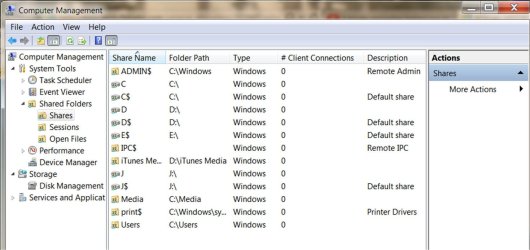
iTunes by default creates its folder inside your user profile folder. You can: right click Computer and Manage - shared folders and see which shares are there (the ones that end with $ are for administrative purposes, don't get confused by them) post a screenshot of that screen with columns expanded enough to show details.
 

My Computer My Computer

At a glance

Windows 7 Ultimate x64 SP1AMD Phenom 2 1090T2x8GB Kingston HyperX Fury Black 1600Mhz Unga...MSI GTX 970 Gaming 4G
Computer type
PC/Desktop
Computer Manufacturer/Model Number
Custom Build
OS
Windows 7 Ultimate x64 SP1
CPU
AMD Phenom 2 1090T
Motherboard
Gigabyte GA-890FXA-UD5
Memory
2x8GB Kingston HyperX Fury Black 1600Mhz Unganged
Graphics Card(s)
MSI GTX 970 Gaming 4G
Sound Card
Realtek On-Board HD 7.1 Audio / Logitech G35
Monitor(s) Displays
3xAcer GD245HQ
Screen Resolution
1920x1080
Hard Drives
Samsung 850 Pro 512GB SSD - OS /
WD Caviar Black SATA 3 - 1 TBx2 - Dynamic RAID 0 /
WD Caviar Green SATA 2 - 640GBx2 - Dynamic RAID 0 /
WD Caviar Green SATA 2 - 640GB - Internal Backup /
Seagate Barracude SATA 3 - 3TB - External Backup/ Sync
PSU
HighPower 1000W
Case
Cooler Master HAF 932
Cooling
Noctua NH-D14
Keyboard
Logitech G19
Mouse
Logitech G500
Internet Speed
100/4 Mbit Cable (100GB quota)
Antivirus
ZoneAlarm Extreme Security / MBAM Pro / MBAE Free / SAS Free
Browser
IE 11 - Firefox - Chrome
Other Info
Logitech F710/ G27/ G940/ Z5500 // TrackIR 5 // Nvidia 3D Surround Vision

My Computer My Computer

At a glance

Windows 7 Ultimate x64 SP1AMD Phenom 2 1090T2x8GB Kingston HyperX Fury Black 1600Mhz Unga...MSI GTX 970 Gaming 4G
Computer type
PC/Desktop
Computer Manufacturer/Model Number
Custom Build
OS
Windows 7 Ultimate x64 SP1
CPU
AMD Phenom 2 1090T
Motherboard
Gigabyte GA-890FXA-UD5
Memory
2x8GB Kingston HyperX Fury Black 1600Mhz Unganged
Graphics Card(s)
MSI GTX 970 Gaming 4G
Sound Card
Realtek On-Board HD 7.1 Audio / Logitech G35
Monitor(s) Displays
3xAcer GD245HQ
Screen Resolution
1920x1080
Hard Drives
Samsung 850 Pro 512GB SSD - OS /
WD Caviar Black SATA 3 - 1 TBx2 - Dynamic RAID 0 /
WD Caviar Green SATA 2 - 640GBx2 - Dynamic RAID 0 /
WD Caviar Green SATA 2 - 640GB - Internal Backup /
Seagate Barracude SATA 3 - 3TB - External Backup/ Sync
PSU
HighPower 1000W
Case
Cooler Master HAF 932
Cooling
Noctua NH-D14
Keyboard
Logitech G19
Mouse
Logitech G500
Internet Speed
100/4 Mbit Cable (100GB quota)
Antivirus
ZoneAlarm Extreme Security / MBAM Pro / MBAE Free / SAS Free
Browser
IE 11 - Firefox - Chrome
Other Info
Logitech F710/ G27/ G940/ Z5500 // TrackIR 5 // Nvidia 3D Surround Vision
See if this is what you are after. I grabbed it using SnagIt. I will continue to did into this. As you can see, my iTunes media folder is now located on my D drive. J is the media drive that I am trying to transfer ISO file too.
 

Attachments

  • Computer Management.jpg
    Computer Management.jpg
    101.2 KB · Views: 0

My Computer My Computer

At a glance

windows 7 home 64
OS
windows 7 home 64
Yeah, this is what we need.

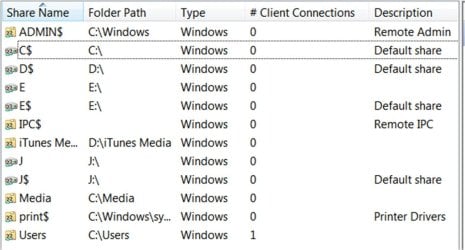
Seems you have shared C, D and J - no need for those. There should be an option to disable/stop sharing them if you click/right click on them.

In Windows Explorer browse to D, (make sure the video/audio files are in it somewhere) right click "iTunes Media" - Properties - Sharing - Advanced Sharing - tick "Share this folder" (should be shared already) - Permissions - Add - enter media in the box - Ok all the way out. Right click and properties once again, but this time switch to Security tab, Edit, Add, enter media in the box, Ok all the way out.

What we did is configure both Sharing permissions and NTFS permissions to allow read to the "media" user. Connect to the share with media user from KDlinks.
 

My Computer My Computer

At a glance

Windows 7 Ultimate x64 SP1AMD Phenom 2 1090T2x8GB Kingston HyperX Fury Black 1600Mhz Unga...MSI GTX 970 Gaming 4G
Computer type
PC/Desktop
Computer Manufacturer/Model Number
Custom Build
OS
Windows 7 Ultimate x64 SP1
CPU
AMD Phenom 2 1090T
Motherboard
Gigabyte GA-890FXA-UD5
Memory
2x8GB Kingston HyperX Fury Black 1600Mhz Unganged
Graphics Card(s)
MSI GTX 970 Gaming 4G
Sound Card
Realtek On-Board HD 7.1 Audio / Logitech G35
Monitor(s) Displays
3xAcer GD245HQ
Screen Resolution
1920x1080
Hard Drives
Samsung 850 Pro 512GB SSD - OS /
WD Caviar Black SATA 3 - 1 TBx2 - Dynamic RAID 0 /
WD Caviar Green SATA 2 - 640GBx2 - Dynamic RAID 0 /
WD Caviar Green SATA 2 - 640GB - Internal Backup /
Seagate Barracude SATA 3 - 3TB - External Backup/ Sync
PSU
HighPower 1000W
Case
Cooler Master HAF 932
Cooling
Noctua NH-D14
Keyboard
Logitech G19
Mouse
Logitech G500
Internet Speed
100/4 Mbit Cable (100GB quota)
Antivirus
ZoneAlarm Extreme Security / MBAM Pro / MBAE Free / SAS Free
Browser
IE 11 - Firefox - Chrome
Other Info
Logitech F710/ G27/ G940/ Z5500 // TrackIR 5 // Nvidia 3D Surround Vision
Ok; I think that I was able to unshared c and d drives ok. J drive comes up when I plug my 2T passport in. I am able to see this drive from the media player just fine.

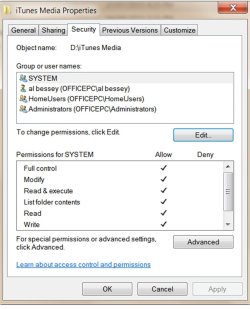
At the end of your instruction, I wasn't sure which of the Group or usernames I should be doing this to. Better for me to be safe than sorry. Screenshots included. Hope they help in sorting me out.
 

Attachments

  • Updated Computer Management.jpg
    Updated Computer Management.jpg
    71.3 KB · Views: 0
  • iTunes Media Property.jpg
    iTunes Media Property.jpg
    87.3 KB · Views: 0

My Computer My Computer

At a glance

windows 7 home 64
OS
windows 7 home 64
To be honest the permissions assigned already should work but to be certain in the last screenshot - edit - add - enter media in the box - select the user account named media (the one we created while trying the share). Once you Ok out of the properties, try to access share with user account: media password as we have set in that previous post.

Looks like your own user account has a space between name and lastname, that might have caused an issue with accessing the share from KDlinks.
 

My Computer My Computer

At a glance

Windows 7 Ultimate x64 SP1AMD Phenom 2 1090T2x8GB Kingston HyperX Fury Black 1600Mhz Unga...MSI GTX 970 Gaming 4G
Computer type
PC/Desktop
Computer Manufacturer/Model Number
Custom Build
OS
Windows 7 Ultimate x64 SP1
CPU
AMD Phenom 2 1090T
Motherboard
Gigabyte GA-890FXA-UD5
Memory
2x8GB Kingston HyperX Fury Black 1600Mhz Unganged
Graphics Card(s)
MSI GTX 970 Gaming 4G
Sound Card
Realtek On-Board HD 7.1 Audio / Logitech G35
Monitor(s) Displays
3xAcer GD245HQ
Screen Resolution
1920x1080
Hard Drives
Samsung 850 Pro 512GB SSD - OS /
WD Caviar Black SATA 3 - 1 TBx2 - Dynamic RAID 0 /
WD Caviar Green SATA 2 - 640GBx2 - Dynamic RAID 0 /
WD Caviar Green SATA 2 - 640GB - Internal Backup /
Seagate Barracude SATA 3 - 3TB - External Backup/ Sync
PSU
HighPower 1000W
Case
Cooler Master HAF 932
Cooling
Noctua NH-D14
Keyboard
Logitech G19
Mouse
Logitech G500
Internet Speed
100/4 Mbit Cable (100GB quota)
Antivirus
ZoneAlarm Extreme Security / MBAM Pro / MBAE Free / SAS Free
Browser
IE 11 - Firefox - Chrome
Other Info
Logitech F710/ G27/ G940/ Z5500 // TrackIR 5 // Nvidia 3D Surround Vision
I can see if I can change my username to same but with no space. Just got in so will try to catch up here.
Interesting difference when I booted the pc. Two password options on login screen; me, and media right beside it. I wasn't using a password to get in yesterday, but it works ok for me, but when I try to log in to the media, it comes up with preparing media followed by " do you want to allow: CpuLevelUpHookLaunch.exe " unknown then type admin password which was rejected. I thought it would be my normal password or the "media" password. I will work on the other instructions now. Still unsure if I should be altering system, Alan Bessey, homeUsers or administrators from the list.
 

My Computer My Computer

At a glance

windows 7 home 64
OS
windows 7 home 64

My Computer My Computer

At a glance

Windows 7 Ultimate x64 SP1AMD Phenom 2 1090T2x8GB Kingston HyperX Fury Black 1600Mhz Unga...MSI GTX 970 Gaming 4G
Computer type
PC/Desktop
Computer Manufacturer/Model Number
Custom Build
OS
Windows 7 Ultimate x64 SP1
CPU
AMD Phenom 2 1090T
Motherboard
Gigabyte GA-890FXA-UD5
Memory
2x8GB Kingston HyperX Fury Black 1600Mhz Unganged
Graphics Card(s)
MSI GTX 970 Gaming 4G
Sound Card
Realtek On-Board HD 7.1 Audio / Logitech G35
Monitor(s) Displays
3xAcer GD245HQ
Screen Resolution
1920x1080
Hard Drives
Samsung 850 Pro 512GB SSD - OS /
WD Caviar Black SATA 3 - 1 TBx2 - Dynamic RAID 0 /
WD Caviar Green SATA 2 - 640GBx2 - Dynamic RAID 0 /
WD Caviar Green SATA 2 - 640GB - Internal Backup /
Seagate Barracude SATA 3 - 3TB - External Backup/ Sync
PSU
HighPower 1000W
Case
Cooler Master HAF 932
Cooling
Noctua NH-D14
Keyboard
Logitech G19
Mouse
Logitech G500
Internet Speed
100/4 Mbit Cable (100GB quota)
Antivirus
ZoneAlarm Extreme Security / MBAM Pro / MBAE Free / SAS Free
Browser
IE 11 - Firefox - Chrome
Other Info
Logitech F710/ G27/ G940/ Z5500 // TrackIR 5 // Nvidia 3D Surround Vision
I think that I had to turn on password protection to access something recently. Turned it back off now. Will test it later.

"media" wasn't on the list initially; SYSTEM was high lit so I got a bit muddled up. So, the good news; I can now access iTunes Media including music, videos etc. I have to sort out a small password issue with the KD720 ( not remembering in favorites). Later.

I also still see, and can access the media folder we created on the C drive. I would like to change that to be D:\media instead. C is my SSD drive and I like to keep it for OS and programs only, if I can. I want to move all my picture over to the D so I would like to access that folder from the Media player also. That might be about it.
 

My Computer My Computer

At a glance

windows 7 home 64
OS
windows 7 home 64
You don't need that media folder, we created it to test :) nothing in it right? Just delete it

Or keep and add any folders you wish to it, you may have to reshare after moving it. You know how to now

If you need any help of course ask here.

Did you manage to auto login again and change your normal user account to remove the space in between?
 

My Computer My Computer

At a glance

Windows 7 Ultimate x64 SP1AMD Phenom 2 1090T2x8GB Kingston HyperX Fury Black 1600Mhz Unga...MSI GTX 970 Gaming 4G
Computer type
PC/Desktop
Computer Manufacturer/Model Number
Custom Build
OS
Windows 7 Ultimate x64 SP1
CPU
AMD Phenom 2 1090T
Motherboard
Gigabyte GA-890FXA-UD5
Memory
2x8GB Kingston HyperX Fury Black 1600Mhz Unganged
Graphics Card(s)
MSI GTX 970 Gaming 4G
Sound Card
Realtek On-Board HD 7.1 Audio / Logitech G35
Monitor(s) Displays
3xAcer GD245HQ
Screen Resolution
1920x1080
Hard Drives
Samsung 850 Pro 512GB SSD - OS /
WD Caviar Black SATA 3 - 1 TBx2 - Dynamic RAID 0 /
WD Caviar Green SATA 2 - 640GBx2 - Dynamic RAID 0 /
WD Caviar Green SATA 2 - 640GB - Internal Backup /
Seagate Barracude SATA 3 - 3TB - External Backup/ Sync
PSU
HighPower 1000W
Case
Cooler Master HAF 932
Cooling
Noctua NH-D14
Keyboard
Logitech G19
Mouse
Logitech G500
Internet Speed
100/4 Mbit Cable (100GB quota)
Antivirus
ZoneAlarm Extreme Security / MBAM Pro / MBAE Free / SAS Free
Browser
IE 11 - Firefox - Chrome
Other Info
Logitech F710/ G27/ G940/ Z5500 // TrackIR 5 // Nvidia 3D Surround Vision
Back
Top