Solved Kernel-Power error ID 41 (task 63) causing total PC freeze.

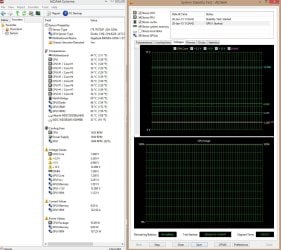
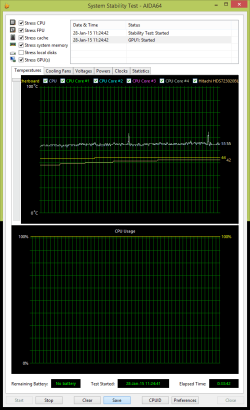
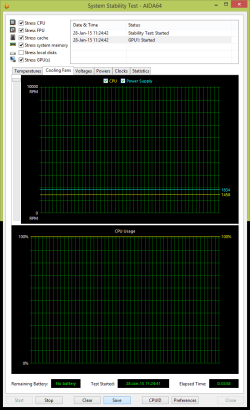
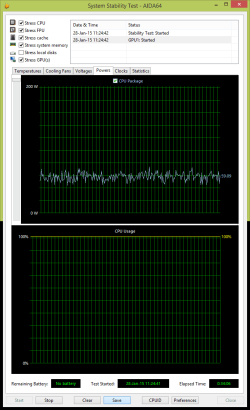
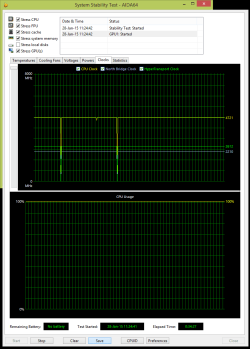
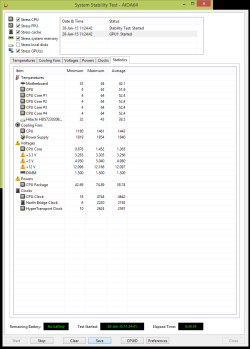
Here's results of full stress test of cpu, gpu, fpu, ram, cache after 34min with shutdown after I stopped test:
 

Attachments

  • Capture.JPG
    Capture.JPG
    186.2 KB · Views: 0
  • stabilitytest.png
    stabilitytest.png
    14.5 KB · Views: 0
  • 2.png
    2.png
    12.9 KB · Views: 0
  • 3.png
    3.png
    14.2 KB · Views: 0
  • 4.png
    4.png
    14 KB · Views: 0
  • 5.png
    5.png
    21.1 KB · Views: 0

My Computer

Computer type
PC/Desktop
OS
Windows 8.1 Pro x64
CPU
Amd FX 9590
Motherboard
Gigabyte GA-990FXA-UD7 rev.3
Memory
MUSHKIN REDLINE 8gb 1866MHz
Graphics Card(s)
SAPPHIRE VAPOR-X R9 280X
Hard Drives
1. HDD: Hitachi HDS723020BLA642 2tb
2. HDD: WDC WD20EARS-00J99B0 2tb
3. SSD: Corsair Force 3 SSD 120gb
Antivirus
Eset Smart Security 8
Browser
Google Chrome
Here's results of full stress test of cpu, gpu, fpu, ram, cache after 34min with shutdown after I stopped test:


34 Minutes that sounds about right for a PSU to warm up enough to shut down just so happen i was doing the same thing and about the same time frame it would shut down so i am now sure it's your PSU

It's faulty you should try a different one and see if that makes a difference and also check your PSU fan if it isn't spinning after like 5 minutes of stressing that means it's not working or cooling off this is exactly what happens to everyone in this situation
 

My Computer

Computer type
PC/Desktop
Computer Manufacturer/Model Number
CoreI7-6700K MrFingerIII Special Builds
OS
Windows 10 Home Premium 64bit sp1
CPU
Intel I7-6700K @ 4.6 Ghz 1.344 volts everyday OC
Motherboard
Asrock Fatality K6 Z170 Socket 1151
Memory
32GB G-Skill TridentZ 3200mhz 16-18-18-38 DDR4
Graphics Card(s)
Sli Gigabyte Windforce GTX 980 G1
Sound Card
AC97 Creative Rage Tactic 3D Headphones Bluetooth
Monitor(s) Displays
27" Asus ROG Swift PG278Q G-Sync 48" Vizio Smart HD TV
Screen Resolution
2560x1440p 27"- 48" Currently Gaming at 2560x1440p Res 2K
Hard Drives
250GB Samsung Evo840SSD Seagate baracuda 500 GB WD Mybook 500Gb 1TB Seagate Barracuda
PSU
HX1050w Corsair Silver 80plus certified crosfire/sli
Case
Enthod Pro Full Tower
Cooling
Corsair H110i GT 280 mm High Performance WaterBlock
Keyboard
Logitech wireless keyboard
Mouse
Logitech wireless mouse
Internet Speed
Cox Cable 100+ mb
Antivirus
WebRoot Spysweeper with Antivirus
Browser
IE-10, Chrome, Opera
Other Info
My Other Rig is a AMD FX8320E @4.6Ghz 16GB Ballistic Sport Ram
Mobo Asrock Fatality 990FX 120GB OCZ SSD 1TB Seagate Barracuda Corsair H75 Cooling PSU Corsair CX750
GPU GTX Gigabyte 970G1
I did CLEAR CMOS and I started full stress test over an hour and all is fine. I'll let you know if everything is ok for couple of days :geek::), I returned C-state back to Enable just in case... :huh:
 

My Computer

Computer type
PC/Desktop
OS
Windows 8.1 Pro x64
CPU
Amd FX 9590
Motherboard
Gigabyte GA-990FXA-UD7 rev.3
Memory
MUSHKIN REDLINE 8gb 1866MHz
Graphics Card(s)
SAPPHIRE VAPOR-X R9 280X
Hard Drives
1. HDD: Hitachi HDS723020BLA642 2tb
2. HDD: WDC WD20EARS-00J99B0 2tb
3. SSD: Corsair Force 3 SSD 120gb
Antivirus
Eset Smart Security 8
Browser
Google Chrome
I would see if you have a friend or someone who would loan you a PSU, just for testing for a few days. That would answer that question.
 

My Computers

System One System Two

  • Computer type
    PC/Desktop
    Computer Manufacturer/Model Number
    ALWAYS UNDER CONSTRUCTION
    OS
    Windows 11 Pro
    CPU
    Ryzen 9 5900X
    Motherboard
    Asus X570 Crosshair Viii Hero
    Memory
    32GB G Skill DDR4-3600
    Graphics Card(s)
    EVGA RTX 3080 FTW 3 Ultra
    Sound Card
    On Board/Sennheiser PC37X Headset
    Monitor(s) Displays
    3 X Asus 27"
    Screen Resolution
    2560x1440
    Hard Drives
    2 X 1 TB NVME drives
    PSU
    EVGA 850
    Case
    Phanteks Eclipse P400A
    Cooling
    EVGA 280 AIO
    Keyboard
    Logitech G510s/ Logitech G13
    Mouse
    Logitech G502
    Internet Speed
    24/1
    Antivirus
    ESET/MBAM Pro/SAS Pro
    Browser
    Chrome/ Firefox/ Edge
  • Computer type
    Laptop
    System Manufacturer/Model Number
    Dell 16 Plus
    OS
    Windows 11 Pro
    CPU
    Intel Ultra 9 288V
    Memory
    32 GB LPDDR5X 8533
    Monitor(s) Displays
    16" Mini-LED HDR600 Touch 90 Hz
    Screen Resolution
    2560X1600
    Hard Drives
    1 TB NVME
Yes mate agree with the others on the PSU and you remember what I said about ok volts but dud current?

Just think of a near flat car battery - it will give you good volts but no grunt to turn the engine - just a rather simple analogy.
 

My Computer

Computer type
PC/Desktop
Computer Manufacturer/Model Number
Own build (new) Desk1 / Asus ROG Win 7 / Desk2 1st build
OS
Desk1 7 Home Prem / Desk2 10 Pro / Main lap Asus ROG 10 Pro 2 laptop Toshiba 7 Pro Asus P2520 7 & 10
CPU
Desk1 i5 3750K / Laptop i7 GTX 860M / Desk2 i5 2500
Motherboard
Desk1 Asus P877-V / Desk2 Gigabyte H67 UD3H / Laptop ?
Memory
Desk1 8GB (1866) / Desk2 16GB (1333) / Laptop 8Gb DDR3
Graphics Card(s)
Desk 1& 2NVidia GTX 650 & Laptops on board Intel
Sound Card
Desk 1 & 2 -XONAR DG Realtek High Def audio Laptop
Monitor(s) Displays
Desk 1 Benq HD 2450 / Desk2 Philips 24" / Laptop 17.5"
Screen Resolution
1920x1080 D1 & D2 & Laptop 1
Hard Drives
Desk1 Samsung 120GB 830 SSD
Asus ROG 256GB 850 Pro SSD
Desk2 Samsung 840 256 SSD
Toshiba 120GB EVO
PSU
Desk 1 Corsair HX 1050/ Laptop ? / Desk 2 Corsair HX 650
Case
Desk 1 Cooler HAF XM ? Toshiba laptop / Desk2 Coolermaster
Cooling
Fans on all Desk1 -2 Desk2 - all Coolermasters 5 Laptop ?
Keyboard
Desk 1 MS Sidewinder X6 Desk 2 MS Sidewinder X 4
Mouse
Desk 1&2 - Gigabyte MS 900 gamer - laptop - Logitec wireless
Internet Speed
ADSL2+
Other Info
One other Desktop (tester) and spare Toshba laptop both with SSD's
Running Kaspersky 2016 ISS on all machines config'd identically
Logitec audio stereo systems on each machine (x3)
Canon MG5250MFC
Router/modem TP-Link running WPA2SK
It just happened again, it happens when I'm working in Camera Raw (Adobe Photoshop). When I moving cursor quickly from one to another point. And after 5-20sec of that, comp restart, everytime now. Because PSU or? I will try another psu tomorow...
 
Last edited:

My Computer

Computer type
PC/Desktop
OS
Windows 8.1 Pro x64
CPU
Amd FX 9590
Motherboard
Gigabyte GA-990FXA-UD7 rev.3
Memory
MUSHKIN REDLINE 8gb 1866MHz
Graphics Card(s)
SAPPHIRE VAPOR-X R9 280X
Hard Drives
1. HDD: Hitachi HDS723020BLA642 2tb
2. HDD: WDC WD20EARS-00J99B0 2tb
3. SSD: Corsair Force 3 SSD 120gb
Antivirus
Eset Smart Security 8
Browser
Google Chrome
Ok Marc best thing to do mate as it could just be something gone south in that device - it has a self testing circuitry inside that governs whether the machine fires up the system and if the volts are not right or go down then it is an auto shut down it is called the Power_Good signal and that occurs at pin 8 (grey cable) on the 24 pin board socket.

It is detailed here
Voltage Rails - Power Supply 101: A Reference Of Specifications scroll down page 2 until you see Power_Good signal:) it will explain.

Now it might not be that but a possibility.
 

My Computer

Computer type
PC/Desktop
Computer Manufacturer/Model Number
Own build (new) Desk1 / Asus ROG Win 7 / Desk2 1st build
OS
Desk1 7 Home Prem / Desk2 10 Pro / Main lap Asus ROG 10 Pro 2 laptop Toshiba 7 Pro Asus P2520 7 & 10
CPU
Desk1 i5 3750K / Laptop i7 GTX 860M / Desk2 i5 2500
Motherboard
Desk1 Asus P877-V / Desk2 Gigabyte H67 UD3H / Laptop ?
Memory
Desk1 8GB (1866) / Desk2 16GB (1333) / Laptop 8Gb DDR3
Graphics Card(s)
Desk 1& 2NVidia GTX 650 & Laptops on board Intel
Sound Card
Desk 1 & 2 -XONAR DG Realtek High Def audio Laptop
Monitor(s) Displays
Desk 1 Benq HD 2450 / Desk2 Philips 24" / Laptop 17.5"
Screen Resolution
1920x1080 D1 & D2 & Laptop 1
Hard Drives
Desk1 Samsung 120GB 830 SSD
Asus ROG 256GB 850 Pro SSD
Desk2 Samsung 840 256 SSD
Toshiba 120GB EVO
PSU
Desk 1 Corsair HX 1050/ Laptop ? / Desk 2 Corsair HX 650
Case
Desk 1 Cooler HAF XM ? Toshiba laptop / Desk2 Coolermaster
Cooling
Fans on all Desk1 -2 Desk2 - all Coolermasters 5 Laptop ?
Keyboard
Desk 1 MS Sidewinder X6 Desk 2 MS Sidewinder X 4
Mouse
Desk 1&2 - Gigabyte MS 900 gamer - laptop - Logitec wireless
Internet Speed
ADSL2+
Other Info
One other Desktop (tester) and spare Toshba laptop both with SSD's
Running Kaspersky 2016 ISS on all machines config'd identically
Logitec audio stereo systems on each machine (x3)
Canon MG5250MFC
Router/modem TP-Link running WPA2SK
How to check voltage with VOLTAGE TESTER (UNIMER) and to examine validity of board and psu? :huh: First I need to buy it. :)

On Monday I will be replace for new psu Cooler Master M2 1000w, same one. And if problem is still some, then is mb for sure... It is my opinion... :huh:
 

Attachments

  • Digitalni-unimer-sa-par-nedostataka_slika_O_13921713.jpg
    Digitalni-unimer-sa-par-nedostataka_slika_O_13921713.jpg
    128.9 KB · Views: 0

My Computer

Computer type
PC/Desktop
OS
Windows 8.1 Pro x64
CPU
Amd FX 9590
Motherboard
Gigabyte GA-990FXA-UD7 rev.3
Memory
MUSHKIN REDLINE 8gb 1866MHz
Graphics Card(s)
SAPPHIRE VAPOR-X R9 280X
Hard Drives
1. HDD: Hitachi HDS723020BLA642 2tb
2. HDD: WDC WD20EARS-00J99B0 2tb
3. SSD: Corsair Force 3 SSD 120gb
Antivirus
Eset Smart Security 8
Browser
Google Chrome
Yep well any meter like that one can be bought so cheap these days and is quite good enough for what we need running volt checks.
Now I know it is a hit or miss affair but testing pin 8 and hoping to see if the pin signal falls out and you seeing it when that happens but is worth a try.
 

My Computer

Computer type
PC/Desktop
Computer Manufacturer/Model Number
Own build (new) Desk1 / Asus ROG Win 7 / Desk2 1st build
OS
Desk1 7 Home Prem / Desk2 10 Pro / Main lap Asus ROG 10 Pro 2 laptop Toshiba 7 Pro Asus P2520 7 & 10
CPU
Desk1 i5 3750K / Laptop i7 GTX 860M / Desk2 i5 2500
Motherboard
Desk1 Asus P877-V / Desk2 Gigabyte H67 UD3H / Laptop ?
Memory
Desk1 8GB (1866) / Desk2 16GB (1333) / Laptop 8Gb DDR3
Graphics Card(s)
Desk 1& 2NVidia GTX 650 & Laptops on board Intel
Sound Card
Desk 1 & 2 -XONAR DG Realtek High Def audio Laptop
Monitor(s) Displays
Desk 1 Benq HD 2450 / Desk2 Philips 24" / Laptop 17.5"
Screen Resolution
1920x1080 D1 & D2 & Laptop 1
Hard Drives
Desk1 Samsung 120GB 830 SSD
Asus ROG 256GB 850 Pro SSD
Desk2 Samsung 840 256 SSD
Toshiba 120GB EVO
PSU
Desk 1 Corsair HX 1050/ Laptop ? / Desk 2 Corsair HX 650
Case
Desk 1 Cooler HAF XM ? Toshiba laptop / Desk2 Coolermaster
Cooling
Fans on all Desk1 -2 Desk2 - all Coolermasters 5 Laptop ?
Keyboard
Desk 1 MS Sidewinder X6 Desk 2 MS Sidewinder X 4
Mouse
Desk 1&2 - Gigabyte MS 900 gamer - laptop - Logitec wireless
Internet Speed
ADSL2+
Other Info
One other Desktop (tester) and spare Toshba laptop both with SSD's
Running Kaspersky 2016 ISS on all machines config'd identically
Logitec audio stereo systems on each machine (x3)
Canon MG5250MFC
Router/modem TP-Link running WPA2SK
Quick update! :party:

I changed motherboard and the problems disappeared... Now, my new mb is Asus Crosshair V Formula-Z! :)
 

My Computer

Computer type
PC/Desktop
OS
Windows 8.1 Pro x64
CPU
Amd FX 9590
Motherboard
Gigabyte GA-990FXA-UD7 rev.3
Memory
MUSHKIN REDLINE 8gb 1866MHz
Graphics Card(s)
SAPPHIRE VAPOR-X R9 280X
Hard Drives
1. HDD: Hitachi HDS723020BLA642 2tb
2. HDD: WDC WD20EARS-00J99B0 2tb
3. SSD: Corsair Force 3 SSD 120gb
Antivirus
Eset Smart Security 8
Browser
Google Chrome
Well then it just goes to prove that these things can be right out of field sometimes. But mate I would still check out that PSU after all the board is new and if the board was out of whack (old one) who knows if the problem may have been caused by some askew in the PSU - takes only a few minutes and what have you got to lose.
See my little ditty and use it to check the volts out
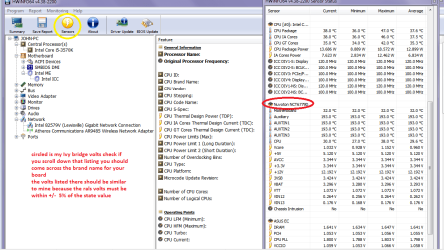
Using HW Info
You can test the volts on the PSU with HW Info HWiNFO, HWiNFO32/64 - Download < download the right bit version and close the right hand window select Sensors and scroll down to the power section where you will see what the volts are doing see my pic.
The original right hand window shows the machine running and is handy for that but for looking at the components in some detail close it and use the main left hand side panel
FOR OTHER COMPONENTS
Open each small square with + in it on the section the components are in and then click on the individual component/s (it will highlight in blue) - in the right hand side will appear all sorts of details including brands speeds and other essential info that particular device. See pic for example.
It is a good program to have on board so to speak for any of the component details.
 

Attachments

  • HW Info PSU VOLTS DSEKTOP.PNG
    HW Info PSU VOLTS DSEKTOP.PNG
    51.7 KB · Views: 4

My Computer

Computer type
PC/Desktop
Computer Manufacturer/Model Number
Own build (new) Desk1 / Asus ROG Win 7 / Desk2 1st build
OS
Desk1 7 Home Prem / Desk2 10 Pro / Main lap Asus ROG 10 Pro 2 laptop Toshiba 7 Pro Asus P2520 7 & 10
CPU
Desk1 i5 3750K / Laptop i7 GTX 860M / Desk2 i5 2500
Motherboard
Desk1 Asus P877-V / Desk2 Gigabyte H67 UD3H / Laptop ?
Memory
Desk1 8GB (1866) / Desk2 16GB (1333) / Laptop 8Gb DDR3
Graphics Card(s)
Desk 1& 2NVidia GTX 650 & Laptops on board Intel
Sound Card
Desk 1 & 2 -XONAR DG Realtek High Def audio Laptop
Monitor(s) Displays
Desk 1 Benq HD 2450 / Desk2 Philips 24" / Laptop 17.5"
Screen Resolution
1920x1080 D1 & D2 & Laptop 1
Hard Drives
Desk1 Samsung 120GB 830 SSD
Asus ROG 256GB 850 Pro SSD
Desk2 Samsung 840 256 SSD
Toshiba 120GB EVO
PSU
Desk 1 Corsair HX 1050/ Laptop ? / Desk 2 Corsair HX 650
Case
Desk 1 Cooler HAF XM ? Toshiba laptop / Desk2 Coolermaster
Cooling
Fans on all Desk1 -2 Desk2 - all Coolermasters 5 Laptop ?
Keyboard
Desk 1 MS Sidewinder X6 Desk 2 MS Sidewinder X 4
Mouse
Desk 1&2 - Gigabyte MS 900 gamer - laptop - Logitec wireless
Internet Speed
ADSL2+
Other Info
One other Desktop (tester) and spare Toshba laptop both with SSD's
Running Kaspersky 2016 ISS on all machines config'd identically
Logitec audio stereo systems on each machine (x3)
Canon MG5250MFC
Router/modem TP-Link running WPA2SK
I took PSU to examination test in some pc servise, and the power supply is completely correct and without errors. After that I changed the motherboard and problems are completely gone ... Asus is Asus :)
 

My Computer

Computer type
PC/Desktop
OS
Windows 8.1 Pro x64
CPU
Amd FX 9590
Motherboard
Gigabyte GA-990FXA-UD7 rev.3
Memory
MUSHKIN REDLINE 8gb 1866MHz
Graphics Card(s)
SAPPHIRE VAPOR-X R9 280X
Hard Drives
1. HDD: Hitachi HDS723020BLA642 2tb
2. HDD: WDC WD20EARS-00J99B0 2tb
3. SSD: Corsair Force 3 SSD 120gb
Antivirus
Eset Smart Security 8
Browser
Google Chrome
Good to hear but hang on to that program HW Info it is very handy to have and is not space hungry:)
 

My Computer

Computer type
PC/Desktop
Computer Manufacturer/Model Number
Own build (new) Desk1 / Asus ROG Win 7 / Desk2 1st build
OS
Desk1 7 Home Prem / Desk2 10 Pro / Main lap Asus ROG 10 Pro 2 laptop Toshiba 7 Pro Asus P2520 7 & 10
CPU
Desk1 i5 3750K / Laptop i7 GTX 860M / Desk2 i5 2500
Motherboard
Desk1 Asus P877-V / Desk2 Gigabyte H67 UD3H / Laptop ?
Memory
Desk1 8GB (1866) / Desk2 16GB (1333) / Laptop 8Gb DDR3
Graphics Card(s)
Desk 1& 2NVidia GTX 650 & Laptops on board Intel
Sound Card
Desk 1 & 2 -XONAR DG Realtek High Def audio Laptop
Monitor(s) Displays
Desk 1 Benq HD 2450 / Desk2 Philips 24" / Laptop 17.5"
Screen Resolution
1920x1080 D1 & D2 & Laptop 1
Hard Drives
Desk1 Samsung 120GB 830 SSD
Asus ROG 256GB 850 Pro SSD
Desk2 Samsung 840 256 SSD
Toshiba 120GB EVO
PSU
Desk 1 Corsair HX 1050/ Laptop ? / Desk 2 Corsair HX 650
Case
Desk 1 Cooler HAF XM ? Toshiba laptop / Desk2 Coolermaster
Cooling
Fans on all Desk1 -2 Desk2 - all Coolermasters 5 Laptop ?
Keyboard
Desk 1 MS Sidewinder X6 Desk 2 MS Sidewinder X 4
Mouse
Desk 1&2 - Gigabyte MS 900 gamer - laptop - Logitec wireless
Internet Speed
ADSL2+
Other Info
One other Desktop (tester) and spare Toshba laptop both with SSD's
Running Kaspersky 2016 ISS on all machines config'd identically
Logitec audio stereo systems on each machine (x3)
Canon MG5250MFC
Router/modem TP-Link running WPA2SK
I have it :) , HWinfo, Aida64, HWMonitorPro, cpu-z, Open Hardware Monitor... I think it's a lot and enough :D
 

My Computer

Computer type
PC/Desktop
OS
Windows 8.1 Pro x64
CPU
Amd FX 9590
Motherboard
Gigabyte GA-990FXA-UD7 rev.3
Memory
MUSHKIN REDLINE 8gb 1866MHz
Graphics Card(s)
SAPPHIRE VAPOR-X R9 280X
Hard Drives
1. HDD: Hitachi HDS723020BLA642 2tb
2. HDD: WDC WD20EARS-00J99B0 2tb
3. SSD: Corsair Force 3 SSD 120gb
Antivirus
Eset Smart Security 8
Browser
Google Chrome

My Computer

Computer type
PC/Desktop
Computer Manufacturer/Model Number
Own build (new) Desk1 / Asus ROG Win 7 / Desk2 1st build
OS
Desk1 7 Home Prem / Desk2 10 Pro / Main lap Asus ROG 10 Pro 2 laptop Toshiba 7 Pro Asus P2520 7 & 10
CPU
Desk1 i5 3750K / Laptop i7 GTX 860M / Desk2 i5 2500
Motherboard
Desk1 Asus P877-V / Desk2 Gigabyte H67 UD3H / Laptop ?
Memory
Desk1 8GB (1866) / Desk2 16GB (1333) / Laptop 8Gb DDR3
Graphics Card(s)
Desk 1& 2NVidia GTX 650 & Laptops on board Intel
Sound Card
Desk 1 & 2 -XONAR DG Realtek High Def audio Laptop
Monitor(s) Displays
Desk 1 Benq HD 2450 / Desk2 Philips 24" / Laptop 17.5"
Screen Resolution
1920x1080 D1 & D2 & Laptop 1
Hard Drives
Desk1 Samsung 120GB 830 SSD
Asus ROG 256GB 850 Pro SSD
Desk2 Samsung 840 256 SSD
Toshiba 120GB EVO
PSU
Desk 1 Corsair HX 1050/ Laptop ? / Desk 2 Corsair HX 650
Case
Desk 1 Cooler HAF XM ? Toshiba laptop / Desk2 Coolermaster
Cooling
Fans on all Desk1 -2 Desk2 - all Coolermasters 5 Laptop ?
Keyboard
Desk 1 MS Sidewinder X6 Desk 2 MS Sidewinder X 4
Mouse
Desk 1&2 - Gigabyte MS 900 gamer - laptop - Logitec wireless
Internet Speed
ADSL2+
Other Info
One other Desktop (tester) and spare Toshba laptop both with SSD's
Running Kaspersky 2016 ISS on all machines config'd identically
Logitec audio stereo systems on each machine (x3)
Canon MG5250MFC
Router/modem TP-Link running WPA2SK
In my case, "Disable ReadyBoot" brought about stopping the random crashes (id = 41).
Please try "ReadyBoob.bat".

No kp41
 

My Computer

Computer Manufacturer/Model Number
DELL /vostro 230s Desktop
OS
Windows 7 Professional 32bit
CPU
Intel Celeron E3400 2.60GHz
Motherboard
Dell
Memory
2GB DDR3 SDRAM 1333MHz
Graphics Card(s)
None
Sound Card
None
Monitor(s) Displays
Dell
Hard Drives
250GB Hdd, 250BG Hdd
PSU
250W
Case
Dell
The meaning of Kernel Power 41 is simply The system has rebooted without cleanly shutting down first. That can be caused by any number of causes from a bad PSU to a short in the system, or anything in between. There is no single cause for that.
 

My Computers

System One System Two

  • Computer type
    PC/Desktop
    Computer Manufacturer/Model Number
    ALWAYS UNDER CONSTRUCTION
    OS
    Windows 11 Pro
    CPU
    Ryzen 9 5900X
    Motherboard
    Asus X570 Crosshair Viii Hero
    Memory
    32GB G Skill DDR4-3600
    Graphics Card(s)
    EVGA RTX 3080 FTW 3 Ultra
    Sound Card
    On Board/Sennheiser PC37X Headset
    Monitor(s) Displays
    3 X Asus 27"
    Screen Resolution
    2560x1440
    Hard Drives
    2 X 1 TB NVME drives
    PSU
    EVGA 850
    Case
    Phanteks Eclipse P400A
    Cooling
    EVGA 280 AIO
    Keyboard
    Logitech G510s/ Logitech G13
    Mouse
    Logitech G502
    Internet Speed
    24/1
    Antivirus
    ESET/MBAM Pro/SAS Pro
    Browser
    Chrome/ Firefox/ Edge
  • Computer type
    Laptop
    System Manufacturer/Model Number
    Dell 16 Plus
    OS
    Windows 11 Pro
    CPU
    Intel Ultra 9 288V
    Memory
    32 GB LPDDR5X 8533
    Monitor(s) Displays
    16" Mini-LED HDR600 Touch 90 Hz
    Screen Resolution
    2560X1600
    Hard Drives
    1 TB NVME
I think Win7/8 Kernel Power 41 issue is depend on OS.
If the same HW, and in different OS, perhaps the 41 issue will not occur.
I think the most dark culprit is "ReadyBoot" function from my experience.
I'm convinced that ReadyBoot has a bug.

To see is to believe.
If old HW circumstance can be available, please try "ReadyBoob.bat".
 

My Computer

Computer Manufacturer/Model Number
DELL /vostro 230s Desktop
OS
Windows 7 Professional 32bit
CPU
Intel Celeron E3400 2.60GHz
Motherboard
Dell
Memory
2GB DDR3 SDRAM 1333MHz
Graphics Card(s)
None
Sound Card
None
Monitor(s) Displays
Dell
Hard Drives
250GB Hdd, 250BG Hdd
PSU
250W
Case
Dell
The point is that every BSOD is different. If there was a bug in Windows 7 ready boost, every Windows 7 would suffer the same fate. They all do not. Every computer with new hardware does not suffer from Kernel Power 41 errors nor does every computer with old hardware suffer from it. I am happy you tried that and it fixed your problem, but that will not fix everyone's problem.
 

My Computers

System One System Two

  • Computer type
    PC/Desktop
    Computer Manufacturer/Model Number
    ALWAYS UNDER CONSTRUCTION
    OS
    Windows 11 Pro
    CPU
    Ryzen 9 5900X
    Motherboard
    Asus X570 Crosshair Viii Hero
    Memory
    32GB G Skill DDR4-3600
    Graphics Card(s)
    EVGA RTX 3080 FTW 3 Ultra
    Sound Card
    On Board/Sennheiser PC37X Headset
    Monitor(s) Displays
    3 X Asus 27"
    Screen Resolution
    2560x1440
    Hard Drives
    2 X 1 TB NVME drives
    PSU
    EVGA 850
    Case
    Phanteks Eclipse P400A
    Cooling
    EVGA 280 AIO
    Keyboard
    Logitech G510s/ Logitech G13
    Mouse
    Logitech G502
    Internet Speed
    24/1
    Antivirus
    ESET/MBAM Pro/SAS Pro
    Browser
    Chrome/ Firefox/ Edge
  • Computer type
    Laptop
    System Manufacturer/Model Number
    Dell 16 Plus
    OS
    Windows 11 Pro
    CPU
    Intel Ultra 9 288V
    Memory
    32 GB LPDDR5X 8533
    Monitor(s) Displays
    16" Mini-LED HDR600 Touch 90 Hz
    Screen Resolution
    2560X1600
    Hard Drives
    1 TB NVME
Back
Top