Keyboard Layouts

Rammstein

New member
Local time
6:07 PM
Messages
15
Location
Yerevan
Is there a program, for making an alternative keyboard layouts in Win 7?

P.S. I have found this, but don't know, if this works in Windows 7 (in Vista works).
 

My Computer

OS
Windows 7 Ultimate x64
CPU
Intel Core i5 2500
Motherboard
ASUS P8H61-M LX2
Memory
4 GB DDR3
Graphics Card(s)
GT440 1GB
Sound Card
Onboard
Monitor(s) Displays
NEC LCD22WV
Screen Resolution
1680x1050 px
Hard Drives
Seagate 500 GB
PSU
400 Watt
Case
Vento
Keyboard
Genius SlimStar i220
Mouse
A4 Tech WOP-35
Internet Speed
1024/512 Kbps
im google it, it does work, better try it on your own.
 

My Computer

OS
Windows Seven
Yes, the keyboard layout creator works for Windows 7. The same layout I created installs fine on XP, Vista and 7.
 

My Computer

Computer Manufacturer/Model Number
Me :) I build all my PCs
OS
Windows 7 Home 64, Vista Ultimate 64
Yeah, really it works, thanks!
 

My Computer

OS
Windows 7 Ultimate x64
CPU
Intel Core i5 2500
Motherboard
ASUS P8H61-M LX2
Memory
4 GB DDR3
Graphics Card(s)
GT440 1GB
Sound Card
Onboard
Monitor(s) Displays
NEC LCD22WV
Screen Resolution
1680x1050 px
Hard Drives
Seagate 500 GB
PSU
400 Watt
Case
Vento
Keyboard
Genius SlimStar i220
Mouse
A4 Tech WOP-35
Internet Speed
1024/512 Kbps
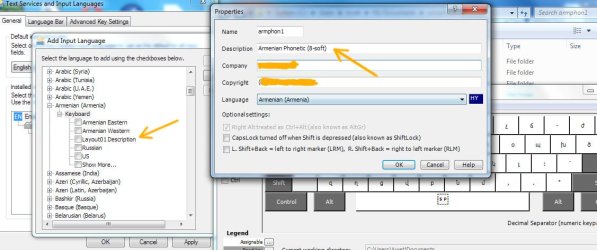
... but it have a problem, with layout names.
I'm enternig it into "Description" box, but after instalation all layouts in laguage bar settings are showing with same name - "Layout01 Description".
 

Attachments

  • 0000.jpg
    0000.jpg
    95.3 KB · Views: 167

My Computer

OS
Windows 7 Ultimate x64
CPU
Intel Core i5 2500
Motherboard
ASUS P8H61-M LX2
Memory
4 GB DDR3
Graphics Card(s)
GT440 1GB
Sound Card
Onboard
Monitor(s) Displays
NEC LCD22WV
Screen Resolution
1680x1050 px
Hard Drives
Seagate 500 GB
PSU
400 Watt
Case
Vento
Keyboard
Genius SlimStar i220
Mouse
A4 Tech WOP-35
Internet Speed
1024/512 Kbps
... but it have a problem, with layout names.
I'm enternig it into "Description" box, but after instalation all layouts in laguage bar settings are showing with same name - "Layout01 Description".

This problem I have solved manually. Only needs to edit with Notepad .klc file, saved by Keyboard Layout Creator, and in the end ther are rows

Code:
DESCRIPTIONS

0409	Layout1 Description

LANGUAGENAMES

0409	English (United States)

ENDKBD

The "Layout1 Description" needs to change with real name.
 

My Computer

OS
Windows 7 Ultimate x64
CPU
Intel Core i5 2500
Motherboard
ASUS P8H61-M LX2
Memory
4 GB DDR3
Graphics Card(s)
GT440 1GB
Sound Card
Onboard
Monitor(s) Displays
NEC LCD22WV
Screen Resolution
1680x1050 px
Hard Drives
Seagate 500 GB
PSU
400 Watt
Case
Vento
Keyboard
Genius SlimStar i220
Mouse
A4 Tech WOP-35
Internet Speed
1024/512 Kbps
Make sure you install version 1.4 of MSKLC which is Vista/Windows 7 compatible, has some new features specific to those OSes and can generate x64 keyboard layout DLLs.
 

My Computer

Computer Manufacturer/Model Number
Custom built
OS
Windows XP Media Center Edition 2005
CPU
Intel Core i9
Memory
DDR3 6GB Triple Channel
Graphics Card(s)
ATI HD 5970
Sound Card
SoundBlaster X-Fi HomeTheater HD
Monitor(s) Displays
LG Monitor TV
Screen Resolution
1920 x 1080
Hard Drives
Intel X-25 E in RAID 1+0
PSU
750 Watts
Case
HomeTheater HD
Cooling
Liquid cooling
Keyboard
Microsoft
Mouse
Microsoft
Internet Speed
1 Mbps
Other Info
In love with Windows.
Make sure you install version 1.4 of MSKLC which is Vista/Windows 7 compatible, has some new features specific to those OSes and can generate x64 keyboard layout DLLs.

Yes, I have installed 1.4.:)
 

My Computer

OS
Windows 7 Ultimate x64
CPU
Intel Core i5 2500
Motherboard
ASUS P8H61-M LX2
Memory
4 GB DDR3
Graphics Card(s)
GT440 1GB
Sound Card
Onboard
Monitor(s) Displays
NEC LCD22WV
Screen Resolution
1680x1050 px
Hard Drives
Seagate 500 GB
PSU
400 Watt
Case
Vento
Keyboard
Genius SlimStar i220
Mouse
A4 Tech WOP-35
Internet Speed
1024/512 Kbps
Are you trying to use Dvorak or something? I want to try it!
 
Am I the only one here who had trouble installing Microsoft's Keyboard Layout Creator in Windows 7? For me the installation program refuses to proceed, claiming that I need to download and install the .NET 2.0 framework.

I downloaded that, but it won't run, because .NET 2.0 is already a component of the Windows 7 OS, and configurable only through Control Panel's "Programs and Features" -> "Turn Windows Features On or Off"...

So I go there and see only Microsoft .NET Framework 3.5.1, which is already checked (plus the unchecked sub-entries Windows Communication Foundation HTTP Activation & Windows Communication Foundation non-HTTP Activation). I tried un-checking it, rebooting, re-checking it, and re-rebooting, but nothing has changed...

I've tried running the MSKLC setup program in various compatibility modes, as an administrator, and I've tried running compatibility troubleshooting on it and running in "ignore version check" mode. I've tried these same methods directly on the unpacked setup *.msi in its temp' folder.

But no matter what I get the same message every time:

Microsoft Keyboard Layout Creator requires the .NET Framework.
Please install the .NET Framework from http://msdn.microsoft.com/downloads/sample.asp?url=/msdn-files/027/001/829/msdncompositedoc.xml and run this setup again.
Yes / No


]-:<

And you guys mean to tell me that you all just happily installed this program without any complications at all? I'm jealous. I found two other people who share my trouble, but neither of them seems to've found any solution yet.

Any ideas? Thanks for any! Cheers.

 

My Computer

Computer Manufacturer/Model Number
Asus 1005HA
OS
Windows 7 Ultimate
CPU
Atom 1.67ghz
Memory
2GB
Monitor(s) Displays
7" LCD
I had the same problem recently. The thing is there are 2 versions of MKLC out there. Version 1.3 is about 5MB and it gives me this .NET error. Version 1.4 is about 10MB and it installs just fine. You can get it from here: Download details: Microsoft Keyboard Layout Creator 1.4
 

My Computer

Computer Manufacturer/Model Number
Me :) I build all my PCs
OS
Windows 7 Home 64, Vista Ultimate 64
Thanks from the mountains, Ivo! I could swear that I had tried installing both versions before... but I followed your link and re-downloaded, just to quadruple-check, and you're right -- it installed fine for me. [-:
 

My Computer

Computer Manufacturer/Model Number
Asus 1005HA
OS
Windows 7 Ultimate
CPU
Atom 1.67ghz
Memory
2GB
Monitor(s) Displays
7" LCD
Am I the only one here who had trouble installing Microsoft's Keyboard Layout Creator in Windows 7? For me the installation program refuses to proceed, claiming that I need to download and install the .NET 2.0 framework.

I downloaded that, but it won't run, because .NET 2.0 is already a component of the Windows 7 OS, and configurable only through Control Panel's "Programs and Features" -> "Turn Windows Features On or Off"...

So I go there and see only Microsoft .NET Framework 3.5.1, which is already checked (plus the unchecked sub-entries Windows Communication Foundation HTTP Activation & Windows Communication Foundation non-HTTP Activation). I tried un-checking it, rebooting, re-checking it, and re-rebooting, but nothing has changed...

I've tried running the MSKLC setup program in various compatibility modes, as an administrator, and I've tried running compatibility troubleshooting on it and running in "ignore version check" mode. I've tried these same methods directly on the unpacked setup *.msi in its temp' folder.

But no matter what I get the same message every time:

Microsoft Keyboard Layout Creator requires the .NET Framework.
Please install the .NET Framework from http://msdn.microsoft.com/downloads/sample.asp?url=/msdn-files/027/001/829/msdncompositedoc.xml and run this setup again.
Yes / No


]-:<

And you guys mean to tell me that you all just happily installed this program without any complications at all? I'm jealous. I found two other people who share my trouble, but neither of them seems to've found any solution yet.

Any ideas? Thanks for any! Cheers.

The exact same thing is happening for me. So incredibly frustrating, yet I cannot find an answer online.
 

My Computer

OS
Windows 7 Home Premium 64bit
Yeah, I feel your pain.

Did you try installing the version Ivo linked to? I don't remember details anymore, but it worked for me after everything else failed.

Let us know. Good luck!
 

My Computer

Computer Manufacturer/Model Number
Asus 1005HA
OS
Windows 7 Ultimate
CPU
Atom 1.67ghz
Memory
2GB
Monitor(s) Displays
7" LCD
Yeah, I feel your pain.

Did you try installing the version Ivo linked to? I don't remember details anymore, but it worked for me after everything else failed.

Let us know. Good luck!

Yes, I installed that version, but still no go.

Fortunately, I found a blog post, written by (I believe) a Microsoft programmer, that provided a workaround. The non-appearing keyboard was a bug that apparently Microsoft knew about but didn't address, or something like that.

Anyway, slightly increasing the screen resolution DPI fixes the problem, believe it or not. Here's a link to the post where I found this fix:

A picture that *still* can't be easily described with words - Sorting it all Out - Site Home - MSDN Blogs
 

My Computer

OS
Windows 7 Home Premium 64bit
Back
Top