
Keyboard shortcuts do not work

Steampunk7

New member
Member
VIP
Local time
9:37 AM
Messages
119
Keyboard shortcuts do not work (missing iassdo.dll.mui file)

After running CCleaner I noticed that my keyboard shortcuts do not work properly, neither in Win Explorer nor in PS cS6. For instance, Shift+Del does not work. "End" as well. Some things work, some don't. When I tried to write down "ctrl" using ctrl button I found that capital c does not work wither. I had to click on CapsLock to write it down.
ccleaner might not be the culprit, though, since I am using it for years and I haven't had problems with that app so far.
I run the SFC /SCANNOW Command several times in a row. I always get message saying "WRP found corrupt files but was unable to fix some of them." I attached sfcdetails.txt file with SFC scan result details from the CBS.LOG. I must say that though it says that "All files and registry keys listed in this transaction have been successfully repaired" the problem persists. The file iassdo.dll.mui is missing, apparently. I just run several more times sfc/scannow and both times I got message saying "WRP found corrupt files but was unable to fix some of them."
 

Attachments

Last edited:

My Computer My Computer

At a glance

Windows 7 Ultimate x64Intel(R) Xeon(R) CPU E3-1231 v3 @ 3.40GHz16 GBAMD Radeon (TM) R9 390 Series
Computer type
PC/Desktop
OS
Windows 7 Ultimate x64
CPU
Intel(R) Xeon(R) CPU E3-1231 v3 @ 3.40GHz
Motherboard
ASUSTeK COMPUTER INC. Z97-A Rev 1.xx
Memory
16 GB
Graphics Card(s)
AMD Radeon (TM) R9 390 Series
Sound Card
(1) AMD High Definition Audio Device (2) Realtek High Defi
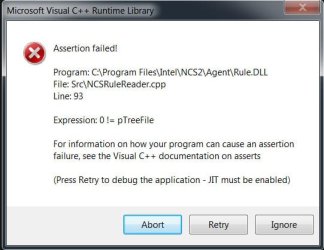
Edit- I restored system to a date before this had started to happen, hoping that that would solve the problem. Then I tried to download Windows updates, but unsuccessfully. I received this message Untitled-1.jpg
 

My Computer My Computer

At a glance

Windows 7 Ultimate x64Intel(R) Xeon(R) CPU E3-1231 v3 @ 3.40GHz16 GBAMD Radeon (TM) R9 390 Series
Computer type
PC/Desktop
OS
Windows 7 Ultimate x64
CPU
Intel(R) Xeon(R) CPU E3-1231 v3 @ 3.40GHz
Motherboard
ASUSTeK COMPUTER INC. Z97-A Rev 1.xx
Memory
16 GB
Graphics Card(s)
AMD Radeon (TM) R9 390 Series
Sound Card
(1) AMD High Definition Audio Device (2) Realtek High Defi
Hi Steampunk7,

To undo a system restore operation in Windows 7:

  1. Click Start and type System Restore in the search box. From the list of results, click System Restore.
  2. Click Undo my last restoration and click Next.
  3. Review your choices and click Finish.
  4. Your computer will restart once the process is complete. Log on to the computer.
When it completes please post again.
 

My Computer My Computer

At a glance

Win 10 x64, Linux Lite, Win 7 x64, BlackArch,...
Computer type
PC/Desktop
Computer Manufacturer/Model Number
HP Desktop & Compaq Laptop
OS
Win 10 x64, Linux Lite, Win 7 x64, BlackArch, & Kali
Hard Drives
Samsung 850 Pro 256Gb,
Hitachi HDD 1Tb,
Crucial MX SSD 250Gb
Segate 3Tb USB 3.0 Ext. Backup HDD
Internet Speed
150Mbps dn, 20Mbps up
Antivirus
Avast Free, Malwarebytes Anti-Exploit & Anti-Ransomware
Browser
Firefox, Chrome, Opera, & VPN
Hi Snick, I run System restore several times, until - after I ran the earliest system restore date - a couple of shortcuts started to work. Majority of issues are still present, but some keys are back again ("End" for instance"). trl button is still down. Can't write down capital c. I am saying this because I am afraid that when I undo system restore, the keys that are back now will not work. I will do it, though, if it is really necessary..
 

My Computer My Computer

At a glance

Windows 7 Ultimate x64Intel(R) Xeon(R) CPU E3-1231 v3 @ 3.40GHz16 GBAMD Radeon (TM) R9 390 Series
Computer type
PC/Desktop
OS
Windows 7 Ultimate x64
CPU
Intel(R) Xeon(R) CPU E3-1231 v3 @ 3.40GHz
Motherboard
ASUSTeK COMPUTER INC. Z97-A Rev 1.xx
Memory
16 GB
Graphics Card(s)
AMD Radeon (TM) R9 390 Series
Sound Card
(1) AMD High Definition Audio Device (2) Realtek High Defi
Not necessary being that you managed to get your system up and running.

Check for missing/corrupt system files, to do so:

Please run sfc /scannow from Administrative Command Prompt.

Click :orb: type cmd, when it appears, right-click and choose Run as Administrator

At the > type sfc /scannow

When it completes, copy and paste below into Admin CMD, post log that appears on your desktop please.

findstr /c:"[SR]" %systemroot%\Logs\CBS\CBS.log >sfcdetails.txt
 

My Computer My Computer

At a glance

Win 10 x64, Linux Lite, Win 7 x64, BlackArch,...
Computer type
PC/Desktop
Computer Manufacturer/Model Number
HP Desktop & Compaq Laptop
OS
Win 10 x64, Linux Lite, Win 7 x64, BlackArch, & Kali
Hard Drives
Samsung 850 Pro 256Gb,
Hitachi HDD 1Tb,
Crucial MX SSD 250Gb
Segate 3Tb USB 3.0 Ext. Backup HDD
Internet Speed
150Mbps dn, 20Mbps up
Antivirus
Avast Free, Malwarebytes Anti-Exploit & Anti-Ransomware
Browser
Firefox, Chrome, Opera, & VPN
OK, here is the log. (Note that I already attached one in my first post.) Seems that iassdo.dll.mui file is missing.
 

Attachments

My Computer My Computer

At a glance

Windows 7 Ultimate x64Intel(R) Xeon(R) CPU E3-1231 v3 @ 3.40GHz16 GBAMD Radeon (TM) R9 390 Series
Computer type
PC/Desktop
OS
Windows 7 Ultimate x64
CPU
Intel(R) Xeon(R) CPU E3-1231 v3 @ 3.40GHz
Motherboard
ASUSTeK COMPUTER INC. Z97-A Rev 1.xx
Memory
16 GB
Graphics Card(s)
AMD Radeon (TM) R9 390 Series
Sound Card
(1) AMD High Definition Audio Device (2) Realtek High Defi
Great job so far!

Yes it is, let me peruse the log.

Here's the underlying error

Cannot repair member file [l:28{14}]"iassdo.dll.mui" of Microsoft-Windows-Networking-Internet_Authentication_Service_Iassdo.Resources, Version = 6.1.7600.16385, pA = PROCESSOR_ARCHITECTURE_INTEL (0), Culture = [l:10{5}]"en-US", VersionScope = 1 nonSxS, PublicKeyToken = {l:8 b:31bf3856ad364e35}, Type neutral, TypeName neutral, PublicKey neutral in the store, hash mismatch

2018-10-30 15:32:16, Info CSI 00000381 [SR] Could not reproject corrupted file [ml:60{30},l:58{29}]"\??\C:\Windows\SysWOW64\en-US"\[l:28{14}]"iassdo.dll.mui"; source file in store is also corrupted

Little research on my part now.
 
Last edited:

My Computer My Computer

At a glance

Win 10 x64, Linux Lite, Win 7 x64, BlackArch,...
Computer type
PC/Desktop
Computer Manufacturer/Model Number
HP Desktop & Compaq Laptop
OS
Win 10 x64, Linux Lite, Win 7 x64, BlackArch, & Kali
Hard Drives
Samsung 850 Pro 256Gb,
Hitachi HDD 1Tb,
Crucial MX SSD 250Gb
Segate 3Tb USB 3.0 Ext. Backup HDD
Internet Speed
150Mbps dn, 20Mbps up
Antivirus
Avast Free, Malwarebytes Anti-Exploit & Anti-Ransomware
Browser
Firefox, Chrome, Opera, & VPN
Download SFCFix.exe (by niemiro) and save this to your Desktop
Place View attachment SFCFix.zip on your Desktop
Drag the file SFCFix.zip onto the file SFCFix.exe and release it.
Upon completion, a file should be created on your Desktop: SFCFix.txt.
Please post SFCFix.txt
 

My Computer My Computer

At a glance

Win 10 x64, Linux Lite, Win 7 x64, BlackArch,...
Computer type
PC/Desktop
Computer Manufacturer/Model Number
HP Desktop & Compaq Laptop
OS
Win 10 x64, Linux Lite, Win 7 x64, BlackArch, & Kali
Hard Drives
Samsung 850 Pro 256Gb,
Hitachi HDD 1Tb,
Crucial MX SSD 250Gb
Segate 3Tb USB 3.0 Ext. Backup HDD
Internet Speed
150Mbps dn, 20Mbps up
Antivirus
Avast Free, Malwarebytes Anti-Exploit & Anti-Ransomware
Browser
Firefox, Chrome, Opera, & VPN
@@@
 

Attachments

My Computer My Computer

At a glance

Windows 7 Ultimate x64Intel(R) Xeon(R) CPU E3-1231 v3 @ 3.40GHz16 GBAMD Radeon (TM) R9 390 Series
Computer type
PC/Desktop
OS
Windows 7 Ultimate x64
CPU
Intel(R) Xeon(R) CPU E3-1231 v3 @ 3.40GHz
Motherboard
ASUSTeK COMPUTER INC. Z97-A Rev 1.xx
Memory
16 GB
Graphics Card(s)
AMD Radeon (TM) R9 390 Series
Sound Card
(1) AMD High Definition Audio Device (2) Realtek High Defi
Successfully copied file C:\Users\Redacted\AppData\Local\niemiro\Archive\Winsxs\x86_microsoft-windows-n..ce_iassdo.resources_31bf3856ad364e35_6.1.7600.16385_en-us_e86c80b89a3f77b7\iassdo.dll.mui to C:\Windows\Winsxs\x86_microsoft-windows-n..ce_iassdo.resources_31bf3856ad364e35_6.1.7600.16385_en-us_e86c80b89a3f77b7\iassdo.dll.mui.
 

My Computer My Computer

At a glance

Win 10 x64, Linux Lite, Win 7 x64, BlackArch,...
Computer type
PC/Desktop
Computer Manufacturer/Model Number
HP Desktop & Compaq Laptop
OS
Win 10 x64, Linux Lite, Win 7 x64, BlackArch, & Kali
Hard Drives
Samsung 850 Pro 256Gb,
Hitachi HDD 1Tb,
Crucial MX SSD 250Gb
Segate 3Tb USB 3.0 Ext. Backup HDD
Internet Speed
150Mbps dn, 20Mbps up
Antivirus
Avast Free, Malwarebytes Anti-Exploit & Anti-Ransomware
Browser
Firefox, Chrome, Opera, & VPN
I still can not type the following capital letters yxcvm. And can not permanently delete files using shift+del buttons... (which I was able before.)
 

My Computer My Computer

At a glance

Windows 7 Ultimate x64Intel(R) Xeon(R) CPU E3-1231 v3 @ 3.40GHz16 GBAMD Radeon (TM) R9 390 Series
Computer type
PC/Desktop
OS
Windows 7 Ultimate x64
CPU
Intel(R) Xeon(R) CPU E3-1231 v3 @ 3.40GHz
Motherboard
ASUSTeK COMPUTER INC. Z97-A Rev 1.xx
Memory
16 GB
Graphics Card(s)
AMD Radeon (TM) R9 390 Series
Sound Card
(1) AMD High Definition Audio Device (2) Realtek High Defi
You might want to try a Repair Install it replaces Windows7 and keeps all your installed programs, files, folder, music, pictures, etc.

Here's an excellent video by Brian at Britec Computer UK
Repair Install to Fix Windows 7 Without Reformatting by Britec

You will need your 25 character product key, you can obtain it from your computer with
KeyFinder | Magical Jelly Bean
You want the CD key not Product ID. I usually copy and paste it into, say, notepad and print it to avoid typos.

If you don't have a Win7 DVD you can obtain an ISO from
TechBench by WZT
The only working downloads are for Win7 Ultimate x64 and Win7 Ultimate x32
To make all version available use
eicfg_removal_utility.zip

You can't copy and paste an ISO file to DVD or USB Flash Drive, it has to be burned
To dvd Burn .ISO Image Files ImgBurn
To USB Rufus - Create bootable USB drives the easy way

To avoid days of updates, 230+ and counting, and numerous reboots, use
Website Dism++ | New Windows Utility.
Direct Download DISM++
Yes, it's from Chinese firm! When you run it, click on Updates, then Scan, Choose the updates you wish to install, and then click Install updates.

Any questions, we're here for you!
 

My Computer My Computer

At a glance

Win 10 x64, Linux Lite, Win 7 x64, BlackArch,...
Computer type
PC/Desktop
Computer Manufacturer/Model Number
HP Desktop & Compaq Laptop
OS
Win 10 x64, Linux Lite, Win 7 x64, BlackArch, & Kali
Hard Drives
Samsung 850 Pro 256Gb,
Hitachi HDD 1Tb,
Crucial MX SSD 250Gb
Segate 3Tb USB 3.0 Ext. Backup HDD
Internet Speed
150Mbps dn, 20Mbps up
Antivirus
Avast Free, Malwarebytes Anti-Exploit & Anti-Ransomware
Browser
Firefox, Chrome, Opera, & VPN
Thank you Snick. I am watching the video. Brian says that if I have SP1 installed (which I do) and the DVD doesn't have it built in, than I have to uninstall SP1 first.
It is logical.
But, on the link you provided there actually is Win7_Ult_SP1 available. So, since I'll be using that file, I do not have to uninstall my SP1, before the Repair Install, right?
 

My Computer My Computer

At a glance

Windows 7 Ultimate x64Intel(R) Xeon(R) CPU E3-1231 v3 @ 3.40GHz16 GBAMD Radeon (TM) R9 390 Series
Computer type
PC/Desktop
OS
Windows 7 Ultimate x64
CPU
Intel(R) Xeon(R) CPU E3-1231 v3 @ 3.40GHz
Motherboard
ASUSTeK COMPUTER INC. Z97-A Rev 1.xx
Memory
16 GB
Graphics Card(s)
AMD Radeon (TM) R9 390 Series
Sound Card
(1) AMD High Definition Audio Device (2) Realtek High Defi
No you do not have to uninstall SP1. Techbench links to M$ servers and directly downloads from M$ & it contains SP1. You have to install the same version as you have now which is Win7x64 Ultimate.

With your system having 16GB of RAM, DISM++ should install all the applicable Win Updates. It also informs you if there is an issue with the update and choice to install it or not.

When you run DISM++, click on update (lower-left of GUI), then Scan, after a few minutes the scan will complete and updates will appear.

Two things, make sure you have your 25-character key. If you use Magic Jellybean, it is the CD key not Product ID. When you get to the screen during repair install you want Upgrade.

Piece of Cake, do it all the time. Since you've already run SURT and we fixed the issues, excluding your AV errors, it should successfully complete.

Please let us know your results!
 

My Computer My Computer

At a glance

Win 10 x64, Linux Lite, Win 7 x64, BlackArch,...
Computer type
PC/Desktop
Computer Manufacturer/Model Number
HP Desktop & Compaq Laptop
OS
Win 10 x64, Linux Lite, Win 7 x64, BlackArch, & Kali
Hard Drives
Samsung 850 Pro 256Gb,
Hitachi HDD 1Tb,
Crucial MX SSD 250Gb
Segate 3Tb USB 3.0 Ext. Backup HDD
Internet Speed
150Mbps dn, 20Mbps up
Antivirus
Avast Free, Malwarebytes Anti-Exploit & Anti-Ransomware
Browser
Firefox, Chrome, Opera, & VPN
I used Magic Jellybean and took a photo of all the data shown (CD Key is among those.)At the moment I am waiting for the backup to be completed. I still have a couple of questions, since I have never had to perform Repair Install before, nor I have usedDISM++. When should I use DISM++ ? After the Repair Install is completed? Should I run Dism++ARM64 file or Dism++x64 ?
Btw, you said that the ISO file has to be burned on DVD, yet Brian says that the file has to be at the desktop, not on disc (check video at 4:10)
 

My Computer My Computer

At a glance

Windows 7 Ultimate x64Intel(R) Xeon(R) CPU E3-1231 v3 @ 3.40GHz16 GBAMD Radeon (TM) R9 390 Series
Computer type
PC/Desktop
OS
Windows 7 Ultimate x64
CPU
Intel(R) Xeon(R) CPU E3-1231 v3 @ 3.40GHz
Motherboard
ASUSTeK COMPUTER INC. Z97-A Rev 1.xx
Memory
16 GB
Graphics Card(s)
AMD Radeon (TM) R9 390 Series
Sound Card
(1) AMD High Definition Audio Device (2) Realtek High Defi
DISM++ after repair install. Temporarily turn off Win Updates, when DISM++ finishes installing update, turn it on again (prevents Win Update from downloading same updates)


You don't have an ARMx64 processor, nor is your system x32/x86. Therefore, run DISM++x64

FYI: DISM++ is intelligent and it will run the appropriate DISM++ program on x64 systems. It will give you an error message if you try x64 on an x32/x86 system. The ARM processor is a RISC processor, meaning it is built using the reduced instruction set computer (RISC) instruction set architecture (ISA). ARM processors are microprocessors and are widely used in many of the mobile phones sold each year, as many as 98% of mobile phones.
 
Last edited:

My Computer My Computer

At a glance

Win 10 x64, Linux Lite, Win 7 x64, BlackArch,...
Computer type
PC/Desktop
Computer Manufacturer/Model Number
HP Desktop & Compaq Laptop
OS
Win 10 x64, Linux Lite, Win 7 x64, BlackArch, & Kali
Hard Drives
Samsung 850 Pro 256Gb,
Hitachi HDD 1Tb,
Crucial MX SSD 250Gb
Segate 3Tb USB 3.0 Ext. Backup HDD
Internet Speed
150Mbps dn, 20Mbps up
Antivirus
Avast Free, Malwarebytes Anti-Exploit & Anti-Ransomware
Browser
Firefox, Chrome, Opera, & VPN
Thanx again. But the problem is- Win7_Ult_SP1 file is ISO, so I can not run it. It should be burnt on disc or USB. Yet, in the video Brian says that the file has to be at the desktop, not on disc...
 

My Computer My Computer

At a glance

Windows 7 Ultimate x64Intel(R) Xeon(R) CPU E3-1231 v3 @ 3.40GHz16 GBAMD Radeon (TM) R9 390 Series
Computer type
PC/Desktop
OS
Windows 7 Ultimate x64
CPU
Intel(R) Xeon(R) CPU E3-1231 v3 @ 3.40GHz
Motherboard
ASUSTeK COMPUTER INC. Z97-A Rev 1.xx
Memory
16 GB
Graphics Card(s)
AMD Radeon (TM) R9 390 Series
Sound Card
(1) AMD High Definition Audio Device (2) Realtek High Defi
Thank you for your observation. I'll correct my Repair Install file. Actually, you can use USB or DVD or extract the ISO with 7-zip.

Here's SevenForums instruction that has both options from USB or DVD and from extracted ISO
Repair Install - Windows 7 Help Forums

You can use7-Zip to extract the contents of the ISO or if you have it burned to DVD or USB, you access it though computer, then choose your CD/DVD, select Setup.exe. It's the one that has application on the right side under Type.


My Computer My Computer

At a glance

Win 10 x64, Linux Lite, Win 7 x64, BlackArch,...
Computer type
PC/Desktop
Computer Manufacturer/Model Number
HP Desktop & Compaq Laptop
OS
Win 10 x64, Linux Lite, Win 7 x64, BlackArch, & Kali
Hard Drives
Samsung 850 Pro 256Gb,
Hitachi HDD 1Tb,
Crucial MX SSD 250Gb
Segate 3Tb USB 3.0 Ext. Backup HDD
Internet Speed
150Mbps dn, 20Mbps up
Antivirus
Avast Free, Malwarebytes Anti-Exploit & Anti-Ransomware
Browser
Firefox, Chrome, Opera, & VPN
No bother and no problem with questions, there are no dumb questions. My sincere wish is that everyone I assist, or try to, comes away with a better understanding of their issue, and hopefully, resolved.

Weird, my email notification has

Here is the message that has just been posted:
Great, thanx. Sorry for bothering you again, but should I run ISO file from the desktop, as Brian suggested?


but it's not on here.
 

My Computer My Computer

At a glance

Win 10 x64, Linux Lite, Win 7 x64, BlackArch,...
Computer type
PC/Desktop
Computer Manufacturer/Model Number
HP Desktop & Compaq Laptop
OS
Win 10 x64, Linux Lite, Win 7 x64, BlackArch, & Kali
Hard Drives
Samsung 850 Pro 256Gb,
Hitachi HDD 1Tb,
Crucial MX SSD 250Gb
Segate 3Tb USB 3.0 Ext. Backup HDD
Internet Speed
150Mbps dn, 20Mbps up
Antivirus
Avast Free, Malwarebytes Anti-Exploit & Anti-Ransomware
Browser
Firefox, Chrome, Opera, & VPN
I deleted that one a minute later, feeling that I should be more specific. Then I posted a new one, #17. I'll let you know about the outcome of Repair Install tomorrow, but prior to that I decided to do an online virus scan. ESET is working on it for 90 minutes now, hope it will be completed in a reasonable time, since it is almost midnight here in Europe.
 

My Computer My Computer

At a glance

Windows 7 Ultimate x64Intel(R) Xeon(R) CPU E3-1231 v3 @ 3.40GHz16 GBAMD Radeon (TM) R9 390 Series
Computer type
PC/Desktop
OS
Windows 7 Ultimate x64
CPU
Intel(R) Xeon(R) CPU E3-1231 v3 @ 3.40GHz
Motherboard
ASUSTeK COMPUTER INC. Z97-A Rev 1.xx
Memory
16 GB
Graphics Card(s)
AMD Radeon (TM) R9 390 Series
Sound Card
(1) AMD High Definition Audio Device (2) Realtek High Defi
Back
Top