"LAN doesn't have a valid IP Config"

Asclepius

New member
Local time
7:06 PM
Messages
28
I've been trying to solve this problem for days now.
Using Win7 64 bit
7 finally gave me this error to work with (after tiresome troubleshooting) but I don't know what this means or how to fix it. "LAN doesn't have a valid IP Config"

It's weird because I could use the net just fine with the RC 32bit, and also on my other XP OS's.

I use a cable modem. All the settings are set to detect automatically. (The settings are the same as all my other OS's) but this OS won't connect to the internet... and half the time it won't even connect to the Network..
When I reboot the modem or adapter it will often see the network temporarily and try to connect to the internet but then it keeps losing connection and then randomly connecting to network again..... Oh and when it does connect to the network, it says it's an "Unidentified Network" ??

It has even momentarily connected to the internet once or twice, but only momentarily...!

Can anyone PLEASE help me to resolve this. I've checked tutorials and other posts, but I haven't found any help that way.
Thank you
 

My Computer

Computer Manufacturer/Model Number
Digital Storm
OS
windows 7 64bit & XP 32bit
CPU
dual core 2.4
Motherboard
Asus P5NSLI
Memory
6gb corsair
Graphics Card(s)
nividia 7950gt
Sound Card
SBA
Monitor(s) Displays
viewsonic v922
Hard Drives
320gb & 1T
Open a command prompt. Copy and paste:
ipconfig /allcompartments /all

Hit enter. Please post a screenshot so us wonderful people here at Sevenforums.com can help you.
 

My Computer

Computer Manufacturer/Model Number
self built
OS
7600.20510 x86
CPU
P4 550 3.4 GHz HT running at 3.5 GHz
Motherboard
MSI PM8M3-V (MS-7211 v1.x) Micro-ATX mainboard
Memory
OCZ 2 GB(2x1GB) DDR400mHz running @ 414 mHz
Graphics Card(s)
HIS Radeon HD 3850 IceQ 3 Turbo HDMI Dual DL-DVI AGP
Sound Card
MOTU Traveler firewire studio interface 192 kHz 24 bit
Monitor(s) Displays
22" widescreen Acer X223W LCD, 17" Compaq P75 CRT
Screen Resolution
1680x1050 and 1280x1024
Hard Drives
SATA I x2 WD, 400 GB and 120 GB, SATA 2 WD Caviar Black 1 TB
PSU
350W generic
Case
Cybertronpc, it glows blue
Cooling
stock cpu fan, Ice-Q 3 gpu and system, many case fans
Keyboard
Logitch Classical Keyboard 200
Mouse
Logitech Mediaplay cordless
Internet Speed
1792/448 kbits/sec
Other Info
SATA II PCI fake RAID adapter, 1 GB Readyboost, original ATI Remote Wonder (even works with WMC perfectly), Logitech Rumblepad 2 game controller x2
Open a command prompt. Copy and paste:
ipconfig /allcompartments /all

Hit enter. Please post a screenshot so us wonderful people here at Sevenforums.com can help you.


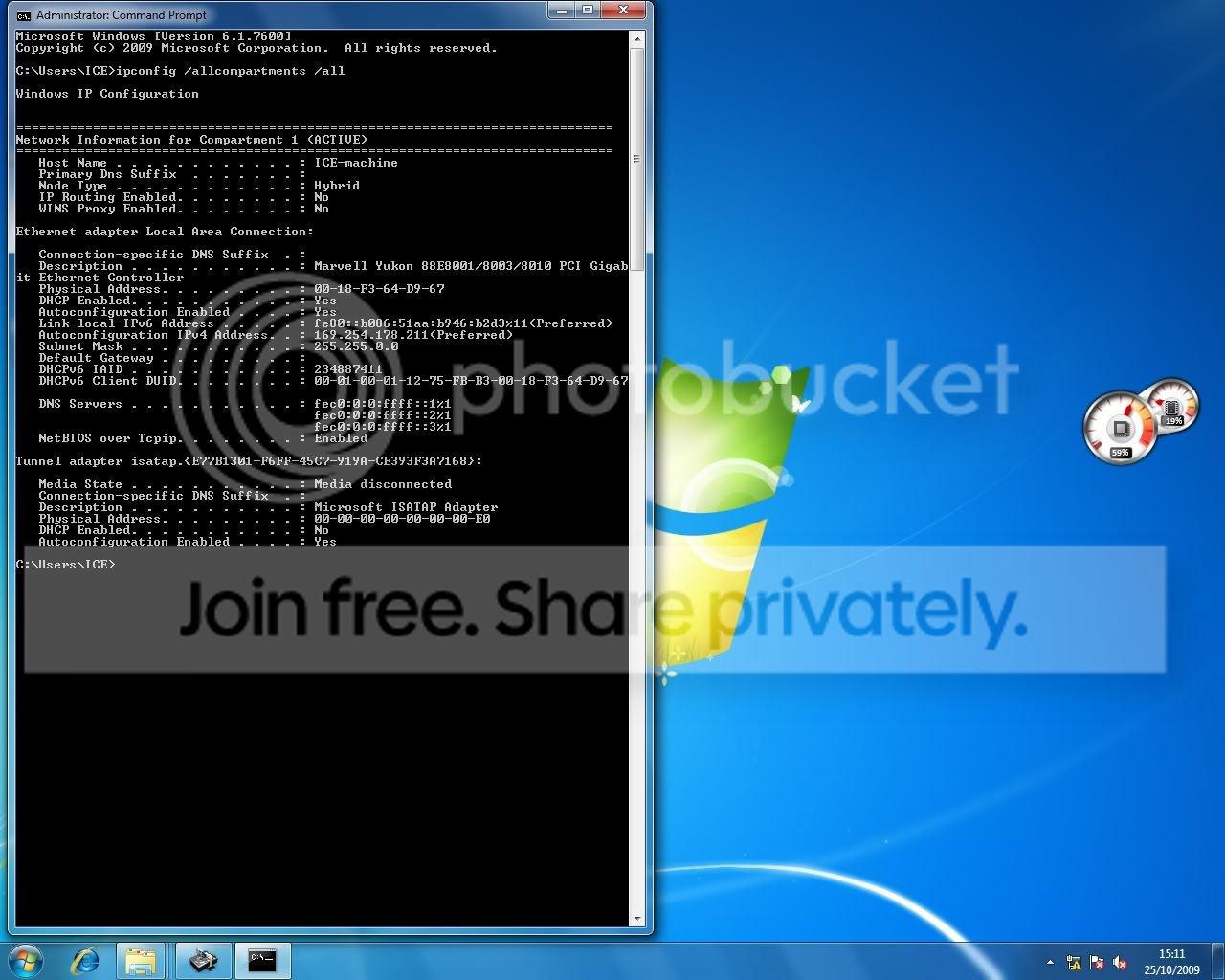
OK, here is the screen shot!
ipconfig.jpg

http://i10.photobucket.com/albums/a138/Gitterduun/ipconfig.jpg
 

Attachments

  • ipconfig.jpg
    ipconfig.jpg
    99.9 KB · Views: 385
Last edited:

My Computer

Computer Manufacturer/Model Number
Digital Storm
OS
windows 7 64bit & XP 32bit
CPU
dual core 2.4
Motherboard
Asus P5NSLI
Memory
6gb corsair
Graphics Card(s)
nividia 7950gt
Sound Card
SBA
Monitor(s) Displays
viewsonic v922
Hard Drives
320gb & 1T
My thought is that your driver for your ethernet card isn't right. You got a 169.x.x.x internet address which is self-generated because your machine can't get to the DHCP server (at your cable ISP) to get a proper 198.162.x.x local address. If it used to work, then it's either the 64 bit driver for your NIC card, or the physical ethernet wire to the cable modem.
 

My Computer

OS
Windows Vista Home Premium -> Windows 7 Home Premium
Last edited:

My Computer

Computer Manufacturer/Model Number
Digital Storm
OS
windows 7 64bit & XP 32bit
CPU
dual core 2.4
Motherboard
Asus P5NSLI
Memory
6gb corsair
Graphics Card(s)
nividia 7950gt
Sound Card
SBA
Monitor(s) Displays
viewsonic v922
Hard Drives
320gb & 1T
Ok, I found the source: Marvell: Drive Search Results

I dl'd these drivers and i'll go try to install them. hope it works. thanks for your help. if you have anything else to add please do. I'll be back with an update.
 

My Computer

Computer Manufacturer/Model Number
Digital Storm
OS
windows 7 64bit & XP 32bit
CPU
dual core 2.4
Motherboard
Asus P5NSLI
Memory
6gb corsair
Graphics Card(s)
nividia 7950gt
Sound Card
SBA
Monitor(s) Displays
viewsonic v922
Hard Drives
320gb & 1T
Well, it hasn't fixed it....

if you go to the Marvell website above (now linked below), u will see 2 driver updates. Only one (1), however, seems to be an installer... the other (2) contains files like a .dll n others, but clicking on all of them produces nothing.. just opens up some applications that I can't do anything with- won't install anything... (see attached for a dl of this #2)
And its this one (2) that seems, based on the description, to be the more important one of the two. the one that installed (1) didn't even have windows 7 in the description..

(1) W2000/WXP/2003/Vista/Win x86 and x64 Multi-Language Installer (32- and 64-bit) for Yukon Devices

(2) Windows 7 & Server 2008 R2 x64 (64-bit)

My pc is still telling me that the LAN doesn't have a valid IP config...
Please, any more suggestions would be great. Thanks
 

Attachments

My Computer

Computer Manufacturer/Model Number
Digital Storm
OS
windows 7 64bit & XP 32bit
CPU
dual core 2.4
Motherboard
Asus P5NSLI
Memory
6gb corsair
Graphics Card(s)
nividia 7950gt
Sound Card
SBA
Monitor(s) Displays
viewsonic v922
Hard Drives
320gb & 1T
Well, for anyone that cares...

I solved my problem:

I tried using the command prompt to do something Dinesh suggested in another post:
1: Release and renew ip address.
ipconfig /release and ipconfig /renew in an elevated command prompt.
2: clear the winsock catalog by netsh winsock reset calatog command.

ipconfig /renew kept saying "An error occurred while renewing interface LAN : unable to contact you DHCP server. request has timed out"

What fixed everything was this: (I can't find the author atm sorry):
Under LAN Status > Properties > Uncheck "Internet Protocol V6" I guess this v6 doesn't work with win7 or 64 bit? anyway thats what worked for me. Very happy now!
 

My Computer

Computer Manufacturer/Model Number
Digital Storm
OS
windows 7 64bit & XP 32bit
CPU
dual core 2.4
Motherboard
Asus P5NSLI
Memory
6gb corsair
Graphics Card(s)
nividia 7950gt
Sound Card
SBA
Monitor(s) Displays
viewsonic v922
Hard Drives
320gb & 1T
nevermind... that fixed, but only for a few minutes, and then somehow it decided to screw the connection.

I'm still getting "LAN doesn't have a valid IP config" and
"An error occurred while renewing interface LAN : unable to contact you DHCP server. request has timed out" (cmd > ipconfig /renew)

Any suggestions for this?
 

My Computer

Computer Manufacturer/Model Number
Digital Storm
OS
windows 7 64bit & XP 32bit
CPU
dual core 2.4
Motherboard
Asus P5NSLI
Memory
6gb corsair
Graphics Card(s)
nividia 7950gt
Sound Card
SBA
Monitor(s) Displays
viewsonic v922
Hard Drives
320gb & 1T
This is Crazy! Now its showing that I'm connected to the internet, but it won't give me access to it when I open IE or Firefox. Nor will perform windows update!! Even though it says I'm connected!
And, it keeps going in and out of connectivity, even back and forth from Identified network to Unidentified network... randomly!

If you guys haven't been helping me because you think I didn't look hard enough on the forums for an answer, then please help me now because I have read through multiple long troubleshooting threads and tried everything that might have been applicable... and it's gotten me to here- random ghost access to internet!

I would appreciate any help. Thanks!
 

My Computer

Computer Manufacturer/Model Number
Digital Storm
OS
windows 7 64bit & XP 32bit
CPU
dual core 2.4
Motherboard
Asus P5NSLI
Memory
6gb corsair
Graphics Card(s)
nividia 7950gt
Sound Card
SBA
Monitor(s) Displays
viewsonic v922
Hard Drives
320gb & 1T
Try setting a static ip within Windows for your network adapter. Please Google how to do so if you don't know. Also feel free to ask any questions here if you need.

Before doing that, have a look in Internet Explorer. Tools | Internet Options | Connections Tab | LAN Settings

Remove any and all checked boxes you see and hit ok.
 

My Computer

Computer Manufacturer/Model Number
self built
OS
7600.20510 x86
CPU
P4 550 3.4 GHz HT running at 3.5 GHz
Motherboard
MSI PM8M3-V (MS-7211 v1.x) Micro-ATX mainboard
Memory
OCZ 2 GB(2x1GB) DDR400mHz running @ 414 mHz
Graphics Card(s)
HIS Radeon HD 3850 IceQ 3 Turbo HDMI Dual DL-DVI AGP
Sound Card
MOTU Traveler firewire studio interface 192 kHz 24 bit
Monitor(s) Displays
22" widescreen Acer X223W LCD, 17" Compaq P75 CRT
Screen Resolution
1680x1050 and 1280x1024
Hard Drives
SATA I x2 WD, 400 GB and 120 GB, SATA 2 WD Caviar Black 1 TB
PSU
350W generic
Case
Cybertronpc, it glows blue
Cooling
stock cpu fan, Ice-Q 3 gpu and system, many case fans
Keyboard
Logitch Classical Keyboard 200
Mouse
Logitech Mediaplay cordless
Internet Speed
1792/448 kbits/sec
Other Info
SATA II PCI fake RAID adapter, 1 GB Readyboost, original ATI Remote Wonder (even works with WMC perfectly), Logitech Rumblepad 2 game controller x2
Ok, I unchecked "Automatically detect settings"

Things just keep gettin weird. The default gateway sometimes isn't found, and suddenly its found... It's even told me that the it fixed the valid IP config issue a couple times... but nothing happened as a result, and it would soon go back to saying "not fixed"
Even when it says I'm connected to the internet (short and sparse times) it doesn't mean literally I guess! cuz it doesn't actually connect to a web page..

Ok, I'm going look up how to set up a static IP and be back
 

My Computer

Computer Manufacturer/Model Number
Digital Storm
OS
windows 7 64bit & XP 32bit
CPU
dual core 2.4
Motherboard
Asus P5NSLI
Memory
6gb corsair
Graphics Card(s)
nividia 7950gt
Sound Card
SBA
Monitor(s) Displays
viewsonic v922
Hard Drives
320gb & 1T
Network and Sharing Center. Click local area connection, properties. Double click IPv4. Click the circle for use the following ip address.

ip address = same as your router config page, change the last part to anything you want between 50 and 100

i.e. 192.168.0.75 or 192.168.1.75

subnet mask = 255.255.255.0

default gateway = router's config page, most likely either 192.168.0.1 or 192.168.1.1

preferred dns = same as router's config page = default gateway

Hit ok twice. Hit close.
 

My Computer

Computer Manufacturer/Model Number
self built
OS
7600.20510 x86
CPU
P4 550 3.4 GHz HT running at 3.5 GHz
Motherboard
MSI PM8M3-V (MS-7211 v1.x) Micro-ATX mainboard
Memory
OCZ 2 GB(2x1GB) DDR400mHz running @ 414 mHz
Graphics Card(s)
HIS Radeon HD 3850 IceQ 3 Turbo HDMI Dual DL-DVI AGP
Sound Card
MOTU Traveler firewire studio interface 192 kHz 24 bit
Monitor(s) Displays
22" widescreen Acer X223W LCD, 17" Compaq P75 CRT
Screen Resolution
1680x1050 and 1280x1024
Hard Drives
SATA I x2 WD, 400 GB and 120 GB, SATA 2 WD Caviar Black 1 TB
PSU
350W generic
Case
Cybertronpc, it glows blue
Cooling
stock cpu fan, Ice-Q 3 gpu and system, many case fans
Keyboard
Logitch Classical Keyboard 200
Mouse
Logitech Mediaplay cordless
Internet Speed
1792/448 kbits/sec
Other Info
SATA II PCI fake RAID adapter, 1 GB Readyboost, original ATI Remote Wonder (even works with WMC perfectly), Logitech Rumblepad 2 game controller x2
I'm having the exact same problem, so I've been following along. I've tried everything that you've listed.

I set up a static IP just as you described, when I did the icon in the Network and Sharing Center changed from a public network and gave me the option set it as a Home Network.

I'm not sure what it means, but before I changed it to a static IP I had 0/0 in the packets received/set but after it shoot up to 300/1300.

The kicker is that in order to get onto the internet and research this issue I'm the express gate on my motherboard (Asus 6T V2) to access the internet.

Not sure if this addition information will help, but there it is.
 

My Computer

OS
7
Ok, I set up a static ip config.
when I typed "ipconfig /all " to get my the settings I needed, there were NO DNS servers at all... I used the numbers that my laptop shows, which is connected to the same modem through a router -- which my desktop is also sometimes connected to, like now- since I need both my laptop and desktop.. Are the dns servers different when connected to a router?

my desktop shows that dhcp is NOT enabled right now. (I think it was earlier?) and it says that "autoconfig enabled - yes" even though I unchecked the the "auto detect settings" under LAN settings...
My laptop shows that dhcp IS enabled and the "auto detect settings" IS checked. (but my laptop is connecting fine obviously)

I've set the ip address to 192.168.1.80
while the laptop says : 192.168.1.100

Also, the default gateway was blank again (goes in and out..?) so I plugged in the same numbers as my laptop.

**Also right now it says that I AM connected! but it doesn't actually give me internet access!?! it won't even update windows! But it won't stay like this long... lol there it just randomly lost connection after a few minutes. Oh, its back. lol. (this in and out thing isn't the reason it won't open a web page when it says its connected tho, because I check to see that its still connected while I open up IE or Firefox.

what can I try next?
I've already Clean installed 3 times, doing a complete format before the third time. I've updated the driver to the NIC card, though please see the previous post where I mention one of the two drivers wouldn't install anything... not sure if I'm doing something wrong... but that may be the missing link..

thanks
 

My Computer

Computer Manufacturer/Model Number
Digital Storm
OS
windows 7 64bit & XP 32bit
CPU
dual core 2.4
Motherboard
Asus P5NSLI
Memory
6gb corsair
Graphics Card(s)
nividia 7950gt
Sound Card
SBA
Monitor(s) Displays
viewsonic v922
Hard Drives
320gb & 1T

My Computer

Computer Manufacturer/Model Number
self built
OS
7600.20510 x86
CPU
P4 550 3.4 GHz HT running at 3.5 GHz
Motherboard
MSI PM8M3-V (MS-7211 v1.x) Micro-ATX mainboard
Memory
OCZ 2 GB(2x1GB) DDR400mHz running @ 414 mHz
Graphics Card(s)
HIS Radeon HD 3850 IceQ 3 Turbo HDMI Dual DL-DVI AGP
Sound Card
MOTU Traveler firewire studio interface 192 kHz 24 bit
Monitor(s) Displays
22" widescreen Acer X223W LCD, 17" Compaq P75 CRT
Screen Resolution
1680x1050 and 1280x1024
Hard Drives
SATA I x2 WD, 400 GB and 120 GB, SATA 2 WD Caviar Black 1 TB
PSU
350W generic
Case
Cybertronpc, it glows blue
Cooling
stock cpu fan, Ice-Q 3 gpu and system, many case fans
Keyboard
Logitch Classical Keyboard 200
Mouse
Logitech Mediaplay cordless
Internet Speed
1792/448 kbits/sec
Other Info
SATA II PCI fake RAID adapter, 1 GB Readyboost, original ATI Remote Wonder (even works with WMC perfectly), Logitech Rumblepad 2 game controller x2
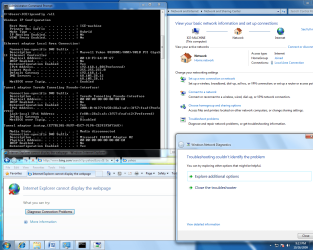
Here's a Screen shot showing the ipconfig, that its connected, that troubleshooter cant identify the problem now, and showing IE not connecting... Up until now, the troubleshooter has been mostly saying that the LAN doesn't have a valid ipconfig.
 

Attachments

  • ipcon-net-trblsht.png
    ipcon-net-trblsht.png
    104.6 KB · Views: 209

My Computer

Computer Manufacturer/Model Number
Digital Storm
OS
windows 7 64bit & XP 32bit
CPU
dual core 2.4
Motherboard
Asus P5NSLI
Memory
6gb corsair
Graphics Card(s)
nividia 7950gt
Sound Card
SBA
Monitor(s) Displays
viewsonic v922
Hard Drives
320gb & 1T
Do you have any adobe or apple products installed?

THey often install a service called "bonjour" that can mess with your DHCP ability.

Remove the Bonjour service just installed because if fuques up networking.
a) Open a command window with admin privs.
b) cd \Program Files (x86)\Bonjour
c) mDNSResponder.exe -remove
d) regsvr32 -u mdnsNSP.dll
e) reboot

Something ELSE I had to do :(

* Network dropping while on line. Go to the device manager and set the following
device options for the offending adapter:
LAN port configuration:
Sleep on disconnect: Disabled
Flow control: disabled
Interrupt moderation: disabled
IP checksum offload: disabled
Jumbo packet: 9014 bytes (this might have no effect for you)
ALL large send offloads: disabled
low power idle mode: disabled
Network address: not present
Priority & vlan: priority enabled
Receive side scaling: disabled
Speed/duplex settings: auto
ALL TCP & UDP offloads: disabled
vlan id: 1
ALL wake ons: enabled

It's possible that only ONE of thioose settings was responsible for the random connection drops but setting all of them that way (and killing bonjour) I've had no net problems for months now.
 

My Computer

Computer Manufacturer/Model Number
Scratch built
OS
Windows 7 x64 Ultimate
CPU
i7 960
Motherboard
Asus P6X58D
Memory
12 Gig Corsair Dominator
Graphics Card(s)
Nvidia 480
Sound Card
Maudio Delta 44 + breakout box
Monitor(s) Displays
Dell UltraSharp U2410 24in and Samsung 21 dual monitors
Screen Resolution
1920x1200 and 1280x1024
Hard Drives
Primary: Intel X-25M G2 160G SSD
Secondary: Segate baracuda 1.0 TB
HDs in AHCI mode.
PSU
Corasair TX850
Case
Cooler Master HAF
Cooling
Corsair H50
Keyboard
Logitech G15 + N52 game pad
Mouse
Logitech MX518
Internet Speed
15kbs down 4.5kbps up
Other Info
WEI 7.6
CPU & RAM 7.6
Graphics 7.9
Hard disk 7.7
Ok, ya I had already dl'd those drivers and installed one of them. that one you pointed to was the one I opened and it didn't have a setup.exe or anything that would install something... but I guess what I should do is try to update driver, but not automatically and choose this download instead? I assume so, that's what I'll do now, I hadn't thot of that.
 

My Computer

Computer Manufacturer/Model Number
Digital Storm
OS
windows 7 64bit & XP 32bit
CPU
dual core 2.4
Motherboard
Asus P5NSLI
Memory
6gb corsair
Graphics Card(s)
nividia 7950gt
Sound Card
SBA
Monitor(s) Displays
viewsonic v922
Hard Drives
320gb & 1T
Excellent FSeal.

Asclepius, if you don't use Homegroup, it's a good idea to disable IPv6. And install the driver I put in my last post. The first one.

Extract contents of driver to a folder. In device manager, right your click network adapter, choose update driver software. Browse, let me pick, have disk, browse. Find the .inf in the extracted folder now.
 

My Computer

Computer Manufacturer/Model Number
self built
OS
7600.20510 x86
CPU
P4 550 3.4 GHz HT running at 3.5 GHz
Motherboard
MSI PM8M3-V (MS-7211 v1.x) Micro-ATX mainboard
Memory
OCZ 2 GB(2x1GB) DDR400mHz running @ 414 mHz
Graphics Card(s)
HIS Radeon HD 3850 IceQ 3 Turbo HDMI Dual DL-DVI AGP
Sound Card
MOTU Traveler firewire studio interface 192 kHz 24 bit
Monitor(s) Displays
22" widescreen Acer X223W LCD, 17" Compaq P75 CRT
Screen Resolution
1680x1050 and 1280x1024
Hard Drives
SATA I x2 WD, 400 GB and 120 GB, SATA 2 WD Caviar Black 1 TB
PSU
350W generic
Case
Cybertronpc, it glows blue
Cooling
stock cpu fan, Ice-Q 3 gpu and system, many case fans
Keyboard
Logitch Classical Keyboard 200
Mouse
Logitech Mediaplay cordless
Internet Speed
1792/448 kbits/sec
Other Info
SATA II PCI fake RAID adapter, 1 GB Readyboost, original ATI Remote Wonder (even works with WMC perfectly), Logitech Rumblepad 2 game controller x2
Back
Top