LAN/Wired Local Area Connection - Unidentified Network; No Internet

epilogue10

New member
Local time
1:04 AM
Messages
10
Hi Guys, I have been experiencing this issue since 3 days ago. (1 year on and was having no problems)

I am currently using a Dell Studio XPS 16, Windows 7 64-bit

I am able to connect to the internet via wifi, however to no avail with my LAN connection. I have tried the basic stuff like changing LAN cables, testing connection with other Windows 7/Vista/XP laptops and they worked except for mine.

I have tried methods posted online such as the netsh winsock reset, disabling IPv6, setting static IP for IPv4 etc. However, none has worked for me.

Below is my ipconfig/all :
137.132.5.199Microsoft Windows [Version 6.1.7600]
Copyright (c) 2009 Microsoft Corporation. All rights reserved.

C:\Users\Christopher Koh>ipconfig/all

Windows IP Configuration

Host Name . . . . . . . . . . . . : ChristopherKoh
Primary Dns Suffix . . . . . . . :
Node Type . . . . . . . . . . . . : Broadcast
IP Routing Enabled. . . . . . . . : No
WINS Proxy Enabled. . . . . . . . : No
DNS Suffix Search List. . . . . . : nus.edu.sg
mshome.net

Ethernet adapter Local Area Connection:

Connection-specific DNS Suffix . : nus.edu.sg
Description . . . . . . . . . . . : Broadcom NetLink (TM) Gigabit Ethernet
Physical Address. . . . . . . . . : 00-22-19-F8-C1-77
DHCP Enabled. . . . . . . . . . . : Yes
Autoconfiguration Enabled . . . . : Yes
Link-local IPv6 Address . . . . . : fe80::ed35:5ea:c983:4061%12(Preferred)
IPv4 Address. . . . . . . . . . . : 172.19.109.229(Preferred)
Subnet Mask . . . . . . . . . . . : 255.255.240.0
Lease Obtained. . . . . . . . . . : Friday, 24 September, 2010 12:41:43 AM
Lease Expires . . . . . . . . . . : Friday, 24 September, 2010 1:11:42 AM
Default Gateway . . . . . . . . . : fe80::50d8:626c:9cf2:f16d%12
fe80::b5c8:b699:165e:bf69%12
fe80::4475:3e89:d454:4aa2%12
172.19.96.1
DHCP Server . . . . . . . . . . . : 137.132.5.246
DHCPv6 IAID . . . . . . . . . . . : 268444185
DHCPv6 Client DUID. . . . . . . . : 00-01-00-01-12-A9-1F-2E-00-22-19-F8-C1-77

DNS Servers . . . . . . . . . . . : 137.132.0.252
137.132.0.254
Primary WINS Server . . . . . . . : 137.132.4.5
Secondary WINS Server . . . . . . : 137.132.4.25
NetBIOS over Tcpip. . . . . . . . : Enabled

Wireless LAN adapter Wireless Network Connection:

Connection-specific DNS Suffix . : nus.edu.sg
Description . . . . . . . . . . . : Intel(R) WiFi Link 5100 AGN
Physical Address. . . . . . . . . : 00-22-FB-9B-83-C0
DHCP Enabled. . . . . . . . . . . : Yes
Autoconfiguration Enabled . . . . : Yes
Link-local IPv6 Address . . . . . : fe80::a9b7:be29:49f2:a1e8%11(Preferred)
IPv4 Address. . . . . . . . . . . : 172.17.186.97(Preferred)
Subnet Mask . . . . . . . . . . . : 255.255.224.0
Lease Obtained. . . . . . . . . . : Friday, 24 September, 2010 12:27:44 AM
Lease Expires . . . . . . . . . . : Friday, 24 September, 2010 2:04:35 AM
Default Gateway . . . . . . . . . : fe80::e4af:bf2a:4a22:8847%11
fe80::10d8:a2c6:8702:eafd%11
fe80::b5a0:17c:8b35:1db9%11
fe80::a54d:895d:d276:b961%11
fe80::d1ef:27ef:38da:1c49%11
172.17.160.1
DHCP Server . . . . . . . . . . . : 137.132.5.199
DHCPv6 IAID . . . . . . . . . . . : 184558331
DHCPv6 Client DUID. . . . . . . . : 00-01-00-01-12-A9-1F-2E-00-22-19-F8-C1-77

DNS Servers . . . . . . . . . . . : fe80::85a6:37c4:4cfe:40a0%11
137.132.0.254
137.132.0.252
Primary WINS Server . . . . . . . : 137.132.4.5
Secondary WINS Server . . . . . . : 137.132.4.25
NetBIOS over Tcpip. . . . . . . . : Enabled
Connection-specific DNS Suffix Search List :
mshome.net

Tunnel adapter Local Area Connection* 11:

Connection-specific DNS Suffix . :
Description . . . . . . . . . . . : Teredo Tunneling Pseudo-Interface
Physical Address. . . . . . . . . : 00-00-00-00-00-00-00-E0
DHCP Enabled. . . . . . . . . . . : No
Autoconfiguration Enabled . . . . : Yes
IPv6 Address. . . . . . . . . . . : 2001:0:4137:9e76:3444:f62a:767b:1bfa(Pref
erred)
Link-local IPv6 Address . . . . . : fe80::3444:f62a:767b:1bfa%14(Preferred)
Default Gateway . . . . . . . . . : ::
NetBIOS over Tcpip. . . . . . . . : Disabled

Tunnel adapter isatap.nus.edu.sg:

Media State . . . . . . . . . . . : Media disconnected
Connection-specific DNS Suffix . : nus.edu.sg
Description . . . . . . . . . . . : Microsoft ISATAP Adapter #2
Physical Address. . . . . . . . . : 00-00-00-00-00-00-00-E0
DHCP Enabled. . . . . . . . . . . : No
Autoconfiguration Enabled . . . . : Yes

Can anyone help me??????
 

My Computer My Computer

At a glance

Windows 7 Home Premium 64bitIntel(R) Core(TM)2 Duo CPU P8600 @2.40GHz 2.4...4.00 GB
Computer Manufacturer/Model Number
Dell Studio XPS 16 (640)
OS
Windows 7 Home Premium 64bit
CPU
Intel(R) Core(TM)2 Duo CPU P8600 @2.40GHz 2.40GHz
Memory
4.00 GB
You should automatically obtain your ip address, dns, and gateway, unless directed otherwise by your isp.
Did you "power down/power up" your cable modem and wireless router?
Check to make sure you have the latest driver for your network card.
Can you ping an ip address? Can you ping the router? Can you connect to the router?
Do you have to contend with a firewall from the National University of Singapore?
Researching more. Let me know about this...
 

My Computer My Computer

At a glance

Systems 1 and 2: Windows 7 Enterprise x64, Wi...System 1: i7 [email protected], System 2: AMD FX-41...System 1: 8GB System 2: 8GBSystem 1: ATI FirePro V4800 System 2: Radeon ...
Computer Manufacturer/Model Number
Dell and Custom
OS
Systems 1 and 2: Windows 7 Enterprise x64, Win 8 Developer
CPU
System 1: i7 [email protected], System 2: AMD FX-4100 Zambezi 3.6G
Motherboard
System 1:Dell 06NWYK System 2: ASUS M5A97 AM3+
Memory
System 1: 8GB System 2: 8GB
Graphics Card(s)
System 1: ATI FirePro V4800 System 2: Radeon HD 6850
Sound Card
System 1: onboard System 2: onboard
Monitor(s) Displays
System1: Viewsonic HDMI 24"
Screen Resolution
System 1: 1920x1080 System 2: 1920x1080
Hard Drives
System 1: Mirrored .5B drives System 2: Seagate Barracuda ST1000DM003 1TB 7200 RPM 64MB Cache SATA 6.0Gb/s
Case
System 1: Dell System 2: Cooler Master
Internet Speed
10 MBPS

My Computer My Computer

At a glance

Systems 1 and 2: Windows 7 Enterprise x64, Wi...System 1: i7 [email protected], System 2: AMD FX-41...System 1: 8GB System 2: 8GBSystem 1: ATI FirePro V4800 System 2: Radeon ...
Computer Manufacturer/Model Number
Dell and Custom
OS
Systems 1 and 2: Windows 7 Enterprise x64, Win 8 Developer
CPU
System 1: i7 [email protected], System 2: AMD FX-4100 Zambezi 3.6G
Motherboard
System 1:Dell 06NWYK System 2: ASUS M5A97 AM3+
Memory
System 1: 8GB System 2: 8GB
Graphics Card(s)
System 1: ATI FirePro V4800 System 2: Radeon HD 6850
Sound Card
System 1: onboard System 2: onboard
Monitor(s) Displays
System1: Viewsonic HDMI 24"
Screen Resolution
System 1: 1920x1080 System 2: 1920x1080
Hard Drives
System 1: Mirrored .5B drives System 2: Seagate Barracuda ST1000DM003 1TB 7200 RPM 64MB Cache SATA 6.0Gb/s
Case
System 1: Dell System 2: Cooler Master
Internet Speed
10 MBPS
Did you "power down/power up" your cable modem and wireless router?
What do you mean here? Anyways, I can't power down or up the school's modem.
Check to make sure you have the latest driver for your network card.
I have the latest driver.

Can you ping an ip address?
Can you ping the router?
Can you connect to the router?
For the 3 questions above, I suppose I have to switch off my WIFI connection before executing?

Do you have to contend with a firewall from the National University of Singapore?
This should not post as a possibility as I have been well on the connection for the past 1 year with the same laptop on Windows 7.
 

My Computer My Computer

At a glance

Windows 7 Home Premium 64bitIntel(R) Core(TM)2 Duo CPU P8600 @2.40GHz 2.4...4.00 GB
Computer Manufacturer/Model Number
Dell Studio XPS 16 (640)
OS
Windows 7 Home Premium 64bit
CPU
Intel(R) Core(TM)2 Duo CPU P8600 @2.40GHz 2.40GHz
Memory
4.00 GB
Default Gateway . . . . . . . . . : fe80::e4af:bf2a:4a22:8847%11
fe80::10d8:a2c6:8702:eafd%11
fe80::b5a0:17c:8b35:1db9%11
fe80::a54d:895d:d276:b961%11
fe80::d1ef:27ef:38da:1c49%11
172.17.160.1 < most likely the correct default gateway for this network.

The ipconfig read out from this network is pretty messed up so it's hard to say what the problem is.

Default Gateway . . . . . . . . . : fe80::50d8:626c:9cf2:f16d%12
fe80::b5c8:b699:165e:bf69%12
fe80::4475:3e89:d454:4aa2%12
172.19.96.1 < other possible default gateway

You might also try ipconfig /release command then ipconfig /renew typed into your command prompt.


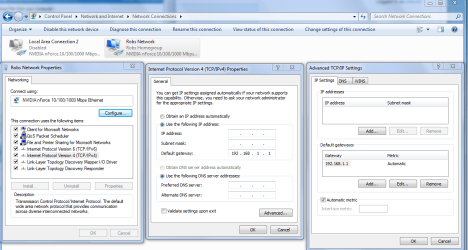
Everything in bold red isn't supposed to be there. You might try going into your ipv4 properties and enter the correct default gateway manually. Enter 172.17.160.1 or 172.19.96.1 for your default gateway like in the picture below.
 

Attachments

  • IPV4 properties manual default gateway entry.PNG
    IPV4 properties manual default gateway entry.PNG
    63.2 KB · Views: 481

My Computer My Computer

At a glance

Windows 7 Ult, Windows 8.1 Pro,Q9650-4.275GHz, E8600 4.5GHz, E6750-3.8GHzG.Skill PC2 9600 1200Mhz 5 5 5 15 2TGTX480
Computer type
PC/Desktop
Computer Manufacturer/Model Number
Home built
OS
Windows 7 Ult, Windows 8.1 Pro,
CPU
Q9650-4.275GHz, E8600 4.5GHz, E6750-3.8GHz
Motherboard
Evga 780i FTW
Memory
G.Skill PC2 9600 1200Mhz 5 5 5 15 2T
Graphics Card(s)
GTX480
Sound Card
Asus Xonar D2
Monitor(s) Displays
HannsG
Screen Resolution
1680X1050
Hard Drives
GSkill Phoenix Pro 120GB SSD
PSU
ThermalTake Toughpower 1000Watt modular
Case
ThermalTake XaserV
Cooling
Xigmatek S1283
Keyboard
Logitech G15
Mouse
Logitech G9
Internet Speed
T1
I think he hardcoded things which is probably not good. Nothing should be changed in ipv6. In ipv4, use defaults unless directed by the network admin.
c:ipconfig /release
c:ipconfig /renew
c: ping 128.163.16.242
If good, then
c: ping University of Kentucky - Welcome to the University of Kentucky
If successful let us know.

chev65, that garbage you notice is link local ipv6 address.
 

My Computer My Computer

At a glance

Systems 1 and 2: Windows 7 Enterprise x64, Wi...System 1: i7 [email protected], System 2: AMD FX-41...System 1: 8GB System 2: 8GBSystem 1: ATI FirePro V4800 System 2: Radeon ...
Computer Manufacturer/Model Number
Dell and Custom
OS
Systems 1 and 2: Windows 7 Enterprise x64, Win 8 Developer
CPU
System 1: i7 [email protected], System 2: AMD FX-4100 Zambezi 3.6G
Motherboard
System 1:Dell 06NWYK System 2: ASUS M5A97 AM3+
Memory
System 1: 8GB System 2: 8GB
Graphics Card(s)
System 1: ATI FirePro V4800 System 2: Radeon HD 6850
Sound Card
System 1: onboard System 2: onboard
Monitor(s) Displays
System1: Viewsonic HDMI 24"
Screen Resolution
System 1: 1920x1080 System 2: 1920x1080
Hard Drives
System 1: Mirrored .5B drives System 2: Seagate Barracuda ST1000DM003 1TB 7200 RPM 64MB Cache SATA 6.0Gb/s
Case
System 1: Dell System 2: Cooler Master
Internet Speed
10 MBPS
I think he hardcoded things which is probably not good. Nothing should be changed in ipv6. In ipv4, use defaults unless directed by the network admin.
c:ipconfig /release
c:ipconfig /renew
c: ping 128.163.16.242
If good, then
c: ping University of Kentucky - Welcome to the University of Kentucky
If successful let us know.

chev65, that garbage you notice is link local ipv6 address.

With due respect I know exactly what they are and the ipv6 address info is absolutely not supposed to be under the default gateway. I have seen this stange IPv6 address problem create problems in the past, in fact I helped someone with a similar problem just the other day and simply typing in the correct default gateway into the IPv4 properties fixed it. This is standard procedure for this unidentified network problem. It usually is caused by an out of date router firmware or using an improper driver.

And I agree that this should be done using DHCP, this is one messed up ipconfig in my book.

And why did you repeat what I just said about releasing and renewing the ip, maybe I added that after you did LOL? You do not need to put a C in front of those ipconfig commands. ;)
 

My Computer My Computer

At a glance

Windows 7 Ult, Windows 8.1 Pro,Q9650-4.275GHz, E8600 4.5GHz, E6750-3.8GHzG.Skill PC2 9600 1200Mhz 5 5 5 15 2TGTX480
Computer type
PC/Desktop
Computer Manufacturer/Model Number
Home built
OS
Windows 7 Ult, Windows 8.1 Pro,
CPU
Q9650-4.275GHz, E8600 4.5GHz, E6750-3.8GHz
Motherboard
Evga 780i FTW
Memory
G.Skill PC2 9600 1200Mhz 5 5 5 15 2T
Graphics Card(s)
GTX480
Sound Card
Asus Xonar D2
Monitor(s) Displays
HannsG
Screen Resolution
1680X1050
Hard Drives
GSkill Phoenix Pro 120GB SSD
PSU
ThermalTake Toughpower 1000Watt modular
Case
ThermalTake XaserV
Cooling
Xigmatek S1283
Keyboard
Logitech G15
Mouse
Logitech G9
Internet Speed
T1
With respect as well, I assumed you knew this. If I repeated, it's b/c I'm multi-tasking at work.
The C: was b/c I thought when using a command prompt, he would see something like:
C:\Users\Epilogue10
I didn't know what his level of expertise was.
Also, he didn't say he was at a university, so I thought it could be a router issue. Then I rechecked his dns and saw he was at National University of Singapore.

Meanwhile, I don't see the OP responding.
 

My Computer My Computer

At a glance

Systems 1 and 2: Windows 7 Enterprise x64, Wi...System 1: i7 [email protected], System 2: AMD FX-41...System 1: 8GB System 2: 8GBSystem 1: ATI FirePro V4800 System 2: Radeon ...
Computer Manufacturer/Model Number
Dell and Custom
OS
Systems 1 and 2: Windows 7 Enterprise x64, Win 8 Developer
CPU
System 1: i7 [email protected], System 2: AMD FX-4100 Zambezi 3.6G
Motherboard
System 1:Dell 06NWYK System 2: ASUS M5A97 AM3+
Memory
System 1: 8GB System 2: 8GB
Graphics Card(s)
System 1: ATI FirePro V4800 System 2: Radeon HD 6850
Sound Card
System 1: onboard System 2: onboard
Monitor(s) Displays
System1: Viewsonic HDMI 24"
Screen Resolution
System 1: 1920x1080 System 2: 1920x1080
Hard Drives
System 1: Mirrored .5B drives System 2: Seagate Barracuda ST1000DM003 1TB 7200 RPM 64MB Cache SATA 6.0Gb/s
Case
System 1: Dell System 2: Cooler Master
Internet Speed
10 MBPS
I figured so on the multi tasking LOL.

The problem with these university's is that if you have a router problem you can't just reset the router so going into the IPv4 properties is one way around that. I'm thinking router also by the way but it sucks when you can't actually access the router in these situations.
 

My Computer My Computer

At a glance

Windows 7 Ult, Windows 8.1 Pro,Q9650-4.275GHz, E8600 4.5GHz, E6750-3.8GHzG.Skill PC2 9600 1200Mhz 5 5 5 15 2TGTX480
Computer type
PC/Desktop
Computer Manufacturer/Model Number
Home built
OS
Windows 7 Ult, Windows 8.1 Pro,
CPU
Q9650-4.275GHz, E8600 4.5GHz, E6750-3.8GHz
Motherboard
Evga 780i FTW
Memory
G.Skill PC2 9600 1200Mhz 5 5 5 15 2T
Graphics Card(s)
GTX480
Sound Card
Asus Xonar D2
Monitor(s) Displays
HannsG
Screen Resolution
1680X1050
Hard Drives
GSkill Phoenix Pro 120GB SSD
PSU
ThermalTake Toughpower 1000Watt modular
Case
ThermalTake XaserV
Cooling
Xigmatek S1283
Keyboard
Logitech G15
Mouse
Logitech G9
Internet Speed
T1
It's a top - down hierarchy with IT. If you don't control your hardware firewalls (Cisco pix for me), your routers, etc., then it's a major headache. Especially telling that he can get an ip from the wireless nic.
 

My Computer My Computer

At a glance

Systems 1 and 2: Windows 7 Enterprise x64, Wi...System 1: i7 [email protected], System 2: AMD FX-41...System 1: 8GB System 2: 8GBSystem 1: ATI FirePro V4800 System 2: Radeon ...
Computer Manufacturer/Model Number
Dell and Custom
OS
Systems 1 and 2: Windows 7 Enterprise x64, Win 8 Developer
CPU
System 1: i7 [email protected], System 2: AMD FX-4100 Zambezi 3.6G
Motherboard
System 1:Dell 06NWYK System 2: ASUS M5A97 AM3+
Memory
System 1: 8GB System 2: 8GB
Graphics Card(s)
System 1: ATI FirePro V4800 System 2: Radeon HD 6850
Sound Card
System 1: onboard System 2: onboard
Monitor(s) Displays
System1: Viewsonic HDMI 24"
Screen Resolution
System 1: 1920x1080 System 2: 1920x1080
Hard Drives
System 1: Mirrored .5B drives System 2: Seagate Barracuda ST1000DM003 1TB 7200 RPM 64MB Cache SATA 6.0Gb/s
Case
System 1: Dell System 2: Cooler Master
Internet Speed
10 MBPS
i'm sorry guys for not being able to reply as soon as possible because its my exams period. i'll probably be able to try the methods you guys suggested when i get back to my hall room later. (probably in another 7 hours)

and w/o a doubt, my lvl of expertise in this area is just LOW.

I thank the both of you for providing me assistance.
 

My Computer My Computer

At a glance

Windows 7 Home Premium 64bitIntel(R) Core(TM)2 Duo CPU P8600 @2.40GHz 2.4...4.00 GB
Computer Manufacturer/Model Number
Dell Studio XPS 16 (640)
OS
Windows 7 Home Premium 64bit
CPU
Intel(R) Core(TM)2 Duo CPU P8600 @2.40GHz 2.40GHz
Memory
4.00 GB
Below are the stuff I did last night when I was with just the LAN connection and wifi turned off..


ipconfig/all
Windows IP Configuration
Host Name . . . . . . . . . . . . : ChristopherKoh
Primary Dns Suffix . . . . . . . :
Node Type . . . . . . . . . . . . : Broadcast
IP Routing Enabled. . . . . . . . : No
WINS Proxy Enabled. . . . . . . . : No
DNS Suffix Search List. . . . . . : nus.edu.sg

Ethernet adapter Local Area Connection:
Connection-specific DNS Suffix . : nus.edu.sg
Description . . . . . . . . . . . : Broadcom NetLink (TM) Gigabit Ethernet
Physical Address. . . . . . . . . : 00-22-19-F8-C1-77
DHCP Enabled. . . . . . . . . . . : Yes
Autoconfiguration Enabled . . . . : Yes
Link-local IPv6 Address . . . . . : fe80::ed35:5ea:c983:4061%12(Preferred)
IPv4 Address. . . . . . . . . . . : 172.19.109.229(Preferred)
Subnet Mask . . . . . . . . . . . : 255.255.240.0
Lease Obtained. . . . . . . . . . : Friday, 24 September, 2010 3:33:50 AM
Lease Expires . . . . . . . . . . : Friday, 24 September, 2010 4:03:50 AM
Default Gateway . . . . . . . . . : fe80::4475:3e89:d454:4aa2%12
172.19.96.1
DHCP Server . . . . . . . . . . . : 137.132.5.246
DHCPv6 IAID . . . . . . . . . . . : 268444185
DHCPv6 Client DUID. . . . . . . . : 00-01-00-01-12-A9-1F-2E-00-22-19-F8-C1-77

DNS Servers . . . . . . . . . . . : 137.132.0.252
137.132.0.254
Primary WINS Server . . . . . . . : 137.132.4.5
Secondary WINS Server . . . . . . : 137.132.4.25
NetBIOS over Tcpip. . . . . . . . : Enabled

Wireless LAN adapter Wireless Network Connection:

Media State . . . . . . . . . . . : Media disconnected
Connection-specific DNS Suffix . : nus.edu.sg
Description . . . . . . . . . . . : Intel(R) WiFi Link 5100 AGN
Physical Address. . . . . . . . . : 00-22-FB-9B-83-C0
DHCP Enabled. . . . . . . . . . . : Yes
Autoconfiguration Enabled . . . . : Yes

Tunnel adapter Local Area Connection* 11:

Media State . . . . . . . . . . . : Media disconnected
Connection-specific DNS Suffix . :
Description . . . . . . . . . . . : Teredo Tunneling Pseudo-Interface
Physical Address. . . . . . . . . : 00-00-00-00-00-00-00-E0
DHCP Enabled. . . . . . . . . . . : No
Autoconfiguration Enabled . . . . : Yes

Tunnel adapter isatap.nus.edu.sg:
Media State . . . . . . . . . . . : Media disconnected
Connection-specific DNS Suffix . : nus.edu.sg
Description . . . . . . . . . . . : Microsoft ISATAP Adapter #2
Physical Address. . . . . . . . . : 00-00-00-00-00-00-00-E0
DHCP Enabled. . . . . . . . . . . : No
Autoconfiguration Enabled . . . . : Yes

(Ping Gateway IP)
C:\Windows\system32>ping 172.19.96.1

Pinging 172.19.96.1 with 32 bytes of data:
Request timed out.
Request timed out.
Reply from 172.19.109.229: Destination host unreachable.
Request timed out.

Ping statistics for 172.19.96.1:
Packets: Sent = 4, Received = 1, Lost = 3 (75% loss),

(Ping google.com)

C:\Windows\system32>ping Google
Ping request could not find host Google. Please check the name and try a
gain.

(ping DNS servers)
C:\Windows\system32>ping 137.132.0.252

Pinging 137.132.0.252 with 32 bytes of data:
Reply from 172.19.109.229: Destination host unreachable.

Ping statistics for 137.132.0.252:
Packets: Sent = 4, Received = 4, Lost = 0 (0% loss),

C:\Windows\system32>ping 137.132.0.254

Pinging 137.132.0.254 with 32 bytes of data:
Request timed out.
Reply from 172.19.109.229: Destination host unreachable.
Request timed out.
Reply from 172.19.109.229: Destination host unreachable.

Ping statistics for 137.132.0.254:
Packets: Sent = 4, Received = 2, Lost = 2 (50% loss),


The above are what I did. (Once again, with my wifi turned off and on the LAN connection.)


Something weird that I spotted when I turned on iTunes, I was able to view the shared libraries by my neighbours. (fruit for thought?)
 

My Computer My Computer

At a glance

Windows 7 Home Premium 64bitIntel(R) Core(TM)2 Duo CPU P8600 @2.40GHz 2.4...4.00 GB
Computer Manufacturer/Model Number
Dell Studio XPS 16 (640)
OS
Windows 7 Home Premium 64bit
CPU
Intel(R) Core(TM)2 Duo CPU P8600 @2.40GHz 2.40GHz
Memory
4.00 GB
I have tried what both of you asked me to.

But they didn't work for me.

More information, my iTunes have been crashing freely after playing for like 1 song etc. (could it be bonjour?) And I realized that I will tend to lose connection after hibernation, with the same situation as I do now. However, those few times were resolved by just rebooting the system.
 

My Computer My Computer

At a glance

Windows 7 Home Premium 64bitIntel(R) Core(TM)2 Duo CPU P8600 @2.40GHz 2.4...4.00 GB
Computer Manufacturer/Model Number
Dell Studio XPS 16 (640)
OS
Windows 7 Home Premium 64bit
CPU
Intel(R) Core(TM)2 Duo CPU P8600 @2.40GHz 2.40GHz
Memory
4.00 GB
My question for you, and your IT department, is as follow:

It seems your university own the 137.132.x.x domain.

Your wireless ip address is: 137.132.5.199
Your DHCP Server is: 137.132.5.246
Your DNS Server is: 137.132.0.252
Your Primary WINS Server is: 137.132.4.5
Your Secondary WINS Server is: 137.132.4.25

So...

Why the heck is your lan connection ip address: 172.19.109.229 ?????????

Contact the IT help desk and give them this information.
 

My Computer My Computer

At a glance

Systems 1 and 2: Windows 7 Enterprise x64, Wi...System 1: i7 [email protected], System 2: AMD FX-41...System 1: 8GB System 2: 8GBSystem 1: ATI FirePro V4800 System 2: Radeon ...
Computer Manufacturer/Model Number
Dell and Custom
OS
Systems 1 and 2: Windows 7 Enterprise x64, Win 8 Developer
CPU
System 1: i7 [email protected], System 2: AMD FX-4100 Zambezi 3.6G
Motherboard
System 1:Dell 06NWYK System 2: ASUS M5A97 AM3+
Memory
System 1: 8GB System 2: 8GB
Graphics Card(s)
System 1: ATI FirePro V4800 System 2: Radeon HD 6850
Sound Card
System 1: onboard System 2: onboard
Monitor(s) Displays
System1: Viewsonic HDMI 24"
Screen Resolution
System 1: 1920x1080 System 2: 1920x1080
Hard Drives
System 1: Mirrored .5B drives System 2: Seagate Barracuda ST1000DM003 1TB 7200 RPM 64MB Cache SATA 6.0Gb/s
Case
System 1: Dell System 2: Cooler Master
Internet Speed
10 MBPS
I just called them up. They will be sending someone over to try to get it fixed.

still, if anyone has any idea what's wrong here... i will greatly appreciate your help as I need the connection to be up...

Thanks.
 

My Computer My Computer

At a glance

Windows 7 Home Premium 64bitIntel(R) Core(TM)2 Duo CPU P8600 @2.40GHz 2.4...4.00 GB
Computer Manufacturer/Model Number
Dell Studio XPS 16 (640)
OS
Windows 7 Home Premium 64bit
CPU
Intel(R) Core(TM)2 Duo CPU P8600 @2.40GHz 2.40GHz
Memory
4.00 GB
I agree Lemur, the ipconfig doesn't make much sense to me either.

If it is the bonjour problem "very likely if you have apple stuff or adobe photo shop installed" try this.
To fix ...
Run MsConfig

Under the Services tab uncheck the service called "##Id_String1.6844[... and then a bunch of numbers]" by Apple.

To remove bonjour from your system.
1. Navigate to C:\Program Files\Bonjour
2. Rename the mdnsNSP.dll file in that folder to mdnsNSP.old
3. Restart your computer
4. Delete the Program Files\Bonjour folder

I helped fix this problem with bonjour just last week, not to mention about fifty other times.
http://www.sevenforums.com/network-sharing/111221-competing-internet-connections.html
 

My Computer My Computer

At a glance

Windows 7 Ult, Windows 8.1 Pro,Q9650-4.275GHz, E8600 4.5GHz, E6750-3.8GHzG.Skill PC2 9600 1200Mhz 5 5 5 15 2TGTX480
Computer type
PC/Desktop
Computer Manufacturer/Model Number
Home built
OS
Windows 7 Ult, Windows 8.1 Pro,
CPU
Q9650-4.275GHz, E8600 4.5GHz, E6750-3.8GHz
Motherboard
Evga 780i FTW
Memory
G.Skill PC2 9600 1200Mhz 5 5 5 15 2T
Graphics Card(s)
GTX480
Sound Card
Asus Xonar D2
Monitor(s) Displays
HannsG
Screen Resolution
1680X1050
Hard Drives
GSkill Phoenix Pro 120GB SSD
PSU
ThermalTake Toughpower 1000Watt modular
Case
ThermalTake XaserV
Cooling
Xigmatek S1283
Keyboard
Logitech G15
Mouse
Logitech G9
Internet Speed
T1
Hey... I've went to my friend's room and ran ipconfig... its providing similar IPs... that Lemur pointed out.

under the service tab, i am seeing bonjour service instead of the id_string... are they the same?

once i figure this out, i'll go offline and try.
 

My Computer My Computer

At a glance

Windows 7 Home Premium 64bitIntel(R) Core(TM)2 Duo CPU P8600 @2.40GHz 2.4...4.00 GB
Computer Manufacturer/Model Number
Dell Studio XPS 16 (640)
OS
Windows 7 Home Premium 64bit
CPU
Intel(R) Core(TM)2 Duo CPU P8600 @2.40GHz 2.40GHz
Memory
4.00 GB
Yes I believe they are the same,disable the bonjour service there and it's best to get it off of your system.

I guess those strange IP read outs are just part of the server's ipconfig. No doubt that bonjour is to blame once again.

The confusing part was the IPv6 addresses in front of the default gateways which made no sense to me but it looks to be part of this servers routing set up.
 

My Computer My Computer

At a glance

Windows 7 Ult, Windows 8.1 Pro,Q9650-4.275GHz, E8600 4.5GHz, E6750-3.8GHzG.Skill PC2 9600 1200Mhz 5 5 5 15 2TGTX480
Computer type
PC/Desktop
Computer Manufacturer/Model Number
Home built
OS
Windows 7 Ult, Windows 8.1 Pro,
CPU
Q9650-4.275GHz, E8600 4.5GHz, E6750-3.8GHz
Motherboard
Evga 780i FTW
Memory
G.Skill PC2 9600 1200Mhz 5 5 5 15 2T
Graphics Card(s)
GTX480
Sound Card
Asus Xonar D2
Monitor(s) Displays
HannsG
Screen Resolution
1680X1050
Hard Drives
GSkill Phoenix Pro 120GB SSD
PSU
ThermalTake Toughpower 1000Watt modular
Case
ThermalTake XaserV
Cooling
Xigmatek S1283
Keyboard
Logitech G15
Mouse
Logitech G9
Internet Speed
T1
hey chev,

i have stopped the service and removed bonjour. but its still not making any difference to my connection
 

My Computer My Computer

At a glance

Windows 7 Home Premium 64bitIntel(R) Core(TM)2 Duo CPU P8600 @2.40GHz 2.4...4.00 GB
Computer Manufacturer/Model Number
Dell Studio XPS 16 (640)
OS
Windows 7 Home Premium 64bit
CPU
Intel(R) Core(TM)2 Duo CPU P8600 @2.40GHz 2.40GHz
Memory
4.00 GB
I dislike Apple's bonjour, but it wouldn't have an effect on the ip address.
 

My Computer My Computer

At a glance

Systems 1 and 2: Windows 7 Enterprise x64, Wi...System 1: i7 [email protected], System 2: AMD FX-41...System 1: 8GB System 2: 8GBSystem 1: ATI FirePro V4800 System 2: Radeon ...
Computer Manufacturer/Model Number
Dell and Custom
OS
Systems 1 and 2: Windows 7 Enterprise x64, Win 8 Developer
CPU
System 1: i7 [email protected], System 2: AMD FX-4100 Zambezi 3.6G
Motherboard
System 1:Dell 06NWYK System 2: ASUS M5A97 AM3+
Memory
System 1: 8GB System 2: 8GB
Graphics Card(s)
System 1: ATI FirePro V4800 System 2: Radeon HD 6850
Sound Card
System 1: onboard System 2: onboard
Monitor(s) Displays
System1: Viewsonic HDMI 24"
Screen Resolution
System 1: 1920x1080 System 2: 1920x1080
Hard Drives
System 1: Mirrored .5B drives System 2: Seagate Barracuda ST1000DM003 1TB 7200 RPM 64MB Cache SATA 6.0Gb/s
Case
System 1: Dell System 2: Cooler Master
Internet Speed
10 MBPS
Back
Top