laptop 32bit or 64 bit

salman nazir

New member
Member
Local time
8:33 AM
Messages
45
i bought laptop with window seven i have reinstall the window there is two disc 64 bit and 32 bit just woundering which is best for me laptop specs are:
core i3
4 gb ram
1 gb HD5470 card
500 gb hard
can any body answer it soon and also for gaming purpose which is best thanks:
 

My Computer

Computer Manufacturer/Model Number
HP G42
OS
window 7 Professional 64 bit
Memory
4 GB
Graphics Card(s)
HD5470
Monitor(s) Displays
14"
Screen Resolution
1366x768
Hard Drives
500 GB
Install 64 bit, you may be able to add Ram in the future.
 

My Computer

Computer type
PC/Desktop
Computer Manufacturer/Model Number
Skylake Special #666
OS
Windows 10 Pro x64
CPU
Intel Core i7 6700K
Motherboard
Asus Sabertooth Z170 Mark 1
Memory
GSkill TridentZ RGB 16GB 3600 16-16-16-36
Graphics Card(s)
EVGA GTX 980 Ti SC x2
Sound Card
Realtek High Definition
Monitor(s) Displays
AOC G2460PG
Screen Resolution
1920 x 1080 144Hz
Hard Drives
Samsung 860 Pro 256GB, Seagate Barracuda 4TB x2
PSU
EVGA 1000 P2, EVGA White Custom Braided Cables
Case
Corsair Vengeance C70 Gunmetal Black
Cooling
Corsair H100i v2, Corsair ML120 x2, Thermal Grizzly Kryonaut
Keyboard
Logitech G910 Orion Spectrum
Mouse
Logitech G700s
Internet Speed
Verizon Fios Quantum Gateway 75/75
Antivirus
Windows Defender, Malwarebytes Free 3.8.3
Browser
Chrome
Other Info
Corsair SP120 x4, LG Blu-ray Drive, Durabrand HT-395 100 Watt Dolby Digital Amp, Corsair H2100 Wireless 7.1 Headset
salman nazir,

With the specs on this new laptop you should be able to operate x64 without issues. But, if you run into high memory usage, then you should install more RAM (like suggested above.)
 

My Computer

OS
Windows 7 Professional (x86)
so i just install 64 bit and my system will use whole 4 gb ram if needed right.with 32 bit it cant use whole . do games use more ram or video card
one thing more which is best 64 or 32 bit
 

My Computer

Computer Manufacturer/Model Number
HP G42
OS
window 7 Professional 64 bit
Memory
4 GB
Graphics Card(s)
HD5470
Monitor(s) Displays
14"
Screen Resolution
1366x768
Hard Drives
500 GB
overall
 

My Computer

Computer Manufacturer/Model Number
HP G42
OS
window 7 Professional 64 bit
Memory
4 GB
Graphics Card(s)
HD5470
Monitor(s) Displays
14"
Screen Resolution
1366x768
Hard Drives
500 GB
64 bit is the way to go.
 

My Computer

Computer Manufacturer/Model Number
HP, Dell, Gateway, Toshiba - 4 laptops and 2 desktops
OS
Vista, Windows7, Mint Mate, Zorin, Windows 8
CPU
from 1.6GHz Duo to i7
Monitor(s) Displays
2x HP w2207
Hard Drives
5x HDD, 7x SSD, 12x Externals
Keyboard
with trackball - no mices
Mouse
Trackball mice
Internet Speed
DSL 6000
It`s tricky, If the board only supports 4 gigs, it will see 4 gigs but show a lower amount usable as some of it will be hardware reserved. There`s nothing you can do about that. But all the memory is used, so don`t worry. If the board supports more memory you can always add it in the future. You have to find and read the specs to see if the memory is upgradable.
 

My Computer

Computer type
PC/Desktop
Computer Manufacturer/Model Number
Skylake Special #666
OS
Windows 10 Pro x64
CPU
Intel Core i7 6700K
Motherboard
Asus Sabertooth Z170 Mark 1
Memory
GSkill TridentZ RGB 16GB 3600 16-16-16-36
Graphics Card(s)
EVGA GTX 980 Ti SC x2
Sound Card
Realtek High Definition
Monitor(s) Displays
AOC G2460PG
Screen Resolution
1920 x 1080 144Hz
Hard Drives
Samsung 860 Pro 256GB, Seagate Barracuda 4TB x2
PSU
EVGA 1000 P2, EVGA White Custom Braided Cables
Case
Corsair Vengeance C70 Gunmetal Black
Cooling
Corsair H100i v2, Corsair ML120 x2, Thermal Grizzly Kryonaut
Keyboard
Logitech G910 Orion Spectrum
Mouse
Logitech G700s
Internet Speed
Verizon Fios Quantum Gateway 75/75
Antivirus
Windows Defender, Malwarebytes Free 3.8.3
Browser
Chrome
Other Info
Corsair SP120 x4, LG Blu-ray Drive, Durabrand HT-395 100 Watt Dolby Digital Amp, Corsair H2100 Wireless 7.1 Headset
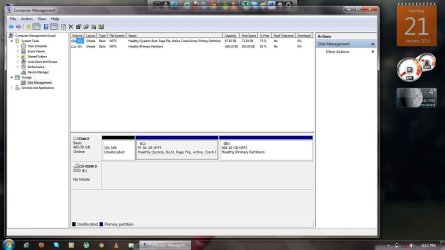
so if istall 64 bit i have two drives Local C 100gb and Local d 300something so 64 bit didnit mess with local d data will be save RIGHT?

i have need for speed carbon dvd it ran perfectly on 32 bit .is it still able to ran on 64 bit
 

My Computer

Computer Manufacturer/Model Number
HP G42
OS
window 7 Professional 64 bit
Memory
4 GB
Graphics Card(s)
HD5470
Monitor(s) Displays
14"
Screen Resolution
1366x768
Hard Drives
500 GB
If you install Windows 7 on D, yes it will wipe everything out .

It might, it might not.
 

My Computer

Computer type
PC/Desktop
Computer Manufacturer/Model Number
Skylake Special #666
OS
Windows 10 Pro x64
CPU
Intel Core i7 6700K
Motherboard
Asus Sabertooth Z170 Mark 1
Memory
GSkill TridentZ RGB 16GB 3600 16-16-16-36
Graphics Card(s)
EVGA GTX 980 Ti SC x2
Sound Card
Realtek High Definition
Monitor(s) Displays
AOC G2460PG
Screen Resolution
1920 x 1080 144Hz
Hard Drives
Samsung 860 Pro 256GB, Seagate Barracuda 4TB x2
PSU
EVGA 1000 P2, EVGA White Custom Braided Cables
Case
Corsair Vengeance C70 Gunmetal Black
Cooling
Corsair H100i v2, Corsair ML120 x2, Thermal Grizzly Kryonaut
Keyboard
Logitech G910 Orion Spectrum
Mouse
Logitech G700s
Internet Speed
Verizon Fios Quantum Gateway 75/75
Antivirus
Windows Defender, Malwarebytes Free 3.8.3
Browser
Chrome
Other Info
Corsair SP120 x4, LG Blu-ray Drive, Durabrand HT-395 100 Watt Dolby Digital Amp, Corsair H2100 Wireless 7.1 Headset
64 bit is better as it addresses 64 bit memory at a time. But it depends on what your usage is.
 

My Computer

Computer Manufacturer/Model Number
Dell Inc./Vostro 1088
OS
windows 7 Ultimate 32 bit
CPU
Intel Core 2 Duo
Memory
2 GB
Screen Resolution
1366*768
Hard Drives
HUAWEI SD STorage USB Device
Well since your system has 4gbs of ram then use 64 bit because 32bit will only let you use about 3-3.5. You wouldn't be using all your ram running in 32 bit and your system would benefit more from 64bit due to the extra memory and like mentioned in the post above. If you plan on upgrading ram at some point in the future then having 64 bit os installed would benefit you.
 

My Computer

Computer type
PC/Desktop
Computer Manufacturer/Model Number
custom build
OS
Windows 10 64bit
CPU
AMD Phenom II X4 925 (Deneb)(2.8GHz) OC 3.4GHz
Motherboard
M5A78L-MLX Plus
Memory
Corsair Vengeance DDR3 4GBX2 (8192MB)
Graphics Card(s)
XFX HD 6870 1GB (OC)- 940MHz core, mem 1150MHz
Monitor(s) Displays
Vizio 26' 1920x1080 / Acer 1336x768
Screen Resolution
1920x1080 60Hz /1336x768
Hard Drives
Kingston Digital 60GB SSDNow V300/500gb HDD Western Digital 7200rpm (/WD 160GB HDD 7200rpm
PSU
CORSAIR CX600 600w
Case
AZZA Orion 202 EVO
Cooling
cooler master hyper TX3 cpu cooler
Keyboard
Razer DeathStalker
Mouse
Logitech Optical Gaming Mouse G400
Antivirus
Defualt on win 10
Browser
Firefox
Other Info
cpu is overclocked in bios
thank u all .just one thing if i format and install 64 bit in C so my D drive will be fine no data will be deleted RIGHT?
 

My Computer

Computer Manufacturer/Model Number
HP G42
OS
window 7 Professional 64 bit
Memory
4 GB
Graphics Card(s)
HD5470
Monitor(s) Displays
14"
Screen Resolution
1366x768
Hard Drives
500 GB
Nothing will be affected on D. Just be careful, take your time. When you do the install you will see 2 partitions listed, C will be at the top and D will be below it. You will know by their sizes.

Only format C, the 1 at the top.

Unless you have a system reserved partition, then that will be at the top and it will be a 100 MB partition. Can you post a shot of disk management.

http://www.sevenforums.com/tutorials/9733-screenshots-files-upload-post-seven-forums.html
 

My Computer

Computer type
PC/Desktop
Computer Manufacturer/Model Number
Skylake Special #666
OS
Windows 10 Pro x64
CPU
Intel Core i7 6700K
Motherboard
Asus Sabertooth Z170 Mark 1
Memory
GSkill TridentZ RGB 16GB 3600 16-16-16-36
Graphics Card(s)
EVGA GTX 980 Ti SC x2
Sound Card
Realtek High Definition
Monitor(s) Displays
AOC G2460PG
Screen Resolution
1920 x 1080 144Hz
Hard Drives
Samsung 860 Pro 256GB, Seagate Barracuda 4TB x2
PSU
EVGA 1000 P2, EVGA White Custom Braided Cables
Case
Corsair Vengeance C70 Gunmetal Black
Cooling
Corsair H100i v2, Corsair ML120 x2, Thermal Grizzly Kryonaut
Keyboard
Logitech G910 Orion Spectrum
Mouse
Logitech G700s
Internet Speed
Verizon Fios Quantum Gateway 75/75
Antivirus
Windows Defender, Malwarebytes Free 3.8.3
Browser
Chrome
Other Info
Corsair SP120 x4, LG Blu-ray Drive, Durabrand HT-395 100 Watt Dolby Digital Amp, Corsair H2100 Wireless 7.1 Headset
during installation do have to leave a space of 100 mb for system reserve or just format c and then install.
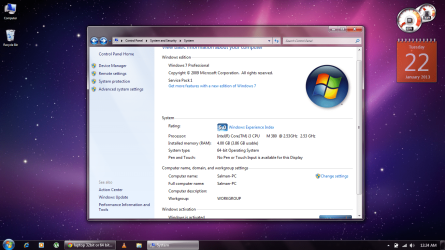
after 64 bit ram usable will be greater then that.now almost 1gb is not used
 

Attachments

  • disk manegment.jpg
    disk manegment.jpg
    86.4 KB · Views: 10
  • properties.png
    properties.png
    54.4 KB · Views: 10

My Computer

Computer Manufacturer/Model Number
HP G42
OS
window 7 Professional 64 bit
Memory
4 GB
Graphics Card(s)
HD5470
Monitor(s) Displays
14"
Screen Resolution
1366x768
Hard Drives
500 GB
Just format C don`t touch anyhting else.

Highlight the C partition, choose drive options, choose format. When it`s done the format simply choose next and the install will begin.

Make sure you have your data saved to your other partition before you start.;)

You do realize you are wiping out windows and you will have to reinstall all your programs and redo all the windows updates again. Windows will basically be blank. You do realize this, correct ?
 

My Computer

Computer type
PC/Desktop
Computer Manufacturer/Model Number
Skylake Special #666
OS
Windows 10 Pro x64
CPU
Intel Core i7 6700K
Motherboard
Asus Sabertooth Z170 Mark 1
Memory
GSkill TridentZ RGB 16GB 3600 16-16-16-36
Graphics Card(s)
EVGA GTX 980 Ti SC x2
Sound Card
Realtek High Definition
Monitor(s) Displays
AOC G2460PG
Screen Resolution
1920 x 1080 144Hz
Hard Drives
Samsung 860 Pro 256GB, Seagate Barracuda 4TB x2
PSU
EVGA 1000 P2, EVGA White Custom Braided Cables
Case
Corsair Vengeance C70 Gunmetal Black
Cooling
Corsair H100i v2, Corsair ML120 x2, Thermal Grizzly Kryonaut
Keyboard
Logitech G910 Orion Spectrum
Mouse
Logitech G700s
Internet Speed
Verizon Fios Quantum Gateway 75/75
Antivirus
Windows Defender, Malwarebytes Free 3.8.3
Browser
Chrome
Other Info
Corsair SP120 x4, LG Blu-ray Drive, Durabrand HT-395 100 Watt Dolby Digital Amp, Corsair H2100 Wireless 7.1 Headset
yup i do i want to do that soon as just bought laptop few days back there is not much of i install just NFs carbon Office couple more i can install them again.just one thing i intsall carbon in my D drive so after window can i be able to play have to delete it.thanks
 

My Computer

Computer Manufacturer/Model Number
HP G42
OS
window 7 Professional 64 bit
Memory
4 GB
Graphics Card(s)
HD5470
Monitor(s) Displays
14"
Screen Resolution
1366x768
Hard Drives
500 GB
You will have to reinstall it from C
 

My Computer

Computer type
PC/Desktop
Computer Manufacturer/Model Number
Skylake Special #666
OS
Windows 10 Pro x64
CPU
Intel Core i7 6700K
Motherboard
Asus Sabertooth Z170 Mark 1
Memory
GSkill TridentZ RGB 16GB 3600 16-16-16-36
Graphics Card(s)
EVGA GTX 980 Ti SC x2
Sound Card
Realtek High Definition
Monitor(s) Displays
AOC G2460PG
Screen Resolution
1920 x 1080 144Hz
Hard Drives
Samsung 860 Pro 256GB, Seagate Barracuda 4TB x2
PSU
EVGA 1000 P2, EVGA White Custom Braided Cables
Case
Corsair Vengeance C70 Gunmetal Black
Cooling
Corsair H100i v2, Corsair ML120 x2, Thermal Grizzly Kryonaut
Keyboard
Logitech G910 Orion Spectrum
Mouse
Logitech G700s
Internet Speed
Verizon Fios Quantum Gateway 75/75
Antivirus
Windows Defender, Malwarebytes Free 3.8.3
Browser
Chrome
Other Info
Corsair SP120 x4, LG Blu-ray Drive, Durabrand HT-395 100 Watt Dolby Digital Amp, Corsair H2100 Wireless 7.1 Headset
Salman Nazir,

To erase the Windows 7 32-bit version and replace it with the 64-bit, you can just do the following:

  1. Visit your Manufacturer's website and download drivers for your system that apply to Windows 7 64-bit and save them either to your D drive, or an external USB thumb drive.
    • The most important to probably make sure you get (if no others) will be the driver(s) for your LAN/Wireless connection... whichever you use to connect to the internet.
    • While Windows 7 comes with a lot of built-in drivers, I wouldn't trust it to have everything.
  2. Insert your Windows 7 64-bit CD into your CD-drive
  3. Restart the PC
  4. When prompted with "Press any key to boot from CD", press a key
  5. Wait for Windows to load its setup files
  6. Move through the prompts (including one that has you click a button that reads "Install") until it asks you to choose where to install windows
  7. Click the "Advanced" link so you can see all options
  8. Select the drive-partition where Windows is installed (in your case, the one that is less than 100 Gb) and click "Erase"
    • You can do this for the System Reserve drive (typically between 100-300 Mb) on a single boot system (which is what you have) without worry. Windows will recreate it if it isn't there
    • Do not touch your Data drive with the 300+ Gb
  9. Select the drive that is now labeled as "Unallocated space" and proceed through the prompts (basically telling Windows to install there)
    • There is no need to format it. Windows will do this automatically and set aside a piece of it for the System Reserve
  10. Continue and follow all instructions to install Windows 7 64-bit
  11. Install all missing drivers & Windows updates
All programs you installed under the previous OS will have to be reinstalled, even if you installed them to the D drive. There may be some few exceptions, but unless you're certain, just do it anyway.

64-bit is better than 32-bit. There may be some (old) programs that won't run on it, but there are quite a few compatibility modes within Win 7 and the 64-bit systems do a fairly good job at running 32-bit programs.

Good luck!
 

My Computer

Computer type
Laptop
Computer Manufacturer/Model Number
HP ZBook 17 G2
OS
Microsoft Windows 7 Professional 64-bit 7601 Multiprocessor Free Service Pack 1
CPU
Intel(R) Core(TM) i7-4810MQ CPU @ 2.80GHz
Motherboard
Hewlett-Packard 2255
Memory
16.00 GB
Graphics Card(s)
NVIDIA Quadro K3100M
Sound Card
Realtek High Definition Audio; NVIDIA High Definition Audio
Monitor(s) Displays
Samsung 24" + Acer 20"
Hard Drives
SanDisk SD6PP4M-256G-1006 ATA Device
HGST HTS721010A9E6300 SCSI Disk Device 1TB internal
HGST HTS721010A9E6300 SCSI Disk Device 1TB external (docking station)
thank u so. now new properties are these.ram usage is way better then then 32 bit almost 1 gb
 

Attachments

  • 64 bit properties.png
    64 bit properties.png
    245.5 KB · Views: 6

My Computer

Computer Manufacturer/Model Number
HP G42
OS
window 7 Professional 64 bit
Memory
4 GB
Graphics Card(s)
HD5470
Monitor(s) Displays
14"
Screen Resolution
1366x768
Hard Drives
500 GB
what is experience index as on 32 bit on same machine it was 3.2 but now on 64 bit its 5.0
 

My Computer

Computer Manufacturer/Model Number
HP G42
OS
window 7 Professional 64 bit
Memory
4 GB
Graphics Card(s)
HD5470
Monitor(s) Displays
14"
Screen Resolution
1366x768
Hard Drives
500 GB
Back
Top