Laptop becomes slow, file segment is unreadable

Xylonez

New member
Local time
3:49 AM
Messages
24
Hi guys, i need some help here.
So, 2 days ago ive noticed that my laptop performance has become slower compared to before, and I was lagging when playing my games so I decided to run CCleaner and restart my laptop. Unfortunately, it become worse after I restarted it. It took me about 45 mins to take to the dekstop after booting my laptop, and whenever i do some action(left click, right click), it takes about 5-10 mins till the system respond again. I checked the task manager's performance tab and nothing unusual there, no signs of overheating and the fan is working just fine.

So, i turned it off and boot into safe mode. Surprisingly, the performance is still normal in safe mode. Then, I tried to run chkdsk( the laptop asked me to restart). After running chkdsk it said "file record segment ### is unreadable), after it finish, I tried to boot to windows normally only to find out that the problem is still there. I tried to boot to safe mode but I was stuck After it loads classpnp.sys

I tried to backup my data using a win 7 installer from this link, and i get error 0x8007045D instead and the system asked me to run chkdsk again.

Im using win 7 ultimate x64 and my laptop is sager np 8150.
My specs:
- processor i7-2630QM, 2.0-2.8GHz
- nVidia GeForce GTX 485M 2GB GDDR5 DX11
- 2x4 GB DDR3 RAM
- 500GB HDD, partitioned to C and D. C mainly for programs, windows and data, D is for my games and vids

I hope this is the right section of the forum since i think this has something to do with its performance. Im posting this from my iphone, and any helps would be appreciated.
Thanks before,
Xylonez
 
Last edited:

My Computer My Computer

Computer Manufacturer/Model Number
Sager NP8150
OS
Windows 7 home premium x64
Mouse
Razer Orochi+Kabuto
I ran chkdsk c: /r and now it get to stage 2, start correcting some errors, then the last 2 lines were

332368 index entries processed.
Index verification completed.

It just stuck there and do nothing. It doesnt go to stage 3.
My question is, how do you know if chkdsk is still running or if its frozen? Should I wait until it finishes or restart my laptop now? Any ideas?

Xylonez

EDIT:
Chkdsk is finished now and it says "chkdsk error failed to transfer logged messages to the event log with status 50". Whats that means?
 

My Computer My Computer

Computer Manufacturer/Model Number
Sager NP8150
OS
Windows 7 home premium x64
Mouse
Razer Orochi+Kabuto
Hi,

How long has chkdsk been running?

Regards,
Golden
 

My Computer My Computer

Computer type
PC/Desktop
Computer Manufacturer/Model Number
Golden Mk. I.4
OS
Windows 10 Pro x64 ; Xubuntu x64
CPU
Intel i7 860 @ 2.80 GHz O/C'ed to 4.0GHz
Motherboard
Gigabyte P55A-UD3R Rev.1. Award BIOS F13
Memory
16GB Corsair Vengance DDR3 @ 661 MHz Dual Channel (9-9-9-24)
Graphics Card(s)
EVGA NVidia GTX 560 1024MB
Sound Card
Realtek Integrated
Monitor(s) Displays
Dual Samsung SyncMaster 2494HS
Screen Resolution
1920*1080 and 1920*1080
Hard Drives
1*Samsung 840 EVO 120GB SSD;
1*OCZ Vertex 2 60GB SSD;
2*Samsung F3 SpinPoint 1TB in RAID0;
1*Samsung F1 SpinPoint 1TB;
2*Western Digital 1TB External USB 3.0
1*Western Digital 500GB External USB 3.0
1*Seagate 500GB External USB 2.0
PSU
Thermaltake ToughPower QFan 750W
Case
Thermaltake Element S VK60001W2Z
Cooling
Corsair H60 Water Cooling, 2*230mm and 2*80mm case fans
Keyboard
Logitech G110
Mouse
Logitech MX518
Hi,

How long has chkdsk been running?

Regards,
Golden

Hi Golden,
its actually finished now with a "chkdsk error failed to transfer logged messages to the event log with status 50" message at the end. What am I supposed to do now?

Thanks,
Xylonez
 

My Computer My Computer

Computer Manufacturer/Model Number
Sager NP8150
OS
Windows 7 home premium x64
Mouse
Razer Orochi+Kabuto
Guys, im really desperate here.. Now, I cant even boot into windows and safe mode. Some help please?
 

My Computer My Computer

Computer Manufacturer/Model Number
Sager NP8150
OS
Windows 7 home premium x64
Mouse
Razer Orochi+Kabuto

My Computer My Computer

Computer type
PC/Desktop
Computer Manufacturer/Model Number
Golden Mk. I.4
OS
Windows 10 Pro x64 ; Xubuntu x64
CPU
Intel i7 860 @ 2.80 GHz O/C'ed to 4.0GHz
Motherboard
Gigabyte P55A-UD3R Rev.1. Award BIOS F13
Memory
16GB Corsair Vengance DDR3 @ 661 MHz Dual Channel (9-9-9-24)
Graphics Card(s)
EVGA NVidia GTX 560 1024MB
Sound Card
Realtek Integrated
Monitor(s) Displays
Dual Samsung SyncMaster 2494HS
Screen Resolution
1920*1080 and 1920*1080
Hard Drives
1*Samsung 840 EVO 120GB SSD;
1*OCZ Vertex 2 60GB SSD;
2*Samsung F3 SpinPoint 1TB in RAID0;
1*Samsung F1 SpinPoint 1TB;
2*Western Digital 1TB External USB 3.0
1*Western Digital 500GB External USB 3.0
1*Seagate 500GB External USB 2.0
PSU
Thermaltake ToughPower QFan 750W
Case
Thermaltake Element S VK60001W2Z
Cooling
Corsair H60 Water Cooling, 2*230mm and 2*80mm case fans
Keyboard
Logitech G110
Mouse
Logitech MX518

My Computer My Computer

Computer Manufacturer/Model Number
Toshiba Satellite S875D-S7239 laptop
OS
MS Windows 7 Ultimate SP1 64-bit
CPU
AMD A10-4600M
Motherboard
AMD Pumori (Socket FT1)
Memory
6.00 GB Dual-Channel DDR3 @ 798MHz (11-11-12-28)
Graphics Card(s)
AMD Radeon HD 7660G
Sound Card
High Definition Audio Device
Monitor(s) Displays
Generic PnP Monitor (1600x900@60Hz)
Screen Resolution
1600x900@60Hz
Hard Drives
SSD 119GB Corsair CSSD-V128GB2 ATA Device
Keyboard
Standard PS/2 Keyboard
Mouse
HP Wireless Optical Mobile Mouse Model FHA-3410
Internet Speed
What the local pub, local coffee shop offers.
Other Info
Optical Drive:MATSHITA BD-CMB UJ160B ATA Device


Also have an Asus ha1002xp netbook with Win 7 Ultimate installed.
Hi, sorry for my late reply
After a couple of chkdsk runs, my hdd is fine now.. I think..

Hi,

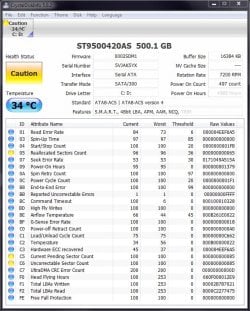
Please run this program, then post a screen capture of the output:

CrystalDiskInfo - Software - Crystal Dew World

Regards,
Golden
Ive attached the screenshot on this post

XyloneZ

first let's see if your hard disk is defective.

run the extended test of Seagate Tools for DOS. Makes no difference who made the disk.


Seagate Sea Tools Disk Diagnostic Tool
Seagate SeaTools for DOS download
Seagate for DOS tutorial
For some reason, I cant get it to work both on DOS and on Windows
In DOS, my laptop just doesnt detect the seaTools, so when I boot from my CD, it just log in as usual.

Is there other kind of tests that I can use to test my windows system file and hardware check?
 

Attachments

  • CDI.jpg
    CDI.jpg
    105.2 KB · Views: 49

My Computer My Computer

Computer Manufacturer/Model Number
Sager NP8150
OS
Windows 7 home premium x64
Mouse
Razer Orochi+Kabuto
Hi,

The SMART points to some potential problems with the HDD - how old is it?

What happens when you run Seatools for Windows? Can you give specific errors?

Regards,
Golden
 

My Computer My Computer

Computer type
PC/Desktop
Computer Manufacturer/Model Number
Golden Mk. I.4
OS
Windows 10 Pro x64 ; Xubuntu x64
CPU
Intel i7 860 @ 2.80 GHz O/C'ed to 4.0GHz
Motherboard
Gigabyte P55A-UD3R Rev.1. Award BIOS F13
Memory
16GB Corsair Vengance DDR3 @ 661 MHz Dual Channel (9-9-9-24)
Graphics Card(s)
EVGA NVidia GTX 560 1024MB
Sound Card
Realtek Integrated
Monitor(s) Displays
Dual Samsung SyncMaster 2494HS
Screen Resolution
1920*1080 and 1920*1080
Hard Drives
1*Samsung 840 EVO 120GB SSD;
1*OCZ Vertex 2 60GB SSD;
2*Samsung F3 SpinPoint 1TB in RAID0;
1*Samsung F1 SpinPoint 1TB;
2*Western Digital 1TB External USB 3.0
1*Western Digital 500GB External USB 3.0
1*Seagate 500GB External USB 2.0
PSU
Thermaltake ToughPower QFan 750W
Case
Thermaltake Element S VK60001W2Z
Cooling
Corsair H60 Water Cooling, 2*230mm and 2*80mm case fans
Keyboard
Logitech G110
Mouse
Logitech MX518
Hi,

The SMART points to some potential problems with the HDD - how old is it?

What happens when you run Seatools for Windows? Can you give specific errors?

Regards,
Golden

The hdd is only about 1 and a half years old.
It says
"Now is a good time to make sure you have a current backup of your important data.

Unfortunately, your Seagate product has failed an important diagnostic test, possibly caused by problem sectors which are difficult to read. Seagate recommends that you run SeaTools for DOS, which has the ability to repair most problem sectors. SeaTools for DOS may be able to save you from the inconvenience and down time of exchanging the drive."
 

My Computer My Computer

Computer Manufacturer/Model Number
Sager NP8150
OS
Windows 7 home premium x64
Mouse
Razer Orochi+Kabuto
Hi,

That sounds pretty self-explanatory : it looks like the HDD might be on the way out, or at least damaged beyond repair. Have you tried Karl's suggestion again and tried to get Seatools for DOS working again?

Regards,
Golden
 

My Computer My Computer

Computer type
PC/Desktop
Computer Manufacturer/Model Number
Golden Mk. I.4
OS
Windows 10 Pro x64 ; Xubuntu x64
CPU
Intel i7 860 @ 2.80 GHz O/C'ed to 4.0GHz
Motherboard
Gigabyte P55A-UD3R Rev.1. Award BIOS F13
Memory
16GB Corsair Vengance DDR3 @ 661 MHz Dual Channel (9-9-9-24)
Graphics Card(s)
EVGA NVidia GTX 560 1024MB
Sound Card
Realtek Integrated
Monitor(s) Displays
Dual Samsung SyncMaster 2494HS
Screen Resolution
1920*1080 and 1920*1080
Hard Drives
1*Samsung 840 EVO 120GB SSD;
1*OCZ Vertex 2 60GB SSD;
2*Samsung F3 SpinPoint 1TB in RAID0;
1*Samsung F1 SpinPoint 1TB;
2*Western Digital 1TB External USB 3.0
1*Western Digital 500GB External USB 3.0
1*Seagate 500GB External USB 2.0
PSU
Thermaltake ToughPower QFan 750W
Case
Thermaltake Element S VK60001W2Z
Cooling
Corsair H60 Water Cooling, 2*230mm and 2*80mm case fans
Keyboard
Logitech G110
Mouse
Logitech MX518
Back
Top