Laptop keeps disconnecting from wireless

Tbrummet

New member
Local time
9:10 PM
Messages
6
I just bought a new laptop and when I shut the lid or the computer goes into sleep/hibernate mode I get disconnected from my wireless, so when I open my computer back up i have to turn wireless capability back on and reconnect to the internet. I have tried changing the power options but nothing has worked. Any help please??
 

My Computer My Computer

Computer Manufacturer/Model Number
Asus K52f
OS
Windows 7 Home Premium 64bit
No matter what if you close your lid and you have it set to go into sleep mode, your wireless will disconnect. When your PC is put into sleep mode it uses minimum power.

To disable your PC from going into sleep mode when the lid is closed, follow these instructions.

Click start, type in "Power Options" on the left hand side, click, "Choose what closing the lid dose"
Then go to the "When I close the lid" section, and choose what ever option best fits what you wish for it to do.
 

My Computer My Computer

OS
Windows 7 Home Premium, 64 bit.
Memory
3GB Ram
Internet Speed
49MB / SEC download speed (Comcast)
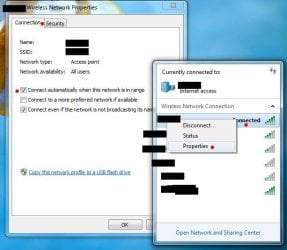
Have you configured it to connect to the network automatically? If not, you can do so by:

1) Left click on the connection icon in the SysTray.
2) Right click on your connection, choose Properties.
3) In the resulting properties dialog, click on the Connection tab
4) Make sure that the 'Connect automatically when this network is in range' box is checked.

James
 

Attachments

  • Wireless Connection Default.JPG
    Wireless Connection Default.JPG
    59.8 KB · Views: 128

My Computer My Computer

OS
Win7U 64 RTM
CPU
Q9550
Motherboard
GA-EP45-UD3R
Memory
8GB Gskill
Graphics Card(s)
ASUS|EAH4850/HTDI/1GD3/A
Sound Card
xfi Plat
Monitor(s) Displays
Dell 2405fpw
Screen Resolution
1920x1200
Hard Drives
Seagate & WD sata Drives
PSU
Antec
Case
Antec
Keyboard
MS Natural Ergonomic 4000
Mouse
Logitech MX610 USB Cordless
Ya I've done that. Ok i guess my question should be, How do i get my laptop to automatically connect to the internet when i turn it back on? Its set to automatically connect to my wireless when it is in range already.
 

My Computer My Computer

Computer Manufacturer/Model Number
Asus K52f
OS
Windows 7 Home Premium 64bit
Go to the device manager, select your wifi card, and in the properties there will be a box that says allow Windows to turn off the device to save power. Make sure this is not checked.
 

My Computer My Computer

Computer Manufacturer/Model Number
Dell XPS 15 L502x
OS
Windows 7 Ultimate x64 SP1
CPU
Core i7-2670QM
Memory
8GB DDR3 PC3-10600
Graphics Card(s)
Intel HD Graphics 3000 + GeForce GT 540M
Screen Resolution
1920x1080
Hard Drives
1TB 5400RPM Seagate
Ya I've done that also.
 

My Computer My Computer

Computer Manufacturer/Model Number
Asus K52f
OS
Windows 7 Home Premium 64bit
I'm getting this same thing with my new Asus Zenbook. No other laptops that I use have this problem (but they are Win XP). This one is Win7 Pro and every time it goes to sleep, it disconnects from the internet. The only way to get it back on is to run the Troubleshoot Connection wizard. This is extremely annoying. The driver for my wireless adapter is up to date as is Windows itself via MS Update. Any ideas??
 

My Computer My Computer

Computer Manufacturer/Model Number
Dell Studio XPS 8000
OS
Windows 7 64-bit
CPU
Core i7-860
Memory
6GB
Graphics Card(s)
nVidia GeForce GT 220
Sound Card
nVidia
Monitor(s) Displays
Mac 30" HD Cinema Display
Windows 7 disconnects after sleep

Try this -
go to control panel - network and internet - manage wireless networks
delete all networks that have been created
click Profile types on the menu bar just above (Add, Adapter properties etc)
and make sure it is set to - use all user profiles only
click Add (on the menu bar) then select manually create a network profile
then manually enter SSID encryption type and your security key
make sure you are connected to the internet then enter sleep mode
wake up computer and internet should still be connected.
 

My Computer My Computer

Computer type
Laptop
OS
Windows 7
I've had this problem with 3 separate computers all running 64 bit windows 7.
I have always managed to cure it by doing one of the following
1 - the method in the above post (delete networks and manually create a new one
2 - disable wake up password
3 - create a new standard account and use that
4 - tick the connect when ssid not broadcasting in network properties

one or a mixture of the above has always solved this problem for me.
 

My Computer My Computer

Computer type
Laptop
OS
Windows 7
Back
Top