
Laptop not displaying colors properly

Skater

Shine, Ever So Bright
Member
Local time
10:12 AM
Messages
59
Location
Massachusetts.
So my grandmother just gave me her "old" (2012 HP) laptop and told me if I could fix it, I could have it. I know a good deal about computers when it comes to software and OS, but my knowledge of hardware problems is pretty limited in all honesty. Could anybody tell me how to solve this problem? I read somewhere that it could be the GUI not receiving enough power, but I have no idea if that's it or not. Any help would be greatly appreciated!

EDIT: See my fourth post with the picture of what I'm actually seeing. The screenshots were much different when viewed from the laptop itself, so I took a picture with my phone to show what I was actually seeing.
 

Attachments
  • colors.png
    colors.png
    114.9 KB · Views: 6
Last edited:

My Computer My Computer

Computer Manufacturer/Model Number
Hewlett-Packard XH066UA#ABA
OS
Windows 7 Home Premium x64
CPU
ACPI x64-based PC
Memory
3GB RAM
Graphics Card(s)
AMD M880G with ATI Mobility Radeon HD 4250

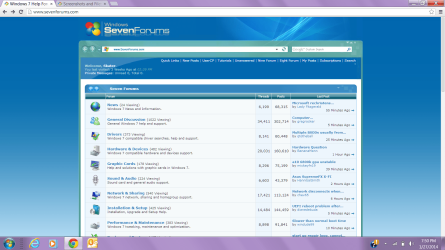
I don't see anything wrong with the way the SevenForums webpage is being displayed. Am I missing something?

Now the window borders and menubar are lavender, which is not the default color. If that's what she's referring to, then it looks like somebody changed the theme at some point. That's easy to fix. Move your pointer to an empty spot on the desktop and right-click on "Personalize." Then left-click select the Windows 7 theme and it should come back to the default colors.
 

My Computer My Computer

OS
Windows 7 x64
I don't see anything wrong with the way the SevenForums webpage is being displayed. Am I missing something?

Now the window borders and menubar are lavender, which is not the default color. If that's what she's referring to, then it looks like somebody changed the theme at some point. That's easy to fix. Move your pointer to an empty spot on the desktop and right-click on "Personalize." Then left-click select the Windows 7 theme and it should come back to the default colors.
I probably should've taken a screen shot of the desktop instead, I didn't mean anything about the SF page. I know its not the theme though, the colors flash and brighten and dull and aren't normal whatsoever. It's difficult to tell how the screenshot really looks, as the colors are already messed up.
 

Attachments

  • color1.png
    color1.png
    23.3 KB · Views: 5

My Computer My Computer

Computer Manufacturer/Model Number
Hewlett-Packard XH066UA#ABA
OS
Windows 7 Home Premium x64
CPU
ACPI x64-based PC
Memory
3GB RAM
Graphics Card(s)
AMD M880G with ATI Mobility Radeon HD 4250
Hey Skater,

Is it possible for you to select a wallpaper for the desktop and then take a screenshot? Are you getting different colors on icons, wallpaper or text?
 

My Computer My Computer

Computer type
PC/Desktop
Computer Manufacturer/Model Number
Custom Bulid/Self made
OS
Windows 11 x64
CPU
i5 2500K @ 3.3 GHz
Motherboard
ASUS P8 Z77 V pro
Memory
16 GB DDR 3 @ 1600Mhz
Graphics Card(s)
MSI 1050TI 4GB OC version
Sound Card
On Board (Realtek HD audio)
Monitor(s) Displays
Samsung 22" LCD
Screen Resolution
1920*1080
Hard Drives
Seagate 1 TB, WD 1TB, Seagate 2 TB ( I use a lot of space)
PSU
coolermaster 750 W
Case
Coolermaster HAF912
Cooling
Coolermaster hyper 212 EVO
Keyboard
Samsung
Mouse
Dell Wireless
Internet Speed
Wireless 50 Mbps
Antivirus
AVG 2016 Internet Security
Browser
Google Chrome
Hey Skater,

Is it possible for you to select a wallpaper for the desktop and then take a screenshot? Are you getting different colors on icons, wallpaper or text?

Sure, I won't be able to for a few hours, but I'll be sure to when I get home!

EDIT: Looking at those screenshots from my phone, I realized that the screenshot don't look at all like they do when looking at the computer. I'll try and take a picture of it from my phone later to show you what I see.
 

My Computer My Computer

Computer Manufacturer/Model Number
Hewlett-Packard XH066UA#ABA
OS
Windows 7 Home Premium x64
CPU
ACPI x64-based PC
Memory
3GB RAM
Graphics Card(s)
AMD M880G with ATI Mobility Radeon HD 4250
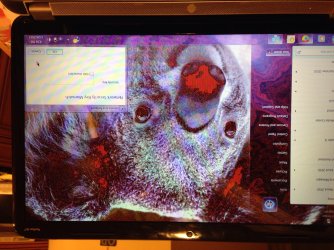
"...the colors flash and brighten and dull and aren't normal whatsoever."

That sounds like your screen has an intermittent flicker.

Can you connect your laptop to an external monitor? If that works, then there is a bad connection to the laptop screen or a bad board somewhere.
 

My Computer My Computer

OS
Windows 7 x64
This is what it looks like from my view, change the desktop so Archer could see what I mean.

EDIT: Oh no, I apologize for it being upside down!
 

Attachments

  • image.jpg
    image.jpg
    958.8 KB · Views: 8

My Computer My Computer

Computer Manufacturer/Model Number
Hewlett-Packard XH066UA#ABA
OS
Windows 7 Home Premium x64
CPU
ACPI x64-based PC
Memory
3GB RAM
Graphics Card(s)
AMD M880G with ATI Mobility Radeon HD 4250
Garbled video like that is either: a bad connection to the screen; a bad inverter; or a bad video processor.

The best way to rule out the video processor is to connect an external monitor. If the external monitor's display is OK, then it's not the video processor. Then you have to open up the laptop's top and get to the screen. The inverter is located right next to it. Replacing the cables and inverter is a do-it-yourself job.

If the external monitor's display is also garbled, then the video processor is bad. Fixing that is not for the average joe.
 

My Computer My Computer

OS
Windows 7 x64
I tried connecting to an external monitor and the picture looked fine. This laptop is almost like the HP G62 that I have, so I'm going to take it apart tonight and have a look at the screen.
 

My Computer My Computer

Computer Manufacturer/Model Number
Hewlett-Packard XH066UA#ABA
OS
Windows 7 Home Premium x64
CPU
ACPI x64-based PC
Memory
3GB RAM
Graphics Card(s)
AMD M880G with ATI Mobility Radeon HD 4250
Back
Top