Laptop Not Sleeping

laxman7

New member
Local time
9:51 PM
Messages
9
Location
Vancouver, Canada
I changed the setting to not sleep when I close the lid while plugged in, however whenever I do press the sleep button on the start menu and close the lid, the laptop boots up again. Would this be a windows error that needs re installation, or is it a hardware issue?

Thanks in advance
 

My Computer

Computer Manufacturer/Model Number
Dell XPS L502X
OS
OEM Windows 7 Home Premium 64bit
CPU
Intel i5-2410M 2.3GHz
Motherboard
Intel HM67
Memory
6GB Shared Dual Channel DDR3 Memory
Graphics Card(s)
1GB NVIDIA GeForce GT525M
Monitor(s) Displays
15.6 inch display
Screen Resolution
1366x768
Hard Drives
500GB SATA 7200RPM
So you are telling it to sleep then closing the lid immediately telling it not to sleep and you are wondering where the problem is?
Maybe you should try setting lid close to do nothing.
 

My Computer

Computer Manufacturer/Model Number
Insane hobo technologies. ;-)
OS
Windows 7 x64
CPU
Intel i7 2600k
Motherboard
Asrock z68 extreme 4 gen 3
Memory
G.skill Ripjaw 16gigs @ 1866
Graphics Card(s)
Nvidia gtx580 (evga)
Sound Card
Integrated HD audio + hdmi
Monitor(s) Displays
24" ASUS widescreen + 42" insignia
Screen Resolution
1080p (1920x1080)
Hard Drives
128 Samsung 830
256 Samsung 840
3 x 1tb storage drive (various)
1 western digital 1tb (eSATA)
1 Seagate 1tb (eSATA)
PSU
1 kilowatt SLI/Crossfire rated Silverstone modular
Case
NZXT Phantom + additional 220 fan
Cooling
Zalmann
Keyboard
Microsoft wireless 3000 (v2)
Mouse
MS - wireless 5000 (bluetrack)
Internet Speed
depends on if you ask me or my provider.
Other Info
The above information is provided as is, and the author assumes no responsibility for issues it may cause with your sanity or fanboyism.
I set the lid setting to do nothing, because sometimes i want to leave my computer on without dust collecting on the screen, so I close it. But when I actually want the computer to sleep, the second I shut the lid it'll turn back on
 

My Computer

Computer Manufacturer/Model Number
Dell XPS L502X
OS
OEM Windows 7 Home Premium 64bit
CPU
Intel i5-2410M 2.3GHz
Motherboard
Intel HM67
Memory
6GB Shared Dual Channel DDR3 Memory
Graphics Card(s)
1GB NVIDIA GeForce GT525M
Monitor(s) Displays
15.6 inch display
Screen Resolution
1366x768
Hard Drives
500GB SATA 7200RPM
Okay give me a few here I'll see if I can reproduce your problem on my laptop.
 

My Computer

Computer Manufacturer/Model Number
Insane hobo technologies. ;-)
OS
Windows 7 x64
CPU
Intel i7 2600k
Motherboard
Asrock z68 extreme 4 gen 3
Memory
G.skill Ripjaw 16gigs @ 1866
Graphics Card(s)
Nvidia gtx580 (evga)
Sound Card
Integrated HD audio + hdmi
Monitor(s) Displays
24" ASUS widescreen + 42" insignia
Screen Resolution
1080p (1920x1080)
Hard Drives
128 Samsung 830
256 Samsung 840
3 x 1tb storage drive (various)
1 western digital 1tb (eSATA)
1 Seagate 1tb (eSATA)
PSU
1 kilowatt SLI/Crossfire rated Silverstone modular
Case
NZXT Phantom + additional 220 fan
Cooling
Zalmann
Keyboard
Microsoft wireless 3000 (v2)
Mouse
MS - wireless 5000 (bluetrack)
Internet Speed
depends on if you ask me or my provider.
Other Info
The above information is provided as is, and the author assumes no responsibility for issues it may cause with your sanity or fanboyism.
I set the lid setting to do nothing, because sometimes i want to leave my computer on without dust collecting on the screen, so I close it. But when I actually want the computer to sleep, the second I shut the lid it'll turn back on

Suggestion :

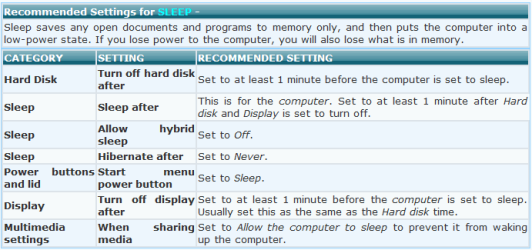
Start > search box, enter power options > press Enter > right column, click one of the " Change plan settings " ( anyone ) > bottom left, click " Change advanced power settings " > scroll down to Multimedia settings, expand the + sign > set it to Allow the computer to sleep.
Refer to this tutorial : see 5 (c)
http://www.sevenforums.com/tutorials/778-power-plan-settings-change.html
 

Attachments

  • sleep settings.PNG
    sleep settings.PNG
    13.3 KB · Views: 37

My Computer

Computer Manufacturer/Model Number
Acer Aspire 7741Z
OS
Windows 7 Home Premium 64-bit, SP1
CPU
Intel Pentium P6200, Cores 2, 2.13 GHz
Memory
4 GB
Graphics Card(s)
Intel HD
Sound Card
unknown
Monitor(s) Displays
17.3 inches
Screen Resolution
1600 x 900
Hard Drives
640 GB, 5400 PRM
Start > search box, enter power options > press Enter > right column, click one of the " Change plan settings " ( anyone ) > bottom left, click " Change advanced power settings " > scroll down to Multimedia settings, expand the + sign > set it to Allow the computer to sleep.
Refer to this tutorial : see 5 (c)
http://www.sevenforums.com/tutorials/778-power-plan-settings-change.html

At first I thought this worked, but I am still having this problem. Any other suggestions?
 

My Computer

Computer Manufacturer/Model Number
Dell XPS L502X
OS
OEM Windows 7 Home Premium 64bit
CPU
Intel i5-2410M 2.3GHz
Motherboard
Intel HM67
Memory
6GB Shared Dual Channel DDR3 Memory
Graphics Card(s)
1GB NVIDIA GeForce GT525M
Monitor(s) Displays
15.6 inch display
Screen Resolution
1366x768
Hard Drives
500GB SATA 7200RPM
Start > search box, enter power options > press Enter > right column, click one of the " Change plan settings " ( anyone ) > bottom left, click " Change advanced power settings " > scroll down to Multimedia settings, expand the + sign > set it to Allow the computer to sleep.
Refer to this tutorial : see 5 (c)
http://www.sevenforums.com/tutorials/778-power-plan-settings-change.html

At first I thought this worked, but I am still having this problem. Any other suggestions?

Age old question. It may not be relevant anymore.

Do you use a wireless keyboard or wireless mouse ?
If yes , do you have this update installed....
Microsoft - HID Non-User Input Data Filter (KB911895)

Your wireless app will wake up the machine if you do not have this update installed.
Have a look at your Update History.
 

My Computer

Computer Manufacturer/Model Number
Acer Aspire 7741Z
OS
Windows 7 Home Premium 64-bit, SP1
CPU
Intel Pentium P6200, Cores 2, 2.13 GHz
Memory
4 GB
Graphics Card(s)
Intel HD
Sound Card
unknown
Monitor(s) Displays
17.3 inches
Screen Resolution
1600 x 900
Hard Drives
640 GB, 5400 PRM
I do not have anything wireless attached, but there was an update for the keyboard and I installed that, still didn't help.
 

My Computer

Computer Manufacturer/Model Number
Dell XPS L502X
OS
OEM Windows 7 Home Premium 64bit
CPU
Intel i5-2410M 2.3GHz
Motherboard
Intel HM67
Memory
6GB Shared Dual Channel DDR3 Memory
Graphics Card(s)
1GB NVIDIA GeForce GT525M
Monitor(s) Displays
15.6 inch display
Screen Resolution
1366x768
Hard Drives
500GB SATA 7200RPM
I do not have anything wireless attached, but there was an update for the keyboard and I installed that, still didn't help.

How about you start the power options from scratch.....

Open Power Options > on your chosen power plan ( such as Balanced, Power saver, and High Performance ), click Change Plan Settings > click Restore Default Settings for this plan.

Now, start from scratch.....
Left column, you have ......
Choose what closing the lid does.
Choose when to turn off the display.
Change when computer sleeps.

Click on them and decide what setting you want for each > click Save Changes each time.

Now see if the computer does go to sleep when you close the lid.
 

My Computer

Computer Manufacturer/Model Number
Acer Aspire 7741Z
OS
Windows 7 Home Premium 64-bit, SP1
CPU
Intel Pentium P6200, Cores 2, 2.13 GHz
Memory
4 GB
Graphics Card(s)
Intel HD
Sound Card
unknown
Monitor(s) Displays
17.3 inches
Screen Resolution
1600 x 900
Hard Drives
640 GB, 5400 PRM
It still doesn't work! I'm beginning to think the only solution is a reinstall, what a hassle :P
 

My Computer

Computer Manufacturer/Model Number
Dell XPS L502X
OS
OEM Windows 7 Home Premium 64bit
CPU
Intel i5-2410M 2.3GHz
Motherboard
Intel HM67
Memory
6GB Shared Dual Channel DDR3 Memory
Graphics Card(s)
1GB NVIDIA GeForce GT525M
Monitor(s) Displays
15.6 inch display
Screen Resolution
1366x768
Hard Drives
500GB SATA 7200RPM
It still doesn't work! I'm beginning to think the only solution is a reinstall, what a hassle :P

Sorry, I can't help any further.
 

My Computer

Computer Manufacturer/Model Number
Acer Aspire 7741Z
OS
Windows 7 Home Premium 64-bit, SP1
CPU
Intel Pentium P6200, Cores 2, 2.13 GHz
Memory
4 GB
Graphics Card(s)
Intel HD
Sound Card
unknown
Monitor(s) Displays
17.3 inches
Screen Resolution
1600 x 900
Hard Drives
640 GB, 5400 PRM
Back
Top