
Laptop running slow on battery

bindoksala

New member
Local time
10:11 PM
Messages
11
Location
Pune
My Laptop is acting weird now..

Whenever laptop is on Power supply plugged in, it runs normally, but whenever I disconnect the power supply or when there is sudden power cut, it becomes damn slow .

Please note that my laptop battery is 70% worn :(

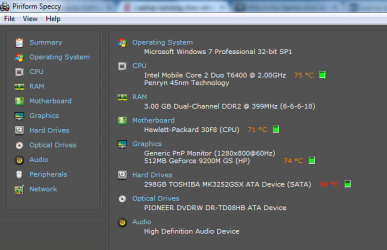
Below is the screenshot of system spec along with the CPU and HDD temp. (screenshot taken after 10 minutes when the laptop was turned on)
 

Attachments
  • Untitled.png
    Untitled.png
    18.8 KB · Views: 13
Last edited:

My Computer My Computer

At a glance

Microsoft Windows 7 Professional 32-bit 7601 ...Intel(R) Core(TM)2 Duo CPU T6400 @ 2.00GHz3.00 GBNVIDIA GeForce 9200M GS
Computer type
Laptop
Computer Manufacturer/Model Number
HP
OS
Microsoft Windows 7 Professional 32-bit 7601 Multiprocessor Free Service Pack 1
CPU
Intel(R) Core(TM)2 Duo CPU T6400 @ 2.00GHz
Motherboard
Hewlett-Packard 30F8
Memory
3.00 GB
Graphics Card(s)
NVIDIA GeForce 9200M GS
Sound Card
(1) NVIDIA High Definition Audio (2) High Definition Audio
Screen Resolution
1280 x 800 x 32 bits (4294967296 colors) @ 59 Hz
Hard Drives
(1) TOSHIBA MK3252GSX ATA Device (2) USBModem Disk USB Device
Antivirus
ESET NOD 4
Browser
Chrome
Hello Bindoksala,

Your temperatures are pretty high. I would recommend to increase air flow and blow out the dust to help cool the temps some.

If your laptop gets to hot, your CPU's and motherboard's performance could get idled down by your BIOS to help prevent a meltdown, or the laptop could even get powered off.

Since your laptop is only doing this while on battery, you might check your advanced power plan settings to see what you have set while "On battery", and adjust as needed. Specifically, check your "Processor power management" settings for this.

http://www.sevenforums.com/tutorials/778-power-plan-settings-change.html

Hope this helps, :)
Shawn
 

My Computer My Computer

At a glance

64-bit Windows 11 Pro for WorkstationsIntel i7-8700K OC'd to 5 GHz64 GB (4x16GB) G.SKILL TridentZ RGB DDR4 3600...ASUS ROG-STRIX-GTX1080TI-O11G-GAMING
Computer type
PC/Desktop
Computer Manufacturer/Model Number
Self built custom
OS
64-bit Windows 11 Pro for Workstations
CPU
Intel i7-8700K OC'd to 5 GHz
Motherboard
ASUS ROG Maximus XI Formula Z390
Memory
64 GB (4x16GB) G.SKILL TridentZ RGB DDR4 3600 MHz
Graphics Card(s)
ASUS ROG-STRIX-GTX1080TI-O11G-GAMING
Sound Card
Integrated
Monitor(s) Displays
2 x Samsung Odyssey G7 27"
Screen Resolution
2560x1440
Hard Drives
1TB Samsung 990 PRO M.2,
4TB Samsung 990 PRO PRO M.2,
TerraMaster F8 SSD Plus NAS
PSU
Seasonic Prime Titanium 850W
Case
Thermaltake Core P3
Cooling
Corsair Hydro H115i
Keyboard
Logitech wireless K800
Mouse
Logitech MX Master 4
Internet Speed
2 Gb/s Download and 100 Mb/s Upload
Antivirus
Malwarebyte Anti-Malware Premium
Browser
Google Chrome
Other Info
Logitech Z625 speaker system,
Logitech BRIO 4K Pro webcam,
HP Color LaserJet Pro MFP M477fdn,
APC SMART-UPS RT 1000 XL - SURT1000XLI,
Galaxy S23 Plus phone
My Laptop is acting weird now..

Whenever laptop is on Power supply plugged in, it runs normally, but whenever I disconnect the power supply or when there is sudden power cut, it becomes damn slow .

Please note that my laptop battery is 70% worn :(

Below is the screenshot of system spec along with the CPU and HDD temp. (screenshot taken after 10 minutes when the laptop was turned on)

Hello,

I prop my old Dell Latitude D820 up with a few comic backing boards to increase airflow underneath and she stays pretty cool. It will get warm (fan begins to run a lot) when I'm playing a flash game mostly, perhaps if I have many applications open, but for the most part not too much trouble As Brink said, try to get some airflow as keeping the vents plugged up won't allow for air transfer.

Also make sure you keep the keyboard and other components clean. Your fan can get clogged, but I use compressed air to give everything a good spray, but I do not take mine apart to get to the actual fan itself, as I haven't had many overheating problems (except in the summer then it's already blistering hot)
 

My Computer My Computer

At a glance

Microsoft Windows 7 Professional 64-bit SP1Intel(R) Core(TM) i5 CPU M 520 @ 2.40GHz8.00 GBNVIDIA NVS 3100M
Computer type
PC/Desktop
OS
Microsoft Windows 7 Professional 64-bit SP1
CPU
Intel(R) Core(TM) i5 CPU M 520 @ 2.40GHz
Motherboard
Dell Inc. 0K42JR
Memory
8.00 GB
Graphics Card(s)
NVIDIA NVS 3100M
Sound Card
(1) NVIDIA High Definition Audio (2) IDT High Definition A
Monitor(s) Displays
1
Screen Resolution
1440 x 900 x 32 bits (4294967296 colors) @ 59 Hz
Hard Drives
Samsung SSD 840 PRO Series ATA Device
Hello Bindoksala,

Your temperatures are pretty high. I would recommend to increase air flow and blow out the dust to help cool the temps some.

If your laptop gets to hot, your CPU's and motherboard's performance could get idled down by your BIOS to help prevent a meltdown, or the laptop could even get powered off.

Since your laptop is only doing this while on battery, you might check your advanced power plan settings to see what you have set while "On battery", and adjust as needed. Specifically, check your "Processor power management" settings for this.

http://www.sevenforums.com/tutorials/778-power-plan-settings-change.html

Hope this helps, :)
Shawn

Hi Brink,

Below the laptop I have three cooling fan, yes I may need to blow the dust out.

My laptop behave this way when the power cord is plugged out, but when I again plugged in then also it is slow, then after some 5-10 it starts working nornmal.

For your information "Maximum processor state on battery is 80%"

Regards
BS
 

My Computer My Computer

At a glance

Microsoft Windows 7 Professional 32-bit 7601 ...Intel(R) Core(TM)2 Duo CPU T6400 @ 2.00GHz3.00 GBNVIDIA GeForce 9200M GS
Computer type
Laptop
Computer Manufacturer/Model Number
HP
OS
Microsoft Windows 7 Professional 32-bit 7601 Multiprocessor Free Service Pack 1
CPU
Intel(R) Core(TM)2 Duo CPU T6400 @ 2.00GHz
Motherboard
Hewlett-Packard 30F8
Memory
3.00 GB
Graphics Card(s)
NVIDIA GeForce 9200M GS
Sound Card
(1) NVIDIA High Definition Audio (2) High Definition Audio
Screen Resolution
1280 x 800 x 32 bits (4294967296 colors) @ 59 Hz
Hard Drives
(1) TOSHIBA MK3252GSX ATA Device (2) USBModem Disk USB Device
Antivirus
ESET NOD 4
Browser
Chrome
In those same settings, check to make sure that "System cooling policy" is set to "Active" as well for "on battery". This will help with cooling.

Be sure to check all "On battery" settings in your power plan to see if anything may stand out.
 

My Computer My Computer

At a glance

64-bit Windows 11 Pro for WorkstationsIntel i7-8700K OC'd to 5 GHz64 GB (4x16GB) G.SKILL TridentZ RGB DDR4 3600...ASUS ROG-STRIX-GTX1080TI-O11G-GAMING
Computer type
PC/Desktop
Computer Manufacturer/Model Number
Self built custom
OS
64-bit Windows 11 Pro for Workstations
CPU
Intel i7-8700K OC'd to 5 GHz
Motherboard
ASUS ROG Maximus XI Formula Z390
Memory
64 GB (4x16GB) G.SKILL TridentZ RGB DDR4 3600 MHz
Graphics Card(s)
ASUS ROG-STRIX-GTX1080TI-O11G-GAMING
Sound Card
Integrated
Monitor(s) Displays
2 x Samsung Odyssey G7 27"
Screen Resolution
2560x1440
Hard Drives
1TB Samsung 990 PRO M.2,
4TB Samsung 990 PRO PRO M.2,
TerraMaster F8 SSD Plus NAS
PSU
Seasonic Prime Titanium 850W
Case
Thermaltake Core P3
Cooling
Corsair Hydro H115i
Keyboard
Logitech wireless K800
Mouse
Logitech MX Master 4
Internet Speed
2 Gb/s Download and 100 Mb/s Upload
Antivirus
Malwarebyte Anti-Malware Premium
Browser
Google Chrome
Other Info
Logitech Z625 speaker system,
Logitech BRIO 4K Pro webcam,
HP Color LaserJet Pro MFP M477fdn,
APC SMART-UPS RT 1000 XL - SURT1000XLI,
Galaxy S23 Plus phone
Back
Top