Solved laptop unresponsive and laggy to the point of locking up

JeepRider

New member
Local time
5:55 PM
Messages
34
it was running fine a few weeks ago, then the sound became scratchy, skippy and distorted, then after that it would become, i guess you could say "lazy". i watch the HDD light all the time, and i notice now when i click on something, the HDD doesn't work (what i mean is load work, like opening a program) for up to 3 minutes, doing NOTHING. then all the sudden, it works its arse off. what is going on with this thing??? i ran windows defrag, disk cleanup, avast full system antivirus scan, and spyhunter 4 full scan and found NOTHING. chkdsk found no bad sectors. im lost. any ideas?
 

My Computer My Computer

At a glance

Windows 7 Ultimate 64 bitIntel Core i7-2600 3.4GHZ12GBNvidia Geforce 1050Ti
Computer type
PC/Desktop
Computer Manufacturer/Model Number
Dell Optiplex 990
OS
Windows 7 Ultimate 64 bit
CPU
Intel Core i7-2600 3.4GHZ
Motherboard
Stock Dell board
Memory
12GB
Graphics Card(s)
Nvidia Geforce 1050Ti
Sound Card
On board
Hard Drives
250GB Kingston SSD.
1TB mechanical drive.
Keyboard
Razer black widow ultimate 2014
Mouse
Logitech G500
Antivirus
CM Security
Browser
Google Chrome
Update the Sound driver from the Dell Support Downloads webpage for your PC model.

Check over the PC thoroughly using the Troubleshooting Steps for Windows 7


Does the PC still have the factory install? If so that is the worst possible install of Win7 one can have, larded with bloatware and duplicate utilities which interfere with better versions built into Win7. That's why most tech enthusiasts won't even run such an install but instead http://www.sevenforums.com/tutorials/219487-clean-reinstall-factory-oem-windows-7-a.html#post1839164.

Everything needed is in the blue link to get and keep a perfect install just like a million others have done without a single complaint.

Until then you can Clean Up Factory Bloatware.
 
Update the Sound driver from the Dell Support Downloads webpage for your PC model.

Check over the PC thoroughly using the Troubleshooting Steps for Windows 7


Does the PC still have the factory install? If so that is the worst possible install of Win7 one can have, larded with bloatware and duplicate utilities which interfere with better versions built into Win7. That's why most tech enthusiasts won't even run such an install but instead http://www.sevenforums.com/tutorials/219487-clean-reinstall-factory-oem-windows-7-a.html#post1839164.

Everything needed is in the blue link to get and keep a perfect install just like a million others have done without a single complaint.

Until then you can Clean Up Factory Bloatware.

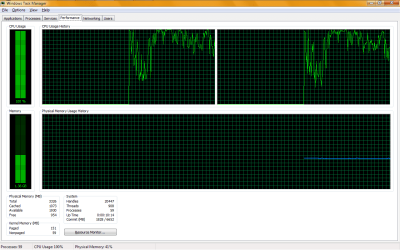
ive gotten rid of all bloatware i could find, this install is clean, all drivers are up to date. i figured out its not the HDD, its the CPU, with NO TASKS RUNNING AT ALL, just base windows with no programs running, cpu usage NEVER goes below 98%. i can not find the cpu hogger no matter what i do. its SO annoying. got any ideas?
 

My Computer My Computer

At a glance

Windows 7 Ultimate 64 bitIntel Core i7-2600 3.4GHZ12GBNvidia Geforce 1050Ti
Computer type
PC/Desktop
Computer Manufacturer/Model Number
Dell Optiplex 990
OS
Windows 7 Ultimate 64 bit
CPU
Intel Core i7-2600 3.4GHZ
Motherboard
Stock Dell board
Memory
12GB
Graphics Card(s)
Nvidia Geforce 1050Ti
Sound Card
On board
Hard Drives
250GB Kingston SSD.
1TB mechanical drive.
Keyboard
Razer black widow ultimate 2014
Mouse
Logitech G500
Antivirus
CM Security
Browser
Google Chrome
If you previously had the factory install and have not yet done a Clean Reinstall Windows 7 then it is still suspect since there is no way you can ever improve a factory install anywhere close to clean. The corruption goes deep into the registry.

Make sure you've created a Clean Boot, are using a recommended AV for best performance, resolve repeat errors and access System Resources - all from Troubleshooting Steps for Windows 7 . If these aren't sufficient then keep working through all steps to go over your install thoroughly.

You can try creating a new Admin User account to see if the same CPU usage persists and if not gradually migrate over to that account and delete the old one. User Account - Create - Windows 7 Help Forums
 
I personally would check the cpu temp with some app like core temp. Just to be sure the laptop is not over heating and stepping down the cpu to try and compensate for the high temps.
 

My Computer My Computer

At a glance

Windows 7 Ultimate 64bitIntel i5 650G.SKILL 8GB DDR3 1333Radeon HD 5770
Computer Manufacturer/Model Number
Custom
OS
Windows 7 Ultimate 64bit
CPU
Intel i5 650
Motherboard
Intel DQ57TM
Memory
G.SKILL 8GB DDR3 1333
Graphics Card(s)
Radeon HD 5770
Sound Card
Realtek
Monitor(s) Displays
2 - LG W2061TQ
Hard Drives
OCZ Vertex 2 60GB
Seagate Barracuda 320GB
PSU
Antec EarthWatts 650W
it used to run at 170 oF and it didnt step the cpu down. i put a different cooler on it and arctic silver 5, now it runs 122 oF. so its way cooler, i dont tink cpu is being stepped down. its a task killing it. i was in process explorer and there was something called "interrupter" taking 48% of the cpu. i tried to end it, but it says invalid parameter. heres a screen shot of Windows task manager, and this is all the time, not just for the screenshot.
 

Attachments

  • cpu maxed out.png
    cpu maxed out.png
    20.5 KB · Views: 4

My Computer My Computer

At a glance

Windows 7 Ultimate 64 bitIntel Core i7-2600 3.4GHZ12GBNvidia Geforce 1050Ti
Computer type
PC/Desktop
Computer Manufacturer/Model Number
Dell Optiplex 990
OS
Windows 7 Ultimate 64 bit
CPU
Intel Core i7-2600 3.4GHZ
Motherboard
Stock Dell board
Memory
12GB
Graphics Card(s)
Nvidia Geforce 1050Ti
Sound Card
On board
Hard Drives
250GB Kingston SSD.
1TB mechanical drive.
Keyboard
Razer black widow ultimate 2014
Mouse
Logitech G500
Antivirus
CM Security
Browser
Google Chrome
Did you use Process Monitor from Step 12 of Troubleshooting Steps for Windows 7
to zero in on the offending Service? There is even a video given in the same step to demonstrate it.

We don't know what steps you've completed until you start working through them with feedback. Not interacting fully with the steps is normally assumed to be laziness or at least a lack of thoroughness that means the problem won't get solved. We're not going to spoon feed everything when very explicit steps complete with video tutorials are just ignored.
 
Did you use Process Monitor from Step 12 of Troubleshooting Steps for Windows 7
to zero in on the offending Service? There is even a video given in the same step to demonstrate it.

We don't know what steps you've completed until you start working through them with feedback. Not interacting fully with the steps is normally assumed to be laziness or at least a lack of thoroughness that means the problem won't get solved. We're not going to spoon feed everything when very explicit steps complete with video tutorials are just ignored.

i looked at that list, went through with process explorer, and i also did some disabling in device manager (drivers i newly installed i thought were causing issues, and they were), now cpu usage is not even close to what it used to be. but now my video and sound is still slow and clicky/skippy and distorted.

sorry if this thread is annoying, im not real good with finding issues that are in deep.
 

My Computer My Computer

At a glance

Windows 7 Ultimate 64 bitIntel Core i7-2600 3.4GHZ12GBNvidia Geforce 1050Ti
Computer type
PC/Desktop
Computer Manufacturer/Model Number
Dell Optiplex 990
OS
Windows 7 Ultimate 64 bit
CPU
Intel Core i7-2600 3.4GHZ
Motherboard
Stock Dell board
Memory
12GB
Graphics Card(s)
Nvidia Geforce 1050Ti
Sound Card
On board
Hard Drives
250GB Kingston SSD.
1TB mechanical drive.
Keyboard
Razer black widow ultimate 2014
Mouse
Logitech G500
Antivirus
CM Security
Browser
Google Chrome
How about doing one perfect Clean Reinstall Windows 7 following the steps in the tutorial which assure a perfect install which stays that way if you stick with only the tools and methods given?

Then save it as a backup image and you'll never need to do it again.
 
How about doing one perfect Clean Reinstall Windows 7 following the steps in the tutorial which assure a perfect install which stays that way if you stick with only the tools and methods given?

Then save it as a backup image and you'll never need to do it again.

i will have to think about that one. seems to be running good now, but time will tell. i will look around some more if it goes loopy again. if it does, i will do the clean re install. thanks for all the help everyone so far! very appreciated!
 
Last edited:

My Computer My Computer

At a glance

Windows 7 Ultimate 64 bitIntel Core i7-2600 3.4GHZ12GBNvidia Geforce 1050Ti
Computer type
PC/Desktop
Computer Manufacturer/Model Number
Dell Optiplex 990
OS
Windows 7 Ultimate 64 bit
CPU
Intel Core i7-2600 3.4GHZ
Motherboard
Stock Dell board
Memory
12GB
Graphics Card(s)
Nvidia Geforce 1050Ti
Sound Card
On board
Hard Drives
250GB Kingston SSD.
1TB mechanical drive.
Keyboard
Razer black widow ultimate 2014
Mouse
Logitech G500
Antivirus
CM Security
Browser
Google Chrome
Did you do all the other Troublesbooting steps including updating or reinstalling the display driver, check for overheating, clean boot?
 
Did you do all the other Troublesbooting steps including updating or re installing the display driver, check for overheating, clean boot?

i did the troubleshooting, went through device manager while latency checker was running, and i found out if i roll back my driver for "Intel PRO/Wireless Network Connection" which i think is my wireless internet chip , and the latency went from 6000 to 1900. so i guess the issue was the newer driver. The driver installed was from 2010, now rolled back, 2008, and works just as well, but latency is way better (i dont care how old the driver is, as long as it works best :-) ). i went through other things that have to do with Bluetooth and network, and nothing else changed the latency, yet when i turn all wireless connections off (i have a switch on the side of my laptop that turns off ALL wireless connectivity), latency goes down to 500, and maxes out at 1200. but its WAYYY better than it was. ive updated all software i have installed, did clean boot, (i do that anyway, no need for all the extra stuff at bootup), and i constantly monitor my temperatures, CPU cores never goes above 170 oF, if they do, its when im working it brutally hard. usually hovers between 119oF and 131oF.
 

My Computer My Computer

At a glance

Windows 7 Ultimate 64 bitIntel Core i7-2600 3.4GHZ12GBNvidia Geforce 1050Ti
Computer type
PC/Desktop
Computer Manufacturer/Model Number
Dell Optiplex 990
OS
Windows 7 Ultimate 64 bit
CPU
Intel Core i7-2600 3.4GHZ
Motherboard
Stock Dell board
Memory
12GB
Graphics Card(s)
Nvidia Geforce 1050Ti
Sound Card
On board
Hard Drives
250GB Kingston SSD.
1TB mechanical drive.
Keyboard
Razer black widow ultimate 2014
Mouse
Logitech G500
Antivirus
CM Security
Browser
Google Chrome
The intel ProSet driver is horrendous. You may be having a driver conflict. Do a search on how to find "hidden devices" in device manager (a preliminary step must be taken), and uninstall the grayed out drivers you don't need. Then reboot.
 

My Computer My Computer

At a glance

Linux Lite 3.2 x64; Windows 7, 8.1Core2Duo 2.46GB ddr2nVidia
Computer type
PC/Desktop
Computer Manufacturer/Model Number
dell precision t3400 tower
OS
Linux Lite 3.2 x64; Windows 7, 8.1
CPU
Core2Duo 2.4
Memory
6GB ddr2
Graphics Card(s)
nVidia
Hard Drives
120gb SSD, 1TB HD, 2TB HD; sata II
Internet Speed
12/2
Browser
Vivaldi, Slimjet (Chromium) x64
Change to Ethernet adapter with wireless turned off and disabled in Device Manager to compare performance.

If you further confirm wireless adapter as the cause, try all drivers stored at Device Manager>Network Adapter>Wireless Adapter>Update>Browse>Let Me Choose. Then using Ethernet uninstall any Wireless Drivers in Control Panel>Programs and Device Manager, Enable hardware auto-updating via Windows Update (Steps 3 and 6), check for Updates, install all Important and Optional Updates to be sure to get all drivers and patches for your wireless adapter and software.


If all of these fail, your wireless adapter itself may be failing. You can try reinstalling it in its port under laptop, or replace it.
 
haven't posted in here for a week. did a clean re-install of Windows 7 Ultimate 32-bit, and now i'm having issues with hardware interrupts. sometimes it will be taking only 1% of the CPU, and then randomly start taking 48%. I looked everywhere and most of them say a bad driver. So i went through ALL my drivers in device manager, updated them, rolled them back, no difference. BUT, i think i may have a bad graphics chip driver because my display will blink black with white lines going across the screen at random times. i have looked for a week for drivers that work, and can't find any. at this point, i'm stumped...
 

My Computer My Computer

At a glance

Windows 7 Ultimate 64 bitIntel Core i7-2600 3.4GHZ12GBNvidia Geforce 1050Ti
Computer type
PC/Desktop
Computer Manufacturer/Model Number
Dell Optiplex 990
OS
Windows 7 Ultimate 64 bit
CPU
Intel Core i7-2600 3.4GHZ
Motherboard
Stock Dell board
Memory
12GB
Graphics Card(s)
Nvidia Geforce 1050Ti
Sound Card
On board
Hard Drives
250GB Kingston SSD.
1TB mechanical drive.
Keyboard
Razer black widow ultimate 2014
Mouse
Logitech G500
Antivirus
CM Security
Browser
Google Chrome
The intel ProSet driver is horrendous. You may be having a driver conflict. Do a search on how to find "hidden devices" in device manager (a preliminary step must be taken), and uninstall the grayed out drivers you don't need. Then reboot.

i just looked, and nothing is grayed out in device manager.
 

My Computer My Computer

At a glance

Windows 7 Ultimate 64 bitIntel Core i7-2600 3.4GHZ12GBNvidia Geforce 1050Ti
Computer type
PC/Desktop
Computer Manufacturer/Model Number
Dell Optiplex 990
OS
Windows 7 Ultimate 64 bit
CPU
Intel Core i7-2600 3.4GHZ
Motherboard
Stock Dell board
Memory
12GB
Graphics Card(s)
Nvidia Geforce 1050Ti
Sound Card
On board
Hard Drives
250GB Kingston SSD.
1TB mechanical drive.
Keyboard
Razer black widow ultimate 2014
Mouse
Logitech G500
Antivirus
CM Security
Browser
Google Chrome
Change to Ethernet adapter with wireless turned off and disabled in Device Manager to compare performance.

If you further confirm wireless adapter as the cause, try all drivers stored at Device Manager>Network Adapter>Wireless Adapter>Update>Browse>Let Me Choose. Then using Ethernet uninstall any Wireless Drivers in Control Panel>Programs and Device Manager, Enable hardware auto-updating via Windows Update (Steps 3 and 6), check for Updates, install all Important and Optional Updates to be sure to get all drivers and patches for your wireless adapter and software.


If all of these fail, your wireless adapter itself may be failing. You can try reinstalling it in its port under laptop, or replace it.

ill take a look, i did rebuild this laptop with another motherboard, maybe i didn't seat the WiFi adapter in correctly.
 

My Computer My Computer

At a glance

Windows 7 Ultimate 64 bitIntel Core i7-2600 3.4GHZ12GBNvidia Geforce 1050Ti
Computer type
PC/Desktop
Computer Manufacturer/Model Number
Dell Optiplex 990
OS
Windows 7 Ultimate 64 bit
CPU
Intel Core i7-2600 3.4GHZ
Motherboard
Stock Dell board
Memory
12GB
Graphics Card(s)
Nvidia Geforce 1050Ti
Sound Card
On board
Hard Drives
250GB Kingston SSD.
1TB mechanical drive.
Keyboard
Razer black widow ultimate 2014
Mouse
Logitech G500
Antivirus
CM Security
Browser
Google Chrome
ok so figured out the issues with drivers and stuff, now runs mint. but now ( da dat daaa!) i cant install a newer version of directx! WTFUDGE!! i went to play need for speed world and it said no directx device found. so i went to download directx 11, failed to install, along with 10 and 9. so what do i do now?

(i know this is getting ridiculous, but i dont know why all this is happening.)
 

My Computer My Computer

At a glance

Windows 7 Ultimate 64 bitIntel Core i7-2600 3.4GHZ12GBNvidia Geforce 1050Ti
Computer type
PC/Desktop
Computer Manufacturer/Model Number
Dell Optiplex 990
OS
Windows 7 Ultimate 64 bit
CPU
Intel Core i7-2600 3.4GHZ
Motherboard
Stock Dell board
Memory
12GB
Graphics Card(s)
Nvidia Geforce 1050Ti
Sound Card
On board
Hard Drives
250GB Kingston SSD.
1TB mechanical drive.
Keyboard
Razer black widow ultimate 2014
Mouse
Logitech G500
Antivirus
CM Security
Browser
Google Chrome
Last edited:

My Computer My Computer

At a glance

Windows 7 Ultimate 64 bitIntel Core i7-2600 3.4GHZ12GBNvidia Geforce 1050Ti
Computer type
PC/Desktop
Computer Manufacturer/Model Number
Dell Optiplex 990
OS
Windows 7 Ultimate 64 bit
CPU
Intel Core i7-2600 3.4GHZ
Motherboard
Stock Dell board
Memory
12GB
Graphics Card(s)
Nvidia Geforce 1050Ti
Sound Card
On board
Hard Drives
250GB Kingston SSD.
1TB mechanical drive.
Keyboard
Razer black widow ultimate 2014
Mouse
Logitech G500
Antivirus
CM Security
Browser
Google Chrome
Back
Top