Solved Larger and no-shiny taskbar icons

luinox86

New member
Local time
1:13 PM
Messages
18
Hi guys,

1. What I am looking for is to make my taskbar set to "Use small icons". But using the default setting from right clicking on the taskbar -> Properties -> Use small icons, does make the taskbar smaller as I want, but the icons are way too small I cannot see clearly on my taskbar.

What I am talking about is to have the actual size of the icon to be bigger, occupying more space rather than having some space around it; and I am not talking about the MinWidth trick. Is there anyway to do that via registry or even third party?

2. I don't like the shiny way Windows 7's taskbar is. XP was great to just show clearly what is written there with minimal effect on mouse hover. Is there anyway to do so? By the way, the following three tricks did not work for me (or people out there are talking about something else!): [1] [2] and [3]

What I am talking about is the glossy look that the taskbar icons have by default with some white strips around. Or when you hover the mouse, the white strips change a bit. I want all removed, something like XP.

PS:
1. I don't want to use Classic Theme
2. I have already tried third party custom themes like Luna XP for windows 7 or others, but they all tend to change so many styles and start menu features that I won't need.

All I want is to have an option to remove the shiny look and get bigger icons on the taskbar!

Regards,
Ali.
 

My Computer My Computer

OS
Windows 7 Professional x64

YES! Damnit I hate those stupid glossy stripes, sorry I couldn't be of more assistance.
 

My Computer My Computer

OS
Windows 7 Home Premium 64bit
techpro,

May be you can try the solution links given in my first post to see if they work for you. I am not sure its not working on my notebook or its something different, people look happy to find that trick there!

Thanks.
 

My Computer My Computer

OS
Windows 7 Professional x64
You only have two choices large icons or small icons there is nothing in between, even if you change the size of the icon image it still only shows in them two sizes.

Post a screenshotof the shiny icons that you are talking about and I may be able to help you there by editing .msstyles.
Jerry
Use these tutorials for posting screenshots.
http://www.sevenforums.com/tutorials/9717-screenshot-paint.html
How to Use the Snipping Tool in Vista - Vista Forums
http://www.sevenforums.com/tutorials/9733-screenshots-files-upload-post-seven-forums.html
 

My Computer My Computer

Computer type
Laptop
Computer Manufacturer/Model Number
Sager NP9170
OS
Win 7 Pro x64 / Win 10 Pro
CPU
Intel(R) Core(TM) i7-3630QM CPU @ 2.40GHz
Motherboard
CLEVO P170EM
Memory
12 GB
Graphics Card(s)
(1) Intel(R) HD Graphics 4000 (2) NVIDIA GeForce GTX 675M
Sound Card
(1) Realtek High Definition Audio (2) Intel(R) Display Aud
Monitor(s) Displays
17.3
Screen Resolution
1920x1080
Hard Drives
(1) Samsung 860 EVO 500GB(OS) (1) Samsung 860 EVO 500GB(Data)
Keyboard
Backlite
Antivirus
MSE, Malwarebytes Pro
Browser
Firefox
Other Info
DESKTOP: Custom-built.
OS: Win 10 Pro x64.
CASE: Rosewill R5.
CPU: Intel I5 4670K CPU @ 3.40GHz.
CPU COOLER: Cool Master Hyper 212 EVO.
MOTHERBOARD: Asus Z87-A.
MEMORY: Kingston HyperX 2x4 GB.
GPU: Nvidia Geforce 650 TI.
PSU: Corsair TX750.
DRIVES: (1) Samsung 840 120 GB SSD (2) Western Digital blue 500 GB 7200 RPM.
Bongo,

Thank you for your reply.
The shiny look I am talking about is shown in the image below:
Taskbar-Glossy.png

The small white-shade on the top corner of each application icon, the whole-white shade on the paint icon and the blue shade on Google Talk icon (mouse hover).

If you know how to edit these things, I will appreciate your help, or giving me a resource to know how to do so would be perfect as well. I have found something called like Vista theme for Windows 7. It looks fine to me, as it has the minimal reflection-look, and I can change the color and disable transparency:
VistaLook.png

The only problem with this, as you can see, it has a shade starting from the middle. The top side and the bottom side do not have the same color. Do you think that can be fixed? If that could be done, the small icons look more visible and I think both problems are solved together!

It even looks worse when I want to use a vertical start menu:
VistaVertical.png


Thanks again.
Regards,
Luinox86.
 

My Computer My Computer

OS
Windows 7 Professional x64
The small white-shade on the top corner of each application icon
If you are using the default aero theme I can change that for you, using Windows Style Builder and post it here in a zip folder.
If you are using a custom theme you will need to ask the theme maker. It's not cool to change someone else work.
&
This will be a custom theme and you will need to do 1 of these 2 ways of Enabling custom themes for it to work.
http://www.sevenforums.com/tutorials/34579-enabling-custom-themes-windows-7-a.html
Or
http://www.sevenforums.com/tutorials/28377-theme-how-apply-custom-themes.html?filter

Not sure if I can help with paint icon and Google Talk icon.
I would need a name to call the custom theme from you.
Let me know.
Jerry
 

My Computer My Computer

Computer type
Laptop
Computer Manufacturer/Model Number
Sager NP9170
OS
Win 7 Pro x64 / Win 10 Pro
CPU
Intel(R) Core(TM) i7-3630QM CPU @ 2.40GHz
Motherboard
CLEVO P170EM
Memory
12 GB
Graphics Card(s)
(1) Intel(R) HD Graphics 4000 (2) NVIDIA GeForce GTX 675M
Sound Card
(1) Realtek High Definition Audio (2) Intel(R) Display Aud
Monitor(s) Displays
17.3
Screen Resolution
1920x1080
Hard Drives
(1) Samsung 860 EVO 500GB(OS) (1) Samsung 860 EVO 500GB(Data)
Keyboard
Backlite
Antivirus
MSE, Malwarebytes Pro
Browser
Firefox
Other Info
DESKTOP: Custom-built.
OS: Win 10 Pro x64.
CASE: Rosewill R5.
CPU: Intel I5 4670K CPU @ 3.40GHz.
CPU COOLER: Cool Master Hyper 212 EVO.
MOTHERBOARD: Asus Z87-A.
MEMORY: Kingston HyperX 2x4 GB.
GPU: Nvidia Geforce 650 TI.
PSU: Corsair TX750.
DRIVES: (1) Samsung 840 120 GB SSD (2) Western Digital blue 500 GB 7200 RPM.
Jerry,

Thanks.
It is a custom theme which already has removed the shiny effects, the only thing left is that the top and the bottom are not the same, so I think that would need less effort.

If you can modify a default Windows 7 theme, great. I will appreciate your help. Just to remove shiny styles (as much as possible, like the images I sent you in my previous post) and in a way that I am able to disable transparency and changing its color (using Windows Personalize).

In one of the links you sent me I found some customization tool that I believe I have played around with very long time ago. I just remembered that. So what I want to do on the vista-like theme is a simple modification (I am not going to publish it anywhere, only personal use) which can be done using that tool.

And I didn't understand you by "I would need a name to call the custom theme from you.". Are you asking me to give you a name for the theme you will create?! Well, it could be anything like "no-shiny Windows 7 theme" if that's what you are asking!

Regards.
Ali.
 

My Computer My Computer

OS
Windows 7 Professional x64
I will create one based off the default Aero theme and I will name it "no-shiny Windows 7 theme" and post it here it may take me the rest of the day working on it off and on but I will try to get it out later today or first thing tomorrow.

Following this tutorial http://www.sevenforums.com/tutorials/29646-theme-customize-custom-themes.html you could customize that theme that you like for your own personal use with no problems at all, If you would like to know about image numbers for the taskbar let me know and I can provide them for you, the top, bottom, left, right task bar images all have different numbers just for your information.
Jerry
 

My Computer My Computer

Computer type
Laptop
Computer Manufacturer/Model Number
Sager NP9170
OS
Win 7 Pro x64 / Win 10 Pro
CPU
Intel(R) Core(TM) i7-3630QM CPU @ 2.40GHz
Motherboard
CLEVO P170EM
Memory
12 GB
Graphics Card(s)
(1) Intel(R) HD Graphics 4000 (2) NVIDIA GeForce GTX 675M
Sound Card
(1) Realtek High Definition Audio (2) Intel(R) Display Aud
Monitor(s) Displays
17.3
Screen Resolution
1920x1080
Hard Drives
(1) Samsung 860 EVO 500GB(OS) (1) Samsung 860 EVO 500GB(Data)
Keyboard
Backlite
Antivirus
MSE, Malwarebytes Pro
Browser
Firefox
Other Info
DESKTOP: Custom-built.
OS: Win 10 Pro x64.
CASE: Rosewill R5.
CPU: Intel I5 4670K CPU @ 3.40GHz.
CPU COOLER: Cool Master Hyper 212 EVO.
MOTHERBOARD: Asus Z87-A.
MEMORY: Kingston HyperX 2x4 GB.
GPU: Nvidia Geforce 650 TI.
PSU: Corsair TX750.
DRIVES: (1) Samsung 840 120 GB SSD (2) Western Digital blue 500 GB 7200 RPM.
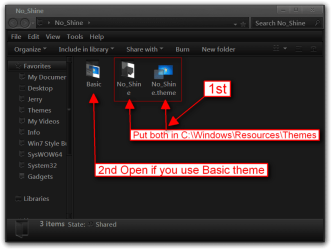
OK here you go download and extract the zip file at the bottom of this post to your desktop, after you have extracted it put both (highlighted in a red box) 1 No_Shine folder and 1 No_Shine.theme file in C:\Windows\Resources\Themes
No_Shine.png

If you ever use the basic themes open up the Basic folder and put the No_Shine.theme file in C:\Windows\Resources\Ease of Access Themes
Basic.png

It will show up in Personalization under the Installed Themes as No_Shine, and if you use the Basic it will show up under Basic and High Contrast themes as No_Shine
Personalization.png

Let me know what you think.
Jerry
 

Attachments

My Computer My Computer

Computer type
Laptop
Computer Manufacturer/Model Number
Sager NP9170
OS
Win 7 Pro x64 / Win 10 Pro
CPU
Intel(R) Core(TM) i7-3630QM CPU @ 2.40GHz
Motherboard
CLEVO P170EM
Memory
12 GB
Graphics Card(s)
(1) Intel(R) HD Graphics 4000 (2) NVIDIA GeForce GTX 675M
Sound Card
(1) Realtek High Definition Audio (2) Intel(R) Display Aud
Monitor(s) Displays
17.3
Screen Resolution
1920x1080
Hard Drives
(1) Samsung 860 EVO 500GB(OS) (1) Samsung 860 EVO 500GB(Data)
Keyboard
Backlite
Antivirus
MSE, Malwarebytes Pro
Browser
Firefox
Other Info
DESKTOP: Custom-built.
OS: Win 10 Pro x64.
CASE: Rosewill R5.
CPU: Intel I5 4670K CPU @ 3.40GHz.
CPU COOLER: Cool Master Hyper 212 EVO.
MOTHERBOARD: Asus Z87-A.
MEMORY: Kingston HyperX 2x4 GB.
GPU: Nvidia Geforce 650 TI.
PSU: Corsair TX750.
DRIVES: (1) Samsung 840 120 GB SSD (2) Western Digital blue 500 GB 7200 RPM.
Wow Jerry,

That's exactly what I was looking for man. It looks great now. No shiny and I can change the color as I want.

I really appreciate your help Jerry.

I am trying to learn customizing the themes from the resource you gave me earlier, so where is the part that I can define the shiny look and adjust it?


Regards,
Ali.
 

My Computer My Computer

OS
Windows 7 Professional x64
I have been playing around with the Restorator and its working pretty well. The only point is that I am not sure which code belongs to what. Is there something like a documentation or something that shows all files indexes?

Thanks.
 

My Computer My Computer

OS
Windows 7 Professional x64
Wow Jerry,

That's exactly what I was looking for man. It looks great now. No shiny and I can change the color as I want.

I really appreciate your help Jerry.

I am trying to learn customizing the themes from the resource you gave me earlier, so where is the part that I can define the shiny look and adjust it?


Regards,
Ali.
You're Welcome
Taskbar buttons numbers
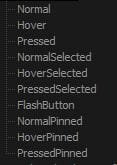
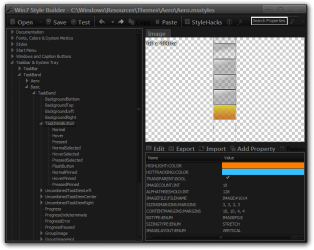
There are 7 or 10 states for each image look at screenshots, the ones that are 7 states are the same so you only need to edit 1 and use it 2 more times (3 for Horizontal and 3 for Vertical), in the 10 states image the top 7 are the same as the 7 states images.
10 states
1.JPG

7 states
2.JPG

Custom themes
Horizontal
10 states #1150, 7 states #1151,1152,1153
TaskBand2_TaskItemButtonImage.pngTaskBand2_UncombinedTaskItemLeftImage.png

Vertical
10 states #1160, 7 states #1161,1162,1163
TaskBand2Vertical__Taskband2_TaskItemButtonImage.pngTaskBand2Vertical__Taskband2_UncombinedTaskItemLeftImage.png

Default Aero
Horizontal
#1014,1015,1016,1017

Vertical
#1024,1025,1026,1027
Windows Styles Builder changes the numbers.

I have been playing around with the Restorator and its working pretty well. The only point is that I am not sure which code belongs to what. Is there something like a documentation or something that shows all files indexes?

Thanks.
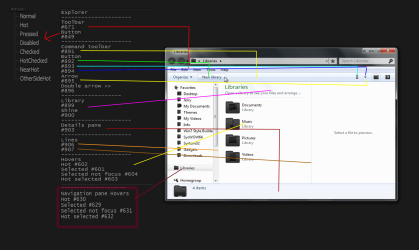
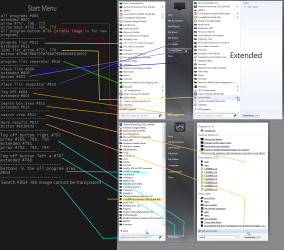
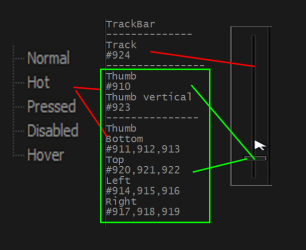
No there is not. But I have some default aero theme numbers look at screenshots.
Explorer.pngscroolbar_.pngStart Menu (2).pngtaskbar.pngth.png

It best to start a new theme based off the default aero theme using a copy look at Post #38 of this thread it will so you how to do it http://www.sevenforums.com/customization/135985-start-menu-color-change-4.html#post1358071

If you are going to start themeing I would get Ave's Windows7 Style Builder it makes it easier.
Win7 Style Builder .png
Jerry
 

My Computer My Computer

Computer type
Laptop
Computer Manufacturer/Model Number
Sager NP9170
OS
Win 7 Pro x64 / Win 10 Pro
CPU
Intel(R) Core(TM) i7-3630QM CPU @ 2.40GHz
Motherboard
CLEVO P170EM
Memory
12 GB
Graphics Card(s)
(1) Intel(R) HD Graphics 4000 (2) NVIDIA GeForce GTX 675M
Sound Card
(1) Realtek High Definition Audio (2) Intel(R) Display Aud
Monitor(s) Displays
17.3
Screen Resolution
1920x1080
Hard Drives
(1) Samsung 860 EVO 500GB(OS) (1) Samsung 860 EVO 500GB(Data)
Keyboard
Backlite
Antivirus
MSE, Malwarebytes Pro
Browser
Firefox
Other Info
DESKTOP: Custom-built.
OS: Win 10 Pro x64.
CASE: Rosewill R5.
CPU: Intel I5 4670K CPU @ 3.40GHz.
CPU COOLER: Cool Master Hyper 212 EVO.
MOTHERBOARD: Asus Z87-A.
MEMORY: Kingston HyperX 2x4 GB.
GPU: Nvidia Geforce 650 TI.
PSU: Corsair TX750.
DRIVES: (1) Samsung 840 120 GB SSD (2) Western Digital blue 500 GB 7200 RPM.
Jerry,

Thank you very much. I think I will consider purchasing a copy of the Vista Style Builder. Until then I will use your screen shots to modify my theme. I have had the problem of "not liking windows 7 look" from the first day I started using it.


Thank you again.
Regards.
 

My Computer My Computer

OS
Windows 7 Professional x64
very old thread I know but this is unbelievable useful! Looked on so many threads to get this effect so glad I found this one.
 

My Computer My Computer

Computer type
Laptop
Computer Manufacturer/Model Number
PC Specialist
OS
Windows 7 Home Premium SP1 x64
CPU
Intel Core i5-4200m
Memory
8GB DDR3
Graphics Card(s)
NVidia GeForce 750m
Sound Card
Realtek
Monitor(s) Displays
1080p 15.6" Laptop, LG 24MT46
Screen Resolution
1920x1080
Hard Drives
250GB Samsung Evo 840 Pro, 750GB Western Digital Black 7200rpm
Antivirus
None
Browser
Chrome
very old thread I know but this is unbelievable useful! Looked on so many threads to get this effect so glad I found this one.
Welcome to the Seven Forums

Glad I could help you out.

Jerry
 

My Computer My Computer

Computer type
Laptop
Computer Manufacturer/Model Number
Sager NP9170
OS
Win 7 Pro x64 / Win 10 Pro
CPU
Intel(R) Core(TM) i7-3630QM CPU @ 2.40GHz
Motherboard
CLEVO P170EM
Memory
12 GB
Graphics Card(s)
(1) Intel(R) HD Graphics 4000 (2) NVIDIA GeForce GTX 675M
Sound Card
(1) Realtek High Definition Audio (2) Intel(R) Display Aud
Monitor(s) Displays
17.3
Screen Resolution
1920x1080
Hard Drives
(1) Samsung 860 EVO 500GB(OS) (1) Samsung 860 EVO 500GB(Data)
Keyboard
Backlite
Antivirus
MSE, Malwarebytes Pro
Browser
Firefox
Other Info
DESKTOP: Custom-built.
OS: Win 10 Pro x64.
CASE: Rosewill R5.
CPU: Intel I5 4670K CPU @ 3.40GHz.
CPU COOLER: Cool Master Hyper 212 EVO.
MOTHERBOARD: Asus Z87-A.
MEMORY: Kingston HyperX 2x4 GB.
GPU: Nvidia Geforce 650 TI.
PSU: Corsair TX750.
DRIVES: (1) Samsung 840 120 GB SSD (2) Western Digital blue 500 GB 7200 RPM.
Back
Top