
You are using an out of date browser. It may not display this or other websites correctly.
You should upgrade or use an alternative browser.
You should upgrade or use an alternative browser.
Latest Intel Chipset Device Software
- Thread starter ratePV
- Start date

try this...Regarding the Realtek Link it does say to check for drivers from then Mobo's downloads - which I did.
Plus when I click on next (in the Realtek page), I get this:
Object moved to here.
Realtek
Check the box below...then a download page appears...choose the executable file for Windows 7 x64...
Trust me you can download the driver from that link and it should work
My Computer
- Computer Manufacturer/Model Number
- Compal JFT02 (Custom Build Laptop)
- OS
- Windows 7 Home Premium x64 - Mac OS X 10.6.4 x64
- CPU
- Intel Core 2 Duo T9300 2.5 GHz
- Motherboard
- JFT02
- Memory
- 4GB Kingston DDR2-800
- Graphics Card(s)
- NVIDIA Geforce 8600M GT (512MB Model)
- Sound Card
- Realtek HD Audio
- Monitor(s) Displays
- WUXGA Standard Laptop Display
- Screen Resolution
- 1680*1050
- Hard Drives
- Toshiba 320GB 5400RPM Laptop HD
- PSU
- Standard Laptop Power Supply
- Case
- Standard Laptop Case
- Cooling
- Standard Laptop Cooling
- Keyboard
- Standard Laptop 105 Key-Keyboard
- Mouse
- Synaptics Touchpad
- Internet Speed
- Verizion Online DSL 3360/864 kbs (dl/up)
Hello,
anyone has found a way to fix intel chipset problem on Windows 7 yet?
Regards
Jehanzeb
anyone has found a way to fix intel chipset problem on Windows 7 yet?
Regards
Jehanzeb
My Computer
- Computer Manufacturer/Model Number
- Sony VGN-A517B
- OS
- Windows 7 Professional 32bit
- CPU
- Intel Pentium M 1.73
- Motherboard
- VGN-A51B Intel i915PM/GM
- Memory
- 2GB DDR2
- Graphics Card(s)
- ATi Mobility Radeon X600
- Sound Card
- Onboard
- Monitor(s) Displays
- 17 inch Wide
- Hard Drives
- 320GB 7200RPM 2.5" West Dig with Free fall sensor
I'm surprised that throughout all 11 pages of this thread, no-one has pointed out that these chipset "drivers" are not drivers at all. What you are downloading is the "Chipset Device Software". It does not contain any drivers at all, it is it's just a collection of INF files that tell Windows the correct descriptive names of the devices to show in Device Manager:

That's all it does. Windows 7 does this automatically, so the only reason you would need this software is if you had messed up your computer somehow and the devices were not showing. You do not need this software on a fresh OS install.
More from Intel:
Intel® Chipset Software Installation Utility - What is the Intel® Chipset Software Installation Utility?
The Intel® Chipset Software Installation Utility (also known as the Intel® Chipset Device Software) is often referred to as the chipset driver or chipset drivers. This is a common misconception.
What is a driver?
A driver is a program that allows a computer to communicate (or talk to) a piece of hardware. The Intel Chipset Software Installation Utility, however, is not a driver, nor does it include drivers. It contains information files (INFs).
What is an INF?
An INF is a text file that provides the operating system with information about a piece of hardware on the system. In the case of the current Intel Chipset Software Installation Utility, that information is primarily the product name for the piece of hardware. This allows the operating system to show the correct name for that piece of hardware in Device Manager.
If a chipset is released well after an operating system, the INF allows the operating system to identify all the pieces of the chipset. Intel and Microsoft* work together to include information on both current and future chipsets in new operating systems so, in many cases, the operating system will recognize all the pieces of the chipset even without the INF.
That's all it does. Windows 7 does this automatically, so the only reason you would need this software is if you had messed up your computer somehow and the devices were not showing. You do not need this software on a fresh OS install.
More from Intel:
Intel® Chipset Software Installation Utility - What is the Intel® Chipset Software Installation Utility?
The Intel® Chipset Software Installation Utility (also known as the Intel® Chipset Device Software) is often referred to as the chipset driver or chipset drivers. This is a common misconception.
What is a driver?
A driver is a program that allows a computer to communicate (or talk to) a piece of hardware. The Intel Chipset Software Installation Utility, however, is not a driver, nor does it include drivers. It contains information files (INFs).
What is an INF?
An INF is a text file that provides the operating system with information about a piece of hardware on the system. In the case of the current Intel Chipset Software Installation Utility, that information is primarily the product name for the piece of hardware. This allows the operating system to show the correct name for that piece of hardware in Device Manager.
If a chipset is released well after an operating system, the INF allows the operating system to identify all the pieces of the chipset. Intel and Microsoft* work together to include information on both current and future chipsets in new operating systems so, in many cases, the operating system will recognize all the pieces of the chipset even without the INF.
My Computer
- Computer Manufacturer/Model Number
- Self-built
- OS
- Win7 Pro; Linux Mint 7
- CPU
- E8500 @ 3.8GHz
- Motherboard
- Asus P5QL PRO
- Memory
- Corsair XMS2 2GB @800MHz
- Graphics Card(s)
- Nvidia 9800GT
- Sound Card
- onboard
- Hard Drives
- Western Digital Caviar 500GB x2
Alrighty then...the next time my friend installs XP on his X58 chipset and his USB devices and the sort do not work...I'm surprised that throughout all 11 pages of this thread, no-one has pointed out that these chipset "drivers" are not drivers at all. What you are downloading is the "Chipset Device Software". It does not contain any drivers at all, it is it's just a collection of INF files that tell Windows the correct descriptive names of the devices to show in Device Manager:
That's all it does. Windows 7 does this automatically, so the only reason you would need this software is if you had messed up your computer somehow and the devices were not showing. You do not need this software on a fresh OS install.
More from Intel:
Intel® Chipset Software Installation Utility - What is the Intel® Chipset Software Installation Utility?
The Intel® Chipset Software Installation Utility (also known as the Intel® Chipset Device Software) is often referred to as the chipset driver or chipset drivers. This is a common misconception.
What is a driver?
A driver is a program that allows a computer to communicate (or talk to) a piece of hardware. The Intel Chipset Software Installation Utility, however, is not a driver, nor does it include drivers. It contains information files (INFs).
What is an INF?
An INF is a text file that provides the operating system with information about a piece of hardware on the system. In the case of the current Intel Chipset Software Installation Utility, that information is primarily the product name for the piece of hardware. This allows the operating system to show the correct name for that piece of hardware in Device Manager.
If a chipset is released well after an operating system, the INF allows the operating system to identify all the pieces of the chipset. Intel and Microsoft* work together to include information on both current and future chipsets in new operating systems so, in many cases, the operating system will recognize all the pieces of the chipset even without the INF.
I will tell him that updating the chipset from intel won't make a difference...
Seriously though...intel is undercutting the fact that the chipset does more than provides you a meaningful name to Device Manager
My Computer
- Computer Manufacturer/Model Number
- Compal JFT02 (Custom Build Laptop)
- OS
- Windows 7 Home Premium x64 - Mac OS X 10.6.4 x64
- CPU
- Intel Core 2 Duo T9300 2.5 GHz
- Motherboard
- JFT02
- Memory
- 4GB Kingston DDR2-800
- Graphics Card(s)
- NVIDIA Geforce 8600M GT (512MB Model)
- Sound Card
- Realtek HD Audio
- Monitor(s) Displays
- WUXGA Standard Laptop Display
- Screen Resolution
- 1680*1050
- Hard Drives
- Toshiba 320GB 5400RPM Laptop HD
- PSU
- Standard Laptop Power Supply
- Case
- Standard Laptop Case
- Cooling
- Standard Laptop Cooling
- Keyboard
- Standard Laptop 105 Key-Keyboard
- Mouse
- Synaptics Touchpad
- Internet Speed
- Verizion Online DSL 3360/864 kbs (dl/up)
If he is installing current generation chipset in a 9 year old OS, then he may need this software in order that XP can display the device names correctly. But this is a Windows 7 forum, and 7 can display the correct device names for all current intel chipsets, without the need for this software utility. It is simply unnecessary.Alrighty then...the next time my friend installs XP on his X58 chipset and his USB devices and the sort do not work...
I will tell him that updating the chipset from intel won't make a difference...
Seriously though...intel is undercutting the fact that the chipset does more than provides you a meaningful name to Device Manager
My Computer
- Computer Manufacturer/Model Number
- Self-built
- OS
- Win7 Pro; Linux Mint 7
- CPU
- E8500 @ 3.8GHz
- Motherboard
- Asus P5QL PRO
- Memory
- Corsair XMS2 2GB @800MHz
- Graphics Card(s)
- Nvidia 9800GT
- Sound Card
- onboard
- Hard Drives
- Western Digital Caviar 500GB x2
Codify -
So, then no need to update the Intel Chipset?
Prior to posting here, I went to ASUS (my mobo) website. Downloaded what I thought was a intel chipset driver and it ended up turning off the front port (Maybe others) head phone port- I got no sound from the front of my PC tower.
here is the weblink:
ASUSTeK Computer Inc.-Support-
for
Intel Chipset Inf Update Program V9.1.1.1014 for Windows XP 32bit/XP 64bit/Vista 32bit/Vista 64bit Win7 32bit/64bit.
So what your saying is the above install is not neccessary ( and is not an actual driver) if my Device Mgr is working fine?
I thought I saw a Intel update months ago when my machine was runnning under Vista. If there was one, its now off the ASUS site. I wonder what it was.
And in other words – leave it alone.
I also noticed something else the other day and which I thought was connected to this Intel chipset deal, is that when I connect my iPod Nano, a menu pops up as if it was a USB device.
AND I don’t have that checked in the iTunes setting – about using the Nano as a manual driver (sorry at work so forgot the actual lingo).
So, then no need to update the Intel Chipset?
Prior to posting here, I went to ASUS (my mobo) website. Downloaded what I thought was a intel chipset driver and it ended up turning off the front port (Maybe others) head phone port- I got no sound from the front of my PC tower.
here is the weblink:
ASUSTeK Computer Inc.-Support-
for
Intel Chipset Inf Update Program V9.1.1.1014 for Windows XP 32bit/XP 64bit/Vista 32bit/Vista 64bit Win7 32bit/64bit.
So what your saying is the above install is not neccessary ( and is not an actual driver) if my Device Mgr is working fine?
I thought I saw a Intel update months ago when my machine was runnning under Vista. If there was one, its now off the ASUS site. I wonder what it was.
And in other words – leave it alone.
I also noticed something else the other day and which I thought was connected to this Intel chipset deal, is that when I connect my iPod Nano, a menu pops up as if it was a USB device.
AND I don’t have that checked in the iTunes setting – about using the Nano as a manual driver (sorry at work so forgot the actual lingo).
My Computer
- OS
- Windows 7

- Local time
- 8:40 AM
- Messages
- 524
Quote from readme on Intel's site.The Intel(R) Chipset Device Software installs Windows*
INF files to the target system. These files outline to
the operating system how to configure the Intel(R) chipset
components in order to ensure that the following features
function properly:
- Core PCI and ISAPNP Services
- PCIe Support
- IDE/ATA33/ATA66/ATA100 Storage Support
- SATA Storage Support
- USB Support
- Identification of Intel(R) Chipset Components in
the Device Manager
And yes you can choose not to install them(but loosing the functions of your mobo)
SO YES EVERYONE SHOULD INSTALL THEM!
My Computer
- Computer type
- PC/Desktop
- Computer Manufacturer/Model Number
- Custom
- OS
- Windows 7 SP1 x64
- CPU
- Intel E8400 3.0 GHz
- Motherboard
- Gigabyte EP45-DS3R
- Memory
- 4x1 Trascend DDR2 800 Mhz
- Graphics Card(s)
- Gainward 8800GT 512 Mb
- Sound Card
- Realtek HD Audio 889A
- Monitor(s) Displays
- LG L204WS
- Screen Resolution
- 1680x1050
- Hard Drives
- Intel 520 Series 120Gb SSD (System)
Western Digital 6400AAKS 640Gb (Data)
- PSU
- Cooler Master 650W
- Case
- Cooler Master Centurion 532
- Cooling
- 2x 12 cm fans
- Keyboard
- Logitech Wave
- Mouse
- Logitech G5
- Internet Speed
- 10 Mbit Cable Flat
- Antivirus
- NOD32 Smart Security
- Browser
- Google Chrome

- Local time
- 8:40 AM
- Messages
- 55
http://files.laptopvideo2go.com/chipset/intel_chipset_9.1.1.1023.exeall versions including W7 intel_chipset_9.1.1.1023
intel inf update
intel inf update
My Computer
- Computer Manufacturer/Model Number
- dv5 1199ew
- OS
- W7
- Other Info
- +Rep if I have helped
THANK YOU!!!Quote from readme on Intel's site.The Intel(R) Chipset Device Software installs Windows*
INF files to the target system. These files outline to
the operating system how to configure the Intel(R) chipset
components in order to ensure that the following features
function properly:
- Core PCI and ISAPNP Services
- PCIe Support
- IDE/ATA33/ATA66/ATA100 Storage Support
- SATA Storage Support
- USB Support
- Identification of Intel(R) Chipset Components in
the Device Manager
And yes you can choose not to install them(but loosing the functions of your mobo)
SO YES EVERYONE SHOULD INSTALL THEM!
That guys post above would have people think that updating a chipset isn't necessary...
Why the hell would intel update a chipset if all it did was make Device Manager show correctly? By his logic they could put out a version of the chipset per each OS once and be done with it
My Computer
- Computer Manufacturer/Model Number
- Compal JFT02 (Custom Build Laptop)
- OS
- Windows 7 Home Premium x64 - Mac OS X 10.6.4 x64
- CPU
- Intel Core 2 Duo T9300 2.5 GHz
- Motherboard
- JFT02
- Memory
- 4GB Kingston DDR2-800
- Graphics Card(s)
- NVIDIA Geforce 8600M GT (512MB Model)
- Sound Card
- Realtek HD Audio
- Monitor(s) Displays
- WUXGA Standard Laptop Display
- Screen Resolution
- 1680*1050
- Hard Drives
- Toshiba 320GB 5400RPM Laptop HD
- PSU
- Standard Laptop Power Supply
- Case
- Standard Laptop Case
- Cooling
- Standard Laptop Cooling
- Keyboard
- Standard Laptop 105 Key-Keyboard
- Mouse
- Synaptics Touchpad
- Internet Speed
- Verizion Online DSL 3360/864 kbs (dl/up)
That's exactly all it does. Read:Why the hell would intel update a chipset if all it did was make Device Manager show correctly?
Intel® Chipset Software Installation Utility - What is the Intel® Chipset Software Installation Utility?
My Computer
- Computer Manufacturer/Model Number
- Self-built
- OS
- Win7 Pro; Linux Mint 7
- CPU
- E8500 @ 3.8GHz
- Motherboard
- Asus P5QL PRO
- Memory
- Corsair XMS2 2GB @800MHz
- Graphics Card(s)
- Nvidia 9800GT
- Sound Card
- onboard
- Hard Drives
- Western Digital Caviar 500GB x2
- Local time
- 8:40 AM
- Messages
- 524
That's exactly all it does. Read:Why the hell would intel update a chipset if all it did was make Device Manager show correctly?
Intel® Chipset Software Installation Utility - What is the Intel® Chipset Software Installation Utility?
Geez!
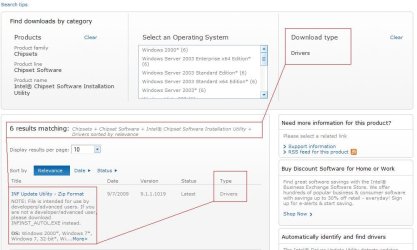
Why do you then have to click "drivers" when you search on the site
and it pop's out INF UPDATE UTILITY?
My Computer
- Computer type
- PC/Desktop
- Computer Manufacturer/Model Number
- Custom
- OS
- Windows 7 SP1 x64
- CPU
- Intel E8400 3.0 GHz
- Motherboard
- Gigabyte EP45-DS3R
- Memory
- 4x1 Trascend DDR2 800 Mhz
- Graphics Card(s)
- Gainward 8800GT 512 Mb
- Sound Card
- Realtek HD Audio 889A
- Monitor(s) Displays
- LG L204WS
- Screen Resolution
- 1680x1050
- Hard Drives
- Intel 520 Series 120Gb SSD (System)
Western Digital 6400AAKS 640Gb (Data)
- PSU
- Cooler Master 650W
- Case
- Cooler Master Centurion 532
- Cooling
- 2x 12 cm fans
- Keyboard
- Logitech Wave
- Mouse
- Logitech G5
- Internet Speed
- 10 Mbit Cable Flat
- Antivirus
- NOD32 Smart Security
- Browser
- Google Chrome
- Local time
- 8:40 AM
- Messages
- 524

My Computer
- Computer type
- PC/Desktop
- Computer Manufacturer/Model Number
- Custom
- OS
- Windows 7 SP1 x64
- CPU
- Intel E8400 3.0 GHz
- Motherboard
- Gigabyte EP45-DS3R
- Memory
- 4x1 Trascend DDR2 800 Mhz
- Graphics Card(s)
- Gainward 8800GT 512 Mb
- Sound Card
- Realtek HD Audio 889A
- Monitor(s) Displays
- LG L204WS
- Screen Resolution
- 1680x1050
- Hard Drives
- Intel 520 Series 120Gb SSD (System)
Western Digital 6400AAKS 640Gb (Data)
- PSU
- Cooler Master 650W
- Case
- Cooler Master Centurion 532
- Cooling
- 2x 12 cm fans
- Keyboard
- Logitech Wave
- Mouse
- Logitech G5
- Internet Speed
- 10 Mbit Cable Flat
- Antivirus
- NOD32 Smart Security
- Browser
- Google Chrome
On the page - Intel® Chipset Software Installation Utility - Do I need the Intel® Chipset Software Installation Utility?
it reads:
"Did you just install the operating system?
If the answer is yes, you can install the Intel Chipset Software Installation Utility to ensure that all the chipset components are recognized by the operating system."
Yet, doing so seem to do more harm then good. Since I had just did a clean install of Win 7, it would seem to me that installing the Utility was necessary.
As far as I can tell my Device Mgr page is working as it should.
Oh since I am not an advanced user, instead of installing that Utility, I am told to download - [FONT="]INFINST_AUTOL.EXE
Yet, no link to this file is given. I don't understand that.[/FONT]
it reads:
"Did you just install the operating system?
If the answer is yes, you can install the Intel Chipset Software Installation Utility to ensure that all the chipset components are recognized by the operating system."
Yet, doing so seem to do more harm then good. Since I had just did a clean install of Win 7, it would seem to me that installing the Utility was necessary.
As far as I can tell my Device Mgr page is working as it should.
Oh since I am not an advanced user, instead of installing that Utility, I am told to download - [FONT="]INFINST_AUTOL.EXE
Yet, no link to this file is given. I don't understand that.[/FONT]
My Computer
- OS
- Windows 7
I am going to try the
Intel Driver Update Utility (which automatically identify and find drivers)
Found it here:
Intel® Driver Update Utility
Intel Driver Update Utility (which automatically identify and find drivers)
Found it here:
Intel® Driver Update Utility
My Computer
- OS
- Windows 7
I'm still confused whether or not there is a purpose in installing the INF Update Utility.
Look at this:
INF Update Utility - Primarily for Intel® 5, 4, 3, 900 Series Chipsets
Look at this:
INF Update Utility - Primarily for Intel® 5, 4, 3, 900 Series Chipsets
Intel® Chipset Device Software is the new name for the Intel® Chipset Software Installation Utility; this name will be seen when running the installation package.
The Intel® Chipset Device Software installs the Windows* INF files. An INF is a text file that provides the operating system with information about a piece of hardware on the system. In the case of the current Intel Chipset Device Software, that information is primarily the product name for the piece of hardware. This allows the operating system to show the correct name for that piece of hardware in Device Manager.
**Important**
The Intel Chipset Device Software does not install drivers for AGP or USB. DO NOT DOWNLOAD THIS UTILITY IF YOUR DEVICE MANUFACTURER IS RECOMMENDING IT TO CORRECT AN "AGP DRIVER," "AGP GART," OR "USB DRIVER" ISSUE; IT WILL NOT CORRECT YOUR ISSUE.
My Computer
- OS
- Windows 7
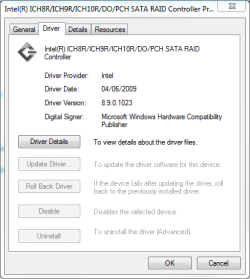
This what I find under: storage controllers
View attachment 32640
Your help will be greatly appreciated.
Regards
I did a fresh install of the windows7 x64 ultimate.
Following that installed the IMSM and now the detais are as follows:
Attachments
My Computer
- Computer Manufacturer/Model Number
- Dell
- OS
- Windows 7 Ultimate 64bit
- CPU
- Intel viiv Duo core 6400 @ 2.13
- Memory
- 6GB
- Graphics Card(s)
- Nvidis GX2 1GB v7.15.10.9746 [Dell's 14359 Driver]
- Sound Card
- Creative Sound Blaster
- Local time
- 8:40 AM
- Messages
- 524
On the page - Intel® Chipset Software Installation Utility - Do I need the Intel® Chipset Software Installation Utility?
it reads:
"Did you just install the operating system?
If the answer is yes, you can install the Intel Chipset Software Installation Utility to ensure that all the chipset components are recognized by the operating system."
Yet, doing so seem to do more harm then good. Since I had just did a clean install of Win 7, it would seem to me that installing the Utility was necessary.
As far as I can tell my Device Mgr page is working as it should.
Oh since I am not an advanced user, instead of installing that Utility, I am told to download - [FONT="]INFINST_AUTOL.EXE
Yet, no link to this file is given. I don't understand that.[/FONT]
Fine!
Install whatever you like!
I just know that driver's ARE MEANT FOR RECOGNIZING DEVICES!
I know what i'm doing and this post is too small to explain.
So people you should install(or not) as they want(loosing many functions of your mobo) as read here from Intel's readme:
The Intel(R) Chipset Device Software installs Windows*
INF files to the target system. These files outline to
the operating system how to configure the Intel(R) chipset
components in order to ensure that the following features
function properly:
- Core PCI and ISAPNP Services
- PCIe Support
- IDE/ATA33/ATA66/ATA100 Storage Support
- SATA Storage Support
- USB Support
- Identification of Intel(R) Chipset Components in
the Device Manager
My Computer
- Computer type
- PC/Desktop
- Computer Manufacturer/Model Number
- Custom
- OS
- Windows 7 SP1 x64
- CPU
- Intel E8400 3.0 GHz
- Motherboard
- Gigabyte EP45-DS3R
- Memory
- 4x1 Trascend DDR2 800 Mhz
- Graphics Card(s)
- Gainward 8800GT 512 Mb
- Sound Card
- Realtek HD Audio 889A
- Monitor(s) Displays
- LG L204WS
- Screen Resolution
- 1680x1050
- Hard Drives
- Intel 520 Series 120Gb SSD (System)
Western Digital 6400AAKS 640Gb (Data)
- PSU
- Cooler Master 650W
- Case
- Cooler Master Centurion 532
- Cooling
- 2x 12 cm fans
- Keyboard
- Logitech Wave
- Mouse
- Logitech G5
- Internet Speed
- 10 Mbit Cable Flat
- Antivirus
- NOD32 Smart Security
- Browser
- Google Chrome
Rate...it is a waste of our time trying to convince them they need it...On the page - Intel® Chipset Software Installation Utility - Do I need the Intel® Chipset Software Installation Utility?
it reads:
"Did you just install the operating system?
If the answer is yes, you can install the Intel Chipset Software Installation Utility to ensure that all the chipset components are recognized by the operating system."
Yet, doing so seem to do more harm then good. Since I had just did a clean install of Win 7, it would seem to me that installing the Utility was necessary.
As far as I can tell my Device Mgr page is working as it should.
Oh since I am not an advanced user, instead of installing that Utility, I am told to download - [FONT="]INFINST_AUTOL.EXE
Yet, no link to this file is given. I don't understand that.[/FONT]
Fine!
Install whatever you like!
I just know that driver's ARE MEANT FOR RECOGNIZING DEVICES!
I know what i'm doing and this post is too small to explain.
So people you should install(or not) as they want(loosing many functions of your mobo) as read here from Intel's readme:
The Intel(R) Chipset Device Software installs Windows*
INF files to the target system. These files outline to
the operating system how to configure the Intel(R) chipset
components in order to ensure that the following features
function properly:
- Core PCI and ISAPNP Services
- PCIe Support
- IDE/ATA33/ATA66/ATA100 Storage Support
- SATA Storage Support
- USB Support
- Identification of Intel(R) Chipset Components in
the Device Manager
Funny how a new member shows up and makes a statement that they don't need it and everyone instantly declares they don't while we (who have distinguished ourselves as knowledgeable, helpful, and truthful) say they do AND CAN PROVE THAT THEY DO are met with resistance and scrutiny...
Its their machine...if it doesn't work as expected than I don't care and don't wine to us about it
My Computer
- Computer Manufacturer/Model Number
- Compal JFT02 (Custom Build Laptop)
- OS
- Windows 7 Home Premium x64 - Mac OS X 10.6.4 x64
- CPU
- Intel Core 2 Duo T9300 2.5 GHz
- Motherboard
- JFT02
- Memory
- 4GB Kingston DDR2-800
- Graphics Card(s)
- NVIDIA Geforce 8600M GT (512MB Model)
- Sound Card
- Realtek HD Audio
- Monitor(s) Displays
- WUXGA Standard Laptop Display
- Screen Resolution
- 1680*1050
- Hard Drives
- Toshiba 320GB 5400RPM Laptop HD
- PSU
- Standard Laptop Power Supply
- Case
- Standard Laptop Case
- Cooling
- Standard Laptop Cooling
- Keyboard
- Standard Laptop 105 Key-Keyboard
- Mouse
- Synaptics Touchpad
- Internet Speed
- Verizion Online DSL 3360/864 kbs (dl/up)

Why in the heck don't you guys just install it! If you have a problem afterwards simply do a system restore back to the moment b4 you installed. It will automatically creat a restore point.
My Computer
- Computer type
- Laptop
- Computer Manufacturer/Model Number
- Panasonic Toughbook CF54
- OS
- W7 Pro
- CPU
- Intel Core i-5300U
- Motherboard
- America MegaTrends
- Memory
- 16Gb DDR3
- Graphics Card(s)
- Intel HD Graphics 5500
- Sound Card
- SoundMax
- Monitor(s) Displays
- DFP W/CircularPolarization 1000 Nit Touch
- Screen Resolution
- 1920X1080
- Hard Drives
- Samsung SSD 850 Pro 512Gb
- PSU
- N/A
- Case
- Magnesium
- Cooling
- Passive
- Keyboard
- Emissive
- Internet Speed
- U-Verse Extreme 21MBPS,
- Antivirus
- MSE, Malwarebytes Professional
Similar threads


- Replies
- 1
- Views
- 15K

- Replies
- 12
- Views
- 15K

- Replies
- 11
- Views
- 41K
