Latest Internet Explorer 9 Release

Probably not worth the trouble if you depend on your system. I use FF mainly but I decided to wait for the final release.

Jim :geek:
 

My Computer My Computer

Computer type
PC/Desktop
Computer Manufacturer/Model Number
Home Built
OS
Windows 8.1 Pro w/Media Center 64bit, Windows 7 HP 64bit
CPU
Phenom II X6 1100T
Motherboard
ASUS M5A99X EVO
Memory
Crucial Balistic 8gb DDR3-1866 CL9
Graphics Card(s)
MSI R6850 Cyclone IGD5 PE
Sound Card
On Board
Monitor(s) Displays
ASUS VE258Q 25" LED with DVI-HDMI-DisplayPort
Screen Resolution
1920 x 1080
Hard Drives
Two WD Cavier Black 2TB Sata III, WD My Book Essential 2TB USB 3.0
PSU
Seasonic X650 80 Plus GOLD Modular
Case
Corsair 400R
Cooling
Antec Kuhler H2O 620, Two 120mm and four 140mm
Keyboard
Logitech K120
Mouse
Logitech Marble Mouse USB, Logitech Precision Game Pad
Internet Speed
15MB
Antivirus
Norton IS 2013, Malwarebytes Pro Beta 2
Browser
IE-11, FF-27
Other Info
APC UPS ES 750, Netgear WNR3500L Gigabit & Wireless N Router with SamKnows Test Program, Motorola SB6120 Gigabit Cable Modem. Brother HL-2170W Laser Printer, Epson V300 Scanner
Not sure yet whether I should try it or wait a bit longer, IE is the only browser I use and it's the only one I have installed.

I think someone said Roboform works in IE9, I use that and have it as a Toolbar under the Menu bar, my main concern would be if it worked on my shopping site and bank, if not is it a lot of hassle getting back to IE8 ?

I say give it a try Joan.

Worst case Scenario, restore with a system restore. :)
 

My Computer My Computer

Computer Manufacturer/Model Number
Custom | Whitebox
OS
Windows 7 Ultimate, OS X 10.7, Ubuntu 11.04
CPU
Intel E6750 @ 3.80GHz
Motherboard
Gigabyte GA-EP45-UD3L (Revision 1.1)
Memory
2x2GB & 2x1GB (6GB) OCZ Reaper 1066MHz @ 1080MHz
Graphics Card(s)
EVGA nVidia GTX 260 896mb (216 Core) FTW Edition
Sound Card
Realtek ALC888
Monitor(s) Displays
21" VIZIO TV
Screen Resolution
1680x1050 @ 60Hz
Hard Drives
Western Digital WD6401AALS - 640GB
Hitachi HDP725016GLA380 - 160GB
PSU
Corsair 750W
Case
NZXT Nemesis Elite
Cooling
Thermaltake SpinQ
Keyboard
Logitech Wireless S520
Mouse
Logitech Wireless S520 - Microsoft Wireless Arc Mouse
Internet Speed
Download: 20mbps, Upload: 3mbps
Not sure yet whether I should try it or wait a bit longer, IE is the only browser I use and it's the only one I have installed.

I think someone said Roboform works in IE9, I use that and have it as a Toolbar under the Menu bar, my main concern would be if it worked on my shopping site and bank, if not is it a lot of hassle getting back to IE8 ?

I've had no problems with any of my bank, credit card, cell phone, cable, or utility accounts.
 

My Computer My Computer

Computer Manufacturer/Model Number
24c Built
OS
Win7 x64 Ult
CPU
Intel i7-950
Motherboard
ASUS PT6
Memory
12 GB DDR3
Graphics Card(s)
NVIDIA 9800GT+
Sound Card
none
Monitor(s) Displays
2 Samsung SyncMaster 2343bwx
Screen Resolution
2048X1152
Hard Drives
1st-4 OCZ Vertex Turbos 32GB RAID 0
2nd-2 WD 640GB RAID 1
PSU
Thermaltake Toughpower XT W0229RU 750W
Case
Antec 900
Cooling
case fans
Keyboard
Logitech cordless
Mouse
Logitech cordless
Internet Speed
up to 15 MB/s
Roboform works for me.
 

My Computer My Computer

Computer Manufacturer/Model Number
Samsung rv520
OS
Windows Seven, Ubuntu
CPU
Intel
Graphics Card(s)
Intel
Not sure yet whether I should try it or wait a bit longer, IE is the only browser I use and it's the only one I have installed.

I think someone said Roboform works in IE9, I use that and have it as a Toolbar under the Menu bar, my main concern would be if it worked on my shopping site and bank, if not is it a lot of hassle getting back to IE8 ?

Here you go Joan,

How do I install or uninstall Internet Explorer 9?

I haven't had any hassle with my bank either, but it's up to you. :)
 

My Computer My Computer

Computer type
PC/Desktop
Computer Manufacturer/Model Number
Self Built
OS
Win 10 Pro x64
CPU
Intel I5-2500K @3.3GHz
Motherboard
Asrock P67 Extreme4
Memory
16GB G.Skill Ripjaws X (4x4GB)
Graphics Card(s)
EVGA GeForce 750 Ti SC 2GB
Sound Card
ASUS Xonar DG 5.1 Channels 24-bit 96KHz PCI Interface Sound
Monitor(s) Displays
auria eq2367
Screen Resolution
1920 x 1080
Hard Drives
250GB Samsung 850 EVO SSD
1TB WD Blue
1TB Hitachi
PSU
SeaSonic X 650W 80 Plus Gold
Case
Corsair Obsidian 750D
Cooling
Corsair H60, Three 140mm case fans
Keyboard
Logitech Wireless Keyboard K520
Mouse
Logitech Wireless Mouse M310
Internet Speed
Wave Broadband ~ 100 dn 5 up
Antivirus
Windows Defender, Malwarebytes Premium
Browser
Edge, IE11, Chrome
Other Info
Laptop specs: HP g7-1365dx /
CPU: AMD A6-3420M APU with Radeon(tm) HD Graphics /
RAM: Crucial 8Gb (2x4Gb) /
SSD: Crucial M4-CT128M4SSD2 ATA Device/ FW 000F /
GFX: AMD Radeon HD 6520G /
OS: Windows 10 Pro x64
Joan I have had no problems either and it really is a great improvement. ;)
 

My Computer My Computer

Computer Manufacturer/Model Number
Self build
OS
Windows 7 Ultimate x64
CPU
AMD Phenom II x4
Motherboard
Gigabyte 880
Memory
8GB
Graphics Card(s)
NVIDIA GeForce HD
Sound Card
Realtek HD Audio
Screen Resolution
1920 x 1080
Hard Drives
2 x 1TB
PSU
Thermalake 550w
Case
XCase
Internet Speed
8MB
Agreed. Wow, I'm running the x64 version with the new x64 Flash and this just blows Firefox right out of the water. I might have to switch. :D
 

My Computer My Computer

Computer type
PC/Desktop
Computer Manufacturer/Model Number
Mellon Labs (custom build)
OS
Win 7 Pro x64/Win 10 Pro x64 dual boot
CPU
AMD FX 8350 Vishera @ 4200
Motherboard
ASUS M5A97 R2.0
Memory
16 GB Mushkin Blackline DDR3-2400 @ 1866 (9-10-10-10-31)
Graphics Card(s)
XFX Radeon R9 280 Double D Black Edition
Sound Card
Realtek HD Audio on MB. Sounds great.
Monitor(s) Displays
Acer 24", Acer 22"
Screen Resolution
3840 x 1080
Hard Drives
1 x Mushkin Chronos 120 GB SSD (Win 10)
1 x Samsung 850 EVO 250 GB SSD (Win 7)
1 x WD 1TB SATA Blue
1 x WD 1TB SATA Green
PSU
Corsair TX-750
Case
CoolerMaster HAF 912+
Cooling
Coolermaster Seidon 240M Liquid AIO. 6 case fans
Keyboard
Logitech G710+
Mouse
Logitech G500s
Internet Speed
Much better since I got fiber, but still way overpriced.
Antivirus
MSE, Malware Bytes for scanning
Browser
Firefox
Other Info
Corsair VOID USB headphones.

A Mellon Labs X-1 - LCD Smartie driven system status display.

Brought to you by the letter E
Are there any x64 flash apps around to play with?
 

My Computer My Computer

OS
Windows 7 Enterprise
CPU
Intel Pentium Dual E2200 @2.2GHz
Motherboard
Gigabyte II-G31
Memory
4GB
Graphics Card(s)
Palit GForce 9500GT 1GB
Sound Card
onBoard
Hard Drives
WesternDigital: 250GB + 1TB + 1TB + 2TB
PSU
450W
Case
CoolerMaster CM690
Cooling
Corsair H50
Mouse
Logitech MX518

Attachments

  • favorites.jpg
    favorites.jpg
    174.2 KB · Views: 1

My Computer My Computer

Computer type
PC/Desktop
Computer Manufacturer/Model Number
Self Built
OS
Win 10 Pro x64
CPU
Intel I5-2500K @3.3GHz
Motherboard
Asrock P67 Extreme4
Memory
16GB G.Skill Ripjaws X (4x4GB)
Graphics Card(s)
EVGA GeForce 750 Ti SC 2GB
Sound Card
ASUS Xonar DG 5.1 Channels 24-bit 96KHz PCI Interface Sound
Monitor(s) Displays
auria eq2367
Screen Resolution
1920 x 1080
Hard Drives
250GB Samsung 850 EVO SSD
1TB WD Blue
1TB Hitachi
PSU
SeaSonic X 650W 80 Plus Gold
Case
Corsair Obsidian 750D
Cooling
Corsair H60, Three 140mm case fans
Keyboard
Logitech Wireless Keyboard K520
Mouse
Logitech Wireless Mouse M310
Internet Speed
Wave Broadband ~ 100 dn 5 up
Antivirus
Windows Defender, Malwarebytes Premium
Browser
Edge, IE11, Chrome
Other Info
Laptop specs: HP g7-1365dx /
CPU: AMD A6-3420M APU with Radeon(tm) HD Graphics /
RAM: Crucial 8Gb (2x4Gb) /
SSD: Crucial M4-CT128M4SSD2 ATA Device/ FW 000F /
GFX: AMD Radeon HD 6520G /
OS: Windows 10 Pro x64
I take back what I had said about flash running like it did in IE8 from yesterday.

Even though I never messed with the settings in the Advanced section of the internet options, when I restored settings to their defaults now web pages are running smoother and flash is just as smooth as it is in Firefox and Chrome.

Simply amazing.
 

My Computer My Computer

Computer Manufacturer/Model Number
Gigabyte GA-EP43T-UD3L
OS
Windows 7 Home Premium 32-bit SP1
CPU
Intel Core 2 Duo E8500 @ 3.80 GHz
Motherboard
GIGABYTE Intel Chipset
Memory
4GB of Kingston HyperX 1333 MHz DDR3 Dual Channel RAM
Graphics Card(s)
nVIDIA GTX 460 768 MB GDDR5
Sound Card
Realtek ALC888 HD audio
Monitor(s) Displays
BENQ FP731
Screen Resolution
1280 x 1024
Hard Drives
640 GB Western Digital Caviar Black SATA 7200 rpm
260 GB Western Digital SATA 7200 rpm
PSU
750W Ultra X Pro
Case
Cooler Master G Lite
Cooling
Zalman CNPS9500
Keyboard
Logitech Deluxe
Mouse
Logitech HD
Internet Speed
30 Mbps
I have the Menu bar showing all the time - File-Edit-Favorites-Tools-Help - it is on the left side of the browser. I want it on the right side of the browser.
How can I this?
 

My Computer My Computer

Computer Manufacturer/Model Number
24c Built
OS
Win7 x64 Ult
CPU
Intel i7-950
Motherboard
ASUS PT6
Memory
12 GB DDR3
Graphics Card(s)
NVIDIA 9800GT+
Sound Card
none
Monitor(s) Displays
2 Samsung SyncMaster 2343bwx
Screen Resolution
2048X1152
Hard Drives
1st-4 OCZ Vertex Turbos 32GB RAID 0
2nd-2 WD 640GB RAID 1
PSU
Thermaltake Toughpower XT W0229RU 750W
Case
Antec 900
Cooling
case fans
Keyboard
Logitech cordless
Mouse
Logitech cordless
Internet Speed
up to 15 MB/s
I have the Menu bar showing all the time - File-Edit-Favorites-Tools-Help - it is on the left side of the browser. I want it on the right side of the browser.
How can I this?

Not sure, mine is on the left too.
 

My Computer My Computer

Computer type
PC/Desktop
Computer Manufacturer/Model Number
Self Built
OS
Win 10 Pro x64
CPU
Intel I5-2500K @3.3GHz
Motherboard
Asrock P67 Extreme4
Memory
16GB G.Skill Ripjaws X (4x4GB)
Graphics Card(s)
EVGA GeForce 750 Ti SC 2GB
Sound Card
ASUS Xonar DG 5.1 Channels 24-bit 96KHz PCI Interface Sound
Monitor(s) Displays
auria eq2367
Screen Resolution
1920 x 1080
Hard Drives
250GB Samsung 850 EVO SSD
1TB WD Blue
1TB Hitachi
PSU
SeaSonic X 650W 80 Plus Gold
Case
Corsair Obsidian 750D
Cooling
Corsair H60, Three 140mm case fans
Keyboard
Logitech Wireless Keyboard K520
Mouse
Logitech Wireless Mouse M310
Internet Speed
Wave Broadband ~ 100 dn 5 up
Antivirus
Windows Defender, Malwarebytes Premium
Browser
Edge, IE11, Chrome
Other Info
Laptop specs: HP g7-1365dx /
CPU: AMD A6-3420M APU with Radeon(tm) HD Graphics /
RAM: Crucial 8Gb (2x4Gb) /
SSD: Crucial M4-CT128M4SSD2 ATA Device/ FW 000F /
GFX: AMD Radeon HD 6520G /
OS: Windows 10 Pro x64
My biggest complaint about IE9 is the inability to set the menus etc. where I want them like I can in Firefox.
 

My Computer My Computer

Computer Manufacturer/Model Number
24c Built
OS
Win7 x64 Ult
CPU
Intel i7-950
Motherboard
ASUS PT6
Memory
12 GB DDR3
Graphics Card(s)
NVIDIA 9800GT+
Sound Card
none
Monitor(s) Displays
2 Samsung SyncMaster 2343bwx
Screen Resolution
2048X1152
Hard Drives
1st-4 OCZ Vertex Turbos 32GB RAID 0
2nd-2 WD 640GB RAID 1
PSU
Thermaltake Toughpower XT W0229RU 750W
Case
Antec 900
Cooling
case fans
Keyboard
Logitech cordless
Mouse
Logitech cordless
Internet Speed
up to 15 MB/s
I think it will work for me great, as long as it stays fast..er. :P
All i use, i Opera, and now IE9 has a great GUI, and also has a sort of nice bookmark page in the new tab-menu. So it's pretty awsome. Its fast too.
 

My Computer My Computer

Computer Manufacturer/Model Number
HP dv6000t CTO Entertainment Lappy |My Desktop @ Bottom
OS
7 x64/ Back-Track 4
CPU
Intel Core 2 Duo CPU 8300@ 2.4 Ghz
Motherboard
HP's Own
Memory
4096 MB DDR2
Graphics Card(s)
Nvidia 8400M GS
Sound Card
Altec Lansing (The usual on Laptops )
Monitor(s) Displays
Laptop Screen. 17' Wide.
Screen Resolution
1280 x 800
Hard Drives
150 GB HDD.
Cooling
2 External Fans, Undervolted, Coolant
Keyboard
Norm. Cheap Random Keyboard
Mouse
Norm. Cheap Random Mouse
Other Info
This is my Homemade Desktop :)
HDD: Western Digital Caviar Blue 320GB 16MB 7200RPM SATA2
And more to come in a bit! :D
I installed it, tried it and dumped it within 15 minutes. There are no Favorites bar or Menu bar. I already have Chrome, which I rarely use, so I don't need another "chrome" style browser.

The I.E.9 browser is not compatible with the Dell users forum unless it uses the compatibility mode.
 

My Computer My Computer

Computer type
PC/Desktop
Computer Manufacturer/Model Number
My Own Build
OS
Windows 10 64 bit
CPU
Intel i7 6700K
Motherboard
ASUS ROG Maximus VIII Hero
Memory
16GB Corsair Dominator
Graphics Card(s)
Intel CPU Graphics
Sound Card
RealTek
Monitor(s) Displays
27" Dell S2719dgf
Screen Resolution
2560X1440
Hard Drives
1 TB Samsung 850 EVO SSD for Win 10 Pro
500GB Samsung 850 EVO SSD for Win 10 Insider
2 TB drive for backup
PSU
EVGA Supernova 750G2
Case
BeQuiet Silent Base 600
Cooling
Deepcool Captain 120EX
Keyboard
Microsoft Wireless 2000
Mouse
Microsoft wireless
Internet Speed
100 MB/sec (Cable)
Antivirus
Microsoft Defender and Malwarebytes
Browser
Edge/Firefox
Other Info
Cakewalk (Sonar) by BandLab and Studio One 4.1 Pro recording studio software. MOTU 896Mk3 Hybrid recording interface, Frontier Tranzport wireless control unit, Behringer X-Touch Control Surface.
Five USB connected optical drives for CD Audio production using Nero BurningROM
I installed it, tried it and dumped it within 15 minutes. There are no Favorites bar or Menu bar. I already have Chrome, which I rarely use, so I don't need another "chrome" style browser.

The I.E.9 browser is not compatible with the Dell users forum unless it uses the compatibility mode.
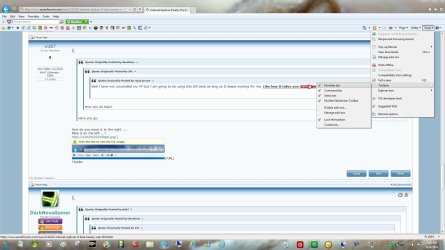
You can get the Favorites bar if you right click next to the tabs and check the "Favorites bar" option.
 

My Computer My Computer

Computer Manufacturer/Model Number
Dell Inspiron 14R N4110
OS
Windows 7 Home Premium x64
CPU
Intel Core i5-2410M Quad Core CPU @ 2.30 GHz
Memory
8 GB Shared Channel DDR3 Memory
Graphics Card(s)
Intel HD Graphics 3000, AMD Radeon HD 6470M
Sound Card
Intel Display Audio, Realtek High Definition Audio
Monitor(s) Displays
14" HD 720p LED Display
Screen Resolution
1366x768
Hard Drives
500 GB 5400 RPM SATA Hard Drive
Mouse
Microsoft USB IntelliMouse Explorer 3.0
My biggest complaint about IE9 is the inability to set the menus etc. where I want them like I can in Firefox.

Yeah, I hope that we can customize later on, 'cause I also want to make the buttons smaller like in IE8. And even though it's not too much of a big deal, I'm hoping the .gif speed issue gets fixed too.
 

My Computer My Computer

Computer Manufacturer/Model Number
Gigabyte GA-EP43T-UD3L
OS
Windows 7 Home Premium 32-bit SP1
CPU
Intel Core 2 Duo E8500 @ 3.80 GHz
Motherboard
GIGABYTE Intel Chipset
Memory
4GB of Kingston HyperX 1333 MHz DDR3 Dual Channel RAM
Graphics Card(s)
nVIDIA GTX 460 768 MB GDDR5
Sound Card
Realtek ALC888 HD audio
Monitor(s) Displays
BENQ FP731
Screen Resolution
1280 x 1024
Hard Drives
640 GB Western Digital Caviar Black SATA 7200 rpm
260 GB Western Digital SATA 7200 rpm
PSU
750W Ultra X Pro
Case
Cooler Master G Lite
Cooling
Zalman CNPS9500
Keyboard
Logitech Deluxe
Mouse
Logitech HD
Internet Speed
30 Mbps
I have the Menu bar showing all the time - File-Edit-Favorites-Tools-Help - it is on the left side of the browser. I want it on the right side of the browser.
How can I this?

Do you mean how IE8 had one on the right? Right click next to the tabs and click "command bar" if you mean something like that.

Been using it a bit more today, and it's becoming alright. I prefer having the favourites bar and command bar added to the UI like in IE8. It's still in beta so I can't say too much about performance for me, though I find it takes just a bit longer to load SF than Chrome. I notice it aligns everything and you can see the icons for each forum move in to position, where Chrome doesn't do that.

But IE was never good for web page layouts, so I guess it's nothing new lol.
 

My Computer My Computer

Computer type
PC/Desktop
Computer Manufacturer/Model Number
Custom Built
OS
Windows 8.1 Pro x64
CPU
Intel Core i7 4790k
Motherboard
MSI Z97S Krait Edition
Memory
8GB Corsair Dominator 1600MHz
Graphics Card(s)
MSI TwinFrozr GeForce GTX770
Sound Card
ASUS Xonar DX/XD 7.1
Monitor(s) Displays
Dell 24" S2409W + Dell 20" E207WFP
Screen Resolution
1920x1080 + 1680x1050
Hard Drives
1x 120GB OCZ Agility 3, 1x 750GB Western Digital Caviar Black, 1x 1TB Western Digital Caviar Blue
PSU
Corsair HX850 modular
Case
Fractal Design Define R4
Cooling
Corsair H60 w/ twin Corsair SP120 fans
Keyboard
Logitech G510S Keyboard
Mouse
Logitech G500S Laser Mouse
Internet Speed
40Mbps
Antivirus
Microsoft Security Essentials
Browser
Google Chrome
Other Info
LG Blu-Ray player
-->> Favorites Bar..needs to be transparent.
I like the Favorites bar on all the time but its SOOO ugly.
Other than that like the download manager,look,single address/search bar, simple look UI.
 

My Computer My Computer

OS
Win7 RC
I don't think I'm too crazy about the menu layouts, and I'm also a big fan of Firefox's ability to set up the menus the way you like. Maybe somebody will make an add on for that. Heh, maybe I will myself.

I do have to say that I'm really impressed with the fluidity of the page rendering and the overall loading speed of pages. The scrolling is impressive too. Scrolling in FF is a little bit jerky. IE9 behaves a bit more like I would expect a browser to run on a relatively high end machine like mine, so we'll see.

I'm a die hard FF user, but I'm going to give this a go for a week and see if I really like it.
 

My Computer My Computer

Computer type
PC/Desktop
Computer Manufacturer/Model Number
Mellon Labs (custom build)
OS
Win 7 Pro x64/Win 10 Pro x64 dual boot
CPU
AMD FX 8350 Vishera @ 4200
Motherboard
ASUS M5A97 R2.0
Memory
16 GB Mushkin Blackline DDR3-2400 @ 1866 (9-10-10-10-31)
Graphics Card(s)
XFX Radeon R9 280 Double D Black Edition
Sound Card
Realtek HD Audio on MB. Sounds great.
Monitor(s) Displays
Acer 24", Acer 22"
Screen Resolution
3840 x 1080
Hard Drives
1 x Mushkin Chronos 120 GB SSD (Win 10)
1 x Samsung 850 EVO 250 GB SSD (Win 7)
1 x WD 1TB SATA Blue
1 x WD 1TB SATA Green
PSU
Corsair TX-750
Case
CoolerMaster HAF 912+
Cooling
Coolermaster Seidon 240M Liquid AIO. 6 case fans
Keyboard
Logitech G710+
Mouse
Logitech G500s
Internet Speed
Much better since I got fiber, but still way overpriced.
Antivirus
MSE, Malware Bytes for scanning
Browser
Firefox
Other Info
Corsair VOID USB headphones.

A Mellon Labs X-1 - LCD Smartie driven system status display.

Brought to you by the letter E
Back
Top