Try this:
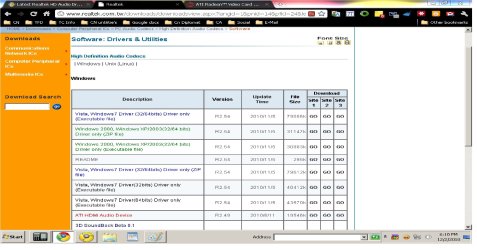
Open control panel, select "Programs and Features", scroll down and fine the Realtek Drivers, Uninstall.
Now, without rebooting, install the new drivers then reboot.
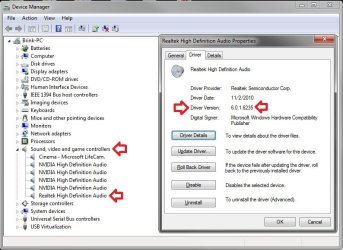
Also, ceck device manager and see if you have both a "High Definition Audio Device" and a Realtek High Definition Device". If so, select the High Definition audio Device then properties and disable it.
Ap
Thanks, this... worked(?) I did what you suggested, but when I tried to install, it gave me an error and closed out of the installation. I tried again but the same thing happened. I then decided to restart my computer, and when it booted up, I had the newest driver installed. (6.0.1.6235) So I'm not sure how that happened, but thanks.
Glad you worked it out...that was just a reboot need, i guess...

My Computer
At a glance
Windows 7 Professional SP1 - x64 [Non-UEFI Boot]Ivy Bridge Core i5 3570K (Delidded)G.Skill "Ares" DDR3 PC3-12800 - 1600MHz (16Gb)Asus Dual-RX480-O4G
- Computer type
- PC/Desktop
- Computer Manufacturer/Model Number
- Custom Build
- OS
- Windows 7 Professional SP1 - x64 [Non-UEFI Boot]
- CPU
- Ivy Bridge Core i5 3570K (Delidded)
- Motherboard
- Asus P8Z77-V LE PLUS
- Memory
- G.Skill "Ares" DDR3 PC3-12800 - 1600MHz (16Gb)
- Graphics Card(s)
- Asus Dual-RX480-O4G
- Sound Card
- Creative Sound Blaster Z w/5.1 sound system
- Monitor(s) Displays
- Asus IPS 23"
- Screen Resolution
- 16/9
- Hard Drives
- Internal:
500Go Sata 6Gb/s (x2)
500Go Sata 3Gb/s (x2)
SSD 60Go Sata 6Gb/s
- PSU
- In Win C 900W Series 80+ Platinum
- Case
- Thermaltake Chaser A71
- Cooling
- Custom Water Cooling Loop
- Keyboard
- Cooler Master QuickFire XTi
- Mouse
- Razer Imperator 2012 (4G)
- Antivirus
- MSE
- Browser
- IE 11.0.xxx Rtm
- Other Info
- "Raid0" with Intel Smart Response Technology (HDD/SSD)