Latest Realtek HD Audio Driver Version

My Computer My Computer

At a glance

Operating System : Windows 7 Home Premium Edi...Processor : Intel Core 2 Quad Q8300 @ 2500 MHzPhysical Memory :8GB Corsair4x 2GB 800MHz C5 ...Video Card : XFX 6700 AMD
Computer Manufacturer/Model Number
packard bell IXTREME M5722
OS
Operating System : Windows 7 Home Premium Edition 6.01.7600 SP1 (x64)
CPU
Processor : Intel Core 2 Quad Q8300 @ 2500 MHz
Motherboard
Mainboard : Packard Bell (Acer EG43M )
Memory
Physical Memory :8GB Corsair4x 2GB 800MHz C5 DDR2
Graphics Card(s)
Video Card : XFX 6700 AMD
Monitor(s) Displays
Maestro 234DL - BenQ V2220 - BenQ VW2420H
Screen Resolution
Current Display :1920x1080p pixels at 60 Hz in HD LED
Hard Drives
Hard Disks : WDC (1000 GB)
Drive C: (Hard Disk) : 428 GB available on 491 GB
Drive D: (Hard Disk) : 426 GB available on 492 GB
SAMSUNG spinpoint HD103SJ 1000.2 GB
(X 2) KINGSTON SSD NOW V 30GB
PSU
XFX ProSeries 550W PSU
Case
PACKARD BELL IXTREME
Cooling
System Blower Current: 150mA Air Flow16CFM ;Akasa 90mm rear
Keyboard
Gigabyte Aivia K8100
Mouse
TRUST-Wireless Laser Mouse - Carbon edition MI-7770C
Internet Speed
TP-LINK > TL-WN951N / AV500 Gigabit Powerline Adapters
Browser
chrome dev
Other Info
EXTRA COOLING>(FAN CONTROLLER) PC Bay Cooler 3 x 40mm fans; Akasa AK-HD-BL Blue hard drive cooler 2 x 40 mm fan 4500 rpm 29.7 dBA
Bios> American Megatrends Inc.
Version : P01-A1
Date : 08/31/2009
New Realtek 2.69 HD audio driver released. See first post for more details. :)
 

My Computer My Computer

At a glance

64-bit Windows 11 Pro for WorkstationsIntel i7-8700K OC'd to 5 GHz64 GB (4x16GB) G.SKILL TridentZ RGB DDR4 3600...ASUS ROG-STRIX-GTX1080TI-O11G-GAMING
Computer type
PC/Desktop
Computer Manufacturer/Model Number
Self built custom
OS
64-bit Windows 11 Pro for Workstations
CPU
Intel i7-8700K OC'd to 5 GHz
Motherboard
ASUS ROG Maximus XI Formula Z390
Memory
64 GB (4x16GB) G.SKILL TridentZ RGB DDR4 3600 MHz
Graphics Card(s)
ASUS ROG-STRIX-GTX1080TI-O11G-GAMING
Sound Card
Integrated
Monitor(s) Displays
2 x Samsung Odyssey G7 27"
Screen Resolution
2560x1440
Hard Drives
1TB Samsung 990 PRO M.2,
4TB Samsung 990 PRO PRO M.2,
TerraMaster F8 SSD Plus NAS
PSU
Seasonic Prime Titanium 850W
Case
Thermaltake Core P3
Cooling
Corsair Hydro H115i
Keyboard
Logitech wireless K800
Mouse
Logitech MX Master 4
Internet Speed
2 Gb/s Download and 100 Mb/s Upload
Antivirus
Malwarebyte Anti-Malware Premium
Browser
Google Chrome
Other Info
Logitech Z625 speaker system,
Logitech BRIO 4K Pro webcam,
HP Color LaserJet Pro MFP M477fdn,
APC SMART-UPS RT 1000 XL - SURT1000XLI,
Galaxy S23 Plus phone
RELEASE DATE: June 22nd, 2012
DRIVER VERSION: R 2.70

Driver Version in Device Manager: 6.0.1.6662


My Computer My Computer

At a glance

Windows 8.1 Pro RTM x64Intel Core-i5-3570K 4-core @ 3.4GHz (Ivy Brid...4 x 4GB DDR3-1600 Corsair Vengeance CMZ8GX3M2...MSI GeForce GTX770 Gaming OC 2GB
Computer type
PC/Desktop
Computer Manufacturer/Model Number
Dwarf Dwf/11/2012 r09/2013
OS
Windows 8.1 Pro RTM x64
CPU
Intel Core-i5-3570K 4-core @ 3.4GHz (Ivy Bridge) (OC 4.4GHz)
Motherboard
ASRock Z77 Extreme4-M
Memory
4 x 4GB DDR3-1600 Corsair Vengeance CMZ8GX3M2A1600C9B (16GB)
Graphics Card(s)
MSI GeForce GTX770 Gaming OC 2GB
Sound Card
Realtek High Definition on board solution (ALC 898)
Monitor(s) Displays
ViewSonic VA1912w Widescreen (VGA)
Screen Resolution
1440x900
Hard Drives
OCZ Agility 3 SSD 120GB SATA III x2 (RAID 0)
Samsung HD501LJ 500GB SATA II x2
Hitachi HDS721010CLA332 1TB SATA II
Iomega 1.5TB Ext USB 2.0
WD 2.0TB Ext USB 3.0
PSU
XFX Pro Series 850W Semi-Modular
Case
Gigabyte IF233
Cooling
1 x 120mm Front Inlet 1 x 120mm Rear Exhaust
Keyboard
Microsoft Comfort Curve Keyboard 3000 (USB)
Mouse
Microsoft Comfort Mouse 3000 for Business (USB)
Internet Speed
NetGear DG834Gv3 ADSL Modem/Router (Ethernet) ~4.0 Mb/s (O2)
Antivirus
Avast! 8.0.1497
Browser
IE 11
Other Info
Optical Drive: HL-DT-ST BD-RE BH10LS30 SATA Bluray
Lexmark S305 Printer/Scanner/Copier (USB)
WEI Score: 8.1/8.1/8.5/8.5/8.25
Asus Eee PC 1011PX Netbook (Windows 7 x86 Starter)
another release so soon whats in this update?
 

My Computer My Computer

At a glance

Operating System : Windows 7 Home Premium Edi...Processor : Intel Core 2 Quad Q8300 @ 2500 MHzPhysical Memory :8GB Corsair4x 2GB 800MHz C5 ...Video Card : XFX 6700 AMD
Computer Manufacturer/Model Number
packard bell IXTREME M5722
OS
Operating System : Windows 7 Home Premium Edition 6.01.7600 SP1 (x64)
CPU
Processor : Intel Core 2 Quad Q8300 @ 2500 MHz
Motherboard
Mainboard : Packard Bell (Acer EG43M )
Memory
Physical Memory :8GB Corsair4x 2GB 800MHz C5 DDR2
Graphics Card(s)
Video Card : XFX 6700 AMD
Monitor(s) Displays
Maestro 234DL - BenQ V2220 - BenQ VW2420H
Screen Resolution
Current Display :1920x1080p pixels at 60 Hz in HD LED
Hard Drives
Hard Disks : WDC (1000 GB)
Drive C: (Hard Disk) : 428 GB available on 491 GB
Drive D: (Hard Disk) : 426 GB available on 492 GB
SAMSUNG spinpoint HD103SJ 1000.2 GB
(X 2) KINGSTON SSD NOW V 30GB
PSU
XFX ProSeries 550W PSU
Case
PACKARD BELL IXTREME
Cooling
System Blower Current: 150mA Air Flow16CFM ;Akasa 90mm rear
Keyboard
Gigabyte Aivia K8100
Mouse
TRUST-Wireless Laser Mouse - Carbon edition MI-7770C
Internet Speed
TP-LINK > TL-WN951N / AV500 Gigabit Powerline Adapters
Browser
chrome dev
Other Info
EXTRA COOLING>(FAN CONTROLLER) PC Bay Cooler 3 x 40mm fans; Akasa AK-HD-BL Blue hard drive cooler 2 x 40 mm fan 4500 rpm 29.7 dBA
Bios> American Megatrends Inc.
Version : P01-A1
Date : 08/31/2009
Thank you Dwarf. First post updated. :)
 

My Computer My Computer

At a glance

64-bit Windows 11 Pro for WorkstationsIntel i7-8700K OC'd to 5 GHz64 GB (4x16GB) G.SKILL TridentZ RGB DDR4 3600...ASUS ROG-STRIX-GTX1080TI-O11G-GAMING
Computer type
PC/Desktop
Computer Manufacturer/Model Number
Self built custom
OS
64-bit Windows 11 Pro for Workstations
CPU
Intel i7-8700K OC'd to 5 GHz
Motherboard
ASUS ROG Maximus XI Formula Z390
Memory
64 GB (4x16GB) G.SKILL TridentZ RGB DDR4 3600 MHz
Graphics Card(s)
ASUS ROG-STRIX-GTX1080TI-O11G-GAMING
Sound Card
Integrated
Monitor(s) Displays
2 x Samsung Odyssey G7 27"
Screen Resolution
2560x1440
Hard Drives
1TB Samsung 990 PRO M.2,
4TB Samsung 990 PRO PRO M.2,
TerraMaster F8 SSD Plus NAS
PSU
Seasonic Prime Titanium 850W
Case
Thermaltake Core P3
Cooling
Corsair Hydro H115i
Keyboard
Logitech wireless K800
Mouse
Logitech MX Master 4
Internet Speed
2 Gb/s Download and 100 Mb/s Upload
Antivirus
Malwarebyte Anti-Malware Premium
Browser
Google Chrome
Other Info
Logitech Z625 speaker system,
Logitech BRIO 4K Pro webcam,
HP Color LaserJet Pro MFP M477fdn,
APC SMART-UPS RT 1000 XL - SURT1000XLI,
Galaxy S23 Plus phone
hi, i downloaded thru the vaio update the latest realtek driver version 6.0.1.6526. Now i have no sound whatsoever and neither sony or realtek have replied to my emails. the speaker icon in the bottom rh corner has am=n x in it like its muted but when i hover over it it says no audio output device is installed. i have been to the sony support site and tried re-updating version 6.0.1.6526 but it still has no sound... help! running win 7 home prem 64bit on a sony vaio c series vpccb15fg
 

My Computer My Computer

At a glance

Windows 7 Home Premium 64bit
OS
Windows 7 Home Premium 64bit
Sorry , Brink i want ask , this's first time i want update Realtek, can you tell me how? which i must download Exe / Zip File ? my OS is 64bit , and i want ask if i want update, i must uninstall the old one first?
 

My Computer My Computer

At a glance

Windows 7 Home Premium 64bit
OS
Windows 7 Home Premium 64bit
Hello sle3pingz,

If your motherboard has a Realtek HD audio chip, then the .exe would easier to download use. No need to install anything older, just running the .exe will install that version. :)
 

My Computer My Computer

At a glance

64-bit Windows 11 Pro for WorkstationsIntel i7-8700K OC'd to 5 GHz64 GB (4x16GB) G.SKILL TridentZ RGB DDR4 3600...ASUS ROG-STRIX-GTX1080TI-O11G-GAMING
Computer type
PC/Desktop
Computer Manufacturer/Model Number
Self built custom
OS
64-bit Windows 11 Pro for Workstations
CPU
Intel i7-8700K OC'd to 5 GHz
Motherboard
ASUS ROG Maximus XI Formula Z390
Memory
64 GB (4x16GB) G.SKILL TridentZ RGB DDR4 3600 MHz
Graphics Card(s)
ASUS ROG-STRIX-GTX1080TI-O11G-GAMING
Sound Card
Integrated
Monitor(s) Displays
2 x Samsung Odyssey G7 27"
Screen Resolution
2560x1440
Hard Drives
1TB Samsung 990 PRO M.2,
4TB Samsung 990 PRO PRO M.2,
TerraMaster F8 SSD Plus NAS
PSU
Seasonic Prime Titanium 850W
Case
Thermaltake Core P3
Cooling
Corsair Hydro H115i
Keyboard
Logitech wireless K800
Mouse
Logitech MX Master 4
Internet Speed
2 Gb/s Download and 100 Mb/s Upload
Antivirus
Malwarebyte Anti-Malware Premium
Browser
Google Chrome
Other Info
Logitech Z625 speaker system,
Logitech BRIO 4K Pro webcam,
HP Color LaserJet Pro MFP M477fdn,
APC SMART-UPS RT 1000 XL - SURT1000XLI,
Galaxy S23 Plus phone
i mean need to uninstall the old version ?

and i want ask a weird Question too, why my sound mixer name like this "2- Realtek High Definition Audio" why there's "2" there and other is "Realtek High Definition Audio" no "2" there and why someone else is this too "High Definition Audio Device" there's something different between us? there's something wrong with mine?

14w6mte.jpg
 

My Computer My Computer

At a glance

Windows 7 Home Premium 64bit
OS
Windows 7 Home Premium 64bit
The 2.69 update left me with no sound so I disabled the Realtek HD audio drivers and I had sound again but of poor quality, I only just got around to trying to sort it, so un-installed all the realtek stuff and installed the new 2.70 drivers - now I have system sounds but no sound in VLC player or Winamp... :confused: Any ideas guys? I've tried unistalling and reinstalling the drivers, VLC and winamp with no change.
 
Last edited:

My Computer My Computer

At a glance

Windows 7 pro x64Intel 3.3Ghz8 GBOn board
Computer Manufacturer/Model Number
Me
OS
Windows 7 pro x64
CPU
Intel 3.3Ghz
Motherboard
Asus P8Z68-V LX
Memory
8 GB
Graphics Card(s)
On board
Sound Card
On board
Hard Drives
2 Samsung 256gb SSD
2 Seagate 3TB HDD
PSU
BeQuiet 350w
Case
Lian Li
Cooling
Err.. cant remember
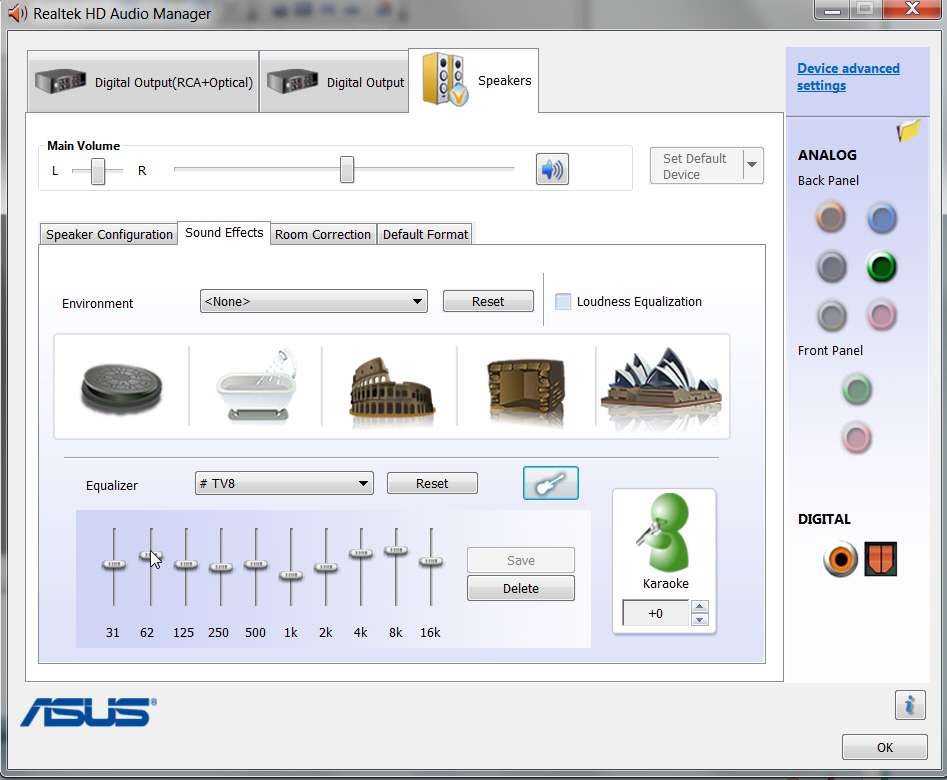
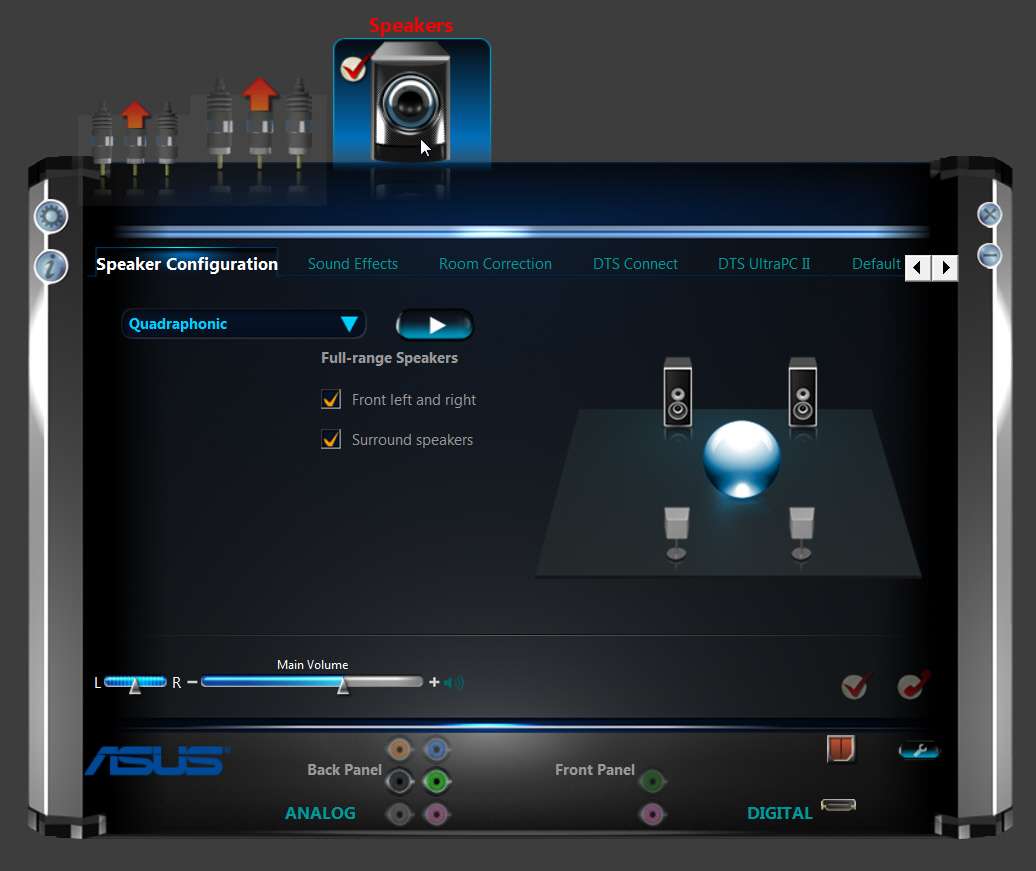
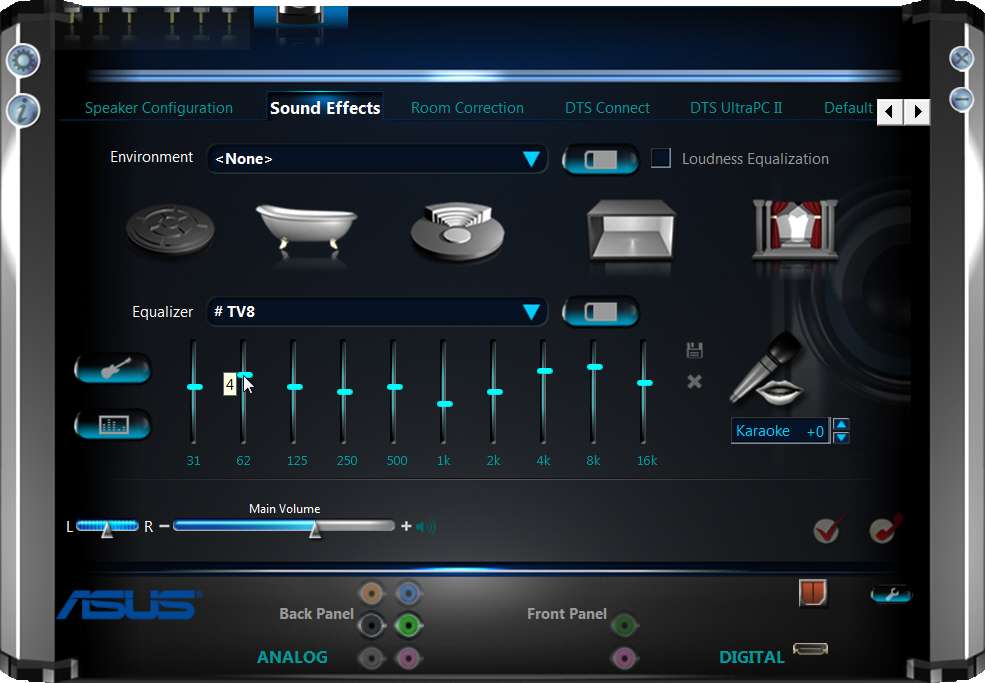
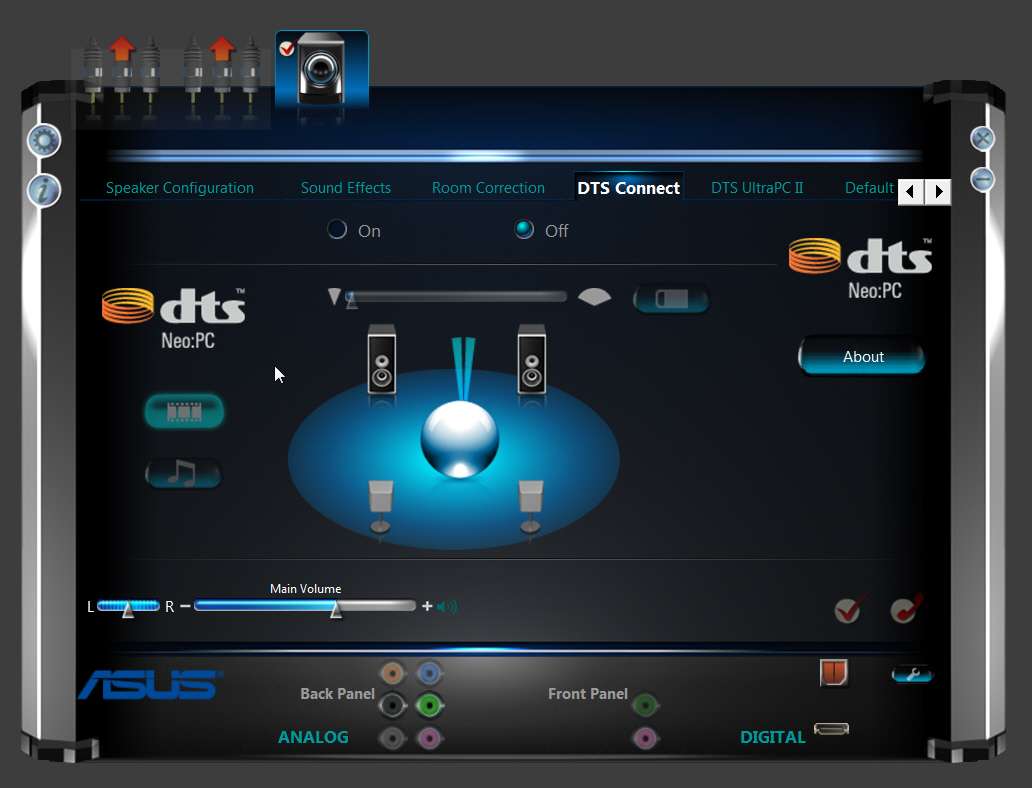
New HD Audio Manager skin for new mobo/chip

Looks like Realtek has dramatically slicked-up the new skin when installing 2.70 driver package on a mobo/chip that is very recent.

I have the 2.70 driver installed on both of my machines:

(a) ASUS P5Q3 - Realtek ALC1200 chip (Intel E8450 Core2 Duo, P45/ICH10R chipset)

(b) ASUS P8Z77-V Pro - Realtek ALC892 (Intel i5-3350p 3rd-generation, Z77 chipset) which includes some type of DTS-related audio enhancement I haven't read about yet

And the look of the HD Audio Manager is completely different on the two systems, although it is the same 2.70 driver installed on both.

Most significantly to me, they have FINALLY modified the GUI for the EQ, so that when you click on a slider it reveals the digital number setting offset for the +/- value of the slider. This allows you to write down (in numerical form, so that you duplicate it if you had to) each custom EQ setting.

As most or all of us probably know, each new driver install erases all prior custom EQ setups you might have created, and you have to re-build them each time (perhaps from a screenshot, or perhaps because you've written down how many "nudges" you tapped each slider up/down to, etc.). Well now you actually CAN TRULY SEE the current digital value of an EQ slider, so that what you write down actually IS ACCURATE AND PRECISE, and makes it 100% reliable that you end up with what you want when you have to rebuild it.

(Of course it would be really ideal if they simply would not erase all prior custom EQ setups each time you uninstall/reinstall a driver, but that's another matter. Or, they could simply implement a "flyover HELP", when you hover the mouse over a slider to present its current value. Or, they could have implemented a small "LED" at the top of each slider's column, to display all 10 slider +/- values all the time.)


Anyway, here's what the two different systems present:


(1) ASUS P5Q3 with ALC1200

asusp5q3alc1200realtek1.jpg


asusp5q3alc1200realtek2.jpg


(2) ASUS P8Z77-V Pro with ALC892

asusp8z77alc892realtek1.jpg


asusp8z77alc892realtek2.jpg


asusp8z77alc892realtek3.jpg
 

My Computer My Computer

At a glance

Windows 7 Pro x64 (1), Win7 Pro X64 (2)i5-3350p 3.1Ghz/6MB-cache (1); E8400 3.0Ghz/6...8GB PC3-12800 DDR3 (1); 4GB PC3-10600 DDR3 (2)ATI HD7750 (1), (see TV cards); ATI R7 250 (2)
Computer type
PC/Desktop
Computer Manufacturer/Model Number
Home-built, two systems (1) and (2)
OS
Windows 7 Pro x64 (1), Win7 Pro X64 (2)
CPU
i5-3350p 3.1Ghz/6MB-cache (1); E8400 3.0Ghz/6MB-cache (2)
Motherboard
ASUS P8Z77-V Pro (1); ASUS P5Q3 (2)
Memory
8GB PC3-12800 DDR3 (1); 4GB PC3-10600 DDR3 (2)
Graphics Card(s)
ATI HD7750 (1), (see TV cards); ATI R7 250 (2)
Sound Card
Realtek ALC892 HD Audio (1); Realtek ALC1200 HD Audio (2)
Monitor(s) Displays
Eizo HD2441W LCD, Eizo S2433W (1); Eizo 24" S2433W (2)
Screen Resolution
1920x1200, 1920x1200 (1); 1920x1200 (2)
Hard Drives
(1) 1TB SATA-II (7200RPM), 2x2TB SATA-III (7200RPM), 250GB SATA-III (10000RPM) for OS; 2x2TB external USB 3.0

(2) 320GB SATA-II (7200RPM), 750GB SATA-II (7200RPM), 150GB SATA-II (10000RPM) for OS; 2TB external USB 3.0
PSU
Nesteq ECS-6001 600W (1); Nesteq ECS-5001 500W (2)
Case
Acousti-Case 360 (1) and (2)
Cooling
Noctua NH-U12P SE2 for CPU, 2x120mm case fans (1) and (2)
Keyboard
IBM PS/2 (1) and (2)
Mouse
Logitech MX Revolution wireless (1); Microsoft wired (2)
Internet Speed
100mbps down / 10mbps up
Antivirus
Microsoft Security Essentials; Malwarebyte Anti-Malware Pro
Browser
Firefox
Other Info
Ceton InfiniTV 4-tuner cablecard-enabled TV card as well as Hauppauge HVR-2250 OTA/ATSC 2-tuner TV card in (1), running under Win7 WMC
i have a new board with the same alc889 as the last gen board and I just put 2.70 in the new board GA990FXa UD3, but there seems to be a new Dolby Home Theater version. I have the prior gigabyte 890fxa ud5,. I have a dual monitor set up but only really use sound for the one to a large flat screen and avr, onkyo608. all worked fine with the hdmi i had connected and used 8channel. Now i have issues. Environment, Room correction tabs just do not appear. In the realtek control panel with the icon in task bar, hdmi doesnt show up as it had before. Getting information from realtek about version changes, changelog and that stuff has been elusive , outside of forum information sharing. I have never been able to map my front top speakers in realtek or microsoft for the Dolby PLIIz Height or even PLIIx Wide.
I get sound from the 'side' or 'rear' speakers twice when doing the test.
Now , I dont know what is going on. had done a clean install ,even though the build is brand new, still the built in win7 drivers got put in before i could stop it, so the 'first' install of 2.70 wasnt really first in actuality. so, i did a driver sweep to be sure with lan /internet disconnected. Although dolby claims to be able to do 5.1 and 7.1 , there is no action at all with dolby in the multi channel config and not through hdmi. i have to set up the only other digital output, optical spdif, which is 2 channel and does not support all the formats i can get with hdmi. no matter what i do, i am not able to replicate the same perfectly working config i had with the 890fx with alc889 and same version drivers. i have used them with each update. i keep past installers for a long time, so rolled back to 2.40 and no matter which of the best working drivers i had used in the past, i can not make this new one work. I use the ati and/or amd hdmi drivers. i have a new amd gfx 7950 and was using the ati 5870 through the same onkyo 608 with perfect results for 2yrs, all realtek driver updates up to and including the latest 2.70. Have been to specific forums for the board and graphics card and get no responses to my posts though enough hits. i saw no prior fixes.
so, just trying to get the hdmi output icon/tab to show up and ,even with the other digital output options , there is no 'room correction' or 'environment' tab and instead of having the hdmi tab , it puts a 2nd 'digital audio' tab and my board only has one optical, no co ax , and the hdmi and 2 display ports with the dvi. not sure why realtek is mixed up with the iconic representation, and i am only a step away from novice, have been for 10yrs and it confuses me. I have managed to output multi channel sound , but no Dolby is involved and still no tabs in the realtek control panel.. However, i can , now, use a small option panel pop up from the 'playback' through 'properties' but it says i need to use a microphone to get 'room correction' to show up at all. same with loudness, but no environment and no gui interface for any of them
sorry , but this has been a complex issue, after a number of years smooth sailing with no direction which way to look for a fix, if there is one. this may be some upgrade?
john
 

My Computer My Computer

At a glance

Windows7 x64 ProfAMD FX8120, PhenomII x6 1090T BEGSkill 16Gz(4X4) 8Ghz DDR3 1600,(4x2) Ripjaws...SAPPHIRE 7950OC BOOST DUAL X, Asus EAH 5870 v...
Computer Manufacturer/Model Number
self
OS
Windows7 x64 Prof
CPU
AMD FX8120, PhenomII x6 1090T BE
Motherboard
Gigabyte GA 990FXA UD3, GA890FXA UD5
Memory
GSkill 16Gz(4X4) 8Ghz DDR3 1600,(4x2) Ripjaws cl7 1600 7-8-7
Graphics Card(s)
SAPPHIRE 7950OC BOOST DUAL X, Asus EAH 5870 v2 1G DDR5
Sound Card
Built in RealTec889
Monitor(s) Displays
Samsung 2430, LG 42LD550, Samsung T260HD
Screen Resolution
1920X1200
Hard Drives
2 CRUCIAL M4 128Gb, 3x Samsung Spinpoint F3 750Gig, 3x 1T WD Caviar Black 7,200rpm. Cavalry 1T ext eSATA
PSU
ANTEC MOD. 750, ThermalTake ToughPower 750XT mod
Case
CM HAF922, CM 690 II Advance
Cooling
TT WATER2.0 PRO,CM 212Hyper v2 w/ 3kDelta/Scythe led control
Mouse
CORSAIR M90 VENGENCE, LOGITECH M705
Internet Speed
25MB
I'm wrapping up the install of a new machine based around an ASUS P8Z77-V Pro motherboard, which includes Realtek ALC892 sound.

Initially, I installed the various drivers and utilities from the Support CD provided with the mobo, but now I'm updating to the latest drivers and software versions from the ASUS support site for this board.

Since I thought that 2.70 (6.0.1.6662, 6/19/2012) was the latest Realtek HD Audio Codec, imagine my surprise to find that the ASUS site showed 6.0.1.6699 as the current driver.

So I downloaded it and updated the initially installed 2.70 audio driver (which was not on the Support CD but which I used from the Realtek site). Sure enough, it must be the upcoming 2.71 in my opinion, as it's truly 6.0.1.6699 dated 8/7/2012.

One very interesting variation on the install technique, which I've not seen before. So I don't know when this change was made, or maybe it's brand new, but previously whenever I'd upgraded to a new version of Realtek drivers I had to go throught a manual 2-step process which is automatically controlled by the installer itself. First, run the installer and it discovers that it must uninstall the currently installed drivers, and then push FINISH to re-boot. Second, after re-boot, run the installer again yourself and now it discovers it needs to install the new driver, and then re-boot for a second time.

Well, the new installer doesn't require that you do anything yourself manually after the first re-boot. It apparently schedules an automatic running of the installer immediately after coming up to the Windows desktop after that first re-boot. It just starts by itself! There's still a need for that second re-boot, but at least you don't have to manually run the installer for that second time to actually do the install as it just automatically starts by itself.

Of course there still is the eternally present problem with custom-created EQ's from the old installed driver get deleted when you uninstall that old driver, so that you have to re-create it from scratch after the new criver gets installed. This is obviously due to the fact that that saved EQ is in a Registry key somewhere, and thus it gets lost during the uninstall step.

And the second problem is that the newly added "digital flyout" with the numeric value of the EQ slider setting (which I'd noticed during the install of 2.70 on this new P8Z77 board with the ALC892 chip) doesn't actually present itself unless you click the mouse while on the slider adjuster, which unfortunately also tends to move the slider up one notch unless you are careful or see it happen and pull it back down one notch. It really should simply fly out when you hover the mouse over the slider adjuster. Or, each slider column should simply have a new always-present LED over it showing the numeric slider value in that column.

And finally, there's no select-and-stick function tied to the up/down arrow keys that occurs when you click on an individual EQ slider adjuster with the mouse (as there is, say, on the Windows sliders in the Volume Mixer). In other words, it's very hard to precisely move the slider adjuster up or down by just one notch because it can only be done with the mouse, but it would be trivial to do this if you just could just tap the up/down arrow keys once to do that one-notch adjustment. Unfortunately, the up/down arrow keys are not tied to the sliders and the mouse must be used. It's always been this way, but it also has always needed enhancing.
 

My Computer My Computer

At a glance

Windows 7 Pro x64 (1), Win7 Pro X64 (2)i5-3350p 3.1Ghz/6MB-cache (1); E8400 3.0Ghz/6...8GB PC3-12800 DDR3 (1); 4GB PC3-10600 DDR3 (2)ATI HD7750 (1), (see TV cards); ATI R7 250 (2)
Computer type
PC/Desktop
Computer Manufacturer/Model Number
Home-built, two systems (1) and (2)
OS
Windows 7 Pro x64 (1), Win7 Pro X64 (2)
CPU
i5-3350p 3.1Ghz/6MB-cache (1); E8400 3.0Ghz/6MB-cache (2)
Motherboard
ASUS P8Z77-V Pro (1); ASUS P5Q3 (2)
Memory
8GB PC3-12800 DDR3 (1); 4GB PC3-10600 DDR3 (2)
Graphics Card(s)
ATI HD7750 (1), (see TV cards); ATI R7 250 (2)
Sound Card
Realtek ALC892 HD Audio (1); Realtek ALC1200 HD Audio (2)
Monitor(s) Displays
Eizo HD2441W LCD, Eizo S2433W (1); Eizo 24" S2433W (2)
Screen Resolution
1920x1200, 1920x1200 (1); 1920x1200 (2)
Hard Drives
(1) 1TB SATA-II (7200RPM), 2x2TB SATA-III (7200RPM), 250GB SATA-III (10000RPM) for OS; 2x2TB external USB 3.0

(2) 320GB SATA-II (7200RPM), 750GB SATA-II (7200RPM), 150GB SATA-II (10000RPM) for OS; 2TB external USB 3.0
PSU
Nesteq ECS-6001 600W (1); Nesteq ECS-5001 500W (2)
Case
Acousti-Case 360 (1) and (2)
Cooling
Noctua NH-U12P SE2 for CPU, 2x120mm case fans (1) and (2)
Keyboard
IBM PS/2 (1) and (2)
Mouse
Logitech MX Revolution wireless (1); Microsoft wired (2)
Internet Speed
100mbps down / 10mbps up
Antivirus
Microsoft Security Essentials; Malwarebyte Anti-Malware Pro
Browser
Firefox
Other Info
Ceton InfiniTV 4-tuner cablecard-enabled TV card as well as Hauppauge HVR-2250 OTA/ATSC 2-tuner TV card in (1), running under Win7 WMC
I found the motheboard changeand driver for realtek audio manager change confusing. Some of the interface skin is the same as the old alc889, though the new board touts the high s/n ratio of 108 as a special feature on the Gigabyte stat page for the board. I am just not seeing the 'HDMI' tab on the interface nor does the Environment or Room Correction tabs appear. I am able to get at those particular functions as well as the Loudness check box. Only, i am no longer to do any manual room correction for individual speakers , just get an error message if i check the box provided next to the 'room correction' test only line in a small dialogue box through properties. i need to have a microphone or no room correction can be done. this is not at all similar to the same alc889 in the last gigabyte 890fx board. it had the whole pictogram with 8speakers and corrections for each one for distance and db. now , there is a new expanded dolby Home Theater interface with a ton of corrections but it doesnt work with the hdmi connection to my onkyo 608. I have not been able to get it to work with anything but the headphone jack or analogue speaker plugs on the back. it has all the standard equalizers and a new Intelligent Equalizer with built in pre sets. i can not set my realtek audio manager equalizer anymore because there is no more tab . I am able to get audio to my onkyo well enough and i can configure it as stereo , quad, 5.1 and 7.1. but it stops there. no other options but the loudness check box or an electronic room correction that i get error messages when i use a standard microsoft mono microphone on a stand. it doesnt like tha mic for some reason though will do a lousy job of running through the beeping speaker test but only comes out with a stereo result despite having sound come from all 8 speakers.
i am pretty sure it isnt functioning properly, though functional, but no idea how it is supposed to work. no new manuals, instructions or change logs, nothing i have found as yet to cover any of the changes from last generation. Nor has my google shown up any other people with the issue, not even on the specific 990 fx ud3/5/7 forum threads. i got no responses on the overclocker threads for the board either.
John.
 

My Computer My Computer

At a glance

Windows7 x64 ProfAMD FX8120, PhenomII x6 1090T BEGSkill 16Gz(4X4) 8Ghz DDR3 1600,(4x2) Ripjaws...SAPPHIRE 7950OC BOOST DUAL X, Asus EAH 5870 v...
Computer Manufacturer/Model Number
self
OS
Windows7 x64 Prof
CPU
AMD FX8120, PhenomII x6 1090T BE
Motherboard
Gigabyte GA 990FXA UD3, GA890FXA UD5
Memory
GSkill 16Gz(4X4) 8Ghz DDR3 1600,(4x2) Ripjaws cl7 1600 7-8-7
Graphics Card(s)
SAPPHIRE 7950OC BOOST DUAL X, Asus EAH 5870 v2 1G DDR5
Sound Card
Built in RealTec889
Monitor(s) Displays
Samsung 2430, LG 42LD550, Samsung T260HD
Screen Resolution
1920X1200
Hard Drives
2 CRUCIAL M4 128Gb, 3x Samsung Spinpoint F3 750Gig, 3x 1T WD Caviar Black 7,200rpm. Cavalry 1T ext eSATA
PSU
ANTEC MOD. 750, ThermalTake ToughPower 750XT mod
Case
CM HAF922, CM 690 II Advance
Cooling
TT WATER2.0 PRO,CM 212Hyper v2 w/ 3kDelta/Scythe led control
Mouse
CORSAIR M90 VENGENCE, LOGITECH M705
Internet Speed
25MB
You can find an unofficial version of the Realtek Semiconductor Pilote High Definition Audio v6.0.1.6804 (Date of publication 01/14/2013), certified WHQL by Microsoft HERE for those wanted new ones, 'cause it's been a while (6/22/2012) Realtek didn't upped some on their site.

Notes:
-Microsoft Whql certified drivers
-Support for newer motherboards
-Updated Control Panel
-Updated Installation Program
-Updated Pilote version v6.0.1.6804
Realtek HDA:
ALC221, ALC231, ALC260, ALC262, ALC265, ALC267, ALC268, ALC269, ALC270, ALC272, ALC273, ALC275, ALC276, ALC280, ALC282, ALC283, ALC290, ALC660, ALC662, ALC663, ALC665, ALC670, ALC671, ALC672, ALC676, ALC680, ALC861VC, ALC861VD, ALC880, ALC882, ALC883, ALC885, ALC886, ALC887, ALC888, ALC889, ALC892 ou ALC899
Operating systems:
Windows 2000/2003/2008/XP/XP MCE/Vista/7/8/2003-64/2008-64/2008 R2-64/2012-64/XP-64/Vista-64/7-64/8-64.

FileSize: 135Mb
 

My Computer My Computer

At a glance

Windows 7 Professional SP1 - x64 [Non-UEFI Boot]Ivy Bridge Core i5 3570K (Delidded)G.Skill "Ares" DDR3 PC3-12800 - 1600MHz (16Gb)Asus Dual-RX480-O4G
Computer type
PC/Desktop
Computer Manufacturer/Model Number
Custom Build
OS
Windows 7 Professional SP1 - x64 [Non-UEFI Boot]
CPU
Ivy Bridge Core i5 3570K (Delidded)
Motherboard
Asus P8Z77-V LE PLUS
Memory
G.Skill "Ares" DDR3 PC3-12800 - 1600MHz (16Gb)
Graphics Card(s)
Asus Dual-RX480-O4G
Sound Card
Creative Sound Blaster Z w/5.1 sound system
Monitor(s) Displays
Asus IPS 23"
Screen Resolution
16/9
Hard Drives
Internal:
500Go Sata 6Gb/s (x2)
500Go Sata 3Gb/s (x2)
SSD 60Go Sata 6Gb/s
PSU
In Win C 900W Series 80+ Platinum
Case
Thermaltake Chaser A71
Cooling
Custom Water Cooling Loop
Keyboard
Cooler Master QuickFire XTi
Mouse
Razer Imperator 2012 (4G)
Antivirus
MSE
Browser
IE 11.0.xxx Rtm
Other Info
"Raid0" with Intel Smart Response Technology (HDD/SSD)
Thanks for this link, got to use my translator doc page and came across a new tool for a clean uninstal/install of catalyst. The Google translation page i used offers a word for word translation and no idiomatic phrases are covered , so some sentences were a bit tricky
 

My Computer My Computer

At a glance

Windows7 x64 ProfAMD FX8120, PhenomII x6 1090T BEGSkill 16Gz(4X4) 8Ghz DDR3 1600,(4x2) Ripjaws...SAPPHIRE 7950OC BOOST DUAL X, Asus EAH 5870 v...
Computer Manufacturer/Model Number
self
OS
Windows7 x64 Prof
CPU
AMD FX8120, PhenomII x6 1090T BE
Motherboard
Gigabyte GA 990FXA UD3, GA890FXA UD5
Memory
GSkill 16Gz(4X4) 8Ghz DDR3 1600,(4x2) Ripjaws cl7 1600 7-8-7
Graphics Card(s)
SAPPHIRE 7950OC BOOST DUAL X, Asus EAH 5870 v2 1G DDR5
Sound Card
Built in RealTec889
Monitor(s) Displays
Samsung 2430, LG 42LD550, Samsung T260HD
Screen Resolution
1920X1200
Hard Drives
2 CRUCIAL M4 128Gb, 3x Samsung Spinpoint F3 750Gig, 3x 1T WD Caviar Black 7,200rpm. Cavalry 1T ext eSATA
PSU
ANTEC MOD. 750, ThermalTake ToughPower 750XT mod
Case
CM HAF922, CM 690 II Advance
Cooling
TT WATER2.0 PRO,CM 212Hyper v2 w/ 3kDelta/Scythe led control
Mouse
CORSAIR M90 VENGENCE, LOGITECH M705
Internet Speed
25MB
Thanks for this link, got to use my translator doc page and came across a new tool for a clean uninstal/install of catalyst. The Google translation page i used offers a word for word translation and no idiomatic phrases are covered , so some sentences were a bit tricky

You have both today! ;)

Ps: thanks rep!:)
 

My Computer My Computer

At a glance

Windows 7 Professional SP1 - x64 [Non-UEFI Boot]Ivy Bridge Core i5 3570K (Delidded)G.Skill "Ares" DDR3 PC3-12800 - 1600MHz (16Gb)Asus Dual-RX480-O4G
Computer type
PC/Desktop
Computer Manufacturer/Model Number
Custom Build
OS
Windows 7 Professional SP1 - x64 [Non-UEFI Boot]
CPU
Ivy Bridge Core i5 3570K (Delidded)
Motherboard
Asus P8Z77-V LE PLUS
Memory
G.Skill "Ares" DDR3 PC3-12800 - 1600MHz (16Gb)
Graphics Card(s)
Asus Dual-RX480-O4G
Sound Card
Creative Sound Blaster Z w/5.1 sound system
Monitor(s) Displays
Asus IPS 23"
Screen Resolution
16/9
Hard Drives
Internal:
500Go Sata 6Gb/s (x2)
500Go Sata 3Gb/s (x2)
SSD 60Go Sata 6Gb/s
PSU
In Win C 900W Series 80+ Platinum
Case
Thermaltake Chaser A71
Cooling
Custom Water Cooling Loop
Keyboard
Cooler Master QuickFire XTi
Mouse
Razer Imperator 2012 (4G)
Antivirus
MSE
Browser
IE 11.0.xxx Rtm
Other Info
"Raid0" with Intel Smart Response Technology (HDD/SSD)
You can find an unofficial version of the Realtek Semiconductor Pilote High Definition Audio v6.0.1.6804 (Date of publication 01/14/2013), certified WHQL by Microsoft HERE for those wanted new ones, 'cause it's been a while (6/22/2012) Realtek didn't upped some on their site.

Notes:
-Microsoft Whql certified drivers
-Support for newer motherboards
-Updated Control Panel
-Updated Installation Program
-Updated Pilote version v6.0.1.6804
Realtek HDA:
ALC221, ALC231, ALC260, ALC262, ALC265, ALC267, ALC268, ALC269, ALC270, ALC272, ALC273, ALC275, ALC276, ALC280, ALC282, ALC283, ALC290, ALC660, ALC662, ALC663, ALC665, ALC670, ALC671, ALC672, ALC676, ALC680, ALC861VC, ALC861VD, ALC880, ALC882, ALC883, ALC885, ALC886, ALC887, ALC888, ALC889, ALC892 ou ALC899
Operating systems:
Windows 2000/2003/2008/XP/XP MCE/Vista/7/8/2003-64/2008-64/2008 R2-64/2012-64/XP-64/Vista-64/7-64/8-64.

FileSize: 135Mb

thanks updated mine :)
 

My Computer My Computer

At a glance

Operating System : Windows 7 Home Premium Edi...Processor : Intel Core 2 Quad Q8300 @ 2500 MHzPhysical Memory :8GB Corsair4x 2GB 800MHz C5 ...Video Card : XFX 6700 AMD
Computer Manufacturer/Model Number
packard bell IXTREME M5722
OS
Operating System : Windows 7 Home Premium Edition 6.01.7600 SP1 (x64)
CPU
Processor : Intel Core 2 Quad Q8300 @ 2500 MHz
Motherboard
Mainboard : Packard Bell (Acer EG43M )
Memory
Physical Memory :8GB Corsair4x 2GB 800MHz C5 DDR2
Graphics Card(s)
Video Card : XFX 6700 AMD
Monitor(s) Displays
Maestro 234DL - BenQ V2220 - BenQ VW2420H
Screen Resolution
Current Display :1920x1080p pixels at 60 Hz in HD LED
Hard Drives
Hard Disks : WDC (1000 GB)
Drive C: (Hard Disk) : 428 GB available on 491 GB
Drive D: (Hard Disk) : 426 GB available on 492 GB
SAMSUNG spinpoint HD103SJ 1000.2 GB
(X 2) KINGSTON SSD NOW V 30GB
PSU
XFX ProSeries 550W PSU
Case
PACKARD BELL IXTREME
Cooling
System Blower Current: 150mA Air Flow16CFM ;Akasa 90mm rear
Keyboard
Gigabyte Aivia K8100
Mouse
TRUST-Wireless Laser Mouse - Carbon edition MI-7770C
Internet Speed
TP-LINK > TL-WN951N / AV500 Gigabit Powerline Adapters
Browser
chrome dev
Other Info
EXTRA COOLING>(FAN CONTROLLER) PC Bay Cooler 3 x 40mm fans; Akasa AK-HD-BL Blue hard drive cooler 2 x 40 mm fan 4500 rpm 29.7 dBA
Bios> American Megatrends Inc.
Version : P01-A1
Date : 08/31/2009
I'll wait for Realtek to update their site. When I clicked on the link, it initially gave me an estimated download time of over 12hrs. That surpasses even Realtek's slow downloads.
 

My Computer My Computer

At a glance

Windows 8.1 Pro RTM x64Intel Core-i5-3570K 4-core @ 3.4GHz (Ivy Brid...4 x 4GB DDR3-1600 Corsair Vengeance CMZ8GX3M2...MSI GeForce GTX770 Gaming OC 2GB
Computer type
PC/Desktop
Computer Manufacturer/Model Number
Dwarf Dwf/11/2012 r09/2013
OS
Windows 8.1 Pro RTM x64
CPU
Intel Core-i5-3570K 4-core @ 3.4GHz (Ivy Bridge) (OC 4.4GHz)
Motherboard
ASRock Z77 Extreme4-M
Memory
4 x 4GB DDR3-1600 Corsair Vengeance CMZ8GX3M2A1600C9B (16GB)
Graphics Card(s)
MSI GeForce GTX770 Gaming OC 2GB
Sound Card
Realtek High Definition on board solution (ALC 898)
Monitor(s) Displays
ViewSonic VA1912w Widescreen (VGA)
Screen Resolution
1440x900
Hard Drives
OCZ Agility 3 SSD 120GB SATA III x2 (RAID 0)
Samsung HD501LJ 500GB SATA II x2
Hitachi HDS721010CLA332 1TB SATA II
Iomega 1.5TB Ext USB 2.0
WD 2.0TB Ext USB 3.0
PSU
XFX Pro Series 850W Semi-Modular
Case
Gigabyte IF233
Cooling
1 x 120mm Front Inlet 1 x 120mm Rear Exhaust
Keyboard
Microsoft Comfort Curve Keyboard 3000 (USB)
Mouse
Microsoft Comfort Mouse 3000 for Business (USB)
Internet Speed
NetGear DG834Gv3 ADSL Modem/Router (Ethernet) ~4.0 Mb/s (O2)
Antivirus
Avast! 8.0.1497
Browser
IE 11
Other Info
Optical Drive: HL-DT-ST BD-RE BH10LS30 SATA Bluray
Lexmark S305 Printer/Scanner/Copier (USB)
WEI Score: 8.1/8.1/8.5/8.5/8.25
Asus Eee PC 1011PX Netbook (Windows 7 x86 Starter)
I'll wait for Realtek to update their site. When I clicked on the link, it initially gave me an estimated download time of over 12hrs. That surpasses even Realtek's slow downloads.

im uploading the 64 bit (135.6MB) to mediafire and will post the link when done :)
 

My Computer My Computer

At a glance

Operating System : Windows 7 Home Premium Edi...Processor : Intel Core 2 Quad Q8300 @ 2500 MHzPhysical Memory :8GB Corsair4x 2GB 800MHz C5 ...Video Card : XFX 6700 AMD
Computer Manufacturer/Model Number
packard bell IXTREME M5722
OS
Operating System : Windows 7 Home Premium Edition 6.01.7600 SP1 (x64)
CPU
Processor : Intel Core 2 Quad Q8300 @ 2500 MHz
Motherboard
Mainboard : Packard Bell (Acer EG43M )
Memory
Physical Memory :8GB Corsair4x 2GB 800MHz C5 DDR2
Graphics Card(s)
Video Card : XFX 6700 AMD
Monitor(s) Displays
Maestro 234DL - BenQ V2220 - BenQ VW2420H
Screen Resolution
Current Display :1920x1080p pixels at 60 Hz in HD LED
Hard Drives
Hard Disks : WDC (1000 GB)
Drive C: (Hard Disk) : 428 GB available on 491 GB
Drive D: (Hard Disk) : 426 GB available on 492 GB
SAMSUNG spinpoint HD103SJ 1000.2 GB
(X 2) KINGSTON SSD NOW V 30GB
PSU
XFX ProSeries 550W PSU
Case
PACKARD BELL IXTREME
Cooling
System Blower Current: 150mA Air Flow16CFM ;Akasa 90mm rear
Keyboard
Gigabyte Aivia K8100
Mouse
TRUST-Wireless Laser Mouse - Carbon edition MI-7770C
Internet Speed
TP-LINK > TL-WN951N / AV500 Gigabit Powerline Adapters
Browser
chrome dev
Other Info
EXTRA COOLING>(FAN CONTROLLER) PC Bay Cooler 3 x 40mm fans; Akasa AK-HD-BL Blue hard drive cooler 2 x 40 mm fan 4500 rpm 29.7 dBA
Bios> American Megatrends Inc.
Version : P01-A1
Date : 08/31/2009
Back
Top