Latest Realtek HD Audio Driver Version

2.40 available.
 

My Computer My Computer

At a glance

Windows 7 Ultimate x64 SP1Core i7 920 (D0) @ 4Ghz, *26c idle *65c full ...12GB DDR3 Corsair Dominator -CMD12GX3M6A1600C...Zotac Geforce GTX 770
Computer type
PC/Desktop
Computer Manufacturer/Model Number
Airbot 2.0
OS
Windows 7 Ultimate x64 SP1
CPU
Core i7 920 (D0) @ 4Ghz, *26c idle *65c full load on air
Motherboard
Asus P6X58D Premium - Sata 6Gb/s - USB 3.0
Memory
12GB DDR3 Corsair Dominator -CMD12GX3M6A1600C8 at 1600MHz
Graphics Card(s)
Zotac Geforce GTX 770
Sound Card
ASUS Xonar D2X
Monitor(s) Displays
1 LG 24" Flatron W2453V-PF 1 Samsung 24" P2450H both 2ms RT
Screen Resolution
1920x1080@60hz
Hard Drives
1 Samsung 250GB 840 Evo SSD
1 OCZ Vertex2 180GB SSD
1 TB Samsung Spinpoint F1 7200RPM 32MB cache
2 500GB WD Caviar Blacks 7200RPM 32MB cache (WD5001AALS)

Pioneer DVD Burner DVR-S18M
PSU
Corsair HX1000W
Case
Cooler Master HAF 932
Cooling
Case Fans *3 230mm, *1 140mm/CPU - *Tuniq Tower 120 Extreme
Keyboard
Logitech Wireless MK700
Mouse
Logitech Wireless MK700
Internet Speed
DL 15 Mbps UL 0.98 Mbps
Antivirus
None
Browser
Firefox Nightly
Other Info
Processor-7.7 *RAM- 7.9 *Graphics-7.9 *Gaming Graphics- 7.9 *SSD- 7.8 W.E.I final score= 7.7
*Phone- LG Nexus 5
New driver released.

RELEASE DATE: December 30th 2009
DRIVER VERSION: R 2.40
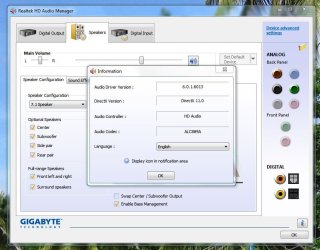
Driver Version In Device Manager: 6.0.1.6013
 

My Computer My Computer

At a glance

Windows 8.1 Pro RTM x64Intel Core-i5-3570K 4-core @ 3.4GHz (Ivy Brid...4 x 4GB DDR3-1600 Corsair Vengeance CMZ8GX3M2...MSI GeForce GTX770 Gaming OC 2GB
Computer type
PC/Desktop
Computer Manufacturer/Model Number
Dwarf Dwf/11/2012 r09/2013
OS
Windows 8.1 Pro RTM x64
CPU
Intel Core-i5-3570K 4-core @ 3.4GHz (Ivy Bridge) (OC 4.4GHz)
Motherboard
ASRock Z77 Extreme4-M
Memory
4 x 4GB DDR3-1600 Corsair Vengeance CMZ8GX3M2A1600C9B (16GB)
Graphics Card(s)
MSI GeForce GTX770 Gaming OC 2GB
Sound Card
Realtek High Definition on board solution (ALC 898)
Monitor(s) Displays
ViewSonic VA1912w Widescreen (VGA)
Screen Resolution
1440x900
Hard Drives
OCZ Agility 3 SSD 120GB SATA III x2 (RAID 0)
Samsung HD501LJ 500GB SATA II x2
Hitachi HDS721010CLA332 1TB SATA II
Iomega 1.5TB Ext USB 2.0
WD 2.0TB Ext USB 3.0
PSU
XFX Pro Series 850W Semi-Modular
Case
Gigabyte IF233
Cooling
1 x 120mm Front Inlet 1 x 120mm Rear Exhaust
Keyboard
Microsoft Comfort Curve Keyboard 3000 (USB)
Mouse
Microsoft Comfort Mouse 3000 for Business (USB)
Internet Speed
NetGear DG834Gv3 ADSL Modem/Router (Ethernet) ~4.0 Mb/s (O2)
Antivirus
Avast! 8.0.1497
Browser
IE 11
Other Info
Optical Drive: HL-DT-ST BD-RE BH10LS30 SATA Bluray
Lexmark S305 Printer/Scanner/Copier (USB)
WEI Score: 8.1/8.1/8.5/8.5/8.25
Asus Eee PC 1011PX Netbook (Windows 7 x86 Starter)
Thank you Aaron and Dwarf. First post updated. :)
 

My Computer My Computer

At a glance

64-bit Windows 11 Pro for WorkstationsIntel i7-8700K OC'd to 5 GHz64 GB (4x16GB) G.SKILL TridentZ RGB DDR4 3600...ASUS ROG-STRIX-GTX1080TI-O11G-GAMING
Computer type
PC/Desktop
Computer Manufacturer/Model Number
Self built custom
OS
64-bit Windows 11 Pro for Workstations
CPU
Intel i7-8700K OC'd to 5 GHz
Motherboard
ASUS ROG Maximus XI Formula Z390
Memory
64 GB (4x16GB) G.SKILL TridentZ RGB DDR4 3600 MHz
Graphics Card(s)
ASUS ROG-STRIX-GTX1080TI-O11G-GAMING
Sound Card
Integrated
Monitor(s) Displays
2 x Samsung Odyssey G7 27"
Screen Resolution
2560x1440
Hard Drives
1TB Samsung 990 PRO M.2,
4TB Samsung 990 PRO PRO M.2,
TerraMaster F8 SSD Plus NAS
PSU
Seasonic Prime Titanium 850W
Case
Thermaltake Core P3
Cooling
Corsair Hydro H115i
Keyboard
Logitech wireless K800
Mouse
Logitech MX Master 4
Internet Speed
2 Gb/s Download and 100 Mb/s Upload
Antivirus
Malwarebyte Anti-Malware Premium
Browser
Google Chrome
Other Info
Logitech Z625 speaker system,
Logitech BRIO 4K Pro webcam,
HP Color LaserJet Pro MFP M477fdn,
APC SMART-UPS RT 1000 XL - SURT1000XLI,
Galaxy S23 Plus phone
Question: now that the EQ has been resurrected in the Win7 driver (since 2.39), I am going to guess that installation of 2.40 over 2.39 will do the same thing that such a process did in WinXP with the old interface: losing all of any customized/saved EQ settings presets you might have created.

I put up with that in WinXP, by taking a screenshot of my EQ settings, which I then manually recreated all over again anytime a new driver was installed. Annoying, but it got the job done. Of course if the EQ settings were (a) numerically apparent, with some kind of flyout help if you mousehover over the individual EQ slider, or (b) available for "export" and "import", the recreation process could at least be precise. Just trying to recreate the slider positions from a visual screenshot isn't terribly precise.

Anyway, I haven't installed 2.40 yet, but no doubt will soon. I tried to figure out where the saved EQ customizations are kept and they don't appear to be in the Registry (that I can find, anyway). If they were there at least I could export and import, and I'd be home.

Does anybody know where saved EQ settings are kept? I'd sure like to avoid the manual recreation process each month as a new driver release comes out.

Thanks.
 

My Computer My Computer

At a glance

Windows 7 Pro x64 (1), Win7 Pro X64 (2)i5-3350p 3.1Ghz/6MB-cache (1); E8400 3.0Ghz/6...8GB PC3-12800 DDR3 (1); 4GB PC3-10600 DDR3 (2)ATI HD7750 (1), (see TV cards); ATI R7 250 (2)
Computer type
PC/Desktop
Computer Manufacturer/Model Number
Home-built, two systems (1) and (2)
OS
Windows 7 Pro x64 (1), Win7 Pro X64 (2)
CPU
i5-3350p 3.1Ghz/6MB-cache (1); E8400 3.0Ghz/6MB-cache (2)
Motherboard
ASUS P8Z77-V Pro (1); ASUS P5Q3 (2)
Memory
8GB PC3-12800 DDR3 (1); 4GB PC3-10600 DDR3 (2)
Graphics Card(s)
ATI HD7750 (1), (see TV cards); ATI R7 250 (2)
Sound Card
Realtek ALC892 HD Audio (1); Realtek ALC1200 HD Audio (2)
Monitor(s) Displays
Eizo HD2441W LCD, Eizo S2433W (1); Eizo 24" S2433W (2)
Screen Resolution
1920x1200, 1920x1200 (1); 1920x1200 (2)
Hard Drives
(1) 1TB SATA-II (7200RPM), 2x2TB SATA-III (7200RPM), 250GB SATA-III (10000RPM) for OS; 2x2TB external USB 3.0

(2) 320GB SATA-II (7200RPM), 750GB SATA-II (7200RPM), 150GB SATA-II (10000RPM) for OS; 2TB external USB 3.0
PSU
Nesteq ECS-6001 600W (1); Nesteq ECS-5001 500W (2)
Case
Acousti-Case 360 (1) and (2)
Cooling
Noctua NH-U12P SE2 for CPU, 2x120mm case fans (1) and (2)
Keyboard
IBM PS/2 (1) and (2)
Mouse
Logitech MX Revolution wireless (1); Microsoft wired (2)
Internet Speed
100mbps down / 10mbps up
Antivirus
Microsoft Security Essentials; Malwarebyte Anti-Malware Pro
Browser
Firefox
Other Info
Ceton InfiniTV 4-tuner cablecard-enabled TV card as well as Hauppauge HVR-2250 OTA/ATSC 2-tuner TV card in (1), running under Win7 WMC
This is what I have been able to find out so far. When you create a customised EQ configuration and save it, the following is written to the registry:

Location: HKEY_LOCAL_MACHINE\SOFTWARE\Microsoft\Windows\CurrentVersion\MMDevices\Audio\Render\{ecb14357-1cd3-44e0-95bc-0416a4980c4e}\FxProperties

Data:
Capture.PNG

Unfortunately, I haven't been able locate any more information than that, so where the actual configuration associated with the name (see above image) is stored is still elusive.
 

My Computer My Computer

At a glance

Windows 8.1 Pro RTM x64Intel Core-i5-3570K 4-core @ 3.4GHz (Ivy Brid...4 x 4GB DDR3-1600 Corsair Vengeance CMZ8GX3M2...MSI GeForce GTX770 Gaming OC 2GB
Computer type
PC/Desktop
Computer Manufacturer/Model Number
Dwarf Dwf/11/2012 r09/2013
OS
Windows 8.1 Pro RTM x64
CPU
Intel Core-i5-3570K 4-core @ 3.4GHz (Ivy Bridge) (OC 4.4GHz)
Motherboard
ASRock Z77 Extreme4-M
Memory
4 x 4GB DDR3-1600 Corsair Vengeance CMZ8GX3M2A1600C9B (16GB)
Graphics Card(s)
MSI GeForce GTX770 Gaming OC 2GB
Sound Card
Realtek High Definition on board solution (ALC 898)
Monitor(s) Displays
ViewSonic VA1912w Widescreen (VGA)
Screen Resolution
1440x900
Hard Drives
OCZ Agility 3 SSD 120GB SATA III x2 (RAID 0)
Samsung HD501LJ 500GB SATA II x2
Hitachi HDS721010CLA332 1TB SATA II
Iomega 1.5TB Ext USB 2.0
WD 2.0TB Ext USB 3.0
PSU
XFX Pro Series 850W Semi-Modular
Case
Gigabyte IF233
Cooling
1 x 120mm Front Inlet 1 x 120mm Rear Exhaust
Keyboard
Microsoft Comfort Curve Keyboard 3000 (USB)
Mouse
Microsoft Comfort Mouse 3000 for Business (USB)
Internet Speed
NetGear DG834Gv3 ADSL Modem/Router (Ethernet) ~4.0 Mb/s (O2)
Antivirus
Avast! 8.0.1497
Browser
IE 11
Other Info
Optical Drive: HL-DT-ST BD-RE BH10LS30 SATA Bluray
Lexmark S305 Printer/Scanner/Copier (USB)
WEI Score: 8.1/8.1/8.5/8.5/8.25
Asus Eee PC 1011PX Netbook (Windows 7 x86 Starter)
Is it best to uninstall the old drivers before installing the newest driver ? If so how do I do that? Or just install it on top of the old one ?


Steve
 

My Computer My Computer

At a glance

Windows 7 Ultimate 64 - OEM Service Pack 1Intel Core i7 930 2.80Ghz Bloomfield Socket L...Patriot Viper 6GB 3x2GB DDR3 PC3-1200C9 1600M...Asus ATI Radeon HD 5770 CuCore 1024MB GDDR5 P...
Computer Manufacturer/Model Number
Over Clockers Ultima Viper 2.80Ghz
OS
Windows 7 Ultimate 64 - OEM Service Pack 1
CPU
Intel Core i7 930 2.80Ghz Bloomfield Socket LGA 1366
Motherboard
Gigabyte GA-X58A-UD3R Intel X58 Socket 1366 DDR3
Memory
Patriot Viper 6GB 3x2GB DDR3 PC3-1200C9 1600Mhz Tri Channel
Graphics Card(s)
Asus ATI Radeon HD 5770 CuCore 1024MB GDDR5 PCI Express
Sound Card
Realtek ALC889 @ Intel 82801JB ICH10 - High Definition Audio
Monitor(s) Displays
Samsung SyncMaster 920N 19"
Screen Resolution
1280*1024
Hard Drives
1 x OCZ Vertex2 Series 120GB 2.5" SATA-II SSD
1 x Seagate Barracuda 7200.12 1TB SATA-II 32MB Cache
1 x Western Digital Caviar Green 2TB SATA-II 64 MB Cache
PSU
Corsair TX 650W ATX SLi
Case
Antec 902 Ultimate Gaming Case Black
Cooling
Prolimatech Megahalems Rev B CPU Cooler Socket 775/1156/1366
Keyboard
Microsoft Comfort Curve Keyboard
Mouse
Microsoft Optical USB
Internet Speed
ADSL24 FTTC 34.2 Mbps Down 7.1Mbps Up
Other Info
OcUK 22x DVDSATA ReWriter Black
Akasa AK-FN058 Apache Black Super Silent 120mm Fan
Printer Epson Stylus Photo R300
Scanner Canon Canoscan 8000F
Usually, you'll need to run the setup twice. First it uninstalls the old, you'll need to reboot, then run the setup again and it will install the new, reboot. Some random occasions, it will only take running the setup once, and upon rebooting, the new is installed. Don't know why, but I get hit or miss with that sometimes. I suppose you can uninstall the old manually, but you can just do the above.

It will say this in the Readme:

Update Driver:
--------------------------
Windows 2000 , XP :
Step 1. Follow Step 2,3,4 described in [Setup at first time] above to complete
the procedure.

Windows Vista, Windows7 :
Step 1. Run setup.exe, it will remove the original driver in your system.

Step 2. Click "Next" to remove the original audio driver in your system.

Step 3. Once after the original driver removed , reboot the computer.

Step 4. Please go back to the new driver package after computer restarted.

Step 5. Run setup.exe, it will install the new audio driver then
.
 

My Computer My Computer

At a glance

Windows 7 Ultimate x64 SP1Core i7 920 (D0) @ 4Ghz, *26c idle *65c full ...12GB DDR3 Corsair Dominator -CMD12GX3M6A1600C...Zotac Geforce GTX 770
Computer type
PC/Desktop
Computer Manufacturer/Model Number
Airbot 2.0
OS
Windows 7 Ultimate x64 SP1
CPU
Core i7 920 (D0) @ 4Ghz, *26c idle *65c full load on air
Motherboard
Asus P6X58D Premium - Sata 6Gb/s - USB 3.0
Memory
12GB DDR3 Corsair Dominator -CMD12GX3M6A1600C8 at 1600MHz
Graphics Card(s)
Zotac Geforce GTX 770
Sound Card
ASUS Xonar D2X
Monitor(s) Displays
1 LG 24" Flatron W2453V-PF 1 Samsung 24" P2450H both 2ms RT
Screen Resolution
1920x1080@60hz
Hard Drives
1 Samsung 250GB 840 Evo SSD
1 OCZ Vertex2 180GB SSD
1 TB Samsung Spinpoint F1 7200RPM 32MB cache
2 500GB WD Caviar Blacks 7200RPM 32MB cache (WD5001AALS)

Pioneer DVD Burner DVR-S18M
PSU
Corsair HX1000W
Case
Cooler Master HAF 932
Cooling
Case Fans *3 230mm, *1 140mm/CPU - *Tuniq Tower 120 Extreme
Keyboard
Logitech Wireless MK700
Mouse
Logitech Wireless MK700
Internet Speed
DL 15 Mbps UL 0.98 Mbps
Antivirus
None
Browser
Firefox Nightly
Other Info
Processor-7.7 *RAM- 7.9 *Graphics-7.9 *Gaming Graphics- 7.9 *SSD- 7.8 W.E.I final score= 7.7
*Phone- LG Nexus 5
d/l new drivers lost sound manager+

Brink,

i know i want to say Happy New Year to you and the rest of the Forum Family


But help

here goes i d/l the new drivers but i lost of sound manager

test sounds
the reason i knew it i went xm online to play music nothing

came out, i tried i-tunes nothing came out

i went sound manager to test the speakers and nothing happens

i am uninstalling the drivers and reinstall them i will keep you posted
 

My Computer My Computer

At a glance

windows 7 ultimate 32 bitintel core2 quad Q6600 2.4ghz4gb ddr3 corsair-twin3x2048-1333c9dhxnvidia geforce 8600gt 512mb
Computer Manufacturer/Model Number
home grown
OS
windows 7 ultimate 32 bit
CPU
intel core2 quad Q6600 2.4ghz
Motherboard
gigiabyte x38t-dq6.0
Memory
4gb ddr3 corsair-twin3x2048-1333c9dhx
Graphics Card(s)
nvidia geforce 8600gt 512mb
Sound Card
realtek onboard alc889a
Monitor(s) Displays
samsung 21.3
Screen Resolution
1024 by 768
Hard Drives
500gb wd

250gb wd
PSU
corsair cmpsu-750tx
Case
standard tower
Cooling
arctic cooling freezer 7 pro
Keyboard
microsoft wireless keyboard 7000
Mouse
microsoft wireless mouse 7000
Internet Speed
cable 850
Other Info
pioneer dvd-rw dvr215d

lite-on cd-rw sohr

creative inspire pt7800 7.1

hp officejet pro 8500 wireless
attached

sorry see attached
 

Attachments

  • realtek.JPG
    realtek.JPG
    96 KB · Views: 145

My Computer My Computer

At a glance

windows 7 ultimate 32 bitintel core2 quad Q6600 2.4ghz4gb ddr3 corsair-twin3x2048-1333c9dhxnvidia geforce 8600gt 512mb
Computer Manufacturer/Model Number
home grown
OS
windows 7 ultimate 32 bit
CPU
intel core2 quad Q6600 2.4ghz
Motherboard
gigiabyte x38t-dq6.0
Memory
4gb ddr3 corsair-twin3x2048-1333c9dhx
Graphics Card(s)
nvidia geforce 8600gt 512mb
Sound Card
realtek onboard alc889a
Monitor(s) Displays
samsung 21.3
Screen Resolution
1024 by 768
Hard Drives
500gb wd

250gb wd
PSU
corsair cmpsu-750tx
Case
standard tower
Cooling
arctic cooling freezer 7 pro
Keyboard
microsoft wireless keyboard 7000
Mouse
microsoft wireless mouse 7000
Internet Speed
cable 850
Other Info
pioneer dvd-rw dvr215d

lite-on cd-rw sohr

creative inspire pt7800 7.1

hp officejet pro 8500 wireless
ok i uninstalled the drivers and reinstalled them with no

sound coming out of any speaker

i tried to test the speakers

when i do that nothing happens, and when i click on each speaker nothing happens

any thoughts
 

My Computer My Computer

At a glance

windows 7 ultimate 32 bitintel core2 quad Q6600 2.4ghz4gb ddr3 corsair-twin3x2048-1333c9dhxnvidia geforce 8600gt 512mb
Computer Manufacturer/Model Number
home grown
OS
windows 7 ultimate 32 bit
CPU
intel core2 quad Q6600 2.4ghz
Motherboard
gigiabyte x38t-dq6.0
Memory
4gb ddr3 corsair-twin3x2048-1333c9dhx
Graphics Card(s)
nvidia geforce 8600gt 512mb
Sound Card
realtek onboard alc889a
Monitor(s) Displays
samsung 21.3
Screen Resolution
1024 by 768
Hard Drives
500gb wd

250gb wd
PSU
corsair cmpsu-750tx
Case
standard tower
Cooling
arctic cooling freezer 7 pro
Keyboard
microsoft wireless keyboard 7000
Mouse
microsoft wireless mouse 7000
Internet Speed
cable 850
Other Info
pioneer dvd-rw dvr215d

lite-on cd-rw sohr

creative inspire pt7800 7.1

hp officejet pro 8500 wireless
ok i uninstalled the drivers and reinstalled them with no

sound coming out of any speaker

i tried to test the speakers

when i do that nothing happens, and when i click on each speaker nothing happens

any thoughts


unplug the cable to your speakers then plug it back in , then select the output ( then you can set the sound scheme up )
 

My Computer My Computer

At a glance

Windows 10 Pro - 64 bitIntel i7 2600K8 Gig ddr3 1600 mhz - viper extreme (Patriot)EVGA 980 TI
Computer type
PC/Desktop
Computer Manufacturer/Model Number
Custom Build
OS
Windows 10 Pro - 64 bit
CPU
Intel i7 2600K
Motherboard
Asus P8P67
Memory
8 Gig ddr3 1600 mhz - viper extreme (Patriot)
Graphics Card(s)
EVGA 980 TI
Monitor(s) Displays
2 - Lg 21" LED , sony 48 " bravia LED
Hard Drives
one - samsung 840 series 465.76 GB SSD
two - wd 2 tB black
one - wd 1.5 tb black
one - wb 1 tb black
PSU
1000 Watt Coolmaster : Silent Pro Gold
Case
antec 1200
Cooling
watercooled
Mouse
logitech wireless
Antivirus
Norton Security 2015
Other Info
powerware 3.1 KVA FERRUPS with 4 - 1000 Amp Deep cycle batteries ...
Just installed R2.40 on my Acer 6920 laptop...the subwoofer is working again on this version and as of yet no clicking...could this be the one they finally fixed :sarc:
 

My Computer My Computer

At a glance

Windows 7 Home Premium 64 bitIntel Core i5 M4608GBATI Radeon HD 5870 1GB GDDR5
Computer Manufacturer/Model Number
MSI GX660R
OS
Windows 7 Home Premium 64 bit
CPU
Intel Core i5 M460
Memory
8GB
Graphics Card(s)
ATI Radeon HD 5870 1GB GDDR5
Sound Card
Realtek HD (Onboard) and Sound Blaster X-Fi Notebook Card
Screen Resolution
1920 x 1080
Hard Drives
2 x 500GB Seagate
Just installed R2.40 on my Acer 6920 laptop...the subwoofer is working again on this version and as of yet no clicking...could this be the one they finally fixed :sarc:

I'm still gettting cracking and popping sounds (R2.40) (Using onboard Gigabyte EP35-DS3). *Sigh* How many driver versions do they need to bring out until this issue gets resolved.
 

My Computer My Computer

At a glance

Windows 7 64-bitIntel Core 2 Duo E8200 @ 2.67 GHz4 GB Kingston DDR 800Gigabyte 8800GT 512 MB
OS
Windows 7 64-bit
CPU
Intel Core 2 Duo E8200 @ 2.67 GHz
Motherboard
Gigabyte EP35-DS3 v2.1
Memory
4 GB Kingston DDR 800
Graphics Card(s)
Gigabyte 8800GT 512 MB
Hello im new and i just got my Win 7 and im having trubble with my adio it shows me a red ''X'' on my adio icon me and my friend have tryd to fix it i even tryd going to my device manager and still nothing and i aslot tryd realtek and still nothing if u can plz help me out with this please do so u can contact me on MSN [EMAIL REMOVED] please do help and truth is im not really good with computers
 
Last edited by a moderator:

My Computer My Computer

At a glance

Windows 7 Ultimate 32-BitNVIDIA
OS
Windows 7 Ultimate 32-Bit
Graphics Card(s)
NVIDIA
Screen Resolution
Widescreen HP Pavilion dv9000
Just installed R2.40 on my Acer 6920 laptop...the subwoofer is working again on this version and as of yet no clicking...could this be the one they finally fixed :sarc:

I'm still gettting cracking and popping sounds (R2.40) (Using onboard Gigabyte EP35-DS3). *Sigh* How many driver versions do they need to bring out until this issue gets resolved.

is your hardware still supported? the read me shows which audio codecs are
 

My Computer My Computer

At a glance

Windows 7 RC
OS
Windows 7 RC
i'm having some pretty serious problems with this driver, and i've registered here hoping to find a solution.

i have a system built around an asus a8v vm motherboard (yeh so it's 4 years old now). it has the realtek alc 660 codec onboard. it's got an athlon 3000 (or thereabouts) in it, a gig of RAM, and a geforce 6200 se vga card installed.

i recently upgraded it to windows 7, and aside from the realtek hd audio problems i'm about to describe, it's a vast improvement over XP (it's my HTPC and xp has it's own problems and shortcomings for this sort of thing), and i really don't want to downgrade back to XP if i can avoid it.

i only performed this upgrade about two weeks ago, and so downloaded all latest drivers, including the then-latest realtek hd audio driver v2.39. this was a clean install on a freshly formatted drive, not an upgrade over XP.

and i've had nothing but problems with the realtek hd audio codec - the main problem i was having with v2.39, is that the driver itself gets disabled on bootup, resulting in no sound. i can still see the device in the device manager, but there's a red X on the speaker icon, and going to "playback devices" gives a message along the lines of "there are no output devices installed". the audio inputs remain intact, but the outputs (and the speakers) are gone.

reinstalling the driver from the executable installer fixes this - although it prompts to reboot, the sound comes back immediately, the red X disappears from the speaker icon, and i can choose stereo speaker outputs again. however, one reboot later and it's all gone again.

various troubleshootings have led me to disable driver signing (with mixed results - it would survive several reboots, but eventually would be gone again), and has also led me here, today, where i find there's been a new driver released. hoping this will be the end of these problems, i eagerly download it.

well i've spent the last hour battling with it. it simply will not install. it first prompted me to remove the old driver, then reboot and run the installer again. so i did that, and that appears to have worked. but now when i try and run the installer, it tells me "no device supported" or something along those lines. if i attempt to run it again i also sometimes get an error "failure error -0101". i also got a message from windows saying "hd audio device successfully installed" some time after uninstalling the old one (after at least one reboot, i think perhaps two reboots) - so it looks like it found an old driver file and reinstalled it for me. i've uninstalled it again from the device manager, and tried the 2.40 installer again, and still no dice. no matter what i do, i cannot get this installer to run.

also, at several occasions during the v2.39 episode, attempting to run the installer to fix the sound also prompted the same error "no device supported", however a reboot and subsequent re-attempt worked whenever that happened. this time now, i've tried about 8 times, with as many reboots, and still it will not run.

i'm certain there's no hardware problems - i've been running this system, under heavy load without any problems whatsoever, ever since i bought that motherboard new back in 2006. and right up until the moment i installed windows 7, the sound (and everything else) has worked fine. also, the fact that the 2.39 driver did work, consistently so, at least until a reboot, would suggest that the hardware is fine. i'm 100% certain that if i format and reinstall XP, the sound will be back to normal again.

i also notice that my model, the ALC 660, is listed in the WHQL list at the start of this thread - yet when i first installed 2.39 windows complained about it being unsigned (at some point trying to fix the problems i had with 2.39 i've probably disabled whatever brings up this warning, it certainly hasn't been appearing the last few times i reinstalled 2.39). and now the 2.40 installer doesn't even recognize my chip, despite it being in the official list of support models.

what can i do? i'm fairly sure i've exhausted all my options. i fix windows systems and servers for a living, so i'm pretty confident poking around in places where others might not, however with 7 being a new OS i'm still learning things about it.

any help/suggestions gratefully received...

 

My Computer My Computer

At a glance

win7amd athlon 30001gb ddrnvidia geforce 6200
Computer Manufacturer/Model Number
own build
OS
win7
CPU
amd athlon 3000
Motherboard
asus a8v-vm
Memory
1gb ddr
Graphics Card(s)
nvidia geforce 6200
Sound Card
onboard realtek alc660
Monitor(s) Displays
TV
Hard Drives
various
PSU
big
Case
grey
Cooling
silent
is your hardware still supported? the read me shows which audio codecs are

It should. I've got ALC889A on my board and the readme says:

Vista/Windows 7 WHQL Supporting: ... ALC889, ....
 

My Computer My Computer

At a glance

Windows 7 64-bitIntel Core 2 Duo E8200 @ 2.67 GHz4 GB Kingston DDR 800Gigabyte 8800GT 512 MB
OS
Windows 7 64-bit
CPU
Intel Core 2 Duo E8200 @ 2.67 GHz
Motherboard
Gigabyte EP35-DS3 v2.1
Memory
4 GB Kingston DDR 800
Graphics Card(s)
Gigabyte 8800GT 512 MB
Here's what ended the skips and pops on my system.
-------------------------------------------------
Windows 7 Home Premium 32-bit.
Using the latest Realtek driver, (R2 40).
Gigabyte P35-S3G Quad-core
4GB RAM
Second audio card
M-Audio AudioPhile 24/96
Both audio devices working, no pops, clicks or skips.
-------------------------------------------------

(note: I do not use any system sounds)
Right click on the Microsoft speaker icon in the taskbar,
select playback devices.
Select the "Recording" tab, select Microphone, then select the "properties" button.
Select the "Listen" tab.
Select the "Do not prompt when this device is plugged in" checkbox.

Next, select the "Levels" tab. If you're not using a mic, move all volume sliders
to zero and select the mic "mute" button.

(still under recording)
Select the "Enhancements" tab, select, "Disable all sound effects".
Back to playback devices window, select the communications tab,
select "Do Nothing".

Go to "Speaker Properties" by double clicking on the speaker icon in the MS volume control. Select the "Levels" tab. Mute and set levels to zero for all devices not being used.

Next, open the Realtek control panel.
On the right side are simulated input/output jacks.
Right click on any of the active input jacks.
Select "Connector Retasking". Deselect the "Enable auto pop up dialog..." checkbox. On my system pops and skips were being caused by the OS trying to monitor active I/O.

FWIW, I also remark out the Realtek control panel/taskbar device that loads from the Registry's RUN Key.

Perhaps this can help someone.

Ap
 

My Computer My Computer

At a glance

Windows 7 Home PremiumIntel Core 2 Duo @ 3.00gHz4 GBATI Radeon HD 2600 XT
Computer Manufacturer/Model Number
Assembled in my workshop
OS
Windows 7 Home Premium
CPU
Intel Core 2 Duo @ 3.00gHz
Motherboard
Gigabyte GA-P35-S3G
Memory
4 GB
Graphics Card(s)
ATI Radeon HD 2600 XT
Sound Card
RME 24/96 Card, Realtek Internal Audio PreSonus FireStudio
Monitor(s) Displays
Acer 1917 (x2)
Screen Resolution
1280 x 1024 on both monitors
Hard Drives
Three 250GB Seagate SATA Barracuda 7200rpm
PSU
Rosewill 500-watt
Case
Rosewill mid-tower
Cooling
Noctua NH-U9B (CPU), PwrSupply fan + single large case Fan
Keyboard
Macally w/2/USB ports.
Mouse
Trackman Wheel
Other Info
Event 20/20 bas studio monitors, Yamaha sub.
Rackmount Korg/Roland/Yamaha synthesizers,
Cubase MIDI/audio recording. Sony Soundforge audio/mastering software. CD Architect Mastering. RME & Presonus audio interfaces.
still no sound from speakers

i d/l the new drivers 6.0.1.6013

i get the windows start sound when i reboot

but i get no sound from the speaker configuration test

i get no sound from i tunes and or from xm on line

or from the cd

i am looking for answers but cannot find any

any direction for me to look would be great
 

Attachments

  • realtek.JPG
    realtek.JPG
    74.5 KB · Views: 115
Last edited:

My Computer My Computer

At a glance

windows 7 ultimate 32 bitintel core2 quad Q6600 2.4ghz4gb ddr3 corsair-twin3x2048-1333c9dhxnvidia geforce 8600gt 512mb
Computer Manufacturer/Model Number
home grown
OS
windows 7 ultimate 32 bit
CPU
intel core2 quad Q6600 2.4ghz
Motherboard
gigiabyte x38t-dq6.0
Memory
4gb ddr3 corsair-twin3x2048-1333c9dhx
Graphics Card(s)
nvidia geforce 8600gt 512mb
Sound Card
realtek onboard alc889a
Monitor(s) Displays
samsung 21.3
Screen Resolution
1024 by 768
Hard Drives
500gb wd

250gb wd
PSU
corsair cmpsu-750tx
Case
standard tower
Cooling
arctic cooling freezer 7 pro
Keyboard
microsoft wireless keyboard 7000
Mouse
microsoft wireless mouse 7000
Internet Speed
cable 850
Other Info
pioneer dvd-rw dvr215d

lite-on cd-rw sohr

creative inspire pt7800 7.1

hp officejet pro 8500 wireless
Got good sound through my speakers. But my motherboard just won't detect my headphones. So sometimes the sound is just too soft. Tried all drivers recommended here even downloaded a realtek driver from a different Asrock motherboard. But no avail. Went to the store to buy a pci soundcard but they were all for vista and others. I'm going to wait for soundcards with a windows 7 driver boxed in. Just going to be patient. Love the OS! best Microsoft ever made!:)
 

My Computer My Computer

At a glance

windows 7:)core2duo 68002gb ddr1nvidia 6800
Computer Manufacturer/Model Number
Myself
OS
windows 7:)
CPU
core2duo 6800
Motherboard
asrock vsta
Memory
2gb ddr1
Graphics Card(s)
nvidia 6800
Monitor(s) Displays
iiyama E2407HDSV
Hard Drives
1*250 gb
1*125 gb
1*125 gb
PSU
coolermaster 500watt
Case
thermaltake soproano
Cooling
arctic cooler
Back
Top