
You are using an out of date browser. It may not display this or other websites correctly.
You should upgrade or use an alternative browser.
You should upgrade or use an alternative browser.
Latest Realtek HD Audio Driver Version
- Thread starter Brink
- Start date

People! Why you dont buy separated sound card like Asus Xonar whos dont have problem with the drivers like Creative or craping Realtek?
What!! And back down from a challenge?
Realtek and M-Audio Audiophile working well here. As others have mentioned, Windows 7 is the cat's meow!.
Ap
My Computer
At a glance
Windows 7 Home PremiumIntel Core 2 Duo @ 3.00gHz4 GBATI Radeon HD 2600 XT
- Computer Manufacturer/Model Number
- Assembled in my workshop
- OS
- Windows 7 Home Premium
- CPU
- Intel Core 2 Duo @ 3.00gHz
- Motherboard
- Gigabyte GA-P35-S3G
- Memory
- 4 GB
- Graphics Card(s)
- ATI Radeon HD 2600 XT
- Sound Card
- RME 24/96 Card, Realtek Internal Audio PreSonus FireStudio
- Monitor(s) Displays
- Acer 1917 (x2)
- Screen Resolution
- 1280 x 1024 on both monitors
- Hard Drives
- Three 250GB Seagate SATA Barracuda 7200rpm
- PSU
- Rosewill 500-watt
- Case
- Rosewill mid-tower
- Cooling
- Noctua NH-U9B (CPU), PwrSupply fan + single large case Fan
- Keyboard
- Macally w/2/USB ports.
- Mouse
- Trackman Wheel
- Other Info
- Event 20/20 bas studio monitors, Yamaha sub.
Rackmount Korg/Roland/Yamaha synthesizers,
Cubase MIDI/audio recording. Sony Soundforge audio/mastering software. CD Architect Mastering. RME & Presonus audio interfaces.
Why is Realtek driver craping!
Because:
-sound is real bleary
-Eq work only on front speakers when is set to 5.1
-speaker fill is crap solution for upmixing stereo to 5.1,and realtek won't give better solution like Stereo to surround option like in creative console or asus xonar audio center...
-Room Corection work good only when is bass management and speaker fill turned off,and envoriments enabled..
Becaouse that,i buy Asus Xonar and don't have problems...
Because:
-sound is real bleary
-Eq work only on front speakers when is set to 5.1
-speaker fill is crap solution for upmixing stereo to 5.1,and realtek won't give better solution like Stereo to surround option like in creative console or asus xonar audio center...
-Room Corection work good only when is bass management and speaker fill turned off,and envoriments enabled..
Becaouse that,i buy Asus Xonar and don't have problems...
My Computer
At a glance
Windows 7 Ultimate x64
- OS
- Windows 7 Ultimate x64

hydrotherion
New member
- Local time
- 10:11 AM
- Messages
- 5
I could buy a asus xonar but going to wait and see. It's the price you pay when you're a early bird. Sound is good from speakers so I know it's w7 conflicting with something. And I also love a challenge!
Sound is good from speakers so I know it's w7 conflicting with something. And I also love a challenge!My Computer
At a glance
windows 7:)core2duo 68002gb ddr1nvidia 6800
- Computer Manufacturer/Model Number
- Myself
- OS
- windows 7:)
- CPU
- core2duo 6800
- Motherboard
- asrock vsta
- Memory
- 2gb ddr1
- Graphics Card(s)
- nvidia 6800
- Monitor(s) Displays
- iiyama E2407HDSV
- Hard Drives
- 1*250 gb
1*125 gb
1*125 gb
- PSU
- coolermaster 500watt
- Case
- thermaltake soproano
- Cooling
- arctic cooler
People! Why you dont buy separated sound card like Asus Xonar whos dont have problem with the drivers like Creative or craping Realtek?
Because ive got a laptop that is perfectly capable of loud, crisp sounds. If i had a pc i would definitely just buy a new sound card, im starting to now think that its always going to be quiet and average aslong as im on windows 7 which is a shame because i like everything else about it.
My Computer
At a glance
Windows 7 Ultimate 64-bitCore 2 duo T6400 2.0ghz3GB DDR3Nvidia geforce 9600m (1791mb)
- Computer Manufacturer/Model Number
- Acer 6935G
- OS
- Windows 7 Ultimate 64-bit
- CPU
- Core 2 duo T6400 2.0ghz
- Memory
- 3GB DDR3
- Graphics Card(s)
- Nvidia geforce 9600m (1791mb)
- Sound Card
- Realtek onboard
- Internet Speed
- 10MB
Because ive got a laptop that is perfectly capable of loud, crisp sounds. If i had a pc i would definitely just buy a new sound card, im starting to now think that its always going to be quiet and average aslong as im on windows 7 which is a shame because i like everything else about it.
Yep, it's odd that that Windows 7 seems "quiet". I'm dual booting with XP and the same audio system sound great, high output, crystal clear sound.
Not sure what's going on or why there seems to be an audio limiter on Windows_7.
Ap
My Computer
At a glance
Windows 7 Home PremiumIntel Core 2 Duo @ 3.00gHz4 GBATI Radeon HD 2600 XT
- Computer Manufacturer/Model Number
- Assembled in my workshop
- OS
- Windows 7 Home Premium
- CPU
- Intel Core 2 Duo @ 3.00gHz
- Motherboard
- Gigabyte GA-P35-S3G
- Memory
- 4 GB
- Graphics Card(s)
- ATI Radeon HD 2600 XT
- Sound Card
- RME 24/96 Card, Realtek Internal Audio PreSonus FireStudio
- Monitor(s) Displays
- Acer 1917 (x2)
- Screen Resolution
- 1280 x 1024 on both monitors
- Hard Drives
- Three 250GB Seagate SATA Barracuda 7200rpm
- PSU
- Rosewill 500-watt
- Case
- Rosewill mid-tower
- Cooling
- Noctua NH-U9B (CPU), PwrSupply fan + single large case Fan
- Keyboard
- Macally w/2/USB ports.
- Mouse
- Trackman Wheel
- Other Info
- Event 20/20 bas studio monitors, Yamaha sub.
Rackmount Korg/Roland/Yamaha synthesizers,
Cubase MIDI/audio recording. Sony Soundforge audio/mastering software. CD Architect Mastering. RME & Presonus audio interfaces.
I agree. My results with sound on my Supermicro C2SBX board with Realtek ALC883 chip, running 2.40 under XP SP3 as well as Win7 Pro x64 are superb! I've never had any of the clicks, pops, or other audio anomalies reported by others. But then I also don't have 5.1/7.1 sound (I have "quadraphonic" sound set, for my Altec-Lansing 641 speaker system) and I also don't have microphone input.Yep, it's odd that that Windows 7 seems "quiet". I'm dual booting with XP and the same audio system sound great, high output, crystal clear sound.
Not sure what's going on or why there seems to be an audio limiter on Windows_7.
What I actually most appreciate about Win7's new approach to audio is that each app has its own individual "master volume" slider in the Mixer, which is (a) independent of the overall Master volume slider for the system as a whole, and (b) almost always independent of volume controls on the apps themselves, which seem to be yet another "pre-amp" gain/level adjuster.
While this multi-layer volume handling is sometimes annoying (e.g. sometimes the app's volume control pushes the Mixer slider for that app, and sometimes it doesn't... depending on how the app was written to provide volume control), overall I think it's ABOUT TIME that the obvious differences in methods for controlling sound volume between apps were separated to be app-specific, instead of them all screwing with the one and only WAV slider which also affected System Sounds.
I think the new approach in Win7, of effectively individual WAV sliders for every app and also for System Sounds, is great.
I also like that the "Master Volume" slider in the Mixer adjusts all the other individual "WAV" sliders for each app up or down proportionally whenever the Master slider is moved. Keeps everything relative to each other in sync.
Just use the individual app WAV sliders in Mixer adjusted correctly, to keep each app's volume to your liking.
My Computer
At a glance
Windows 7 Pro x64 (1), Win7 Pro X64 (2)i5-3350p 3.1Ghz/6MB-cache (1); E8400 3.0Ghz/6...8GB PC3-12800 DDR3 (1); 4GB PC3-10600 DDR3 (2)ATI HD7750 (1), (see TV cards); ATI R7 250 (2)
- Computer type
- PC/Desktop
- Computer Manufacturer/Model Number
- Home-built, two systems (1) and (2)
- OS
- Windows 7 Pro x64 (1), Win7 Pro X64 (2)
- CPU
- i5-3350p 3.1Ghz/6MB-cache (1); E8400 3.0Ghz/6MB-cache (2)
- Motherboard
- ASUS P8Z77-V Pro (1); ASUS P5Q3 (2)
- Memory
- 8GB PC3-12800 DDR3 (1); 4GB PC3-10600 DDR3 (2)
- Graphics Card(s)
- ATI HD7750 (1), (see TV cards); ATI R7 250 (2)
- Sound Card
- Realtek ALC892 HD Audio (1); Realtek ALC1200 HD Audio (2)
- Monitor(s) Displays
- Eizo HD2441W LCD, Eizo S2433W (1); Eizo 24" S2433W (2)
- Screen Resolution
- 1920x1200, 1920x1200 (1); 1920x1200 (2)
- Hard Drives
- (1) 1TB SATA-II (7200RPM), 2x2TB SATA-III (7200RPM), 250GB SATA-III (10000RPM) for OS; 2x2TB external USB 3.0
(2) 320GB SATA-II (7200RPM), 750GB SATA-II (7200RPM), 150GB SATA-II (10000RPM) for OS; 2TB external USB 3.0
- PSU
- Nesteq ECS-6001 600W (1); Nesteq ECS-5001 500W (2)
- Case
- Acousti-Case 360 (1) and (2)
- Cooling
- Noctua NH-U12P SE2 for CPU, 2x120mm case fans (1) and (2)
- Keyboard
- IBM PS/2 (1) and (2)
- Mouse
- Logitech MX Revolution wireless (1); Microsoft wired (2)
- Internet Speed
- 100mbps down / 10mbps up
- Antivirus
- Microsoft Security Essentials; Malwarebyte Anti-Malware Pro
- Browser
- Firefox
- Other Info
- Ceton InfiniTV 4-tuner cablecard-enabled TV card as well as Hauppauge HVR-2250 OTA/ATSC 2-tuner TV card in (1), running under Win7 WMC
Does anyone know what version was the really good one for vista? Like loud and awesome quality. I upgraded my vista partition to the latest version and its now quieter and for some reason rollback driver and system restore doesnt work
My Computer
At a glance
Windows 7 Ultimate 64-bitCore 2 duo T6400 2.0ghz3GB DDR3Nvidia geforce 9600m (1791mb)
- Computer Manufacturer/Model Number
- Acer 6935G
- OS
- Windows 7 Ultimate 64-bit
- CPU
- Core 2 duo T6400 2.0ghz
- Memory
- 3GB DDR3
- Graphics Card(s)
- Nvidia geforce 9600m (1791mb)
- Sound Card
- Realtek onboard
- Internet Speed
- 10MB

YES, my Audio is also sound low
After I have installed Windows 7. It was good with XP. Any ideas?
After I have installed Windows 7. It was good with XP. Any ideas?
My Computer
At a glance
Windows 7 Ultimate x64 SP1Intel Core i34 GB DDR3
- Computer Manufacturer/Model Number
- Dell Inspiron N5010
- OS
- Windows 7 Ultimate x64 SP1
- CPU
- Intel Core i3
- Memory
- 4 GB DDR3
- Screen Resolution
- 1366 X 768
- Hard Drives
- Seagate 500 GB
- Internet Speed
- 4 MBPS
YES, my Audio is also sound low
After I have installed Windows 7. It was good with XP. Any ideas?
Yes, this is what I was referring to in my last post, sound is ok but the overall volume in Windows_7 is considerably lower than in XP, using the same hardware.
Want to see something interesting?
Open registry editor, and use this as a search string:
AudioProcessingObjects
Evidently Win-7 is briging in third party audio processing, I even see something (Maxx Audio) that's listed as a "Waves" product, that's fairly high end stuff.
I wonder if the lower overall volume is to give the system headroom for processing?
Ap
My Computer
At a glance
Windows 7 Home PremiumIntel Core 2 Duo @ 3.00gHz4 GBATI Radeon HD 2600 XT
- Computer Manufacturer/Model Number
- Assembled in my workshop
- OS
- Windows 7 Home Premium
- CPU
- Intel Core 2 Duo @ 3.00gHz
- Motherboard
- Gigabyte GA-P35-S3G
- Memory
- 4 GB
- Graphics Card(s)
- ATI Radeon HD 2600 XT
- Sound Card
- RME 24/96 Card, Realtek Internal Audio PreSonus FireStudio
- Monitor(s) Displays
- Acer 1917 (x2)
- Screen Resolution
- 1280 x 1024 on both monitors
- Hard Drives
- Three 250GB Seagate SATA Barracuda 7200rpm
- PSU
- Rosewill 500-watt
- Case
- Rosewill mid-tower
- Cooling
- Noctua NH-U9B (CPU), PwrSupply fan + single large case Fan
- Keyboard
- Macally w/2/USB ports.
- Mouse
- Trackman Wheel
- Other Info
- Event 20/20 bas studio monitors, Yamaha sub.
Rackmount Korg/Roland/Yamaha synthesizers,
Cubase MIDI/audio recording. Sony Soundforge audio/mastering software. CD Architect Mastering. RME & Presonus audio interfaces.
YES, my Audio is also sound low
After I have installed Windows 7. It was good with XP. Any ideas?
In Device Manager under Sound, Video & Game controllers:
Besides the Realtek Hi Definition Audio Device there's always been a second unlabeled "Hi Definition Audio Device". I thought this was probably part of the Windows HD audio subsystem, Just now disabled it leaving only The Realtek HD and my M-Audio Audiophile drivers as active.
On this system I definitely have more output than before, on both the Realtek and PCI M-Audio card! Strange?
Ap
My Computer
At a glance
Windows 7 Home PremiumIntel Core 2 Duo @ 3.00gHz4 GBATI Radeon HD 2600 XT
- Computer Manufacturer/Model Number
- Assembled in my workshop
- OS
- Windows 7 Home Premium
- CPU
- Intel Core 2 Duo @ 3.00gHz
- Motherboard
- Gigabyte GA-P35-S3G
- Memory
- 4 GB
- Graphics Card(s)
- ATI Radeon HD 2600 XT
- Sound Card
- RME 24/96 Card, Realtek Internal Audio PreSonus FireStudio
- Monitor(s) Displays
- Acer 1917 (x2)
- Screen Resolution
- 1280 x 1024 on both monitors
- Hard Drives
- Three 250GB Seagate SATA Barracuda 7200rpm
- PSU
- Rosewill 500-watt
- Case
- Rosewill mid-tower
- Cooling
- Noctua NH-U9B (CPU), PwrSupply fan + single large case Fan
- Keyboard
- Macally w/2/USB ports.
- Mouse
- Trackman Wheel
- Other Info
- Event 20/20 bas studio monitors, Yamaha sub.
Rackmount Korg/Roland/Yamaha synthesizers,
Cubase MIDI/audio recording. Sony Soundforge audio/mastering software. CD Architect Mastering. RME & Presonus audio interfaces.
In Device Manager under Sound, Video & Game controllers:
Besides the Realtek Hi Definition Audio Device there's always been a second unlabeled "Hi Definition Audio Device". I thought this was probably part of the Windows HD audio subsystem, Just now disabled it leaving only The Realtek HD and my M-Audio Audiophile drivers as active.
On this system I definitely have more output than before, on both the Realtek and PCI M-Audio card! Strange?
Ap
Quoting my own post.
Disabling the MS 'High Definition Audio Device" and rebooting has made a difference in Win-7's audio system. Increased volume, improved sound. If you have both the Realtek HD and the default HD systems showing up in Device Manager. Disable the default device, reboot and see if you notice an improvement.
Ap
My Computer
At a glance
Windows 7 Home PremiumIntel Core 2 Duo @ 3.00gHz4 GBATI Radeon HD 2600 XT
- Computer Manufacturer/Model Number
- Assembled in my workshop
- OS
- Windows 7 Home Premium
- CPU
- Intel Core 2 Duo @ 3.00gHz
- Motherboard
- Gigabyte GA-P35-S3G
- Memory
- 4 GB
- Graphics Card(s)
- ATI Radeon HD 2600 XT
- Sound Card
- RME 24/96 Card, Realtek Internal Audio PreSonus FireStudio
- Monitor(s) Displays
- Acer 1917 (x2)
- Screen Resolution
- 1280 x 1024 on both monitors
- Hard Drives
- Three 250GB Seagate SATA Barracuda 7200rpm
- PSU
- Rosewill 500-watt
- Case
- Rosewill mid-tower
- Cooling
- Noctua NH-U9B (CPU), PwrSupply fan + single large case Fan
- Keyboard
- Macally w/2/USB ports.
- Mouse
- Trackman Wheel
- Other Info
- Event 20/20 bas studio monitors, Yamaha sub.
Rackmount Korg/Roland/Yamaha synthesizers,
Cubase MIDI/audio recording. Sony Soundforge audio/mastering software. CD Architect Mastering. RME & Presonus audio interfaces.
My Computer
At a glance
Windows 7 Ultimate SP1 64- bitIntel Core i7-3770K @3.50ghzKingston Technology 16GB (2x 8GB) 2133MHz DDR...EVGA GTX 670 4gb SC
- Computer type
- PC/Desktop
- Computer Manufacturer/Model Number
- Home Built
- OS
- Windows 7 Ultimate SP1 64- bit
- CPU
- Intel Core i7-3770K @3.50ghz
- Motherboard
- EVGA Z77 FTW
- Memory
- Kingston Technology 16GB (2x 8GB) 2133MHz DDR3 Non-ECC
- Graphics Card(s)
- EVGA GTX 670 4gb SC
- Sound Card
- Nil
- Monitor(s) Displays
- Samsung 22"
- Screen Resolution
- 1920 x 1080 60hz
- Hard Drives
- OCZ Vertex 4 SSD 128GB
SAMSUNG Spinpoint F3 HD502HJ 500GB 7200 RPM
- PSU
- Enermax Platinax EPM1000EWT Special OC Edition
- Case
- Cooler Master HAF Full Tower nVIDIA Edition
- Cooling
- CoolerMaster Hyper 212 Plus
- Keyboard
- HP Wireless Keyboard
- Mouse
- Corsair Vengeance M90
- Internet Speed
- 20 Mb
- Other Info
- ASUS DRW-24B1ST/BLK/B/AS Black SATA 24X DVD Burner
YES, my Audio is also sound low
After I have installed Windows 7. It was good with XP. Any ideas?
In Device Manager under Sound, Video & Game controllers:
Besides the Realtek Hi Definition Audio Device there's always been a second unlabeled "Hi Definition Audio Device". I thought this was probably part of the Windows HD audio subsystem, Just now disabled it leaving only The Realtek HD and my M-Audio Audiophile drivers as active.
On this system I definitely have more output than before, on both the Realtek and PCI M-Audio card! Strange?
Ap
I have only one HIGH DEFINITION AUDIO Device option

My Computer
At a glance
Windows 7 Ultimate x64 SP1Intel Core i34 GB DDR3
- Computer Manufacturer/Model Number
- Dell Inspiron N5010
- OS
- Windows 7 Ultimate x64 SP1
- CPU
- Intel Core i3
- Memory
- 4 GB DDR3
- Screen Resolution
- 1366 X 768
- Hard Drives
- Seagate 500 GB
- Internet Speed
- 4 MBPS
I have only one HIGH DEFINITION AUDIO Device option
Guess it won't help you then, my system had both the Realtek HD device and a second generic (MS) High Definition Audio Device. Disabling the second device cleared up my low volume problems even though the Realtek was set as default audio.
Ap
My Computer
At a glance
Windows 7 Home PremiumIntel Core 2 Duo @ 3.00gHz4 GBATI Radeon HD 2600 XT
- Computer Manufacturer/Model Number
- Assembled in my workshop
- OS
- Windows 7 Home Premium
- CPU
- Intel Core 2 Duo @ 3.00gHz
- Motherboard
- Gigabyte GA-P35-S3G
- Memory
- 4 GB
- Graphics Card(s)
- ATI Radeon HD 2600 XT
- Sound Card
- RME 24/96 Card, Realtek Internal Audio PreSonus FireStudio
- Monitor(s) Displays
- Acer 1917 (x2)
- Screen Resolution
- 1280 x 1024 on both monitors
- Hard Drives
- Three 250GB Seagate SATA Barracuda 7200rpm
- PSU
- Rosewill 500-watt
- Case
- Rosewill mid-tower
- Cooling
- Noctua NH-U9B (CPU), PwrSupply fan + single large case Fan
- Keyboard
- Macally w/2/USB ports.
- Mouse
- Trackman Wheel
- Other Info
- Event 20/20 bas studio monitors, Yamaha sub.
Rackmount Korg/Roland/Yamaha synthesizers,
Cubase MIDI/audio recording. Sony Soundforge audio/mastering software. CD Architect Mastering. RME & Presonus audio interfaces.
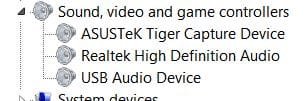
This is what's in my dev manager.
Shall I try diasabling USB audio Device or is that for my web cam?
Probably for your web cam so I doubt if it will make any difference.
See my reply to Venths.
Ap
My Computer
At a glance
Windows 7 Home PremiumIntel Core 2 Duo @ 3.00gHz4 GBATI Radeon HD 2600 XT
- Computer Manufacturer/Model Number
- Assembled in my workshop
- OS
- Windows 7 Home Premium
- CPU
- Intel Core 2 Duo @ 3.00gHz
- Motherboard
- Gigabyte GA-P35-S3G
- Memory
- 4 GB
- Graphics Card(s)
- ATI Radeon HD 2600 XT
- Sound Card
- RME 24/96 Card, Realtek Internal Audio PreSonus FireStudio
- Monitor(s) Displays
- Acer 1917 (x2)
- Screen Resolution
- 1280 x 1024 on both monitors
- Hard Drives
- Three 250GB Seagate SATA Barracuda 7200rpm
- PSU
- Rosewill 500-watt
- Case
- Rosewill mid-tower
- Cooling
- Noctua NH-U9B (CPU), PwrSupply fan + single large case Fan
- Keyboard
- Macally w/2/USB ports.
- Mouse
- Trackman Wheel
- Other Info
- Event 20/20 bas studio monitors, Yamaha sub.
Rackmount Korg/Roland/Yamaha synthesizers,
Cubase MIDI/audio recording. Sony Soundforge audio/mastering software. CD Architect Mastering. RME & Presonus audio interfaces.

When i try to update my audio driver through device manager..windows tell me that i have the latest driver installed whereas my driver version is 6.0.1.5969 (28.10.2009).
Should i update?:sarc:
Should i update?:sarc:
My Computer
At a glance
Win 7 Ultimate SP1 x64Intel Pentium Dual Core E5300 OC'd @ 3GHzKingston 2x2GB DDR2-800 Dual Channel SDRAMIntegrated Intel GMA X4500
- Computer Manufacturer/Model Number
- D3f's Customs
- OS
- Win 7 Ultimate SP1 x64
- CPU
- Intel Pentium Dual Core E5300 OC'd @ 3GHz
- Motherboard
- Asus P5G41-M LE
- Memory
- Kingston 2x2GB DDR2-800 Dual Channel SDRAM
- Graphics Card(s)
- Integrated Intel GMA X4500
- Sound Card
- Realtek 5.1 HD Audio (ALC887)
- Monitor(s) Displays
- LG Flatron W1943S @ 60Hz
- Screen Resolution
- 1360 x 768
- Hard Drives
- Internal - WD Caviar Blue 500GB, External - WD My Passport Essential 500GB
- PSU
- Headway 450w PSU
- Case
- Pixxo Slim Black mATX Case
- Cooling
- Stock Cpu Fan, 1 x Top Case Fan
- Keyboard
- Logitech K120
- Mouse
- Logitech LS1 Laser Mouse
- Internet Speed
- 17.66Mb/s Down, 0.82Mb/s Up
- Other Info
- Creative SBS A300 2.1 Speaker System, LG GH22NS50 22x Internal Super-Multi DVD-RW, 2Wire 5012NV Wireless Modem Router

Yes. Update by downloading and installing the driver directly from Realtek (save the download to your HDD and install from there). The drivers from Microsoft are fine, but they are often 2 or 3 versions behind the current ones available directly from the manufacturer.
My Computer
At a glance
Windows 8.1 Pro RTM x64Intel Core-i5-3570K 4-core @ 3.4GHz (Ivy Brid...4 x 4GB DDR3-1600 Corsair Vengeance CMZ8GX3M2...MSI GeForce GTX770 Gaming OC 2GB
- Computer type
- PC/Desktop
- Computer Manufacturer/Model Number
- Dwarf Dwf/11/2012 r09/2013
- OS
- Windows 8.1 Pro RTM x64
- CPU
- Intel Core-i5-3570K 4-core @ 3.4GHz (Ivy Bridge) (OC 4.4GHz)
- Motherboard
- ASRock Z77 Extreme4-M
- Memory
- 4 x 4GB DDR3-1600 Corsair Vengeance CMZ8GX3M2A1600C9B (16GB)
- Graphics Card(s)
- MSI GeForce GTX770 Gaming OC 2GB
- Sound Card
- Realtek High Definition on board solution (ALC 898)
- Monitor(s) Displays
- ViewSonic VA1912w Widescreen (VGA)
- Screen Resolution
- 1440x900
- Hard Drives
- OCZ Agility 3 SSD 120GB SATA III x2 (RAID 0)
Samsung HD501LJ 500GB SATA II x2
Hitachi HDS721010CLA332 1TB SATA II
Iomega 1.5TB Ext USB 2.0
WD 2.0TB Ext USB 3.0
- PSU
- XFX Pro Series 850W Semi-Modular
- Case
- Gigabyte IF233
- Cooling
- 1 x 120mm Front Inlet 1 x 120mm Rear Exhaust
- Keyboard
- Microsoft Comfort Curve Keyboard 3000 (USB)
- Mouse
- Microsoft Comfort Mouse 3000 for Business (USB)
- Internet Speed
- NetGear DG834Gv3 ADSL Modem/Router (Ethernet) ~4.0 Mb/s (O2)
- Antivirus
- Avast! 8.0.1497
- Browser
- IE 11
- Other Info
- Optical Drive: HL-DT-ST BD-RE BH10LS30 SATA Bluray
Lexmark S305 Printer/Scanner/Copier (USB)
WEI Score: 8.1/8.1/8.5/8.5/8.25
Asus Eee PC 1011PX Netbook (Windows 7 x86 Starter)
Thanks for the reply mr dwarf...Yes. Update by downloading and installing the driver directly from Realtek (save the download to your HDD and install from there). The drivers from Microsoft are fine, but they are often 2 or 3 versions behind the current ones available directly from the manufacturer.
Updating in awhile...
My Computer
At a glance
Win 7 Ultimate SP1 x64Intel Pentium Dual Core E5300 OC'd @ 3GHzKingston 2x2GB DDR2-800 Dual Channel SDRAMIntegrated Intel GMA X4500
- Computer Manufacturer/Model Number
- D3f's Customs
- OS
- Win 7 Ultimate SP1 x64
- CPU
- Intel Pentium Dual Core E5300 OC'd @ 3GHz
- Motherboard
- Asus P5G41-M LE
- Memory
- Kingston 2x2GB DDR2-800 Dual Channel SDRAM
- Graphics Card(s)
- Integrated Intel GMA X4500
- Sound Card
- Realtek 5.1 HD Audio (ALC887)
- Monitor(s) Displays
- LG Flatron W1943S @ 60Hz
- Screen Resolution
- 1360 x 768
- Hard Drives
- Internal - WD Caviar Blue 500GB, External - WD My Passport Essential 500GB
- PSU
- Headway 450w PSU
- Case
- Pixxo Slim Black mATX Case
- Cooling
- Stock Cpu Fan, 1 x Top Case Fan
- Keyboard
- Logitech K120
- Mouse
- Logitech LS1 Laser Mouse
- Internet Speed
- 17.66Mb/s Down, 0.82Mb/s Up
- Other Info
- Creative SBS A300 2.1 Speaker System, LG GH22NS50 22x Internal Super-Multi DVD-RW, 2Wire 5012NV Wireless Modem Router
I seem to be having the same problem as Aphelion (noticeably lower sound quality in speakers, lack of bass in speakers, and quieter speakers speakers after upgrade from Vista to 7). I also don't have MS High Definition Audio listed in the device manager (only Realtek High Definition Audio). However, I have noticed that if you go to the start menu > devices and printers > my pc > hardware only "High Definition Audio Controller" (manufactured by Microsoft) was listed. But after I reinstalled the Realtek HD driver in compatibility mode they were both listed (High Definition Audio controller and Realtek HD Audio Device). I don't know how insightful that information is, but I'd really appreciate some help with this also.I have only one HIGH DEFINITION AUDIO Device option
Guess it won't help you then, my system had both the Realtek HD device and a second generic (MS) High Definition Audio Device. Disabling the second device cleared up my low volume problems even though the Realtek was set as default audio.
Ap
My Computer
At a glance
Windows 7 UltimateAMD Turion 64 x2 TL-60, 2000Mhz3.00 GB RAMATI Radeon X1250
- Computer Manufacturer/Model Number
- Toshiba Satellite A305D
- OS
- Windows 7 Ultimate
- CPU
- AMD Turion 64 x2 TL-60, 2000Mhz
- Motherboard
- Insyde Corp. InsydeH2O Version 1.60 TOSINV - 3 20080707
- Memory
- 3.00 GB RAM
- Graphics Card(s)
- ATI Radeon X1250
- Sound Card
- Realtek High Definition Audio
- Hard Drives
- Drive Name SQ004666V05
Drive Size 189280 MBs
Drive Format NTFS
Similar threads

- Replies
- 13
- Views
- 4K

- Replies
- 1
- Views
- 13K
- Replies
- 15
- Views
- 44K

