Latest Realtek HD Audio Driver Version

...except when I manually install the Realtek 2.46 over it (which results in no sound at all after rebooting).
After manually installing the Realtek driver, if you right-click on the speaker icon in the System Tray, and select the "playback devices" item, is the "speakers" item checked with a green arrow (showing it as the default output device)?

If not, select it, and push the "set default" button.

Still no sound?

No problems or indications of error from the Realtek installation? Uninstall/reinstall is a 2-step process to run their installer file. First time, it uninstalls whatever is installed and asks you to re-boot... resulting in the Microsoft generic audio driver returning after re-boot. Then you run the installer a second time, and after a second re-boot the Realtek audio driver should be installed, and the orange HD Audio control panel icon should be auto-started. Again, you many need to go into "playback devices" and once again select "speakers" and "set default".

Or... you may have already tried all this unsuccessfully.
 

My Computer My Computer

At a glance

Windows 7 Pro x64 (1), Win7 Pro X64 (2)i5-3350p 3.1Ghz/6MB-cache (1); E8400 3.0Ghz/6...8GB PC3-12800 DDR3 (1); 4GB PC3-10600 DDR3 (2)ATI HD7750 (1), (see TV cards); ATI R7 250 (2)
Computer type
PC/Desktop
Computer Manufacturer/Model Number
Home-built, two systems (1) and (2)
OS
Windows 7 Pro x64 (1), Win7 Pro X64 (2)
CPU
i5-3350p 3.1Ghz/6MB-cache (1); E8400 3.0Ghz/6MB-cache (2)
Motherboard
ASUS P8Z77-V Pro (1); ASUS P5Q3 (2)
Memory
8GB PC3-12800 DDR3 (1); 4GB PC3-10600 DDR3 (2)
Graphics Card(s)
ATI HD7750 (1), (see TV cards); ATI R7 250 (2)
Sound Card
Realtek ALC892 HD Audio (1); Realtek ALC1200 HD Audio (2)
Monitor(s) Displays
Eizo HD2441W LCD, Eizo S2433W (1); Eizo 24" S2433W (2)
Screen Resolution
1920x1200, 1920x1200 (1); 1920x1200 (2)
Hard Drives
(1) 1TB SATA-II (7200RPM), 2x2TB SATA-III (7200RPM), 250GB SATA-III (10000RPM) for OS; 2x2TB external USB 3.0

(2) 320GB SATA-II (7200RPM), 750GB SATA-II (7200RPM), 150GB SATA-II (10000RPM) for OS; 2TB external USB 3.0
PSU
Nesteq ECS-6001 600W (1); Nesteq ECS-5001 500W (2)
Case
Acousti-Case 360 (1) and (2)
Cooling
Noctua NH-U12P SE2 for CPU, 2x120mm case fans (1) and (2)
Keyboard
IBM PS/2 (1) and (2)
Mouse
Logitech MX Revolution wireless (1); Microsoft wired (2)
Internet Speed
100mbps down / 10mbps up
Antivirus
Microsoft Security Essentials; Malwarebyte Anti-Malware Pro
Browser
Firefox
Other Info
Ceton InfiniTV 4-tuner cablecard-enabled TV card as well as Hauppauge HVR-2250 OTA/ATSC 2-tuner TV card in (1), running under Win7 WMC
Hi dsperber,
Thank for your reply :D
When I install it over the Microsoft one, after re-booting the only device I see available for playback is the HDMI output. Under Device Manager I can see the Realtek HD Audio device, but with that yellow exclamation point on it, and under properties a message saying that the driver could not be started (Code 10).
Realtek HD Audio Manager is not shown either (the orange speaker icon).
It's also important to mention that the HDMI driver installed is an nVidia driver, which was downloaded via Windows Update.
Every single time I've installed the driver I've done it twice, re-booting when being prompted to, but with no success.
 

My Computer My Computer

At a glance

Windows 7 Home PremiumIntel Atom 330 @ 1600 MHzKingston 800MHz 2Gb (2x1)nVidia ION
Computer Manufacturer/Model Number
ION 330
OS
Windows 7 Home Premium
CPU
Intel Atom 330 @ 1600 MHz
Motherboard
AsRock AMCP7A-ION
Memory
Kingston 800MHz 2Gb (2x1)
Graphics Card(s)
nVidia ION
Monitor(s) Displays
Panasonic 42" HD Plasma
When I install it over the Microsoft one, after re-booting the only device I see available for playback is the HDMI output. Under Device Manager I can see the Realtek HD Audio device, but with that yellow exclamation point on it, and under properties a message saying that the driver could not be started (Code 10).
Hmmm.. bad sign.


Realtek HD Audio Manager is not shown either (the orange speaker icon).
Not surprising, since the associated Realtek device is not "installed" and working successfully.


It's also important to mention that the HDMI driver installed is an nVidia driver, which was downloaded via Windows Update.
Well you might try going directly to the nVidia site for their latest version, just on the off-chance that might help.

However my SuperMicro C2SBX has an ALC883 Realtek chip in it (which is what I use for sound, with my external speakers connected to it's output jacks on the motherboard) and my ATI HD4850 card also has "HDMI audio" associated with it (but I do NOT use it for sound!).

Also, I originally had trouble when I first put Win7 in caused by the ATI HDMI drivers. Although I wasn't using it for sound, it seemed to cause problems with the Realtek driver and HD Audio Manager, preventing the HD Audio Manager (orange speaker icon) from starting and/or even running! It may have just been my confusion about all of these drivers (and the need to set "speakers" to "default" in "playback devices"), or maybe it was actually a problem with the ATI-provided HDMI Audio driver at that time (which I didn't intend to use anyway!).

Whatever the cause (or my ignorance and confusion), I (a) ultimately reverted to the Realtek-provided version of the HDMI audio driver for ATI video cards, and (b) learned that I had to set "speakers" to "default" in "playback devices"), and then finally all of my problems and confusion and difficulties went away. Actually I haven't even bothered to update my version of that driver installed back in December. I don't use that device for sound anyway, and as long as I'm problem-free I don't care to even waste time applying the very latest 2.42 version from Realtek.

Of course I notice that Realtek does not provide a similar nVidia-version of an HDMI audio device driver, only one for ATI... so you're SOL on that side.

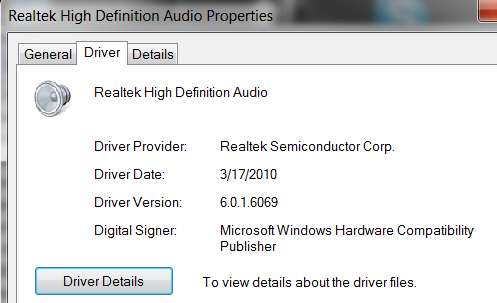
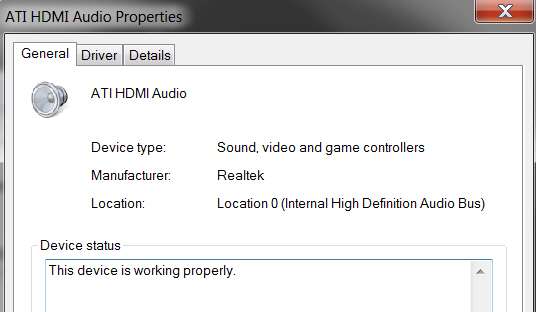
Anyway, though it's not really any specific help to you, here are some screenshots of things on my system... at least for your reference. Again, I'm NOT using "HDMI audio" for sound... I'm using "speakers" as "default", as set by "playback devices" from RMB on white Win7 speaker icon in System tray.

Also, I am problem-free with excellent quality and volume sound running with Realtek 2.45 (again, ALC883 Realtek chip on the SuperMicro C2SBX board). I was thrilled to get the EQ back a few releases ago, and I am not running DD5.1 sound. I am running "quadrophonic" sound, into the front/rear Altec-Lansing 641 speaker system that I have (four satellites plus sub-woofer, crossover in the amp box) which simply uses the 4-channel front/rear outputs from the 2 appropriate 2-channel stereo jacks out of my motherboard into the Altec's amp box.

(1) Device manager, audio devices

audiodevices.jpg


(2) Properties for Realtek HD audio device (which I DO use for sound, selecting "speakers" as "default" in "Playback devices"). I have recently upgraded to 2.45 (of course, 2.46 came out the next day but I haven't bothered to install it yet):

realtekhdaudiogeneral.jpg


realtekhdaudiodriver.jpg


(3) Properties for ATI HDMI audio device (which I DO NOT USE):

atihdmigeneral.jpg


atihdmidriver.jpg


(4) Playback devices:

playbackdevices.jpg
 

My Computer My Computer

At a glance

Windows 7 Pro x64 (1), Win7 Pro X64 (2)i5-3350p 3.1Ghz/6MB-cache (1); E8400 3.0Ghz/6...8GB PC3-12800 DDR3 (1); 4GB PC3-10600 DDR3 (2)ATI HD7750 (1), (see TV cards); ATI R7 250 (2)
Computer type
PC/Desktop
Computer Manufacturer/Model Number
Home-built, two systems (1) and (2)
OS
Windows 7 Pro x64 (1), Win7 Pro X64 (2)
CPU
i5-3350p 3.1Ghz/6MB-cache (1); E8400 3.0Ghz/6MB-cache (2)
Motherboard
ASUS P8Z77-V Pro (1); ASUS P5Q3 (2)
Memory
8GB PC3-12800 DDR3 (1); 4GB PC3-10600 DDR3 (2)
Graphics Card(s)
ATI HD7750 (1), (see TV cards); ATI R7 250 (2)
Sound Card
Realtek ALC892 HD Audio (1); Realtek ALC1200 HD Audio (2)
Monitor(s) Displays
Eizo HD2441W LCD, Eizo S2433W (1); Eizo 24" S2433W (2)
Screen Resolution
1920x1200, 1920x1200 (1); 1920x1200 (2)
Hard Drives
(1) 1TB SATA-II (7200RPM), 2x2TB SATA-III (7200RPM), 250GB SATA-III (10000RPM) for OS; 2x2TB external USB 3.0

(2) 320GB SATA-II (7200RPM), 750GB SATA-II (7200RPM), 150GB SATA-II (10000RPM) for OS; 2TB external USB 3.0
PSU
Nesteq ECS-6001 600W (1); Nesteq ECS-5001 500W (2)
Case
Acousti-Case 360 (1) and (2)
Cooling
Noctua NH-U12P SE2 for CPU, 2x120mm case fans (1) and (2)
Keyboard
IBM PS/2 (1) and (2)
Mouse
Logitech MX Revolution wireless (1); Microsoft wired (2)
Internet Speed
100mbps down / 10mbps up
Antivirus
Microsoft Security Essentials; Malwarebyte Anti-Malware Pro
Browser
Firefox
Other Info
Ceton InfiniTV 4-tuner cablecard-enabled TV card as well as Hauppauge HVR-2250 OTA/ATSC 2-tuner TV card in (1), running under Win7 WMC
RELEASE DATE: April 09th 2010
DRIVER VERSION: R 2.47
Driver Version In Device Manager: 6.0.1.6083


Driver Updates:
1. Customizations
 

My Computer My Computer

At a glance

Windows7 7600-RTM x64 | Win XP x32
OS
Windows7 7600-RTM x64 | Win XP x32
Thank you Wargollo. First post updated. :)
 

My Computer My Computer

At a glance

64-bit Windows 11 Pro for WorkstationsIntel i7-8700K OC'd to 5 GHz64 GB (4x16GB) G.SKILL TridentZ RGB DDR4 3600...ASUS ROG-STRIX-GTX1080TI-O11G-GAMING
Computer type
PC/Desktop
Computer Manufacturer/Model Number
Self built custom
OS
64-bit Windows 11 Pro for Workstations
CPU
Intel i7-8700K OC'd to 5 GHz
Motherboard
ASUS ROG Maximus XI Formula Z390
Memory
64 GB (4x16GB) G.SKILL TridentZ RGB DDR4 3600 MHz
Graphics Card(s)
ASUS ROG-STRIX-GTX1080TI-O11G-GAMING
Sound Card
Integrated
Monitor(s) Displays
2 x Samsung Odyssey G7 27"
Screen Resolution
2560x1440
Hard Drives
1TB Samsung 990 PRO M.2,
4TB Samsung 990 PRO PRO M.2,
TerraMaster F8 SSD Plus NAS
PSU
Seasonic Prime Titanium 850W
Case
Thermaltake Core P3
Cooling
Corsair Hydro H115i
Keyboard
Logitech wireless K800
Mouse
Logitech MX Master 4
Internet Speed
2 Gb/s Download and 100 Mb/s Upload
Antivirus
Malwarebyte Anti-Malware Premium
Browser
Google Chrome
Other Info
Logitech Z625 speaker system,
Logitech BRIO 4K Pro webcam,
HP Color LaserJet Pro MFP M477fdn,
APC SMART-UPS RT 1000 XL - SURT1000XLI,
Galaxy S23 Plus phone
The combination of a Microsoft (optional) update and these latest drivers fixed the slightly garbled audio I was getting when coming out of sleep mode.

Sorry I don't have the number on the MS update, it was listed as correcting the "no sound" problem after sleep or hibernate.
 

My Computer My Computer

At a glance

Windows 7 Home PremiumIntel Core 2 Duo @ 3.00gHz4 GBATI Radeon HD 2600 XT
Computer Manufacturer/Model Number
Assembled in my workshop
OS
Windows 7 Home Premium
CPU
Intel Core 2 Duo @ 3.00gHz
Motherboard
Gigabyte GA-P35-S3G
Memory
4 GB
Graphics Card(s)
ATI Radeon HD 2600 XT
Sound Card
RME 24/96 Card, Realtek Internal Audio PreSonus FireStudio
Monitor(s) Displays
Acer 1917 (x2)
Screen Resolution
1280 x 1024 on both monitors
Hard Drives
Three 250GB Seagate SATA Barracuda 7200rpm
PSU
Rosewill 500-watt
Case
Rosewill mid-tower
Cooling
Noctua NH-U9B (CPU), PwrSupply fan + single large case Fan
Keyboard
Macally w/2/USB ports.
Mouse
Trackman Wheel
Other Info
Event 20/20 bas studio monitors, Yamaha sub.
Rackmount Korg/Roland/Yamaha synthesizers,
Cubase MIDI/audio recording. Sony Soundforge audio/mastering software. CD Architect Mastering. RME & Presonus audio interfaces.
thanks for post
 

My Computer My Computer

At a glance

Windows Xp Pro
OS
Windows Xp Pro
I'm getting lots of BSOD with Realtek's official up to date driver from their site, so I just uninstalled them and when my computer restarted it found generic driver for Realtek, I get decent sound but no 3d sound effects "ROOM" which I can live with.
 

My Computer My Computer

At a glance

Windows 7 Home Premium (64 bit)Intel I5 2500K 3.3Ghz Stock8Gig Kingston DDRIII HyperX Blue 1333 MhzAMD Sapphire 7870 2GB
Computer type
PC/Desktop
Computer Manufacturer/Model Number
Self Built
OS
Windows 7 Home Premium (64 bit)
CPU
Intel I5 2500K 3.3Ghz Stock
Motherboard
Asus P8H 61-M LE USB 3
Memory
8Gig Kingston DDRIII HyperX Blue 1333 Mhz
Graphics Card(s)
AMD Sapphire 7870 2GB
Sound Card
Creative Fatality Pro
Monitor(s) Displays
27" BENQ LED
Screen Resolution
1920X1080
Hard Drives
1 x OCZ Agility 3 120GB SSD
1 x Seagate 250GB
1 x Western Digital 1000GB
1 x HP 500GB
PSU
700W Coolermaster Stealth Pro etc
Case
Coolermaster Scout
Cooling
Some fans
Keyboard
Some Logitech type.
Mouse
Logitech MX518
Internet Speed
Wireless 8mb
Other Info
Canon Scanner
Epson Printer
Nikon DSLR 3000
Wacom Tablet
I've not had a single BSOD on my system due to Realtek drivers. Are you sure that you haven't got a corrupted download? Which method did you use to install the driver?
 

My Computer My Computer

At a glance

Windows 8.1 Pro RTM x64Intel Core-i5-3570K 4-core @ 3.4GHz (Ivy Brid...4 x 4GB DDR3-1600 Corsair Vengeance CMZ8GX3M2...MSI GeForce GTX770 Gaming OC 2GB
Computer type
PC/Desktop
Computer Manufacturer/Model Number
Dwarf Dwf/11/2012 r09/2013
OS
Windows 8.1 Pro RTM x64
CPU
Intel Core-i5-3570K 4-core @ 3.4GHz (Ivy Bridge) (OC 4.4GHz)
Motherboard
ASRock Z77 Extreme4-M
Memory
4 x 4GB DDR3-1600 Corsair Vengeance CMZ8GX3M2A1600C9B (16GB)
Graphics Card(s)
MSI GeForce GTX770 Gaming OC 2GB
Sound Card
Realtek High Definition on board solution (ALC 898)
Monitor(s) Displays
ViewSonic VA1912w Widescreen (VGA)
Screen Resolution
1440x900
Hard Drives
OCZ Agility 3 SSD 120GB SATA III x2 (RAID 0)
Samsung HD501LJ 500GB SATA II x2
Hitachi HDS721010CLA332 1TB SATA II
Iomega 1.5TB Ext USB 2.0
WD 2.0TB Ext USB 3.0
PSU
XFX Pro Series 850W Semi-Modular
Case
Gigabyte IF233
Cooling
1 x 120mm Front Inlet 1 x 120mm Rear Exhaust
Keyboard
Microsoft Comfort Curve Keyboard 3000 (USB)
Mouse
Microsoft Comfort Mouse 3000 for Business (USB)
Internet Speed
NetGear DG834Gv3 ADSL Modem/Router (Ethernet) ~4.0 Mb/s (O2)
Antivirus
Avast! 8.0.1497
Browser
IE 11
Other Info
Optical Drive: HL-DT-ST BD-RE BH10LS30 SATA Bluray
Lexmark S305 Printer/Scanner/Copier (USB)
WEI Score: 8.1/8.1/8.5/8.5/8.25
Asus Eee PC 1011PX Netbook (Windows 7 x86 Starter)
Hello, just wanted to say that dsperber's screenshots are confirmation that i did everything right, but still no sound.....then i thought, lets unplug the speakers from the jack at the back of the pc, and reboot. OK so i did that, while pc was on i plugged in the jacks and low and behold, HAVE SOUND!!!!! yippee
I hope this is helpful to anyone, it turned out to be a simple solution after all :)
thanks dsperber and your helpful screenshots
by the way i downloaded the latest Reatek drivers v6.0.1.6083 dated 06/april/2010
 

My Computer My Computer

At a glance

winows 7 pro 64 bitAMD Phenom 2Corsair 4 gigonboard
OS
winows 7 pro 64 bit
CPU
AMD Phenom 2
Motherboard
Gigabyte GA-890GPA-UD3H
Memory
Corsair 4 gig
Graphics Card(s)
onboard
Sound Card
onboard
Monitor(s) Displays
Samsung Syncmaster
Hard Drives
Seagate and Maxtor
PSU
Corsair 850w Modular
I have the same driver, but I can't find the stereo mix option. I read all about these problems, but the problem still exists(I reinstalled the driver, I checked the show disabled devices and disconnected devices options too ). What should I do?
 

My Computer My Computer

At a glance

windows7AMD Althon(tm) 64x2 Dual Core 6000+2GBNVidia GeForce 9500 GT
OS
windows7
CPU
AMD Althon(tm) 64x2 Dual Core 6000+
Memory
2GB
Graphics Card(s)
NVidia GeForce 9500 GT
Sound Card
Realtech High Deffinition
Monitor(s) Displays
SAMSUNG SyncMaster 923nw
RELEASE DATE: May 05th 2010
DRIVER VERSION: R 2.48
Driver Version In Device Manager: 6.0.1.6101

Driver Updates:
1.
Customizations
 

My Computer My Computer

At a glance

Windows7 7600-RTM x64 | Win XP x32
OS
Windows7 7600-RTM x64 | Win XP x32
RELEASE DATE: May 05th 2010
DRIVER VERSION: R 2.48
Driver Version In Device Manager: 6.0.1.6101

Driver Updates:
1. Customizations

Just installed this and it seems to work fine if anyone is thinking about it.
 

My Computer My Computer

At a glance

windows 7 Ultimate x64Core i7 3770K8 GB Corsair Vengeance DDR3Asus Nvidia GTX 770
OS
windows 7 Ultimate x64
CPU
Core i7 3770K
Motherboard
Asus Sabertooth Z77
Memory
8 GB Corsair Vengeance DDR3
Graphics Card(s)
Asus Nvidia GTX 770
Sound Card
Asus Xonar Essence STX
Monitor(s) Displays
Asus VG248QE
Screen Resolution
1920x1200 @ 60 Hz
Hard Drives
Western DIgital Caviar Black 1 GB
Corsair Force GT 240 GB
PSU
Corsair HX-1000
Case
Corsair Air 540
Cooling
Corsair H100i
Keyboard
Microsoft Sidewinder x4
Mouse
Intellimouse Explorer 3.0
Internet Speed
Cable
Thank you Wargolla. First post updated. :)
 

My Computer My Computer

At a glance

64-bit Windows 11 Pro for WorkstationsIntel i7-8700K OC'd to 5 GHz64 GB (4x16GB) G.SKILL TridentZ RGB DDR4 3600...ASUS ROG-STRIX-GTX1080TI-O11G-GAMING
Computer type
PC/Desktop
Computer Manufacturer/Model Number
Self built custom
OS
64-bit Windows 11 Pro for Workstations
CPU
Intel i7-8700K OC'd to 5 GHz
Motherboard
ASUS ROG Maximus XI Formula Z390
Memory
64 GB (4x16GB) G.SKILL TridentZ RGB DDR4 3600 MHz
Graphics Card(s)
ASUS ROG-STRIX-GTX1080TI-O11G-GAMING
Sound Card
Integrated
Monitor(s) Displays
2 x Samsung Odyssey G7 27"
Screen Resolution
2560x1440
Hard Drives
1TB Samsung 990 PRO M.2,
4TB Samsung 990 PRO PRO M.2,
TerraMaster F8 SSD Plus NAS
PSU
Seasonic Prime Titanium 850W
Case
Thermaltake Core P3
Cooling
Corsair Hydro H115i
Keyboard
Logitech wireless K800
Mouse
Logitech MX Master 4
Internet Speed
2 Gb/s Download and 100 Mb/s Upload
Antivirus
Malwarebyte Anti-Malware Premium
Browser
Google Chrome
Other Info
Logitech Z625 speaker system,
Logitech BRIO 4K Pro webcam,
HP Color LaserJet Pro MFP M477fdn,
APC SMART-UPS RT 1000 XL - SURT1000XLI,
Galaxy S23 Plus phone
I shall download and install the latest driver as soon as I can. I just wish that Realtek would do something about their abysmal download speed. Perhaps they've run out of hamsters for the wheel, and are resorting to using snails instead.
 

My Computer My Computer

At a glance

Windows 8.1 Pro RTM x64Intel Core-i5-3570K 4-core @ 3.4GHz (Ivy Brid...4 x 4GB DDR3-1600 Corsair Vengeance CMZ8GX3M2...MSI GeForce GTX770 Gaming OC 2GB
Computer type
PC/Desktop
Computer Manufacturer/Model Number
Dwarf Dwf/11/2012 r09/2013
OS
Windows 8.1 Pro RTM x64
CPU
Intel Core-i5-3570K 4-core @ 3.4GHz (Ivy Bridge) (OC 4.4GHz)
Motherboard
ASRock Z77 Extreme4-M
Memory
4 x 4GB DDR3-1600 Corsair Vengeance CMZ8GX3M2A1600C9B (16GB)
Graphics Card(s)
MSI GeForce GTX770 Gaming OC 2GB
Sound Card
Realtek High Definition on board solution (ALC 898)
Monitor(s) Displays
ViewSonic VA1912w Widescreen (VGA)
Screen Resolution
1440x900
Hard Drives
OCZ Agility 3 SSD 120GB SATA III x2 (RAID 0)
Samsung HD501LJ 500GB SATA II x2
Hitachi HDS721010CLA332 1TB SATA II
Iomega 1.5TB Ext USB 2.0
WD 2.0TB Ext USB 3.0
PSU
XFX Pro Series 850W Semi-Modular
Case
Gigabyte IF233
Cooling
1 x 120mm Front Inlet 1 x 120mm Rear Exhaust
Keyboard
Microsoft Comfort Curve Keyboard 3000 (USB)
Mouse
Microsoft Comfort Mouse 3000 for Business (USB)
Internet Speed
NetGear DG834Gv3 ADSL Modem/Router (Ethernet) ~4.0 Mb/s (O2)
Antivirus
Avast! 8.0.1497
Browser
IE 11
Other Info
Optical Drive: HL-DT-ST BD-RE BH10LS30 SATA Bluray
Lexmark S305 Printer/Scanner/Copier (USB)
WEI Score: 8.1/8.1/8.5/8.5/8.25
Asus Eee PC 1011PX Netbook (Windows 7 x86 Starter)
I shall download and install the latest driver as soon as I can. I just wish that Realtek would do something about their abysmal download speed. Perhaps they've run out of hamsters for the wheel, and are resorting to using snails instead.


:roflmao:Damn true!

-The Site 1 = 4,08 k/s
-The Site 2 = 8,04 k/s
-The Site 3 = 24,8 k/s!!

by the way...2.48 works fine here.
 
Last edited:

My Computer My Computer

At a glance

Windows 7 Professional SP1 - x64 [Non-UEFI Boot]Ivy Bridge Core i5 3570K (Delidded)G.Skill "Ares" DDR3 PC3-12800 - 1600MHz (16Gb)Asus Dual-RX480-O4G
Computer type
PC/Desktop
Computer Manufacturer/Model Number
Custom Build
OS
Windows 7 Professional SP1 - x64 [Non-UEFI Boot]
CPU
Ivy Bridge Core i5 3570K (Delidded)
Motherboard
Asus P8Z77-V LE PLUS
Memory
G.Skill "Ares" DDR3 PC3-12800 - 1600MHz (16Gb)
Graphics Card(s)
Asus Dual-RX480-O4G
Sound Card
Creative Sound Blaster Z w/5.1 sound system
Monitor(s) Displays
Asus IPS 23"
Screen Resolution
16/9
Hard Drives
Internal:
500Go Sata 6Gb/s (x2)
500Go Sata 3Gb/s (x2)
SSD 60Go Sata 6Gb/s
PSU
In Win C 900W Series 80+ Platinum
Case
Thermaltake Chaser A71
Cooling
Custom Water Cooling Loop
Keyboard
Cooler Master QuickFire XTi
Mouse
Razer Imperator 2012 (4G)
Antivirus
MSE
Browser
IE 11.0.xxx Rtm
Other Info
"Raid0" with Intel Smart Response Technology (HDD/SSD)
1. Customizations

Verbose, aren't they. :rolleyes:

I will say this, the updates are regular and I've noticed improvements. The 2.47 drivers have been very good. Multi-client operation has been improved.

Ap
 

My Computer My Computer

At a glance

Windows 7 Home PremiumIntel Core 2 Duo @ 3.00gHz4 GBATI Radeon HD 2600 XT
Computer Manufacturer/Model Number
Assembled in my workshop
OS
Windows 7 Home Premium
CPU
Intel Core 2 Duo @ 3.00gHz
Motherboard
Gigabyte GA-P35-S3G
Memory
4 GB
Graphics Card(s)
ATI Radeon HD 2600 XT
Sound Card
RME 24/96 Card, Realtek Internal Audio PreSonus FireStudio
Monitor(s) Displays
Acer 1917 (x2)
Screen Resolution
1280 x 1024 on both monitors
Hard Drives
Three 250GB Seagate SATA Barracuda 7200rpm
PSU
Rosewill 500-watt
Case
Rosewill mid-tower
Cooling
Noctua NH-U9B (CPU), PwrSupply fan + single large case Fan
Keyboard
Macally w/2/USB ports.
Mouse
Trackman Wheel
Other Info
Event 20/20 bas studio monitors, Yamaha sub.
Rackmount Korg/Roland/Yamaha synthesizers,
Cubase MIDI/audio recording. Sony Soundforge audio/mastering software. CD Architect Mastering. RME & Presonus audio interfaces.
I've lost my audio for about a week now. I think right about when the latest driver came out (5/5/2010). It's been running fine up until this issue.
  • Speaker icon with red X says "No Audio Output Device is Enabled".
  • Under Playback Devices the Only thing that shows is ATI HDMI Output.
  • Realtek HD Audio Manager is in the Control Panel but will not open.
  • Sound, Video, Game Controllers only shows ATI HDMI High Definition Audio Device
I've tried download the latest and reinstalling (twice).

Any ideas? Anyone Else in the same boat?
Anywhere I can get the old drivers?

Thanks.
 

My Computer My Computer

At a glance

Windows 7 64-bitIntel 2.4Ghz Quad-core8GBGeForce 9800GT XLR8 1GB
Computer Manufacturer/Model Number
HP a6152n
OS
Windows 7 64-bit
CPU
Intel 2.4Ghz Quad-core
Motherboard
IPIBL-LA
Memory
8GB
Graphics Card(s)
GeForce 9800GT XLR8 1GB
Monitor(s) Displays
24" HP, 19" Samsung
Hard Drives
Hitachi 400 GB
Seagate 7200 Barracuda 1TB
PSU
Antec TruePower Trio 550w
Case
HP
Mouse
Microsoft Wireless Mobile Mouse 6000
I've lost my audio for about a week now. I think right about when the latest driver came out (5/5/2010). It's been running fine up until this issue.
  • Speaker icon with red X says "No Audio Output Device is Enabled".
  • Under Playback Devices the Only thing that shows is ATI HDMI Output.
  • Realtek HD Audio Manager is in the Control Panel but will not open.
  • Sound, Video, Game Controllers only shows ATI HDMI High Definition Audio Device
I've tried download the latest and reinstalling (twice).

Any ideas? Anyone Else in the same boat?
Anywhere I can get the old drivers?

Thanks.

Create a thread and you will have much better chance of getting a response that your seeking.
 

My Computer My Computer

At a glance

Windows 7 Ultimate x64.i5 760 @ 4.2Ghz. 1.18v4g Corsair xms3 ddr3, 1600Mhz.Gigabyte GTX-560Ti soc edition
Computer Manufacturer/Model Number
Custom Build.
OS
Windows 7 Ultimate x64.
CPU
i5 760 @ 4.2Ghz. 1.18v
Motherboard
Gigabyte - H55M-USB3
Memory
4g Corsair xms3 ddr3, 1600Mhz.
Graphics Card(s)
Gigabyte GTX-560Ti soc edition
Sound Card
Asus Xonar Dx - Logitech Z5500.
Monitor(s) Displays
Acer 22" LCD Wide screen 1680-1050 -Samsung 42" Plasma....
Screen Resolution
1680/1050 -----1920/1080p.
Hard Drives
2x 2TB Seagate Go Flex,
1x 1TB Seagate,
1x 640WD Black,
x16 Gig sandisc flash drive,
1x8Gig sandisc flash drive.
PSU
XigmaTek 80plus NRP-PC702 - 700w dual 30a.
Case
Venus Gamers Midi Tower Case with LED Display
Cooling
Arctic Freezer 7 Pro Rev 2... x2 Arctic F8 case fans........
Keyboard
Logitech G15-v2 Gaming.
Mouse
Microsoft Sidewinder X8.
Internet Speed
Virgin Media - 50mb down- 8mb up.
Other Info
x2 Xbox 360 wireless controllers...

Dual layer optical disc drive...

Chrome 79million

A.V = MSE
I've lost my audio for about a week now. I think right about when the latest driver came out (5/5/2010). It's been running fine up until this issue.
  • Speaker icon with red X says "No Audio Output Device is Enabled".
  • Under Playback Devices the Only thing that shows is ATI HDMI Output.
  • Realtek HD Audio Manager is in the Control Panel but will not open.
  • Sound, Video, Game Controllers only shows ATI HDMI High Definition Audio Device
I've tried download the latest and reinstalling (twice).

Any ideas? Anyone Else in the same boat?
Anywhere I can get the old drivers?

Thanks.

I've resolved my issue.

After a bunch of unsuccessul attempts at installing the latest RealTek drivers, I checked the BIOS and changed the "Onboard Audio" setting from Auto, to Enabled.
Booted, then clicked on the Red X speaker icon and ran the hardware troubleshooter as it prompted, and this time it detected the speakers and fixed the problem. (I had tried the troubleshooter before but it couldn't fix the problem)
 

My Computer My Computer

At a glance

Windows 7 64-bitIntel 2.4Ghz Quad-core8GBGeForce 9800GT XLR8 1GB
Computer Manufacturer/Model Number
HP a6152n
OS
Windows 7 64-bit
CPU
Intel 2.4Ghz Quad-core
Motherboard
IPIBL-LA
Memory
8GB
Graphics Card(s)
GeForce 9800GT XLR8 1GB
Monitor(s) Displays
24" HP, 19" Samsung
Hard Drives
Hitachi 400 GB
Seagate 7200 Barracuda 1TB
PSU
Antec TruePower Trio 550w
Case
HP
Mouse
Microsoft Wireless Mobile Mouse 6000
Back
Top