Latest Realtek HD Audio Driver Version

Hi all, im new here. I have been looking for like 10 hours non stop for a solution to my problem.

I have 5.1 logitech speaker set and realtek onboard sound card, with only the 2 front, center and sub playing, My 2 rear speakers play but EXTREMELY soft even with speaker fill on and 5.1 music/video file. I have tried so many sets of drivers with nothing working.

MY SOLUTION:

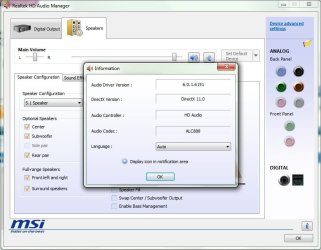
i uninstalled ALL realtek drivers and software and rebooted. when i got back into windows i let windows automatically install the drivers and i didnt install any other drivers manually. then i just enabled 5.1 channel sound in the realtek settings and it somehow worked perfectly (WITH NO STUPID SPEAKER FILL) :)

TO ALL OF YOU HAVING PROBLEMS STILL, i REALLY HOPE THIS HELPS. HERE IS A SCREENSHOT OF THE VERSION DRIVERS WINDOWS AUTOMATICALLY INSTALLED FOR ME:

BTW: im using windows 7 enterprise x64.
Hope this helps
 

Attachments
  • audio.jpg
    audio.jpg
    57.7 KB · Views: 733
Last edited:

My Computer My Computer

At a glance

Windows 7 Enterprise x64Intel E84002GB Kingston value RAM DDR2 800mhzMSI 9600GT (OC)
OS
Windows 7 Enterprise x64
CPU
Intel E8400
Motherboard
Msi p7n platinum
Memory
2GB Kingston value RAM DDR2 800mhz
Graphics Card(s)
MSI 9600GT (OC)
Sound Card
onboard realtek
Monitor(s) Displays
LG W2486L
Screen Resolution
1920 x 1080
Hard Drives
1x WD terabyte
1x Seagate 320gb
1x seagate 500gb
PSU
huntkey 550W green power
Case
aerocool zero degree
Cooling
stock
Internet Speed
384Kb
Thanks for the fix!! ;)
 

My Computer My Computer

At a glance

64-bit Windows 8.1 ProCore(TM) i5 CPU 4330 Haswell @ 3.20GHz12.00 GBIntel(R) HD Graphics
Computer type
PC/Desktop
Computer Manufacturer/Model Number
LENOVO K450 @3.0GHZ
OS
64-bit Windows 8.1 Pro
CPU
Core(TM) i5 CPU 4330 Haswell @ 3.20GHz
Motherboard
LENOVO
Memory
12.00 GB
Graphics Card(s)
Intel(R) HD Graphics
Sound Card
Intel HD integtrated
Monitor(s) Displays
HP 25' ISP Monitor
Screen Resolution
1900/1020
Hard Drives
(1) ST1000DM003-1CH162 (2) Generic STORAGE DEVICE USB Device (3) Generic STORAGE DEVICE USB Device
Internet Speed
100mb down/10mb up
What if Windows only installs a driver? The software isn't installed by default on my PC (Asrock mobo), so I can't enable 5.1.
 

My Computer My Computer

At a glance

Windows 7AMD x2 4000+ (2.5 GHz)4 GB DDR2ATI HD4850 HIS
OS
Windows 7
CPU
AMD x2 4000+ (2.5 GHz)
Motherboard
Asrock NF6P-Vista
Memory
4 GB DDR2
Graphics Card(s)
ATI HD4850 HIS
Sound Card
Realtek ALC662 (onboard)
Monitor(s) Displays
Samsung 2233SN 22"
Hard Drives
Western Digital 160 GB
I also thought it only installed a driver because i didnt see the realtek icon in my taskbar. Try checking in control panel (view small icons) and look for "Realtek HD Audio Manager".

If its not there then im not sure :( sorry

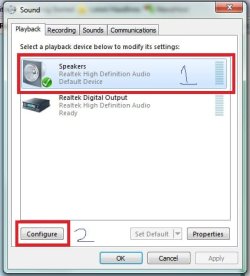
Edit2: try right clicking on the speaker icon in your taskbar bottom right and go to "Playback devices", then select "Speakers" and click on "configure" you can change to 5.1 channel there :)
speaker.jpg

options.jpg

settings.jpg

Edit: This is a very strange problem, and its on windows side and not realtek. Many people have different solutions that only seem to work for them (i have never seen a problem where this happened), I myself have tried every solution i found in this 70 page thread and none of it worked for me. So lets hope my solution works for you, if u find another solution please post it here too :).
 
Last edited:

My Computer My Computer

At a glance

Windows 7 Enterprise x64Intel E84002GB Kingston value RAM DDR2 800mhzMSI 9600GT (OC)
OS
Windows 7 Enterprise x64
CPU
Intel E8400
Motherboard
Msi p7n platinum
Memory
2GB Kingston value RAM DDR2 800mhz
Graphics Card(s)
MSI 9600GT (OC)
Sound Card
onboard realtek
Monitor(s) Displays
LG W2486L
Screen Resolution
1920 x 1080
Hard Drives
1x WD terabyte
1x Seagate 320gb
1x seagate 500gb
PSU
huntkey 550W green power
Case
aerocool zero degree
Cooling
stock
Internet Speed
384Kb
It is that

I have got it all set up like that. I click on every speaker and it works, go into my games and then i have two. Sucks.
 

My Computer My Computer

At a glance

WIN7Intel Quad8gigATI 4800
Computer Manufacturer/Model Number
MRTComputers
OS
WIN7
CPU
Intel Quad
Motherboard
Asus
Memory
8gig
Graphics Card(s)
ATI 4800
Sound Card
Via onboard
Monitor(s) Displays
Samsung
Hard Drives
4 internal WD one external WD
PSU
650 watt something
Case
Kick ass
Cooling
few 120mm
Keyboard
Zboard
Mouse
Logitech Gaming mouse
Internet Speed
10mb
Other Info
Anyone would like a kick ass gaming machine built give me your budget i will see what i can do.
Does your games support 5.1? Games that works with 5.1 for me so far: Grid, Fable, Call of duty MW2, mass effect 2. those are what i have installed so far and they work with 5.1 for me

edit: If your games does not support it then try the speaker fill tick box. but also try checking sound with a movie or music file.
 

My Computer My Computer

At a glance

Windows 7 Enterprise x64Intel E84002GB Kingston value RAM DDR2 800mhzMSI 9600GT (OC)
OS
Windows 7 Enterprise x64
CPU
Intel E8400
Motherboard
Msi p7n platinum
Memory
2GB Kingston value RAM DDR2 800mhz
Graphics Card(s)
MSI 9600GT (OC)
Sound Card
onboard realtek
Monitor(s) Displays
LG W2486L
Screen Resolution
1920 x 1080
Hard Drives
1x WD terabyte
1x Seagate 320gb
1x seagate 500gb
PSU
huntkey 550W green power
Case
aerocool zero degree
Cooling
stock
Internet Speed
384Kb
thanks man..it worked.
 

My Computer My Computer

At a glance

windows 7intel core 2 quad @2.83 ghz4 gb ramgts 250
OS
windows 7
CPU
intel core 2 quad @2.83 ghz
Motherboard
asus p5q pro
Memory
4 gb ram
Graphics Card(s)
gts 250
Sound Card
realtek
Monitor(s) Displays
samsung 20 inch display
Hard Drives
sata 1 tb
PSU
cooler masters 650 watts
Case
cooler masters
Cooling
cooler master
hey guys sorry if im spamming, anybody with the update for 64 bit win 7?
 

My Computer My Computer

At a glance

Windows 7 ultimate
OS
Windows 7 ultimate
I also thought it only installed a driver because i didnt see the realtek icon in my taskbar. Try checking in control panel (view small icons) and look for "Realtek HD Audio Manager".

If its not there then im not sure :( sorry

Edit2: try right clicking on the speaker icon in your taskbar bottom right and go to "Playback devices", then select "Speakers" and click on "configure" you can change to 5.1 channel there :)
View attachment 87414

View attachment 87415

View attachment 87416

Edit: This is a very strange problem, and its on windows side and not realtek. Many people have different solutions that only seem to work for them (i have never seen a problem where this happened), I myself have tried every solution i found in this 70 page thread and none of it worked for me. So lets hope my solution works for you, if u find another solution please post it here too :).
Yes, I did this but there was only "Stereo" available. Anyway, now I have 5.1 available after installing the latest Realtek drivers from their website. I'm using Speaker Fill though.
 

My Computer My Computer

At a glance

Windows 7AMD x2 4000+ (2.5 GHz)4 GB DDR2ATI HD4850 HIS
OS
Windows 7
CPU
AMD x2 4000+ (2.5 GHz)
Motherboard
Asrock NF6P-Vista
Memory
4 GB DDR2
Graphics Card(s)
ATI HD4850 HIS
Sound Card
Realtek ALC662 (onboard)
Monitor(s) Displays
Samsung 2233SN 22"
Hard Drives
Western Digital 160 GB
RELEASE DATE: August 03rd 2010
DRIVER VERSION: R 2.51

Driver Version In Device Manager: 6.0.1.6167

Driver Updates:
1.
Customizations.
--

Seems to be working for me :)
 

My Computer My Computer

At a glance

Windows 7
OS
Windows 7
Thank you TheCorp. First post updated. :)
 

My Computer My Computer

At a glance

64-bit Windows 11 Pro for WorkstationsIntel i7-8700K OC'd to 5 GHz64 GB (4x16GB) G.SKILL TridentZ RGB DDR4 3600...ASUS ROG-STRIX-GTX1080TI-O11G-GAMING
Computer type
PC/Desktop
Computer Manufacturer/Model Number
Self built custom
OS
64-bit Windows 11 Pro for Workstations
CPU
Intel i7-8700K OC'd to 5 GHz
Motherboard
ASUS ROG Maximus XI Formula Z390
Memory
64 GB (4x16GB) G.SKILL TridentZ RGB DDR4 3600 MHz
Graphics Card(s)
ASUS ROG-STRIX-GTX1080TI-O11G-GAMING
Sound Card
Integrated
Monitor(s) Displays
2 x Samsung Odyssey G7 27"
Screen Resolution
2560x1440
Hard Drives
1TB Samsung 990 PRO M.2,
4TB Samsung 990 PRO PRO M.2,
TerraMaster F8 SSD Plus NAS
PSU
Seasonic Prime Titanium 850W
Case
Thermaltake Core P3
Cooling
Corsair Hydro H115i
Keyboard
Logitech wireless K800
Mouse
Logitech MX Master 4
Internet Speed
2 Gb/s Download and 100 Mb/s Upload
Antivirus
Malwarebyte Anti-Malware Premium
Browser
Google Chrome
Other Info
Logitech Z625 speaker system,
Logitech BRIO 4K Pro webcam,
HP Color LaserJet Pro MFP M477fdn,
APC SMART-UPS RT 1000 XL - SURT1000XLI,
Galaxy S23 Plus phone
Will this fix the problem I'm having? I can listen to audio playing on the computer until I try to run a game, then it mutes. Is that a bug? I used to be able to listen to audio and play that game on Windows XP. (Yes, do nothing is checked). Please tell me this will help, because the driver I have is from Feb.
 
Last edited:

My Computer My Computer

At a glance

Windows 76gb DDR3
Computer Manufacturer/Model Number
HP Pavillion p6516f-b
OS
Windows 7
Memory
6gb DDR3
Sound Card
ATI Radeon™HD 4200 integrated graphics(
Monitor(s) Displays
HP 2010i 20-inch Diagonal HD Ready LCD Monitor(
Hard Drives
1TB
I decided to come back to 2.50 after trying this 2.51, because suddenly I started to have cracks and pops as described in many posts.
 

My Computer My Computer

At a glance

Win7 pro 64Core i5-7504GB Patriot DDR3ATI RADEON HD5450
Computer Manufacturer/Model Number
Home made
OS
Win7 pro 64
CPU
Core i5-750
Motherboard
GA-P55M-UD4
Memory
4GB Patriot DDR3
Graphics Card(s)
ATI RADEON HD5450
Hard Drives
SSD Crucial CT250BX100SSD1 ATA
Internet Speed
DSL
Antivirus
Avast free
It's not a driver issue. I've tried many drivers and swapped ALL components out of my system and I see the same issue.
Installed the Codec lite pack .
Disabled speaker effects (enhancements).
Twiddled with every imaginable setting in the Sound panel in Windows 7
Turned off Aero to use a basic theme
Uninstalled any energy saving software by the mobo manufacturer (asus)
Reset the BIOS to the factory default settings.
Flashed the system BIOS to several different versions.
Reinstalled the operating system from ground up.

swapped several different sound cards, internal and external.
swapped several different nics.
Swapped the Video Card.
I even swapped the MoBo with a similar model.
The only think I haven't swapped is the CPU and Power supply. Neither seem likely culprits for a sound problem.
The only thing that affects the popping is a reboot, which resolves it for a few hours, or disabling the network adapter, which resolves the issue 100%, but I sort of need network access.
It sure seems inherent to Windows 7.
 

My Computer My Computer

At a glance

Windows 7Intel Core2 Quad 23308 GBGeForce GT 220 1024 PCI-E
Computer Manufacturer/Model Number
Custom
OS
Windows 7
CPU
Intel Core2 Quad 2330
Motherboard
P5QL PRO
Memory
8 GB
Graphics Card(s)
GeForce GT 220 1024 PCI-E
Sound Card
Realtek High def
help...

I read this three times trying to get it. My onboard IC is the ALC880, mboard by Aopen.

so... the previous Realtek wad I had seems to have uninstalled, but all I did was go to the programs list and clicked 'uninstall'. The driver that Win7 loaded, a generic HD driver, does nothing apparently but create a false 'device'. I doubt it has any effect on the IC itself but I could be wrong. At any rate, no matter what, the Control Panel shows NO Audio Device whatsoever.

So my question is whether you're saying you hacked the registry to get rid of all instances of Realtek-anything? And, as I understand it, the only way to get Win 7 to auto discover the device is to remove the device using the Device Manager settings. Is that what you did? Then what? Did you load another version of the Realtek hairball, THEN reboot? Or are you saying Win7 Enterprise somehow magically found and installed?

Hi all, im new here. I have been looking for like 10 hours non stop for a solution to my problem.

I have 5.1 logitech speaker set and realtek onboard sound card, with only the 2 front, center and sub playing, My 2 rear speakers play but EXTREMELY soft even with speaker fill on and 5.1 music/video file. I have tried so many sets of drivers with nothing working.

MY SOLUTION:

i uninstalled ALL realtek drivers and software and rebooted. when i got back into windows i let windows automatically install the drivers and i didnt install any other drivers manually. then i just enabled 5.1 channel sound in the realtek settings and it somehow worked perfectly (WITH NO STUPID SPEAKER FILL) :)

TO ALL OF YOU HAVING PROBLEMS STILL, i REALLY HOPE THIS HELPS. HERE IS A SCREENSHOT OF THE VERSION DRIVERS WINDOWS AUTOMATICALLY INSTALLED FOR ME:

BTW: im using windows 7 enterprise x64.
Hope this helps
 

My Computer My Computer

At a glance

Windows XP Pro SP3, Windows 7 Pro 32-bit, Win...Pentium 4 3.2GHz, Pentium 4 3.4GHz 64bit, Atom,4GB matched, 1GB, 2.5GB, 4.0 GBGeforce 8400 GS and others
Computer Manufacturer/Model Number
HP DC7600, HP DC7600[2], HP DC7100, Samsung NC10
OS
Windows XP Pro SP3, Windows 7 Pro 32-bit, Windows 7 Ultimate 64bit, Windows XP Home SP3
CPU
Pentium 4 3.2GHz, Pentium 4 3.4GHz 64bit, Atom,
Motherboard
Dunno
Memory
4GB matched, 1GB, 2.5GB, 4.0 GB
Graphics Card(s)
Geforce 8400 GS and others
Sound Card
RealteK ALC260 and others
Monitor(s) Displays
Asus HD
Screen Resolution
1920x1080
Hard Drives
WD Caviar 640gb SATA
Cooling
We Be Cool
Brink ??

UPDATE: SUCCESS!
Yes.
Right after I typed the below, I simply opened up my Realtek folder again and re-ran the install without messing with the Properties of the Windows High Def driver. Just left it as-is.
Install ran, asked permission to install a non-approved driver, did it, asked for a restart, and BAM! we're in business.
No pops or funny noises - all the features of the REaltek panel etc are there and functioning.

I'm leaving the below so others can see the steps that didn't work, then this update.
Zapp

p.s. for the record the mboard is Aopen UX915G-M
+++++++++++++++++++++++++++++++++++++++++++++++++++++++++++++++++

Brink or other.
Going back to your OP, very first pane - the ALC880 is not listed there. Is that an oversight, or is it left out for a reason? Is there a diff package altogether?

And do I understand correctly that there still is, to this date, no Windows 7 driver per se, only Vista drivers?

I just completed my fifth try at this, Version Vista_Win7_R236, again with a big fat fail. Have no idea why.
I uninstalled Realtek using the program list in control panel, then extracted the zip file, then went to Device manager and UNINSTALLED the Windows-supplied "High Definition" device. Then ran the Setup.exe from the extracted zip file. The routine seemed to complete without a glich, and asked to Restart the system, did that, but when it rebooted, Windows 7 auto-installed its High Def Audio driver again [which does nothing but get in the way]. I've not had such a tough time with any device using Windows 7 Ultimate 64b.

thank you much.
 

My Computer My Computer

At a glance

Windows XP Pro SP3, Windows 7 Pro 32-bit, Win...Pentium 4 3.2GHz, Pentium 4 3.4GHz 64bit, Atom,4GB matched, 1GB, 2.5GB, 4.0 GBGeforce 8400 GS and others
Computer Manufacturer/Model Number
HP DC7600, HP DC7600[2], HP DC7100, Samsung NC10
OS
Windows XP Pro SP3, Windows 7 Pro 32-bit, Windows 7 Ultimate 64bit, Windows XP Home SP3
CPU
Pentium 4 3.2GHz, Pentium 4 3.4GHz 64bit, Atom,
Motherboard
Dunno
Memory
4GB matched, 1GB, 2.5GB, 4.0 GB
Graphics Card(s)
Geforce 8400 GS and others
Sound Card
RealteK ALC260 and others
Monitor(s) Displays
Asus HD
Screen Resolution
1920x1080
Hard Drives
WD Caviar 640gb SATA
Cooling
We Be Cool
I just bought a Gigabyte motherboard and had the horrible cracking and popping issues in Windows 7.
My fix for the problem was to disable throttling in the bios (the feature that makes the cpu underclock to save energy). In my case I had to disable the C1E and EIST options. Now the sound is perfect no issues whatsoever with either ms's default driver or realteks latest one (2.51). This solution has probably been given before but I still had the urge to report my solution in case it helps somebody (so please no flaming, this thread is huge).
What is interesting, with my previous asus board (p5n-d) which had a similar feature (its called EPU) there was no problem with its intergrated realtek sound and this feature enabled. So I guess asus's implimentation is just better than gigabytes. My 2 cents.
 

My Computer My Computer

At a glance

windows 7 ultimate 32bit
OS
windows 7 ultimate 32bit
thanks for the tip crushtest i will give that a shot
 

My Computer My Computer

At a glance

Win 7 Pro 64BitCPU Intel Core i7 5820k 3.3GHz 6 CoreG.SKILL Ripjaws 4 (32GB 4 x 8) DDR4 24000MHZ ...MSI GeForce GTX 970 GAMING Twin Frozr V 4GB G...
Computer type
PC/Desktop
Computer Manufacturer/Model Number
2016New Self Build 64Bit Win7Pro
OS
Win 7 Pro 64Bit
CPU
CPU Intel Core i7 5820k 3.3GHz 6 Core
Motherboard
Asus Intel Rampage V Extreme USB 3.1
Memory
G.SKILL Ripjaws 4 (32GB 4 x 8) DDR4 24000MHZ (RED)
Graphics Card(s)
MSI GeForce GTX 970 GAMING Twin Frozr V 4GB GDDR5 >
Sound Card
Intel Onboard
Monitor(s) Displays
Samsung LS27D590CS 27 inch Curve
Screen Resolution
1920x1080
Hard Drives
SSD DRIVE Kingston HYPERX FURY-240G Boot Drive
WD 4 TB Black Performance Desktop Hard Disk Drive (7200 RPM SATA 6
WESTERN DIGI Sata 2Tb Video Storage
WESTERN DIGI Sata 3TB Mp3 Storage
WESTERN DIGI Sata 1TB Backup Image Files
PSU
EVGA SuperNova P2 850 W PLATINUM, Fully Modular Power Supp
Case
Thermaltake Level 10 Snow EDition
Cooling
Noctua NH-D15s (updated for large graph
Keyboard
Logitech S510 inc radio Mouse
Mouse
Logitech See Above
Internet Speed
Upto 100 Meg Yer Right NOT
Antivirus
Norton
Browser
IE 11
Other Info
Logitec Sound System 5100 Knackered Hand Controller
Tv Card TBS 6982Pci-E DVB-S2 Dual Tuner
1x Seagate 1Tb Usb.2.0 External Storage
2x Western 500 Usb.3.0 External Storage
2x Western Digital 3TB External
i have the following program (in the attachments)
it came with my acer verifying dvd that is from acer
it is Realtek High Definition Audio program
so can that be successful ??
should it work??
 

Attachments

  • wwww.png
    wwww.png
    59.9 KB · Views: 103

My Computer My Computer

At a glance

windows 7 ultimate 32bitacer travelmate1 GB
Computer Manufacturer/Model Number
4330
OS
windows 7 ultimate 32bit
CPU
acer travelmate
Motherboard
intel celeron
Memory
1 GB
Sound Card
realtek hd audio manager
Monitor(s) Displays
acer lcd 14.1 screen
Hard Drives
2 60GB$ s-ata hdd
Cooling
fan
Mouse
touchpad or Microsoft wireless notebook optical mouse 3000
Internet Speed
1gb in jordan 500 MB in uae
Hello Anas,

Yes, you will be able to download and use the driver at the link on the first page to update your Realtek HD Audio driver to the latest version. :)
 

My Computer My Computer

At a glance

64-bit Windows 11 Pro for WorkstationsIntel i7-8700K OC'd to 5 GHz64 GB (4x16GB) G.SKILL TridentZ RGB DDR4 3600...ASUS ROG-STRIX-GTX1080TI-O11G-GAMING
Computer type
PC/Desktop
Computer Manufacturer/Model Number
Self built custom
OS
64-bit Windows 11 Pro for Workstations
CPU
Intel i7-8700K OC'd to 5 GHz
Motherboard
ASUS ROG Maximus XI Formula Z390
Memory
64 GB (4x16GB) G.SKILL TridentZ RGB DDR4 3600 MHz
Graphics Card(s)
ASUS ROG-STRIX-GTX1080TI-O11G-GAMING
Sound Card
Integrated
Monitor(s) Displays
2 x Samsung Odyssey G7 27"
Screen Resolution
2560x1440
Hard Drives
1TB Samsung 990 PRO M.2,
4TB Samsung 990 PRO PRO M.2,
TerraMaster F8 SSD Plus NAS
PSU
Seasonic Prime Titanium 850W
Case
Thermaltake Core P3
Cooling
Corsair Hydro H115i
Keyboard
Logitech wireless K800
Mouse
Logitech MX Master 4
Internet Speed
2 Gb/s Download and 100 Mb/s Upload
Antivirus
Malwarebyte Anti-Malware Premium
Browser
Google Chrome
Other Info
Logitech Z625 speaker system,
Logitech BRIO 4K Pro webcam,
HP Color LaserJet Pro MFP M477fdn,
APC SMART-UPS RT 1000 XL - SURT1000XLI,
Galaxy S23 Plus phone
Back
Top