Latest Windows updates causing problems with video...

Florio

New member
Member
Local time
4:43 AM
Messages
77
Location
Italy
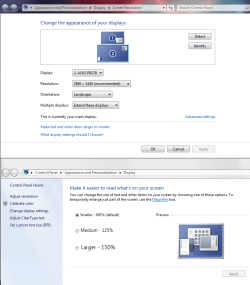
I have Windows 7 Home Premium, and so have also had to put up with all the latest updates. The problem is that after installing them, something happens to my screen resolution (all icons and text are enormous). I have already done two system restores to fix this, but after each one the updates are once again installed and so the situation reoccurs.


I should also add (since the two things are surely connected) that for a while now I've been getting messages regarding my video card drivers. I have checked with AMD, and my drivers are up to date. Yet yesterday and the day before I also got a Blue Screen of Death.


I've installed WhoCrashed, but this won't work since dumps are not enabled(or something similar!!).


I see that my laptop is ready to install the updates again...
 

My Computer

OS
Windows 7 Home Premium 64bit
Is your resolution changing perhaps after it is installing a graphics update, also could be your scaling?
 

Attachments

  • scaling.PNG
    scaling.PNG
    163.6 KB · Views: 2

My Computer

Computer type
PC/Desktop
Computer Manufacturer/Model Number
Custom
OS
10 Pro x64
CPU
Ryzen 9 3900X
Motherboard
Asrock x370 Tachi
Memory
64GB(4x16GB) DDR4
Graphics Card(s)
EVGA 1080ti FTW3
Sound Card
ASUS Xonar Essence STX (V4 Bursons), ODAC rev B, NFB-11, O2
Monitor(s) Displays
3xASUS PB278Q/R, Optoma HD142X
Screen Resolution
3x1440p, 1080p
Hard Drives
512GB 850 EVO(OS, Programs)
4TB (Movies)
3TB (Downloads)
3TB (Programs)
1TB HDD (Games)
2x6TB R1 (videos)
PSU
AX760
Case
Fractal Define R5
Cooling
NH-D15S
Keyboard
Massdrop Ctrl with Box Navy's
Mouse
G903, Alioth XXL Mat
Internet Speed
280/40
Antivirus
MBAM, ESET
Browser
Canary 64 Bit
Other Info
I also own a Thinkpad P50 Xeon 4K, X220T, X1C5
Please follow the Windows Update Posting Instructions and post the requested data

If the file is too large (8MB compressed), remove the older CBSPersist cab files until the final file is below the limit - you can always post them separately after zipping them. (the forum doesn't allow the upload of bare CAB files, for a number of reasons)

Please also post the C:\Windows\windowsudpate.log file


ALSO...
Please post the log files produced using the http://www.sevenforums.com/bsod-help-support/96879-blue-screen-death-bsod-posting-instructions.html I'll ask a specialist to drop in and have a look.
 

My Computer

Computer type
Laptop
Computer Manufacturer/Model Number
Asus K52F or Lenovo B51-80
OS
Win 7 x64 Home Premium (and x86 VirtualBox VM)/Win10
CPU
i3 370M/i7 6500U
Motherboard
Asus/Lenovo
Memory
8GB - finally :)/8GB
Graphics Card(s)
it's an i3, dude!/dual Intel&nVidia
Sound Card
onboard
Monitor(s) Displays
15.6" built-in
Screen Resolution
1366x768/1920x1080
Hard Drives
750GB Seagate internal
Sundry external drives attached to other computers on the local network
1TB SSD on the Lenovo
PSU
n/a
Internet Speed
as much as I can get - usually on a dongle/phone, so <1MB/s
Antivirus
MSE/Defender
Browser
IE11/12/Edge/Chrome/FF(if I must)
Back
Top