
Leadtek Winfast TV2000XP RM Drivers ?

Not sure about your card, but I noticed in your screen shot that it doesn't show Line In...

Violetblood, just to give a little bit more information on Deanos' post above - By default, the line-in is required only if you are sending sound into your PVR. For example, I plugged my old Play Station 2, so I could play the odd game and the line-in was configured to receive the sound from the PS2. My line-out was my realtek high definition speakers so that I could hear the sound. The picture that you show with the windows 'Recording tab' opened s for input (line-in). Are you plugging any input devices into your card?

If not, then could you please show us a picture of the 'playback tab' (line-out) and another of the PVR screen without the drop down box.

On the playback tab, open the device and ensure that it is enabled and that when something is played the green lighted activity bar lights up.

Post back and we'll take it from there.

and good luck! :D
 

My Computer

Computer Manufacturer/Model Number
Custom Hack job
OS
Windows 7 Ultimate 64 bit
CPU
Intel(R) Core(TM)2 Quad CPU Q8200 @ 2.33GHz
Motherboard
GigaByte EP45-UD3
Memory
8 GB Kingston
Graphics Card(s)
Nvidia GeForce 9600GT
Sound Card
Soundblaster Audigy
Monitor(s) Displays
AOC x2 22"
Hard Drives
2 x Samsung 500GB (RAID)
2 x Samsung 2TB
1 x WD Green 2TB
1 x Seagate 1TB
1 x Samsung 500GB
PSU
Thermaltake QFan 750W
Case
CM Scout Gaming
Cooling
Coolermaster V10
Keyboard
Microsoft Wireless Keyboard 1000
Mouse
Microsoft Wireless Optical 2000
Internet Speed
320
Other Info
Winfast PVR2000CP
LG DVD-RAM DVD/RW/DL Super Multi
Linksys WMP300Nx2 Wireless Adapter
Yay, i fixed it, i had recording muted because i thought i will hear myself back when i speak on microphone, so i put it on max and now i have sound. Thanks for all the help guys. I'm now trying to make it work with windows media player.
 

My Computer

Computer type
PC/Desktop
OS
Windows 7 x64 Ultimate
CPU
AMD Phenom X4 965 BE, 3.4Ghz
Motherboard
MSI K9N Neo V3
Memory
4096MB
Graphics Card(s)
GeForce GTX 550 Ti
Sound Card
Realtek HD Audio
Monitor(s) Displays
LG 19"
Screen Resolution
1366x768
Hard Drives
Samsung 160GB
Internet Speed
10MB/s download/upload
Yay, i fixed it, i had recording muted because i thought i will hear myself back when i speak on microphone, so i put it on max and now i have sound. Thanks for all the help guys. I'm now trying to make it work with windows media player.

Fantastic and Yay from me too, I'm glad you got it fixed. Sometimes it's the simple things. :D
 

My Computer

Computer Manufacturer/Model Number
Custom Hack job
OS
Windows 7 Ultimate 64 bit
CPU
Intel(R) Core(TM)2 Quad CPU Q8200 @ 2.33GHz
Motherboard
GigaByte EP45-UD3
Memory
8 GB Kingston
Graphics Card(s)
Nvidia GeForce 9600GT
Sound Card
Soundblaster Audigy
Monitor(s) Displays
AOC x2 22"
Hard Drives
2 x Samsung 500GB (RAID)
2 x Samsung 2TB
1 x WD Green 2TB
1 x Seagate 1TB
1 x Samsung 500GB
PSU
Thermaltake QFan 750W
Case
CM Scout Gaming
Cooling
Coolermaster V10
Keyboard
Microsoft Wireless Keyboard 1000
Mouse
Microsoft Wireless Optical 2000
Internet Speed
320
Other Info
Winfast PVR2000CP
LG DVD-RAM DVD/RW/DL Super Multi
Linksys WMP300Nx2 Wireless Adapter
@violetblood: Can you please post your solution, how did you make it work?

I have used installer and still no success. I was not able to change .ini filed due to access denied error.
But I would really like to watch TV again.

RE: the access denied error. Open notepad as an elevated administrator and then search for the path to the ini and open it.

NOTE: Exit any running PVR application first! Then do this:
1. in SEARCH type NOTEPAD
2. Right click on it and select "Run as Administrator"
3. Once opened, from the Notepad File menu select OPEN
4. Navigate to your ini file and you should be able to alter and save it.
\
 

My Computer

Computer Manufacturer/Model Number
Custom Hack job
OS
Windows 7 Ultimate 64 bit
CPU
Intel(R) Core(TM)2 Quad CPU Q8200 @ 2.33GHz
Motherboard
GigaByte EP45-UD3
Memory
8 GB Kingston
Graphics Card(s)
Nvidia GeForce 9600GT
Sound Card
Soundblaster Audigy
Monitor(s) Displays
AOC x2 22"
Hard Drives
2 x Samsung 500GB (RAID)
2 x Samsung 2TB
1 x WD Green 2TB
1 x Seagate 1TB
1 x Samsung 500GB
PSU
Thermaltake QFan 750W
Case
CM Scout Gaming
Cooling
Coolermaster V10
Keyboard
Microsoft Wireless Keyboard 1000
Mouse
Microsoft Wireless Optical 2000
Internet Speed
320
Other Info
Winfast PVR2000CP
LG DVD-RAM DVD/RW/DL Super Multi
Linksys WMP300Nx2 Wireless Adapter
My Computer

Computer type
PC/Desktop
OS
Windows 7 x64 Ultimate
CPU
AMD Phenom X4 965 BE, 3.4Ghz
Motherboard
MSI K9N Neo V3
Memory
4096MB
Graphics Card(s)
GeForce GTX 550 Ti
Sound Card
Realtek HD Audio
Monitor(s) Displays
LG 19"
Screen Resolution
1366x768
Hard Drives
Samsung 160GB
Internet Speed
10MB/s download/upload
Someone could give full and completed solution to this problem? Some algorithm?
I've tried already everything and start thinking to make dual boot with XP... :confused:
 

My Computer

OS
Win7 x64
CPU
DualCore AMD Athlon 64 X2, 2300 MHz 4400+
Motherboard
Gigabyte GA-MA78GM-S2H
Memory
2Gb
Graphics Card(s)
ATI Radeon HD 3200 (RS780)
Sound Card
ATI RS780(M) Chipset - High Definition Audio Controller
Monitor(s) Displays
Chimei 22ED
Screen Resolution
1920x1080
Hard Drives
320Gb + 500Gb + 1Tb
Case
System unit box
Cooling
Coolers
Keyboard
Teac SMX-10
Mouse
Teac SMX-10
Internet Speed
12mbit/s
Other Info
Leadtek WinFast TV2000 XP
Someone could give full and completed solution to this problem? Some algorithm?
I've tried already everything and start thinking to make dual boot with XP... :confused:

Hi Murka3000,

The solutions vary depending on
a) The chip in your card.
b) The version of the TV2000XP that you have.

Please read the previous information and let us know exactly what you've attempted. We have 'always' managed to get the card working based on the information posted earlier in this thread.

Timo
 

My Computer

Computer Manufacturer/Model Number
Custom Hack job
OS
Windows 7 Ultimate 64 bit
CPU
Intel(R) Core(TM)2 Quad CPU Q8200 @ 2.33GHz
Motherboard
GigaByte EP45-UD3
Memory
8 GB Kingston
Graphics Card(s)
Nvidia GeForce 9600GT
Sound Card
Soundblaster Audigy
Monitor(s) Displays
AOC x2 22"
Hard Drives
2 x Samsung 500GB (RAID)
2 x Samsung 2TB
1 x WD Green 2TB
1 x Seagate 1TB
1 x Samsung 500GB
PSU
Thermaltake QFan 750W
Case
CM Scout Gaming
Cooling
Coolermaster V10
Keyboard
Microsoft Wireless Keyboard 1000
Mouse
Microsoft Wireless Optical 2000
Internet Speed
320
Other Info
Winfast PVR2000CP
LG DVD-RAM DVD/RW/DL Super Multi
Linksys WMP300Nx2 Wireless Adapter
So here is a simple algorithm for TV2000 XP RM (I think RM):
1) Download these drivers and install it in Device Manager (Update driver).
2) Install ReadyDriverPlus or smth else to solve a problem with Win7 driver blocking.

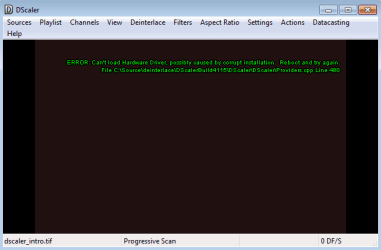
Now it works great with WinFastPVR2 and WinFastPVR (DScaler v4.1.15 shows me an error)

BUT... there is a problem with sound now.
In WinFastPVR2 and PVR there's a loud noise (spitting) but I can hear the channel sound too but really weakly.
I thought the problem is a cabel and I decided to install Win XP... But in XP it works perfectly! Although I get an error in DScaler in XP (it's doesn't matter cuz I don't like this program).

So I think the problem is in a driver.
And today I've happened to see that I can choose TV2000 as a video source in webcam 7 (webcamXP). I can choose a sound source too.
In this program I choose channel like on a radio - I move the slider frequency. So interesting that if I can see video then I hear a loud noise (like in WinFastPVRx) but after I continue to move the slider till I can't see the picture, here the sound from this channel appears clean as it should be.
So the problem is video and audio frequency discrepancy. Any ideas what to do?

PS webcam 7 works also without installing ReadyDriverPlus (with unsigned drivers).
 

Attachments

My Computer

OS
Win7 x64
CPU
DualCore AMD Athlon 64 X2, 2300 MHz 4400+
Motherboard
Gigabyte GA-MA78GM-S2H
Memory
2Gb
Graphics Card(s)
ATI Radeon HD 3200 (RS780)
Sound Card
ATI RS780(M) Chipset - High Definition Audio Controller
Monitor(s) Displays
Chimei 22ED
Screen Resolution
1920x1080
Hard Drives
320Gb + 500Gb + 1Tb
Case
System unit box
Cooling
Coolers
Keyboard
Teac SMX-10
Mouse
Teac SMX-10
Internet Speed
12mbit/s
Other Info
Leadtek WinFast TV2000 XP
Emm, anyone?
 

My Computer

OS
Win7 x64
CPU
DualCore AMD Athlon 64 X2, 2300 MHz 4400+
Motherboard
Gigabyte GA-MA78GM-S2H
Memory
2Gb
Graphics Card(s)
ATI Radeon HD 3200 (RS780)
Sound Card
ATI RS780(M) Chipset - High Definition Audio Controller
Monitor(s) Displays
Chimei 22ED
Screen Resolution
1920x1080
Hard Drives
320Gb + 500Gb + 1Tb
Case
System unit box
Cooling
Coolers
Keyboard
Teac SMX-10
Mouse
Teac SMX-10
Internet Speed
12mbit/s
Other Info
Leadtek WinFast TV2000 XP
Emm, anyone?

Sorry murka3000!
I didn't mean to leave you hanging, I was in Cambodia and unable to get on the internet.

RE: SOUND I posted this previously in another thread, so it may not all apply to you.

1. DRIVERS: Go to your manufacturers website (not MS update) and download the latest drivers for your card. It's common that the standard Windows Installed ones don't work with our old TV card.

2. Check WINDOWS 7 SOUND SETTINGS
Right click on the volume icon in the Windows 7 taskbar
First lets check the playback device without PVR.
Open 'Playback Devices' right click on the 'default device' and click test, if it works go
to the next step, if not change your default device or speakers and troubleshoot until this works.
Click on the 'Recording' tab, if PVR is on, you should see movement in the default device sound-bar. If not change this until you see movement in the default device sound-bar.

3. Check PVR SOUND SETTINGS
Ensure that the same devices as selected in your Windows 7 sound settings are the devices in your PVR settings, or that sound is forwarded correctly through your system is alternate devices are selected.

Here's my configuration....
=MY PVR=
PLAYBACK = Speakers
RECORDING = Line In (High Def)

=MY Windows 7=
Playback = SPeakers
Recording = Line in (High Def)
* Make sure on the Recording tab that you tick the 'Listen to this device' check box otherwise you won't get any audible output.

4. Check Physical connections and hardware
A fault here is unlikely if your sound works for everything else but....Just to be safe, if you have spare hardware, replace each cable/device one at a time (an isolation test) to verify that there is no fault here.

RE: Descaler - If it's not needed than uninstall it; I didn't need it for mine (it depends on the chip). If you need it because of your chip then let me know and I'll request help from 2 of our peers here that I know use it and the TV2000XP card.

Good Luck

Timo
 
Last edited:

My Computer

Computer Manufacturer/Model Number
Custom Hack job
OS
Windows 7 Ultimate 64 bit
CPU
Intel(R) Core(TM)2 Quad CPU Q8200 @ 2.33GHz
Motherboard
GigaByte EP45-UD3
Memory
8 GB Kingston
Graphics Card(s)
Nvidia GeForce 9600GT
Sound Card
Soundblaster Audigy
Monitor(s) Displays
AOC x2 22"
Hard Drives
2 x Samsung 500GB (RAID)
2 x Samsung 2TB
1 x WD Green 2TB
1 x Seagate 1TB
1 x Samsung 500GB
PSU
Thermaltake QFan 750W
Case
CM Scout Gaming
Cooling
Coolermaster V10
Keyboard
Microsoft Wireless Keyboard 1000
Mouse
Microsoft Wireless Optical 2000
Internet Speed
320
Other Info
Winfast PVR2000CP
LG DVD-RAM DVD/RW/DL Super Multi
Linksys WMP300Nx2 Wireless Adapter
So here is a simple algorithm for TV2000 XP RM (I think RM):
1) Download these drivers and install it in Device Manager (Update driver).
2) Install ReadyDriverPlus or smth else to solve a problem with Win7 driver blocking.

Now it works great with WinFastPVR2 and WinFastPVR (DScaler v4.1.15 shows me an error)

BUT... there is a problem with sound now.
In WinFastPVR2 and PVR there's a loud noise (spitting) but I can hear the channel sound too but really weakly.
I thought the problem is a cabel and I decided to install Win XP... But in XP it works perfectly! Although I get an error in DScaler in XP (it's doesn't matter cuz I don't like this program).

So I think the problem is in a driver.
And today I've happened to see that I can choose TV2000 as a video source in webcam 7 (webcamXP). I can choose a sound source too.
In this program I choose channel like on a radio - I move the slider frequency. So interesting that if I can see video then I hear a loud noise (like in WinFastPVRx) but after I continue to move the slider till I can't see the picture, here the sound from this channel appears clean as it should be.
So the problem is video and audio frequency discrepancy. Any ideas what to do?

PS webcam 7 works also without installing ReadyDriverPlus (with unsigned drivers).

Got the exact card, Tried your method at windows 7 64 bit, The drivers won't install with the only two files drivers... and the pvr2 won't work with the drivers that i think are similar to yours :/
 

My Computer

OS
64bit Ultimate
Hi ,i installed the driver and the software for WinFast Tv2000 xp for Windows7 x64 and i have a problem such as it didn't installed in device manager "multimedia controller" and "multimedia video controlller" and it gives me an error when i starting the program PVR2: "Cannot find any available BDA device". I don't know what is the problem and i need some help
I want to mention that I downloaded the driver and software from the official site for my tv tunner board recommended to Winfast Tv2000 xp Expert because Windows will not let me install them automatically
 
Last edited:

My Computer

OS
Windows 7 Ultimate x64
Sorry for getting back so late, had problems getting onto the site again...

If you are using the method I posted, then PVR2 will not work with these drivers.

You WILL need to use Dscaler to run your TV...
 

My Computer

Computer type
PC/Desktop
Computer Manufacturer/Model Number
Custom
OS
Windows 8 Pro x64
CPU
AMD Phenom II X6 1055T
Motherboard
ASUS Crosshair II Formula
Memory
8GB DDR2-800 (4 X 2GB)
Graphics Card(s)
POV 560Ti 2GB and XFX 8800 GTS 512
Sound Card
Onboard
Monitor(s) Displays
Benq G2420HDB & HP ww2207
Screen Resolution
1920x1080 @ 60Hz & 1680x1050 @ 60Hz
Hard Drives
Seagate 250GB - Boot,
Seagate 500GB x2 - in RAID as Personal Data Drive,
Seagate 2TB - As 1st data drive
Seagate 2TB - As 2nd data drive
PSU
Antec 850W
Case
Cooler Master Centurion
Cooling
Zalman CNPS9300
Keyboard
Logitech G11
Mouse
Logitech Performance MX
Internet Speed
4096 / 640 Uncapped
Antivirus
ESET NOD 32
Browser
Firefox
and where i can find it?

Before W7x64 i had x86 and it worked with driver and software from the official site Leadtek and now i had this problem with driver
 

My Computer

OS
Windows 7 Ultimate x64
Yes, it used to work.

If you want it to work now with Win 7 X64, then all you need to do is read this thread from the start, it will guide you through the whole process...

If you still struggle, then I would suggest you get a new TV card that supports Windows 7.
 

My Computer

Computer type
PC/Desktop
Computer Manufacturer/Model Number
Custom
OS
Windows 8 Pro x64
CPU
AMD Phenom II X6 1055T
Motherboard
ASUS Crosshair II Formula
Memory
8GB DDR2-800 (4 X 2GB)
Graphics Card(s)
POV 560Ti 2GB and XFX 8800 GTS 512
Sound Card
Onboard
Monitor(s) Displays
Benq G2420HDB & HP ww2207
Screen Resolution
1920x1080 @ 60Hz & 1680x1050 @ 60Hz
Hard Drives
Seagate 250GB - Boot,
Seagate 500GB x2 - in RAID as Personal Data Drive,
Seagate 2TB - As 1st data drive
Seagate 2TB - As 2nd data drive
PSU
Antec 850W
Case
Cooler Master Centurion
Cooling
Zalman CNPS9300
Keyboard
Logitech G11
Mouse
Logitech Performance MX
Internet Speed
4096 / 640 Uncapped
Antivirus
ESET NOD 32
Browser
Firefox
Back
Top