I have Samsung 850 EVO but I don't use their optimization as my PC is used for my recording studio and I have it manually optimized for recording. I tried it and one thing it did was change my "Power Plan" to something I didn't want. I had to manually reset it.
If not doing anything specifically that the Magician would interfere with, I say use it.
My Computer
Computer type
PC/Desktop
Computer Manufacturer/Model Number
My Own Build
OS
Windows 10 64 bit
CPU
Intel i7 6700K
Motherboard
ASUS ROG Maximus VIII Hero
Memory
16GB Corsair Dominator
Graphics Card(s)
Intel CPU Graphics
Sound Card
RealTek
Monitor(s) Displays
27" Dell S2719dgf
Screen Resolution
2560X1440
Hard Drives
1 TB Samsung 850 EVO SSD for Win 10 Pro
500GB Samsung 850 EVO SSD for Win 10 Insider
2 TB drive for backup
PSU
EVGA Supernova 750G2
Case
BeQuiet Silent Base 600
Cooling
Deepcool Captain 120EX
Keyboard
Microsoft Wireless 2000
Mouse
Microsoft wireless
Internet Speed
100 MB/sec (Cable)
Antivirus
Microsoft Defender and Malwarebytes
Browser
Edge/Firefox
Other Info
Cakewalk (Sonar) by BandLab and Studio One 4.1 Pro recording studio software. MOTU 896Mk3 Hybrid recording interface, Frontier Tranzport wireless control unit, Behringer X-Touch Control Surface.
Five USB connected optical drives for CD Audio production using Nero BurningROM
I have SAMSUNG 850 pro version and I just recently cloned my windows 7 partition on to this new SSD using their own software.
Cloning went smootly and I was able to boot in Windows from the SSD right away. Even driver letters remaind C as it was on the old HDD.
What I didint do is used that software to optimize OS. Honestly Im afraid that it will mess up some fine tuned settings in the OS...or Im just being paranoid...
Hi,
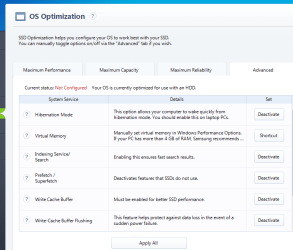
Yea I used maximum reliability and about all it did was create a new power plan that I tweaked a little bit
All the cache... stuff is already recommended to disable so I don't see why doing it manually or through magician is a big deal
As you can see you can re-enable anything in advanced if you start having issues.
My Computer
Computer type
PC/Desktop
Computer Manufacturer/Model Number
Custom assembled by me :}
OS
Win-7-Pro64bit 7-H-Prem-64bit
CPU
i7-5930K 2nd i9-9940x both water blocked VRM's too
2nd ASUS X299 Apex/Intel i9-9940x with Custom water loop/7H-Prem-x64/Corsair 450D case/Ram Trident-z 3600C16 4x8gb / Samsung970Evo plus 500gb SSD/Dual ssd EZ swap evo/PSU EVGA SuperNova 1200w-P2 80+Platinum/GPU Titan Xp /8-ML-140 on push-pull on 2-280GTX rads
HAVOC, have you got the Samsung Magician SSD manual, if not you can download one from this Samsung website. Once you have done that you can read through it & decide on what settings might suit you best.
I never even opened the envelope that was in the SSD box. I downloaded Magician from the website. I can't find the SSD manual on the website so I'll look on the disc.
My Computer
Computer type
PC/Desktop
Computer Manufacturer/Model Number
custom build
OS
Windows 7 Professional 64bit
CPU
Intel i7-5960X
Motherboard
EVGA X99 Classified
Memory
64GB Corsair Dominator 2400MHz
Graphics Card(s)
3 EVGA GTX980's
Sound Card
on board
Monitor(s) Displays
3 Dell E2715H 27"
Screen Resolution
1920x1080 (5760x1080)
Hard Drives
Samsung 950 Pro 1TB M.2 SSD,
Western Digital Black 2TB HDD's x5
Western Digital Black 1TB HDD's x3
It seems that Samsung no longer have the user manual that was available when I bought mine.
You could select one of the options on your screen shot, such as Maximum Reliability or one of the others. This will probably require the system to reboot to make the change.
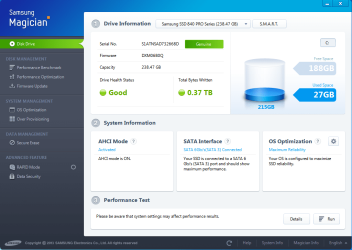
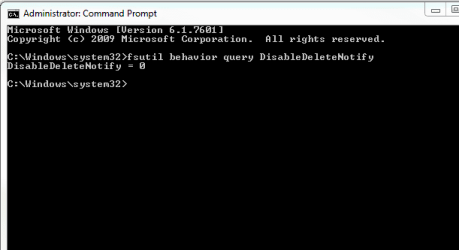
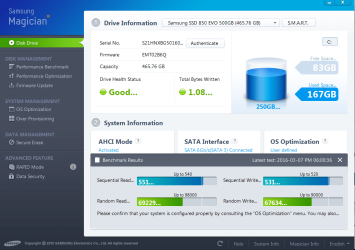
Is your system set for AHCI & is the Trim set up correctly.
2nd ASUS X299 Apex/Intel i9-9940x with Custom water loop/7H-Prem-x64/Corsair 450D case/Ram Trident-z 3600C16 4x8gb / Samsung970Evo plus 500gb SSD/Dual ssd EZ swap evo/PSU EVGA SuperNova 1200w-P2 80+Platinum/GPU Titan Xp /8-ML-140 on push-pull on 2-280GTX rads
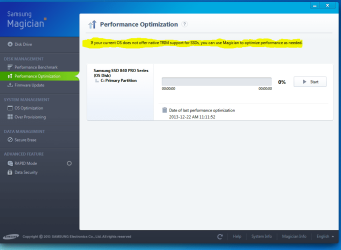
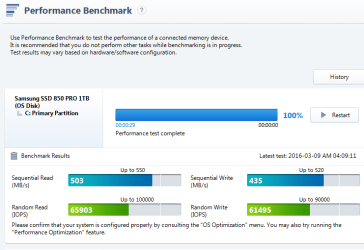
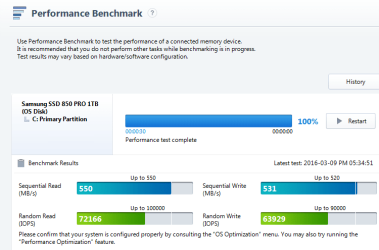
Have you run the Performance Optimisation Feature as mentioned in the screen shot of your Post #13.
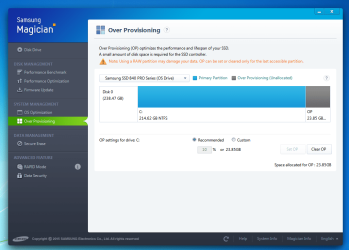
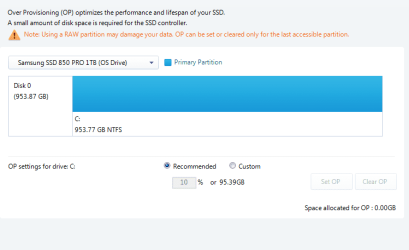
You can also run the Over Provisioning, which will utilise a percentage of your disc for garbage removal & other tasks, that prolong the life of the SSD.
2nd ASUS X299 Apex/Intel i9-9940x with Custom water loop/7H-Prem-x64/Corsair 450D case/Ram Trident-z 3600C16 4x8gb / Samsung970Evo plus 500gb SSD/Dual ssd EZ swap evo/PSU EVGA SuperNova 1200w-P2 80+Platinum/GPU Titan Xp /8-ML-140 on push-pull on 2-280GTX rads
Over provisioning is simply available space on the disk it does not have to be a set amount unless the disk is near full.
If the disk is full which is common if people use a smaller 120gb... ssd and is using 110gbs.. on it then using a set amount will insure only the sdd's firmware will use that amount for OP.
If you look at your disk size in disk management I wouldn't be surprised if it shows less that amount you set for or magician allotted for OP.
My point was Havoc's disk is large and C partition is way too big.
My Computer
Computer type
PC/Desktop
Computer Manufacturer/Model Number
Custom assembled by me :}
OS
Win-7-Pro64bit 7-H-Prem-64bit
CPU
i7-5930K 2nd i9-9940x both water blocked VRM's too
2nd ASUS X299 Apex/Intel i9-9940x with Custom water loop/7H-Prem-x64/Corsair 450D case/Ram Trident-z 3600C16 4x8gb / Samsung970Evo plus 500gb SSD/Dual ssd EZ swap evo/PSU EVGA SuperNova 1200w-P2 80+Platinum/GPU Titan Xp /8-ML-140 on push-pull on 2-280GTX rads
2nd ASUS X299 Apex/Intel i9-9940x with Custom water loop/7H-Prem-x64/Corsair 450D case/Ram Trident-z 3600C16 4x8gb / Samsung970Evo plus 500gb SSD/Dual ssd EZ swap evo/PSU EVGA SuperNova 1200w-P2 80+Platinum/GPU Titan Xp /8-ML-140 on push-pull on 2-280GTX rads