Libraries Icons - Change

How to Change a Library Icon in Windows 7

   Information
This will show you how to change any Windows 7 Library icon to any icon that you would like instead of the default icon.

   Note
If you would like to use a custom library icon (.ico file) on your computer and would like it to also have it display on another computer that joined or is added to the homegroup as well, then you will need to make sure that the .ico file you are using is saved at a location that each computer on the homegroup as full access to first. For example, in a C:\Users\Public folder or shared user folder.

   Tip
For more on libraries managed code, see: Windows 7 Libraries - Managed Code - Windows 7 for Developers

   Warning
You will need to use a 256x256 pixel icon that was made for Windows 7 and Vista for them to display properly at all of the available icon view sizes in Windows 7. For more about these type of icons, see: Icons in Windows Vista


OPTION ONE

To Change a Library Icon Using the "Libraries Icons" Program


1. If you have not already, then click on the Download button below and download and save the ZIP file below to your desktop. Next, extract (drag and drop) the LibraryIconChanger.exe file from within the ZIP file.
Replace_Librarie_Icons_by_bluefisch200.zip

Download


2. Run the LibraryIconChanger.exe file.
NOTE: This is a standalone EXE file that only runs and does not install on your computer.

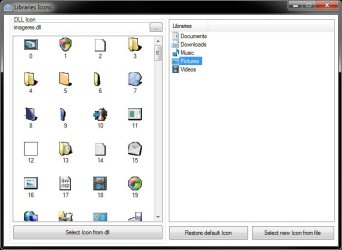
3. In the right pane, select (highlight) the library that you want to change or restore the default icon of. (see screenshot below)
Libraries_Icons.jpg
4. Do either step 5, 6, or 7 below for what you would like to do.

5. To Change a Library Icon with a Icon from a DLL File
NOTE: By default, the available DLL icons are from the C:\Windows\System32\imageres.dll file. If you would like to select a icon from within a different DLL icon, then click on the browse browse.jpg button, navigate to, and select the DLL file.
A) In the left pane, select an available icon, and click on the Select Icon from dll button. (see screenshot below step 3)

B) Go to step 8.
6. To Change a Library Icon with a Icon File of Your Choice
A) Click on the Select new Icon from file button. (see screenshot below step 3)

B) Navigate to and select a .ico file that you want to use, then click on Open.

C) Go to step 8.
7. To Restore the Default Icon of a Library
A) Click on the Restore default icon button. (see screenshot below step 3)

B) Continue on to step 8.
8. Close the Libraries Icons program. (see screenshot below step 3)

9. Log off and log on, or restart the computer to apply.


OPTION TWO

To Manually Change a Library Icon


1. Set Folder Options to Show hidden files, folders, and drives.

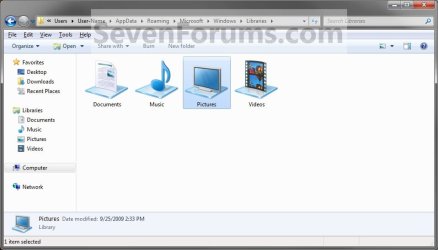
2. In Windows Explorer, navigate to the location below for the library you want to change the icon of. (See screenshot below)
Libraries folder: (ex: Documents, Music, Pictures, Videos)
C:\Users\(User Name)\AppData\Roaming\Microsoft\Windows\Libraries
For "Recorded TV" Library
C:\Users\Public\Libraries
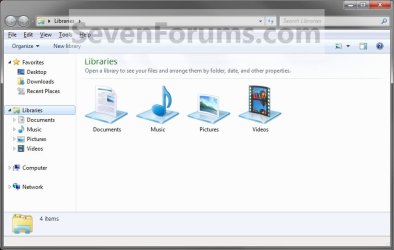
Libraries.jpg
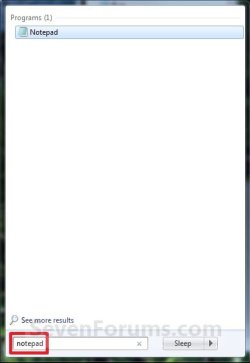
3. Open Notepad by one of the methods below. (See screenshots below)
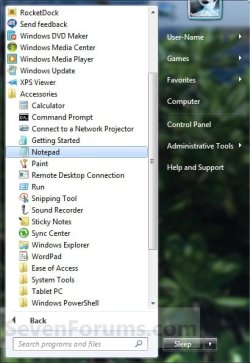
Start_Menu1.jpg

Start_Menu2.jpg

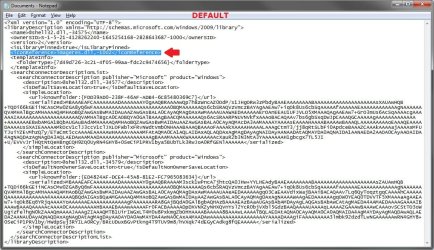
4. Drag the Library icon (from step 2) that you want to change into the blank Notepad and drop it. (See screenshots below)


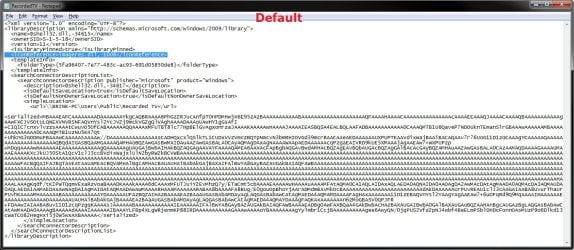
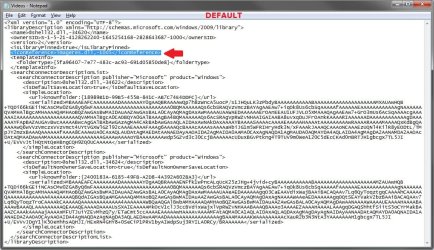
NOTE: Libraries are .xml files, so they can be edited in Notepad. These are the default entries for the Libraries.
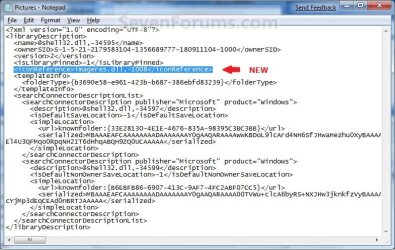
  • Documents default- <iconReference>imageres.dll,-1002</iconReference>
  • Music default - <iconReference>imageres.dll,-1004</iconReference>
  • Pictures default - <iconReference>imageres.dll,-1003</iconReference>
  • Recorded TV default - <iconReference>imageres.dll,-1008</iconReference>
  • Videos default - <iconReference>imageres.dll,-1005</iconReference>
Documents.jpg

Music.jpg

Pictures.jpg

Recorded_TV.jpg

Videos.jpg

5. To Use a Custom Icon of Yours
A) Look for the line below. (See screenshots above)
NOTE: If this is a new Library that you have created, then the line will not be there and you will need to add the <iconReference>"path to icon w/file extension"</iconReference> line directly under the <isLibraryPinned>-1</isLibraryPinned> line entry.
<iconReference>"path to icon w/file extension"</iconReference>
B) In Notepad, substitute path to icon w/file extension in quotes to the full path of the custom icon that you want to use for the default Library icon instead.

C) Go to step 7.
6. To Use another Windows 7 Icon
A) Download and install the free program IconViewer.
NOTE: Be sure to download the correct 32-bit or 64-bit version for your Windows 7.

B) In Windows Explorer navigate to the .exe (ex: for program icons) or .dll (ex: Windows 7 icons) file that contains the icon that you want to use for the default Library icon, then right click on the file, click on Properties, and the Icons tab. (See screenshot below)
NOTE: The most common Windows 7 icons come from the C:\Windows\System32\imageres.dll file.

C) Look for the line below. (See screenshots below step 4)
NOTE: If this is a new Library that you have created, then the line will not be there and you will need to add the <iconReference>path to icon w/file extension,-icon#</iconReference> line directly under the <isLibraryPinned>-1</isLibraryPinned> line entry.
<iconReference>path to icon w/file extension,-icon#</iconReference>
D) In Notepad, substitute path to icon w/file extension to the full path of the file that includes the icon you want from step 6B, then substitute icon# with the icon number under the icon you want from step 6B. (See screenshot below)
NOTE: If the file that includes the icon you want in step 6B is in the C:\Windows\System32 folder, then you will just need to type in the file name instead of the full path.


FOR EXAMPLE:
  • Let's say I want to change the Pictures Library icon to the icon #1008 (step 6B) included in the C:\Windows\System32\imageres.dll file. I would use imageres.dll,-1008. (See screenshot below)
  • Let's say the icon #1008 (step 6B) was included in the C:\Program Files\imageres.dll file. I would use C:\Program Files\imageres.dll,-1008 instead.
imageres_Properties.jpg
7. In Notepad, click on File and Save, then close Notepad. (See screenshot below)
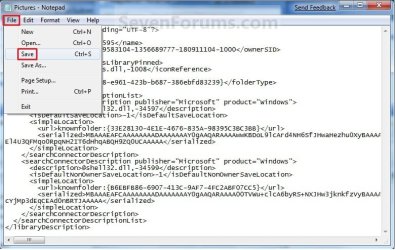
Save.jpg
8. The Library icon will now be changed. (See screenshot below)
NOTE: For example, the default Pictures Library icon.
New_Library_Icon.jpg
9. Repeat steps 3 to 8 if you would like to change any more Library icons.

10. When done, set Folder Options to Don't show hidden files, folders, and drives.

11. Log off and log on, or restart the computer to fully apply the icon change to all locations for this library folder.
That's it,
Shawn


Related Tutorials


Attachments

  • New_Pictures.jpg
    New_Pictures.jpg
    81.4 KB · Views: 384
Last edited:
Hi Shawn,

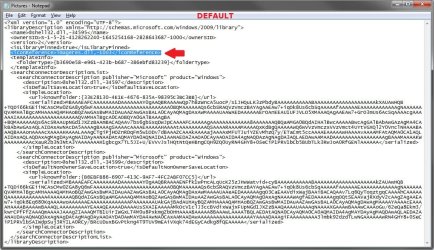
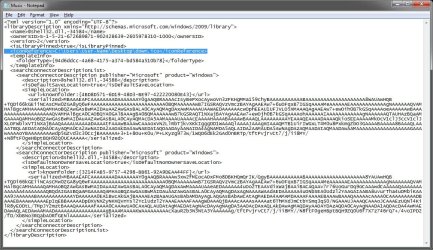
I think the default xml entries have changed just slightly. Here is my default music entry to show as an example next to your original default entries at the beginning of the tutorial.

I've used Word Wrap in Notepad to show everything, but I've highlighted a couple of the slight differences.

Default Music library example:


View attachment 12026

Yep, it looks like they changed it from -1 to true along with the description now. I'll update them now. Nice catch.

Thank you Aaron. :)

Edit:
Changed.
 

My Computer

Computer type
PC/Desktop
Computer Manufacturer/Model Number
Self built custom
OS
64-bit Windows 11 Pro for Workstations
CPU
Intel i7-8700K OC'd to 5 GHz
Motherboard
ASUS ROG Maximus XI Formula Z390
Memory
64 GB (4x16GB) G.SKILL TridentZ RGB DDR4 3600 MHz
Graphics Card(s)
ASUS ROG-STRIX-GTX1080TI-O11G-GAMING
Sound Card
Integrated
Monitor(s) Displays
2 x Samsung Odyssey G7 27"
Screen Resolution
2560x1440
Hard Drives
1TB Samsung 990 PRO M.2,
4TB Samsung 990 PRO PRO M.2,
TerraMaster F8 SSD Plus NAS
PSU
Seasonic Prime Titanium 850W
Case
Thermaltake Core P3
Cooling
Corsair Hydro H115i
Keyboard
Logitech wireless K800
Mouse
Logitech MX Master 4
Internet Speed
2 Gb/s Download and 100 Mb/s Upload
Antivirus
Malwarebyte Anti-Malware Premium
Browser
Google Chrome
Other Info
Logitech Z625 speaker system,
Logitech BRIO 4K Pro webcam,
HP Color LaserJet Pro MFP M477fdn,
APC SMART-UPS RT 1000 XL - SURT1000XLI,
Galaxy S23 Plus phone
No problem, thanks. :)
 

My Computer

Computer type
PC/Desktop
Computer Manufacturer/Model Number
Airbot 2.0
OS
Windows 7 Ultimate x64 SP1
CPU
Core i7 920 (D0) @ 4Ghz, *26c idle *65c full load on air
Motherboard
Asus P6X58D Premium - Sata 6Gb/s - USB 3.0
Memory
12GB DDR3 Corsair Dominator -CMD12GX3M6A1600C8 at 1600MHz
Graphics Card(s)
Zotac Geforce GTX 770
Sound Card
ASUS Xonar D2X
Monitor(s) Displays
1 LG 24" Flatron W2453V-PF 1 Samsung 24" P2450H both 2ms RT
Screen Resolution
1920x1080@60hz
Hard Drives
1 Samsung 250GB 840 Evo SSD
1 OCZ Vertex2 180GB SSD
1 TB Samsung Spinpoint F1 7200RPM 32MB cache
2 500GB WD Caviar Blacks 7200RPM 32MB cache (WD5001AALS)

Pioneer DVD Burner DVR-S18M
PSU
Corsair HX1000W
Case
Cooler Master HAF 932
Cooling
Case Fans *3 230mm, *1 140mm/CPU - *Tuniq Tower 120 Extreme
Keyboard
Logitech Wireless MK700
Mouse
Logitech Wireless MK700
Internet Speed
DL 15 Mbps UL 0.98 Mbps
Antivirus
None
Browser
Firefox Nightly
Other Info
Processor-7.7 *RAM- 7.9 *Graphics-7.9 *Gaming Graphics- 7.9 *SSD- 7.8 W.E.I final score= 7.7
*Phone- LG Nexus 5
Something Weird happend

I drag one of the libary to notepad and edit it. The second time i try to drag and drop to notepad it wont open anything, i get no acsses to open the files. Whats wrong?
 

My Computer

Computer Manufacturer/Model Number
MY OWN
OS
Windows 7 x64
CPU
Intel Q9550 OVERCLOCKED 4.2Ghz
Motherboard
ASUS MAXIMUS FORMULA 2
Memory
CORSAIR 8GB
Graphics Card(s)
2X XFX 4890 1GB CROSSFIRE
Sound Card
SOUNDBLASTER X-FI 2
Monitor(s) Displays
TWO 26 INCH SAMUNG ROSE BLACK 26 + TWO 24 INCH ROSE BLACK
Screen Resolution
1920x1200 + 1680X1050
Hard Drives
INTEL 64GB X-25E SSD + 2GB WD BLACK CAVIAR
PSU
ZALMAN 1000W
Case
COOLERMASTER STACKER 832
Cooling
ZALMAN RESERATOR WATERCOOLING + 10 FANS
Keyboard
RAZER LYCOSA
Mouse
MICROSOFT SIDEWINDER X8
Internet Speed
100/100 MBIT
Hello Djinn, and welcome to Seven Forums.

Are you dragging the library from the hidden C:\Users\(User Name)\AppData\Roaming\Microsoft\Windows\Libraries location? It will not work opened from any other location.

Hope this helps,
Shawn
 

My Computer

Computer type
PC/Desktop
Computer Manufacturer/Model Number
Self built custom
OS
64-bit Windows 11 Pro for Workstations
CPU
Intel i7-8700K OC'd to 5 GHz
Motherboard
ASUS ROG Maximus XI Formula Z390
Memory
64 GB (4x16GB) G.SKILL TridentZ RGB DDR4 3600 MHz
Graphics Card(s)
ASUS ROG-STRIX-GTX1080TI-O11G-GAMING
Sound Card
Integrated
Monitor(s) Displays
2 x Samsung Odyssey G7 27"
Screen Resolution
2560x1440
Hard Drives
1TB Samsung 990 PRO M.2,
4TB Samsung 990 PRO PRO M.2,
TerraMaster F8 SSD Plus NAS
PSU
Seasonic Prime Titanium 850W
Case
Thermaltake Core P3
Cooling
Corsair Hydro H115i
Keyboard
Logitech wireless K800
Mouse
Logitech MX Master 4
Internet Speed
2 Gb/s Download and 100 Mb/s Upload
Antivirus
Malwarebyte Anti-Malware Premium
Browser
Google Chrome
Other Info
Logitech Z625 speaker system,
Logitech BRIO 4K Pro webcam,
HP Color LaserJet Pro MFP M477fdn,
APC SMART-UPS RT 1000 XL - SURT1000XLI,
Galaxy S23 Plus phone
No i will try but i drag it direcly from my computer and it worked now i wont.
 

My Computer

Computer Manufacturer/Model Number
MY OWN
OS
Windows 7 x64
CPU
Intel Q9550 OVERCLOCKED 4.2Ghz
Motherboard
ASUS MAXIMUS FORMULA 2
Memory
CORSAIR 8GB
Graphics Card(s)
2X XFX 4890 1GB CROSSFIRE
Sound Card
SOUNDBLASTER X-FI 2
Monitor(s) Displays
TWO 26 INCH SAMUNG ROSE BLACK 26 + TWO 24 INCH ROSE BLACK
Screen Resolution
1920x1200 + 1680X1050
Hard Drives
INTEL 64GB X-25E SSD + 2GB WD BLACK CAVIAR
PSU
ZALMAN 1000W
Case
COOLERMASTER STACKER 832
Cooling
ZALMAN RESERATOR WATERCOOLING + 10 FANS
Keyboard
RAZER LYCOSA
Mouse
MICROSOFT SIDEWINDER X8
Internet Speed
100/100 MBIT
Djinn, I'm happy to hear that you got it sorted out. :)
 

My Computer

Computer type
PC/Desktop
Computer Manufacturer/Model Number
Self built custom
OS
64-bit Windows 11 Pro for Workstations
CPU
Intel i7-8700K OC'd to 5 GHz
Motherboard
ASUS ROG Maximus XI Formula Z390
Memory
64 GB (4x16GB) G.SKILL TridentZ RGB DDR4 3600 MHz
Graphics Card(s)
ASUS ROG-STRIX-GTX1080TI-O11G-GAMING
Sound Card
Integrated
Monitor(s) Displays
2 x Samsung Odyssey G7 27"
Screen Resolution
2560x1440
Hard Drives
1TB Samsung 990 PRO M.2,
4TB Samsung 990 PRO PRO M.2,
TerraMaster F8 SSD Plus NAS
PSU
Seasonic Prime Titanium 850W
Case
Thermaltake Core P3
Cooling
Corsair Hydro H115i
Keyboard
Logitech wireless K800
Mouse
Logitech MX Master 4
Internet Speed
2 Gb/s Download and 100 Mb/s Upload
Antivirus
Malwarebyte Anti-Malware Premium
Browser
Google Chrome
Other Info
Logitech Z625 speaker system,
Logitech BRIO 4K Pro webcam,
HP Color LaserJet Pro MFP M477fdn,
APC SMART-UPS RT 1000 XL - SURT1000XLI,
Galaxy S23 Plus phone
THX for you help, you made my day, how come it worked at first just drag and drop from my computer and now it wont.
 

My Computer

Computer Manufacturer/Model Number
MY OWN
OS
Windows 7 x64
CPU
Intel Q9550 OVERCLOCKED 4.2Ghz
Motherboard
ASUS MAXIMUS FORMULA 2
Memory
CORSAIR 8GB
Graphics Card(s)
2X XFX 4890 1GB CROSSFIRE
Sound Card
SOUNDBLASTER X-FI 2
Monitor(s) Displays
TWO 26 INCH SAMUNG ROSE BLACK 26 + TWO 24 INCH ROSE BLACK
Screen Resolution
1920x1200 + 1680X1050
Hard Drives
INTEL 64GB X-25E SSD + 2GB WD BLACK CAVIAR
PSU
ZALMAN 1000W
Case
COOLERMASTER STACKER 832
Cooling
ZALMAN RESERATOR WATERCOOLING + 10 FANS
Keyboard
RAZER LYCOSA
Mouse
MICROSOFT SIDEWINDER X8
Internet Speed
100/100 MBIT
It should have never worked if dragged directly from computer. The only thing I can think of is that the two windows do look similiar, and that you may have just thought it was the computer window the first time. :confused:
 

My Computer

Computer type
PC/Desktop
Computer Manufacturer/Model Number
Self built custom
OS
64-bit Windows 11 Pro for Workstations
CPU
Intel i7-8700K OC'd to 5 GHz
Motherboard
ASUS ROG Maximus XI Formula Z390
Memory
64 GB (4x16GB) G.SKILL TridentZ RGB DDR4 3600 MHz
Graphics Card(s)
ASUS ROG-STRIX-GTX1080TI-O11G-GAMING
Sound Card
Integrated
Monitor(s) Displays
2 x Samsung Odyssey G7 27"
Screen Resolution
2560x1440
Hard Drives
1TB Samsung 990 PRO M.2,
4TB Samsung 990 PRO PRO M.2,
TerraMaster F8 SSD Plus NAS
PSU
Seasonic Prime Titanium 850W
Case
Thermaltake Core P3
Cooling
Corsair Hydro H115i
Keyboard
Logitech wireless K800
Mouse
Logitech MX Master 4
Internet Speed
2 Gb/s Download and 100 Mb/s Upload
Antivirus
Malwarebyte Anti-Malware Premium
Browser
Google Chrome
Other Info
Logitech Z625 speaker system,
Logitech BRIO 4K Pro webcam,
HP Color LaserJet Pro MFP M477fdn,
APC SMART-UPS RT 1000 XL - SURT1000XLI,
Galaxy S23 Plus phone
Iam 100% sure that I drag it because i dident even know i should go to the directory and choose show hide files. Thats odd then.
 

My Computer

Computer Manufacturer/Model Number
MY OWN
OS
Windows 7 x64
CPU
Intel Q9550 OVERCLOCKED 4.2Ghz
Motherboard
ASUS MAXIMUS FORMULA 2
Memory
CORSAIR 8GB
Graphics Card(s)
2X XFX 4890 1GB CROSSFIRE
Sound Card
SOUNDBLASTER X-FI 2
Monitor(s) Displays
TWO 26 INCH SAMUNG ROSE BLACK 26 + TWO 24 INCH ROSE BLACK
Screen Resolution
1920x1200 + 1680X1050
Hard Drives
INTEL 64GB X-25E SSD + 2GB WD BLACK CAVIAR
PSU
ZALMAN 1000W
Case
COOLERMASTER STACKER 832
Cooling
ZALMAN RESERATOR WATERCOOLING + 10 FANS
Keyboard
RAZER LYCOSA
Mouse
MICROSOFT SIDEWINDER X8
Internet Speed
100/100 MBIT
Strange indeed.
 

My Computer

Computer type
PC/Desktop
Computer Manufacturer/Model Number
Self built custom
OS
64-bit Windows 11 Pro for Workstations
CPU
Intel i7-8700K OC'd to 5 GHz
Motherboard
ASUS ROG Maximus XI Formula Z390
Memory
64 GB (4x16GB) G.SKILL TridentZ RGB DDR4 3600 MHz
Graphics Card(s)
ASUS ROG-STRIX-GTX1080TI-O11G-GAMING
Sound Card
Integrated
Monitor(s) Displays
2 x Samsung Odyssey G7 27"
Screen Resolution
2560x1440
Hard Drives
1TB Samsung 990 PRO M.2,
4TB Samsung 990 PRO PRO M.2,
TerraMaster F8 SSD Plus NAS
PSU
Seasonic Prime Titanium 850W
Case
Thermaltake Core P3
Cooling
Corsair Hydro H115i
Keyboard
Logitech wireless K800
Mouse
Logitech MX Master 4
Internet Speed
2 Gb/s Download and 100 Mb/s Upload
Antivirus
Malwarebyte Anti-Malware Premium
Browser
Google Chrome
Other Info
Logitech Z625 speaker system,
Logitech BRIO 4K Pro webcam,
HP Color LaserJet Pro MFP M477fdn,
APC SMART-UPS RT 1000 XL - SURT1000XLI,
Galaxy S23 Plus phone
Thanks so much Brink, the ugly defualt icon has been bugging me for ages now. Nice trick. :)
 

My Computer

Computer Manufacturer/Model Number
HP Touchsmart IQ771.uk
OS
Windows 7 Ultimate x64
CPU
AMD Turion(tm) 64 X2 Mobile Technology TL-56
Motherboard
ASUS Pheonix
Memory
3GB Nanya PC2-6400 DDR2-SDRAM SO-DIM (400MHz)
Graphics Card(s)
NVIDIA GeForce Go 7600 256MB GDDR3 SDRAM
Sound Card
High Definition Intergrated NVIDIA MCP51
Monitor(s) Displays
46" Sony Bravia HDTV
Screen Resolution
1600x1200
Hard Drives
1.5TB Samsug
320GB Seagate ST3320820AS - SATA 3Gb/s 8MB
500GB Maxtor Basics STM305003EHD301-RK
Internet Speed
↓6.32 Mb/s ↑0.35 Mb/s ↔26ms
Other Info
BIOS - American Megatrends Inc. 5.07
Ethernet Port - NVIDIA nForce 10/100/1000 Mbps
DVD Drive - TSSTcorp DVDR/RW TS-T632L
You're welcome Rsvr85. :)
 

My Computer

Computer type
PC/Desktop
Computer Manufacturer/Model Number
Self built custom
OS
64-bit Windows 11 Pro for Workstations
CPU
Intel i7-8700K OC'd to 5 GHz
Motherboard
ASUS ROG Maximus XI Formula Z390
Memory
64 GB (4x16GB) G.SKILL TridentZ RGB DDR4 3600 MHz
Graphics Card(s)
ASUS ROG-STRIX-GTX1080TI-O11G-GAMING
Sound Card
Integrated
Monitor(s) Displays
2 x Samsung Odyssey G7 27"
Screen Resolution
2560x1440
Hard Drives
1TB Samsung 990 PRO M.2,
4TB Samsung 990 PRO PRO M.2,
TerraMaster F8 SSD Plus NAS
PSU
Seasonic Prime Titanium 850W
Case
Thermaltake Core P3
Cooling
Corsair Hydro H115i
Keyboard
Logitech wireless K800
Mouse
Logitech MX Master 4
Internet Speed
2 Gb/s Download and 100 Mb/s Upload
Antivirus
Malwarebyte Anti-Malware Premium
Browser
Google Chrome
Other Info
Logitech Z625 speaker system,
Logitech BRIO 4K Pro webcam,
HP Color LaserJet Pro MFP M477fdn,
APC SMART-UPS RT 1000 XL - SURT1000XLI,
Galaxy S23 Plus phone
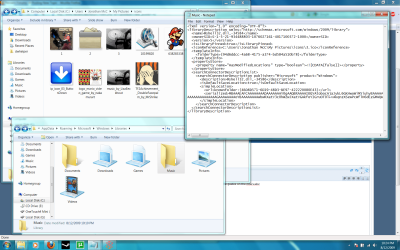
i'm having a problem it's not working for me
here's the pictures, it's not showing up
 

Attachments

  • Untitled.png
    Untitled.png
    214.3 KB · Views: 281

My Computer

OS
WIndows 7
Hello Jon, and welcome to Seven Forums.

Could you upload and attach your icon here? I'll test it out to see what may be the problem.

Did you refresh the Libraries window afterwards to see if that may be it?
 

My Computer

Computer type
PC/Desktop
Computer Manufacturer/Model Number
Self built custom
OS
64-bit Windows 11 Pro for Workstations
CPU
Intel i7-8700K OC'd to 5 GHz
Motherboard
ASUS ROG Maximus XI Formula Z390
Memory
64 GB (4x16GB) G.SKILL TridentZ RGB DDR4 3600 MHz
Graphics Card(s)
ASUS ROG-STRIX-GTX1080TI-O11G-GAMING
Sound Card
Integrated
Monitor(s) Displays
2 x Samsung Odyssey G7 27"
Screen Resolution
2560x1440
Hard Drives
1TB Samsung 990 PRO M.2,
4TB Samsung 990 PRO PRO M.2,
TerraMaster F8 SSD Plus NAS
PSU
Seasonic Prime Titanium 850W
Case
Thermaltake Core P3
Cooling
Corsair Hydro H115i
Keyboard
Logitech wireless K800
Mouse
Logitech MX Master 4
Internet Speed
2 Gb/s Download and 100 Mb/s Upload
Antivirus
Malwarebyte Anti-Malware Premium
Browser
Google Chrome
Other Info
Logitech Z625 speaker system,
Logitech BRIO 4K Pro webcam,
HP Color LaserJet Pro MFP M477fdn,
APC SMART-UPS RT 1000 XL - SURT1000XLI,
Galaxy S23 Plus phone
yeah i tried refreshing
here's an png file since i can't upload .ico files
 

Attachments

  • 638283338.png
    638283338.png
    11.3 KB · Views: 2,462

My Computer

OS
WIndows 7
Jon,

You can place the .ico file in a ZIP folder and upload that instead. I would need to see the actual .ico file that you are using to help rule out if there may be a problem with it as well.
 

My Computer

Computer type
PC/Desktop
Computer Manufacturer/Model Number
Self built custom
OS
64-bit Windows 11 Pro for Workstations
CPU
Intel i7-8700K OC'd to 5 GHz
Motherboard
ASUS ROG Maximus XI Formula Z390
Memory
64 GB (4x16GB) G.SKILL TridentZ RGB DDR4 3600 MHz
Graphics Card(s)
ASUS ROG-STRIX-GTX1080TI-O11G-GAMING
Sound Card
Integrated
Monitor(s) Displays
2 x Samsung Odyssey G7 27"
Screen Resolution
2560x1440
Hard Drives
1TB Samsung 990 PRO M.2,
4TB Samsung 990 PRO PRO M.2,
TerraMaster F8 SSD Plus NAS
PSU
Seasonic Prime Titanium 850W
Case
Thermaltake Core P3
Cooling
Corsair Hydro H115i
Keyboard
Logitech wireless K800
Mouse
Logitech MX Master 4
Internet Speed
2 Gb/s Download and 100 Mb/s Upload
Antivirus
Malwarebyte Anti-Malware Premium
Browser
Google Chrome
Other Info
Logitech Z625 speaker system,
Logitech BRIO 4K Pro webcam,
HP Color LaserJet Pro MFP M477fdn,
APC SMART-UPS RT 1000 XL - SURT1000XLI,
Galaxy S23 Plus phone
yeah i tried refreshing
here's an png file since i can't upload .ico files
lmao...that was the last icon I expected to be uploaded...have a game library do you?
 

My Computer

Computer Manufacturer/Model Number
Compal JFT02 (Custom Build Laptop)
OS
Windows 7 Home Premium x64 - Mac OS X 10.6.4 x64
CPU
Intel Core 2 Duo T9300 2.5 GHz
Motherboard
JFT02
Memory
4GB Kingston DDR2-800
Graphics Card(s)
NVIDIA Geforce 8600M GT (512MB Model)
Sound Card
Realtek HD Audio
Monitor(s) Displays
WUXGA Standard Laptop Display
Screen Resolution
1680*1050
Hard Drives
Toshiba 320GB 5400RPM Laptop HD
PSU
Standard Laptop Power Supply
Case
Standard Laptop Case
Cooling
Standard Laptop Cooling
Keyboard
Standard Laptop 105 Key-Keyboard
Mouse
Synaptics Touchpad
Internet Speed
Verizion Online DSL 3360/864 kbs (dl/up)
John,

Those icons seem to work fine for me. I did notice that we now have to log off and log on to fully apply the icon change to all locations of the library folder though.

Music.jpg
 

My Computer

Computer type
PC/Desktop
Computer Manufacturer/Model Number
Self built custom
OS
64-bit Windows 11 Pro for Workstations
CPU
Intel i7-8700K OC'd to 5 GHz
Motherboard
ASUS ROG Maximus XI Formula Z390
Memory
64 GB (4x16GB) G.SKILL TridentZ RGB DDR4 3600 MHz
Graphics Card(s)
ASUS ROG-STRIX-GTX1080TI-O11G-GAMING
Sound Card
Integrated
Monitor(s) Displays
2 x Samsung Odyssey G7 27"
Screen Resolution
2560x1440
Hard Drives
1TB Samsung 990 PRO M.2,
4TB Samsung 990 PRO PRO M.2,
TerraMaster F8 SSD Plus NAS
PSU
Seasonic Prime Titanium 850W
Case
Thermaltake Core P3
Cooling
Corsair Hydro H115i
Keyboard
Logitech wireless K800
Mouse
Logitech MX Master 4
Internet Speed
2 Gb/s Download and 100 Mb/s Upload
Antivirus
Malwarebyte Anti-Malware Premium
Browser
Google Chrome
Other Info
Logitech Z625 speaker system,
Logitech BRIO 4K Pro webcam,
HP Color LaserJet Pro MFP M477fdn,
APC SMART-UPS RT 1000 XL - SURT1000XLI,
Galaxy S23 Plus phone
Hmm weird it only works if i put the image on the desktop and not any other folder, Thank you :)
 

My Computer

OS
WIndows 7
Back
Top