Libraries - Restore Default

How to Restore the Default Libraries in Windows 7 and Windows 8


   Information
In case you have a missing Library, this will show you how to restore all of the default Libraries in Windows 7.
   Note
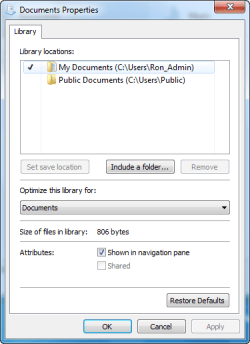
Libraries let you access and arrange items from one or more folders quickly without moving them from their original location. Libraries themselves don't store your files or folders. Instead, they point to different locations on a hard disk or external drive attached to your computer. This gives you easy access to a category of files no matter where they are stored. For instance, if you have music files on your hard disk and on an external drive, you can access all of your music files from within the "Music" library.

Here's a list of the default libraries, as well as the folders you can access in each library:
  • Documents library -Use this library to access the Personal Documents folder, where you can store word-processing documents, spreadsheets, presentations, and other text-related files. By default, files that you move, copy, or save to the Documents library are stored in the Personal Documents folder.
  • Pictures library - Use this library to access the Personal Pictures folder, where you can store digital pictures, whether you get them from your camera, scanner, or in e‑mail from other people. By default, files that you move, copy, or save to the Pictures library are stored in the Personal Pictures folder.
  • Music library - Use this library to access your Personal Music folder, where you can store digital music, such as songs that you copy from an audio CD or download from the Internet. By default, files that you move, copy, or save to the Music library are stored in the Personal Music folder.
  • Videos library - Use this library to access your Personal Videos folder, where you can store videos, such as clips from your digital camera or camcorder, or video files that you download from the Internet. By default, files that you move, copy, or save to the Videos library are stored in the Personal Videos folder.
For more information about Windows 7 Libraries see:
   Tip
The full path to the hidden Libraries folder is below.

C:\Users\(User-Name)\AppData\Roaming\Microsoft\Windows\Libraries

OR

%AppData%\Microsoft\Windows\Libraries


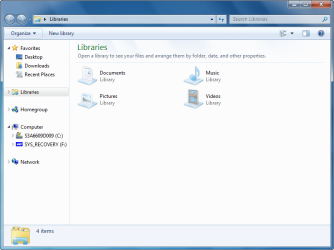
EXAMPLE: Default Libraries
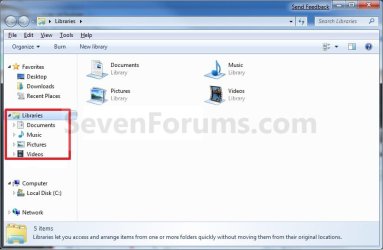
Default_Libraries.jpg


OPTION ONE

To Restore Default Libraries using "Restore Default Libraries"


1. Open Windows Explorer.

2. Right click or press and hold on Libraries in the navigation pane, and click/tap on Restore Default Libraries. (see screenshot below)
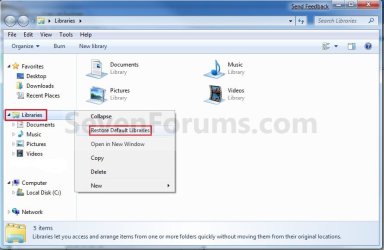
Libraries.jpg


OPTION TWO

To Restore Default Libraries by Unhiding them


   Note
This option is only helpful if your library or libraries have been hidden.

1. For how, see: How to Fix Libraries when Hidden and Empty in Windows 7 and Windows 8


OPTION THREE

To Restore Default Libraries using a REG File


   Note
This option will restore the default registry entries for the default libraries of all users.

You must be logged in as an administrator to be able to do this option.


1. If OPTION ONE and OPTION TWO above didn't help, then click/tap on the download button below to download the below.
Restore_Default_Libraries.reg


Download


2. Save the .reg file to your desktop.

3. Double click/tap on the .reg file to merge it.

4. If prompted, click/tap on Run, Yes (UAC), Yes, and OK to approve merging the .reg file.

5. Restart the computer to apply.

6. You can now delete the downloaded .reg file if you like.

That's it,
Shawn


Attachments

Last edited:
Hidden folders in library pane

My problem is I can't see my folders in the library pane, they are hiden. If I unhide hidden files system wide I can see them, but when I go to the folder attributes the hidden attribute is not checked. I have compared all the settings to another computer I have with windows 7 and everything appears to be exactly the same, but I can see my folders. I have searched through the registry but everthing appears the same on both computers, on the one I am using I can see these folders in the navigation pane, in libraries.
 

My Computer

Computer Manufacturer/Model Number
toshiba L300 PSLB9A-067001 89468687Q
OS
Windows 7 32 bit
CPU
Pentium 4 dual core
Hello Ron, and welcome to Seven Forums.

You might see if doing step 6 in OPTION TWO of the tutorial below with each hidden folder using the original source location in the command may be able unhide them.

http://www.sevenforums.com/tutorials/56005-file-folder-hide-unhide.html

If not, then please post back with the full paths of each hidden folder that you want unhidden and I'll see what I may be able to do to help further. :)

Hope this helps,
Shawn
 

My Computer

Computer type
PC/Desktop
Computer Manufacturer/Model Number
Self built custom
OS
64-bit Windows 11 Pro for Workstations
CPU
Intel i7-8700K OC'd to 5 GHz
Motherboard
ASUS ROG Maximus XI Formula Z390
Memory
64 GB (4x16GB) G.SKILL TridentZ RGB DDR4 3600 MHz
Graphics Card(s)
ASUS ROG-STRIX-GTX1080TI-O11G-GAMING
Sound Card
Integrated
Monitor(s) Displays
2 x Samsung Odyssey G7 27"
Screen Resolution
2560x1440
Hard Drives
1TB Samsung 990 PRO M.2,
4TB Samsung 990 PRO PRO M.2,
TerraMaster F8 SSD Plus NAS
PSU
Seasonic Prime Titanium 850W
Case
Thermaltake Core P3
Cooling
Corsair Hydro H115i
Keyboard
Logitech wireless K800
Mouse
Logitech MX Master 4
Internet Speed
2 Gb/s Download and 100 Mb/s Upload
Antivirus
Malwarebyte Anti-Malware Premium
Browser
Google Chrome
Other Info
Logitech Z625 speaker system,
Logitech BRIO 4K Pro webcam,
HP Color LaserJet Pro MFP M477fdn,
APC SMART-UPS RT 1000 XL - SURT1000XLI,
Galaxy S23 Plus phone
Hidden folders in library pane

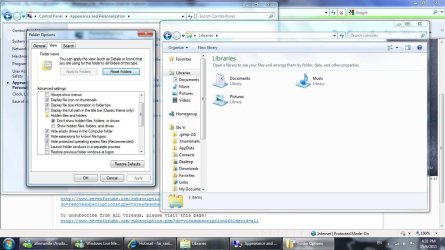
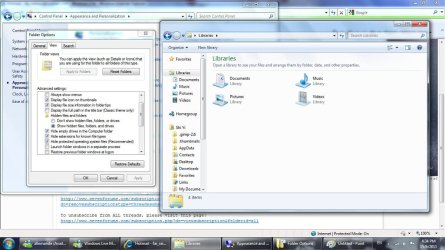
Thank you for the response Shawn. I have included the screen dumps in explorer of my problem. The first image is as I open explorer, then I have set the option in folder and search options to see all hidden and system files, which is the second image. The icons which are then visible appear to be shortcuts and not the actual folder. After clicking on the icon properties I get the actual folder.

Thanks,
Ron
 

Attachments

  • 2011-05-21_181326.png
    2011-05-21_181326.png
    32.2 KB · Views: 1,056
  • 2011-05-21_181237.png
    2011-05-21_181237.png
    94.6 KB · Views: 444
  • 2011-05-21_180917.png
    2011-05-21_180917.png
    84.1 KB · Views: 430

My Computer

Computer Manufacturer/Model Number
toshiba L300 PSLB9A-067001 89468687Q
OS
Windows 7 32 bit
CPU
Pentium 4 dual core
Hidden folders in library pane

Sorry Shawn, in my last post I should have said clicking on the icon shows the shortcut properties.
 

My Computer

Computer Manufacturer/Model Number
toshiba L300 PSLB9A-067001 89468687Q
OS
Windows 7 32 bit
CPU
Pentium 4 dual core
Last edited:

My Computer

Computer type
PC/Desktop
Computer Manufacturer/Model Number
Self built custom
OS
64-bit Windows 11 Pro for Workstations
CPU
Intel i7-8700K OC'd to 5 GHz
Motherboard
ASUS ROG Maximus XI Formula Z390
Memory
64 GB (4x16GB) G.SKILL TridentZ RGB DDR4 3600 MHz
Graphics Card(s)
ASUS ROG-STRIX-GTX1080TI-O11G-GAMING
Sound Card
Integrated
Monitor(s) Displays
2 x Samsung Odyssey G7 27"
Screen Resolution
2560x1440
Hard Drives
1TB Samsung 990 PRO M.2,
4TB Samsung 990 PRO PRO M.2,
TerraMaster F8 SSD Plus NAS
PSU
Seasonic Prime Titanium 850W
Case
Thermaltake Core P3
Cooling
Corsair Hydro H115i
Keyboard
Logitech wireless K800
Mouse
Logitech MX Master 4
Internet Speed
2 Gb/s Download and 100 Mb/s Upload
Antivirus
Malwarebyte Anti-Malware Premium
Browser
Google Chrome
Other Info
Logitech Z625 speaker system,
Logitech BRIO 4K Pro webcam,
HP Color LaserJet Pro MFP M477fdn,
APC SMART-UPS RT 1000 XL - SURT1000XLI,
Galaxy S23 Plus phone
Brink,
I have the same problem. Tried it just now, but didnt work. Also, I went to ...\AppData\Roaming\Microsoft\Windows\Libraries\Videos.library and checked the settings there - in there, it wasnt "hidden" and even afgter hiding and then unhiding them, the libraries shown in the explorer were still hidden.
Any other solution?
 

My Computer

OS
Win 7 Professional 64bit
sorry, too soon. Took a little while, but now they're unhidden again. thanks
 

My Computer

OS
Win 7 Professional 64bit
You're most welcome MariuX. I'm happy to hear that you got it sorted. :)
 

My Computer

Computer type
PC/Desktop
Computer Manufacturer/Model Number
Self built custom
OS
64-bit Windows 11 Pro for Workstations
CPU
Intel i7-8700K OC'd to 5 GHz
Motherboard
ASUS ROG Maximus XI Formula Z390
Memory
64 GB (4x16GB) G.SKILL TridentZ RGB DDR4 3600 MHz
Graphics Card(s)
ASUS ROG-STRIX-GTX1080TI-O11G-GAMING
Sound Card
Integrated
Monitor(s) Displays
2 x Samsung Odyssey G7 27"
Screen Resolution
2560x1440
Hard Drives
1TB Samsung 990 PRO M.2,
4TB Samsung 990 PRO PRO M.2,
TerraMaster F8 SSD Plus NAS
PSU
Seasonic Prime Titanium 850W
Case
Thermaltake Core P3
Cooling
Corsair Hydro H115i
Keyboard
Logitech wireless K800
Mouse
Logitech MX Master 4
Internet Speed
2 Gb/s Download and 100 Mb/s Upload
Antivirus
Malwarebyte Anti-Malware Premium
Browser
Google Chrome
Other Info
Logitech Z625 speaker system,
Logitech BRIO 4K Pro webcam,
HP Color LaserJet Pro MFP M477fdn,
APC SMART-UPS RT 1000 XL - SURT1000XLI,
Galaxy S23 Plus phone
Hidden folders in library pane

Shawn, that fixed my problem. Thank you very much for your help.
Regards,
Ron Henderson
 

My Computer

Computer Manufacturer/Model Number
toshiba L300 PSLB9A-067001 89468687Q
OS
Windows 7 32 bit
CPU
Pentium 4 dual core
You're most welcome Ron. That's great news. :)
 

My Computer

Computer type
PC/Desktop
Computer Manufacturer/Model Number
Self built custom
OS
64-bit Windows 11 Pro for Workstations
CPU
Intel i7-8700K OC'd to 5 GHz
Motherboard
ASUS ROG Maximus XI Formula Z390
Memory
64 GB (4x16GB) G.SKILL TridentZ RGB DDR4 3600 MHz
Graphics Card(s)
ASUS ROG-STRIX-GTX1080TI-O11G-GAMING
Sound Card
Integrated
Monitor(s) Displays
2 x Samsung Odyssey G7 27"
Screen Resolution
2560x1440
Hard Drives
1TB Samsung 990 PRO M.2,
4TB Samsung 990 PRO PRO M.2,
TerraMaster F8 SSD Plus NAS
PSU
Seasonic Prime Titanium 850W
Case
Thermaltake Core P3
Cooling
Corsair Hydro H115i
Keyboard
Logitech wireless K800
Mouse
Logitech MX Master 4
Internet Speed
2 Gb/s Download and 100 Mb/s Upload
Antivirus
Malwarebyte Anti-Malware Premium
Browser
Google Chrome
Other Info
Logitech Z625 speaker system,
Logitech BRIO 4K Pro webcam,
HP Color LaserJet Pro MFP M477fdn,
APC SMART-UPS RT 1000 XL - SURT1000XLI,
Galaxy S23 Plus phone
Nothing like to have some basic knowledge of DOS, I wasnt able to see my libraries music pictures docs and videos, and now they reappeared, I followed your instructions and I solved the problem. Thank you very much.

they were hidden
 
Last edited by a moderator:

My Computer

OS
windows 7 home premium in spanish 64bits
Hello Jair, and welcome to Seven Forums.

You're most welcome. :)
 

My Computer

Computer type
PC/Desktop
Computer Manufacturer/Model Number
Self built custom
OS
64-bit Windows 11 Pro for Workstations
CPU
Intel i7-8700K OC'd to 5 GHz
Motherboard
ASUS ROG Maximus XI Formula Z390
Memory
64 GB (4x16GB) G.SKILL TridentZ RGB DDR4 3600 MHz
Graphics Card(s)
ASUS ROG-STRIX-GTX1080TI-O11G-GAMING
Sound Card
Integrated
Monitor(s) Displays
2 x Samsung Odyssey G7 27"
Screen Resolution
2560x1440
Hard Drives
1TB Samsung 990 PRO M.2,
4TB Samsung 990 PRO PRO M.2,
TerraMaster F8 SSD Plus NAS
PSU
Seasonic Prime Titanium 850W
Case
Thermaltake Core P3
Cooling
Corsair Hydro H115i
Keyboard
Logitech wireless K800
Mouse
Logitech MX Master 4
Internet Speed
2 Gb/s Download and 100 Mb/s Upload
Antivirus
Malwarebyte Anti-Malware Premium
Browser
Google Chrome
Other Info
Logitech Z625 speaker system,
Logitech BRIO 4K Pro webcam,
HP Color LaserJet Pro MFP M477fdn,
APC SMART-UPS RT 1000 XL - SURT1000XLI,
Galaxy S23 Plus phone
Wrong parameter format

Hello

I'm sorry to be bringing this issue up again, but my Videos library is hidden, and when I tried copying and pasting the commands into the elevated command prompt I received "Wrong parameter format" instead.

Does this have anything to do with the OS that I'm running, or is it just a bug?

Thanks in advance.
 

My Computer

OS
Windows 7 Home Premium
Hello Dawn, and welcome to Seven Forums.

That error usually indicates a mistake made in the typing of the command. Try copying and pasting the command for Videos from below instead to see if you get the same error.

ATTRIB -H %UserProfile%\AppData\Roaming\Microsoft\Windows\Libraries\Videos.library-ms /S /D
 

My Computer

Computer type
PC/Desktop
Computer Manufacturer/Model Number
Self built custom
OS
64-bit Windows 11 Pro for Workstations
CPU
Intel i7-8700K OC'd to 5 GHz
Motherboard
ASUS ROG Maximus XI Formula Z390
Memory
64 GB (4x16GB) G.SKILL TridentZ RGB DDR4 3600 MHz
Graphics Card(s)
ASUS ROG-STRIX-GTX1080TI-O11G-GAMING
Sound Card
Integrated
Monitor(s) Displays
2 x Samsung Odyssey G7 27"
Screen Resolution
2560x1440
Hard Drives
1TB Samsung 990 PRO M.2,
4TB Samsung 990 PRO PRO M.2,
TerraMaster F8 SSD Plus NAS
PSU
Seasonic Prime Titanium 850W
Case
Thermaltake Core P3
Cooling
Corsair Hydro H115i
Keyboard
Logitech wireless K800
Mouse
Logitech MX Master 4
Internet Speed
2 Gb/s Download and 100 Mb/s Upload
Antivirus
Malwarebyte Anti-Malware Premium
Browser
Google Chrome
Other Info
Logitech Z625 speaker system,
Logitech BRIO 4K Pro webcam,
HP Color LaserJet Pro MFP M477fdn,
APC SMART-UPS RT 1000 XL - SURT1000XLI,
Galaxy S23 Plus phone
Thank you for the welcome.

I tried copying and pasting the command, but I got the same error. It still says "Parameter format not correct"
 

My Computer

OS
Windows 7 Home Premium
Strange. Could you post a screenshot of your Libraries window and in the Videos library to see if something may standout?

Are you able to open the Videos library?
 

My Computer

Computer type
PC/Desktop
Computer Manufacturer/Model Number
Self built custom
OS
64-bit Windows 11 Pro for Workstations
CPU
Intel i7-8700K OC'd to 5 GHz
Motherboard
ASUS ROG Maximus XI Formula Z390
Memory
64 GB (4x16GB) G.SKILL TridentZ RGB DDR4 3600 MHz
Graphics Card(s)
ASUS ROG-STRIX-GTX1080TI-O11G-GAMING
Sound Card
Integrated
Monitor(s) Displays
2 x Samsung Odyssey G7 27"
Screen Resolution
2560x1440
Hard Drives
1TB Samsung 990 PRO M.2,
4TB Samsung 990 PRO PRO M.2,
TerraMaster F8 SSD Plus NAS
PSU
Seasonic Prime Titanium 850W
Case
Thermaltake Core P3
Cooling
Corsair Hydro H115i
Keyboard
Logitech wireless K800
Mouse
Logitech MX Master 4
Internet Speed
2 Gb/s Download and 100 Mb/s Upload
Antivirus
Malwarebyte Anti-Malware Premium
Browser
Google Chrome
Other Info
Logitech Z625 speaker system,
Logitech BRIO 4K Pro webcam,
HP Color LaserJet Pro MFP M477fdn,
APC SMART-UPS RT 1000 XL - SURT1000XLI,
Galaxy S23 Plus phone
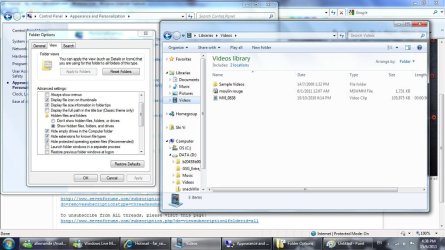
I am able to open the Videos library, if I select "show hidden icons" under the Control Panel.

With "Don't show hidden icons" selected:
hide icons.jpg
With "Show hidden icons" selected:
show icons.jpg
The videos library:
library.jpg

Thanks.
 

My Computer

OS
Windows 7 Home Premium
Hmmm, I'm just not sure why you would be getting a "Parameter format not correct" error unless there was a mistake in the way it was typed or entered in the command prompt. :huh:

Try copying and pasting this command to see if it may help.

Code:
ATTRIB -R -H -S %UserProfile%\AppData\Roaming\Microsoft\Windows\Libraries\Videos.library-ms /S /D
 

My Computer

Computer type
PC/Desktop
Computer Manufacturer/Model Number
Self built custom
OS
64-bit Windows 11 Pro for Workstations
CPU
Intel i7-8700K OC'd to 5 GHz
Motherboard
ASUS ROG Maximus XI Formula Z390
Memory
64 GB (4x16GB) G.SKILL TridentZ RGB DDR4 3600 MHz
Graphics Card(s)
ASUS ROG-STRIX-GTX1080TI-O11G-GAMING
Sound Card
Integrated
Monitor(s) Displays
2 x Samsung Odyssey G7 27"
Screen Resolution
2560x1440
Hard Drives
1TB Samsung 990 PRO M.2,
4TB Samsung 990 PRO PRO M.2,
TerraMaster F8 SSD Plus NAS
PSU
Seasonic Prime Titanium 850W
Case
Thermaltake Core P3
Cooling
Corsair Hydro H115i
Keyboard
Logitech wireless K800
Mouse
Logitech MX Master 4
Internet Speed
2 Gb/s Download and 100 Mb/s Upload
Antivirus
Malwarebyte Anti-Malware Premium
Browser
Google Chrome
Other Info
Logitech Z625 speaker system,
Logitech BRIO 4K Pro webcam,
HP Color LaserJet Pro MFP M477fdn,
APC SMART-UPS RT 1000 XL - SURT1000XLI,
Galaxy S23 Plus phone
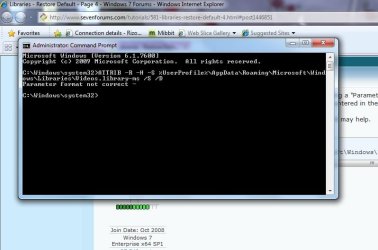
I still got the same error
error.jpg

It's ok, I'll just leave the settings as "Show hidden files" for now. It wouldn't be the first time that things disappear anyway.
 

My Computer

OS
Windows 7 Home Premium
Dawn,

How strange. I'm not sure why you are still getting that error. It appears to be correct in your screenshot.

I noticed that your command prompt has "Version 6.1.7600" instead of "Version 6.1.7601". Do you have SP1 installed? If not, then installing it, might also reset this Videos library back to it's default of not being hidden.
 

My Computer

Computer type
PC/Desktop
Computer Manufacturer/Model Number
Self built custom
OS
64-bit Windows 11 Pro for Workstations
CPU
Intel i7-8700K OC'd to 5 GHz
Motherboard
ASUS ROG Maximus XI Formula Z390
Memory
64 GB (4x16GB) G.SKILL TridentZ RGB DDR4 3600 MHz
Graphics Card(s)
ASUS ROG-STRIX-GTX1080TI-O11G-GAMING
Sound Card
Integrated
Monitor(s) Displays
2 x Samsung Odyssey G7 27"
Screen Resolution
2560x1440
Hard Drives
1TB Samsung 990 PRO M.2,
4TB Samsung 990 PRO PRO M.2,
TerraMaster F8 SSD Plus NAS
PSU
Seasonic Prime Titanium 850W
Case
Thermaltake Core P3
Cooling
Corsair Hydro H115i
Keyboard
Logitech wireless K800
Mouse
Logitech MX Master 4
Internet Speed
2 Gb/s Download and 100 Mb/s Upload
Antivirus
Malwarebyte Anti-Malware Premium
Browser
Google Chrome
Other Info
Logitech Z625 speaker system,
Logitech BRIO 4K Pro webcam,
HP Color LaserJet Pro MFP M477fdn,
APC SMART-UPS RT 1000 XL - SURT1000XLI,
Galaxy S23 Plus phone
Back
Top