Libraries?

dbatt

New member
Local time
12:25 PM
Messages
20
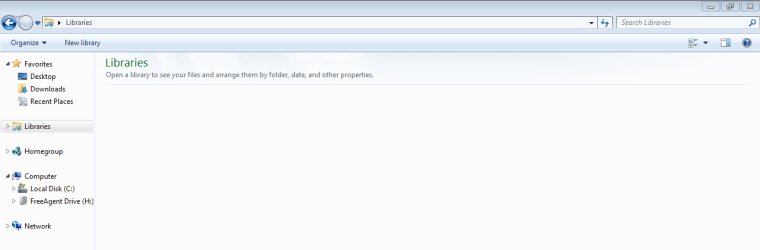
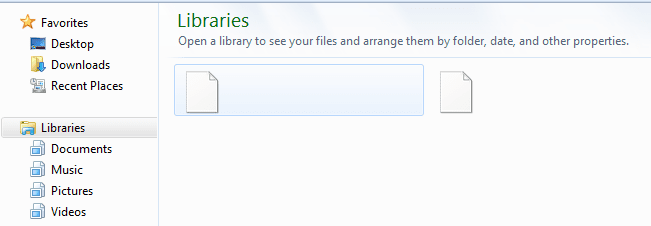
I accidentally deleted my libraries and don't know how to get them back. The recycle bin is empty so there not in there. I still see libraries in the explorer window, its just that there's nothing in that folder (documents, music, etc.). How do I get the libraries back???
 

My Computer

Computer Manufacturer/Model Number
Dell
OS
Windows 7 Home Premium 32bit
Memory
1.5 Gig
Did you delete the libraries including the folders?
 

My Computer

Computer Manufacturer/Model Number
HP, Dell, Gateway, Toshiba - 4 laptops and 2 desktops
OS
Vista, Windows7, Mint Mate, Zorin, Windows 8
CPU
from 1.6GHz Duo to i7
Monitor(s) Displays
2x HP w2207
Hard Drives
5x HDD, 7x SSD, 12x Externals
Keyboard
with trackball - no mices
Mouse
Trackball mice
Internet Speed
DSL 6000
No. I don't know how they got deleted -- they just did. I still see libraries in windows explorer but there is nothing in that folder. If possible, I would like to get the library back and not just add folders that don't function as they use to. (sorry if thats confusing).
 

My Computer

Computer Manufacturer/Model Number
Dell
OS
Windows 7 Home Premium 32bit
Memory
1.5 Gig
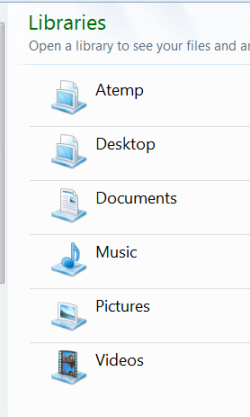
That is confusing. So you still have what I show in the picture (except my Atemp) and the folders are gone.???
 

Attachments

  • 2011-04-27_2236.png
    2011-04-27_2236.png
    9.3 KB · Views: 4

My Computer

Computer Manufacturer/Model Number
HP, Dell, Gateway, Toshiba - 4 laptops and 2 desktops
OS
Vista, Windows7, Mint Mate, Zorin, Windows 8
CPU
from 1.6GHz Duo to i7
Monitor(s) Displays
2x HP w2207
Hard Drives
5x HDD, 7x SSD, 12x Externals
Keyboard
with trackball - no mices
Mouse
Trackball mice
Internet Speed
DSL 6000
no... I see libraries on the side panel but when I click on it, the folder is empty so nothing comes up
 

My Computer

Computer Manufacturer/Model Number
Dell
OS
Windows 7 Home Premium 32bit
Memory
1.5 Gig
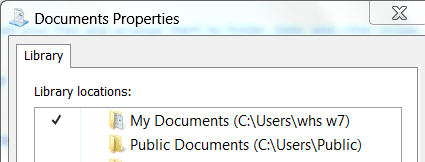
Right click on e.g. Documents and go to Properties. Do you see something like the pic - or what do you see ??
 

Attachments

  • 2011-04-27_2241.png
    2011-04-27_2241.png
    6.7 KB · Views: 2

My Computer

Computer Manufacturer/Model Number
HP, Dell, Gateway, Toshiba - 4 laptops and 2 desktops
OS
Vista, Windows7, Mint Mate, Zorin, Windows 8
CPU
from 1.6GHz Duo to i7
Monitor(s) Displays
2x HP w2207
Hard Drives
5x HDD, 7x SSD, 12x Externals
Keyboard
with trackball - no mices
Mouse
Trackball mice
Internet Speed
DSL 6000
where is documents properties? Sorry... I don't see where to do that. I don't have "documents" in my library if thats what you mean
 

My Computer

Computer Manufacturer/Model Number
Dell
OS
Windows 7 Home Premium 32bit
Memory
1.5 Gig
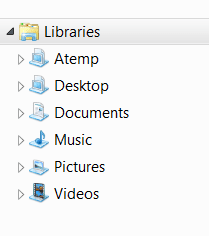
Take a snip of the left pane where it says libraries (like the pic below) and attach it to your post with the paper clip on the top right of the reply window. Do not forget Upload (takes a couple of seconds).
 

Attachments

  • 2011-04-27_2251.png
    2011-04-27_2251.png
    3.7 KB · Views: 126

My Computer

Computer Manufacturer/Model Number
HP, Dell, Gateway, Toshiba - 4 laptops and 2 desktops
OS
Vista, Windows7, Mint Mate, Zorin, Windows 8
CPU
from 1.6GHz Duo to i7
Monitor(s) Displays
2x HP w2207
Hard Drives
5x HDD, 7x SSD, 12x Externals
Keyboard
with trackball - no mices
Mouse
Trackball mice
Internet Speed
DSL 6000
Ok. Here it is. Thanks for your help. :D
 

Attachments

  • Libraries.PNG
    Libraries.PNG
    18.2 KB · Views: 29

My Computer

Computer Manufacturer/Model Number
Dell
OS
Windows 7 Home Premium 32bit
Memory
1.5 Gig
Another thought, just double click on where it says Libraries in the left pane - what happens? I think you just hid them.
 

My Computer

Computer Manufacturer/Model Number
HP, Dell, Gateway, Toshiba - 4 laptops and 2 desktops
OS
Vista, Windows7, Mint Mate, Zorin, Windows 8
CPU
from 1.6GHz Duo to i7
Monitor(s) Displays
2x HP w2207
Hard Drives
5x HDD, 7x SSD, 12x Externals
Keyboard
with trackball - no mices
Mouse
Trackball mice
Internet Speed
DSL 6000
It opens up to nothing and the little arrow on the side of libraries goes away.
 

My Computer

Computer Manufacturer/Model Number
Dell
OS
Windows 7 Home Premium 32bit
Memory
1.5 Gig
Hmm, try this - right click on Libraries and "Restore default libraries"
 

My Computer

Computer Manufacturer/Model Number
HP, Dell, Gateway, Toshiba - 4 laptops and 2 desktops
OS
Vista, Windows7, Mint Mate, Zorin, Windows 8
CPU
from 1.6GHz Duo to i7
Monitor(s) Displays
2x HP w2207
Hard Drives
5x HDD, 7x SSD, 12x Externals
Keyboard
with trackball - no mices
Mouse
Trackball mice
Internet Speed
DSL 6000
nothing happened. i even tried a couple of times but still nothing. Darn!
 

My Computer

Computer Manufacturer/Model Number
Dell
OS
Windows 7 Home Premium 32bit
Memory
1.5 Gig
OK, lets see whether at least your folders are still intact. Go to Computer and double click on C. Then navigate to Users > Your name and have a look whether you can find your folders.
 

My Computer

Computer Manufacturer/Model Number
HP, Dell, Gateway, Toshiba - 4 laptops and 2 desktops
OS
Vista, Windows7, Mint Mate, Zorin, Windows 8
CPU
from 1.6GHz Duo to i7
Monitor(s) Displays
2x HP w2207
Hard Drives
5x HDD, 7x SSD, 12x Externals
Keyboard
with trackball - no mices
Mouse
Trackball mice
Internet Speed
DSL 6000
It looks like I have all my files. I have all my files backed up on an external HD if I need to re copy them to the C Hard Drive.
 

My Computer

Computer Manufacturer/Model Number
Dell
OS
Windows 7 Home Premium 32bit
Memory
1.5 Gig
OK, then I suggest the following - let's recreate those libraries. Right click on the "Libraries" and go to "New". here make a new one for Documents, Music, Videos, Pictures- once you got that, I will tell you the next step.
 

My Computer

Computer Manufacturer/Model Number
HP, Dell, Gateway, Toshiba - 4 laptops and 2 desktops
OS
Vista, Windows7, Mint Mate, Zorin, Windows 8
CPU
from 1.6GHz Duo to i7
Monitor(s) Displays
2x HP w2207
Hard Drives
5x HDD, 7x SSD, 12x Externals
Keyboard
with trackball - no mices
Mouse
Trackball mice
Internet Speed
DSL 6000
Ok. working so far...
 

My Computer

Computer Manufacturer/Model Number
Dell
OS
Windows 7 Home Premium 32bit
Memory
1.5 Gig
Good, now go back to C > Users > Your name and right click on Documents, Music, etc and "Include in Library" - pick the corresponding Library. Then we need to do more - report back
 

My Computer

Computer Manufacturer/Model Number
HP, Dell, Gateway, Toshiba - 4 laptops and 2 desktops
OS
Vista, Windows7, Mint Mate, Zorin, Windows 8
CPU
from 1.6GHz Duo to i7
Monitor(s) Displays
2x HP w2207
Hard Drives
5x HDD, 7x SSD, 12x Externals
Keyboard
with trackball - no mices
Mouse
Trackball mice
Internet Speed
DSL 6000
Ok. Done with that. One thing I noticed is that, even though I named them and can see them in the side panel, they don't show up in the bigger screen. Any Ideas?
 

Attachments

  • library2.PNG
    library2.PNG
    9 KB · Views: 5

My Computer

Computer Manufacturer/Model Number
Dell
OS
Windows 7 Home Premium 32bit
Memory
1.5 Gig
We are not done yet. Now go to C > Users > Public. There you do the same with Public Documents, Public Music, etc and Include tham into the corresponding libraries. Then there is only one little task left.

In the meantime i will figure out why they do not show on the big page.
 

My Computer

Computer Manufacturer/Model Number
HP, Dell, Gateway, Toshiba - 4 laptops and 2 desktops
OS
Vista, Windows7, Mint Mate, Zorin, Windows 8
CPU
from 1.6GHz Duo to i7
Monitor(s) Displays
2x HP w2207
Hard Drives
5x HDD, 7x SSD, 12x Externals
Keyboard
with trackball - no mices
Mouse
Trackball mice
Internet Speed
DSL 6000
Back
Top