
Solved Libraries

Explained below.
Clarify what you mean, Documents is a folder, not an app.
Powell, I think you read too much into those Libraries. They are just a colection of pointers (like an index) to folders. A standard system would come with e.g. a Pictures Library pointing to the folders of My Pictures and to Public Pictures.

If you store something to the Pictures library, that is the same as storing it to My Pictures which is the default folder. If, however, you have additional folders in the library or if you want to store to the Public Pictures, you have to select those specificly.

The default folder has a checkmark in Library Properties as you can see in my picture. What you can also see it that I have another My Pictures folder in a seperate data Partition D.

Libraries are very convenient when you have your data spread all over the place in seperate folders. They serve as common repository.

Libraries is a junction point or shortcut to a folder, file, or groups thereof, whatever you add to them. They contain nothing at all but point to thing which do.
 

My Computer

Computer type
PC/Desktop
Computer Manufacturer/Model Number
Home Built Desktop By DataTech
OS
Windows 7 Ultimate X64 SP1
CPU
Intel i5-2550K, Differing ~4.4-4.8GHz No built in GPU
Motherboard
ASUS P8Z68-V PRO/GEN3
Memory
16GB G.Skill Sniper 1866MHz @ 2133MHz 2x8GB
Graphics Card(s)
ASUS GTX650TIB-DC2OC-2GD5, (650TI Boost)
Sound Card
Onboard Realtek 5-1
Monitor(s) Displays
Samsung P2570HD
Screen Resolution
1920x1080
Hard Drives
Samsung 840 Pro 256GB SSD for OS, 500GB Seagate Constellation (Enterprise drive) for Data
PSU
Corsair HX650W
Case
Inwin Dragon Rider
Cooling
Hyper 212 EVO w/two Noctua fans, push-pull, @1300 RPM
Keyboard
E-Z Eyes, bright yellow keys with large characters
Mouse
steelseries SENSEI Laser Pro Gaming
Internet Speed
48-51Mbs Mbs down, 11 Mbs up Xfinity Cable
Antivirus
Norton Internet Security 2013
Browser
IE 10, Opera, Pale Moon if needed
Other Info
4 case fans, LG BluRay-RE, ASUS DVD-RW, Mr. Fusion power supply, 1.21 gigawatts.
Same thing as in Vista. Just open the folder (e.g. My Documents) and not the library. Again there is nothing different than before. The libraries are just a higher level facility to group folders in different (or same) location(s) together.
 
Last edited:

My Computer

Computer Manufacturer/Model Number
HP, Dell, Gateway, Toshiba - 4 laptops and 2 desktops
OS
Vista, Windows7, Mint Mate, Zorin, Windows 8
CPU
from 1.6GHz Duo to i7
Monitor(s) Displays
2x HP w2207
Hard Drives
5x HDD, 7x SSD, 12x Externals
Keyboard
with trackball - no mices
Mouse
Trackball mice
Internet Speed
DSL 6000
No. Libraries sit on top of the file system and act as a collection of folders as described above. You can still use the file system as you did in XP. if you just use my Computer instead of the default starting point and you have everything you had in XP.
 

My Computer

Computer type
Laptop
Computer Manufacturer/Model Number
Hewlett-Packard/G62-107SA Notebook
OS
Microsoft Windows 7 Home Premium 64-bit Service Pack 1
CPU
Intel(R) Core(TM) i3 CPU M 330 @ 2.13GHz
Motherboard
Hewlett-Packard 1425
Memory
8 GB DDR3
Graphics Card(s)
Intel(R) HD Graphics
Sound Card
Realtek High Definition Audio
Monitor(s) Displays
Builtin
Screen Resolution
1366 x 768 x 32 bits (4294967296 colors) @ 60 Hz
Hard Drives
250 GB SATA Hard Disk Drive 7200 rpm
2TB Seagate GoFlex USB 2 Drive
1TB Iomega Prestige USB 2 Drive
1.5TB Iomega Prestige USB 2 Drive (Samsung)
2TB WD MyBook Live NAS.
Mouse
Logitech Anywhere MX
Internet Speed
152 Mbs download 10 Mbs upload
Antivirus
Norton 360
Browser
Chrome
In my system this is what any open folder looks like. I've doen nothing special to see the pane on the left, it's default. When I click on the items under "Libraries", that folder opens. The same items appear when clicking Start, they are on the right at the top.
Capture.PNG
 

My Computer

Computer type
PC/Desktop
Computer Manufacturer/Model Number
Home Built Desktop By DataTech
OS
Windows 7 Ultimate X64 SP1
CPU
Intel i5-2550K, Differing ~4.4-4.8GHz No built in GPU
Motherboard
ASUS P8Z68-V PRO/GEN3
Memory
16GB G.Skill Sniper 1866MHz @ 2133MHz 2x8GB
Graphics Card(s)
ASUS GTX650TIB-DC2OC-2GD5, (650TI Boost)
Sound Card
Onboard Realtek 5-1
Monitor(s) Displays
Samsung P2570HD
Screen Resolution
1920x1080
Hard Drives
Samsung 840 Pro 256GB SSD for OS, 500GB Seagate Constellation (Enterprise drive) for Data
PSU
Corsair HX650W
Case
Inwin Dragon Rider
Cooling
Hyper 212 EVO w/two Noctua fans, push-pull, @1300 RPM
Keyboard
E-Z Eyes, bright yellow keys with large characters
Mouse
steelseries SENSEI Laser Pro Gaming
Internet Speed
48-51Mbs Mbs down, 11 Mbs up Xfinity Cable
Antivirus
Norton Internet Security 2013
Browser
IE 10, Opera, Pale Moon if needed
Other Info
4 case fans, LG BluRay-RE, ASUS DVD-RW, Mr. Fusion power supply, 1.21 gigawatts.
Navigation in Windows 7 is actually easer than ever. If you use the address bar and type a path, ie:
'C:\Users\Your User Name\Documents' and press ENTER Exlorer browses to that location. Typed paths STAY in the address drop down menu, and are often available in browse boxes when saving files. The only real problem I have with libraries is they take up so much space in the navigation pane. Usually I collapse them and they stay collapsed (until something comes along to expand them ...).

They do really come in handy when using multiple accounts in Windows. Your USER NAME documents are visible along with the PUBLIC documents when using libraries. Same for pictures, vids, etc ...

If you don't want or need the feature find a tutorial you can follow and remove libraries. It is simple enough to do, but like I said, they really can be a handy feature. On one of my machines I use only a single account, and libraries don't help much, but on my desktop I share the entire Public user and libraries are a nice feature on that machine.

Windows 7 is NOT Windows Vista. Learn to use the new tools and I think you'll come to appreciate some of the improvements, and will certainly appreciate how stable and secure the OS is. I can't for the life of me understand Microsoft's whole love affair with the ribbon thing, and was forced to hack Wordpad to get it back into something useful, but I am getting used to the navigation and Explorer changes and find the OS an improvement over anything to date.

Good luck and I hope you find a work flow.
Rªnce
 

My Computer

Computer type
PC/Desktop
Computer Manufacturer/Model Number
Dell Precision M6500 / Dell Insprion 3847
OS
Windows 7 Pro 32bit / Windows 7 Professional
CPU
Intel Core i7-620M Duel Core 2.66GHz / Intel Core i5-4460
Memory
4.0 GB / 8.0 GB
Graphics Card(s)
1.0 GB NVIDIA Quadro FX 2800M / Intel HD Graphics
Screen Resolution
1440x900 / 1920x1080
Hi Powell

I should think that your questions have been answered by the other more knowledgable users on this forum so I won't add anything since I don't use Libraries. I believe the Tutorials here should cover any gaps from what has been said. For large amounts of diverse information spread around different media then I can see the benefits but not for myself. Personally I would like not to see Favorites, Homegroup or Network on the Windows Explorer pane as well as Libraries for a stand-alone computer. I believe Libraries work best with Indexing and Search enabled, both of which I disable.

Hope you manage to sort it all out.

:rolleyes: ;) :rolleyes:
 

My Computer

Computer Manufacturer/Model Number
Compaq desktop
OS
Windows 7 x64 SP1
CPU
Athlon II x2 215
Memory
4.0 GB
Graphics Card(s)
Onboard
Sound Card
Creative SB X-Fi Titanium HD (nice)
Monitor(s) Displays
24" Dell LCD
Screen Resolution
1900 x 1200
Hard Drives
320 GB, 500 GB and 750 GB 7200 rpm
PSU
430w
Keyboard
USB
Mouse
USB
Internet Speed
approx 10 Mbps
Hi Powell

I should think that your questions have been answered by the other more knowledgable users on this forum so I won't add anything since I don't use Libraries. I believe the Tutorials here should cover any gaps from what has been said. For large amounts of diverse information spread around different media then I can see the benefits but not for myself. Personally I would like not to see Favorites, Homegroup or Network on the Windows Explorer pane as well as Libraries for a stand-alone computer. I believe Libraries work best with Indexing and Search enabled, both of which I disable.

Hope you manage to sort it all out.

:rolleyes: ;) :rolleyes:

A folder needs to be indexed to include it in a library and it will set up indexing if it is not already running but you can stop indexing afterwards and, although it complains a bit, it will still work.
 

My Computer

Computer type
Laptop
Computer Manufacturer/Model Number
Hewlett-Packard/G62-107SA Notebook
OS
Microsoft Windows 7 Home Premium 64-bit Service Pack 1
CPU
Intel(R) Core(TM) i3 CPU M 330 @ 2.13GHz
Motherboard
Hewlett-Packard 1425
Memory
8 GB DDR3
Graphics Card(s)
Intel(R) HD Graphics
Sound Card
Realtek High Definition Audio
Monitor(s) Displays
Builtin
Screen Resolution
1366 x 768 x 32 bits (4294967296 colors) @ 60 Hz
Hard Drives
250 GB SATA Hard Disk Drive 7200 rpm
2TB Seagate GoFlex USB 2 Drive
1TB Iomega Prestige USB 2 Drive
1.5TB Iomega Prestige USB 2 Drive (Samsung)
2TB WD MyBook Live NAS.
Mouse
Logitech Anywhere MX
Internet Speed
152 Mbs download 10 Mbs upload
Antivirus
Norton 360
Browser
Chrome
Good Evening Forum Folks:

The problem with Libraries has been resolved. My confusion and irritation was caused by the fact that all the Libraries were hidden. Nothing was showing up in them even when I tried to get them using the Show Default Directories button. It is only when I came across the Tutorial by Shawn (Brink) that I even realized these Directories could be hidden. They still didn't show up when I tried to install the downloadable file which was supposed to restore them. It required entering the coding shown in the tutorial into the Command Prompt to restore them. Once that was done and the Directories appeared the whole Libraries function became clear.

I want to thank all of you who took the time and effort to reply. It must have been just as frustrating for you all who could seen your Library Directories, or Folders, or whatever they're called and not understand what my problem was.
 

My Computer

Computer Manufacturer/Model Number
Dell Inspiron 620s
OS
Windows Home Premium, 64 4.096 bit
CPU
i3-2100
Motherboard
Dell 0DGGBY
Memory
Dimm0, Samsung 64 bit, 4.096 Mb; Dimm1, Hyundai 64 bit, 2.04
Graphics Card(s)
Intel HD Graphics Family
Sound Card
?
Monitor(s) Displays
Dell E197FP
Hard Drives
?
PSU
?
Case
?
Cooling
?
Ah ha. No wonder we we confused, glad you have it sorted out!
 

My Computer

Computer type
PC/Desktop
Computer Manufacturer/Model Number
Home Built Desktop By DataTech
OS
Windows 7 Ultimate X64 SP1
CPU
Intel i5-2550K, Differing ~4.4-4.8GHz No built in GPU
Motherboard
ASUS P8Z68-V PRO/GEN3
Memory
16GB G.Skill Sniper 1866MHz @ 2133MHz 2x8GB
Graphics Card(s)
ASUS GTX650TIB-DC2OC-2GD5, (650TI Boost)
Sound Card
Onboard Realtek 5-1
Monitor(s) Displays
Samsung P2570HD
Screen Resolution
1920x1080
Hard Drives
Samsung 840 Pro 256GB SSD for OS, 500GB Seagate Constellation (Enterprise drive) for Data
PSU
Corsair HX650W
Case
Inwin Dragon Rider
Cooling
Hyper 212 EVO w/two Noctua fans, push-pull, @1300 RPM
Keyboard
E-Z Eyes, bright yellow keys with large characters
Mouse
steelseries SENSEI Laser Pro Gaming
Internet Speed
48-51Mbs Mbs down, 11 Mbs up Xfinity Cable
Antivirus
Norton Internet Security 2013
Browser
IE 10, Opera, Pale Moon if needed
Other Info
4 case fans, LG BluRay-RE, ASUS DVD-RW, Mr. Fusion power supply, 1.21 gigawatts.
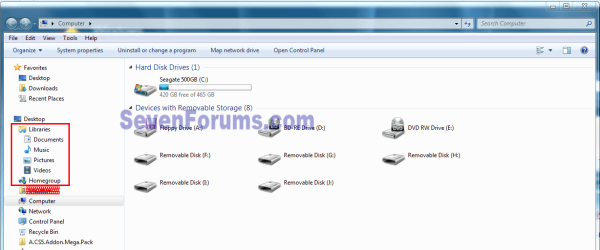
Good Evening Forum Folks:

The problem with Libraries has been resolved. My confusion and irritation was caused by the fact that all the Libraries were hidden. Nothing was showing up in them even when I tried to get them using the Show Default Directories button. It is only when I came across the Tutorial by Shawn (Brink) that I even realized these Directories could be hidden. They still didn't show up when I tried to install the downloadable file which was supposed to restore them. It required entering the coding shown in the tutorial into the Command Prompt to restore them. Once that was done and the Directories appeared the whole Libraries function became clear.

I want to thank all of you who took the time and effort to reply. It must have been just as frustrating for you all who could seen your Library Directories, or Folders, or whatever they're called and not understand what my problem was.

Glad you have it sorted out. I wonder why they were hidden, by default they are not?
 

My Computer

Computer type
Laptop
Computer Manufacturer/Model Number
Hewlett-Packard/G62-107SA Notebook
OS
Microsoft Windows 7 Home Premium 64-bit Service Pack 1
CPU
Intel(R) Core(TM) i3 CPU M 330 @ 2.13GHz
Motherboard
Hewlett-Packard 1425
Memory
8 GB DDR3
Graphics Card(s)
Intel(R) HD Graphics
Sound Card
Realtek High Definition Audio
Monitor(s) Displays
Builtin
Screen Resolution
1366 x 768 x 32 bits (4294967296 colors) @ 60 Hz
Hard Drives
250 GB SATA Hard Disk Drive 7200 rpm
2TB Seagate GoFlex USB 2 Drive
1TB Iomega Prestige USB 2 Drive
1.5TB Iomega Prestige USB 2 Drive (Samsung)
2TB WD MyBook Live NAS.
Mouse
Logitech Anywhere MX
Internet Speed
152 Mbs download 10 Mbs upload
Antivirus
Norton 360
Browser
Chrome
Back
Top